Odoo App · Website & Portal
Sign in with Apple
Apple ID login and customer portal signup for the Odoo website, validated on the server and connected directly to Apple.
Overview
Many customers would rather not create another password for a supplier portal. This module adds Apple ID login to the Odoo website and a Sign up with Apple option on the signup page. It replaces the generic Apple OAuth button with its own Sign in with Apple entry and keeps your other login methods.
Odoo's signup rules still apply. New Apple accounts are created only when the website allows free signup and Apple provides a verified email address, and they get portal access, not internal user access. Invitation-only or disabled signup does not become open registration through Apple. Existing portal users can link their Apple identity after signing in; a matching email address alone never links accounts.
The integration talks to Apple directly. Odoo exchanges the authorization code on the server and validates the identity token against Apple's public signing keys. Short-lived, browser-bound transactions and single-use completion tickets protect the flow. Private relay addresses from Apple's Hide My Email are stored as supplied.
Key features
-
Apple ID login
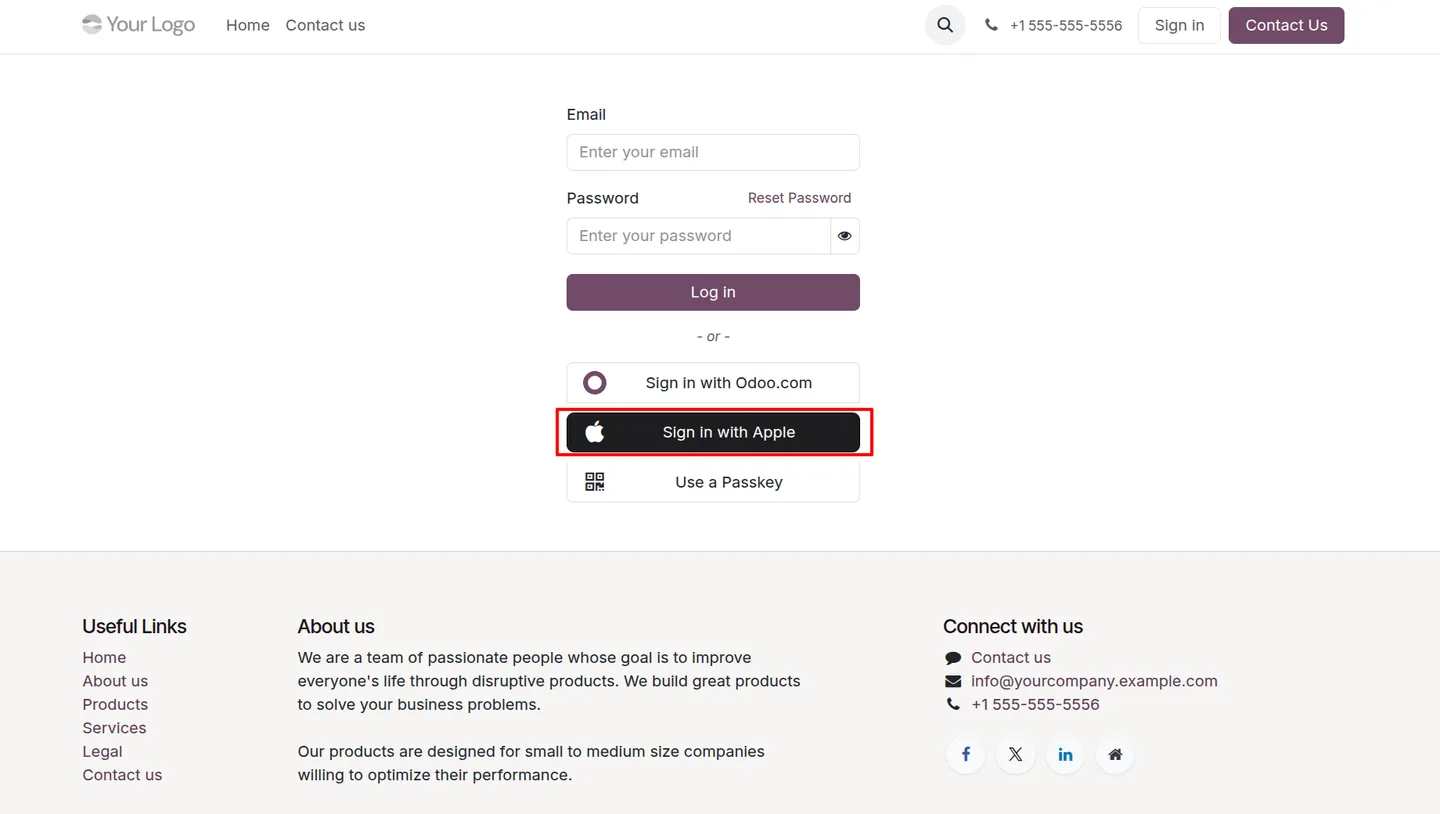
A dedicated Sign in with Apple button on the Odoo website login page, alongside the existing login options.
-
Apple signup for customer portals
First-time Apple users get a portal account when free signup is enabled and Apple supplies a verified email. Invitation-only restrictions stay in place.
-
Server-side authentication
Authorization codes are exchanged with Apple from the Odoo server, and identity tokens are checked for signature, audience, issuer, expiry and nonce.
-
Explicit account linking
Signed-in portal users link their Apple identity through a linking route. Matching emails never link accounts automatically.
-
Hide My Email support
The verified private relay address Apple shares at signup is stored as supplied, not replaced with a personal email.
-
Apple provider configuration
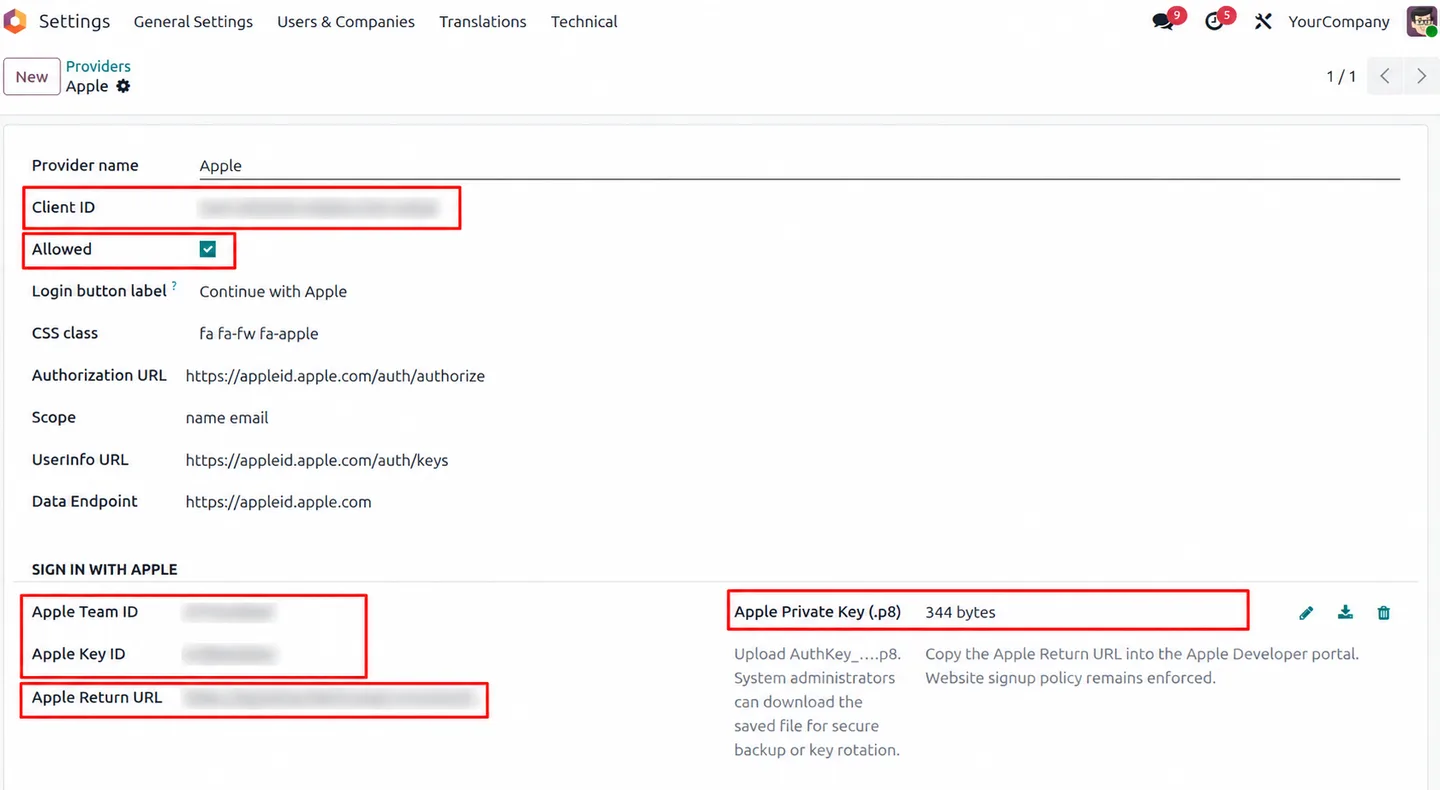
Manage the Services ID, Team ID, Key ID and .p8 key in the Odoo Apple provider, and copy the generated Apple Return URL into Apple Developer.
-
Short-lived login transactions
State and nonce bind the flow to the browser that started it, with expiring transactions and single-use completion tickets.
Sign in with Apple in Odoo
Every screen, in the order you meet it — configuration first, then the module in use.
Technical details
Specification
- Publisher
- TechUltra Solutions Private Limited
- Technical name
- tus_sign_in_with_apple
- Odoo versions
- 17.0, 18.0, 19.0, 20.0
- Lines of code
- 521
- Apple credentials
- Services ID (Client ID), Team ID, Key ID, .p8 private key
- Requirements
- Public HTTPS website; requests and cryptography Python packages
- Third-party auth services
- None (no Firebase, Auth0 or Supabase)
- License
- Odoo Proprietary License v1.0 (OPL-1)
- Price
- $9.00 (one-time)
Deployment
- Odoo Online
- Odoo.sh
- On-premise
Odoo dependencies
- Website
- Discuss
Support
90 days of bug-fix support plus 5 hours of free configuration help (additional hours billable), Monday to Friday (10:00–19:00 IST). Raise a ticket at support@techultra.in.
Setup & configuration
From install to first call — here is the path.
- 1
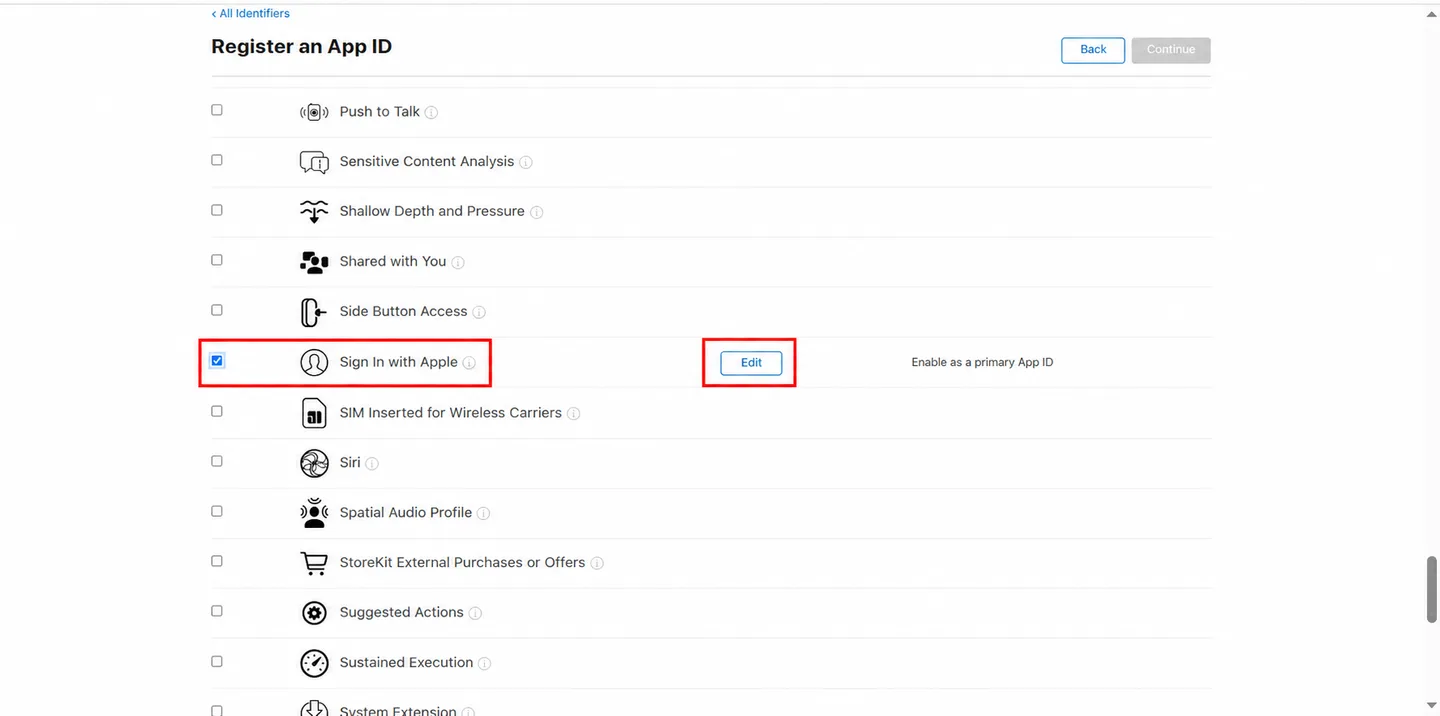
Register an App ID
In Apple Developer → Certificates, Identifiers & Profiles, register an App ID and enable the Sign In with Apple capability as a primary App ID.
- 2
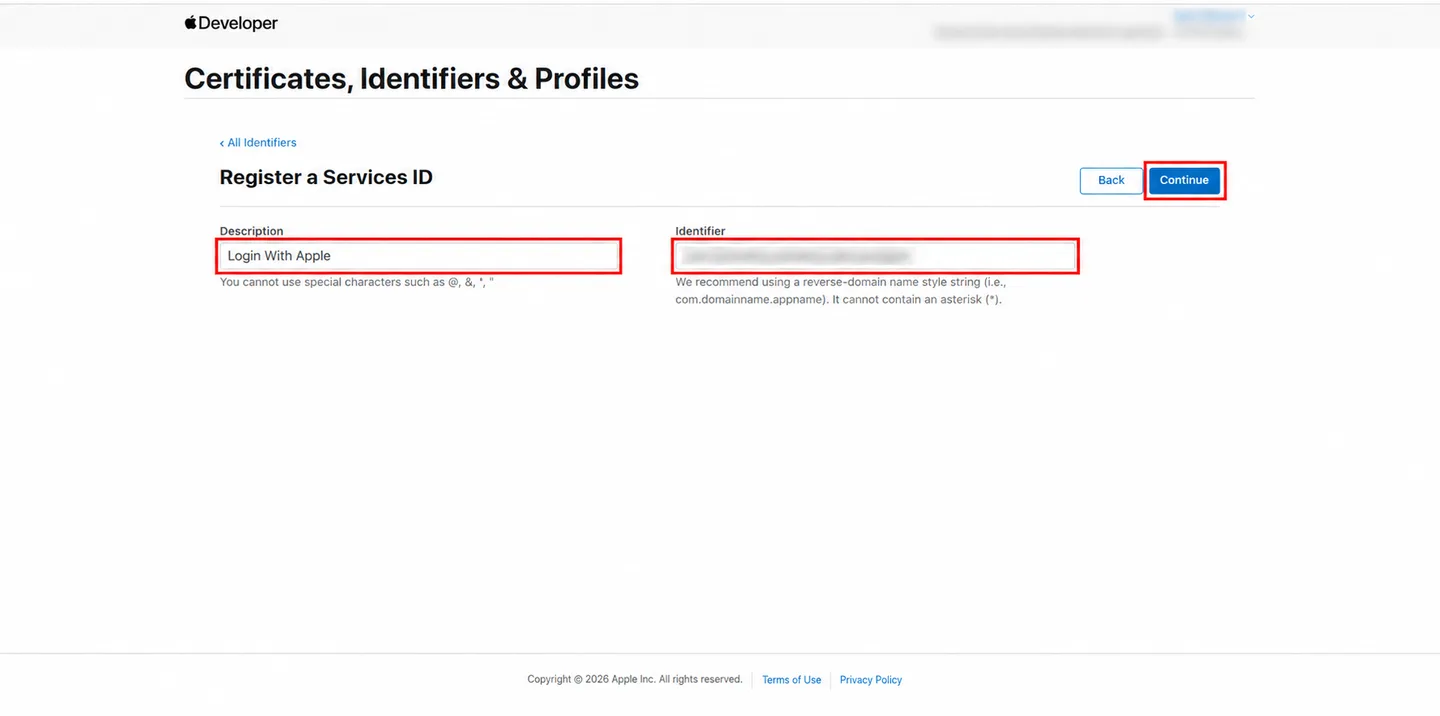
Create a Services ID
Register a Services ID for web login. You will use it as the Client ID in Odoo.
- 3
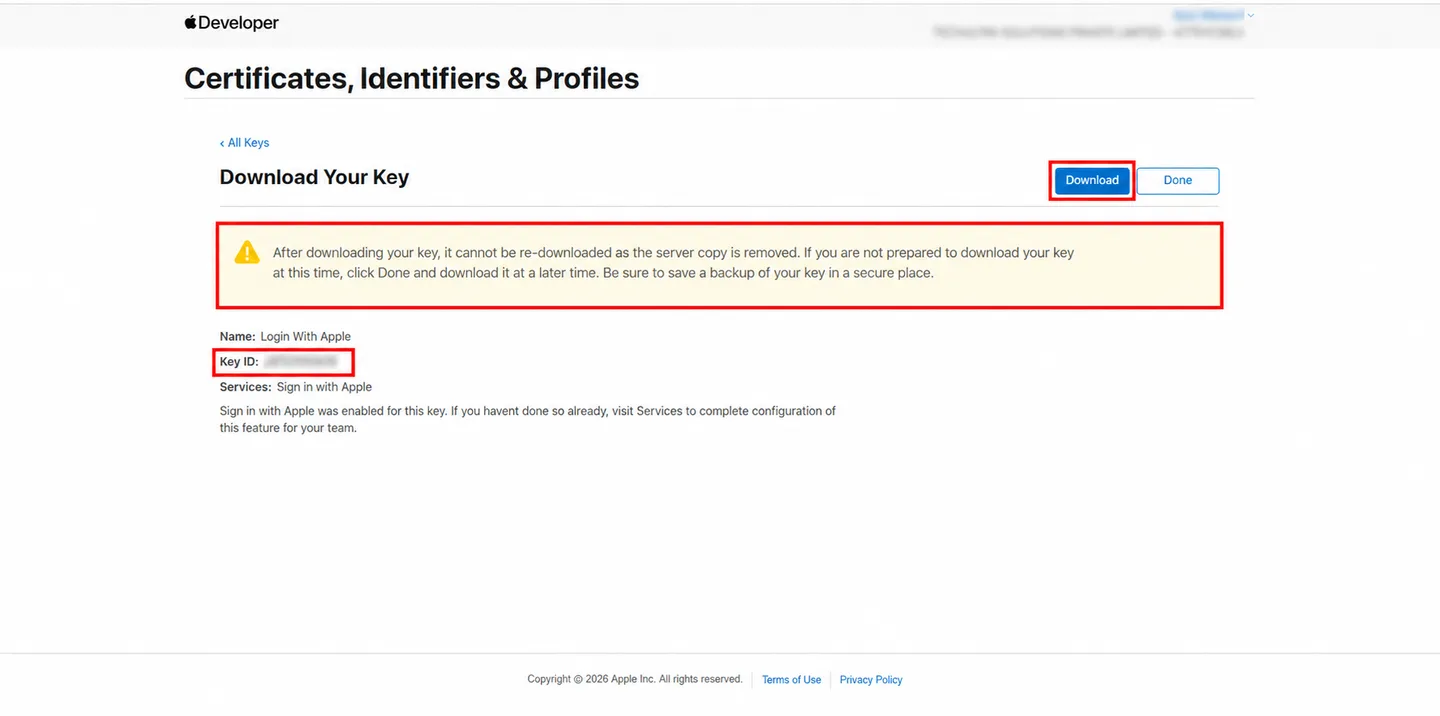
Create and download the key
Create a key with Sign In with Apple enabled, associate it with the primary App ID, then download the .p8 file and note the Key ID. Apple lets you download it only once.
- 4
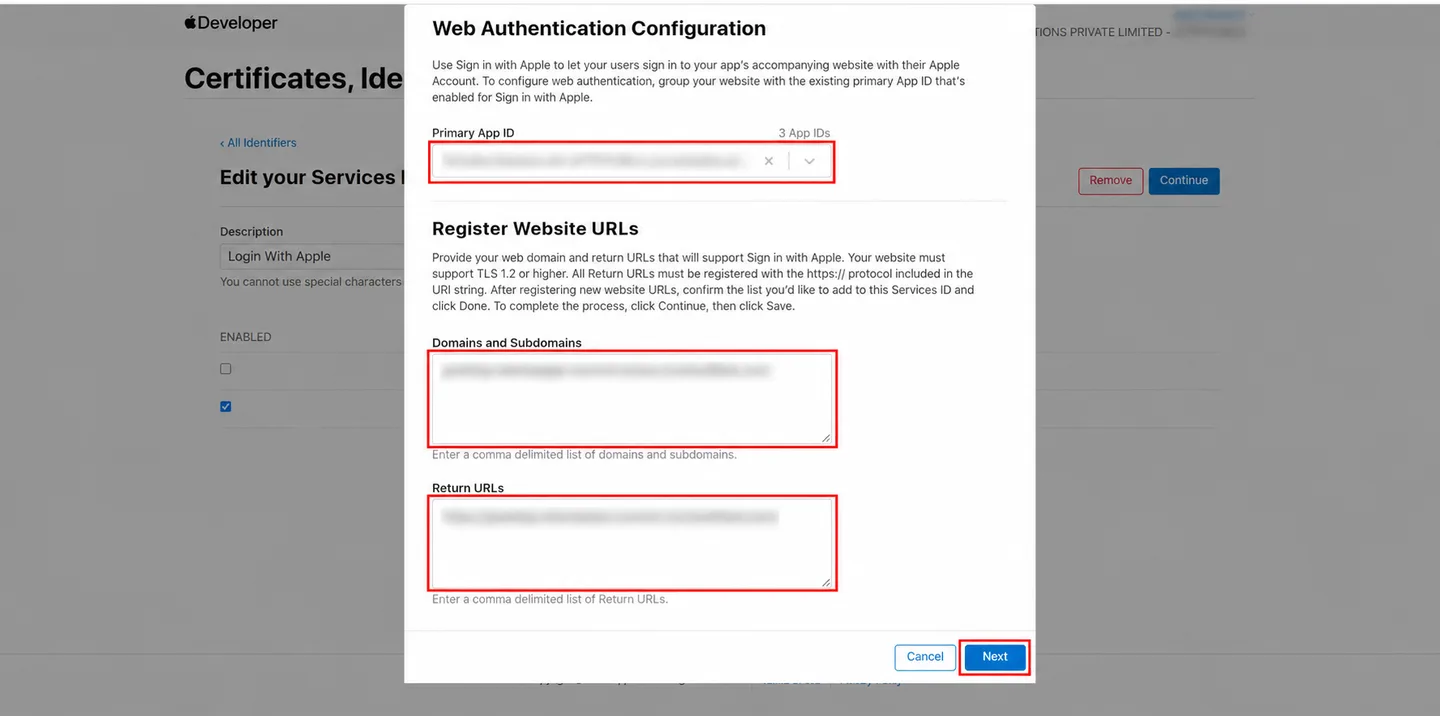
Register the domain and Return URL
On the Services ID, add your public HTTPS domain and the exact Apple Return URL shown in Odoo, ending in /apple/signin.
- 5
Configure the provider in Odoo
In Settings → Users & Companies → OAuth Providers → Apple, enter the Services ID, Team ID and Key ID, upload the .p8 key, set web.base.url to the matching HTTPS origin, and tick Allowed.
Frequently asked questions
-
What does Sign in with Apple add to my Odoo website?
Apple ID authentication on the website login and signup pages. Returning users with a linked Apple identity reach their portal account, and first-time Apple users can create a portal account when free signup is allowed. Other login methods remain available.
-
What do I need to configure Apple login in Odoo?
An Apple Developer setup with Sign in with Apple enabled on the App ID, a Services ID for web login, your Team ID, Key ID and the .p8 private key. Register your HTTPS domain and the return URL ending in /apple/signin with Apple. The server needs the requests and cryptography Python packages.
-
Can Apple users register when Odoo public signup is restricted?
No. New Apple accounts are created only when the website allows free signup and Apple supplies a verified email. Invitation-only or disabled signup blocks first-time Apple account creation. Users with an existing linked Apple identity can still sign in.
-
Can existing portal customers link Apple, including Hide My Email users?
Yes. The customer signs in with their usual method, then starts the linking flow at /auth/apple/authorize?flow=link. Verified private relay addresses are kept as supplied. Internal and administrator accounts cannot use the linking flow.
-
Does it need Firebase, Auth0 or another login service?
No. Odoo exchanges the authorization code directly with Apple and checks the identity token against Apple's public keys. Note that the .p8 key is stored in Odoo for system administrators to manage; the module does not add encryption at rest for it.
-
Are there other social or passwordless login options?
TechUltra also publishes Email OTP Login & 2FA and WhatsApp Login & 2FA for Odoo.
Listing verified against the Odoo App Store:
Related services
Get the most out of this module with senior TechUltra consultants.
-
Odoo Customization Services
Odoo customization from a Gold Partner: custom modules, workflows, reports and Studio changes, upgrade-safe and quoted at a fixed scope. Free scoping call.
-
Hire Odoo Developers
Hire Odoo developers from a Gold Partner: an AI Engineering Pod from USD 1,800 a month, or a dedicated developer for 70–160 hours. Request a proposal today.
-
Odoo Support Services & Maintenance
Odoo support services from a Gold Partner: functional and technical support plus server cover for Enterprise and Community, 30-minute P1 response, 24/7 option.