
Financial services
Odoo for Financial Services
Odoo for NBFCs, microfinance institutions, fintech operators, and financial-advisory firms — back-office accounting, customer onboarding, KYC tracking, and operational reporting tuned for regulatory environments.
Last reviewed:
Financial services
- Odoo modules mapped
- 6 Odoo modules mapped
- pain points covered
- 4 pain points covered
- RBI / SEBI audit trails
- GST + India statutory
- AML / sanctions screening
Pain points & how Odoo solves them
| Challenge | How Odoo addresses it |
|---|---|
| KYC documents stored across email, drives, and partner portals | Centralized customer onboarding workflow with KYC document collection, expiry tracking, and renewal reminders. Audit-ready document repository. |
| Vendor due-diligence is repeated for every new contract | Vendor master with completed-DD flag, expiry dates, and required-document checklist. New contracts can't activate without a current DD on file. |
| Multi-entity holding-company reporting takes weeks | Native multi-company multi-currency. Each entity runs as its own legal-entity Odoo company; consolidated reports + holding-company eliminations run automatically. |
| Audit trail requirements aren't met by current accounting | Every transaction has user-stamp + timestamp + before/after value capture. Audit reports for regulators (RBI, SEBI, equivalents) export in their preferred format. |
Which financial services firms run Odoo with TechUltra?
These 3 companies list TechUltra as their Odoo partner on Odoo's partner directory under the industry label shown on each card (read on 5 November 2026). Work we delivered through other Odoo partners is credited to them and is not listed here.
- Du Group Odoo label: Finance / Legal / Insurance Du Group on Odoo's directory
- inFinance Digital España SL Odoo label: Finance / Legal / Insurance inFinance Digital España SL on Odoo's directory
- inFinance MKB B.V. Odoo label: Finance / Legal / Insurance inFinance MKB B.V. on Odoo's directory
Recommended Odoo modules
-
Accounting
Multi-entity, multi-currency, regulatory-aware audit trails, statutory reporting.
-
Sales + CRM
Customer onboarding workflow with KYC stages and document collection.
-
Documents
Document repository for KYC, contracts, regulatory filings with versioning.
-
HR + Payroll
Compliance-aware payroll, certifications tracking for regulated roles.
-
Helpdesk
Customer-service tickets with SLA tracking; complaint-management for regulated environments.
-
Project
Capital-project tracking, IT-rollout governance, regulatory-program management.
Which Odoo 20 apps do financial services firms need?
| Odoo app | Module (edition) | What it holds |
|---|---|---|
| Invoicing | account (Community) | Journals, invoices, bills and multi-currency |
| Accounting | account_accountant (Enterprise) | Bank matching, reconciliation and the accountant's views |
| Payment follow-up | account_followup (Enterprise) | Reminder levels for overdue invoices |
| Assets | account_asset (Enterprise) | Fixed assets and depreciation |
| CRM | crm (Community) | Client leads and opportunities |
| Documents | documents (Enterprise) | Client files in folders with access rights |
| Sign | sign (Enterprise) | Engagement letters and agreements sent for electronic signature |
| Approvals | approvals (Enterprise) | Approval requests for spend and other decisions |
What does Odoo 20 look like for financial services firms?
Screens from Odoo 20 that financial services firms use every day, from our Odoo 20 feature guide. Each one shows where to find it in Odoo and why it matters.
-
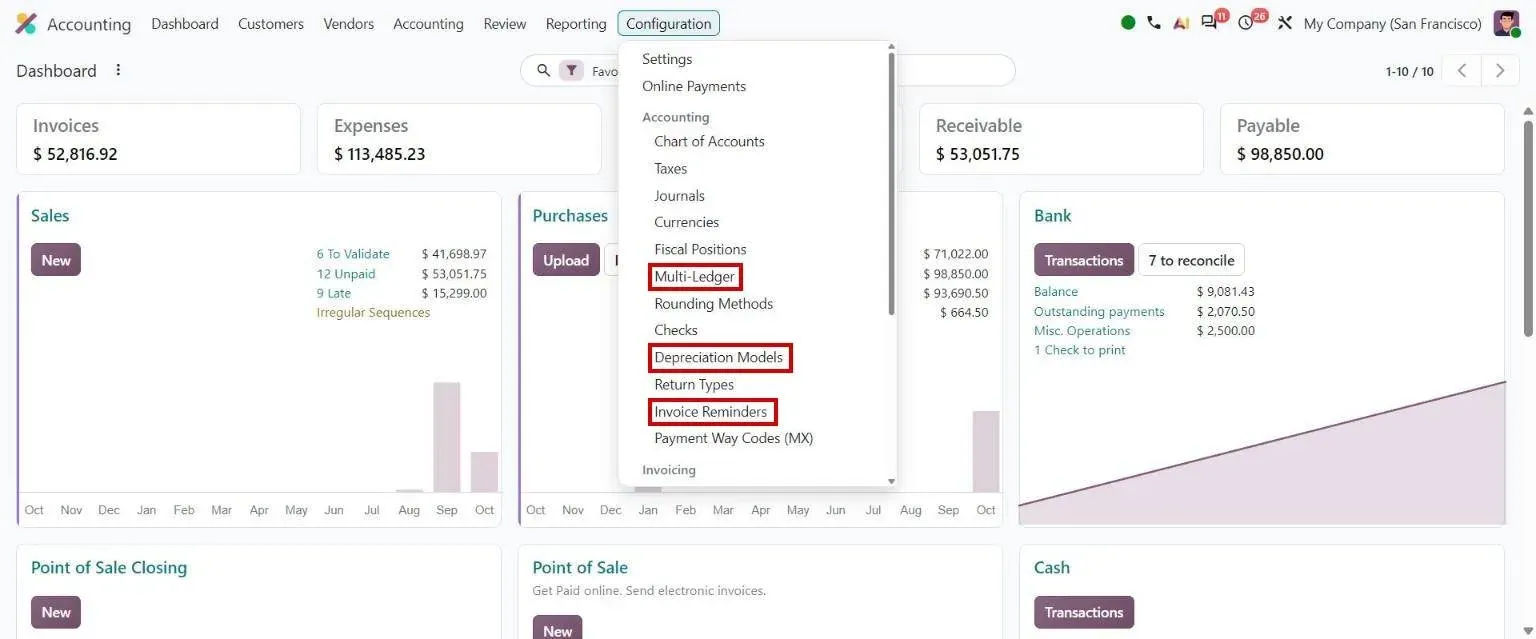
Accounting Configuration menu: Multi-Ledger, Depreciation Models, Invoice Reminders Odoo 20 · Accounting
Multi-ledger consolidation
Accounting > Configuration > Multi-ledger
Helps accountants see clearly which journals make up each ledger group.
Multi-ledger consolidation: how to use it in Odoo 20 -
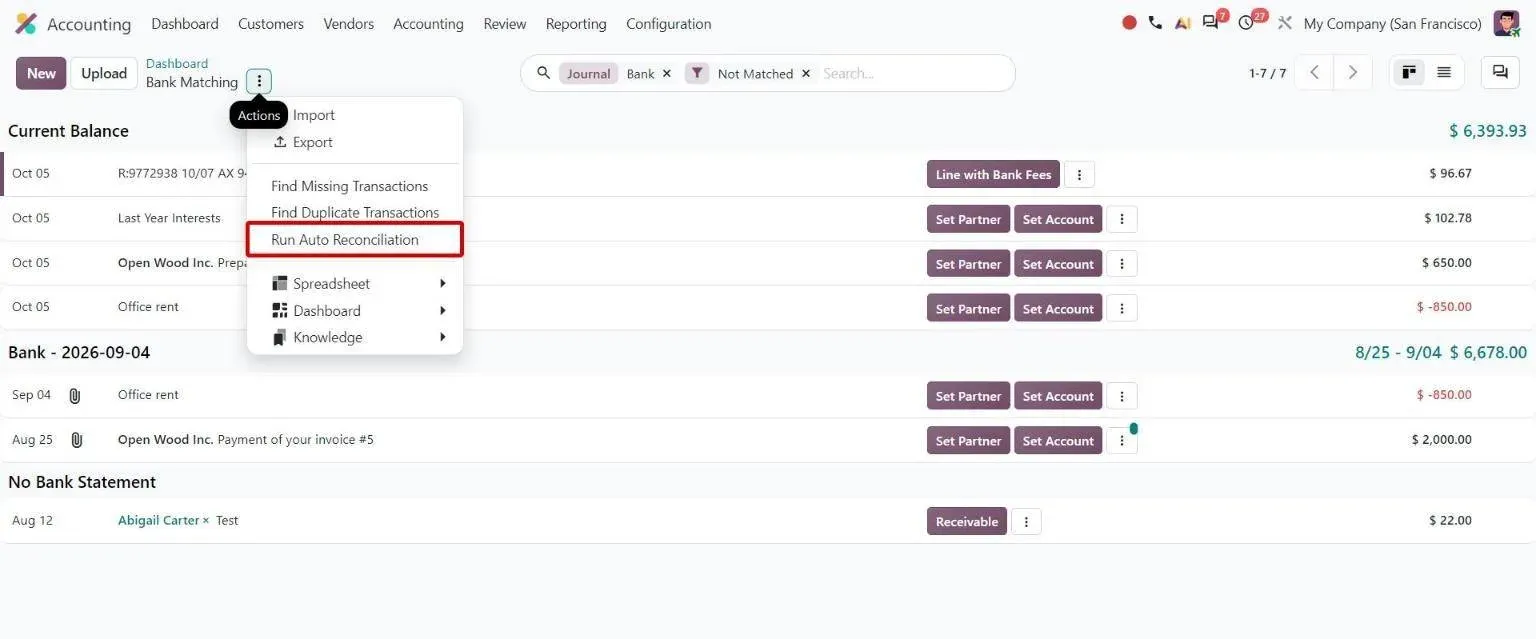
Bank Matching actions menu with the Run Auto Reconciliation option Odoo 20 · Accounting
Run Auto Reconciliation
Accounting > Bank Matching > gear menu
Lets accountants rerun automatic bank matching whenever they need.
Run Auto Reconciliation: how to use it in Odoo 20 -
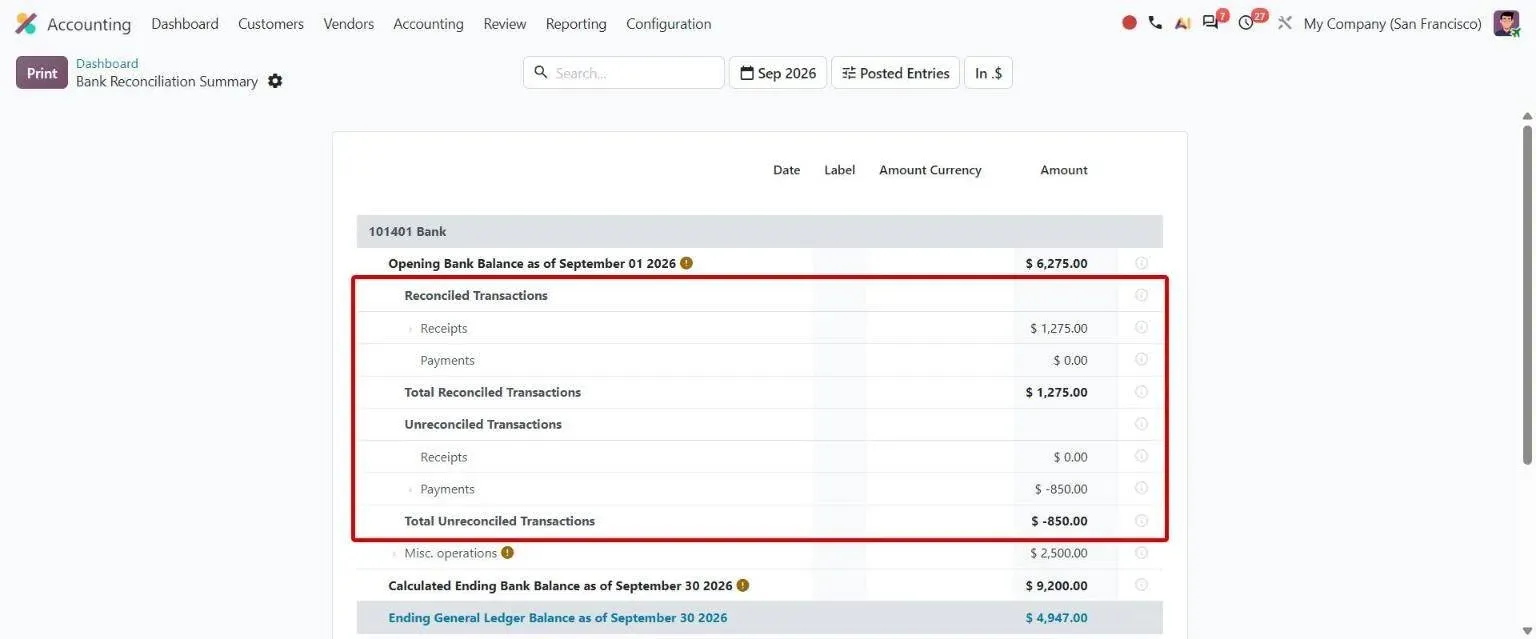
Bank Reconciliation Summary listing reconciled and unreconciled receipts and payments Odoo 20 · Accounting
Bank reconciliation summary report
Accounting > Bank > Bank Reconciliation Summary
Helps accountants review reconciled and unreconciled bank transactions, grouped into receipts and payments.
Bank reconciliation summary report: how to use it in Odoo 20 -
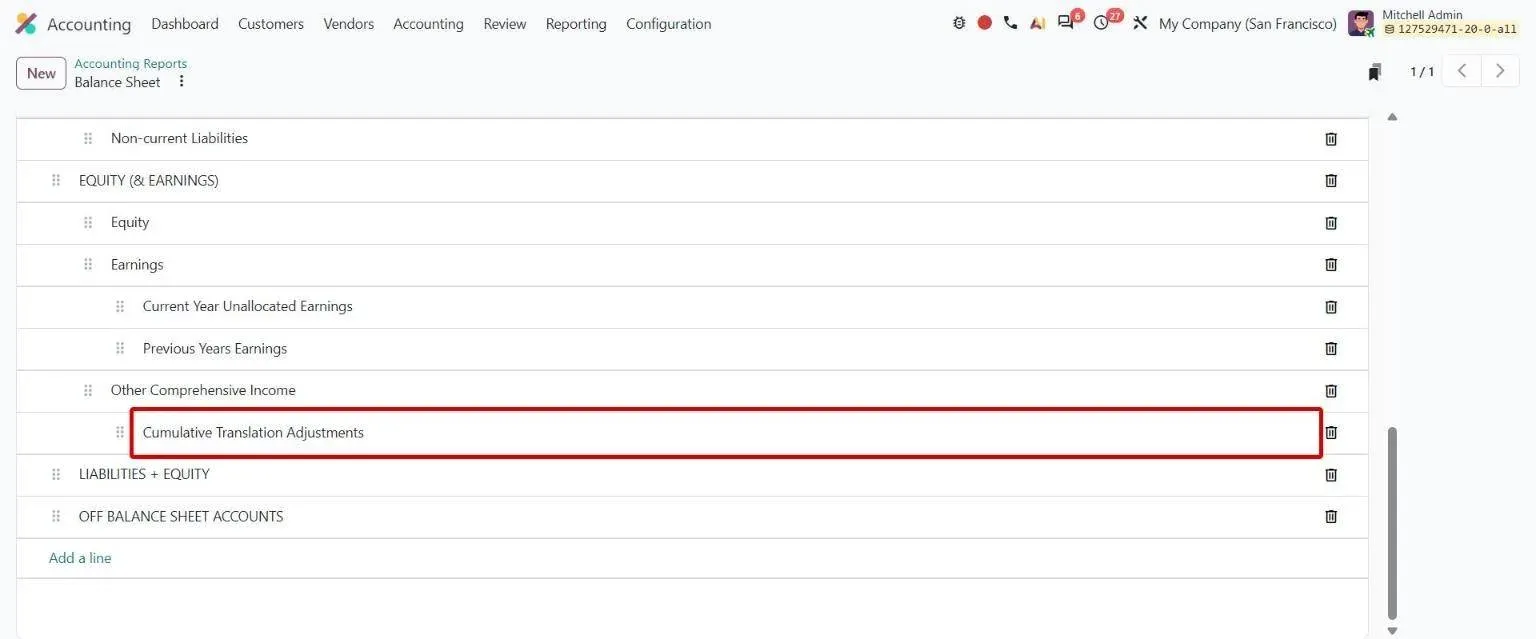
Balance Sheet report lines with the new Cumulative Translation Adjustments line Odoo 20 · Accounting
Cumulative Translation Adjustment (CTA)
Accounting > Configuration > Accounting Reports > Balance Sheet
Helps groups report currency translation differences on an auditable balance sheet line when consolidating.
Cumulative Translation Adjustment (CTA): how to use it in Odoo 20 -
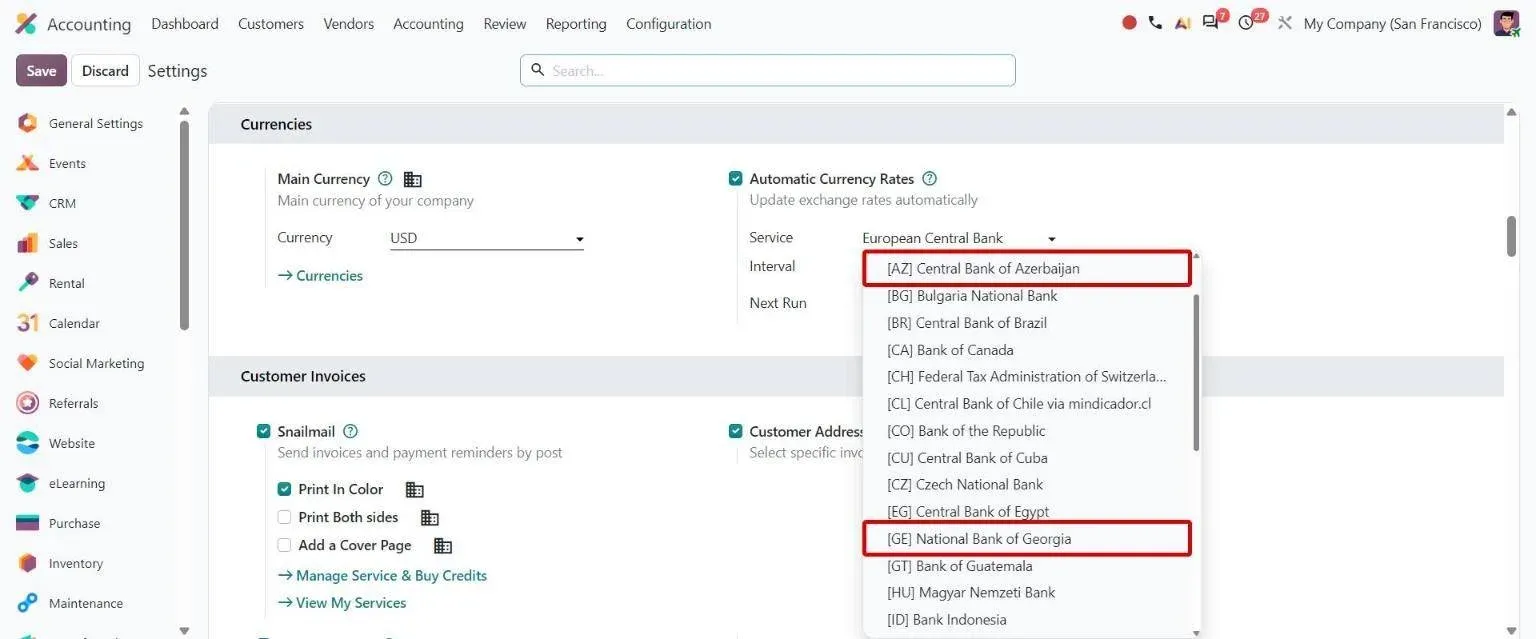
Currency rate Service list including new Azerbaijan and Georgia central banks Odoo 20 · Accounting
Currency exchange rate providers
Accounting > Settings > Currencies > Service
Lets companies fetch exchange rates from the central banks of Azerbaijan, Georgia, Kazakhstan, Saudi Arabia and Uzbekistan.
Currency exchange rate providers: how to use it in Odoo 20 -
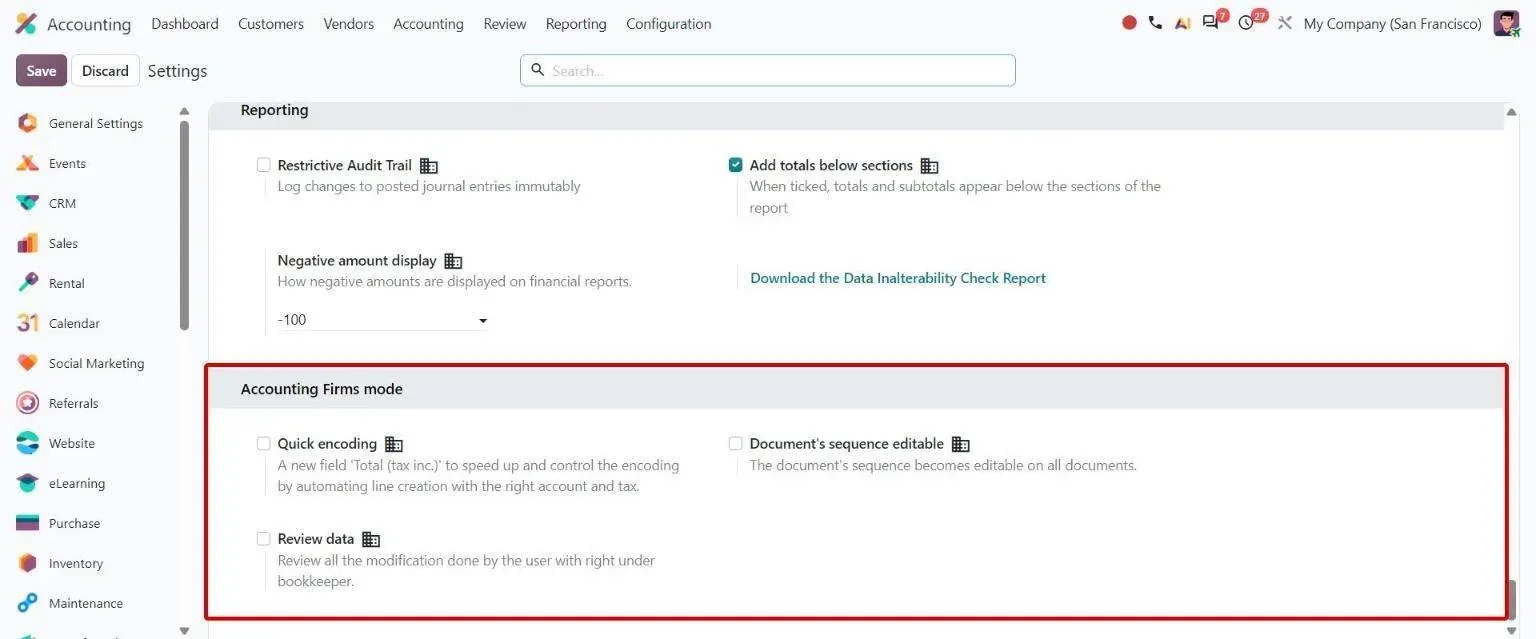
Accounting settings block with Quick encoding, editable sequences and Review data toggles Odoo 20 · Accounting
Accounting Firms mode settings
Accounting > Configuration > Settings
Lets accounting firms switch on quick encoding, editable sequences and review settings separately as needed.
Accounting Firms mode settings: how to use it in Odoo 20
Sample features
- Multi-entity multi-currency accounting with consolidated reporting
- Customer onboarding workflow with KYC document collection
- KYC expiry tracking with renewal reminder automation
- Sanctions screening integration on customer creation
- Vendor master with completed-DD flag and document expiry tracking
- Audit trail capture on every transaction (user, timestamp, before/after)
- Regulatory reporting (RBI, SEBI) with export in required formats
- Compliance-aware role-based access with segregation of duties
- Transaction approval workflows with multi-level escalation
- Document repository with versioning and access logging
Use cases for financial services firms
- Odoo 20 industry package Accounting Firm Odoo 20's package for accounting firms: identity documents, anti-money-laundering checks and customer databases from a dashboard. Open
- Erpmate AI agents Erpmate for the CFO Overdue cash ranked by how each customer really pays, and a month-end open list from day one. Open
- Erpmate AI agents Erpmate in Odoo Accounting Overdue invoices, reconciliation, audit checks and a month-end close list. Open
- AI AI dashboards A question in plain English, an Odoo dashboard back, with the record list under every chart so each number can be checked. Open
- Integration Power BI and Odoo Odoo data in Power BI through a read replica, the external API or a data warehouse, with row-level security. Open
- TechUltra app Post-Dated Cheque Management Register, collect and bounce customer and vendor post-dated cheques inside Odoo Accounting. Open
- Odoo 20 guide Odoo 20 accounting and finance guide Every Odoo 20 change in Accounting, Online Payments and Expenses, with screenshots. Open
Compliance & regulatory
| Standard | What it requires |
|---|---|
| RBI / SEBI audit trails (India) | Native audit-trail capture (user, timestamp, before/after) on every transaction. Audit reports exportable in RBI/SEBI-aligned formats. |
| GST + India statutory | GST e-invoicing, TDS, statutory reports for India operations. Multi-state filing supported for entities operating across states. |
| AML / sanctions screening | We integrate Odoo with sanctions-screening providers (Refinitiv, Dow Jones) so customer onboarding includes automated screening. Hits route to a manual review queue. |
Frequently asked questions
-
Does Odoo handle loan origination or portfolio management?
Not natively — loan origination, portfolio management, and core banking systems are dedicated FS platforms (Finacle, Flexcube, Mambu, Lendingkart, etc.). We integrate Odoo as the back-office layer alongside those systems: Odoo handles accounting, vendor management, customer onboarding, KYC, and operational reporting; the core FS system handles the lending logic.
-
Is Odoo audit-compliant for regulated FS environments?
Out of the box, Odoo captures full audit trails (user, timestamp, before/after) on every transaction. For RBI / SEBI / equivalent regulatory regimes, we add additional patterns: segregation-of-duties role design, transaction-approval workflows, and audit-report export in the regulator's preferred format. We've passed multiple statutory audits with Odoo as the system of record.
-
Can Odoo handle multi-entity holding-company structures?
Yes — multi-company multi-currency is native. Each legal entity runs as its own Odoo company with shared chart of accounts. Inter-entity transactions, consolidation eliminations, and holding-company reporting run automatically. Common in NBFCs and FS holding structures.
-
What about AML and sanctions screening?
We integrate Odoo with sanctions-screening providers (Refinitiv World-Check, Dow Jones Risk Center) so customer onboarding includes automated screening. Hits route to a manual review queue with escalation. Periodic re-screening of existing customers happens on a schedule.
-
How does Odoo handle commission and revenue-share calculations?
Standard sales-commission rules cover most flat or tiered structures. Complex commission programs (split splits, override hierarchies, time-based vesting) are added as custom modules — typical add-on is 2–4 weeks. We've shipped commission engines for advisory firms and brokerages in this scope.
-
Implementation timeline for an FS company?
Mid-sized NBFC back-office: 14–20 weeks. Microfinance institution with field operations: 18–24 weeks. Multi-entity holding company: 16–22 weeks. Fintech operator with custom workflow needs: 14–18 weeks plus custom development. Core-system integration scope is the most variable factor.