
Odoo App · WhatsApp & Messaging
WhatsApp Login & 2FA
Sign in, sign up, run 2FA, and reset passwords through WhatsApp inside Odoo.

Overview
WhatsApp Login & 2FA replaces traditional username-and-password authentication in Odoo with a WhatsApp-driven flow. Users sign in by entering their WhatsApp number and a one-time password delivered straight to their chat — no email link, no SMS gateway.
Built by TechUltra Solutions, the module covers the full authentication journey: sign-in, new-account sign-up, two-factor authentication on top of an existing password, and password reset. Every OTP is delivered through the official Odoo WhatsApp module on Meta's Cloud API, so messages use your own approved templates.
The result is faster, more secure sign-ins for customers and back-office users alike — particularly useful for portal users, B2B buyers, and field staff who already keep WhatsApp open all day.
Key features
-
WhatsApp OTP sign-in
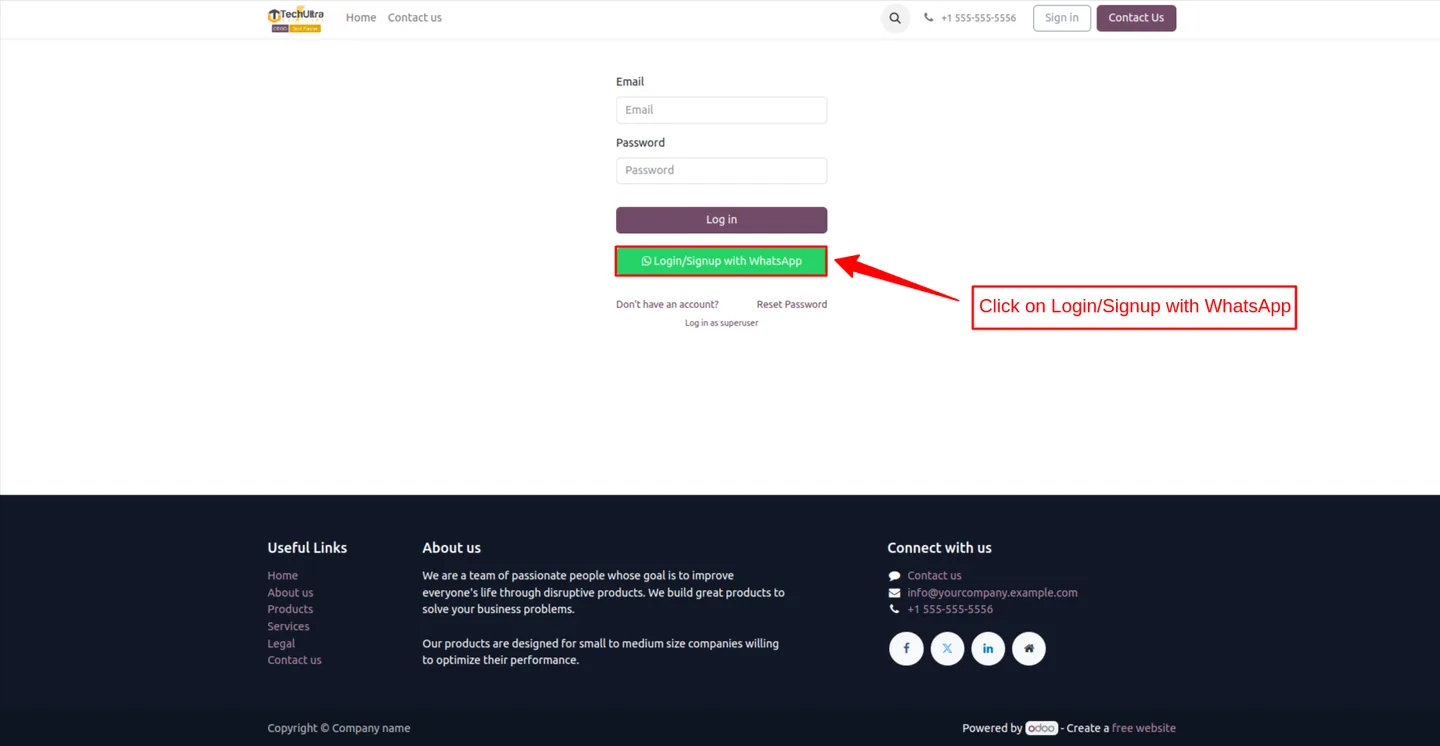
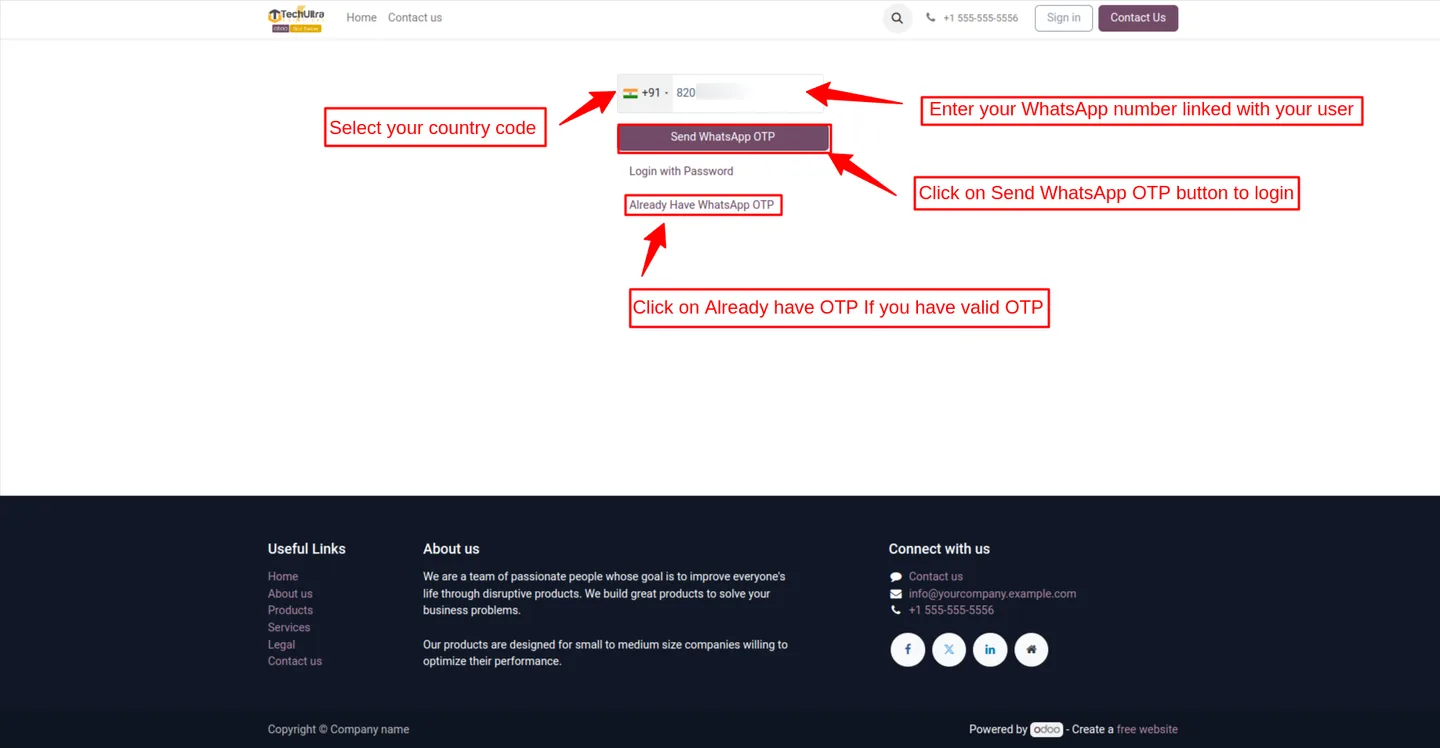
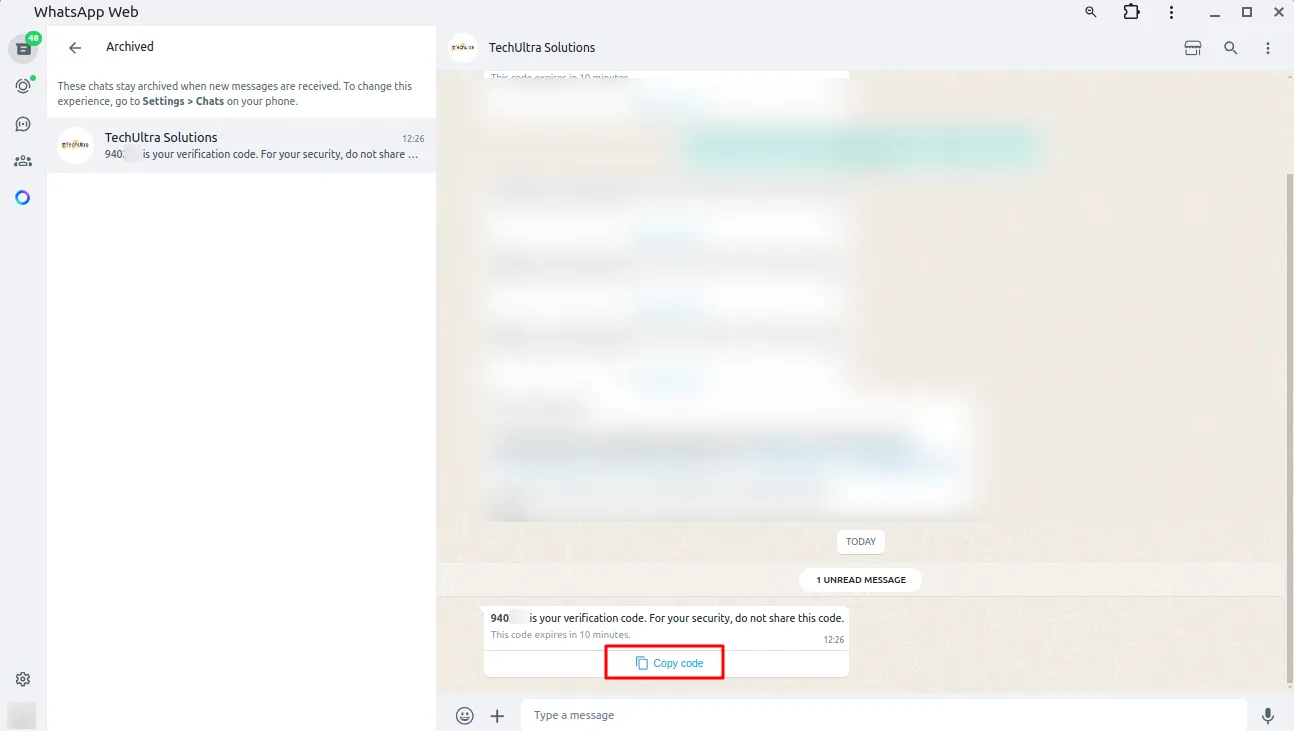
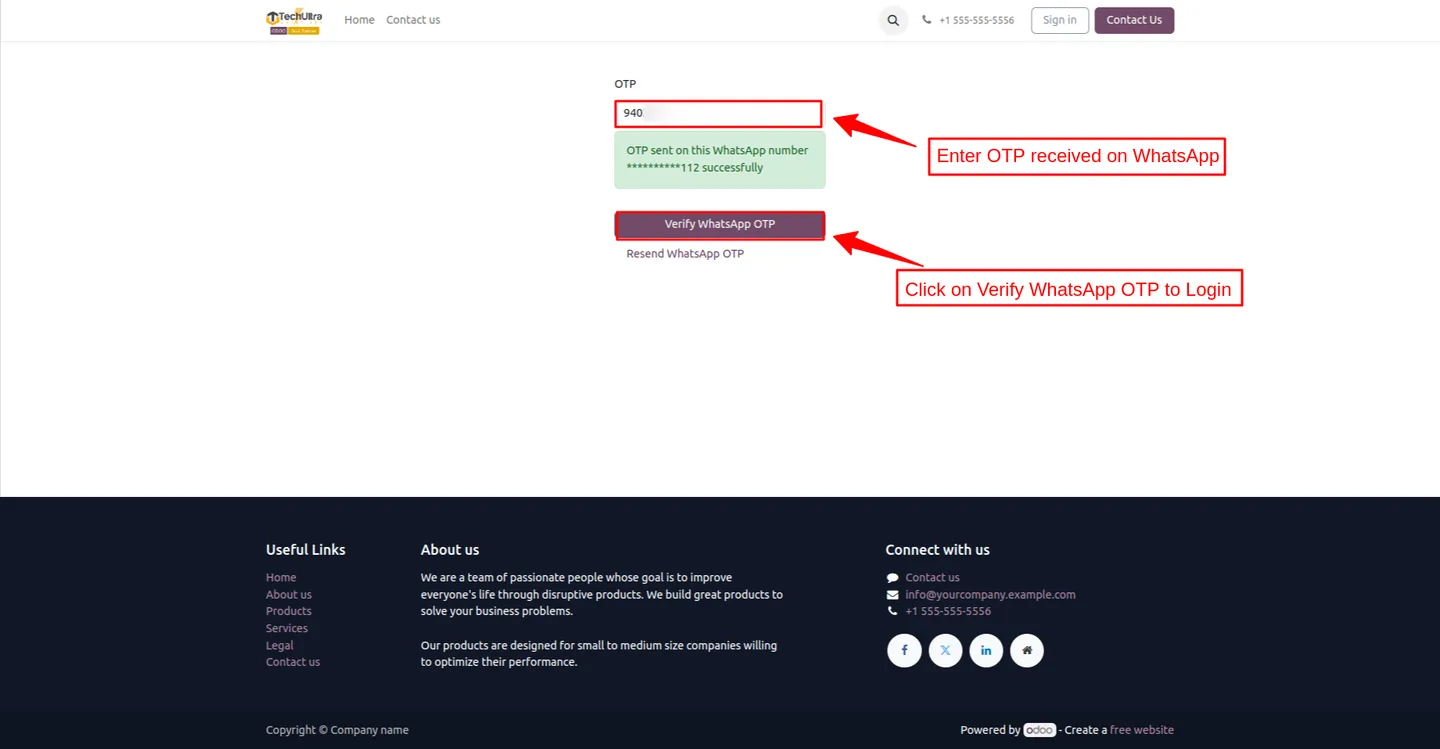
Users log in to Odoo using their WhatsApp account — no traditional username or password needed. An OTP arrives in WhatsApp and is entered on the login screen.
-
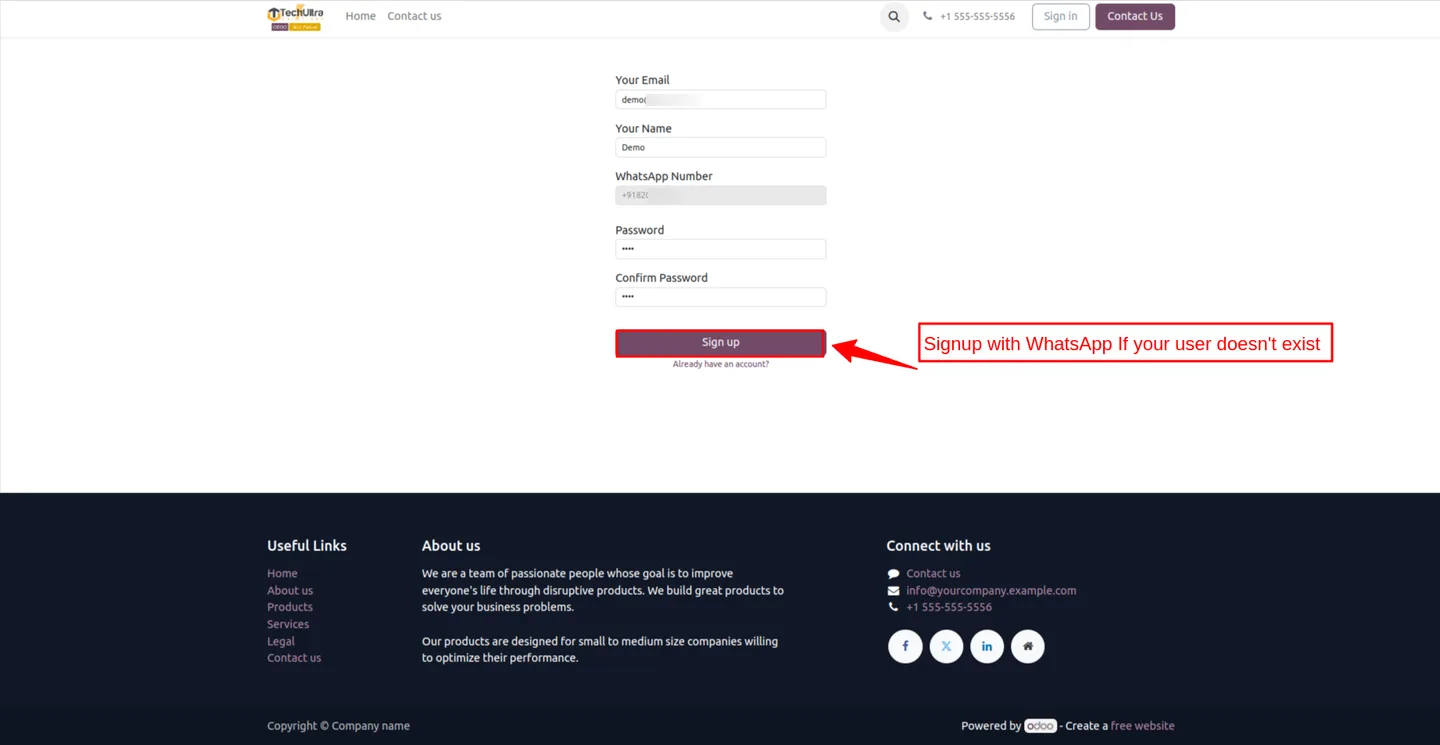
WhatsApp sign-up
New users register an Odoo account using their WhatsApp number, making first-time onboarding a one-step flow instead of an email verification chain.
-
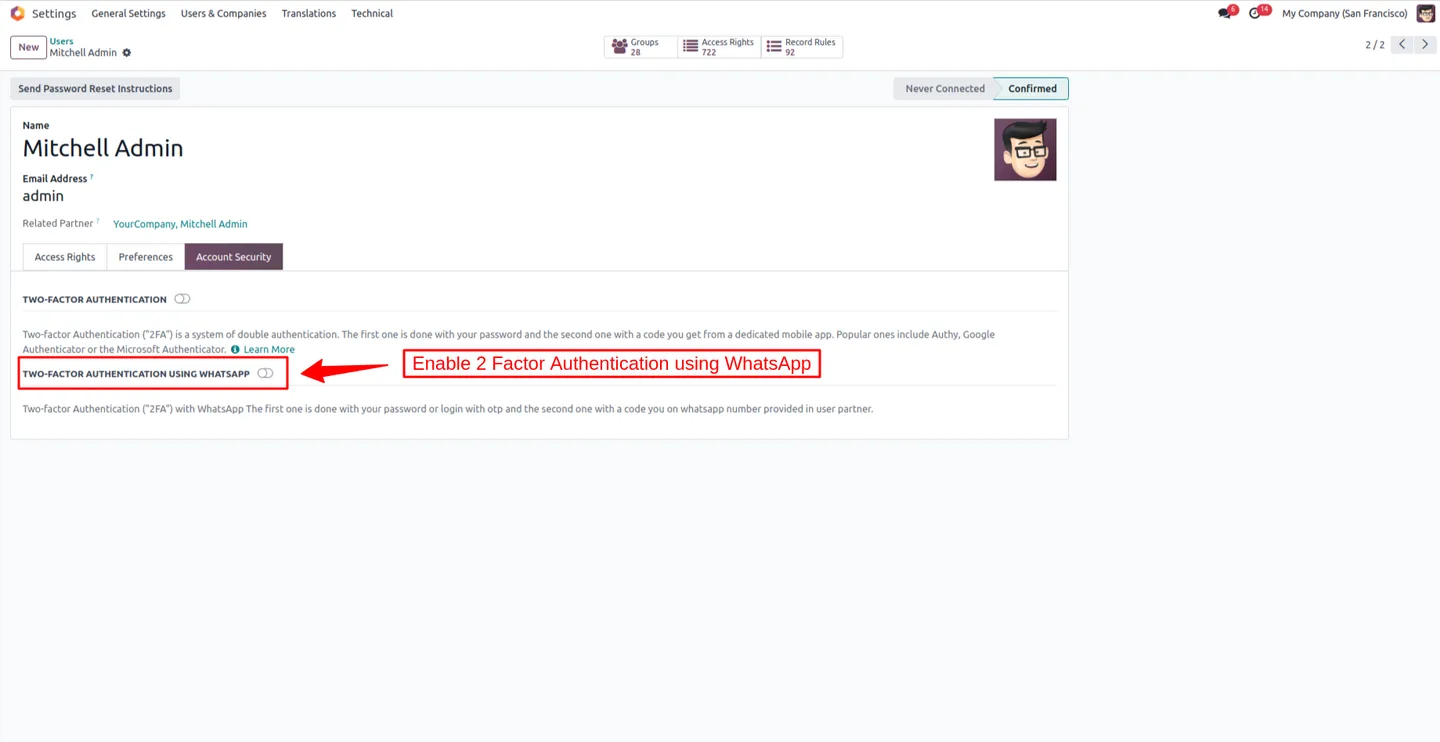
Two-factor authentication (2FA)
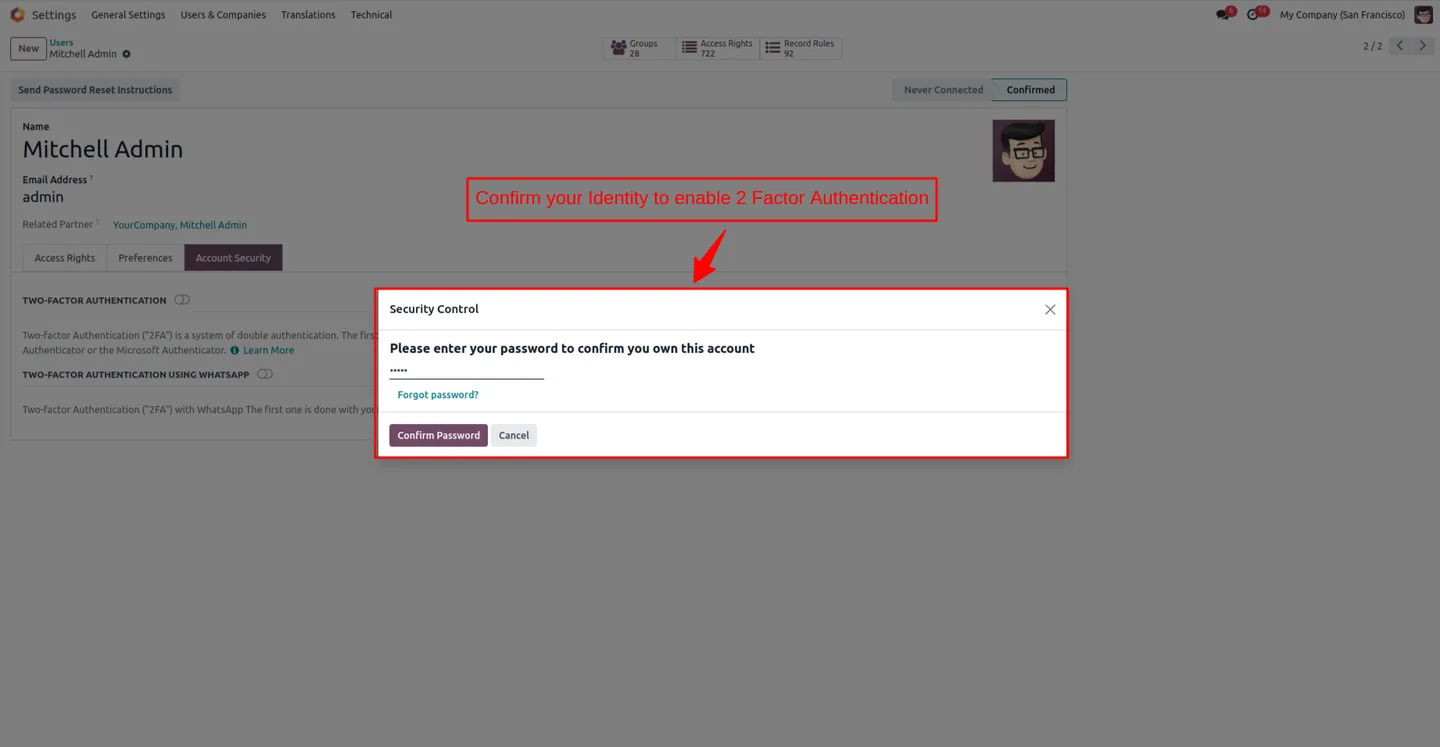
Add WhatsApp-based 2FA on top of an existing password so high-value accounts — admins, accounting users, portal buyers — get an extra layer of security.
-
WhatsApp password reset
Users reset their Odoo password through WhatsApp instead of a traditional email link — convenient, fast, and harder to phish.
-
Configurable OTP templates
OTP messages use approved WhatsApp templates that you configure in the Cloud API settings, so message wording and branding stay under your control.
-
Configurable reset templates
Password-reset messages use their own approved templates, separate from the OTP template, so you can word and brand each flow independently.
-
Mobile-friendly login flow
Built for shoppers and field staff who already keep WhatsApp open on their phone — entering an OTP from a WhatsApp message is one tap away.
-
Official WhatsApp module integration
Built on the official Odoo WhatsApp module (whatsapp), so OTPs flow through Meta's Cloud API and your existing WhatsApp Business sender — no third-party gateway.
WhatsApp Login & 2FA in Odoo
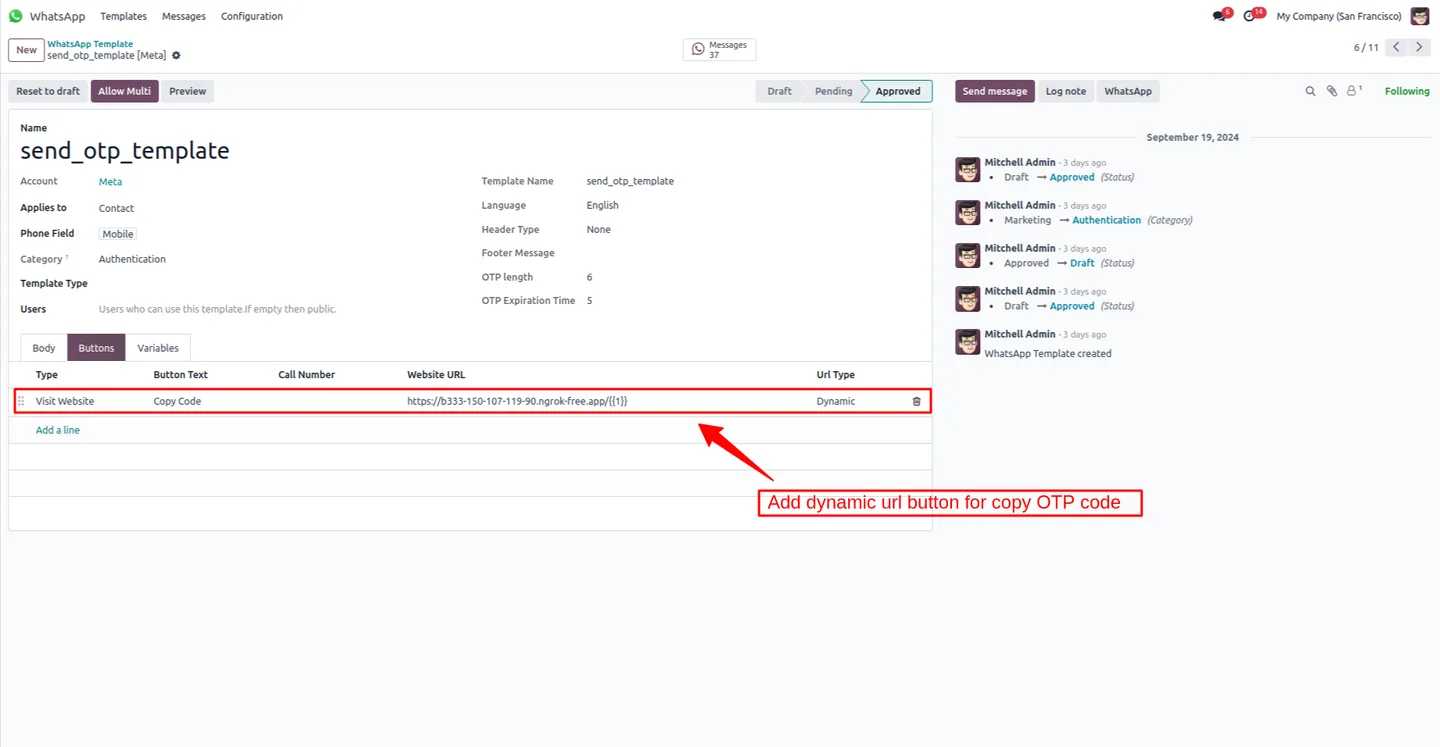
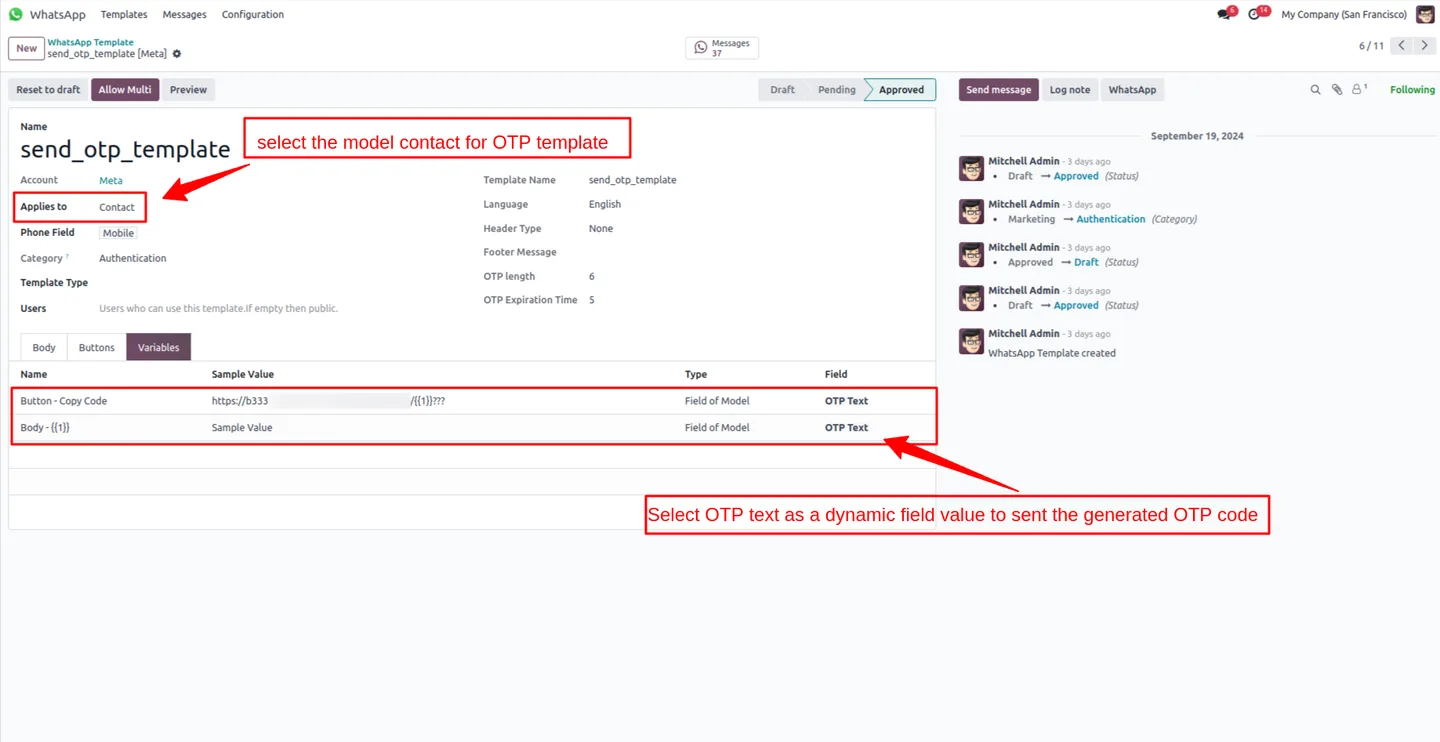
Every screen, in the order you meet it — configuration first, then the module in use.
Technical details
Specification
- Publisher
- TechUltra Solutions Private Limited
- Technical name
- odoo_whatsapp_login
- Odoo versions
- 17.0, 18.0, 19.0, 20.0
- Lines of code
- 2,152
- License
- Odoo Proprietary License v1.0 (OPL-1)
- Price
- $68 (one-time)
Deployment
- Odoo Online
- Odoo.sh
- On-premise
Odoo dependencies
- Discuss
- WhatsApp Messaging
Support
90 days of bug-fix support, Monday to Friday (10:00–19:00 IST). Raise a ticket at support@techultra.in.
Setup & configuration
From install to first call — here is the path.
- 1
Install the module
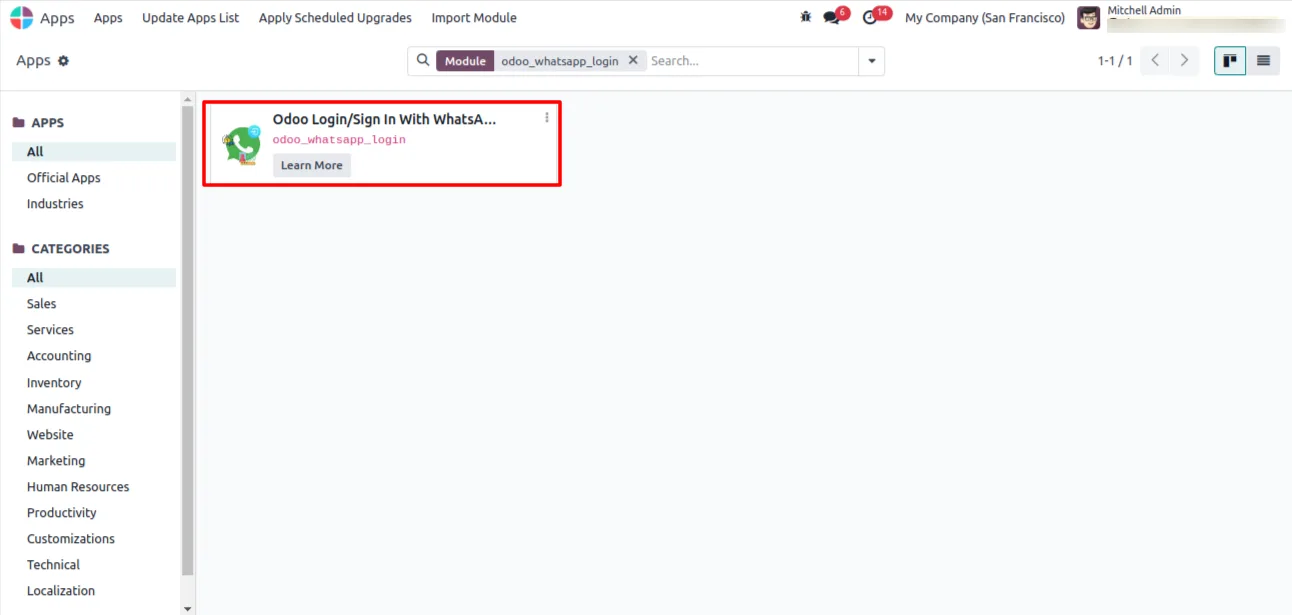
In Odoo, open Apps, remove the Apps filter, search for “WhatsApp Login”, and click Install. The module depends on the official Odoo WhatsApp module (whatsapp), which must already be configured.
- 2
Confirm WhatsApp Cloud API is connected
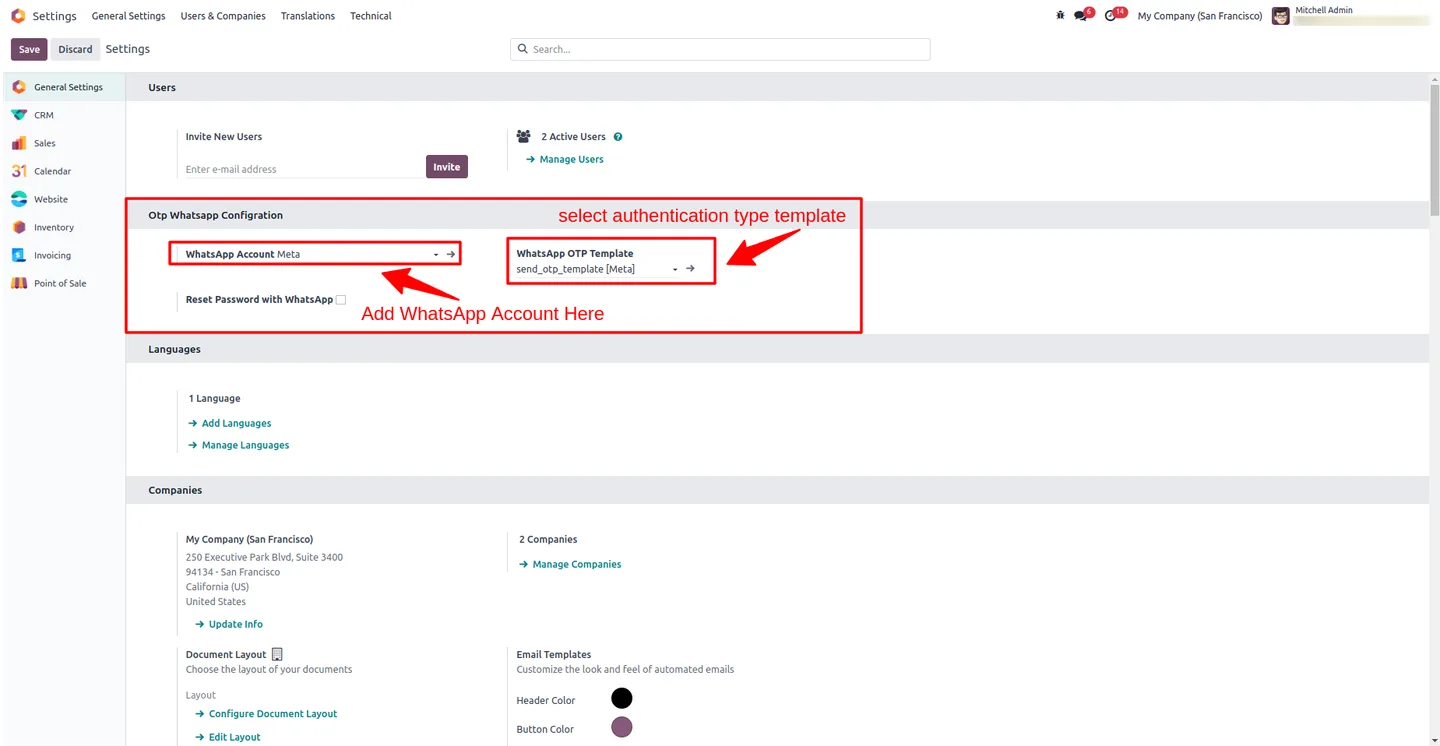
Open WhatsApp → Configuration in Odoo and confirm an active account, phone number, and access token. WhatsApp Login uses that connection to deliver OTPs.
- 3
Create approved OTP templates
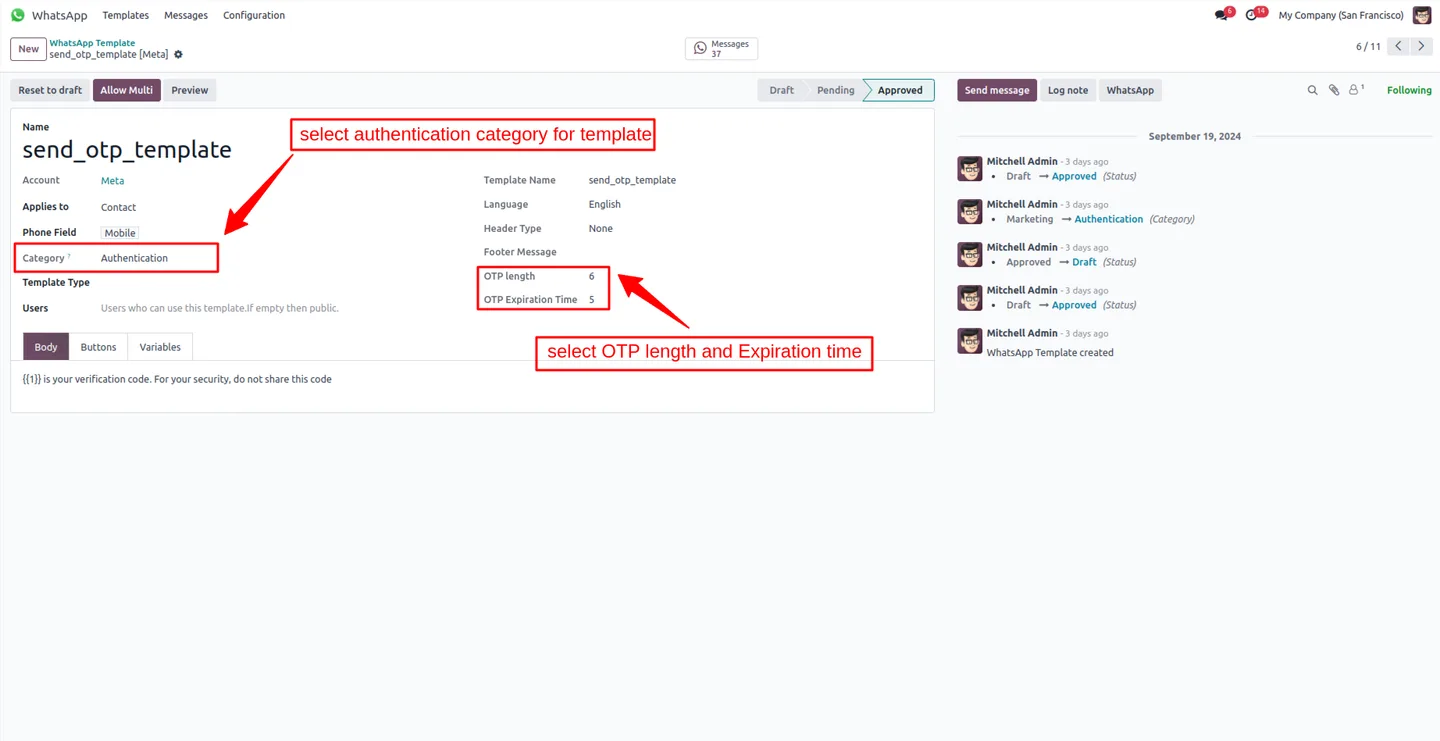
In the WhatsApp Cloud API dashboard, create authentication-category templates for sign-in OTP, sign-up OTP, 2FA OTP, and password reset. Submit them for Meta approval before going live.
- 4
Configure templates in Odoo
Map each approved template to the matching flow — login, signup, 2FA, password reset — under WhatsApp Login configuration. The module uses the assigned template when it needs to send an OTP.
- 5
Enable WhatsApp login on user records
Set the WhatsApp number on the user records that should authenticate through WhatsApp. The number must match a WhatsApp account reachable on the configured Cloud API sender.
- 6
Test the four flows
Run an end-to-end test for each flow: sign in with OTP, sign up with OTP, complete 2FA on a password login, and reset a password through WhatsApp. Confirm OTPs arrive within seconds.
Frequently asked questions
-
Does this module replace passwords entirely?
It can. Users sign in with a WhatsApp OTP only and never enter a password. If you prefer, you can keep passwords and use WhatsApp as a second factor on top.
-
Which Odoo versions are supported?
Odoo 17.0, 18.0, 19.0 and 20.0, in both Community and Enterprise editions.
-
What do I need before installing?
The official Odoo WhatsApp module (technical name whatsapp) must already be installed and connected to your WhatsApp Cloud API account, with at least one approved authentication template.
-
Can I use it for portal and eCommerce users?
Yes. Customer-portal users and eCommerce shoppers can sign up, sign in, and reset their password through WhatsApp, which is especially useful for B2B portals and field-staff logins.
-
How are OTP messages worded?
OTPs are delivered through approved WhatsApp templates that you control. The module uses templates in the authentication category so they comply with Meta policy.
-
Is it more secure than SMS OTP?
WhatsApp OTPs are delivered over an end-to-end encrypted channel tied to a specific account on a specific device, which is harder to spoof than the SMS network. They are also harder to phish than emailed reset links.
-
Will it work if a user changes their WhatsApp number?
Update the WhatsApp number on the user record and the new number receives the OTPs. Until you update it, the OTP keeps going to the old number on file.
-
Is support included?
Yes. The module includes 90 days of bug-fix support, Monday to Friday, 10:00–19:00 IST.
Listing verified against the Odoo App Store:
Related solutions
Whole-platform solutions that complement WhatsApp Login & 2FA.
WhatsApp ↔ Odoo Integration
Connect WhatsApp to Odoo: two-way WhatsApp Business API sync, order and invoice messages, payment links and one shared team inbox. Free demo from a Gold Partner.
AI WhatsApp Chatbot
LLM-powered WhatsApp chatbot grounded in your Odoo data. Handles ordering, support, FAQs, and lead qualification with human-agent escalation.
Odoo WhatsApp Push Notifications
Real-time WhatsApp push notifications in Odoo — web, Android, iOS. Customer names in Discuss instead of phone numbers. Compatible with Odoo 17 and 18.
Related services
Get the most out of this module with senior TechUltra consultants.
Odoo Customization Services
Odoo customization from a Gold Partner: custom modules, workflows, reports and Studio changes, written upgrade-safe and quoted at a fixed scope. Free scoping call.
Hire Odoo Developers
Hire certified Odoo developers from a Gold Partner: one developer or a team, full-time or part-time, 70–160 hours a month. Silver, Gold or Platinum plan, free trial.
Odoo Support Services & Maintenance
Odoo support services from a Gold Partner: functional and technical support plus server cover for Enterprise and Community, 30-minute P1 response, 24/7 option.







