Odoo App · Social & Messaging
Facebook & Instagram Messenger
Two-way Facebook Messenger and Instagram DMs inside Odoo — templates, media, and full chat history.
Overview
Facebook & Instagram Messenger plugs Meta's official Graph API into Odoo so your team handles Facebook Messenger and Instagram Direct Messages from the same inbox they use for email, internal notes, and tasks.
Built by TechUltra Solutions, the module supports single or multiple Facebook and Instagram accounts with multiple users and agents. It manages templates inside Odoo, lets agents share product images, videos, PDFs, and documents with a single click, and detects the right Meta page automatically from the contact record.
Every conversation is stored as a searchable, filterable chat history with grouping options, so support managers can audit past exchanges and reuse what works. Multi-company and multi-provider setups are supported out of the box.
Key features
-
Bidirectional Messenger and Instagram chat
Send and receive messages from Facebook Messenger and Instagram inside Odoo, with the full conversation kept against the matching contact.
-
Multi-account, multi-agent support
Connect a single Facebook–Instagram pair or several at once, and let multiple users or agents handle conversations from the shared Odoo inbox.
-
Template management
Create, edit, and delete Facebook and Instagram message templates directly in Odoo — no separate dashboard, no copy-pasting from another tool.
-
One-click media sharing
Share product videos, pictures, PDFs, and other documents to Messenger or Instagram in a single click from the Odoo composer.
-
Searchable chat history
Browse the full Facebook–Instagram chat history with filters, grouping, and search so managers can audit conversations and surface common questions.
-
Quick-reply buttons in templates
Add quick-reply buttons to Facebook–Instagram templates so customers respond with a tap, keeping conversations crisp and conversion clear.
-
Dynamic product, receipt, and feedback content
Send product details, receipts, coupons, and customer-feedback templates dynamically — useful for order updates, upsell flows, and CSAT prompts.
-
Static URL buttons
Add static URL buttons to templates so customers jump straight to a product page, support article, or booking link without typing.
-
Multi-company, multi-provider configuration
Support several companies and several Meta providers in the same Odoo database, each with its own credentials, pages, and webhook configuration.
-
Integrated error handling
API errors from Meta surface back in Odoo against the conversation, so agents and admins know exactly what failed and why.
Facebook & Instagram Messenger in Odoo
Every screen, in the order you meet it — configuration first, then the module in use.
Technical details
Specification
- Publisher
- TechUltra Solutions Private Limited
- Technical name
- odoo_facebook_instagram_messenger
- Odoo versions
- 16.0, 17.0, 18.0, 19.0
- Lines of code
- 15,424
- License
- Odoo Proprietary License v1.0 (OPL-1)
- Price
- $69 (one-time)
Deployment
- Odoo Online
- Odoo.sh
- On-premise
Odoo dependencies
- Discuss
Support
90 days of bug-fix support, Monday to Friday (10:00–19:00 IST). Raise a ticket at support@techultra.in.
Setup & configuration
From install to first call — here is the path.
- 1
Install the module
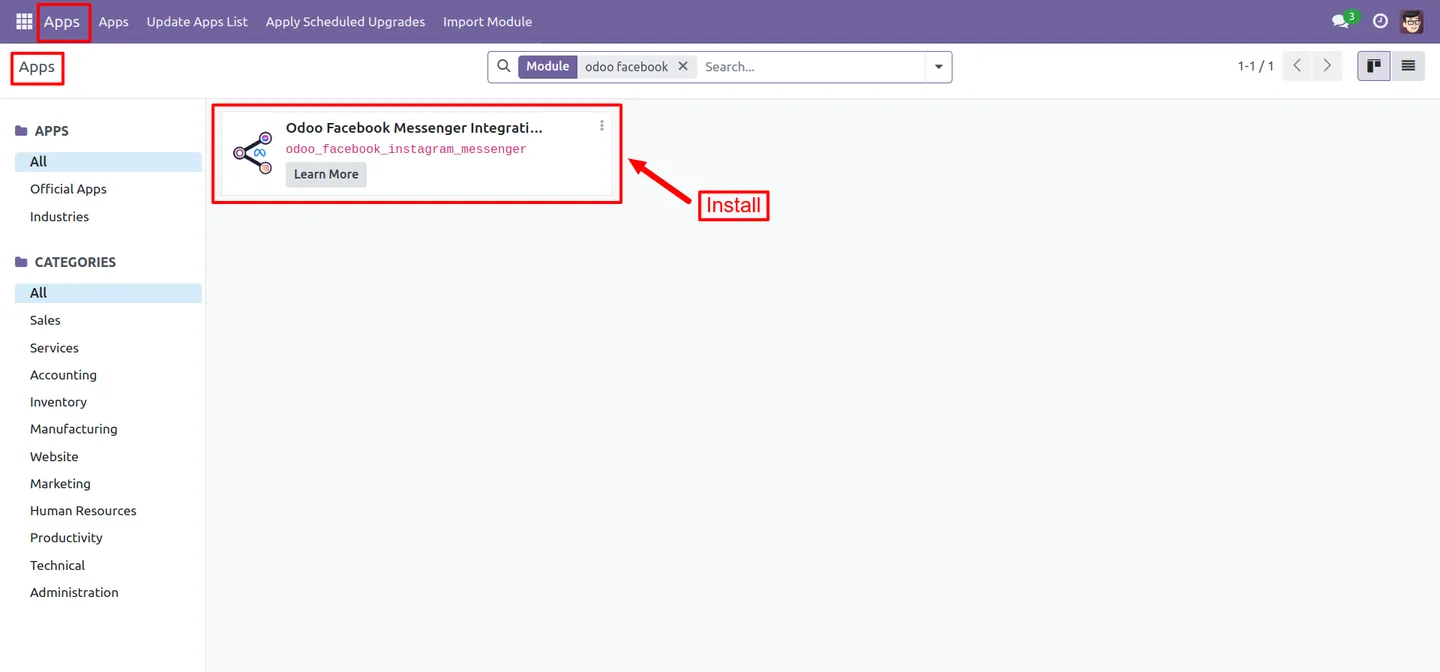
In Odoo, open Apps, remove the Apps filter, search for “Facebook Instagram Messenger”, and click Install.
- 2
Create the Meta Business app
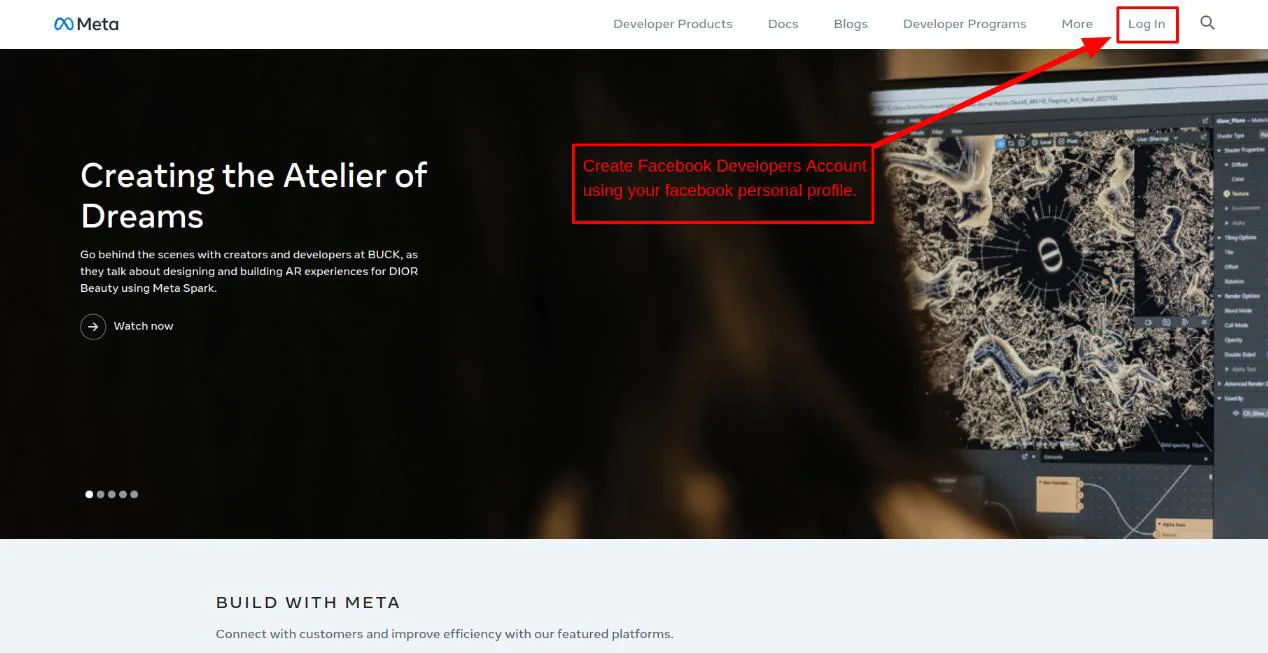
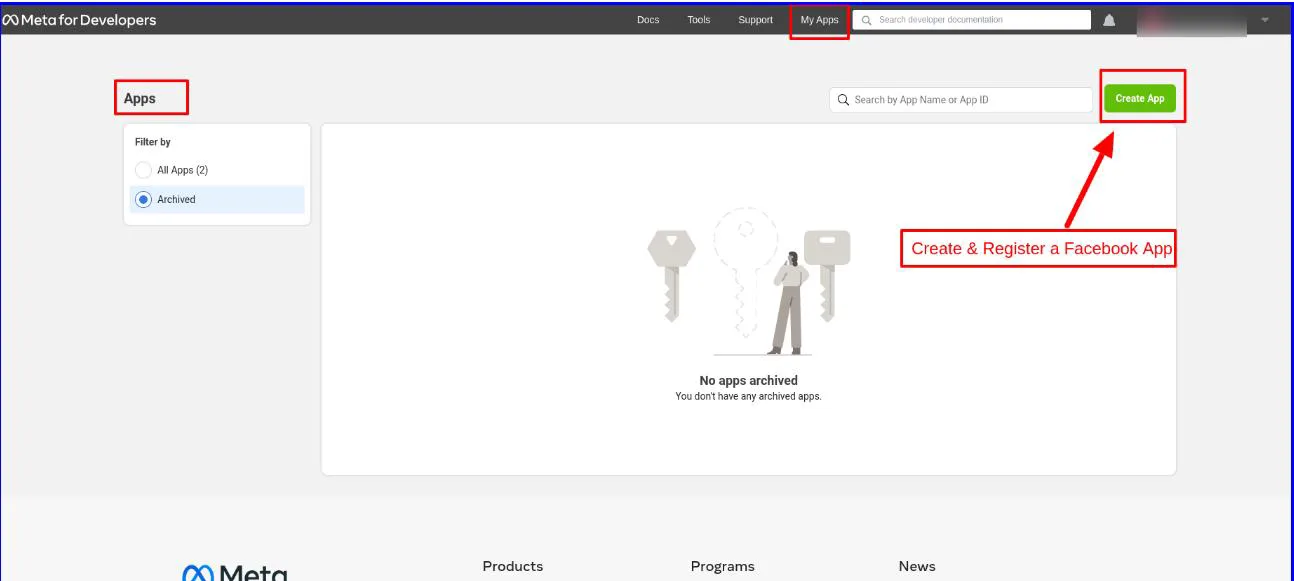
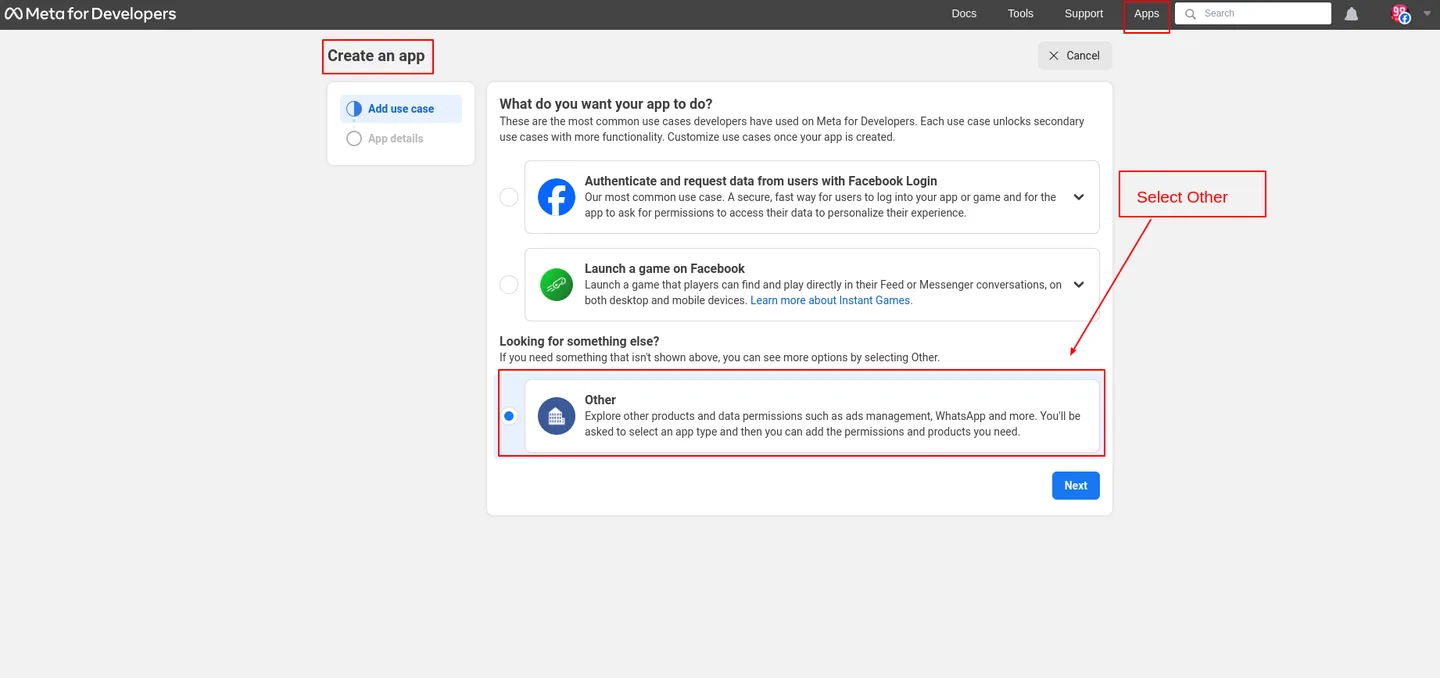
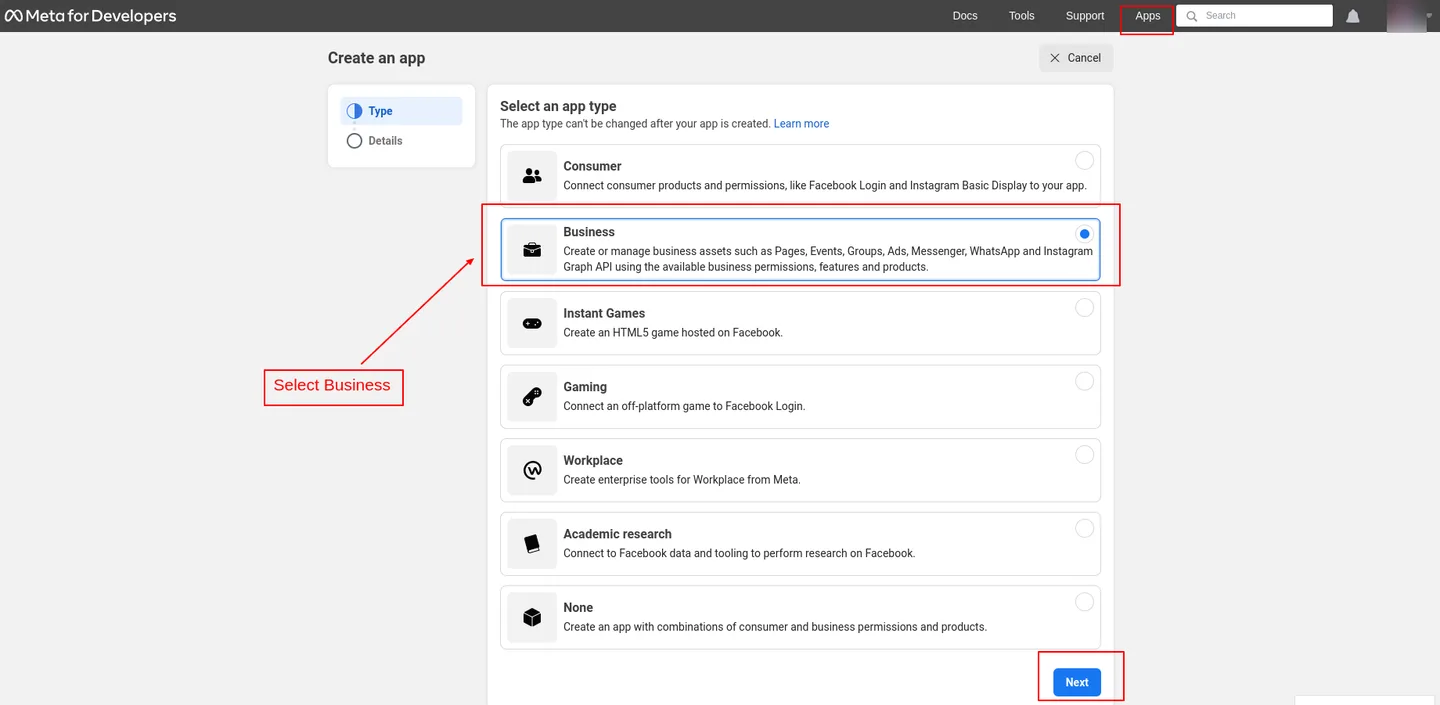
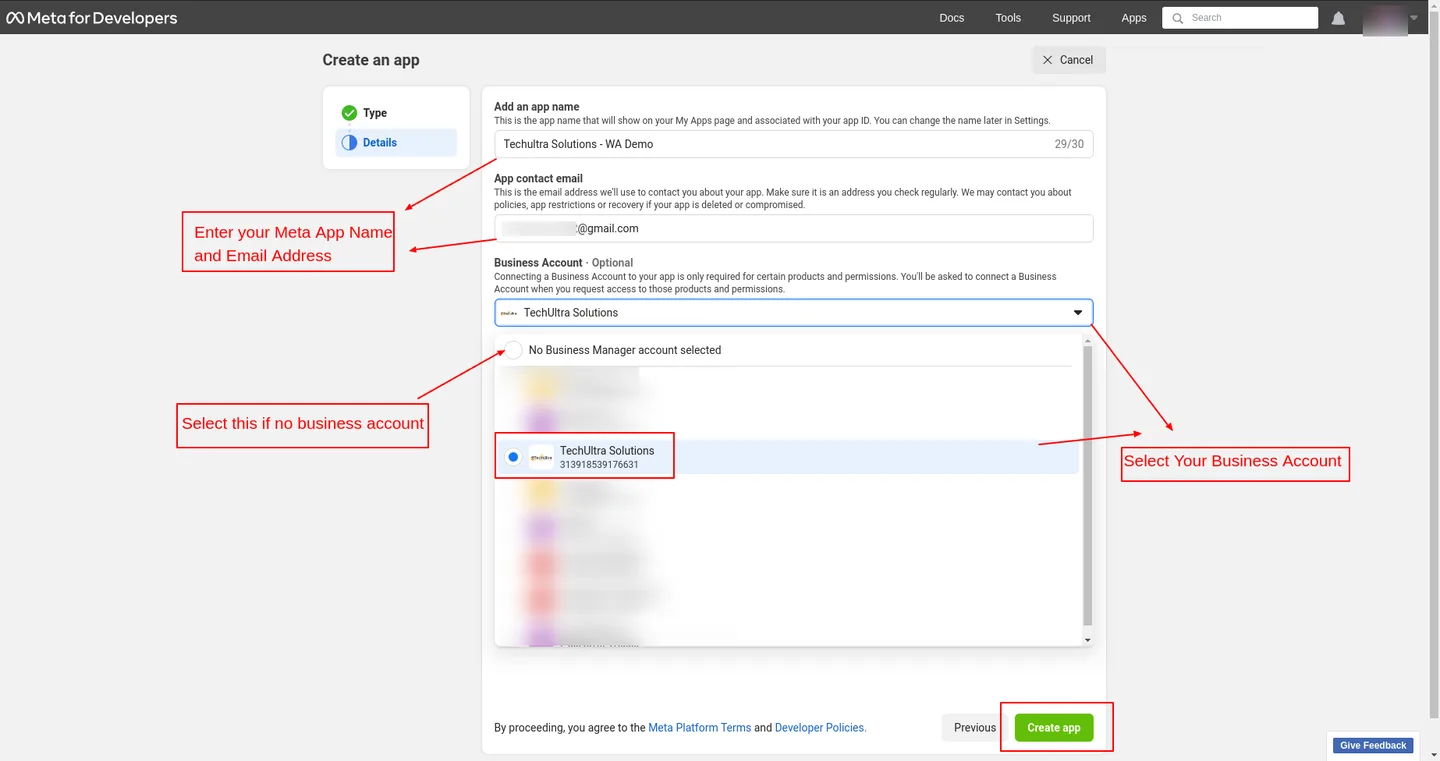
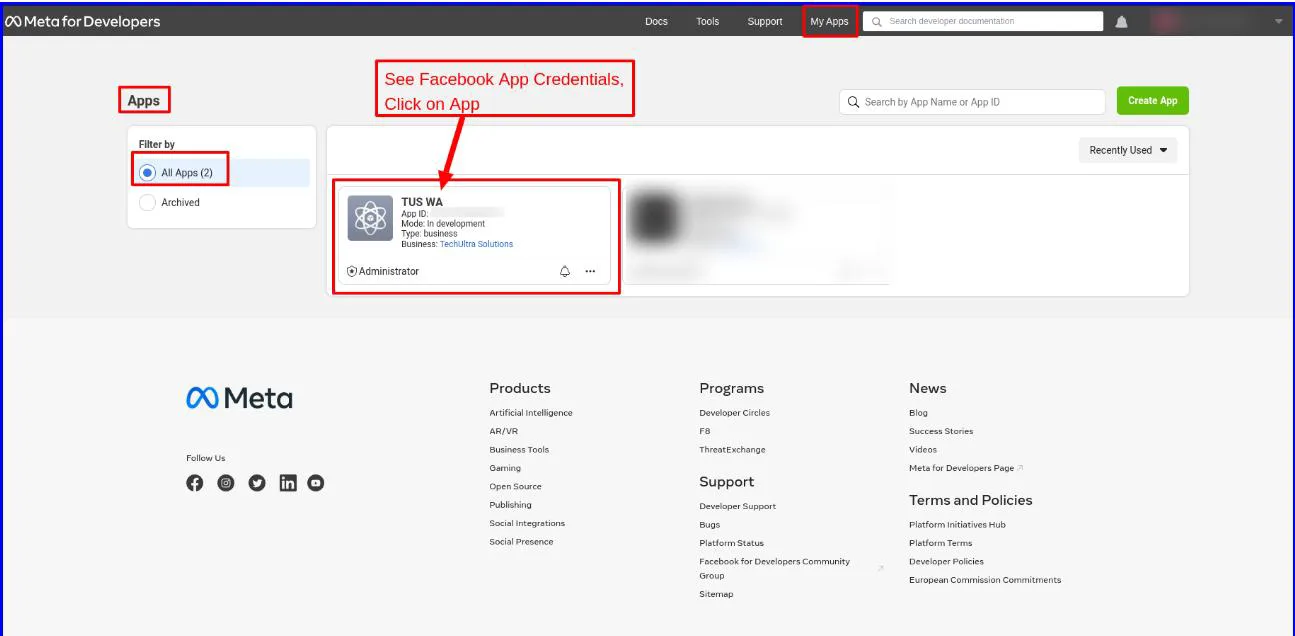
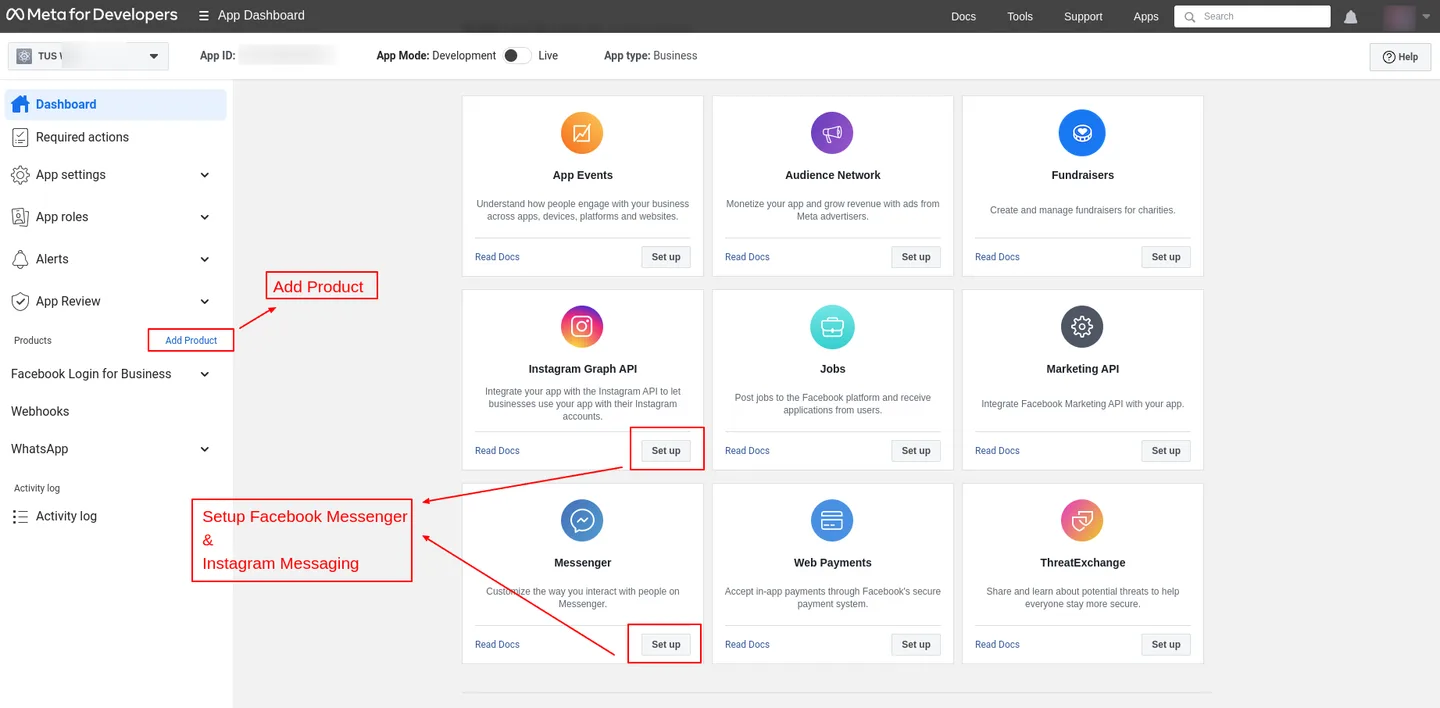
In the Meta Developers portal, create a Business-type app, add the Messenger and Instagram products, and link the Facebook Pages and Instagram accounts you want to manage from Odoo.
- 3
Grant permissions and generate tokens
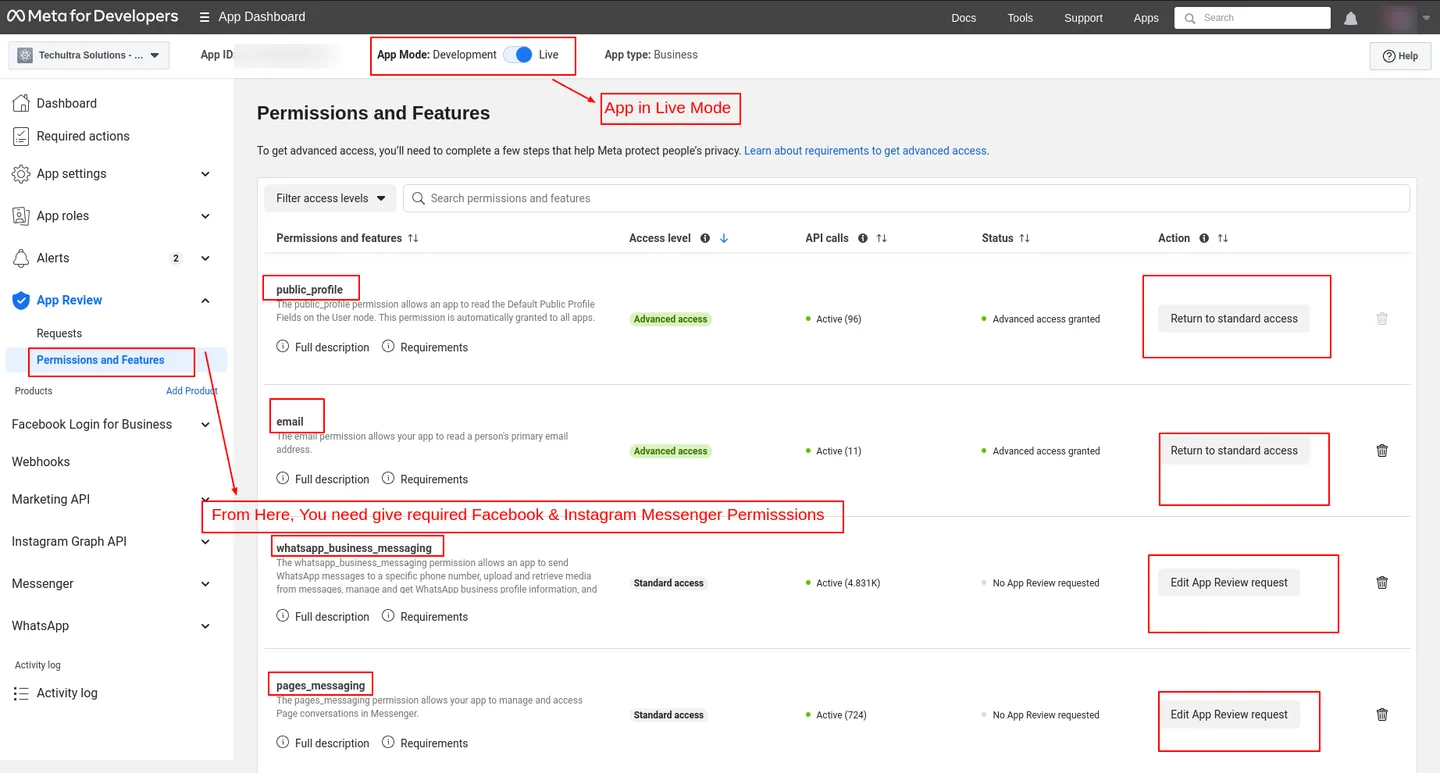
Use App Review to grant the required Messenger and Instagram permissions, then generate the access token for each page. Note the Graph API credentials you'll paste into Odoo.
- 4
Create the provider in Odoo
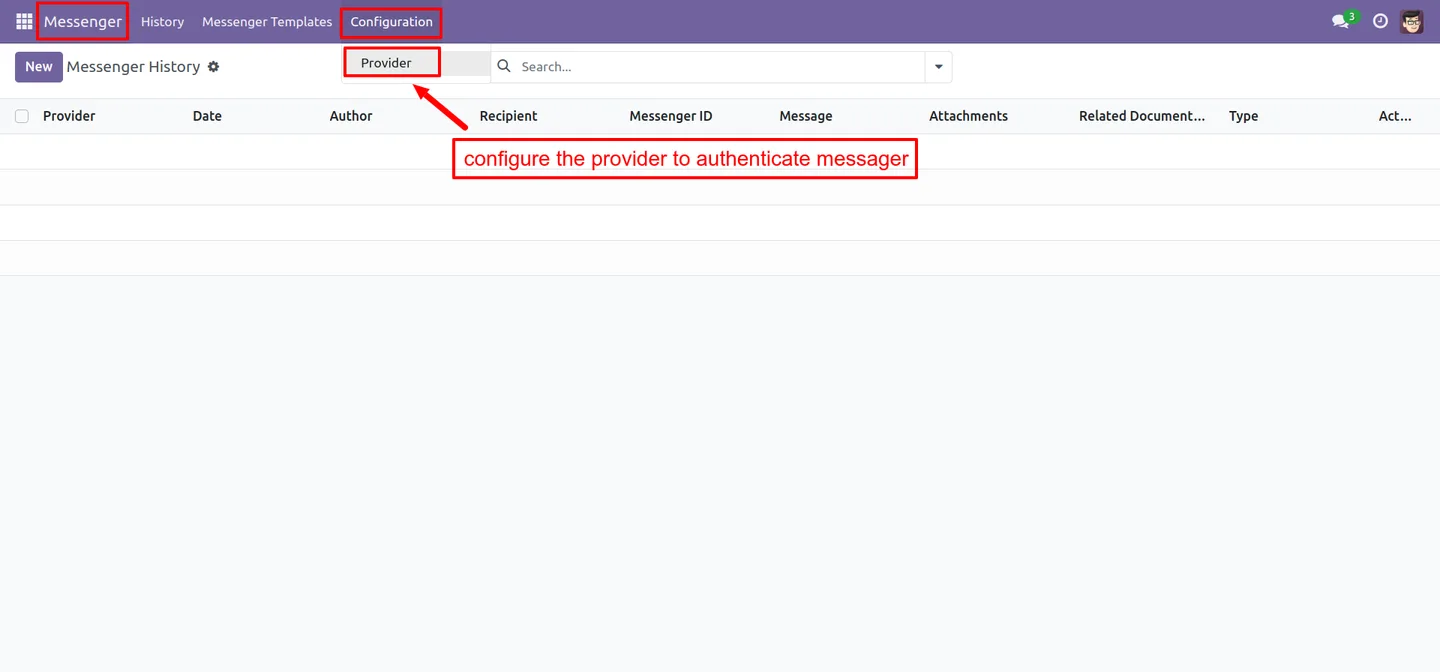
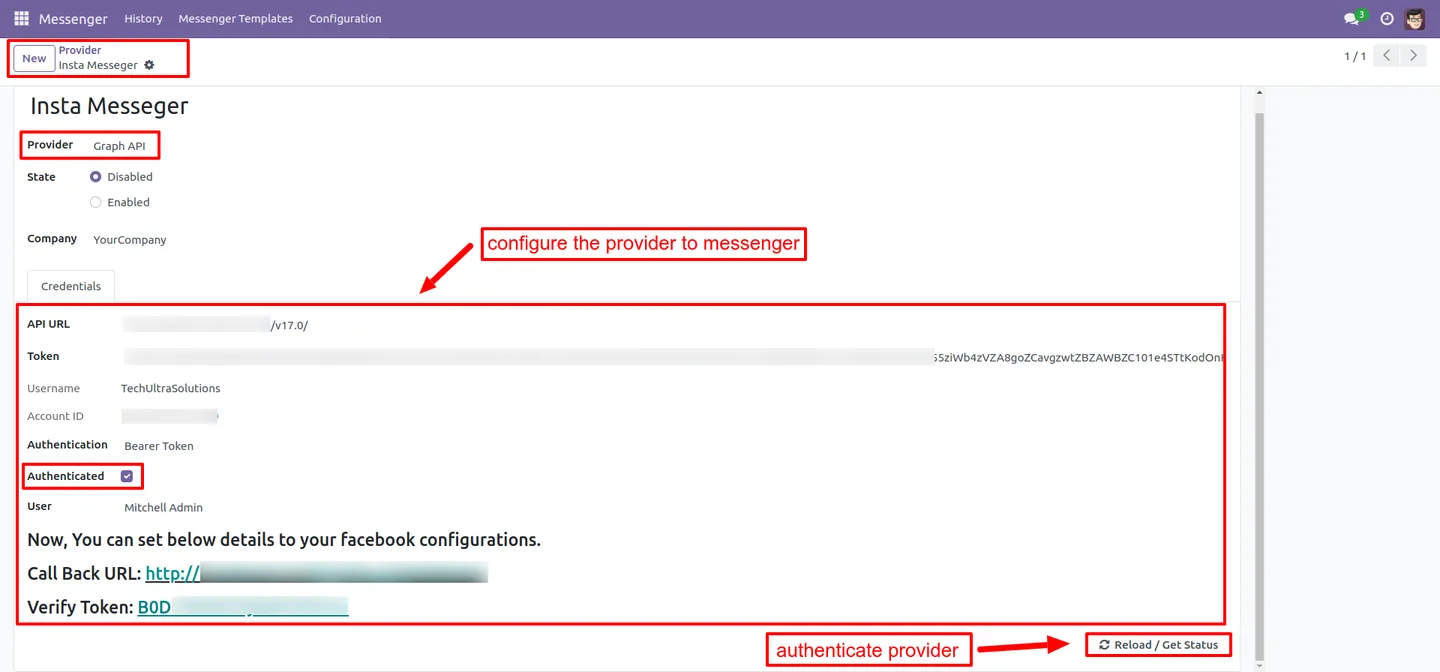
Under Instagram/Messenger → Configuration → Provider, create a record and paste the access token plus the Graph API credentials.
- 5
Configure the webhook
Copy the callback URL and verify token from the Odoo provider and paste them into the Meta webhook settings. Subscribe to the required webhook fields so incoming messages reach Odoo in real time.
- 6
Configure pages and templates
Set the Facebook page ID and Instagram account ID on each Odoo contact (so platform detection is automatic), create reusable message templates, and start replying from the Instagram/Messenger composer.
Frequently asked questions
-
Does the module work for both Facebook Messenger and Instagram?
Yes. A single Meta provider covers both Facebook Messenger and Instagram Direct Messages, and you can connect multiple Facebook–Instagram pairs in the same Odoo database.
-
Can multiple agents handle the same inbox?
Yes. Multi-user, multi-agent support is built in — several Odoo users can monitor and reply to the same Messenger or Instagram pages from the shared inbox.
-
How does Odoo know whether to reply on Messenger or Instagram?
Set the Facebook Page ID and Instagram Account ID on the Odoo contact record. The composer then routes the message to the right Meta platform automatically.
-
Can I share images, PDFs, and other files?
Yes. The module supports one-click media sharing for product videos, pictures, PDFs, and other documents straight from the Odoo composer.
-
Do I need to manage Meta templates in two places?
No. You create, edit, and delete Facebook and Instagram message templates inside Odoo — there is no second dashboard to maintain.
-
Is multi-company supported?
Yes. The module supports multiple companies and multiple Meta providers in the same Odoo database, so each company can run its own pages and credentials.
-
What happens when a Meta API call fails?
Errors from the Graph API are captured against the conversation in Odoo, so the agent — and an admin — can see exactly which message failed and why.
-
Is support included?
Yes. The module includes 90 days of bug-fix support, Monday to Friday, 10:00–19:00 IST.
Related solutions
Whole-platform solutions that complement Facebook & Instagram Messenger.
WhatsApp ↔ Odoo Integration
Two-way WhatsApp Business API integration with Odoo. Customer messages, order updates, invoices, and payment links — unified inbox for agents.
AI WhatsApp Chatbot
LLM-powered WhatsApp chatbot grounded in your Odoo data. Handles ordering, support, FAQs, and lead qualification with human-agent escalation.
Related services
Get the most out of this module with senior TechUltra consultants.
Odoo Customization Services
Tailored Odoo customizations from a Gold Partner — 200+ projects, upgrade-safe patterns, fixed-scope quotes, senior consultants. Free demo consultation.
Hire Odoo Developers
Hire certified Odoo developers from a Gold Partner — 400+ implementations, 92% satisfaction, Odoo since 2016. Silver / Gold / Platinum packages, free trial.
Odoo Support & Maintenance
Odoo Gold Partner support — 24/7 functional, technical, and server coverage for Enterprise and Community editions. Fast turnaround, free consultation.