Odoo App · Social & Messaging
Omnichannel Communication
WhatsApp, Facebook Messenger, and Instagram in a single Odoo inbox — one provider, one chat history.

Overview
Omnichannel Communication unifies WhatsApp, Facebook Messenger, and Instagram in a single Odoo inbox. Sales, support, and marketing agents reply to every Meta channel from the same composer — no separate WhatsApp Business app, no Facebook Page Manager tab, no Instagram phone app.
Built by TechUltra Solutions, the module uses Meta's official WhatsApp Cloud API for WhatsApp and the Graph API for Messenger and Instagram. It supports bidirectional messaging, templates that you manage from inside Odoo, and single-click sharing of product videos, pictures, PDFs, and other documents.
Multi-company and multi-provider configurations are supported out of the box. Each company can run its own WhatsApp number and its own Facebook–Instagram pages, and operators receive only the channels they are assigned to.
Key features
-
Three Meta channels in one inbox
WhatsApp, Facebook Messenger, and Instagram conversations land in the same Odoo inbox so agents handle every Meta channel from one screen.
-
Official Meta APIs
WhatsApp runs on Meta's WhatsApp Cloud API; Messenger and Instagram run on the Graph API — no third-party gateway, no number reseller.
-
Bidirectional chat
Send and receive messages between Odoo and Facebook, Odoo and Instagram, and Odoo and WhatsApp — all kept against the matching contact in Odoo.
-
Template management
Create, edit, and delete Facebook–Instagram templates inside Odoo, and pull approved WhatsApp templates from Meta for use in business-initiated conversations.
-
Customizable Facebook–Instagram templates
Build reusable Messenger and Instagram templates inside Odoo so common replies and product pushes are one click away.
-
Single-click media sharing
Share product videos, pictures, PDFs, and document files across WhatsApp, Messenger, and Instagram with one click from the Odoo composer.
-
Quick-reply buttons
Add quick-reply buttons to Facebook and Instagram templates so customers respond with a tap instead of typing, keeping the conversation tidy.
-
Product detail templates
Send product details directly through Facebook and Instagram templates — useful for catalog pushes, upsell, and reorder prompts.
-
Static URL buttons
Drop a static URL into a template button so customers jump to a product page, support article, or booking link without typing the address.
-
Chat history with search
Browse the full Facebook–Instagram and WhatsApp chat history with filters, grouping, and search, so managers can audit conversations and reuse what works.
-
Multi-company and multi-provider
Run multiple WhatsApp numbers and multiple Facebook–Instagram providers in the same Odoo database, each scoped to the right company and operators.
-
Optimized error handling
API failures from Meta surface against the conversation in Odoo, so agents and admins know exactly which message failed and why.
Omnichannel Communication in Odoo
Every screen, in the order you meet it — configuration first, then the module in use.

Technical details
Specification
- Publisher
- TechUltra Solutions Private Limited
- Technical name
- omni_channel_communication_odoo
- Odoo versions
- 16.0, 17.0, 18.0, 19.0
- Lines of code
- 8,697
- License
- Odoo Proprietary License v1.0 (OPL-1)
- Price
- $149 (one-time)
Deployment
- Odoo Online
- Odoo.sh
- On-premise
Odoo dependencies
- Discuss
Support
90 days of bug-fix support, Monday to Friday (10:00–19:00 IST). Raise a ticket at support@techultra.in.
Setup & configuration
From install to first call — here is the path.
- 1
Install the module
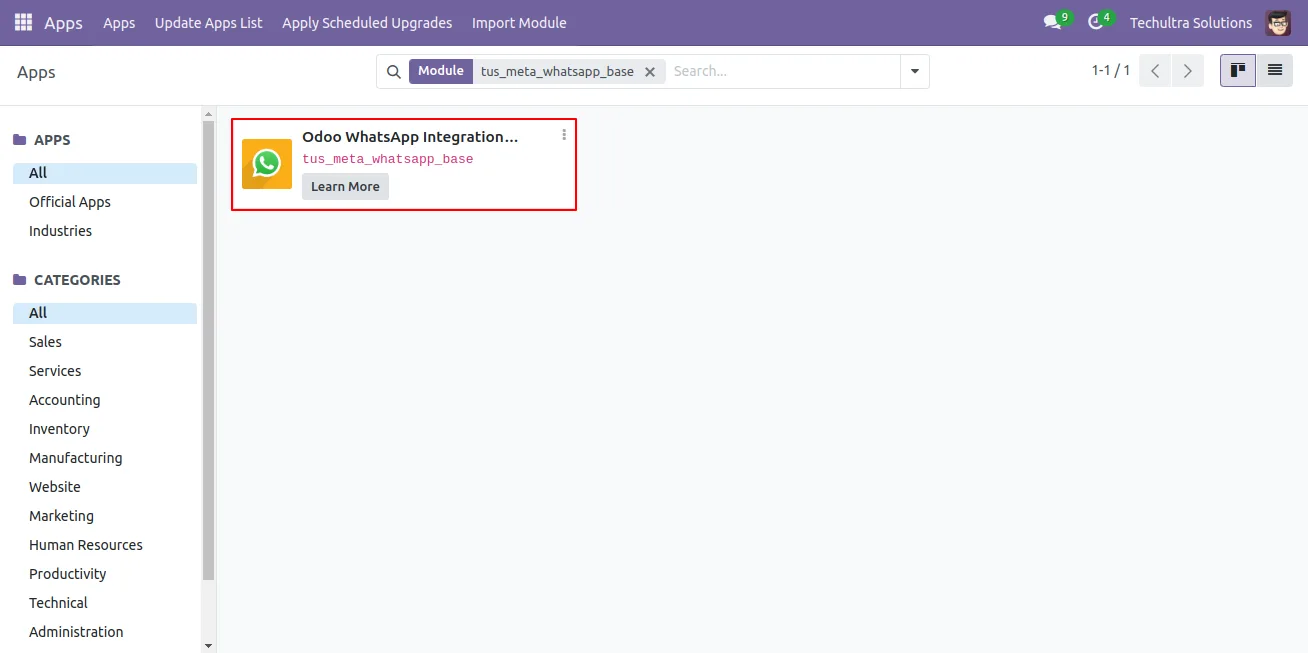
In Odoo, open Apps, remove the Apps filter, search for “Omnichannel Communication”, and click Install.
- 2
Create the Meta Business app
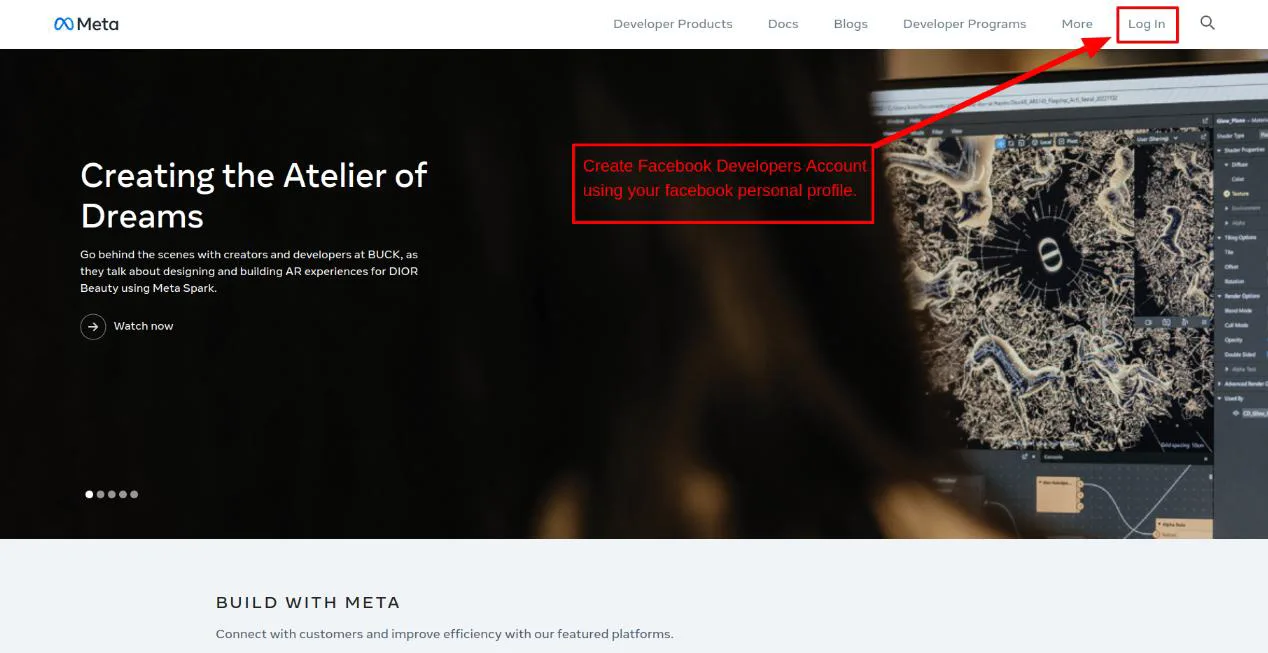
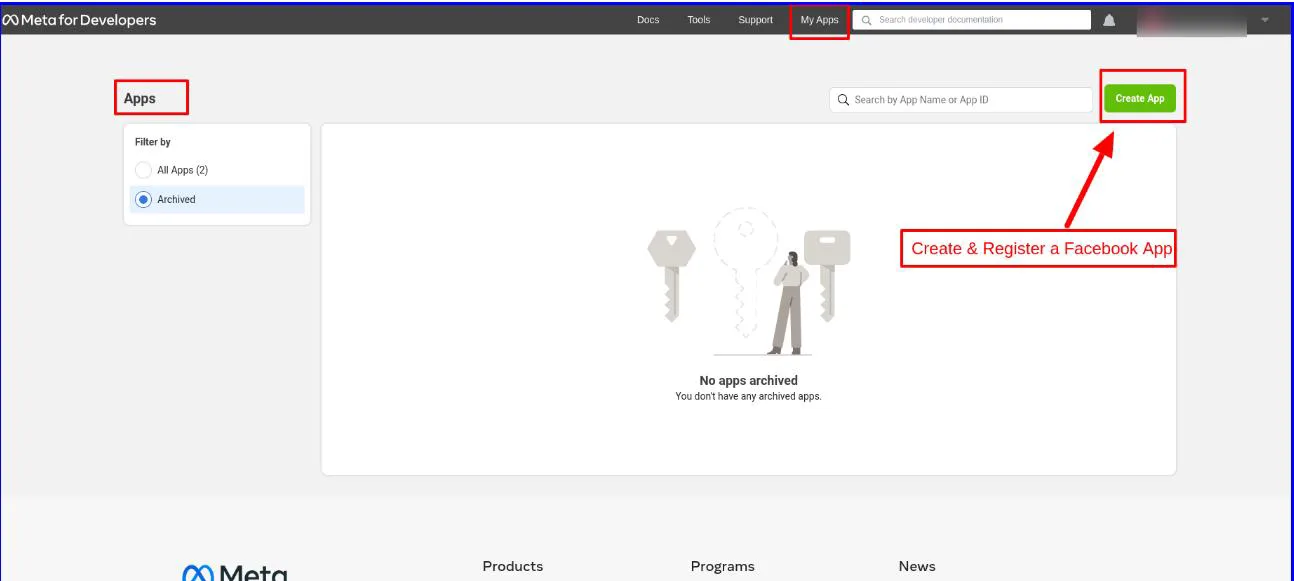
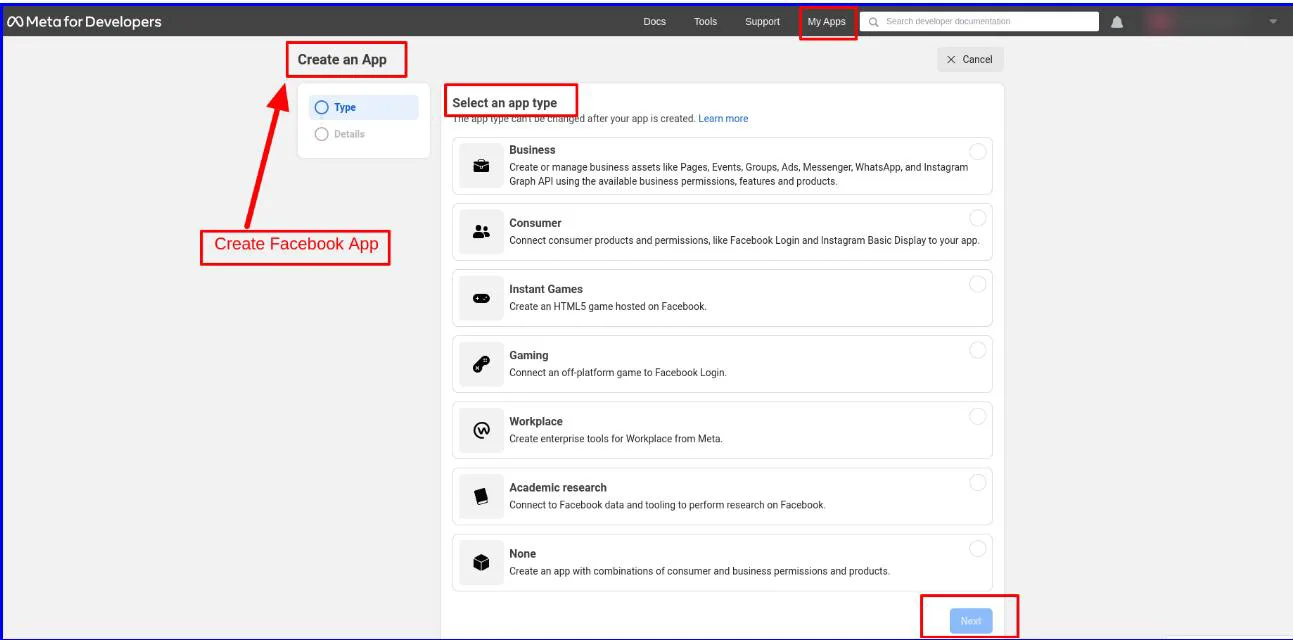
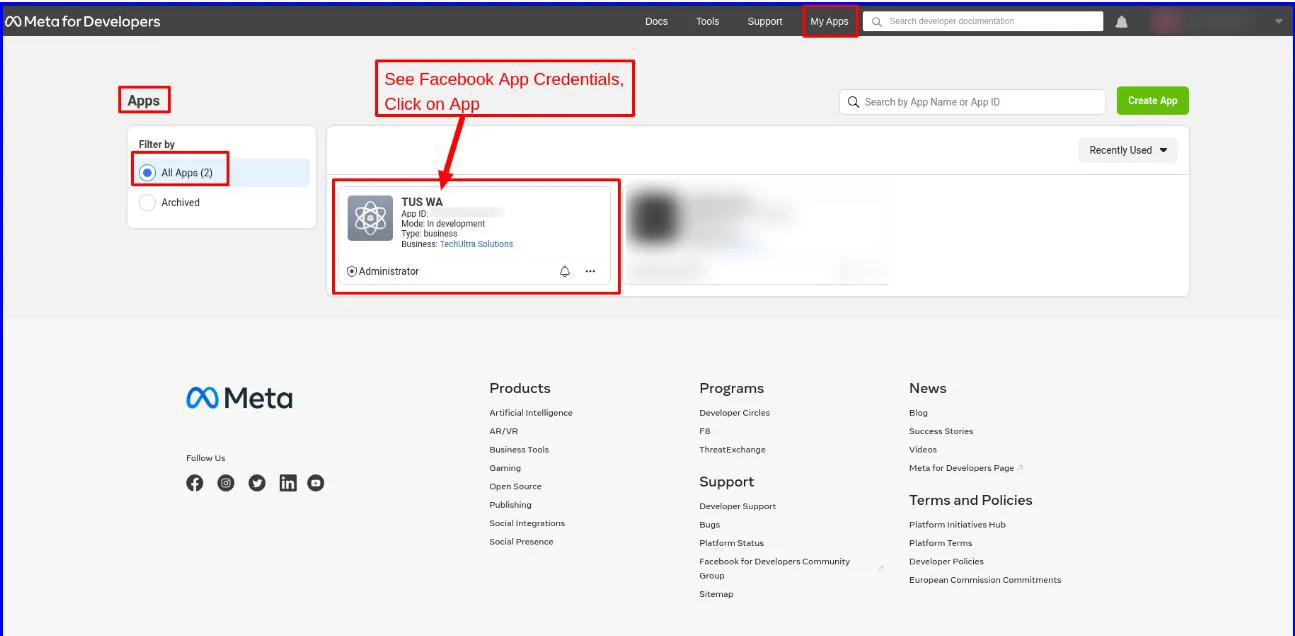
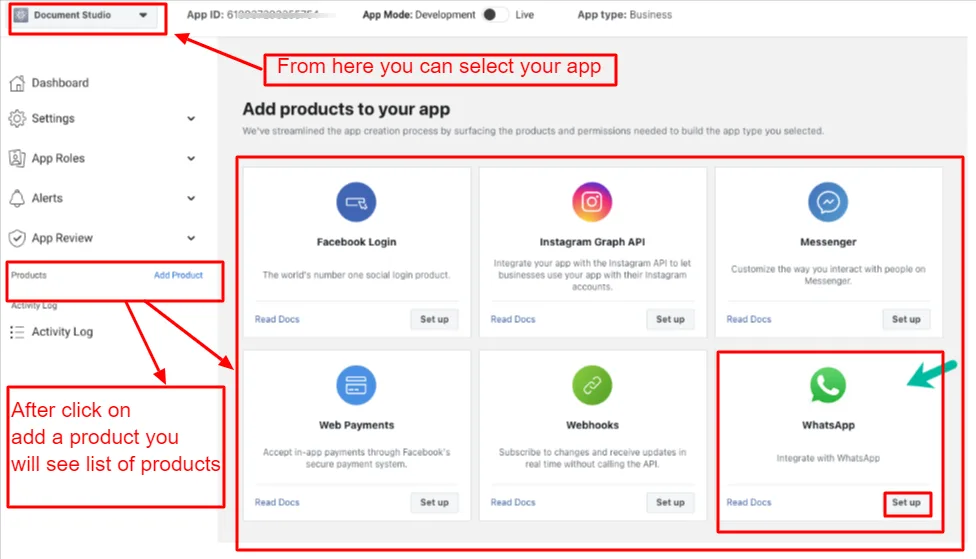
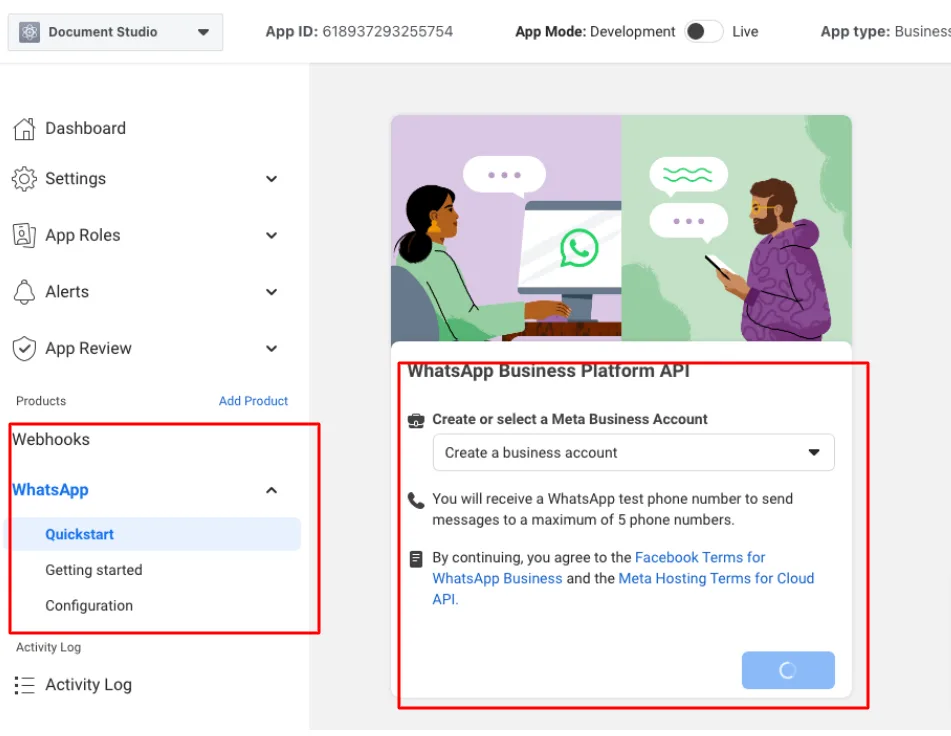
In the Meta Developers portal, create a Business-type app and add the WhatsApp, Messenger, and Instagram products. Connect the WhatsApp Business Account, Facebook Pages, and Instagram accounts you want to manage.
- 3
Generate WhatsApp credentials
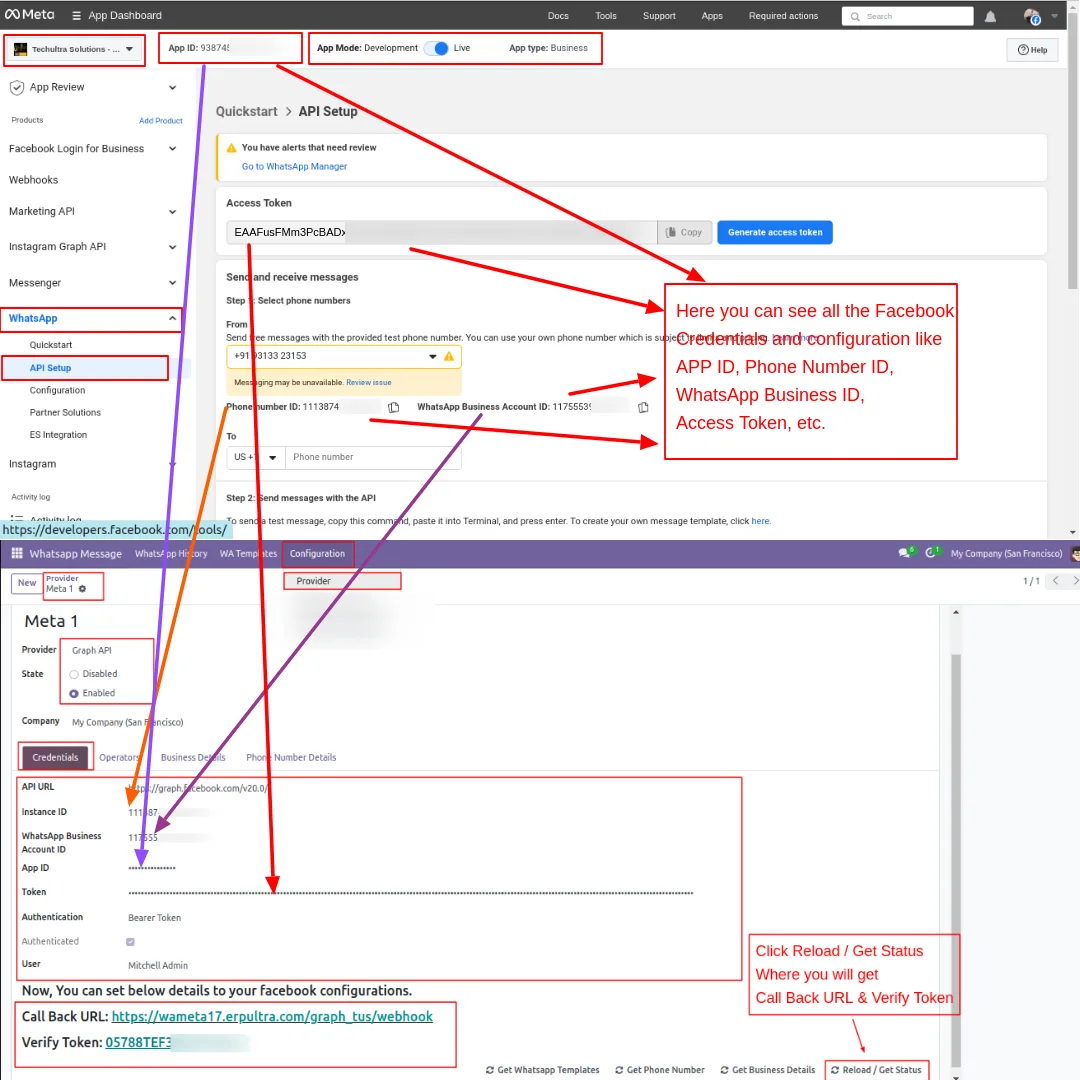
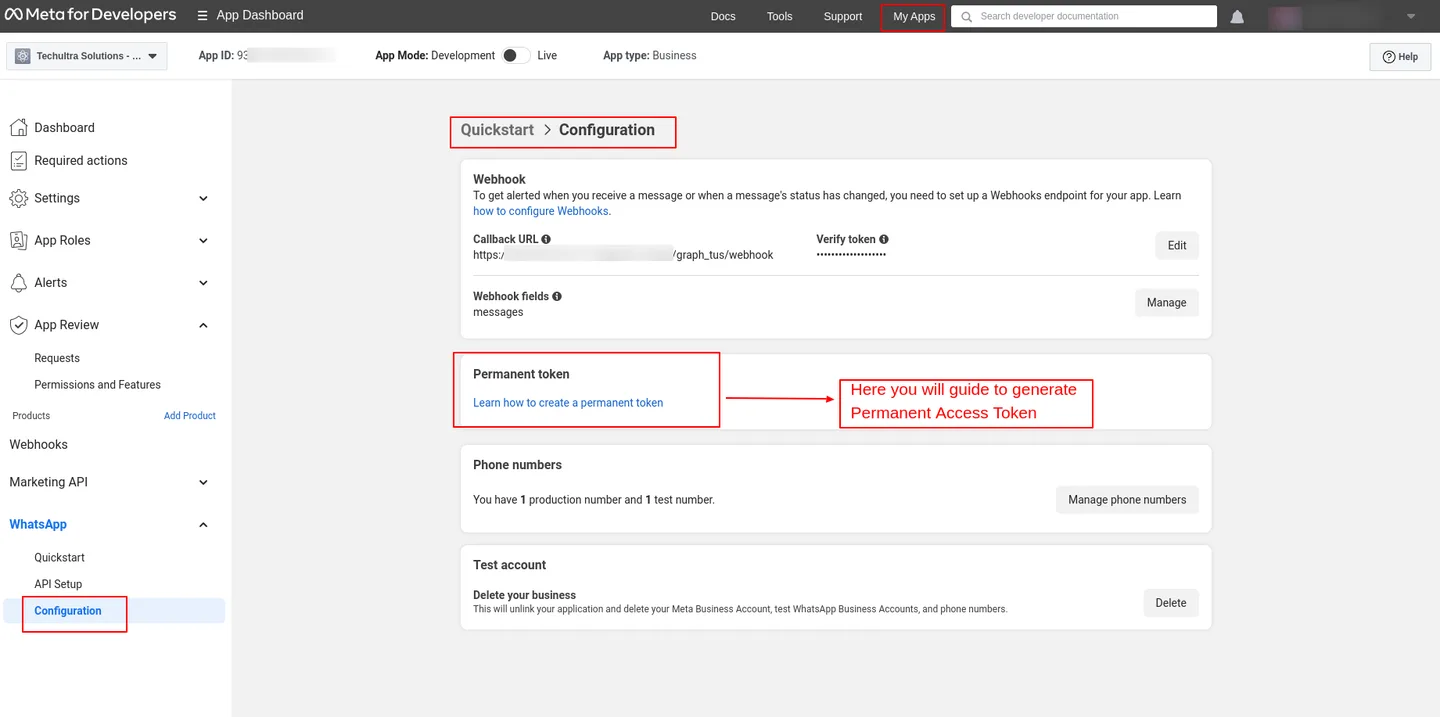
From the WhatsApp product, copy the temporary access token, phone number ID, and WhatsApp Business Account ID. Generate a permanent access token so messages keep flowing after the temp token expires.
- 4
Generate Messenger and Instagram tokens
In App Review, grant the Messenger and Instagram permissions, then generate page-level access tokens for each Facebook Page and Instagram account.
- 5
Create providers in Odoo
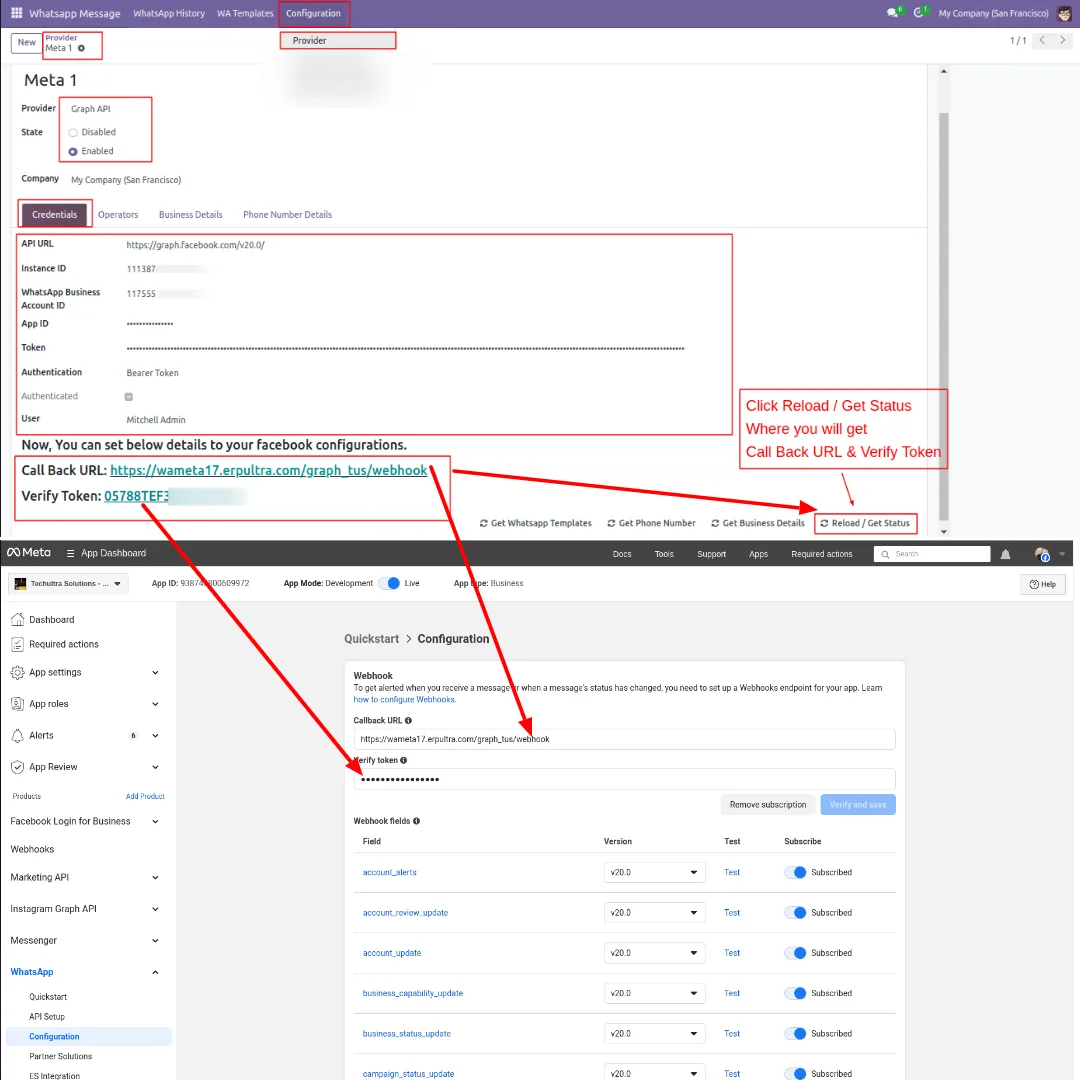
Under Configuration → Provider, create one provider for WhatsApp and one for Facebook–Instagram. Paste the credentials you generated and save.
- 6
Configure webhooks
Use Reload/Get Status to generate the callback URL and verify token in each provider. Paste them into the WhatsApp webhook and the Facebook–Instagram webhook in the Meta app, and subscribe to the required webhook fields.
- 7
Sync templates and assign operators
Pull approved WhatsApp templates with Get WhatsApp Templates, build any Messenger or Instagram templates you need, and assign the agents who should receive each channel's conversations.
Frequently asked questions
-
Which channels does this module cover?
WhatsApp, Facebook Messenger, and Instagram — all three Meta messaging channels — handled from a single inbox in Odoo.
-
Does it use official Meta APIs?
Yes. WhatsApp runs on Meta's official WhatsApp Cloud API, and Messenger and Instagram run on Meta's Graph API. There is no third-party gateway or reseller involved.
-
How is this different from the standalone Messenger or WhatsApp modules?
Omnichannel Communication bundles WhatsApp, Messenger, and Instagram together with a shared template manager, shared media composer, and one inbox, instead of three separate modules and three separate workflows.
-
Can multiple agents handle the same channels?
Yes. The module is multi-user. Several Odoo users can be assigned to a WhatsApp number or a Facebook–Instagram pair, and conversations are kept against the matching contact.
-
Is multi-company supported?
Yes. Multiple companies and multiple Meta providers can run in the same Odoo database, each scoped to its own contacts, operators, and templates.
-
Can I send marketing campaigns through WhatsApp?
Yes. Business-initiated WhatsApp campaigns use pre-approved templates pulled from Meta. The module enforces Meta's conversation categories so you stay compliant with WhatsApp policy.
-
What happens when an API call fails?
Meta API errors are surfaced against the conversation in Odoo, so agents and admins see exactly which message failed and why, instead of guessing from logs.
-
Do I need Odoo Enterprise for this module?
No. The module installs cleanly on Odoo 16, 17, 18, and 19 Community and Enterprise. Discuss is the only Odoo dependency.
Related solutions
Whole-platform solutions that complement Omnichannel Communication.
WhatsApp ↔ Odoo Integration
Two-way WhatsApp Business API integration with Odoo. Customer messages, order updates, invoices, and payment links — unified inbox for agents.
AI WhatsApp Chatbot
LLM-powered WhatsApp chatbot grounded in your Odoo data. Handles ordering, support, FAQs, and lead qualification with human-agent escalation.
Related services
Get the most out of this module with senior TechUltra consultants.
Odoo Customization Services
Tailored Odoo customizations from a Gold Partner — 200+ projects, upgrade-safe patterns, fixed-scope quotes, senior consultants. Free demo consultation.
Hire Odoo Developers
Hire certified Odoo developers from a Gold Partner — 400+ implementations, 92% satisfaction, Odoo since 2016. Silver / Gold / Platinum packages, free trial.
Odoo Support & Maintenance
Odoo Gold Partner support — 24/7 functional, technical, and server coverage for Enterprise and Community editions. Fast turnaround, free consultation.