
Wholesale
Odoo for Wholesale Distribution
Odoo for wholesale distributors and B2B sales channels — multi-warehouse inventory, customer-tiered pricing, B2B portal, sales-rep mobile, and credit-aware order management.
Last reviewed:
Wholesale
- Odoo modules mapped
- 6 Odoo modules mapped
- pain points covered
- 5 pain points covered
- Indian GST — e-invoice and e-way bill
- HSN classification and customs documentation
- UK Making Tax Digital
Pain points & how Odoo solves them
| Challenge | How Odoo addresses it |
|---|---|
| Customer-specific pricing managed in spreadsheets | Customer-tiered pricelists with volume breaks, contract pricing, and effective-date rules. Rep mobile and B2B portal both pull from the same engine. |
| Sales reps re-enter orders from paper into ERP | Sales-rep mobile app with offline order capture, customer-specific pricing, credit-status visibility, and immediate order submission. |
| B2B customers want self-service but call to place orders | B2B portal with order history, reorder shortcut, contract pricing visible, real-time inventory, and credit-aware checkout. |
| Credit limits enforced inconsistently — exposure surprises hit ageing reports | Credit limits with auto-block on new orders past threshold. Override workflow routes to credit team with payment-history context. |
| Multi-warehouse picking inefficient — no zone optimization | Zone-based putaway and picking; wave-picking groups orders for efficient warehouse paths; inter-warehouse transfers automated based on demand. |
Which wholesalers and distributors run Odoo with TechUltra?
These 19 companies list TechUltra as their Odoo partner on Odoo's partner directory under the industry label shown on each card (read on 5 November 2026). Work we delivered through other Odoo partners is credited to them and is not listed here.
- ACM Odoo label: Wholesale / Retail ACM on Odoo's directory
- B2 Payment Solutions Inc Odoo label: Wholesale / Retail
- Elektro Marine Odoo label: Wholesale / Retail Elektro Marine on Odoo's directory
- Establishment Arsel Beshole Business Services Odoo label: Wholesale / Retail
- Excel Foods Odoo label: Wholesale / Retail Excel Foods on Odoo's directory
- Fresh and Natural EST Odoo label: Agriculture Fresh and Natural EST on Odoo's directory
- JSR Clothings SL Odoo label: Wholesale / Retail JSR Clothings SL on Odoo's directory
- Kukui GmbH Odoo label: Wholesale / Retail Kukui GmbH on Odoo's directory
- Madar Al Astora Trading LLC Odoo label: Wholesale / Retail Madar Al Astora Trading LLC on Odoo's directory
- Maknas Trading Co LLC Odoo label: Wholesale / Retail Maknas Trading Co LLC on Odoo's directory
- MCC International Distribution Odoo label: Wholesale / Retail MCC International Distribution on Odoo's directory
- Or Tea Europe BV Odoo label: Wholesale / Retail Or Tea Europe BV on Odoo's directory
Show all 19 wholesalers and distributors
- Pacasdelfrances Odoo label: Wholesale / Retail
- Personal Computers Odoo label: Wholesale / Retail Personal Computers on Odoo's directory
- Quantum Quip Sales Private Limited Odoo label: Wholesale / Retail Quantum Quip Sales Private Limited on Odoo's directory
- Raajas India Private Limited Odoo label: Wholesale / Retail
- Sai Om Texfab Private Limited Odoo label: Wholesale / Retail Sai Om Texfab Private Limited on Odoo's directory
- Sharia Exports Odoo label: Wholesale / Retail Sharia Exports on Odoo's directory
- VanCasa Odoo label: Wholesale / Retail VanCasa on Odoo's directory
Recommended Odoo modules
-
Sales + CRM
B2B customer master, contract management, sales-rep mobile, customer credit tracking.
-
Inventory + Purchase
Multi-warehouse, reorder rules, vendor pricelists, drop-shipping.
-
Accounting
Receivables aging, credit-limit enforcement, multi-currency, payment-term tracking.
-
eCommerce + Website
B2B portal with self-service ordering and customer-specific pricing.
-
Helpdesk
Customer service ticketing tied to order data and credit status.
-
Project
Customer-onboarding projects for new B2B accounts (typically 3–4 weeks).
Which Odoo 20 apps do wholesalers and distributors need?
| Odoo app | Module (edition) | What it holds |
|---|---|---|
| Sales | sale_management (Community) | Quotations and orders, with pricelists by customer, quantity and packaging |
| Purchase | purchase (Community) | Supplier orders and vendor price lists |
| Purchase Agreements | purchase_requisition (Community) | Blanket orders and alternative RFQs to compare vendors |
| Inventory | stock (Community) | Multi-warehouse stock and reordering rules with suggested levels |
| Landed Costs | stock_landed_costs (Community) | Freight, duty and insurance added to the value of received stock |
| Barcode | stock_barcode (Enterprise) | Receiving, picking and counts by scanning |
| Payment follow-up | account_followup (Enterprise) | Reminder levels for overdue customer invoices |
What does Odoo 20 look like for wholesalers and distributors?
Screens from Odoo 20 that wholesalers and distributors use every day, from our Odoo 20 feature guide. Each one shows where to find it in Odoo and why it matters.
-
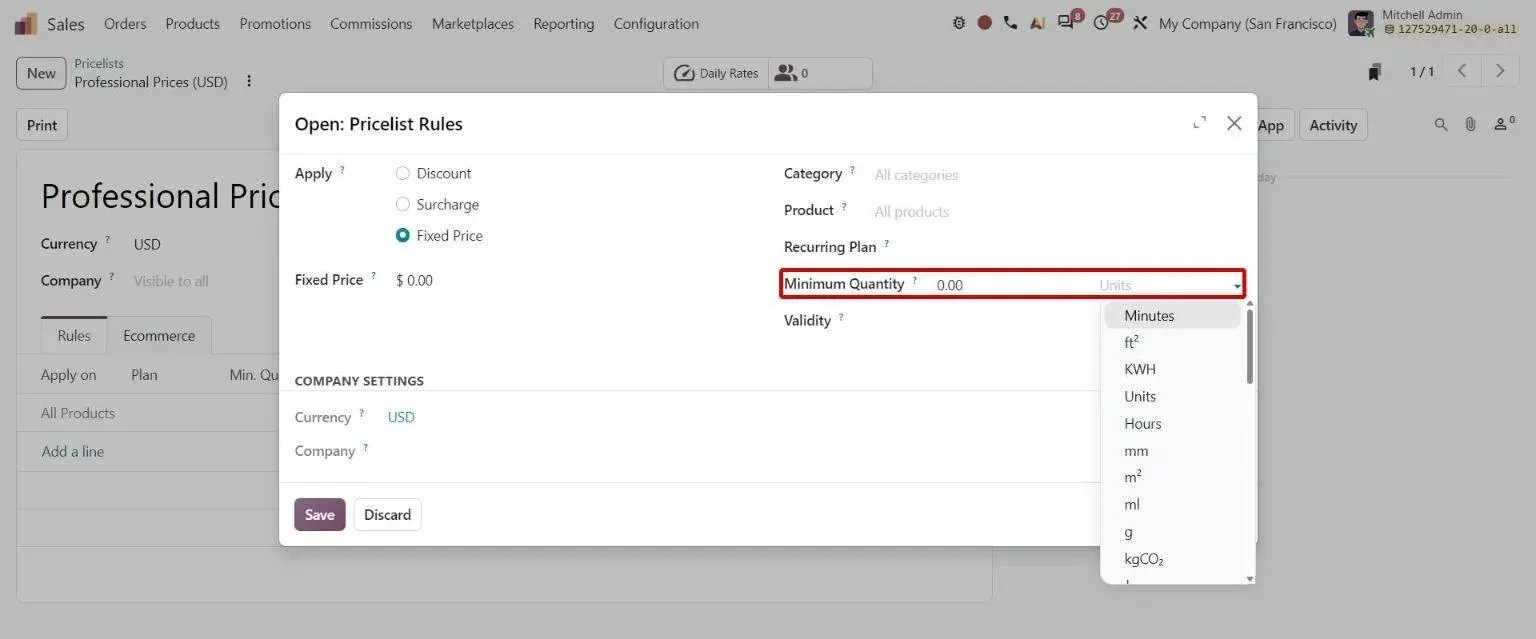
Pricelist rule with unit/packaging selector next to minimum quantity Odoo 20 · Sales
Price rules per packaging type
Sales > Products > Pricelists > [rule] > Packaging
Lets businesses price specific packagings, such as a six-pack, with minimum quantities.
Price rules per packaging type: how to use it in Odoo 20 -
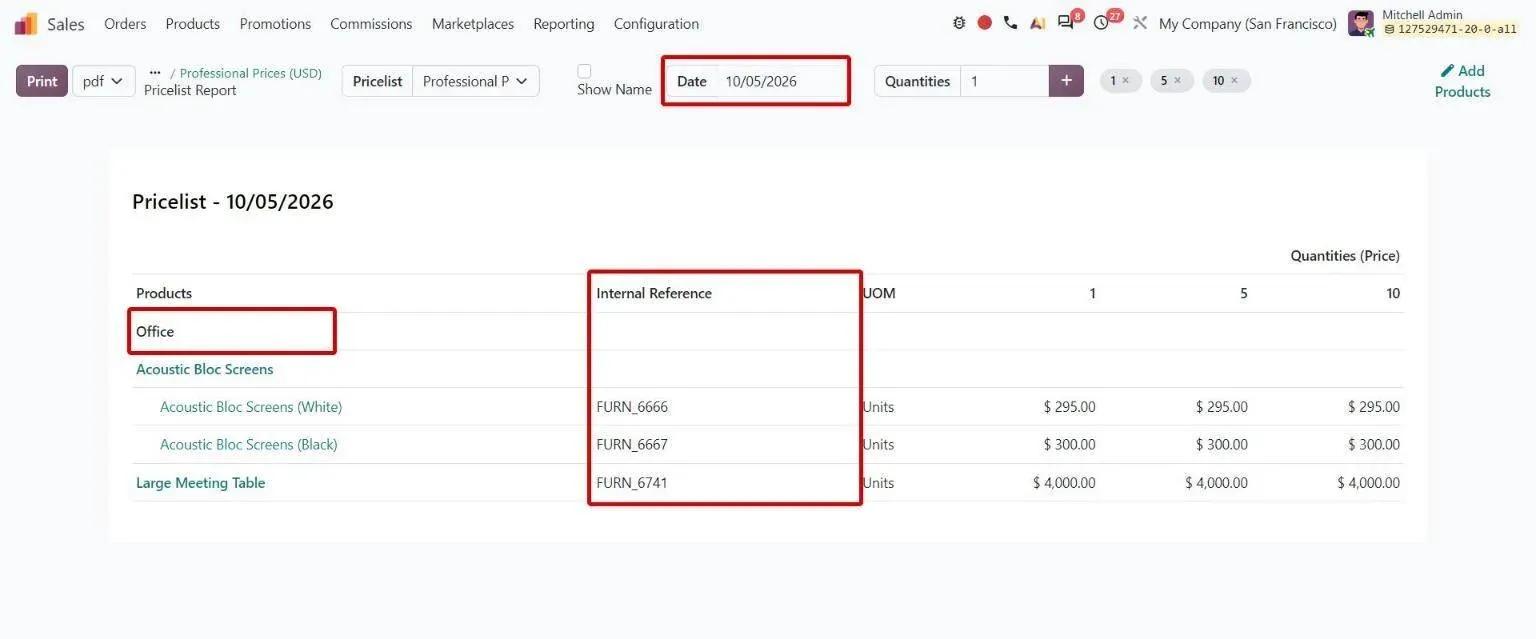
Pricelist report with date picker, product category grouping and internal reference column Odoo 20 · Sales
Pricelist report improvements
Sales > Products > Pricelists > [pricelist] > Print
Helps teams share clearer price lists grouped by category, with barcodes and dated prices.
Pricelist report improvements: how to use it in Odoo 20 -
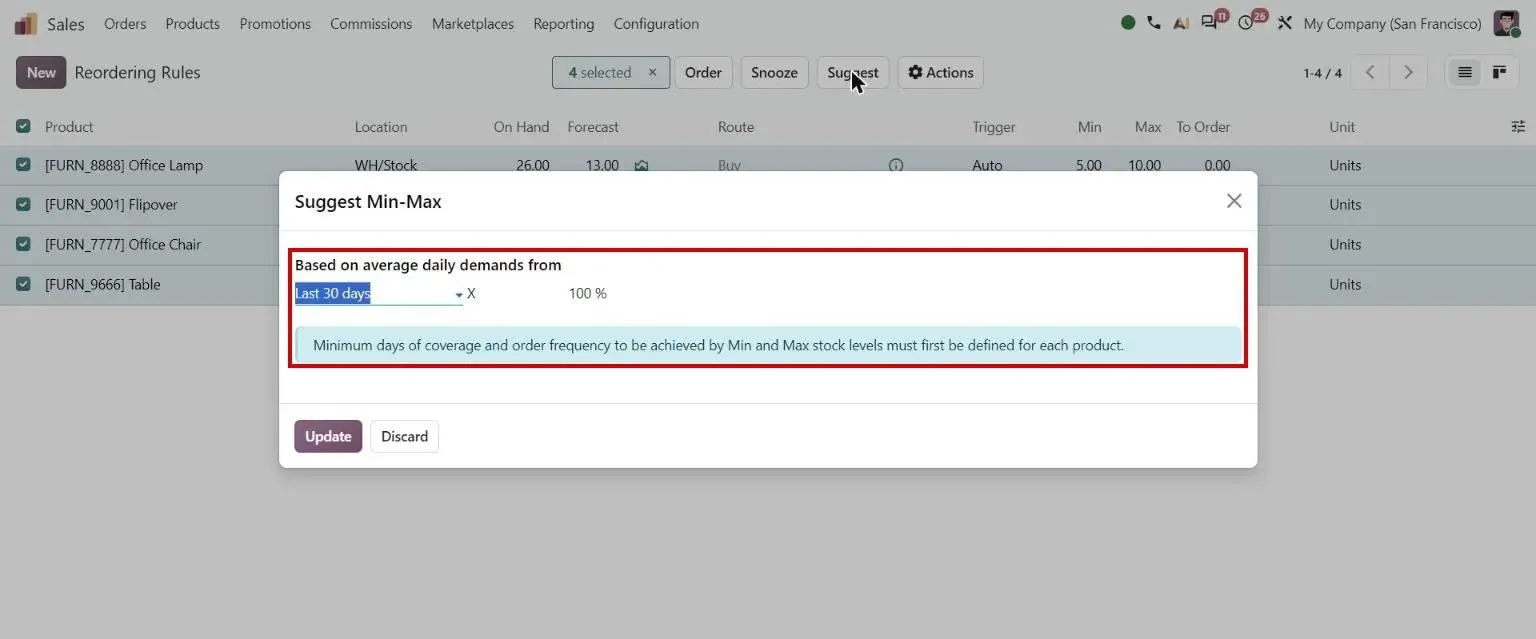
Suggest Min-Max dialog Odoo 20 · Inventory
Suggested stock levels for reordering rules
Inventory > Operations > Replenishment
Helps planners set min and max stock levels based on historical demand.
Suggested stock levels for reordering rules: how to use it in Odoo 20 -
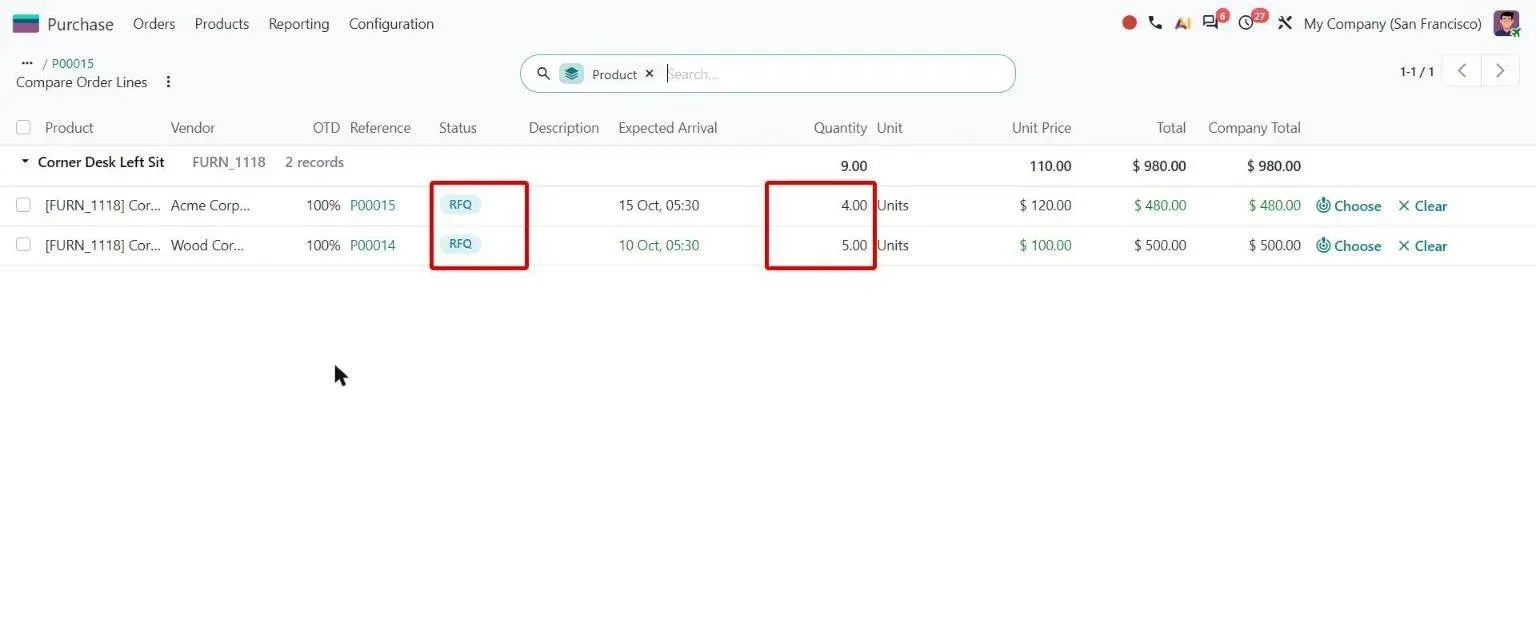
Compare Order Lines with status badges and editable quantities Odoo 20 · Purchase
Alternatives comparison
Purchase > Orders > Requests for Quotation > Alternatives > Compare Product Lines
Helps buyers compare RFQs fairly, with inline quantity edits and unit prices converted across purchase units.
Alternatives comparison: how to use it in Odoo 20 -
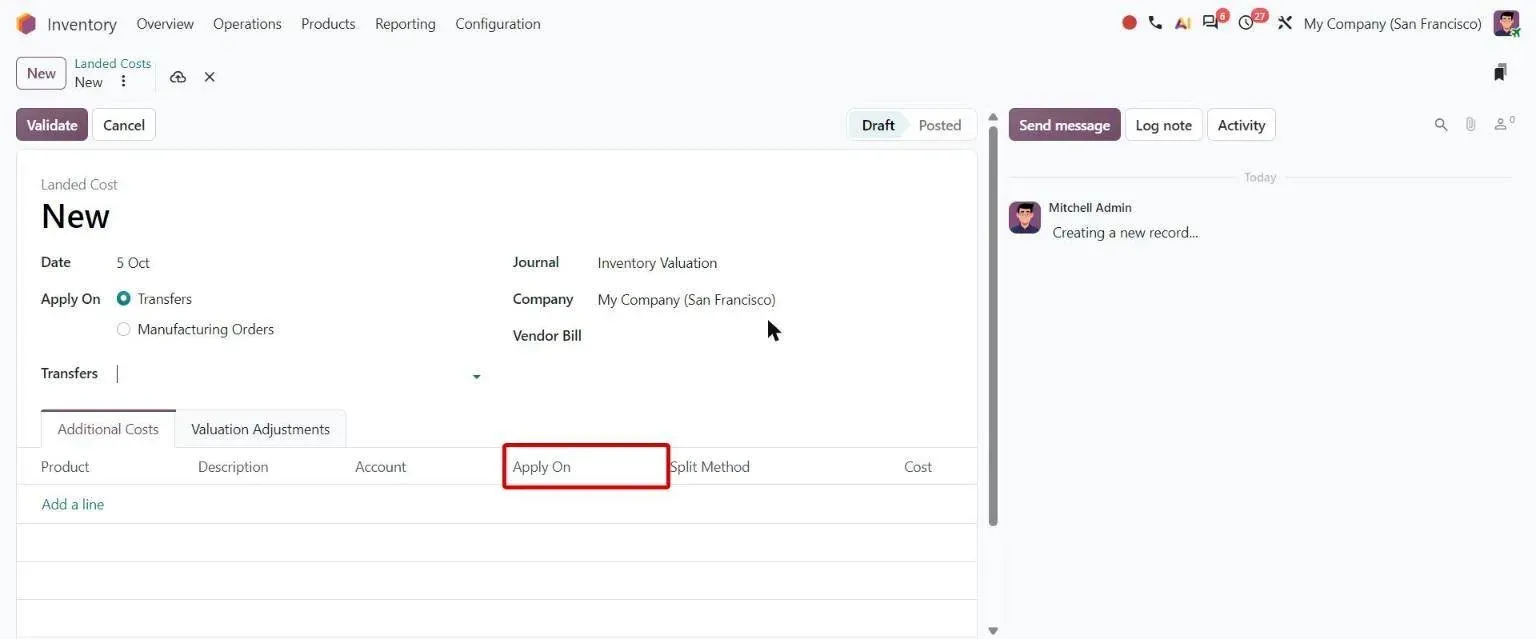
Landed cost form with new Apply On column on cost lines Odoo 20 · Inventory
Landed costs for specific products
Inventory > Operations > Landed Costs
Lets teams apply landed costs to selected products or across the whole transfer.
Landed costs for specific products: how to use it in Odoo 20 -
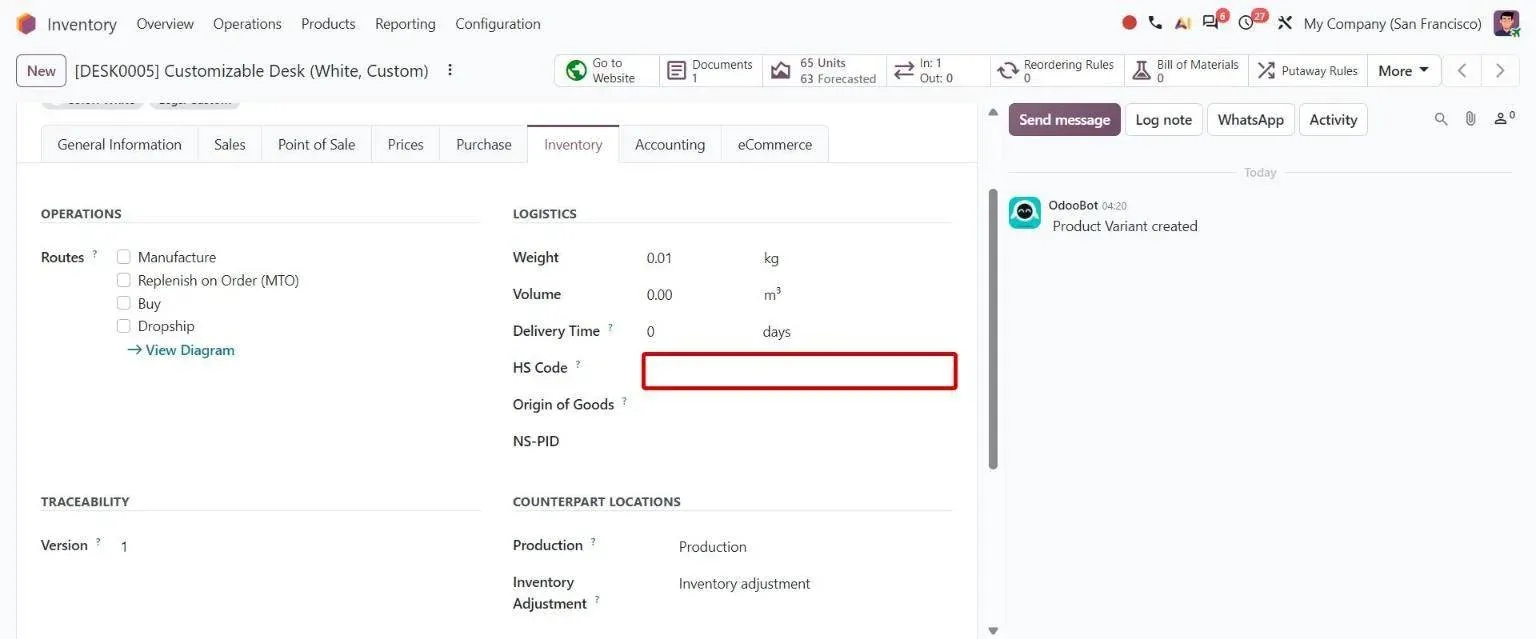
Product variant Inventory tab with its own HS Code field Odoo 20 · Inventory
Variant-specific HS codes
Inventory > Products > Product Variants
Helps customs documents stay accurate when product variants have different HS codes.
Variant-specific HS codes: how to use it in Odoo 20
Sample features
- Customer-tiered pricelists with volume breaks and contract pricing
- Sales-rep mobile app with offline order capture
- B2B self-service portal with order history and reorder shortcut
- Credit-limit enforcement with override workflow
- Multi-warehouse with reorder rules per location
- Drop-shipping with vendor visibility for buyer
- Mixed-margin order analysis (visible to rep at order time)
- Backorder management with promised delivery dates
- Min-order-value enforcement per channel
- Returns and credit-memo workflow with reason coding
Use cases for wholesalers and distributors
- Business process Order-to-cash in Odoo 20 From a quote or an online order to cash in the bank: credit checks, channels, returns and collections. Open
- Erpmate AI agents Erpmate for trading and distribution Agents that check margin on every quote and keep the right stock on the shelf. Open
- Erpmate AI agents Erpmate for retail and wholesale The right stock in the right store, and no expired lots on the shelf. Open
- AI AI inventory forecasting Forecasts trained on your own demand history, with stockout periods resolved so they do not read as low demand. Open
- TechUltra app Centralized Pricelist Setup One menu for sales pricelists, pricelist rules and vendor price rules in Odoo. Open
- TechUltra app Ageing Alerts for Customers and Vendors Overdue customer invoices and vendor bills turned into risk-graded alerts in Odoo. Open
- AI document capture OCR for customer orders Customer purchase orders in PDF or image form read into Odoo sales orders, with no templates to set up. Open
- Odoo 20 guide Odoo 20 inventory and manufacturing guide Every Odoo 20 change in Manufacturing, Inventory, Barcode, Purchase, PLM, Maintenance, Repairs, Shop Floor and Quality, with screenshots. Open
Compliance & regulatory
| Standard | What it requires |
|---|---|
| Indian GST — e-invoice (IRN) and e-way bill | B2B invoices above the notified turnover threshold require an Invoice Reference Number before dispatch, and goods movement requires an e-way bill. Both are generated from the Odoo invoice rather than a separate portal. |
| HSN classification and customs documentation | Every traded good needs a correct HSN code for GST and customs. Codes live on the product record, so invoices, shipping documents and returns all draw the same classification. |
| UK Making Tax Digital | VAT-registered distributors in the UK must keep digital records and file through compatible software. Odoo maintains the digital audit trail from transaction to return. |
| EU packaging and EPR reporting | Distributors placing packaged goods on EU markets report packaging volumes by material. Packaging weights are captured per product so the return is a report, not an annual reconstruction. |
Frequently asked questions
-
How does Odoo handle customer-specific pricing?
Customer-tiered pricelists are native — assign customers to tiers with associated discounts, volume breaks, contract pricing, and effective-date rules. Both sales-rep mobile and B2B portal use the same pricing engine, so customers see consistent prices regardless of channel.
-
Does Odoo have a sales-rep mobile app?
Yes — Odoo's mobile app supports order capture, customer lookup, contract pricing visibility, and credit-status checks. Works offline; orders sync when reps return to network. We've shipped this for distribution businesses with 50–200 reps in the field.
-
Can our B2B customers self-serve via a portal?
Yes — Odoo's B2B portal includes customer-specific pricing, order history, reorder shortcuts, real-time inventory visibility, and credit-aware checkout. Some clients leave 60%+ of order volume to self-service after rolling out the portal.
-
How does credit-limit enforcement work?
Credit limits set per customer; new orders that would exceed the limit are blocked at submission with an override workflow routing to the credit team. The credit team sees payment history, current open orders, and ageing in one view to make a quick approve/deny decision.
-
Can Odoo handle drop-shipping?
Yes — drop-ship workflows route orders directly from vendor to customer without warehouse touch. Vendor confirms shipment; tracking number flows to customer; vendor invoice reconciles against the customer order. Margin tracking shows true contribution per order.
-
Does Odoo handle backorders cleanly?
Yes — short shipments create backorders with promised delivery dates. Customers notified via portal; subsequent shipments reference the original order. Reporting tracks backorder ageing so the operations team can intervene before customers escalate.
-
Implementation timeline for wholesale distribution?
Single-warehouse distributor: 12–16 weeks. Multi-warehouse: 14–18 weeks. With sales-rep mobile + B2B portal: add 2–3 weeks. With heavy customer-pricing migration from a legacy system: add 1–2 weeks for data cleanup. Customer-onboarding for new B2B accounts post-launch typically takes 3–4 weeks each.