
Retail
Odoo for Retail
Odoo for multi-store retailers — POS, inventory, e-commerce, loyalty, and accounting on a unified platform. Real-time stock visibility across stores, e-comm, and warehouses with one source of truth.
Last reviewed:
Retail
- Odoo modules mapped
- 6 Odoo modules mapped
- case studies
- 4 case studies
- GST e-invoicing
- PCI DSS
Pain points & how Odoo solves them
| Challenge | How Odoo addresses it |
|---|---|
| Stock numbers differ between POS, e-comm, and HQ system | Single inventory source feeds POS, online store, and central reports. No nightly batch sync — stock decrements in real time across channels. |
| Promo and pricing changes take 3 days to roll out across stores | Centralized pricelists with effective dates push to POS and online instantly. Conditional pricing (BOGO, tiered, VIP) handled natively without scripts. |
| POS goes down when internet drops | Odoo POS runs offline-first; transactions queue locally and sync when connectivity returns. No lost sales during outages. |
| Loyalty program fragmented across CRM, POS, and email | Unified customer record with loyalty points, segment membership, purchase history, and email-marketing engagement on one screen. |
| Returns and exchanges create accounting nightmares | Returns flow standardized across channels with proper revenue reversal, inventory return-to-stock, and customer-credit tracking. |
Which retailers run Odoo with TechUltra?
These 15 companies list TechUltra as their Odoo partner on Odoo's partner directory under the industry label shown on each card (read on 5 November 2026). 2 of them have a full case study on this site. Work we delivered through other Odoo partners is credited to them and is not listed here.
- CABA Design Odoo label: Wholesale / Retail Case study: CABA Design
- Miller Foods Private Limited Odoo label: Manufacturing / Maintenance Case study: The Miller Stores
- ACM Odoo label: Wholesale / Retail ACM on Odoo's directory
- Akya Retail Private Limited Odoo label: Wholesale / Retail Akya Retail Private Limited on Odoo's directory
- B2 Payment Solutions Inc Odoo label: Wholesale / Retail
- Establishment Arsel Beshole Business Services Odoo label: Wholesale / Retail
- JSR Clothings SL Odoo label: Wholesale / Retail JSR Clothings SL on Odoo's directory
- Kukui GmbH Odoo label: Wholesale / Retail Kukui GmbH on Odoo's directory
- Leemboodi Fashion Odoo label: Wholesale / Retail Leemboodi Fashion on Odoo's directory
- Pacasdelfrances Odoo label: Wholesale / Retail
- Personal Computers Odoo label: Wholesale / Retail Personal Computers on Odoo's directory
- Raajas India Private Limited Odoo label: Wholesale / Retail
Show all 15 retailers
- Sign Mart LLC Odoo label: Wholesale / Retail Sign Mart LLC on Odoo's directory
- The General Store Co Odoo label: Wholesale / Retail The General Store Co on Odoo's directory
- The Star Murti Museum Odoo label: Wholesale / Retail
Recommended Odoo modules
-
Point of Sale
Multi-store POS with offline mode, multiple payment methods, and customer lookup.
-
Inventory + Purchase
Multi-warehouse, store-level stock, automatic replenishment per store.
-
eCommerce + Website
Unified online storefront sharing inventory and customers with the POS.
-
Sales + CRM
Customer master data, loyalty programs, segmentation, and B2B wholesale flows.
-
Marketing Automation
Email/SMS campaigns triggered by purchase history and segment membership.
-
Accounting
Per-store P&L, multi-currency for cross-border chains, GST/VAT handling.
Which Odoo 20 apps do retailers need?
| Odoo app | Module (edition) | What it holds |
|---|---|---|
| Point of Sale | point_of_sale (Community) | Registers, sessions with cash control and closing, orders and payments |
| Loyalty | loyalty (Community) | Loyalty cards, discount codes, gift cards and eWallet programs |
| Inventory | stock (Community) | Store and warehouse stock, transfers between them and replenishment |
| Purchase | purchase (Community) | Supplier orders, including those proposed by reordering rules |
| eCommerce | website_sale (Community) | The online shop, sharing products, prices and stock with the stores |
| Barcode | stock_barcode (Enterprise) | Receipts, transfers and stock counts by scanning |
| Accounting | account (Community) | Session journal entries, payments and bank reconciliation |
What does Odoo 20 look like for retailers?
Screens from Odoo 20 that retailers use every day, from our Odoo 20 feature guide. Each one shows where to find it in Odoo and why it matters.
-
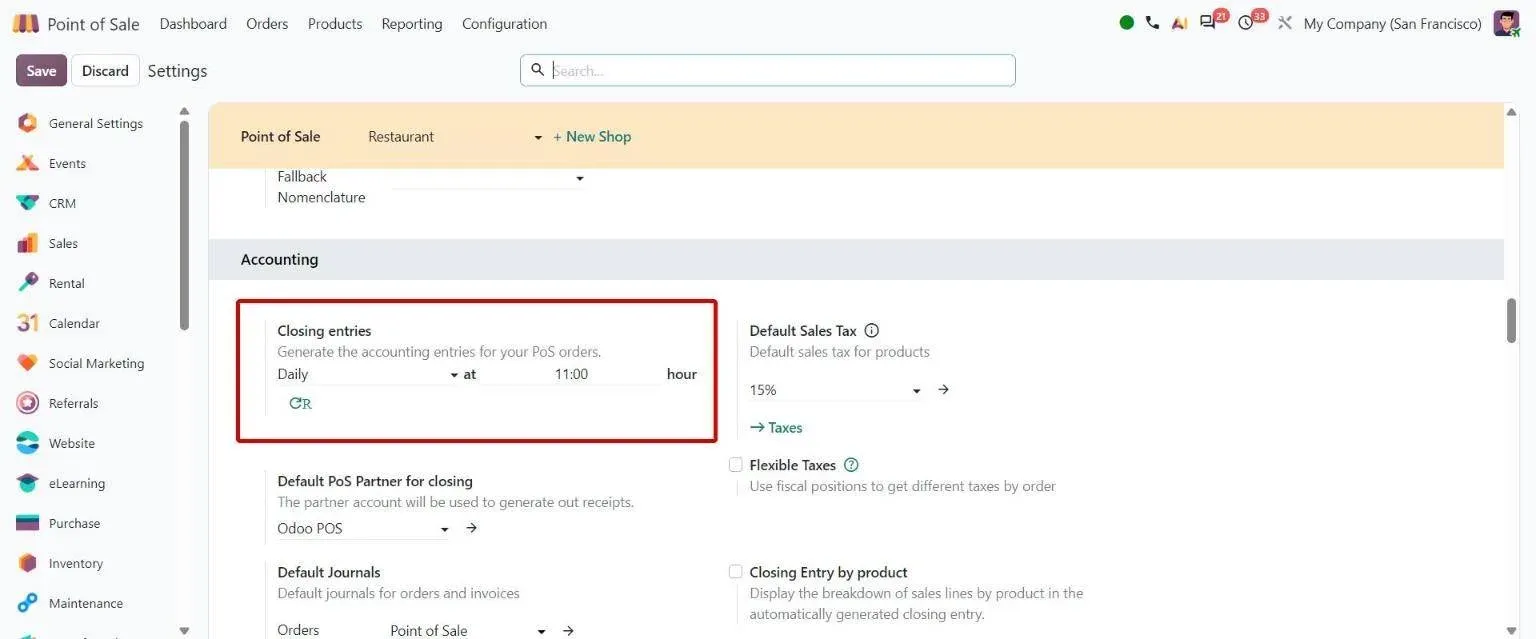
POS settings: Closing entries generated daily at a set hour or at closing Odoo 20 · Point of Sale
End of session
Point of Sale > Configuration > Settings > Accounting
Simplifies accounting by posting one global sale per session and payment entries at a set time.
End of session: how to use it in Odoo 20 -
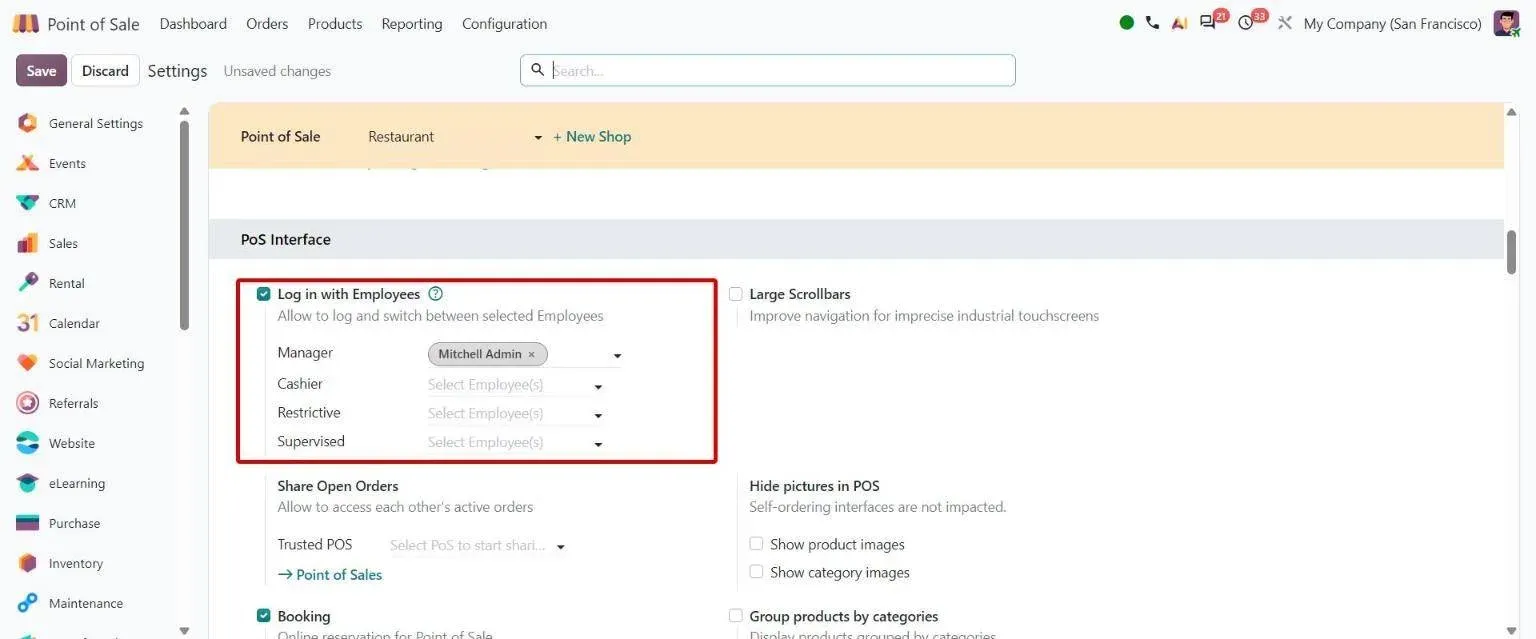
POS settings: employee access levels Manager, Cashier, Restrictive and new Supervised Odoo 20 · Point of Sale
Employee access levels
Point of Sale > Configuration > Point of Sales
Lets managers give new or trainee staff a very restrictive Supervised access level.
Employee access levels: how to use it in Odoo 20 -
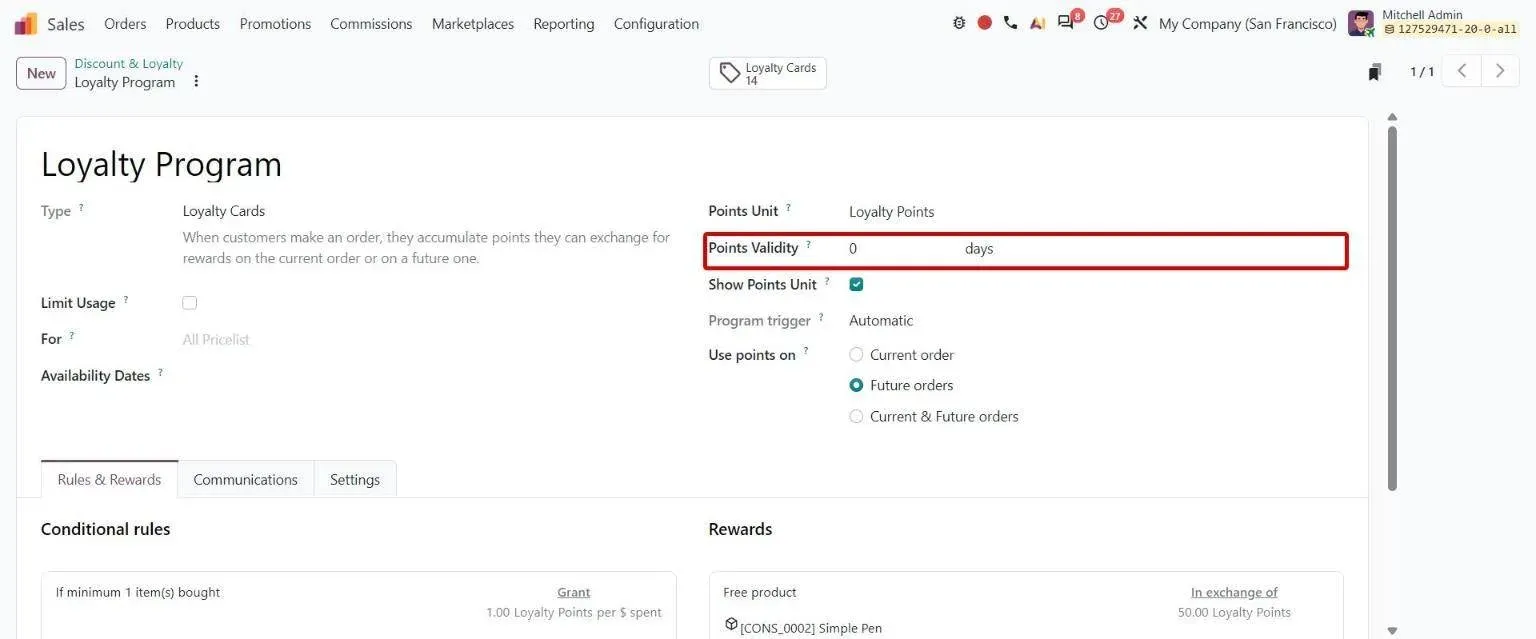
Loyalty program form with new Points Validity field in days Odoo 20 · Sales
Loyalty point expiration
Sales > Products > Discount & Loyalty > [loyalty program]
Lets businesses set how many days earned loyalty points stay usable.
Loyalty point expiration: how to use it in Odoo 20 -
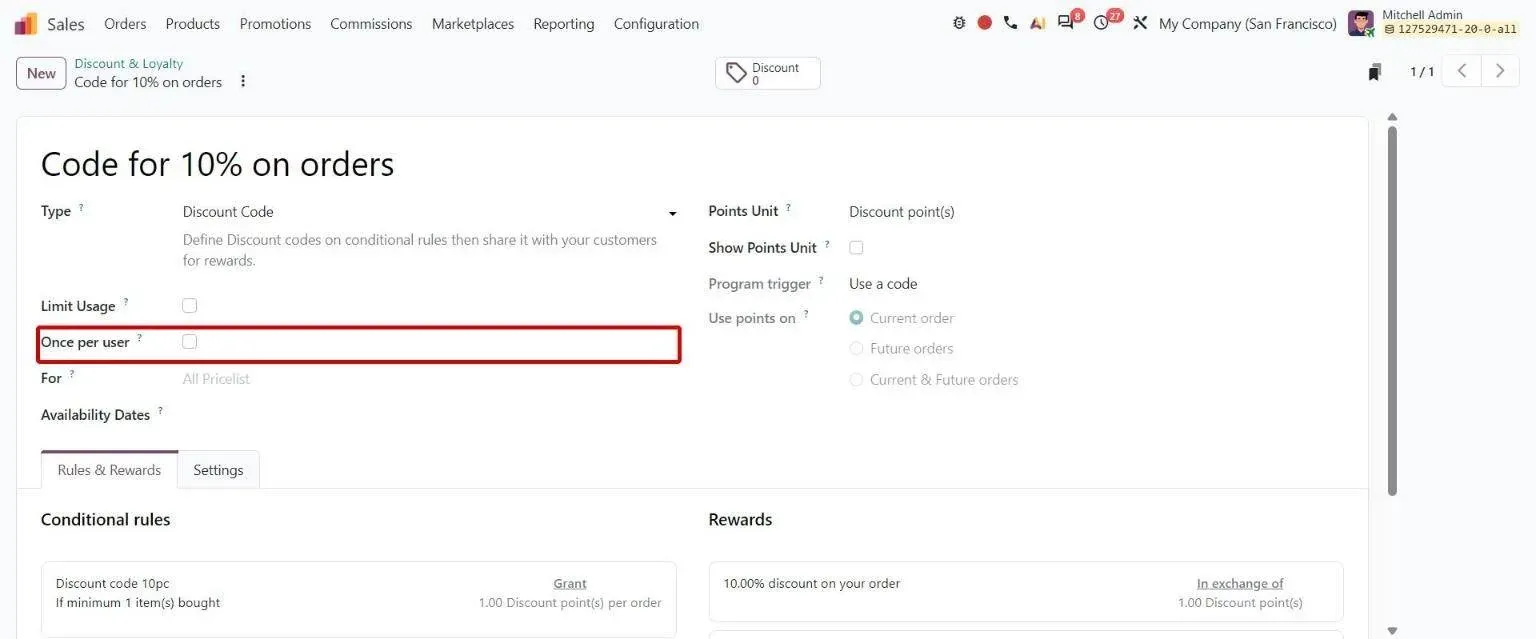
Discount Code program form with new Once per user option Odoo 20 · Sales
Single-use discount codes
Sales > Products > Discount & Loyalty > [Discount Code program]
Stops customers from reusing the same discount code more than once.
Single-use discount codes: how to use it in Odoo 20 -
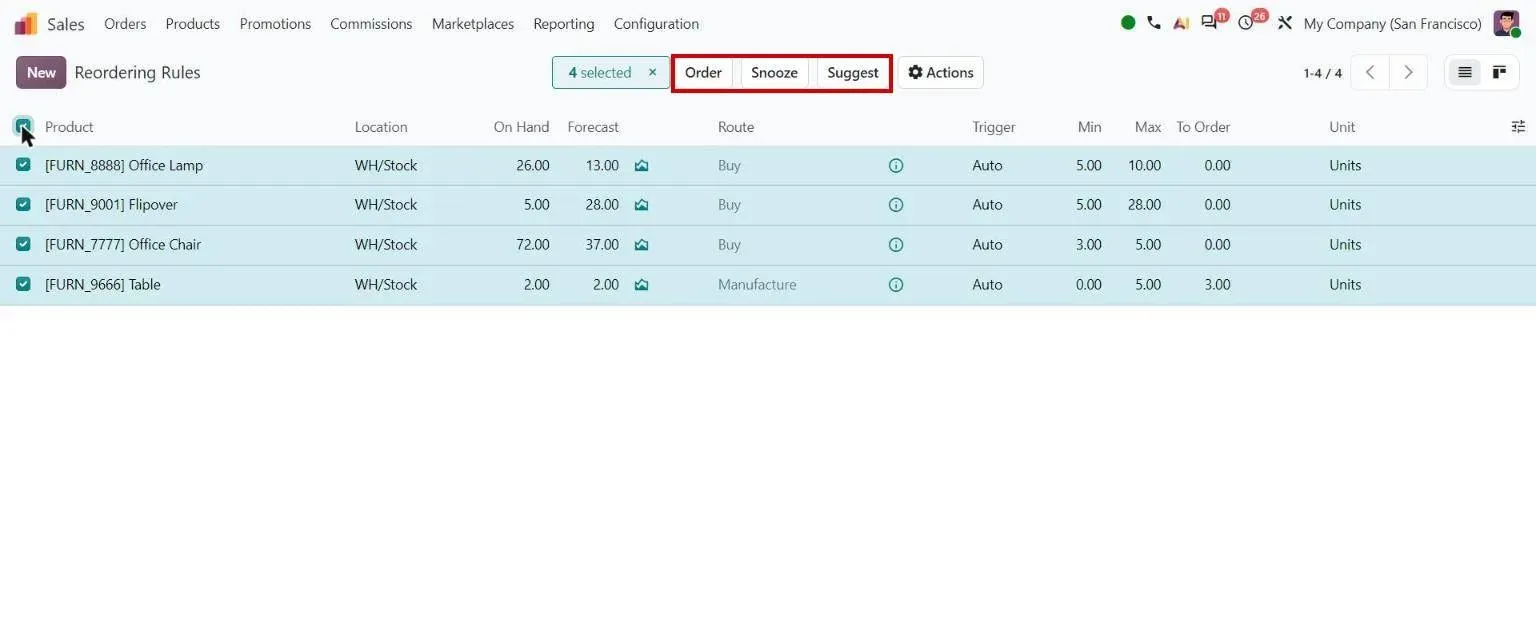
Reordering rules: Order, Snooze, Suggest Odoo 20 · Inventory
Product replenishment
Inventory > Operations > Replenishment
Simplifies replenishment with one button that orders up to the forecast-based maximum.
Product replenishment: how to use it in Odoo 20 -
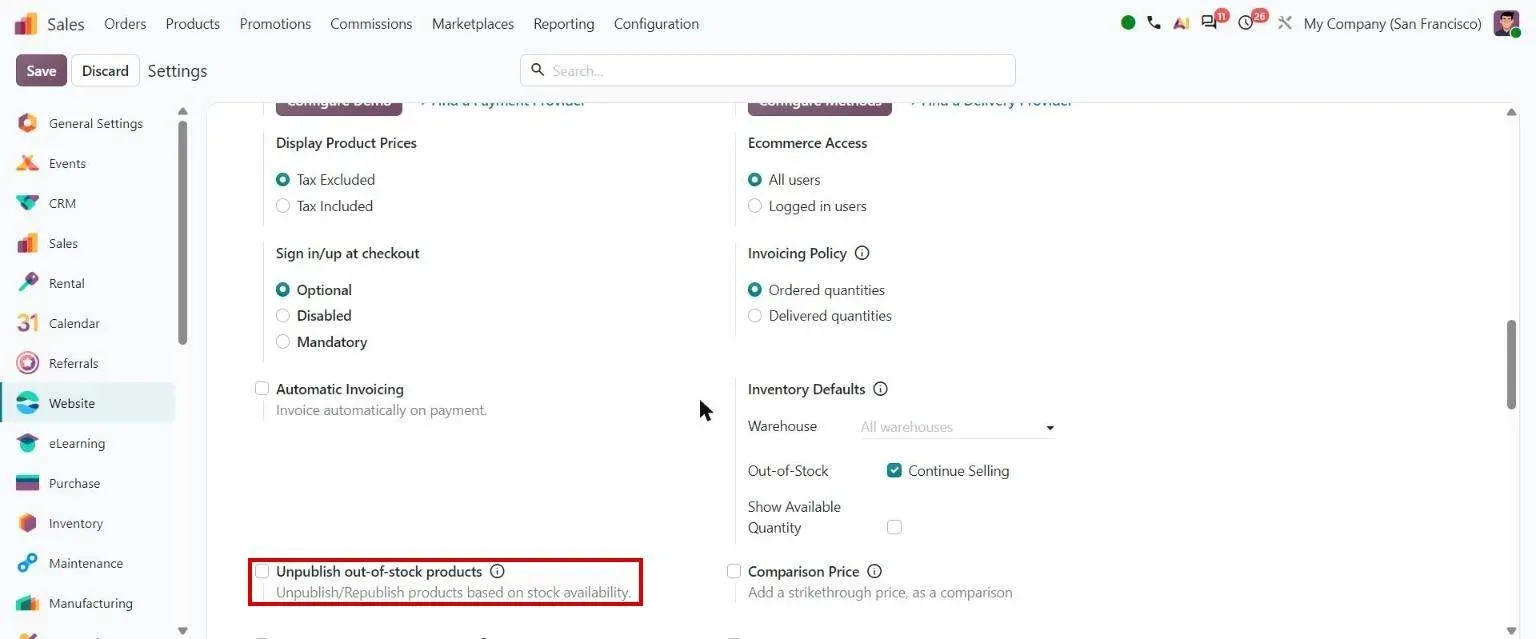
Website settings: Unpublish out-of-stock products Odoo 20 · eCommerce
Stock-based product publishing
Website > Configuration > Settings
Keeps out-of-stock products off the website and brings them back automatically when restocked.
Stock-based product publishing: how to use it in Odoo 20
Sample features
- Offline-first POS with auto-sync on reconnect
- Real-time multi-store inventory visibility
- Centralized pricelists with effective dates pushed instantly
- Loyalty programs (points, tiers, BOGO, gift cards)
- Buy-online / pick-up-in-store with reservation logic
- Click-and-collect with store-level fulfillment
- Per-store P&L and cohort analysis
- Promotional pricing with conditions (cart total, customer segment, time window)
- Returns processing across channels with consistent accounting
- Customer profile unified across POS, e-comm, and call center
Use cases for retailers
- Business process Order-to-cash in Odoo 20 From a quote or an online order to cash in the bank: credit checks, channels, returns and collections. Open
- Erpmate AI agents Erpmate for retail and wholesale The right stock in the right store, and no expired lots on the shelf. Open
- AI AI inventory forecasting Forecasts trained on your own demand history, with stockout periods resolved so they do not read as low demand. Open
- TechUltra app POS Access Management Give each cashier their own set of Point of Sale permissions. Open
- TechUltra app POS Referral Loyalty Reward Referral codes in POS that pay out loyalty points when a referred customer buys. Open
- TechUltra app POS Combo and Bundle Products Sell combos and bundles in the Odoo POS with a guided item-selection popup. Open
- TechUltra app WhatsApp for POS Send POS receipts and order messages over WhatsApp from Odoo Point of Sale. Open
- Odoo 20 guide Odoo 20 sales, CRM and POS guide Every Odoo 20 change in Sales, Point of Sale, Rental, CRM and Subscriptions, with screenshots. Open
Compliance & regulatory
| Standard | What it requires |
|---|---|
| GST e-invoicing (India) | Native e-invoice generation on B2B transactions exceeding GST thresholds. IRN registration, e-way bill, and statutory reports. |
| PCI DSS (payment data) | We integrate Odoo POS with PCI-compliant payment gateways (Stripe, Razorpay, Adyen) so card data never lands in Odoo's database. |
Frequently asked questions
-
Can Odoo handle a chain with 50+ stores?
Yes — we've shipped 100+ store chains. Each store runs Odoo POS connected to a central instance; inventory is real-time; pricing pushes from HQ. The architecture decision (single instance vs. multi-company per region) depends on legal entity structure and reporting requirements — we cover this in discovery.
-
Does Odoo POS work offline?
Yes — Odoo POS runs offline-first. Transactions queue locally during connectivity loss and sync automatically when the network returns. Cash drawers, receipt printing, and barcode scanning all work fully offline. Only the customer lookup against central CRM and online inventory check require connectivity.
-
Can Odoo unify our online store with physical retail?
Yes — Odoo eCommerce shares inventory, customers, products, and pricing with POS. Buy-online/pick-up-in-store, ship-from-store, and return-anywhere flows are standard. For chains running Shopify/Magento alongside Odoo, we build two-way sync — but most retail clients consolidate on Odoo eCommerce within a year of deployment.
-
How does loyalty work in Odoo?
Native loyalty supports points-based programs, tiers, BOGO promotions, and gift cards. For more complex needs (referral programs, gamified mechanics, dynamic point expiration) we add custom rules. Customer record unifies POS purchases, online orders, email engagement, and loyalty status on one screen.
-
Can we run multiple currencies and countries?
Yes — multi-company multi-currency is native. Each country can run as its own legal entity with localized tax (GST, VAT, sales tax), e-invoicing, and statutory reporting, while sharing master data (products, customers) across the group. Consolidated reporting handles the FX translation automatically.
-
What payment methods does Odoo POS support?
Cash, card (via integrated terminals from Adyen/Stripe/Razorpay), wallet (PayPal, Apple Pay, GPay), gift cards, store credit, and split payments across multiple methods. Card processing happens at the terminal — no card data ever lands in Odoo, keeping the system out of PCI scope.
-
Implementation timeline for a multi-store retail chain?
5–10 stores: 12–16 weeks. 10–30 stores: 14–18 weeks. 30+ stores: phased rollout, lead store first then expanding 4–8 stores per fortnight. E-commerce migration adds 2–4 weeks. Loyalty data migration from a previous system adds 1–2 weeks.