
Migration playbook
Migrate from Xero to Odoo
Xero is excellent accounting software and a poor operational ERP. The moment your business outgrows pure bookkeeping — real inventory, manufacturing, multi-warehouse, CRM unified with ops, project costing — you start bolting third-party tools onto Xero and reconciling spreadsheets. Odoo replaces the bolt-on stack with one platform. Here's how the migration actually works.
Last reviewed:
- Weeks end-to-end
- 8–14Weeks end-to-endtypical mid-market scope
- Fixed-price range
- $18–48kFixed-price rangeUSD, scope-dependent
- Weeks parallel run
- 2–3Weeks parallel runboth systems live
Why businesses migrate from Xero to Odoo
-
Inventory beyond Xero's basic tracking
Xero inventory tracks quantity and average cost on a single warehouse. Real inventory — multi-warehouse, batch/serial tracking, putaway rules, replenishment automation, FIFO/LIFO costing — usually requires bolt-on apps (Unleashed, Dear, Cin7) that re-sync to Xero with delay. Odoo Inventory handles all of this natively, same database as accounting.
-
The add-on app stack getting expensive
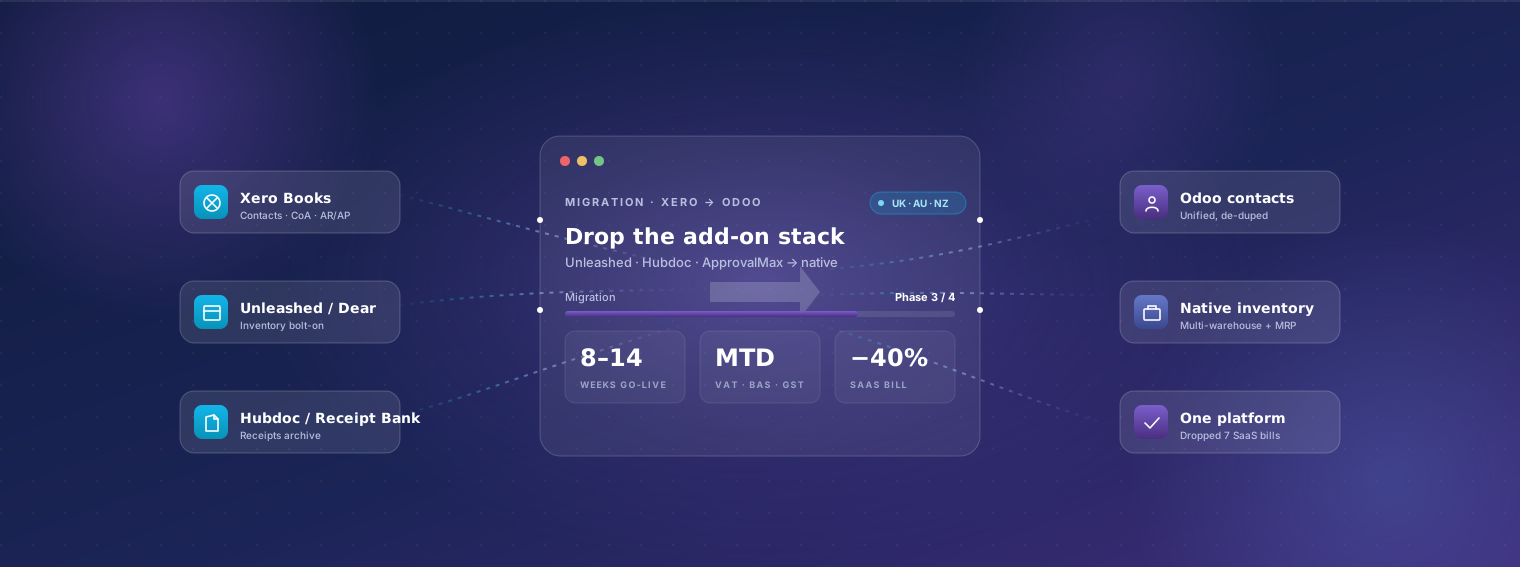
A typical mid-market Xero deployment ends up with 5–10 paid add-ons: Unleashed or Dear for inventory, Hubdoc or Receipt Bank for receipts, ApprovalMax for AP approvals, WorkflowMax or HarvestApp for time, Spotlight for reporting. Combined: USD 400–1,200/month. Odoo Enterprise Custom replaces this stack on one platform at lower total cost.
-
Manufacturing — BOMs, work orders, MRP
Xero has no manufacturing module. Manufacturers on Xero either use spreadsheets, run BOMs in Excel, or buy MRPeasy / Katana and sync. Odoo Manufacturing is native and handles MRP I (BOMs, routings, work orders) plus MRP II features (quality, maintenance, MES integration) on Enterprise.
-
Project costing and time billing
Xero Projects is basic — billable hours and simple cost tracking. Real project accounting (multi-phase budgets, WIP recognition, fixed-price vs T&M billing, retainer management, project P&L by phase) needs WorkflowMax or external tools. Odoo Project + Timesheets + Sales are native and share data.
-
Real CRM beyond contact lists
Xero contacts are essentially an address book. Sales pipeline, opportunity scoring, lead routing, quotation versioning, marketing automation — none of this exists in Xero. Customers usually bolt on HubSpot or Pipedrive and sync, which doubles the contact record and creates reconciliation issues. Odoo CRM lives in the same database.
-
Multi-currency and multi-entity scaling
Xero supports multi-currency on higher tiers but multi-entity remains one-Xero-file-per-company with manual consolidation. Once a group has 3+ entities, the consolidation overhead becomes meaningful. Odoo runs multi-company multi-currency on one database with real-time consolidation.
-
Reporting hitting feature ceilings
Xero standard reports are clean but limited. Custom reports use Spotlight or Fathom, which adds USD 30–150/month and reads from Xero's data delayed. Odoo's native dashboards, Spreadsheet view, and Studio give finance and ops live reports inside the system.
-
E-commerce, marketplaces, EDI integration
Xero integrates with Shopify, A2X, etc. via the Xero App Marketplace — connectors work but each adds cost and a per-platform sync risk. Odoo's CRM, e-commerce, and accounting are native; integrations to payment gateways and marketplaces are first-party or partner-grade.
What survives the migration
Xero stack → one Odoo instance
Before · 5 systems
- Xero — accounting
- Unleashed or Dear — inventory
- Hubdoc / Receipt Bank — documents
- ApprovalMax — AP approval
- WorkflowMax — projects and time
After · 1 system
- Odoo — accounting, inventory, documents, approvals and projects on one database
The five-app pattern this page describes as the signal to move. Illustrative of a typical stack rather than a specific engagement — each add-on has a native Odoo module, which is where the licence saving comes from.
Plain-English breakdown of what we move, what we re-map, and what gets rebuilt in Odoo's framework rather than ported.
| Data category | Coverage | Detail |
|---|---|---|
| Contacts (customers + suppliers) | Fully migrated | All Xero contacts migrated as Odoo contacts with addresses, contact persons, tax IDs (VAT, ABN, GSTIN, etc.), payment terms, banking details, opening balances. De-duplication during migration — Xero files typically accumulate 5–15% duplicate contacts over years. |
| Chart of accounts | Partial / mapped | Migrated with a structural review. Xero CoAs accumulate drift over years; we standardise against Odoo's accounting structure and your accountant's expectations, then map historical transactions to the new CoA. |
| Items / products | Fully migrated | Inventory and non-inventory items with SKUs, descriptions, prices, costs, tax codes, vendor links. Xero's tracked-inventory items become Odoo storable products with opening stock; untracked items become consumables or services. |
| Open AR (unpaid invoices + credit notes) | Fully migrated | Every open invoice migrates with customer, due date, amount, tax breakdown, remaining balance, and any credit notes. Invoice number continuity preserved. |
| Open AP (unpaid bills + credit notes) | Fully migrated | Every open bill migrates with vendor, due date, balance, and credit notes applied. Approval state preserved where it exists in Xero or ApprovalMax. |
| Bank accounts and reconciliation status | Partial / mapped | Opening balances reconciled to cutover date. Bank feeds re-established in Odoo (most UK, Australian, NZ, US banks supported natively via Odoo's bank-feed integration). Unreconciled bank items migrated; historical reconciled items stay in Xero archive. |
| Historical transactions (closed) | Partial / mapped | 1–3 years of invoices, bills, payments, manual journals migrated for historical reporting. Older history stays in read-only Xero — Xero's Ledger plan (USD 1/month) keeps the archive accessible cheaply. |
| Stock balances (if Xero tracked inventory) | Fully migrated | Opening stock by item by warehouse, reconciled to cutover. Costing method (FIFO, average) re-selected in Odoo. If inventory was running on Unleashed/Dear, we migrate from the inventory tool, not Xero — typically gives better data fidelity. |
| Tracking categories | Partial / mapped | Xero's two tracking-category dimensions map to Odoo's analytic accounting (a richer model). Department / Location / Project tracking transfers cleanly; we usually expand to more dimensions in Odoo because the limit doesn't exist. |
| Recurring invoices / bill templates | Rebuild in Odoo | Xero repeating invoices recreated as Odoo subscriptions or recurring invoices. Usually cleaner than the source because Odoo's subscription model handles prorations and revenue recognition. |
| Attached files (receipts, contracts) | Partial / mapped | Files attached to transactions in Xero migrated where the Xero API exposes them. Hubdoc / Receipt Bank archives are bulk-migrated to Odoo's Documents module as a separate scope. |
| Add-on app data (Unleashed, Dear, ApprovalMax, etc.) | Rebuild in Odoo | Add-on app workflows recreated in Odoo's native modules — usually a cleanup, not a port. Most clients drop 5–10 paid add-ons during migration, recovering USD 400–1,200/month in subscription cost. |
| Custom Xero reports (Spotlight, Fathom) | Rebuild in Odoo | External BI reports rebuilt as Odoo native reports, dashboards, or Spreadsheet views. Faster, cheaper, no external sync. |
| Users and roles | Rebuild in Odoo | Xero's user roles (Advisor, Standard, Read-only, etc.) re-created in Odoo's RBAC. Migration is usually a chance to tighten permissions that drifted over years. |
Our phased approach
-
Discovery week
1 week, fixed-priceSenior consultant audits your Xero organisation(s), the add-on app stack, business processes, and target Odoo scope. Output: written migration plan + fixed-price quote. Sample data extraction validates migration script design against your actual file.
-
Sandbox migration
3–5 weeksMigration scripts built against Xero API exports, run into sandbox Odoo, reconciled to the penny against Xero. Your finance team validates contacts, balances, and representative transactions. Iterations are normal — first-pass data is rarely perfect.
-
Odoo configuration in parallel
3–5 weeks (overlapping)Country localisation (UK MTD VAT, Australian BAS, NZ GST, US sales tax, etc.) configured. Add-on app replacements set up: native inventory replaces Unleashed/Dear, native AP automation replaces ApprovalMax, native expense replaces Receipt Bank/Expensify.
-
User training
1 weekRole-based training (AR, AP, ops, sales) with hands-on time in sandbox Odoo. Short recorded modules per role for ongoing reference. Xero users adapt to Odoo quickly because the financial concepts are the same.
-
Cutover weekend
1 weekendXero closes for new transactions Friday evening. Final migration (closing balances, last week's transactions) runs Saturday. Reconciliation Sunday. Monday morning: team starts in Odoo.
-
Parallel-run period
2–3 weeksBoth Odoo and Xero accessible. New transactions in Odoo only; Xero read-only. We monitor every flow, fix anything that surfaces, and validate at least one month-end close in Odoo before decommissioning Xero.
-
Stabilisation
30 days post go-liveOn-call engineering, weekly status, fast fixes. By day 30 the team is comfortable, finance has closed a month-end in Odoo, and we transition to normal support.
Typical timeline
8–14 weeks end-to-end for typical mid-market migrations. Variables: (1) add-on app count — if you're running Unleashed + Hubdoc + ApprovalMax + WorkflowMax, each is a separate sub-project; (2) inventory complexity — multi-warehouse with batch tracking extends sandbox phase; (3) country localisation depth — UK MTD VAT + Making Tax Digital + EU VAT compliance for cross-border traders adds 1–2 weeks. We commit to a timeline at the end of discovery week.
Indicative cost
USD 18,000–48,000 fixed-price for end-to-end migration + Odoo go-live, depending on add-on count, inventory complexity, and customisation. Discovery week: USD 2,500–3,500 fixed, deductible from project quote. Add USD 4,000–12,000 for substantial e-commerce / marketplace integrations. Compare to running Xero + 7 add-ons for 30 users: typically USD 14,000–22,000/year subscriptions, with the same operational ceilings you're hitting.
Risks and mitigations
-
Risk: Add-on app data trapped in vendor silos
Mitigation: Each major add-on (Unleashed, Dear, Cin7, Hubdoc, ApprovalMax, WorkflowMax) has its own API. We audit each during discovery and confirm export-ability. Where APIs are restrictive, we use CSV export as a fallback — adds 1–2 days per app but keeps history intact.
-
Risk: Tracking categories not mapping cleanly
Mitigation: Xero's 2-dimension limit means some businesses have squeezed multiple concepts into one tracking field. We audit your tracking-category use during discovery and design the Odoo analytic-account hierarchy explicitly — usually 3–4 dimensions rather than 2.
-
Risk: Chart of accounts cleanup needed
Mitigation: Xero CoAs that started in the small-business template and grew often have inconsistencies — duplicate accounts, mis-grouped sub-accounts. Discovery week includes a CoA review with your accountant; we re-design before migration rather than carrying drift into Odoo.
-
Risk: MTD VAT (UK) or GST (AU/NZ) registration during cutover
Mitigation: Tax-authority registrations transfer cleanly — your VAT/GST number stays the same. We pre-validate Odoo's MTD or BAS filing format against HMRC / ATO / IRD sandbox before cutover. First filing from Odoo happens within 1–2 months of go-live.
-
Risk: Bank feed re-authentication
Mitigation: Bank feeds in Xero must be disconnected and re-established in Odoo. 1–3 day gap during cutover weekend. We pre-stage manual statement upload for the gap days. Most UK / AU / NZ / US banks supported via Odoo's native feeds or via account-aggregators where direct connections aren't available.
-
Risk: Accountant / advisor access during migration
Mitigation: Your accountant typically has Xero access for advisory and end-of-year work. We coordinate Odoo access (separate user role with read-only or advisor permissions) before cutover so there's no continuity gap.
-
Risk: Add-on app re-subscription before cancellation
Mitigation: We sequence add-on app cancellations to AFTER Odoo's native replacements are operational, not at cutover. Keeping Unleashed running for 2 weeks post-cutover (USD ~200) is cheaper than realising day-3 that Odoo's inventory needs config adjustment.
-
Risk: Multi-currency exchange-rate history
Mitigation: Xero stores historical exchange rates; Odoo re-creates them from the data. We validate the rate history during sandbox by comparing realised FX gain/loss on closed transactions across both systems. Differences over 0.1% trigger investigation.
Who should migrate
Businesses (10–250 users) outgrowing Xero plus its add-on app stack.
- manufacturers needing real MRP
- multi-warehouse retailers/distributors
- service businesses with project costing needs Xero Projects can't meet
- multi-entity groups consolidating across multiple Xero files
- e-commerce operators with significant Shopify/Amazon volume currently synced via A2X. Smaller businesses (under 10 users) running pure Xero bookkeeping without add-ons usually aren't a fit — Xero is still genuinely better for that use case
Frequently asked questions
-
Can you migrate from Xero Cashbook / Ledger / Standard / Premium?
All Xero plans. Xero's API is the same across tiers; the migration mechanics don't change. What changes is the source data depth — Premium files often have inventory tracking and multi-currency enabled, which gives us more to migrate cleanly.
-
What happens to my Xero advisor / accountant access?
Your accountant typically retains Xero access through the audit cycle for historical work. We provision them an Odoo user (read-only or advisor-level depending on your preference) before cutover so they have continuity. Most accountants have used Odoo or can ramp quickly — it's not Xero-specific muscle memory.
-
What about Hubdoc / Receipt Bank receipts archive?
We bulk-migrate the receipt archive to Odoo's Documents module as part of the project. Receipts attached to historical Xero transactions stay linked via the transaction migration. Going forward, Odoo's native receipt OCR (part of Enterprise) replaces Hubdoc — usually with better accuracy because Odoo's OCR is purpose-built and updated more often.
-
Does Odoo handle MTD VAT (UK) and BAS (Australia) and GST (NZ)?
Yes — all three. Odoo's UK localisation is HMRC-recognised for Making Tax Digital filing; Australian localisation handles BAS via the ATO format; New Zealand localisation handles GST returns. We test against each authority's sandbox during migration.
-
Will my Xero invoice numbers continue in Odoo?
Yes. We configure Odoo's number sequences to continue Xero's series — sales invoice, bill, credit note, manual journal — so customers and your accountant see continuity. No number jump or restart.
-
How does Odoo compare to Xero on cost?
Subscription-only: Xero Premium ~USD 80/month + 5–7 add-ons at USD 50–200/month each = USD 400–1,200/month total. Odoo Enterprise Custom for 20 users: ~USD 760/month all-in with native equivalents for the add-ons. Crossover happens around 5–10 users with multiple add-ons.
-
Can we keep Xero for accounting and use Odoo for operations only?
Technically possible — sync orders/inventory/jobs from Odoo to Xero for the financial bookkeeping. We've done this twice when audit / advisor relationships made the bookkeeping-side migration politically difficult. It's not our recommended approach because the sync overhead and reconciliation effort usually outweigh the savings. We'll do it cleanly if it's the right answer for your situation.
-
What about Xero Payroll?
Xero Payroll (UK/AU/NZ) migrates to Odoo's country-specific payroll modules. Employees, pay rates, deductions, leave balances, and YTD figures migrate. The first payroll run from Odoo typically happens within the first month of go-live with full reconciliation against the last Xero payroll.
-
How long does the parallel-run period really need?
2–3 weeks for most businesses. Week 1 proves operational flows; week 2 catches month-end and bank-rec issues; week 3 is cushion. We don't recommend shortening below 2 weeks even under pressure — saving a week here costs more than it's worth if something surfaces in week 4.
-
What about HubSpot / Pipedrive sync to Xero?
Common scenario — Xero customers usually have a CRM bolted on. Two paths post-migration: (1) keep HubSpot/Pipedrive and integrate with Odoo (clean connectors available); (2) consolidate CRM into Odoo's native CRM and decommission the bolt-on. Most clients pick (2) after seeing Odoo CRM live — it's surprisingly capable for HubSpot Starter and Pipedrive Essential equivalents.
-
Will my Xero accountant be able to sign off on the migration?
Yes — and it's part of the plan. We design the cutover with your accountant's input: when to migrate (usually right after year-end or mid-quarter), what reports to validate before close-out, how to handle the audit trail. Big 4 audited businesses pass through without findings; we've done several.
-
What's the first step?
A 30-minute scoping call. Three questions: how many users, which Xero plan + add-ons, top three reasons you're considering a move. From that we'll tell you whether discovery week is worth scheduling and what the realistic project size looks like.