Odoo App · WhatsApp & Messaging
All-in-One WhatsApp (Community)
A complete WhatsApp suite for Odoo Community — base, automation, two-way chat, marketing, and chatbot.

Overview
All-in-One WhatsApp (Community) packages five TechUltra WhatsApp modules into a single install for Odoo Community: the WhatsApp Base, Automation, two-way Discuss chat, Marketing, and Chatbot. It is built on Meta's official WhatsApp Cloud API, so messages flow through a Meta-approved channel rather than an unofficial gateway.
Built by TechUltra Solutions, the suite extends Odoo's native WhatsApp tooling with multi-company and multi-provider support, message-status indicators, interactive templates, and bulk and broadcast sending. Agents handle conversations inside Odoo's Discuss app, with the customer's contact record one click away in the chat sidebar.
Beyond one-to-one chat, the bundle adds targeted marketing campaigns to grouped contacts and an automated chatbot for first-line replies. The result is one place inside Odoo for support chat, promotional messaging, and automation — all on the same WhatsApp Business number.
Key features
-
Official WhatsApp Cloud API by Meta
Messages send and receive through Meta's official WhatsApp Cloud API, so your business number runs on a Meta-approved channel rather than an unofficial gateway.
-
Multi-company and multi-provider
Configure more than one WhatsApp provider and run several companies from a single Odoo database, each routed to the right WhatsApp Business number.
-
Two-way chat inside Discuss
The Discuss module brings bidirectional WhatsApp chat into Odoo's Discuss app, with sent, delivered, and read status indicators and agent assignment for incoming conversations.
-
Interactive message templates
Create and send interactive templates — List, Buttons, Product, and Product List — alongside text and multimedia templates synced from Meta.
-
Single-click media sharing
Share product videos, pictures, PDFs, and document files in one click, straight from the WhatsApp composer inside Odoo.
-
Bulk and broadcast messaging
Send broadcast messages and bulk campaigns to many contacts at once, with an improved sending process that handles large recipient lists.
-
WhatsApp marketing campaigns
The Marketing module targets selected contacts and contact groups for promotional messaging, then tracks campaign status and history.
-
Automated chatbot
The Chatbot module answers common customer questions automatically, handling first-line engagement before an agent picks up the conversation.
-
Chat history and chatter button
Every WhatsApp conversation is tracked as history, and a chatter button on contact records opens the relevant chat without leaving the document.
-
Optimized error handling
Failed and rejected messages surface clear errors, so you can correct templates or numbers instead of guessing why a send did not arrive.
All-in-One WhatsApp (Community) in Odoo
Every screen, in the order you meet it — configuration first, then the module in use.

Technical details
Specification
- Publisher
- TechUltra Solutions Private Limited
- Technical name
- all_in_one_whatsapp_odoo_community
- Odoo versions
- 15.0, 16.0, 17.0, 18.0, 19.0
- Lines of code
- 12,336
- License
- Odoo Proprietary License v1.0 (OPL-1)
- Price
- $198.99 (one-time)
Deployment
- Odoo Online
- Odoo.sh
- On-premise
Odoo dependencies
- CRM
- Contacts
- Calendar
- Discuss
Support
90 days of bug-fix support, Monday to Friday (10:00–19:00 IST). Raise a ticket at support@techultra.in.
Setup & configuration
From install to first call — here is the path.
- 1
Install the module
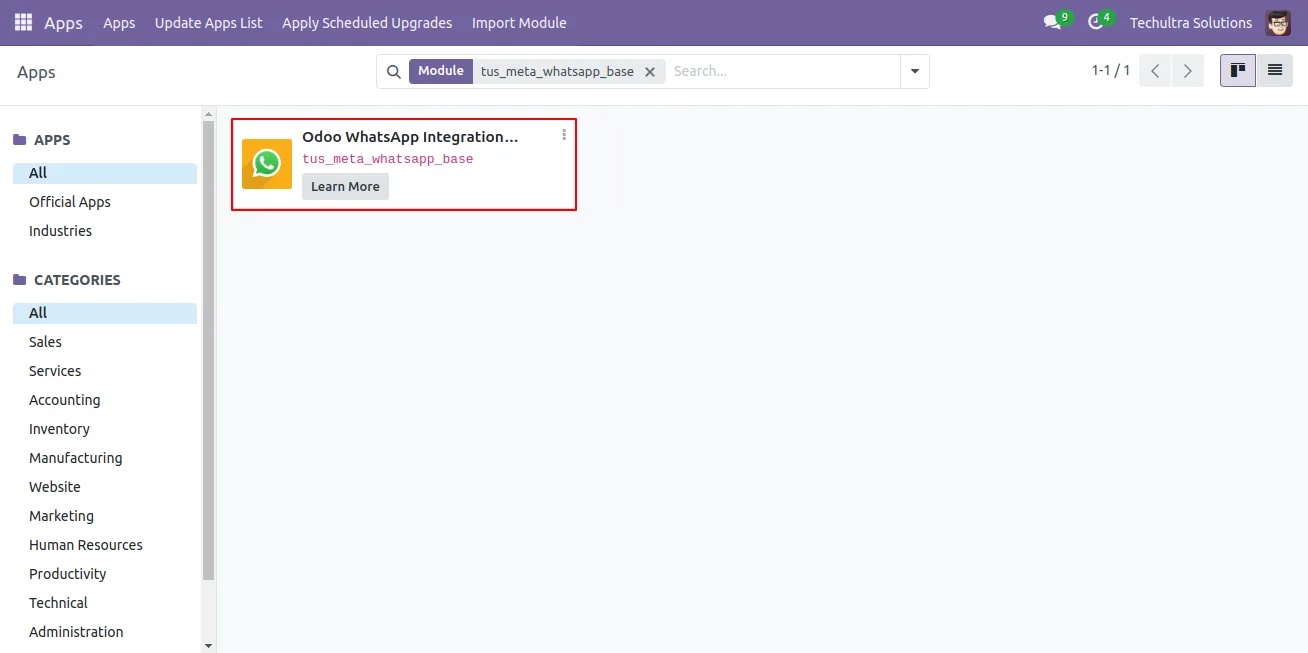
In Odoo, open Apps, remove the Apps filter, search for “All In One Odoo WhatsApp Integration”, and click Install.
- 2
Set up a Meta WhatsApp app
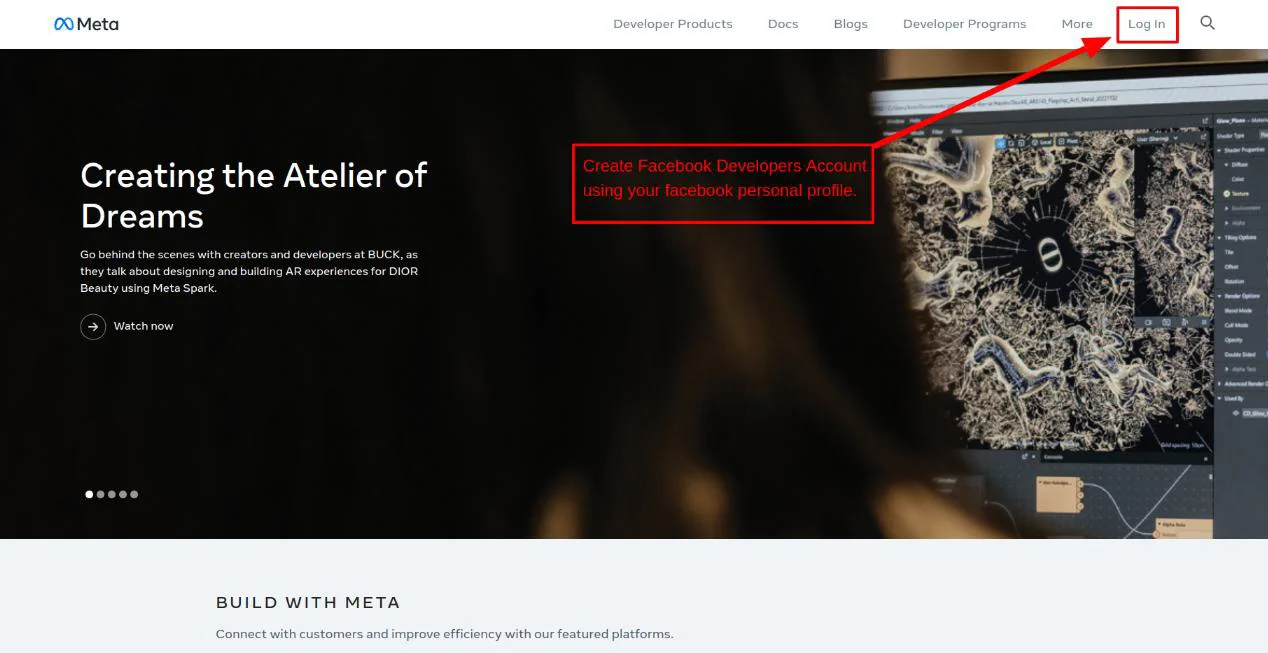
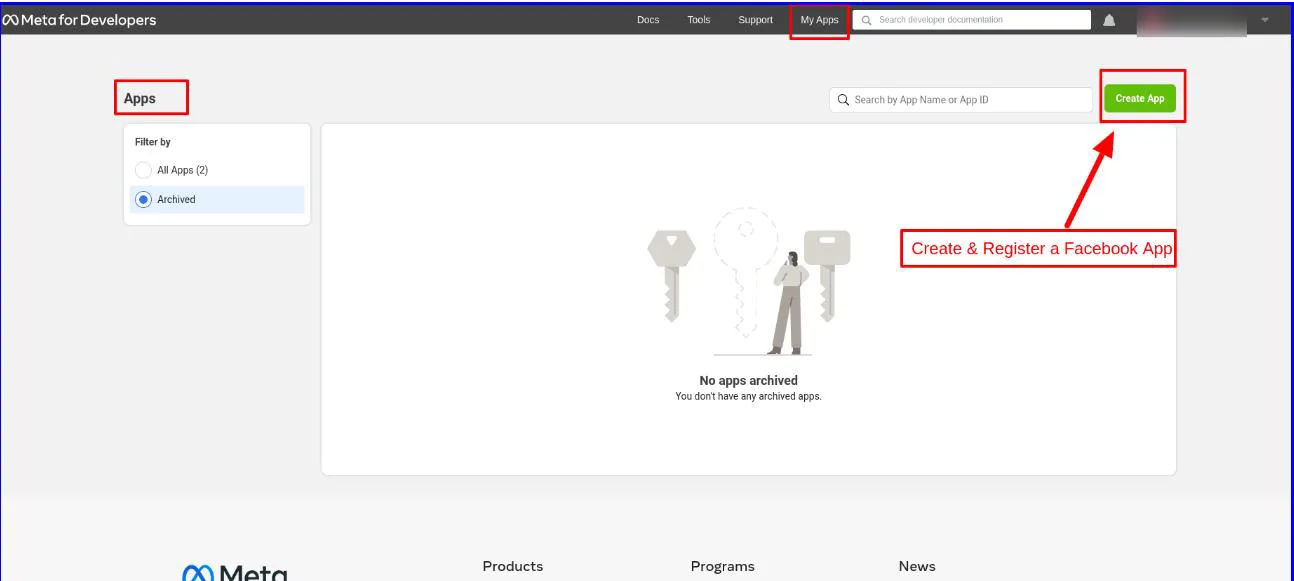
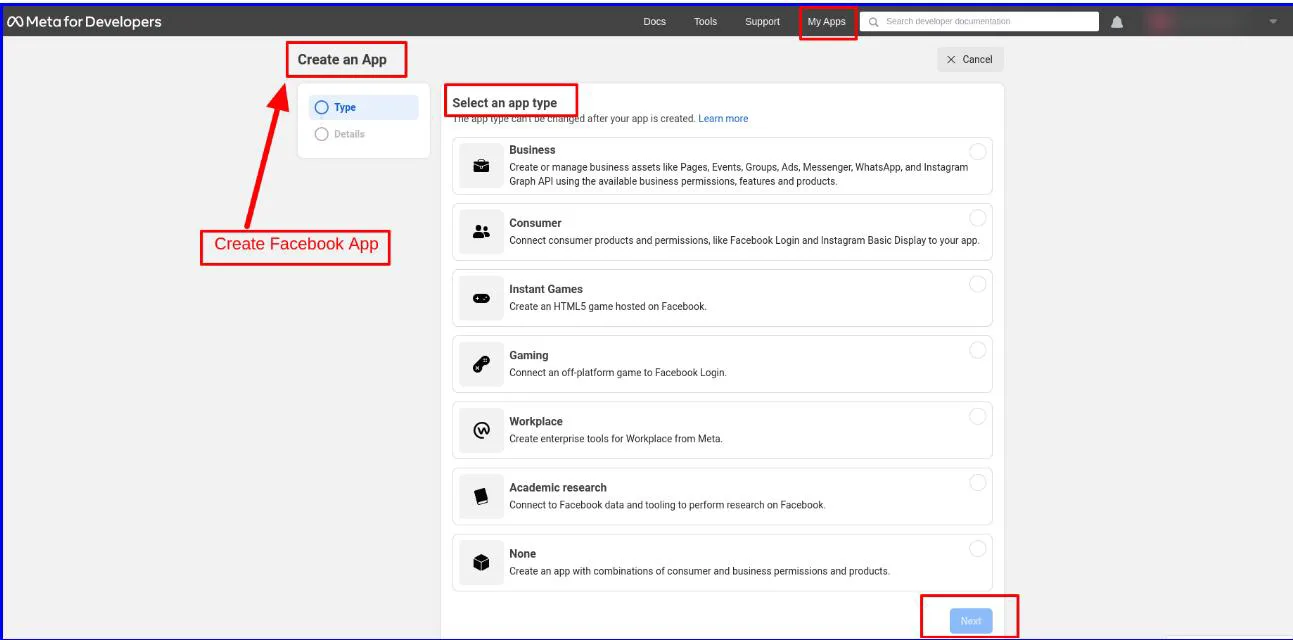
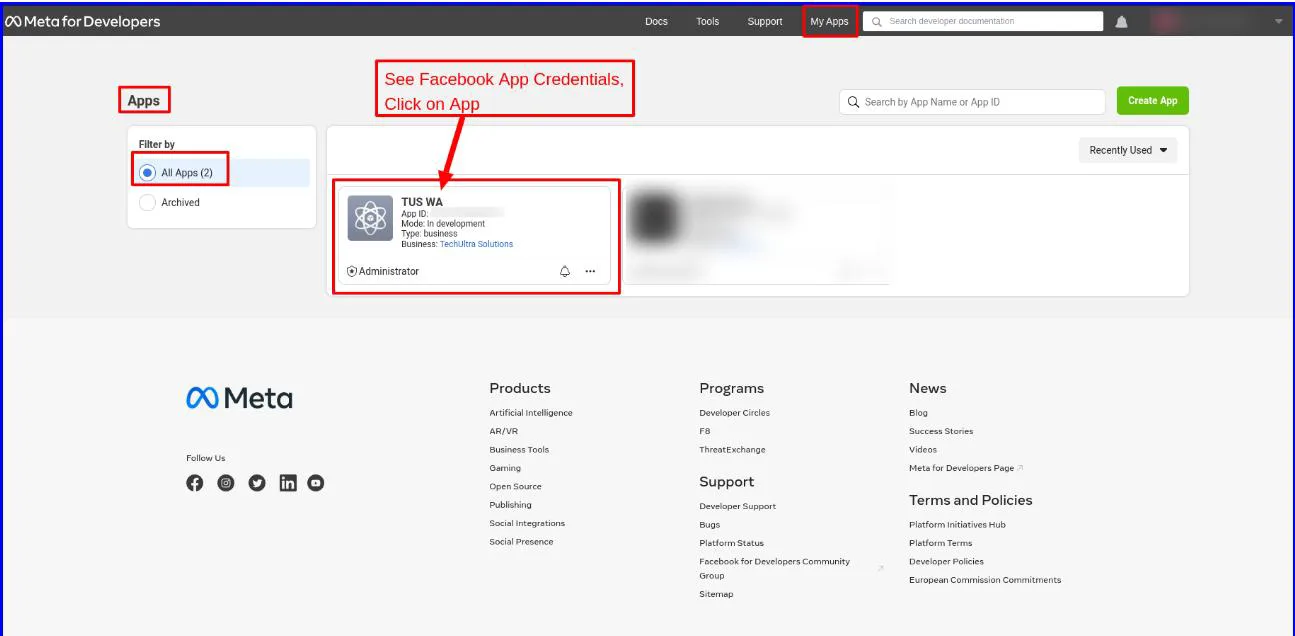
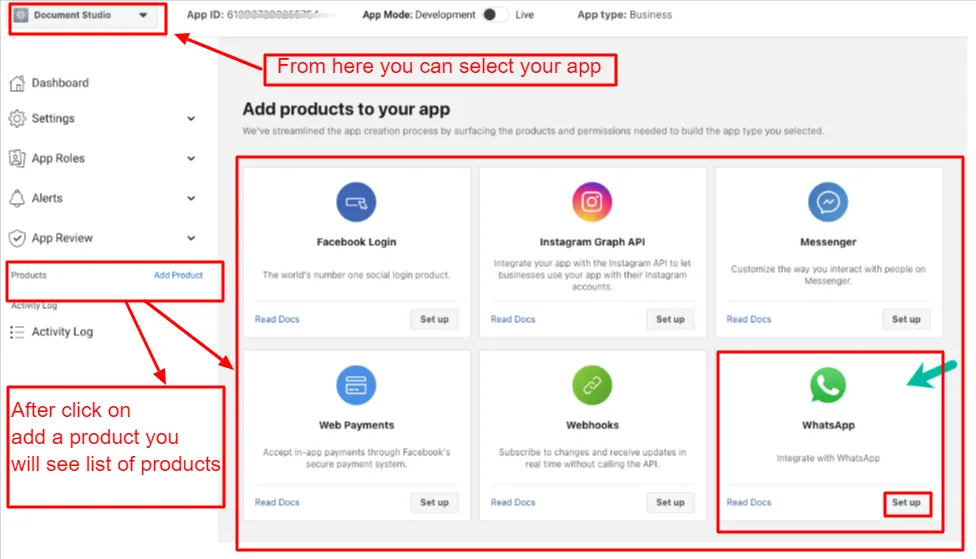
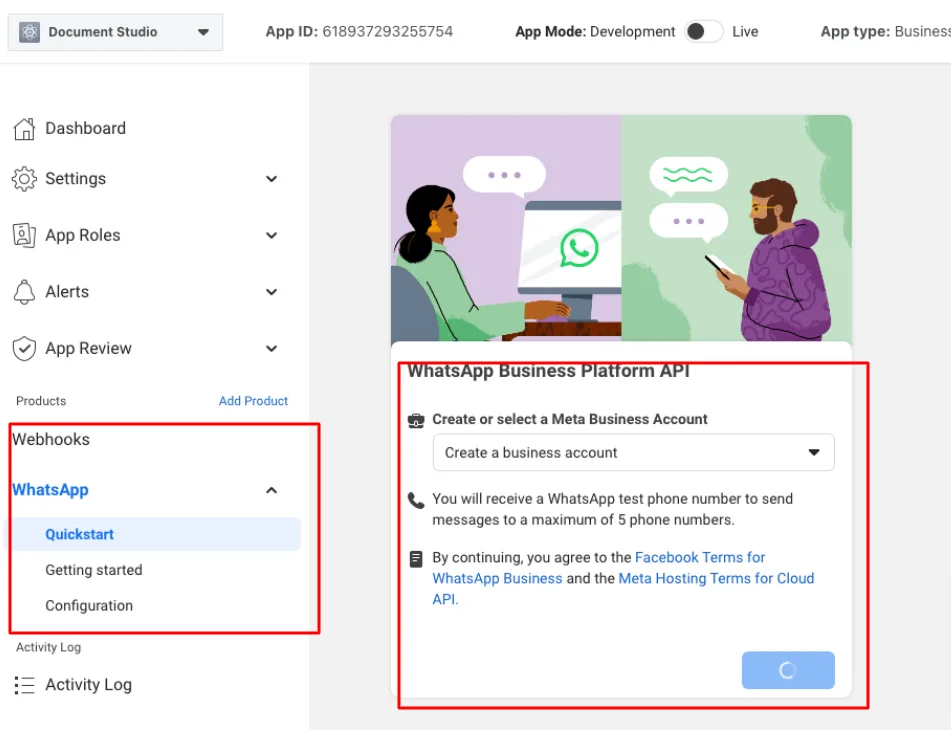
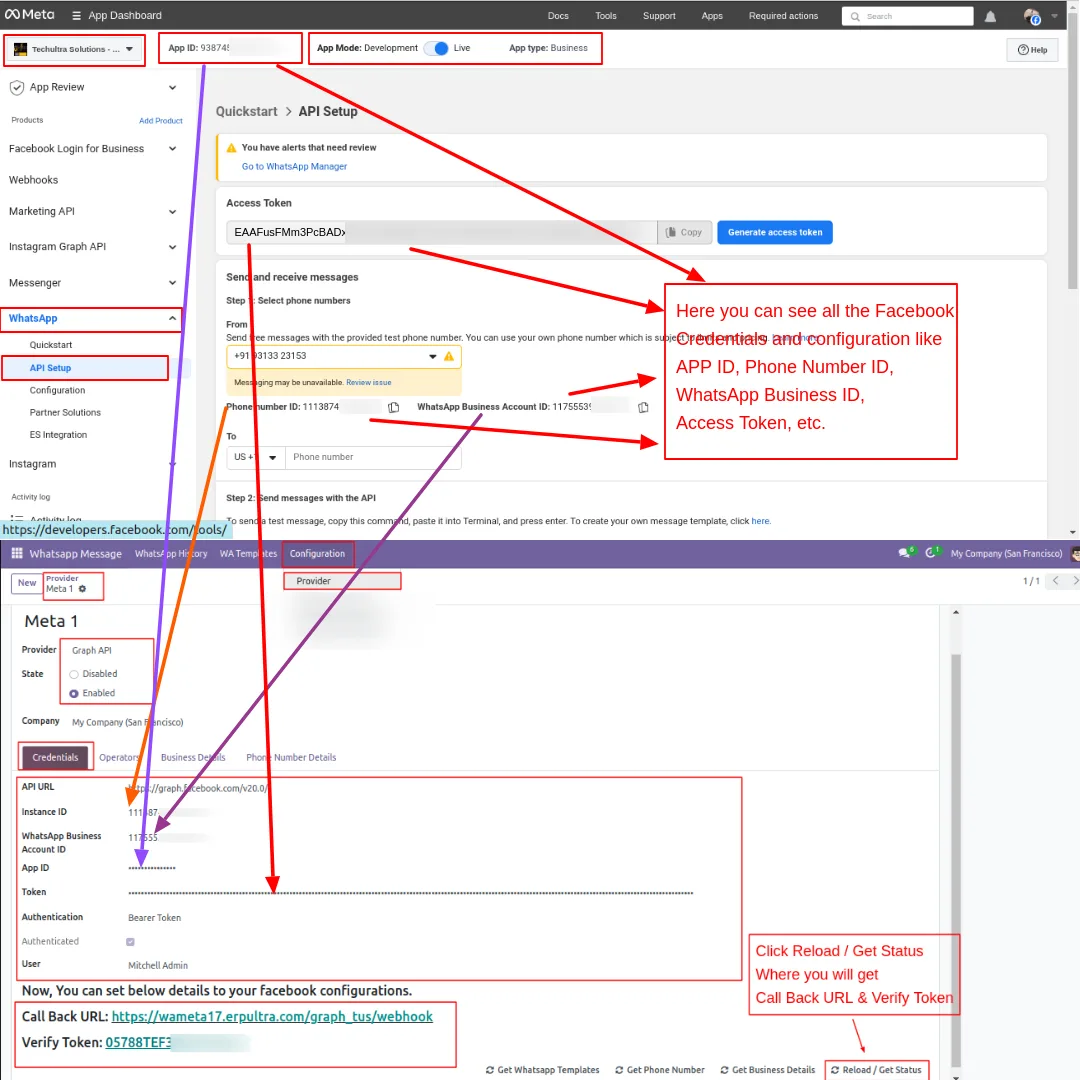
Create a Facebook Developer account, register a new application, add the WhatsApp product, and complete the WhatsApp quick start. Note the temporary access token, phone number ID, and WhatsApp Business Account ID.
- 3
Generate a permanent token
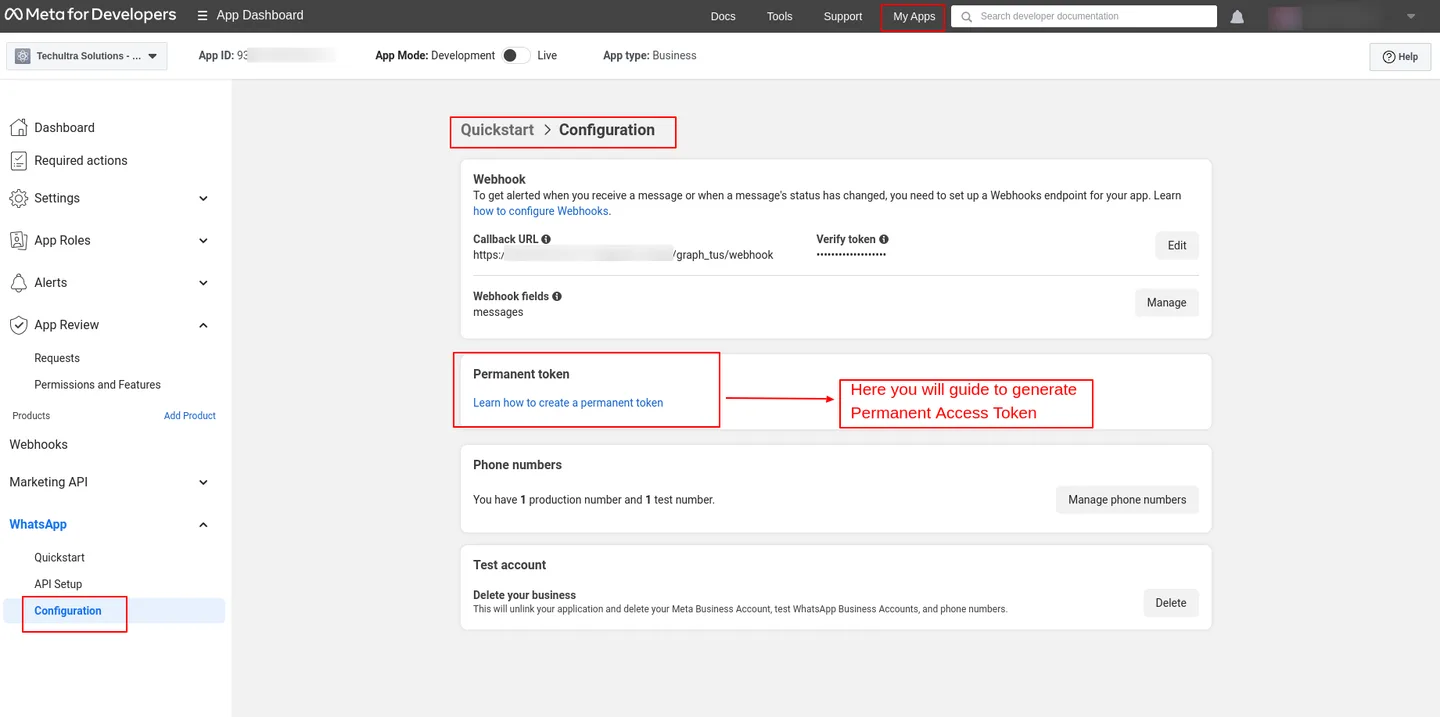
In Meta, generate a permanent access token and register your WhatsApp-enabled phone number, since temporary tokens expire after 24 hours.
- 4
Create a provider in Odoo
Go to WhatsApp Message → Configuration → Provider, create a record, and enter the Graph API endpoint, Business ID, permanent access token, and phone number ID.
- 5
Connect the webhook
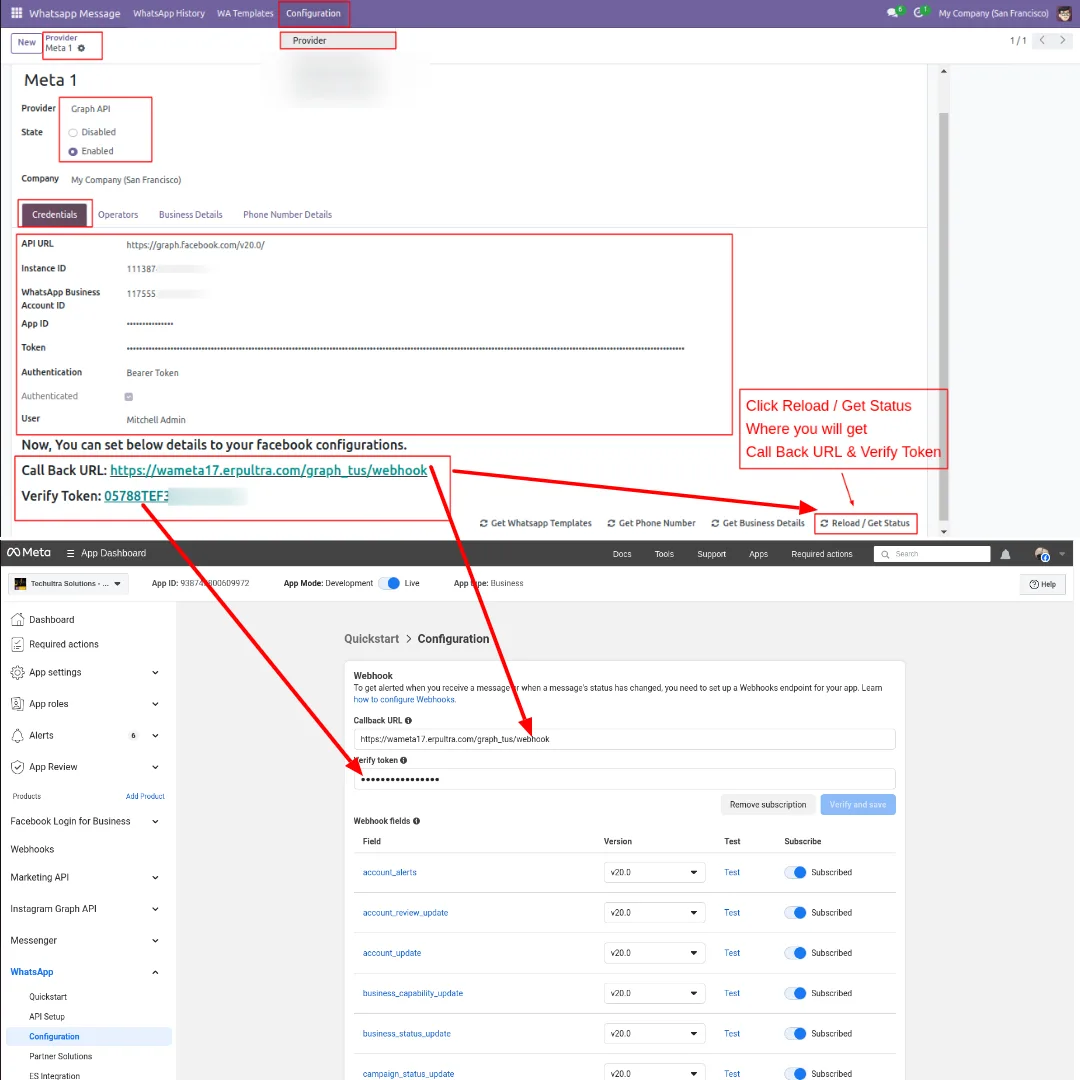
Click Reload / Get Status to retrieve the callback URL and verify token, paste both into Meta's webhook settings, and click Verify & Save.
- 6
Sync templates and add operators
Use Get WhatsApp Templates to import approved templates, add operators under the Operators menu, and set contact mobile numbers with country codes.
Frequently asked questions
-
Which WhatsApp modules are included in this bundle?
The bundle includes five TechUltra modules: WhatsApp Base, Automation, Discuss (two-way chat), Marketing, and Chatbot. They install together so you get the full suite in one package.
-
Does this work with Odoo Community edition?
Yes. The suite is built for the Community edition and supports Odoo 15.0, 16.0, 17.0, 18.0, and 19.0.
-
Is this an official WhatsApp integration?
Yes. The suite uses Meta's official WhatsApp Cloud API, so your business number runs on a Meta-approved channel rather than an unofficial gateway.
-
Can agents reply to customers from inside Odoo?
Yes. The Discuss module adds bidirectional WhatsApp chat to Odoo's Discuss app, with sent, delivered, and read indicators, agent assignment, and the contact record in the chat sidebar.
-
What kinds of templates can I send?
You can send text and multimedia templates plus interactive templates — List, Buttons, Product, and Product List — synced from your Meta WhatsApp account.
-
Can I run marketing campaigns and a chatbot together?
Yes. The Marketing module sends promotional messages to grouped contacts and tracks campaign history, while the Chatbot module handles automated first-line replies on the same number.
-
Do new templates need approval before I can use them?
Yes. WhatsApp message templates go through Meta's review, which typically takes around 24 hours before a template can be sent.
-
Is support included?
Yes. The module includes 90 days of bug-fix support, Monday to Friday, 10:00–19:00 IST.
Related solutions
Whole-platform solutions that complement All-in-One WhatsApp (Community).
WhatsApp ↔ Odoo Integration
Two-way WhatsApp Business API integration with Odoo. Customer messages, order updates, invoices, and payment links — unified inbox for agents.
AI WhatsApp Chatbot
LLM-powered WhatsApp chatbot grounded in your Odoo data. Handles ordering, support, FAQs, and lead qualification with human-agent escalation.
Odoo WhatsApp Push Notifications
Real-time WhatsApp push notifications in Odoo — web, Android, iOS. Customer names in Discuss instead of phone numbers. Compatible with Odoo V12–V18 (as of 2025).
Related services
Get the most out of this module with senior TechUltra consultants.
Odoo Customization Services
Tailored Odoo customizations from a Gold Partner — 200+ projects, upgrade-safe patterns, fixed-scope quotes, senior consultants. Free demo consultation.
Hire Odoo Developers
Hire certified Odoo developers from a Gold Partner — 400+ implementations, 92% satisfaction, Odoo since 2016. Silver / Gold / Platinum packages, free trial.
Odoo Support & Maintenance
Odoo Gold Partner support — 24/7 functional, technical, and server coverage for Enterprise and Community editions. Fast turnaround, free consultation.