
Migration playbook
Migrate from Sage to Odoo
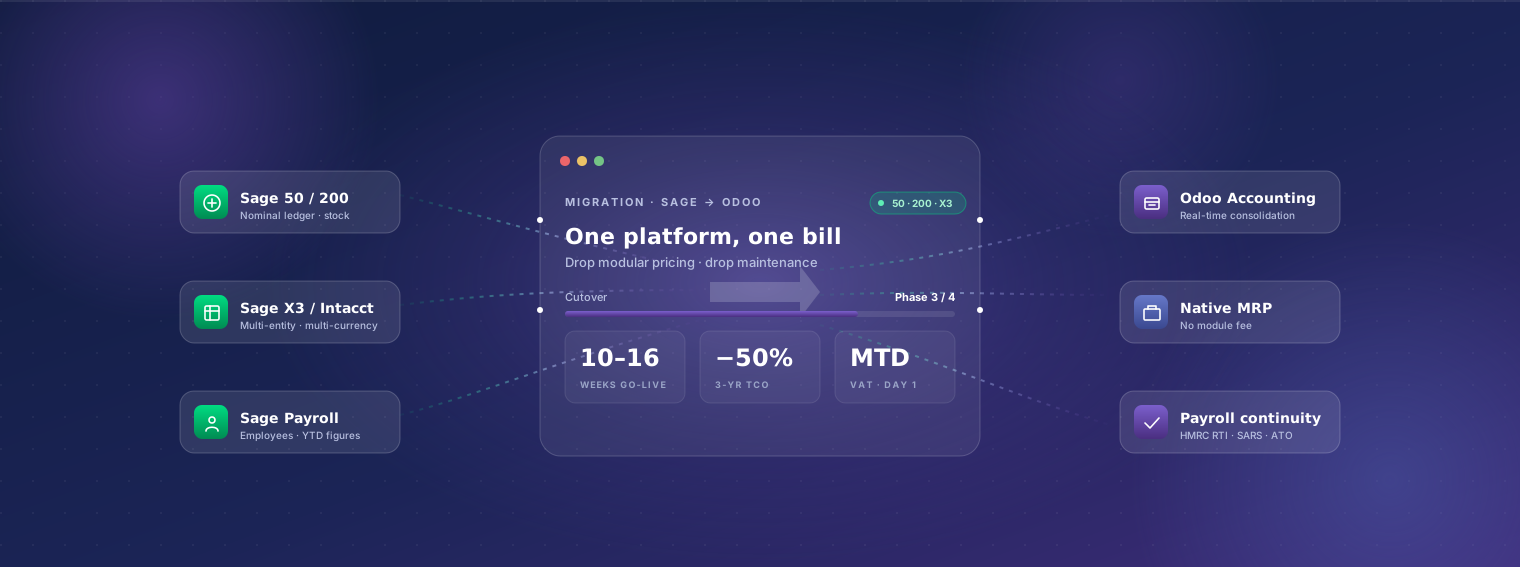
Sage covers a spectrum — from Sage 50 on a single desktop to Sage Intacct in the cloud — and every flavor eventually runs into the same wall: the upgrade path is expensive, the modular pricing compounds, and the integrations are aging. Odoo replaces Sage with one platform across accounting, operations, and CRM. This playbook covers Sage 50, Sage 100, Sage 200, Sage X3, Sage Business Cloud Accounting, and Sage Intacct — pick the section that matches your version.
Last reviewed:
- Weeks end-to-end
- 10–16Weeks end-to-endvaries by Sage version
- Fixed-price range
- $25–65kFixed-price rangeUSD, scope-dependent
- Weeks parallel run
- 3–4Weeks parallel runboth systems live
Why businesses migrate from Sage to Odoo
-
Aging desktop installation (Sage 50/100/200)
Sage 50 and Sage 100 desktop installations are still common in long-running mid-market businesses. The platform works but the per-user license + database server + annual maintenance pile up, and mobile / cloud / remote access remain afterthoughts. Odoo is cloud-native (Odoo.sh or Odoo Online) — the team can work from anywhere on day one.
-
Modular pricing compounding faster than value
Sage's per-module pricing means manufacturing, payroll, project costing, payment processing, and reporting each carry their own monthly fee. By the time a 50-person mid-market business buys what it actually needs, the bill is USD 40,000–80,000/year. Odoo Enterprise Custom at USD 38/user/month is one all-in number.
-
Sage Intacct renewals climbing aggressively
Sage Intacct (USA mid-market cloud) is well-built but its renewal pricing is famously aggressive — 10–25% year-on-year jumps are common. Customers who locked in low Year-1 pricing often see their renewal triple by Year 3. Odoo's per-user pricing is stable and published.
-
Custom Sage developments locked to legacy versions
Sage 200 / X3 / 50 customisations (VBA, Sage SDK, Sage Macros) often block upgrades. Customers stay on out-of-support versions because upgrading means rewriting the customisations. Migration to Odoo rewrites them in modern Python on a platform with versioned upgrade paths.
-
Integration ecosystem dating
Sage's integration ecosystem skews toward older specialist tools (Pegasus, Datel, IRIS, etc.) priced per integration. Modern integrations to Shopify, Amazon, Stripe, payment gateways, e-commerce, and EDI are present but often via third-party connectors at additional cost. Odoo's CRM, e-commerce, and accounting share one database; modern integrations are native or first-party.
-
Manufacturing on Sage feels constrained
Sage 200 Manufacturing and Sage X3 Manufacturing are competitive but cost meaningful add-on fees, and customisation depth is limited compared to modern ERPs. Odoo Manufacturing on Enterprise handles MRP I and II at no incremental module cost.
-
Multi-currency and consolidation overhead
Multi-entity multi-currency on Sage 200 or Sage Intacct works but consolidation involves either manual close processes or paid consolidation tools. Odoo's multi-company multi-currency is native with real-time consolidation included in Enterprise.
-
Mobile and modern UX
Sage desktop applications (50/100/200) require thin-client setups (Citrix, RDP) for remote access. Sage Business Cloud and Intacct are cloud-native but the UX feels dated. Odoo's web UI plus mobile app are modern and consistent across devices.
What survives the migration
Plain-English breakdown of what we move, what we re-map, and what gets rebuilt in Odoo's framework rather than ported.
| Data category | Coverage | Detail |
|---|---|---|
| Customers (sales ledger) | Fully migrated | All sales ledger accounts migrated as Odoo contacts with addresses, contacts, payment terms, credit limits, tax codes, opening AR balances. De-duplication during migration. |
| Suppliers (purchase ledger) | Fully migrated | Purchase ledger accounts migrated with banking details, payment terms, tax registrations, opening AP balances. |
| Nominal ledger / chart of accounts | Partial / mapped | Sage's nominal code structure mapped to Odoo's chart of accounts. Older Sage installations (especially Sage 50) typically have ledgers that have accreted over years — we standardise during migration with your accountant's input. |
| Stock items | Fully migrated | Stock and non-stock items with descriptions, bin locations, prices, costs, tax codes, supplier links. Sage's BOM data (where present) becomes Odoo BOMs. |
| Opening balances | Fully migrated | Bank balances, cash balances, AR, AP, fixed assets, loans, VAT control — reconciled to a specific cutover date. Auditor sign-off before cutover. |
| Stock opening balances | Fully migrated | Opening quantities by item by location with cost. Costing method (FIFO / average / standard) re-selected in Odoo per accounting policy. |
| Transactional history | Partial / mapped | 1–3 years of sales invoices, purchase invoices, payments, receipts, and journals migrated for historical reporting. Older history stays in read-only Sage archive — depending on Sage version, this might be local files, a Sage Drive backup, or Sage Intacct read-only access. |
| VAT registration and history | Fully migrated | VAT settings, tax codes (T0, T1, T2 etc.), MTD filing history, EC sales lists if applicable. Odoo's UK MTD VAT localisation takes over for filing. Comparable for South African VAT, Australian BAS, US sales tax. |
| Payroll (Sage 50cloud Payroll / Sage Business Cloud Payroll) | Partial / mapped | Employees, pay rates, deductions, leave balances, and YTD figures migrated. Payroll history (closed pay runs) stays in Sage; new payroll runs start in Odoo's country-specific payroll. Tax authority reporting (HMRC RTI for UK, SARS for SA) re-registered to Odoo. |
| Project costing / job tracking | Rebuild in Odoo | Sage Project Costing / Sage 200 Project Accounting workflows are recreated in Odoo Project — typically cleaner because Odoo's project model handles WIP, billing types, and project P&L natively. |
| Sage Reports / SBR custom reports | Rebuild in Odoo | Sage Business Reports, SBR, and Crystal Reports rebuilt as Odoo native reports, dashboards, or Spreadsheet views. Document each existing report's purpose during discovery; rebuild only what's load-bearing. |
| Attached documents | Partial / mapped | Documents attached to Sage transactions (invoices, POs, contracts) migrated where the Sage version supports document export. Bulk archives migrated to Odoo Documents separately. |
| Multi-company structure (Sage 200 / X3 / Intacct) | Fully migrated | Multi-entity setup migrates cleanly. Each Sage entity becomes an Odoo company; inter-company flows and consolidation re-implemented in Odoo's native multi-company features. |
| Users and permissions | Rebuild in Odoo | Sage's user roles re-created in Odoo's RBAC. Migration is usually a chance to tighten access patterns that drifted over years. |
Our phased approach
-
Discovery week
1 week, fixed-priceSenior consultant audits your Sage installation (version, modules used, customisations, integration points), business processes, and target Odoo scope. Output: written migration plan + fixed-price quote.
-
Sandbox migration
4–7 weeksMigration scripts built per Sage version — Sage 50 ODBC, Sage 200 SQL, X3 export, Intacct API. Sandbox Odoo loaded and reconciled to the penny. Your finance team validates ledgers, balances, and representative transactions.
-
Odoo configuration in parallel
4–6 weeks (overlapping)Country localisation (UK MTD VAT, South African VAT, Australian BAS, USA sales tax / Avalara, etc.) configured. Sage modules being replaced (manufacturing, project, payroll) set up in Odoo. Integrations migrated from Sage connectors to Odoo equivalents.
-
User training
2 weeksRole-based training (AR, AP, ops, sales, warehouse) with hands-on time in sandbox Odoo. Recorded modules per role. Sage's heritage means many users have been on the platform for years — change management matters more than the typical migration.
-
Cutover weekend
1 weekendSage closes for new transactions Friday evening. Final migration runs Saturday. Reconciliation Sunday with auditor / accountant sign-off. Monday morning: team starts in Odoo.
-
Parallel-run period
3–4 weeksBoth Odoo and Sage accessible. New transactions in Odoo only; Sage read-only. We monitor every flow, fix anything that surfaces, validate one month-end close in Odoo before decommissioning Sage.
-
Stabilisation
30 days post go-liveOn-call engineering, weekly status, fast fixes. By day 30 the team is comfortable, finance has closed a month-end in Odoo, and we transition to normal support.
Typical timeline
10–16 weeks end-to-end for typical mid-market Sage migrations. Variables: (1) Sage version — Sage 50 is fastest (smaller scope), Sage 200/X3 are slower (more modules), Intacct is between; (2) custom code count — VBA macros and Sage SDK customisations each need rewriting; (3) module breadth — adding payroll or manufacturing extends by 2–3 weeks each. We commit to a specific timeline at the end of discovery week.
Indicative cost
USD 25,000–65,000 fixed-price for end-to-end migration + Odoo go-live, depending on Sage version, module count, and customisation depth. Discovery week: USD 3,000–5,000 fixed, deductible. Add USD 5,000–15,000 per substantial integration migration (manufacturing modules, payroll cutover, e-commerce, EDI). Compare to running Sage 200 Professional + 5 modules + maintenance for a 50-user mid-market business: typically USD 45,000–80,000/year all-in.
Risks and mitigations
-
Risk: Sage 50 desktop file corruption or older versions
Mitigation: Sage 50 files older than v25 sometimes have schema issues or corruption from long-running use. Discovery week includes a file health check; we run cleanup scripts (or recommend a paid Sage cleanup session) before attempting migration. Migrations from out-of-support Sage versions are still tractable but slower.
-
Risk: VBA / Sage SDK custom developments
Mitigation: Any meaningful Sage 200 or Sage 50 customisation is in VBA, Sage SDK, or Sage Macros — none portable. We inventory each customisation during discovery, classify as replace-with-Odoo-default, rebuild-as-customisation, or no-longer-needed. Most rebuilds are smaller than the original because Odoo's defaults cover more.
-
Risk: Nominal code restructure mid-migration
Mitigation: Sage 50 nominal codes that started small and grew (e.g. 8 categories of 'Office Expenses') need restructure. We design the new CoA up-front with your accountant's input; map historical transactions during migration; the output is a cleaner CoA than was in Sage.
-
Risk: MTD VAT continuity (UK)
Mitigation: Sage's MTD VAT filing is HMRC-recognised; Odoo's also is. We migrate VAT registration mid-quarter so the same VAT number files via Odoo's submission. Pre-validate Odoo's MTD format against HMRC sandbox before cutover. First Odoo filing usually within the first month post-go-live.
-
Risk: Auditor reluctance to sign off on a migration mid-cycle
Mitigation: Sage-heritage businesses often have long-standing audit relationships. Discovery week includes a call with your auditor to plan cutover timing — usually right after year-end or mid-quarter, not Q4. We've passed migrations with KPMG, Deloitte, BDO, and mid-tier UK / South African / US audit firms without findings.
-
Risk: Sage Intacct API rate limits
Mitigation: Intacct's API is robust but enforces rate limits that slow large data exports. We schedule extractions over multiple nights for large Intacct organisations; saves the 'why is this taking so long' moment in the middle of the sandbox phase.
-
Risk: Sage payroll year-end timing
Mitigation: Sage Payroll year-end (April for UK, varies elsewhere) is a sensitive period. We sequence payroll migration AFTER the Sage year-end run, not during. Pre-Apr cutover means one final HMRC year-end submission from Sage, then April onwards in Odoo.
-
Risk: Sage's installed integration ecosystem (Datel, IRIS, Pegasus)
Mitigation: Each existing connector audited during discovery. Most have direct Odoo equivalents (often cheaper). Where a specific Sage-only connector is genuinely irreplaceable, we keep it as a sync to a small Sage instance OR rebuild the integration in Odoo's framework. Rare case.
Who should migrate
Mid-market businesses (20–500 users) on Sage 50, Sage 100, Sage 200, Sage Business Cloud, Sage Intacct, or Sage X3 where the platform is no longer the best fit. Particularly: businesses bumping into Sage's module pricing ceiling, manufacturers wanting modern MRP, multi-entity groups consolidating, businesses needing modern e-commerce integration without bolt-on connectors, and Intacct customers facing aggressive renewal pricing. Smaller Sage 50 single-user businesses with simple bookkeeping needs are usually not a fit — Sage 50 is still cheap and adequate for that.
Frequently asked questions
-
Which Sage versions can you migrate from?
All commonly-deployed Sage versions: Sage 50 (UK/IE/US/CA), Sage 100 (USA mid-market), Sage 200 (UK/Africa), Sage X3 (global mid-market), Sage Business Cloud Accounting (cloud SMB), and Sage Intacct (USA cloud mid-market). Older Sage Line 50 versions migrate too but require a Sage cleanup pass first.
-
How long does each Sage version take?
Sage 50 with 1–2 years of data: 8–12 weeks. Sage 200 with 5+ years: 12–16 weeks. Sage X3 multi-entity: 14–20 weeks. Sage Intacct: 12–16 weeks. Sage Business Cloud Accounting: 8–12 weeks. Discovery week confirms your specific scope and timeline.
-
Will my nominal codes continue?
We typically restructure the nominal code / chart of accounts during migration because older Sage installations have accreted complexity. The output is a CoA your accountant will actually prefer. Historical Sage transactions are mapped to the new CoA so reports reconcile.
-
What about Sage Payroll?
Sage 50cloud Payroll, Sage Business Cloud Payroll, and Sage 200 Payroll all migrate to Odoo's country-specific payroll. Employees, pay rates, statutory deductions (PAYE, NI, UIF, FICA, etc.), pension schemes, and YTD figures migrate. First payroll run from Odoo happens within the first month, with full reconciliation against the final Sage run.
-
Can we keep Sage Intacct for accounting and use Odoo for everything else?
Technically possible (Odoo → Sage Intacct sync) but rarely the right answer. Intacct's renewal pricing is usually the trigger for the migration in the first place; keeping it negates the saving. We'll do it cleanly if your accounting team genuinely needs to stay on Intacct for audit reasons, but the standard answer is full migration.
-
How does Odoo compare to Sage on TCO?
For a 50-user mid-market business: Sage 200 Professional + 5 modules + maintenance + add-ons ≈ USD 45,000–80,000/year. Odoo Enterprise Custom 50 users + Odoo.sh hosting ≈ USD 25,000–30,000/year. Add implementation (one-time): roughly comparable between the two. 3-year TCO advantage to Odoo: typically USD 60,000–150,000 depending on Sage version and add-on count.
-
Will my Sage advisor / accountant have access?
Yes — we provision them an Odoo user with appropriate permissions (read-only or advisor-level) before cutover. Most UK and US accountants have used Odoo or can ramp quickly because Odoo's accounting UI is intuitive and the underlying double-entry concepts are universal.
-
What about Sage Drive / Sage Business Cloud backups?
Pre-migration backups are preserved as Sage's standard backup format. Post-migration, the Sage file remains accessible for the duration you choose (typically 1–2 years for audit). Sage Business Cloud subscriptions can downgrade to a low-tier read-only plan for archive access.
-
Can you migrate Sage X3 to Odoo? It's a much bigger system.
Yes. Sage X3 migrations are the longest in this category (14–20 weeks) because X3 is a true mid/upper-mid ERP with more modules, more entities typically, and more customisation. We've migrated X3 customers in the UK, France, and South Africa. The output is usually significantly cheaper to run and more flexible to customise.
-
Will customer-facing documents (invoices, statements) keep the same format?
We re-create Sage invoice and statement templates as Odoo report templates during migration. Customers see continuity in format — same layout, same logo, same fonts, same numbering. The first invoice you send from Odoo to a long-standing customer is intentionally indistinguishable from a Sage invoice except for the system that sent it.
-
What's the regional fit — UK, USA, South Africa, Australia?
We migrate Sage globally. Particularly strong fit for UK (TechUltra's UK partner firm handles Sage 50 / 200 / Business Cloud), South Africa (TechUltra's South Africa partner firm handles Sage 200 Evolution / Sage Pastel), and India where we lead from. USA Sage 100 / Intacct migrations run from the India delivery team with US-time-zone consultants on the call.
-
What's the first step?
A 30-minute scoping call. Tell us which Sage version, rough user count, and the top three reasons you're considering a move. We'll tell you whether discovery week is worth scheduling and what the realistic project size looks like.