
Migration playbook
Migrate from QuickBooks to Odoo
Most businesses that outgrow QuickBooks are running into the same three walls: inventory and manufacturing depth, multi-entity / multi-currency, and process automation. Odoo solves all three on one platform. Here's exactly how the migration works — what we move, what we re-map, what we rebuild, the realistic timeline, and what it costs.
Last reviewed:
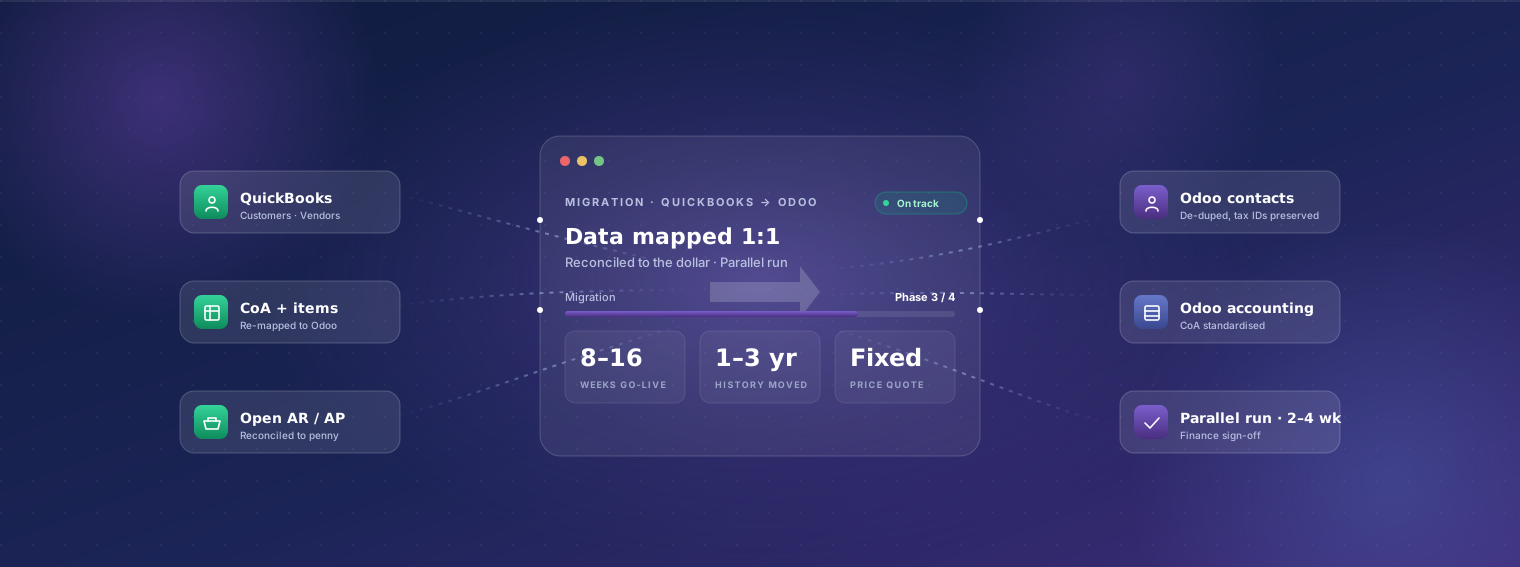
- Weeks end-to-end
- 8–16Weeks end-to-endtypical mid-market scope
- Fixed-price range
- $18–55kFixed-price rangeUSD, scope-dependent
- Weeks parallel run
- 2–4Weeks parallel runboth systems live
Why businesses migrate from QuickBooks to Odoo
-
Inventory and manufacturing depth
QuickBooks inventory is single-warehouse, single-method, with light bill-of-materials. Real manufacturing — multi-step BOMs, work orders, routings, MRP runs, quality control, MES integration — doesn't exist. Odoo Manufacturing handles MRP I and MRP II natively, with the same database as your accounting.
-
Multi-entity and multi-currency
QuickBooks supports one company per file. Multi-entity groups end up with multiple QuickBooks files, manual consolidation in Excel, and quarterly pain. Odoo runs multi-company multi-currency natively on one database with real-time consolidation and inter-company invoicing.
-
Process automation
QuickBooks is a system of record but not a system of work. Sales orders, purchase approvals, project costing, expense workflows, document approvals — all happen in email, spreadsheets, or third-party SaaS that sync clumsily into QuickBooks. Odoo collapses these into one place with real workflows and audit trails.
-
User and entity scaling cost
QuickBooks Online Advanced caps at 25 users; QuickBooks Enterprise scales further but pricing climbs fast (USD 1,800–8,000+/year per company file). At 20–50 users, Odoo Enterprise Standard (around USD 25/user/month) is often cheaper while doing more.
-
Reporting limits
QuickBooks reports cover the basics well but break down on multi-dimensional analytics, cohort-style cuts, deferred revenue, project profitability, and operational reporting outside accounting. Odoo's Studio + Spreadsheet view + dashboards put real BI inside the ERP.
-
E-commerce, CRM, marketing integration
QuickBooks integrates with Shopify, Amazon, HubSpot, Salesforce, etc. via third-party connectors that frequently break and add per-month cost. Odoo's CRM, e-commerce, and marketing modules share one database with accounting — no sync.
-
Regulatory / e-invoicing
QuickBooks is US-built and most regulatory features outside the US are partner-add-ons. For UK MTD, Saudi ZATCA, India GST e-invoicing, Mexico CFDI, Italy FatturaPA, or France's 2026 PDP mandate, you'll need bolt-ons. Odoo ships these as country localizations.
-
Project costing and time tracking
QuickBooks project tracking is basic. Service businesses billing time, managing project P&L, and reconciling actual hours against budget run out of road quickly. Odoo Project + Timesheets + invoicing share data natively.
What survives the migration
QuickBooks stack → one Odoo instance
Before · 4 systems
- QuickBooks — accounting
- Bill.com — accounts payable
- Expensify — expenses
- Spreadsheets — inventory
After · 1 system
- Odoo — accounting, AP, expenses and inventory on one database
A typical QuickBooks stack at the point businesses start looking, not a specific client. The add-on apps named here are the ones this page's FAQ covers; Odoo's modular equivalents replace them natively.
Plain-English breakdown of what we move, what we re-map, and what gets rebuilt in Odoo's framework rather than ported.
| Data category | Coverage | Detail |
|---|---|---|
| Customers and contacts | Fully migrated | All customer records migrated with addresses, contacts, tax IDs, payment terms, opening AR balances. We de-duplicate during the move — QuickBooks files typically have 5–15% duplicate customers from years of casual data entry. |
| Vendors / suppliers | Fully migrated | Vendor records with banking details, payment terms, 1099 status (US), opening AP balances. Same de-duplication pass as customers. |
| Chart of accounts | Partial / mapped | Migrated with a structural review. QuickBooks CoAs tend to drift over years; we standardize against Odoo's accounting structure and your auditor's expectations, then map historical transactions to the new CoA. |
| Items / products | Fully migrated | Inventory and non-inventory items with descriptions, SKUs, costs, prices, tax codes, vendor links. Bundled items in QuickBooks become Odoo BOMs or kits depending on intent. |
| Open AR (unpaid invoices) | Fully migrated | Every open invoice migrates with its customer, due date, amount, tax breakdown, and remaining balance. Customers see continuity — same invoice number, same balance, same dunning. |
| Open AP (unpaid bills) | Fully migrated | Every open vendor bill migrates with its vendor, due date, and remaining balance. Approval state preserved where it exists. |
| Bank and credit-card balances | Fully migrated | Opening balances reconciled to a specific cutover date. Future bank reconciliation runs in Odoo using the same bank feeds (most US/UK/EU banks supported natively). |
| Historical transactions (closed) | Partial / mapped | We migrate 1–3 years of closed transactions for historical reporting and audit trail. Older history stays in a read-only QuickBooks archive — cheaper and faster than porting 10 years of journals. |
| Stock balances | Fully migrated | Opening stock by item by location, reconciled to a specific cutover date. Costing method (FIFO, average, etc.) re-selected in Odoo to match your accounting policy. |
| Custom fields | Partial / mapped | QuickBooks custom fields on customers, items, transactions are mapped to Odoo native fields or new custom fields. Some QuickBooks-isms (e.g. 'Class' tracking) re-map to Odoo's analytic accounting cleanly. |
| Recurring transactions | Rebuild in Odoo | QuickBooks recurring templates are re-created as Odoo subscriptions, recurring invoices, or scheduled actions — usually cleaner than the source. |
| Custom reports | Rebuild in Odoo | QuickBooks custom reports are not portable. We catalog what each report is used for, then rebuild as Odoo's native reports, dashboards, or Spreadsheet views. Output is typically faster and more flexible than the QuickBooks original. |
| Attached documents | Partial / mapped | Documents attached to transactions in QuickBooks Online (receipts, invoices, contracts) are migrated where the QuickBooks API exposes them. Bulk document archives are sometimes faster to move with a one-time storage tool than per-transaction. |
| Users and permissions | Rebuild in Odoo | User accounts and permission groups are re-created in Odoo's role-based model — usually a chance to tighten access patterns that drifted in QuickBooks. |
Our phased approach
-
Discovery week
1 week, fixed-priceSenior consultant audits your QuickBooks file(s), business processes, current pain points, and target Odoo scope. Output: written migration plan + fixed-price quote for the full project. Includes data sample extraction so the migration scripts can be designed against your actual file.
-
Sandbox migration
3–6 weeksWe build the migration scripts, run them against a sandbox Odoo instance, and reconcile against QuickBooks to the dollar / pound / rupee. Your team validates customers, vendors, balances, and a representative sample of transactions. Iterations are normal here — first-pass data is rarely perfect.
-
Odoo configuration in parallel
3–6 weeks (overlapping)While the migration scripts are being refined, we configure Odoo for your operational flow: workflows, approvals, custom fields, integrations (banks, payment gateways, e-commerce), and any custom modules needed. Often parallel with sandbox migration.
-
User training
1–2 weeksRole-based training (AR, AP, sales, ops) with hands-on time in the sandbox Odoo. Short recorded modules for ongoing reference. Goal: by go-live, every user has done their job in Odoo at least three times.
-
Cutover weekend
1 weekendClose QuickBooks for new transactions on Friday. Run the final migration (closing balances, last week's transactions) on Saturday. Reconcile to the penny on Sunday. Monday morning: team starts in Odoo.
-
Parallel-run period
2–4 weeksBoth Odoo and QuickBooks remain accessible. New transactions in Odoo only; QuickBooks is read-only reference. We monitor every business process, fix anything that surfaces, and only fully decommission QuickBooks once finance signs off on a clean reconciliation.
-
Stabilisation
30 days post go-liveOn-call engineering, weekly check-ins, fast fixes for anything operational. By day 30 the team is comfortable, finance has closed a month-end in Odoo, and we move into normal support.
Typical timeline
8–16 weeks end-to-end for a typical mid-market migration. The wide range reflects three variables: (1) data volume — a 5-year QuickBooks Enterprise file takes longer than a 2-year QuickBooks Online file; (2) customization depth — net-new Odoo features being built in parallel extend the timeline; (3) finance team availability for reconciliation, which is often the practical bottleneck. We commit to a specific timeline at the end of discovery week, not before.
Indicative cost
USD 18,000–55,000 fixed-price for end-to-end migration plus Odoo go-live, depending on data scope, integrations, and customization. Discovery week itself is USD 2,500–4,000 fixed, deductible from the full project quote if you proceed. Add USD 5,000–15,000 for substantial integrations (Shopify, Amazon, Stripe, custom). Compare to running QuickBooks Enterprise + 4 add-on apps for 50 users: typically USD 18,000–30,000/year, with the same operational gaps you're trying to fix.
Risks and mitigations
-
Risk: Data hygiene worse than expected
Mitigation: Discovery week always includes a data audit. If we find systemic issues — duplicate customers, mis-coded transactions, broken bank reconciliations in QuickBooks — we either fix in source before migrating or build cleaning scripts. The audit is the early-warning system; surprises after that are rare.
-
Risk: Chart of accounts mismatch
Mitigation: Most QuickBooks CoAs accrete cruft over years (one-off accounts for old projects, duplicates from staff changes). We design the new CoA up-front with your finance team and auditor input, then map historical transactions during migration. Output: a cleaner CoA in Odoo than was ever in QuickBooks.
-
Risk: Custom QuickBooks reports nobody documented
Mitigation: We require a report inventory from your team during discovery: which reports does each role actually use, and why. This catches 'I run this every Monday morning' reports that aren't on anyone's official list. Anything load-bearing gets rebuilt as a native Odoo report.
-
Risk: Custom integrations that won't survive
Mitigation: Any QuickBooks-specific connector (Shopify-via-QB, Stripe-via-QB, etc.) is audited during discovery. Most have direct Odoo equivalents that work better. The few that don't get custom-built; the cost is in the quote.
-
Risk: Finance team reconciliation bottleneck
Mitigation: Reconciliation isn't optional — your finance team must sign off on balances. We schedule it explicitly in the timeline and don't compress that phase. If your finance team is genuinely under-resourced, we recommend hiring a temp specifically for the migration window.
-
Risk: Cutover-weekend transaction volume spike
Mitigation: Some businesses can't shut down for a weekend. We then either (a) cut over module-by-module rather than all at once, or (b) run the cutover on a low-volume weekend (long bank holidays in your region). The migration plan adapts to operational constraints.
-
Risk: Multi-entity reconciliation
Mitigation: Groups running multiple QuickBooks files often have informal inter-company processes that have to be formalized in Odoo. We catch these during discovery and design the inter-company workflows up front, with finance team sign-off.
-
Risk: Bank-feed gap during cutover
Mitigation: Bank feeds in QuickBooks have to be disconnected at cutover and re-established in Odoo. There's a 1–3 day gap for most US/UK/EU banks. We pre-stage manual statement upload for the gap days so reconciliation continuity isn't broken.
Who should migrate
Mid-market businesses (20–500 users) currently on QuickBooks Online Advanced or QuickBooks Enterprise where the platform is no longer keeping up. Particularly: manufacturers (BOMs, work orders, MRP), distributors and retailers with real inventory complexity, multi-entity groups consolidating across multiple QuickBooks files, professional services firms billing project time, and e-commerce operators with significant Shopify/Amazon/WooCommerce volume. Smaller businesses (under 15 users) running pure accounting on QuickBooks Online Simple/Plus are usually a worse fit — the migration cost is hard to justify against limited functional gain. We'll say so honestly during discovery if that's you.
Frequently asked questions
-
Can you migrate from QuickBooks Online or only QuickBooks Desktop?
Both. QuickBooks Online uses the QuickBooks API (clean, well-documented) which makes migration scripts straightforward. QuickBooks Desktop migrates via .IIF / .QBB export or direct database extraction — more setup work, but well-trodden. We've migrated from both; the data fidelity is comparable.
-
Will my invoice numbers continue from where QuickBooks left off?
Yes — and this matters more than it sounds. Customers expect continuity, your accountant expects continuity, and an audit trail with a number jump is annoying. We configure Odoo's number sequences to pick up from the QuickBooks last-used number for invoices, bills, journal entries, and any other numbered document. Same for customer codes and vendor codes if they're meaningful to your team.
-
Can we keep QuickBooks read-only after migration?
Yes — and we recommend it. QuickBooks Online subscriptions can downgrade to the cheapest plan and keep the historical file accessible for audit and reference. QuickBooks Desktop files can be archived locally with the application installed read-only. Most businesses keep this access for 1–3 years (depending on audit cycle) before fully decommissioning.
-
What about QuickBooks Payroll / QuickBooks Time?
Payroll: Odoo has country-specific payroll (US, UK, India, etc.) in Enterprise. We migrate employees, pay rates, deductions, and YTD figures; payroll cuts over to Odoo cleanly. QuickBooks Time → Odoo Timesheets is direct. Both are usually rolled into the same migration project.
-
How is sales tax handled during and after the migration?
Tax codes are re-mapped from QuickBooks to Odoo's tax engine, which is more flexible (multi-jurisdictional, group taxes, automatic rules). For US sales tax with Avalara or TaxJar integration, both have Odoo connectors that take over post-cutover. UK MTD VAT, EU VAT, India GST, Saudi ZATCA all use Odoo's native localizations.
-
Can you migrate while we're using QuickBooks for daily operations?
Yes — the sandbox migration phase doesn't disrupt your live QuickBooks. We run scripts against a copy of your file. The only operational pause is the cutover weekend (closing balances, final transactions, switch users) which is typically a Friday-evening-to-Monday-morning window.
-
What if we have audit requirements we can't break?
Most audited businesses migrate either right after year-end close (simpler) or mid-year with parallel ledger keeping (more complex but workable). Discovery week includes your audit firm's input on cutover timing. We've migrated companies with Big 4 audits without audit findings.
-
How long does the parallel-run period really need to be?
2–4 weeks for most businesses. The first week proves the operational flows; the second week catches month-end reconciliation issues; weeks three and four are cushion. Some businesses extend to 6–8 weeks if they have quarterly close cycles to validate. We recommend not shortening below 2 weeks even if pressure exists — saving a week here costs more than it's worth if something surfaces in week three.
-
Will my QuickBooks add-on apps (e.g. Bill.com, Expensify) have Odoo equivalents?
Almost always. Odoo's modular architecture covers most of what QuickBooks ecosystem apps add: native AP automation (vs. Bill.com), native expense management (vs. Expensify), native time tracking, native e-signature, native CRM, native e-commerce. Where you genuinely want to keep the external tool (e.g. Salesforce), there's a clean integration. Most QuickBooks migrations end up with fewer separate SaaS tools, not more.
-
What about historical reports our accountant needs at year-end?
Two paths. (1) Historical years stay in the read-only QuickBooks archive — accountants can pull standard reports there. (2) Migrated transactional history (1–3 years) supports the same reports in Odoo, regenerated as native Odoo reports. The CoA mapping means side-by-side comparisons reconcile.
-
What region do you migrate from?
Globally. QuickBooks is most prevalent in the US, UK, Canada, Australia, India — and we've migrated from all five regions. Country-specific localization (US sales tax, UK MTD VAT, India GST, Australian BAS) is configured during the migration so day 1 on Odoo is fully compliant.
-
What's the very first step if we want to discuss this?
A 45-minute scoping call. We need three things to give you a useful first estimate: rough user count, which QuickBooks edition you're on, and the top three reasons you're considering a move. From that we can tell you whether discovery week makes sense and what the realistic project size looks like.