
TechUltra Foundry · Odoo 20 Enterprise
Foundry ERP Software on Odoo
TechUltra Foundry is foundry ERP software built on Odoo 20 Enterprise. It runs a casting plant from the metal purchase to the invoice: heats, charge and chemistry, mould plans and patterns, pouring, knockout and fettling, rejections, test certificates, heat costing, GST job work, OEM schedules and CBAM carbon reports. Every casting traces back to its heat.
Last reviewed:
Watch the 18-minute walkthrough
An 18-minute walkthrough of TechUltra Foundry on a demo plant: setting up grades, furnaces and patterns, buying the metal, planning moulds from customer orders, melting and correcting a heat, pouring and finishing, inspection and the test certificate, delivery, invoice and heat costing. It then covers GST job work and OEM schedules for India, CBAM reporting for EU exports, the investment-casting, steel and die-casting modules, the AI defect advisor and the customer portal.
What the video covers
- 0:41 Company and settings
- 1:36 Records needed before we start
- 2:37 Buying the metal
- 3:04 Customer orders and production
- 3:56 Mould plan
- 4:48 Melting a heat
- 6:33 Pouring and finishing
- 7:27 Quality and finishing the order
- 8:30 Delivery and invoice
- 9:27 Costing
- 10:02 India: job work with GST challans
- 11:07 India: OEM customer schedules
- 12:04 Export to Europe: the CBAM carbon report
- 13:06 Investment casting
- 14:18 Steel foundry
- 15:36 Die casting
- 16:16 AI assistant
- 17:28 Customer portal
- 17:57 Wrap-up
What it is
Foundry ERP is software that runs a metal-casting plant: melting, moulding, pouring, finishing, quality and costing, joined to purchasing, sales and accounting. TechUltra Foundry does this inside Odoo 20 Enterprise rather than beside it. Foundry records (metal grades, furnaces, moulding lines, patterns, heats, mould plans, pourings, rejections and cost sheets) sit on the same database as Odoo Purchase, Inventory, Manufacturing, Quality, Sales and Accounting. A heat consumes stock, creates a liquid-metal lot, and every casting lot poured from it carries the heat number to the delivery, the test certificate and the invoice.
Why it matters
Most foundries run the melt shop on paper or spreadsheets and the rest of the business in an ERP that has never heard of a heat. That gap is where money leaks. Nobody can say what a good kilogram of casting really cost, a failed spectrometer sample is found after pouring, and a customer complaint takes days to trace to the heat, the charge and the moulding line. Foundry ERP closes the gap: chemistry is checked against the grade before tapping, the cost of each heat is computed from its own charge, power and returns, and the trace from invoice to heat is one click.
Features
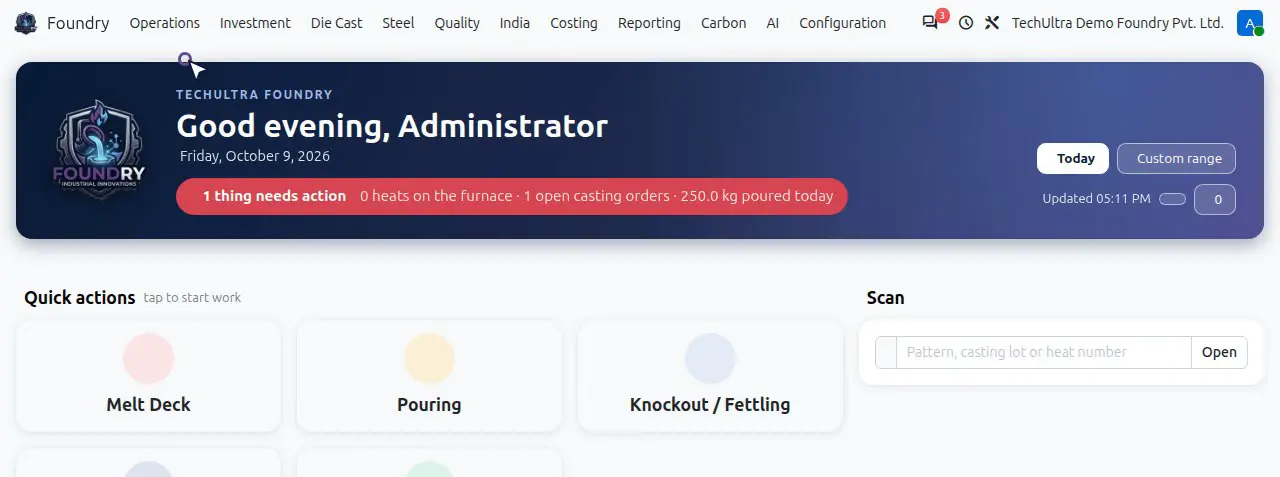
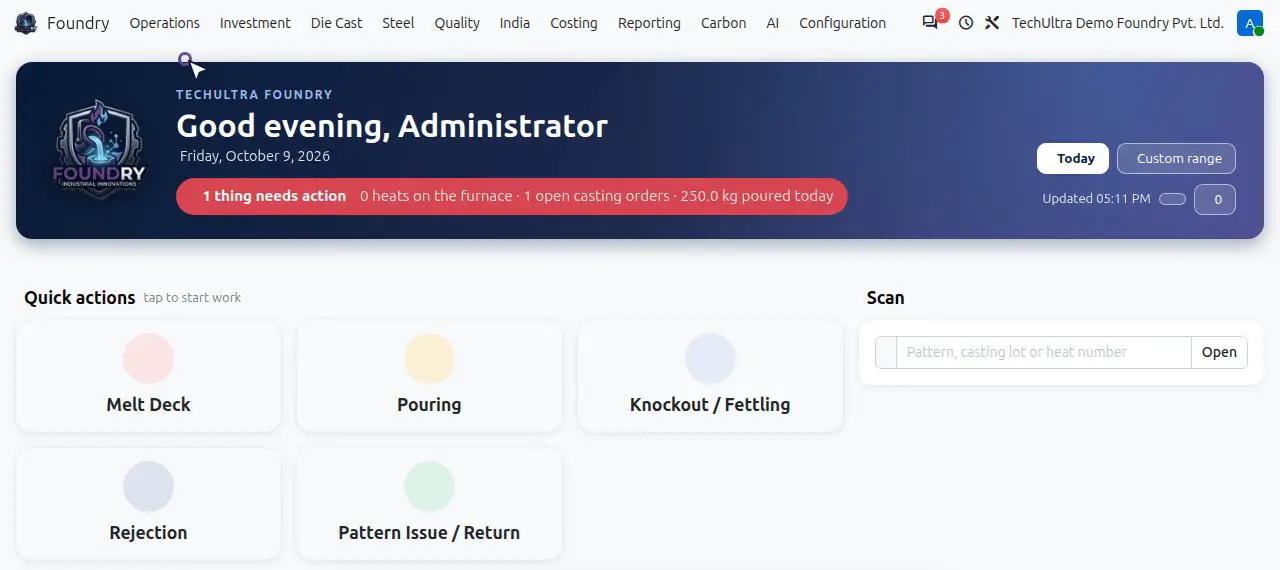
Shop Floor Home: one live screen for the plant
The supervisor opens one screen that shows heats on the furnace, open casting orders, kilograms poured today and anything that needs action. Quick actions open the Melt Deck, Pouring, Knockout / Fettling, Rejection and Pattern Issue / Return. A scan box finds a pattern, casting lot or heat number directly.
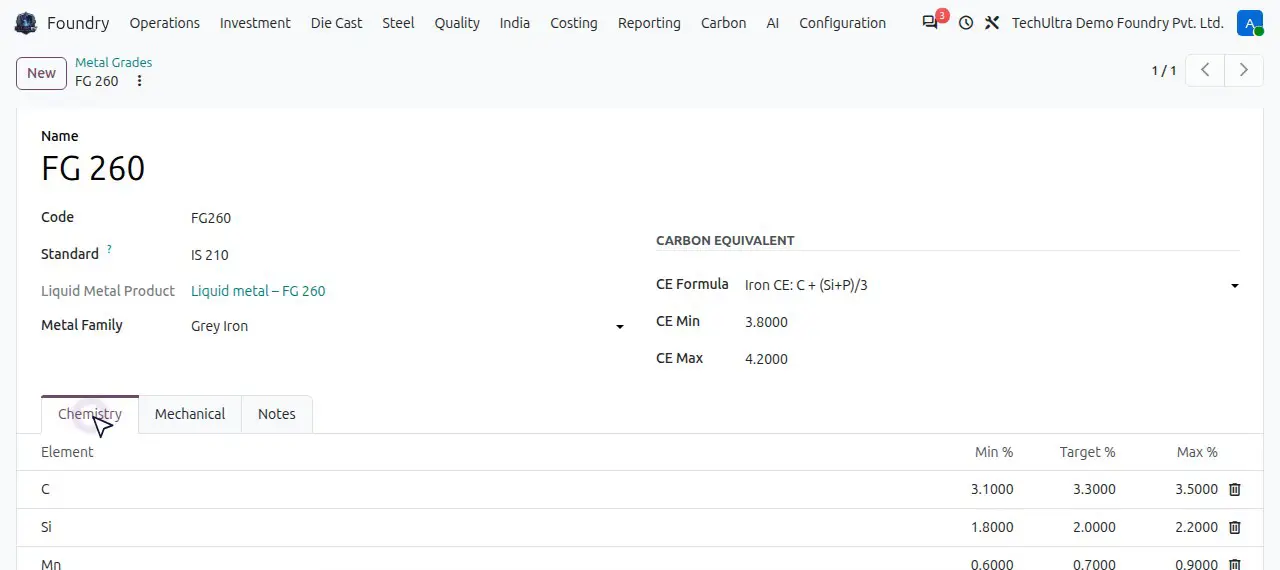
Metal grades with chemistry limits
Each grade holds its chemistry window (carbon, silicon, manganese, sulphur, phosphorus and more) and its carbon-equivalent range. Spectrometer results are checked against the grade automatically, so a sample passes or fails before anyone pours. Charge materials such as pig iron, steel scrap and ferro-alloys carry their own chemistry, so Foundry can calculate corrections.
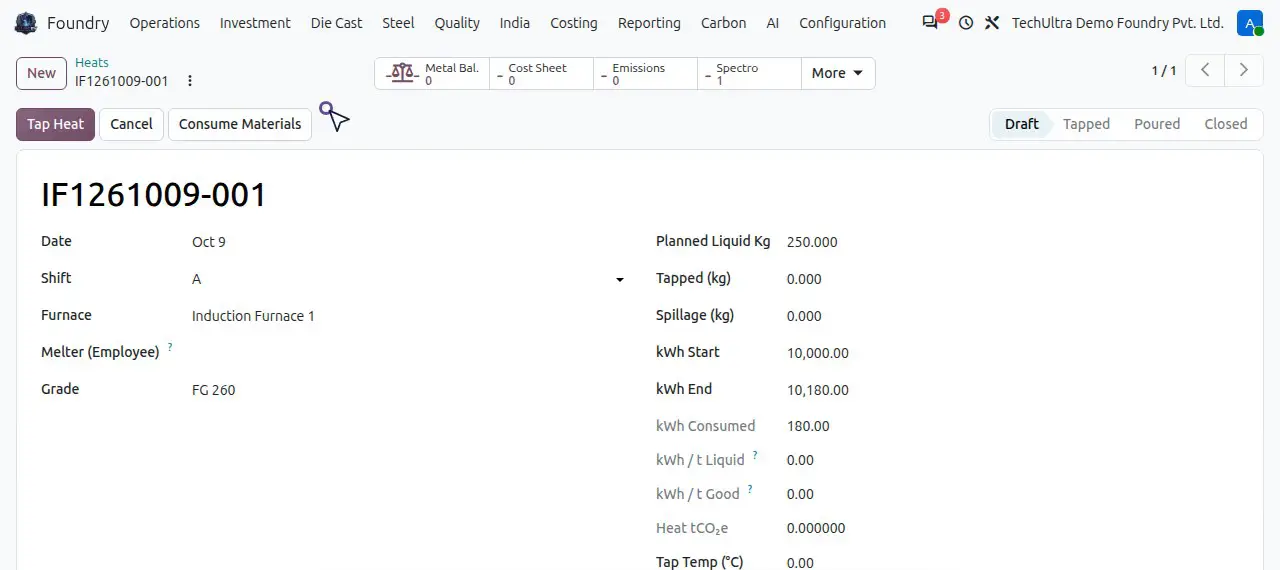
Heats: charge, corrections, power and tapping
A heat records the furnace, the grade, the shift and the melter, the charge weighed on the Charge tab, any corrections such as ferro-silicon, and the energy meter readings before and after the melt. A bath sample that fails the grade blocks the heat until the metallurgist corrects it. Tapping records weight and temperature, moves the charge out of stock and creates the liquid-metal lot every casting will carry.
Mould plans and pattern life
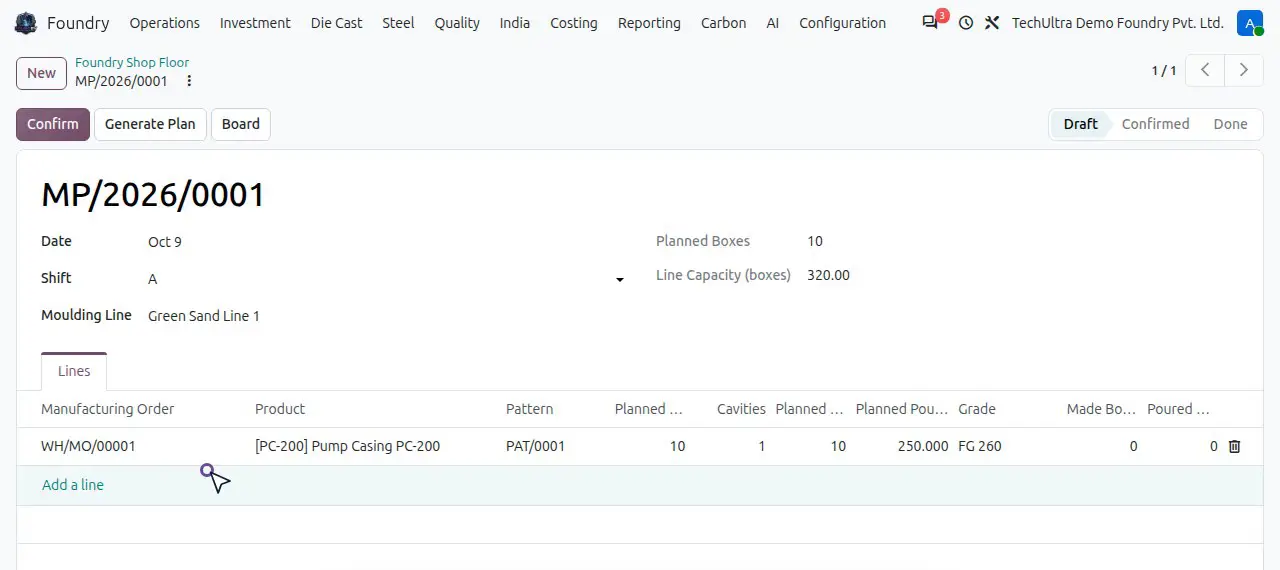
The mould plan wizard builds the day's plan from open manufacturing orders for the moulding line and shift you choose, picks the pattern and calculates boxes against line capacity. Patterns are issued to the line and returned, counted by moulds made, and blocked when they reach their life limit. Moulders record the boxes made against the plan.
Rejections with disposition
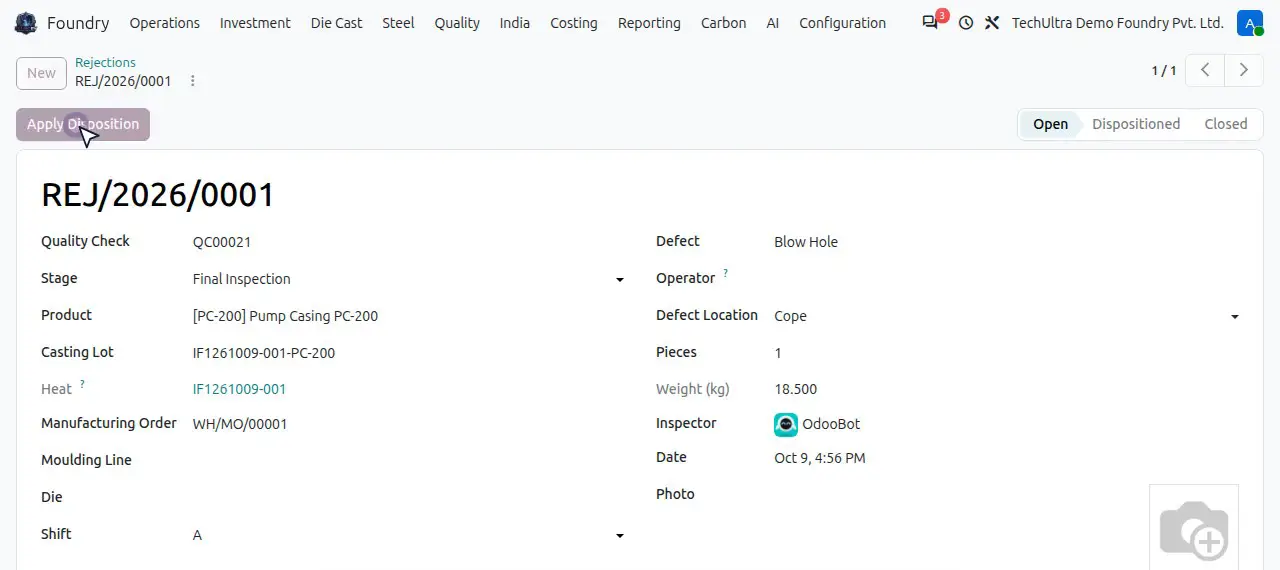
Rejected castings are recorded with the defect, its location on the casting, the stage, the casting lot and the heat. Applying a disposition such as remelt returns the metal to stock and closes the rejection, so rejected weight never disappears from the metal balance. Mechanical tests (tensile, yield, elongation, hardness) are recorded against the heat.
EN 10204 3.1 material test certificates
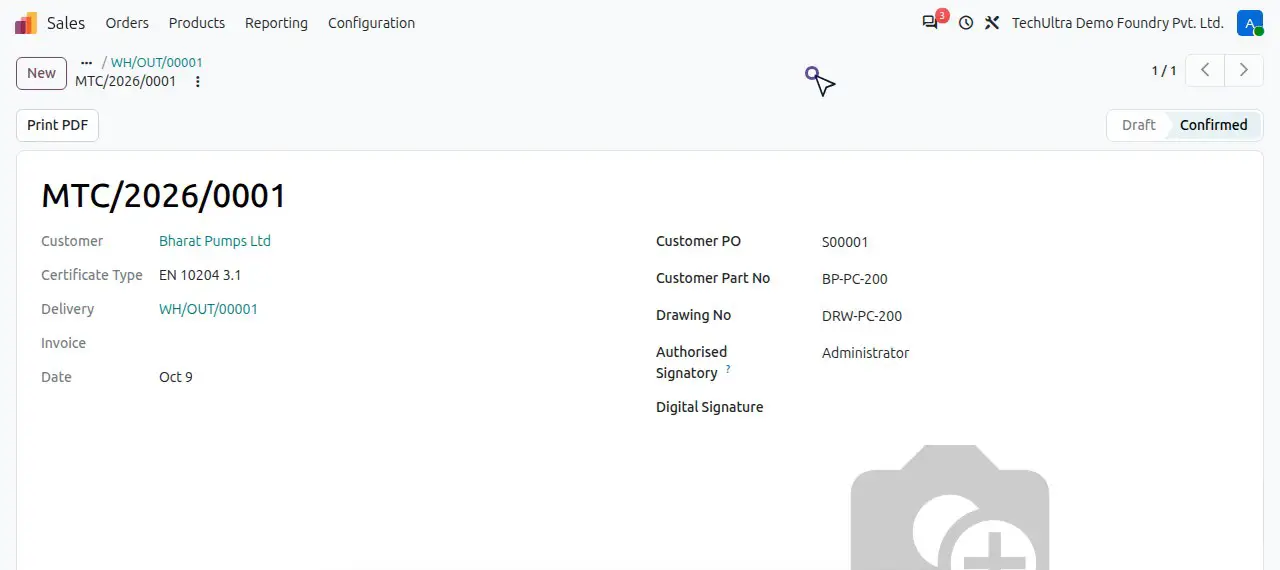
Validating a delivery creates the material test certificate. Chemistry comes from the heat's final spectrometer sample and strength from its tensile test, so nobody retypes results. The certificate carries the customer's PO and part number, and the customer can download it from the portal.
Heat costing: cost per good kilogram
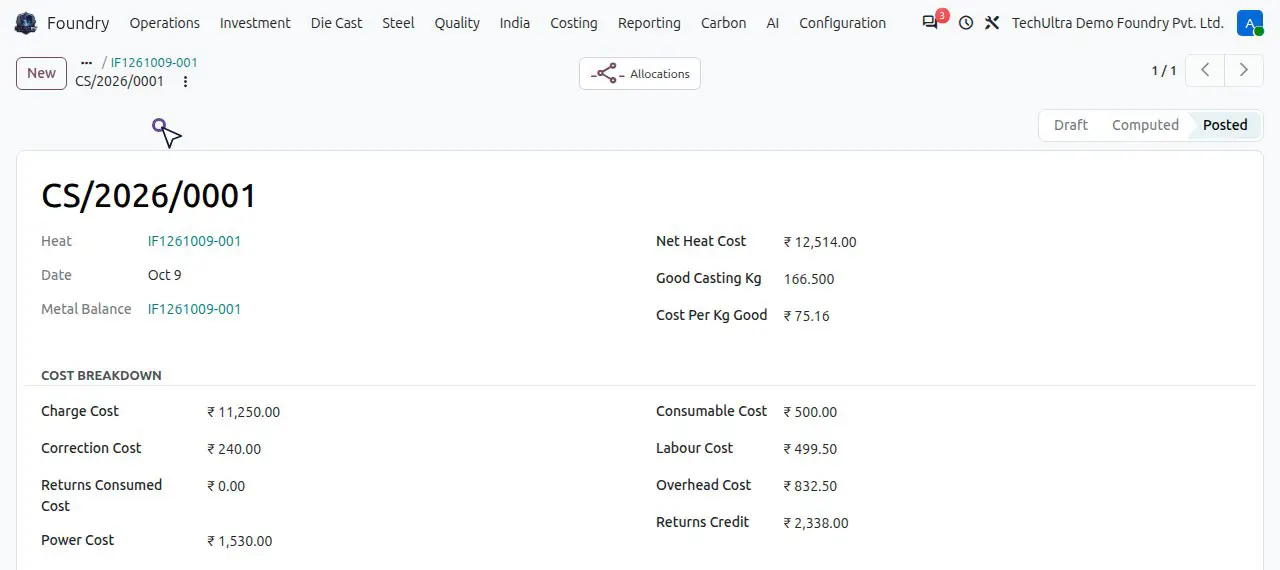
The Cost Sheet on each heat adds charge cost, corrections, power at your tariff, consumables, labour and overhead, credits the returns, and divides by good castings. You see the net heat cost and cost per kilogram of good casting, and post the valuation to accounting.
Yield and energy dashboards
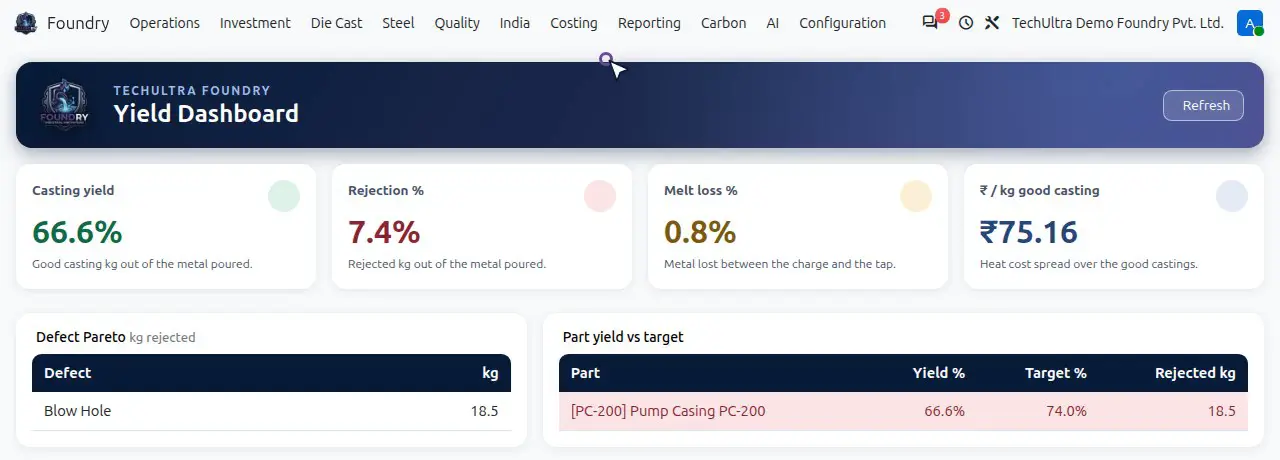
The yield dashboard shows casting yield, rejection percentage, melt loss and cost per kilogram of good casting, with a defect Pareto and yield against target by part. The energy dashboard shows kWh per tonne of good and liquid metal by furnace, grade and month, so you see where metal and power are lost.
India: GST job work challans and ITC-04
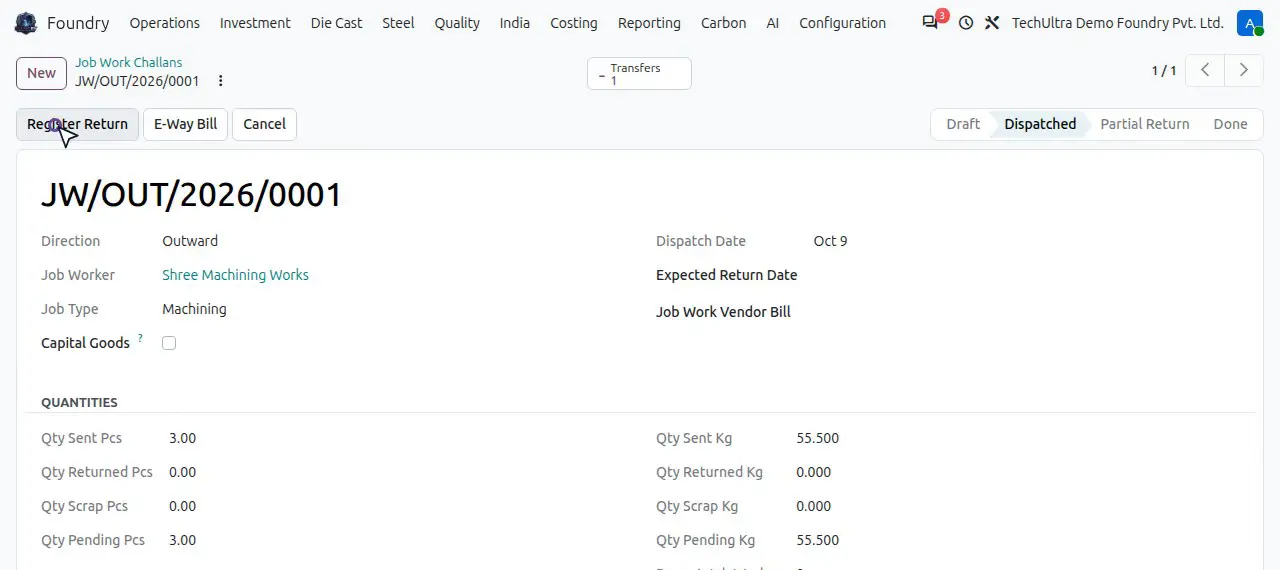
Machining and other outside work go out on an outward job work challan that records what left the plant, its weight and value, and how long it has been with the job worker. Returns are registered against the challan, which closes when nothing is pending. The ITC-04 export builds the Excel return for the GST portal from these challans.
OEM delivery schedules
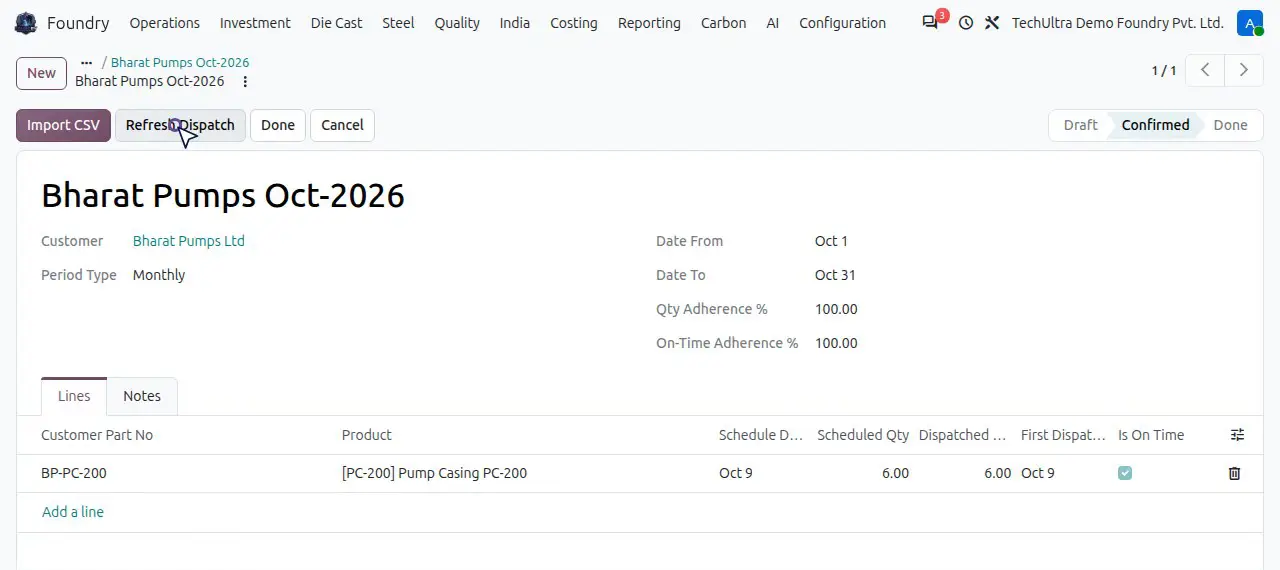
OEM customers usually send their monthly schedule as a spreadsheet. Import CSV reads the file and maps the customer's part number to your product, and can create the sale order lines. After each delivery, Refresh Dispatch compares what was delivered with the schedule and reports quantity and on-time adherence.
CBAM carbon reports for EU exports
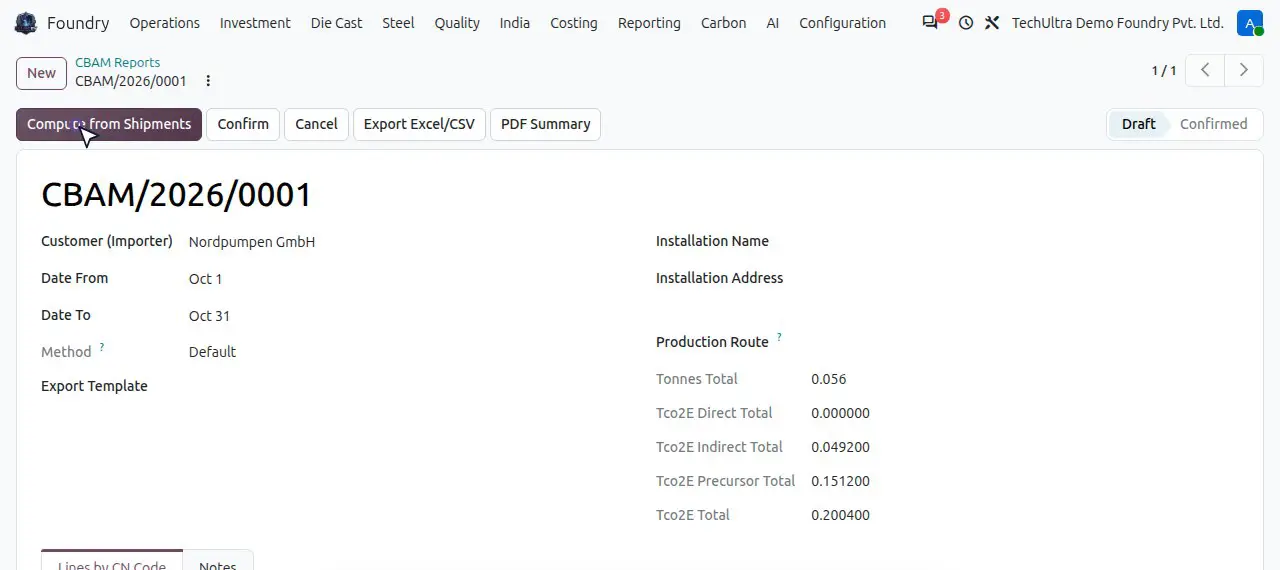
Each heat carries its own tCO2e from power, fuels and raw materials. A CBAM report for an EU importer and period reads your deliveries, groups them by CN code, and totals tonnes and direct, indirect and precursor emissions, ready to export as Excel / CSV or a PDF summary for the importer.
Investment casting (optional module)
For lost-wax foundries: wax injection runs record the die, the wax used and the patterns made, and count die usage. Wax patterns are assembled into trees, then shell batches, dewax cycles and firing follow. The tree yield report shows how much metal became good parts.
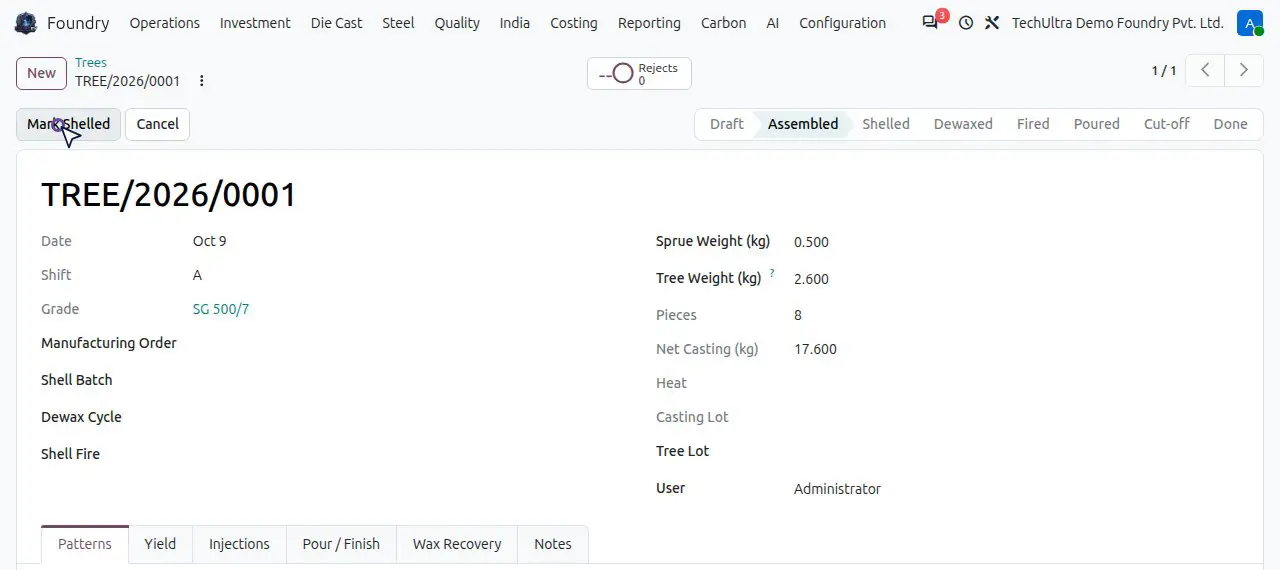
Steel foundry (optional module)
Arc furnace heats with tap control: each grade carries a tapping temperature window, and Odoo refuses to tap a heat outside it, so cold metal is stopped before it reaches a mould. The Steel menu also holds de-oxidation, NDT results, weld repairs and pressure-equipment certificates for PED and IBR customers.
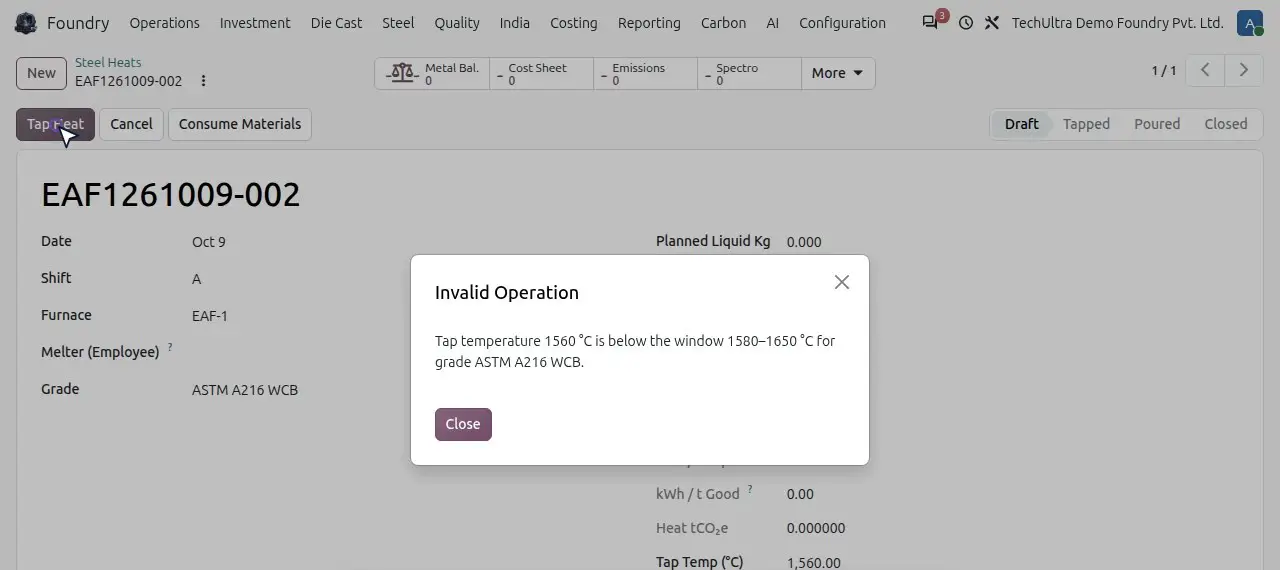
Die casting (optional module)
Die cycles record each production run: the die, the machine, the holding furnace, shots and scrap, cycle time, injection pressure and die temperature. Good shots add to the die counter, and Foundry warns when a die is due for maintenance. Trimming and machining can go to a job worker straight from the run.
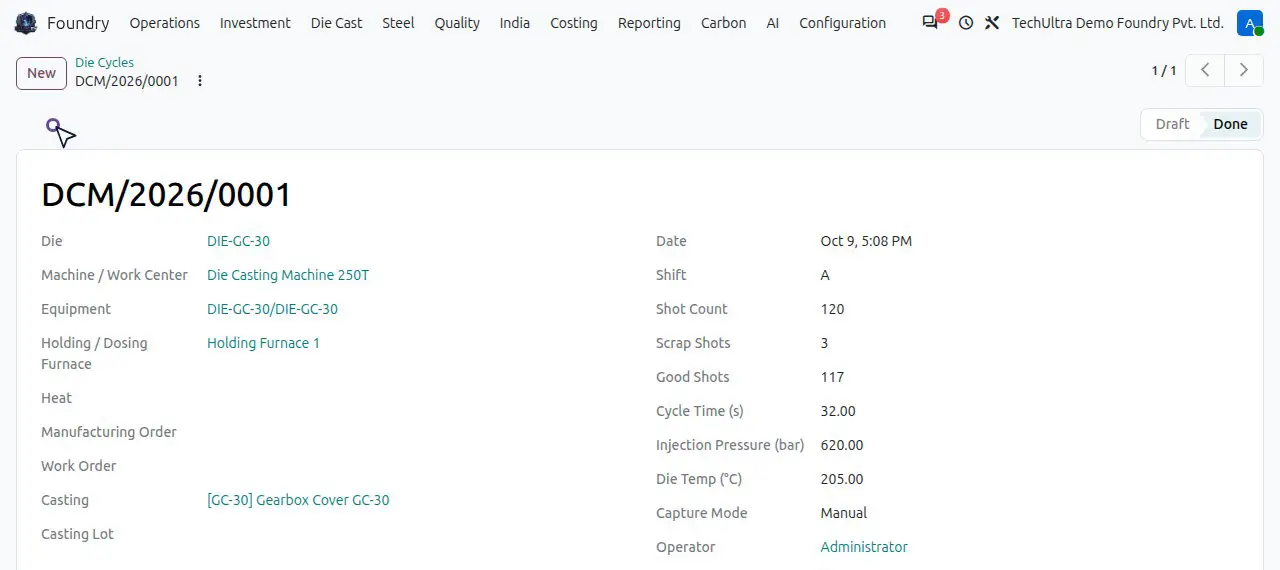
AI defect advisor that learns from your own heats
Train Defect Advisor reads every heat with its chemistry, temperatures and rejections, and saves a risk model with its top drivers. For each new heat it flags the defects that are likely before the metal is poured. You can ask questions in plain English, such as why rejection rose this week, and the answer cites the records it used.
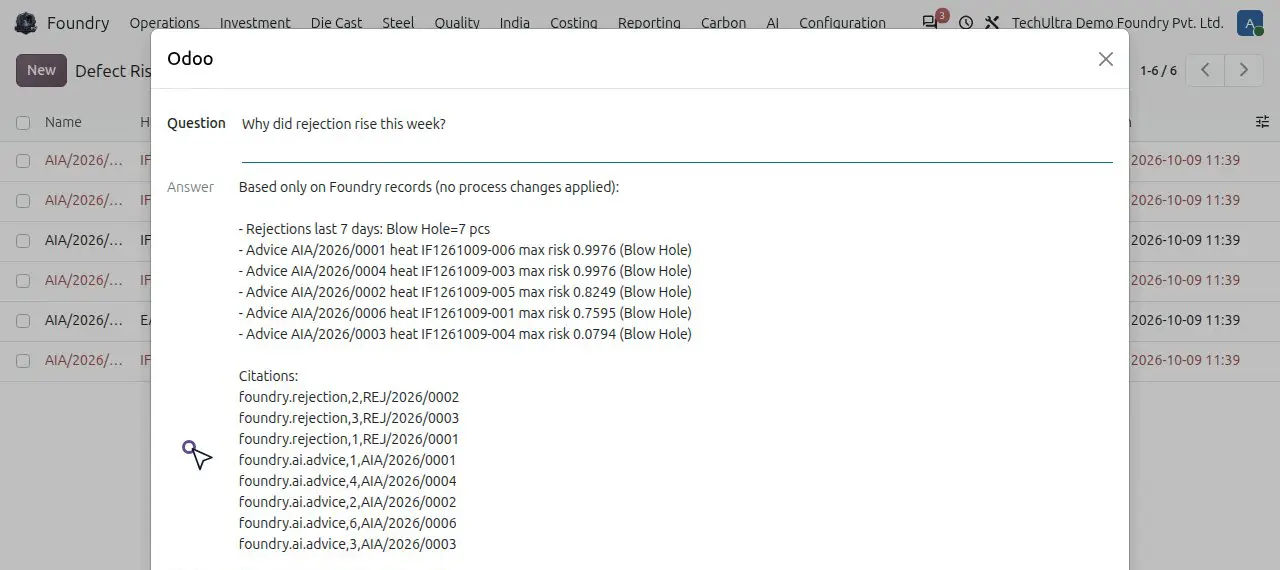
Customer portal
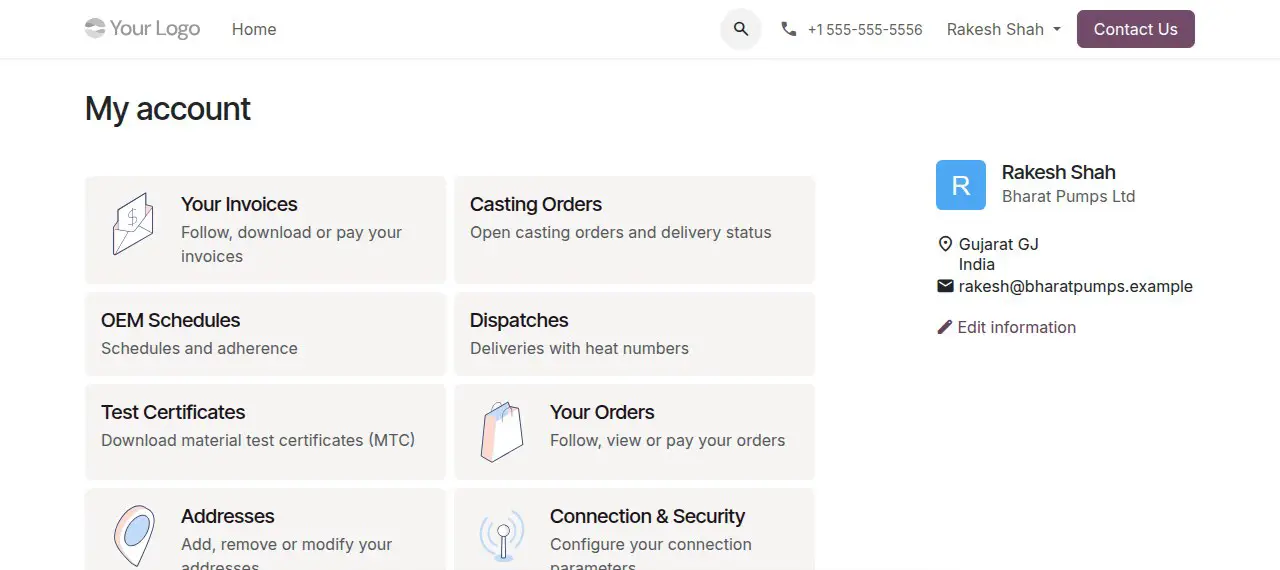
Your customer's buyer or quality engineer logs in and sees their own invoices, casting orders, OEM schedules, dispatches with heat numbers, test certificates, complaints and PPAP documents. A complaint submitted with a photo becomes a numbered NCR your quality team answers from Odoo.
How it works
-
Set up the plant once
Company and GST details, then the foundry records: metal grades with chemistry limits, furnaces, ladles, moulding lines, patterns, defects, charge materials with their chemistry, and casting products with weights, grade and bill of materials. Foundry settings hold the power tariff and the value of returned metal used in costing.
-
Buy the metal
Purchase orders for pig iron, scrap and ferro-alloys run through standard Odoo Purchase. Validating the receipt puts the charge materials in stock, ready to be weighed into a heat.
-
Plan from customer orders
Confirmed sale orders create manufacturing orders for the castings. The mould plan wizard turns open orders into a plan for a moulding line and shift, the pattern is issued to the line, and moulders record boxes made.
-
Melt, check and tap
The heat records charge, corrections, energy and temperatures. A bath sample is checked against the grade, a failing sample is corrected before tapping, and tapping creates the liquid-metal lot.
-
Pour, finish and inspect
Pourings record boxes poured and create the casting lot linked to the heat. Knockout and fettling record good pieces and returns, final inspection records rejections with their disposition, and producing the manufacturing order puts good castings in stock.
-
Deliver, certify, invoice and cost
Validating the delivery creates the EN 10204 3.1 certificate, the invoice carries the heat number, and the heat's cost sheet posts the cost per good kilogram. The yield and energy dashboards update from the same records.
Deployment timeline
Every foundry rollout starts with a one-week discovery on your process: your furnaces and grades, moulding lines, quality checks, costing method and the reports your customers ask for. Discovery ends with a fixed scope and a fixed price. Foundry runs on Odoo 20 Enterprise, so a plant already on Odoo adds the foundry layer to its existing database rather than migrating, and a plant on Tally, SAP Business One or spreadsheets moves its masters and open orders across at go-live.
Best for
Grey and ductile iron, steel, investment-casting and die-casting foundries that sell to OEMs and need heat-level traceability, test certificates and real cost per kilogram. It suits plants in India that run GST job work and OEM schedules, and exporters whose EU customers now ask for CBAM emissions data.
Frequently asked questions
-
What is foundry ERP software?
Foundry ERP software runs a metal-casting plant in one system: melting and heats, charge and chemistry, moulding and patterns, pouring, finishing, rejections, test certificates and heat costing, joined to purchasing, inventory, sales and accounting. A general ERP stops at the manufacturing order. Foundry ERP records what happens inside the melt shop and traces every casting back to the heat it came from.
-
Does TechUltra Foundry run on standard Odoo?
Yes. It runs on Odoo 20 Enterprise and uses Odoo's own Purchase, Inventory, Manufacturing, Quality, Sales, Invoicing and Accounting apps. The foundry layer adds the melt shop, moulding, foundry quality, costing, India and carbon menus on the same database. See our Odoo Manufacturing page for what the standard MRP covers.
-
Which types of foundry does it support?
Grey and ductile (SG) iron foundries out of the box. Optional modules cover investment casting (wax injection, trees, shells, dewax and firing), steel foundries (arc furnace tap control, de-oxidation, NDT, weld repair and PED / IBR certificates) and die casting (die cycles, shot counters and die maintenance).
-
Can I trace a casting back to its heat?
Yes. Pouring creates a casting lot linked to the heat, and that lot follows the castings through knockout, inspection, delivery and the invoice. From a customer complaint you can open the heat and see its charge, spectrometer results, tap temperature and moulding line.
-
How does it check chemistry before pouring?
Each metal grade holds its element limits. A spectrometer result recorded on the heat is checked against them automatically and marked pass or fail. A failing bath sample is corrected (for example with ferro-silicon), the correction is costed on the heat, and a final sample confirms the grade before the test certificate uses it.
-
Does it handle GST job work and ITC-04?
Yes. Outward job work challans record what leaves the plant for machining or other outside work, with weight, value and days at the job worker. Returns are registered against the challan, and the ITC-04 export builds the Excel return for the GST portal from the challans.
-
Can it produce CBAM reports for EU customers?
Yes. Each heat carries its emissions from power, fuels and raw materials, and a CBAM report groups your deliveries to an EU importer by customs code for the period. The EU CBAM definitive period began on 1 January 2026. Whether your castings are in scope depends on their CN code, and imports of up to 50 tonnes per importer per year are exempt, so check the codes with your importer.
-
How much does foundry ERP cost?
It depends on your scope: the number of plants and furnaces, which optional modules you need, your integrations and how much history moves across. We don't work from a price list. A one-week discovery maps your process and ends with a fixed price, and Odoo Enterprise licences are separate (see our Odoo pricing guide).
-
Can I see a demo?
Yes. Book a free call and a consultant walks you through TechUltra Foundry on a demo plant, from buying the metal to the invoice, then answers questions about your own furnaces, grades and customers. Book a foundry ERP demo.