
Odoo App · WhatsApp & Messaging
WhatsApp Flows for Surveys (Enterprise)
Run Odoo surveys as interactive WhatsApp Flows for Odoo Enterprise.

Overview
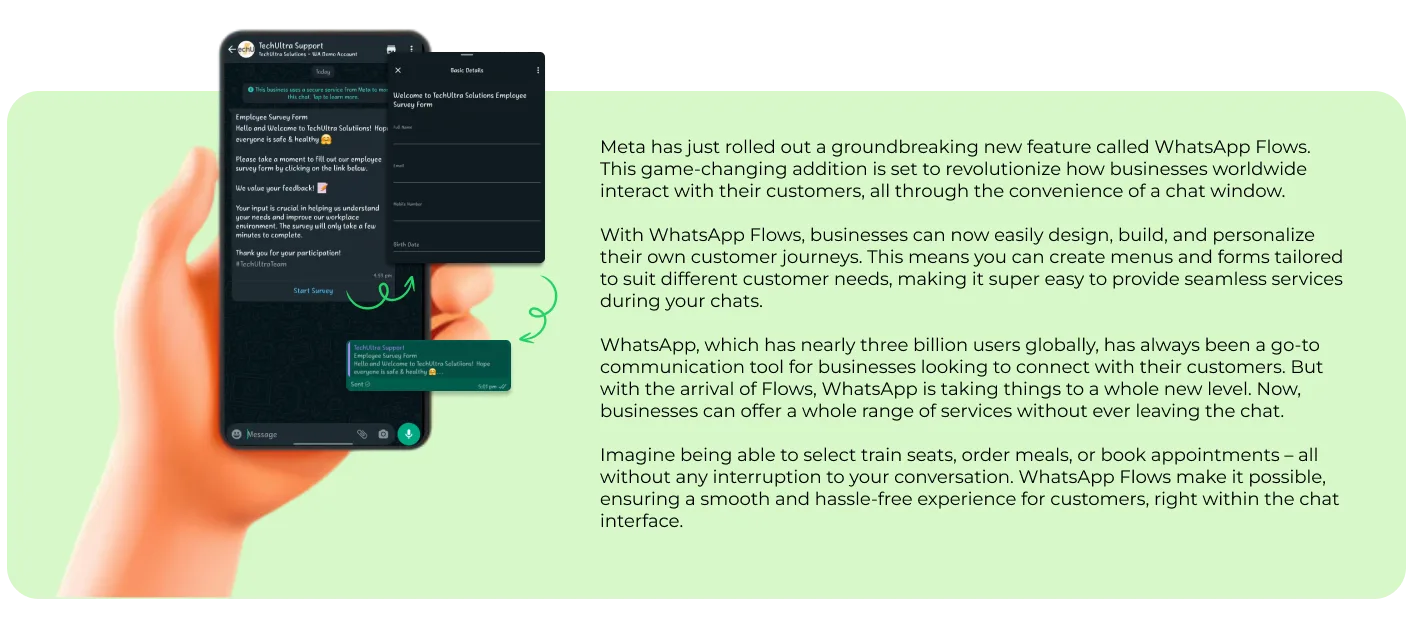
WhatsApp Flows for Surveys (Enterprise) connects WhatsApp Flows — Meta's interactive, form-style messaging feature — to the Odoo Survey app. Recipients answer a survey inside WhatsApp instead of opening a web link.
Built by TechUltra Solutions, this is the Enterprise edition of the module. It builds on Odoo Enterprise's own WhatsApp Messaging app rather than TechUltra's Community WhatsApp base, so it adds Flows-based surveys on top of the WhatsApp integration Odoo Enterprise already ships.
Answers captured inside a guided WhatsApp Flow are written straight back into the Odoo Survey app, where they use the same reporting as web surveys. The module is a lean add-on that relies on Odoo's built-in WhatsApp Messaging.
Key features
-
Surveys delivered as WhatsApp Flows
Send an Odoo survey as an interactive WhatsApp Flow — a structured, form-style message — so recipients answer inside WhatsApp.
-
Built for Odoo Enterprise WhatsApp
Extends Odoo Enterprise's native WhatsApp Messaging app, so Flows-based surveys are added on top of the WhatsApp integration Enterprise already includes.
-
Responses recorded in Odoo Survey
Answers captured in the WhatsApp Flow are written back into the Odoo Survey app, with the same reporting as web surveys.
-
Built on the WhatsApp Cloud API
Runs on Meta's official WhatsApp Cloud API, so messaging and Flows are tied to a verified WhatsApp Business Account.
-
Pre-approved message templates
Works with Meta's pre-approved message templates to start the survey conversation within WhatsApp messaging rules.
-
Interactive Flow screens
Guides recipients through structured Flow screens that present the survey's questions one step at a time.
-
Compact, focused codebase
At roughly 1,300 lines, the Enterprise module is a lean add-on that relies on Odoo's built-in WhatsApp Messaging rather than re-bundling a full WhatsApp stack.
-
Odoo 17 to 19 Enterprise support
Runs on Odoo Enterprise editions 17.0, 18.0, and 19.0, where the native WhatsApp Messaging app is available.
WhatsApp Flows for Surveys (Enterprise) in Odoo
Every screen, in the order you meet it — configuration first, then the module in use.



Technical details
Specification
- Publisher
- TechUltra Solutions Private Limited
- Technical name
- whatsapp_flows_survey_enterprise
- Odoo versions
- 17.0, 18.0, 19.0
- Lines of code
- 1,330
- License
- Odoo Proprietary License v1.0 (OPL-1)
- Price
- $156.99 (one-time)
Deployment
- Odoo Online
- Odoo.sh
- On-premise
Odoo dependencies
- Surveys
- WhatsApp Messaging
- Discuss
Support
90 days of bug-fix support, Monday to Friday (10:00–19:00 IST). Raise a ticket at support@techultra.in.
Setup & configuration
From install to first call — here is the path.
- 1
Install the module
In Odoo Enterprise, open Apps, remove the Apps filter, search for “WhatsApp Flows for Surveys”, and click Install. Odoo's WhatsApp Messaging app must be available.
- 2
Configure native WhatsApp Messaging
Set up Odoo Enterprise's built-in WhatsApp Messaging with your WhatsApp Business Account, phone number, and WhatsApp Cloud API credentials.
- 3
Connect the WhatsApp Cloud API
Generate a permanent access token in the Meta developer console and confirm the WhatsApp Cloud API connection in Odoo.
- 4
Map a survey to a WhatsApp Flow
Pick an Odoo survey and configure the WhatsApp Flow that presents its questions, so answers map back to the survey's response fields.
- 5
Send and review responses
Send the survey Flow to recipients, then review their answers and reporting in the Odoo Survey app.
Frequently asked questions
-
What does WhatsApp Flows for Surveys do?
It sends an Odoo survey as an interactive WhatsApp Flow — a structured form inside WhatsApp — and records the answers back in the Odoo Survey app.
-
How is the Enterprise edition different from the Community one?
The Enterprise edition builds on Odoo Enterprise's native WhatsApp Messaging app, while the Community edition uses TechUltra's own WhatsApp base modules. Both deliver Flows-based surveys.
-
Do I need Odoo Enterprise?
Yes. This module depends on Odoo Enterprise's WhatsApp Messaging app, so it requires an Enterprise edition. TechUltra also publishes a Community edition.
-
Which Odoo versions are supported?
The module supports Odoo Enterprise editions 17.0, 18.0, and 19.0.
-
Does it use the official WhatsApp Cloud API?
Yes. The module runs on Meta's official WhatsApp Cloud API through Odoo's native WhatsApp Messaging app.
-
Where do survey responses appear?
Responses are written back into the Odoo Survey app, so they use the same reporting and analysis as surveys answered on the web.
-
What other modules does it depend on?
It depends on Odoo's Surveys, WhatsApp Messaging, and Discuss apps.
-
Is support included?
Yes. The module includes 90 days of bug-fix support, Monday to Friday, 10:00–19:00 IST.
Related solutions
Whole-platform solutions that complement WhatsApp Flows for Surveys (Enterprise).
WhatsApp ↔ Odoo Integration
Two-way WhatsApp Business API integration with Odoo. Customer messages, order updates, invoices, and payment links — unified inbox for agents.
AI WhatsApp Chatbot
LLM-powered WhatsApp chatbot grounded in your Odoo data. Handles ordering, support, FAQs, and lead qualification with human-agent escalation.
Odoo WhatsApp Push Notifications
Real-time WhatsApp push notifications in Odoo — web, Android, iOS. Customer names in Discuss instead of phone numbers. Compatible with Odoo V12–V18 (as of 2025).
Related services
Get the most out of this module with senior TechUltra consultants.
Odoo Customization Services
Tailored Odoo customizations from a Gold Partner — 200+ projects, upgrade-safe patterns, fixed-scope quotes, senior consultants. Free demo consultation.
Hire Odoo Developers
Hire certified Odoo developers from a Gold Partner — 400+ implementations, 92% satisfaction, Odoo since 2016. Silver / Gold / Platinum packages, free trial.
Odoo Support & Maintenance
Odoo Gold Partner support — 24/7 functional, technical, and server coverage for Enterprise and Community editions. Fast turnaround, free consultation.







