

Odoo App · Sales & Pricing
Multi Pricelist per Order Line
Apply a different pricelist to each sale order line in Odoo, with a built-in price-comparison wizard.

Overview
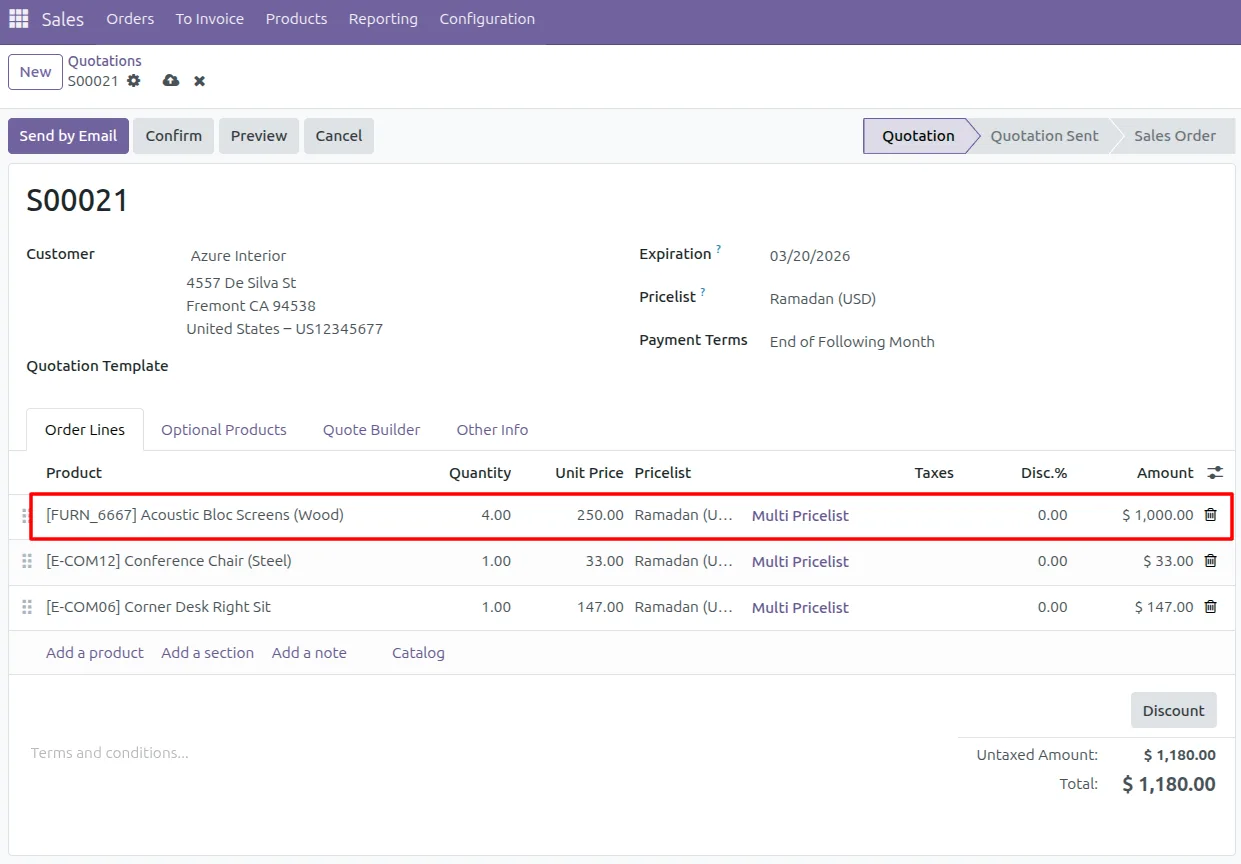
Multi Pricelist per Order Line removes a hard limit in standard Odoo: one pricelist per sale order. With this module, every order line can carry its own pricelist, so a single quotation can mix wholesale, retail, contract, and promotional pricing line by line.
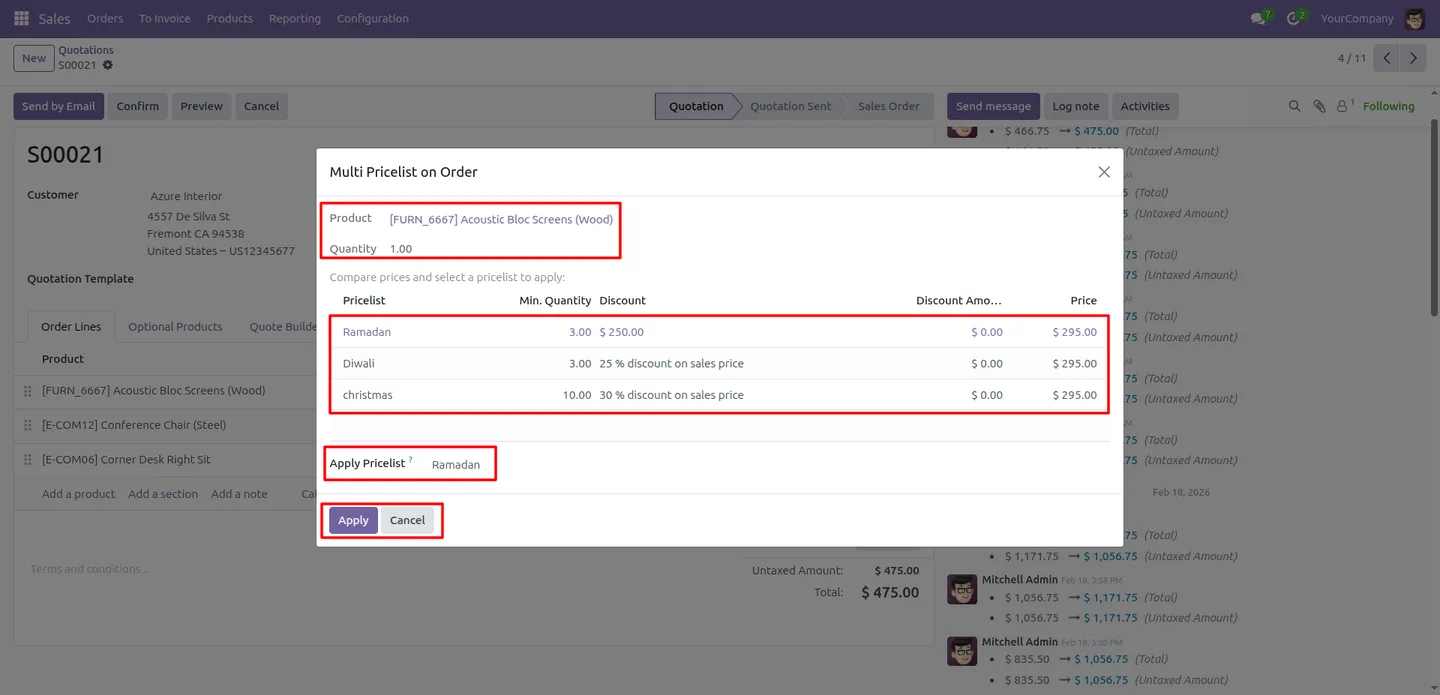
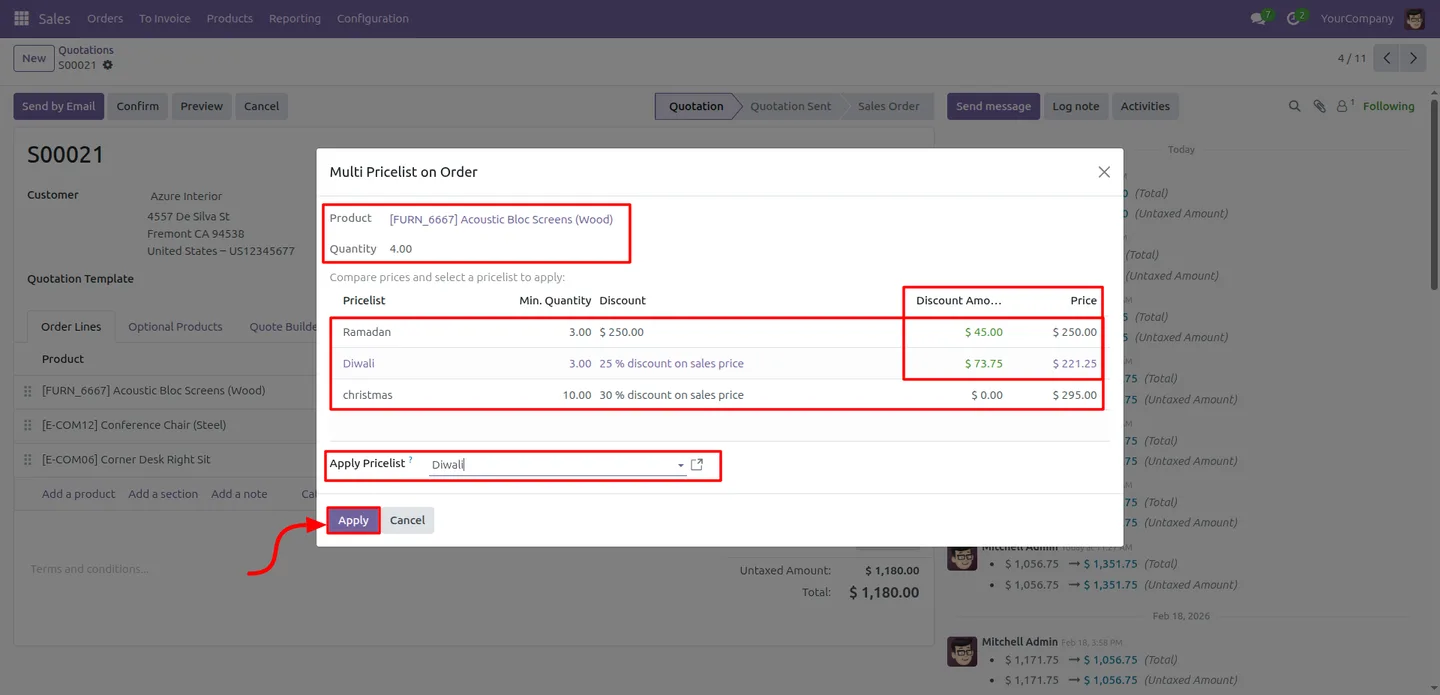
Built by TechUltra Solutions, the module adds a comparison wizard to each line. It lists every active pricelist alongside its price, discount rule, minimum quantity, discount amount, and the resulting saving, so sales staff see the full pricing picture before they commit a price.
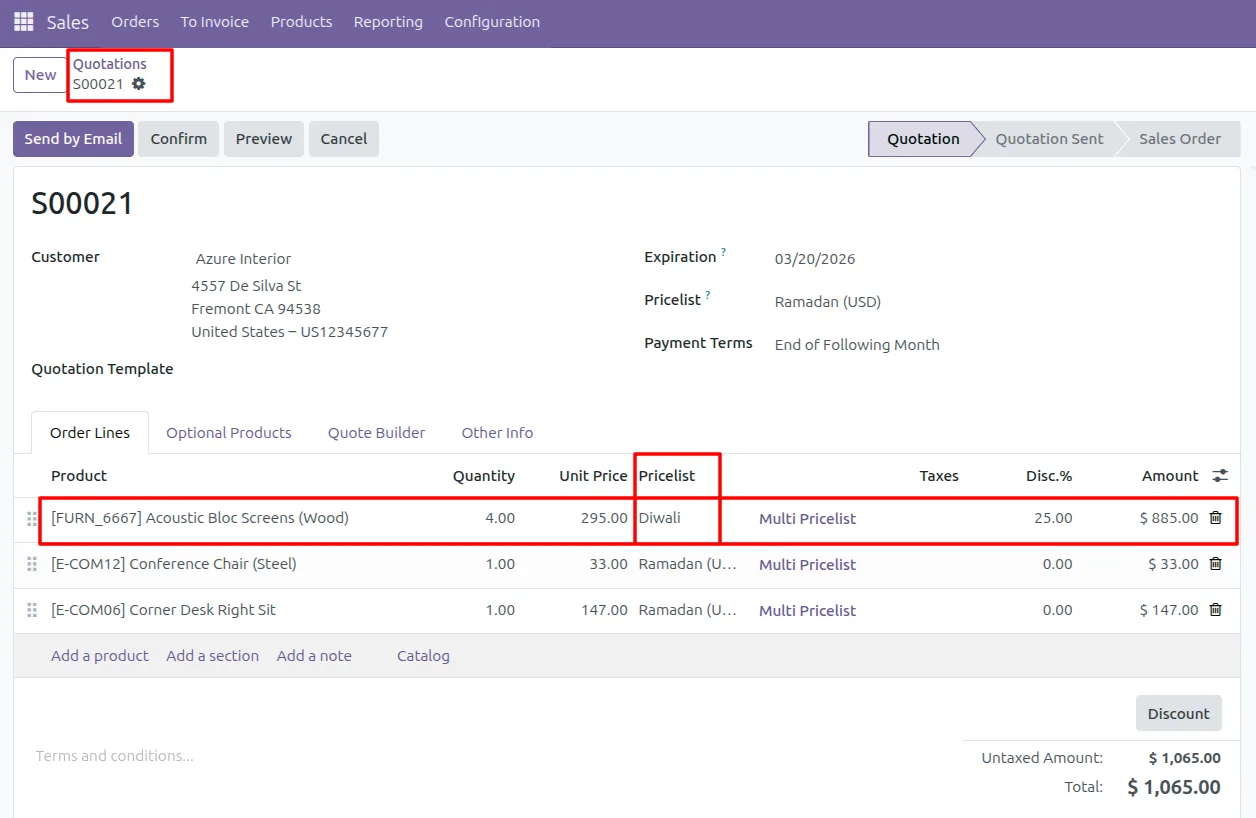
When a line pricelist is chosen, the module recalculates the unit price and discount automatically. It supports product, product template, category, and global pricelist rules, respects company-specific and shared pricelists, and falls back to the sale order's pricelist when no line pricelist is set.
Key features
-
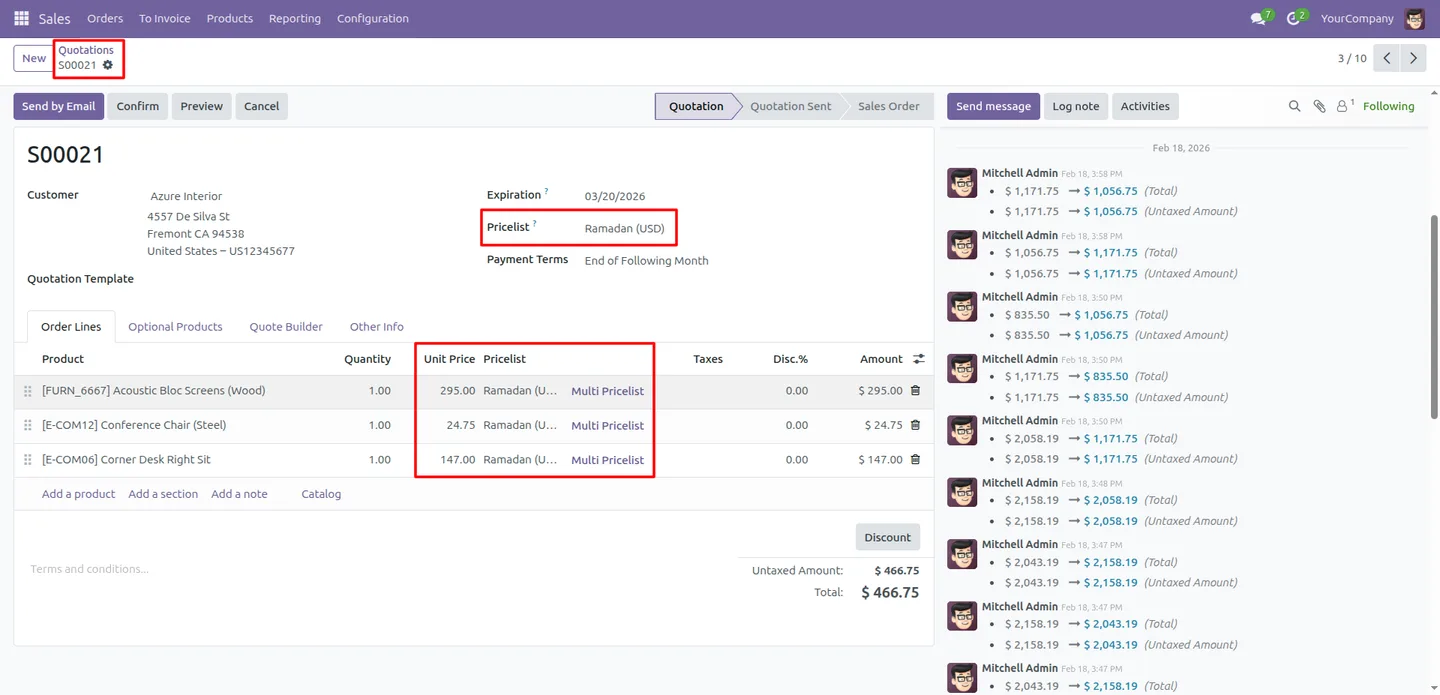
Line-level pricelist control
Each sale order line can use its own pricelist independently, so one quotation can mix wholesale, retail, and contract pricing line by line.
-
Comprehensive price comparison
A wizard displays the price, minimum quantity, discount, and discount amount for every active pricelist, so staff see the full picture before confirming a price.
-
Smart price recalculation
When the pricelist selection on a line changes, the module automatically recalculates the unit price and discount to match the new rule.
-
One-click application
Sales staff apply a chosen pricelist to an order line in a single click, keeping the workflow fast inside the quotation.
-
Full pricelist rule support
The module honours product, product template, category, and global pricelist rules, so line pricing reflects whatever rule applies.
-
Automatic fallback
If no pricelist is set on a line, the line falls back to the sale order's own pricelist, so pricing is never left blank.
-
Multi-company support
The module respects company-specific and shared pricelists, so it behaves correctly in a multi-company Odoo database.
-
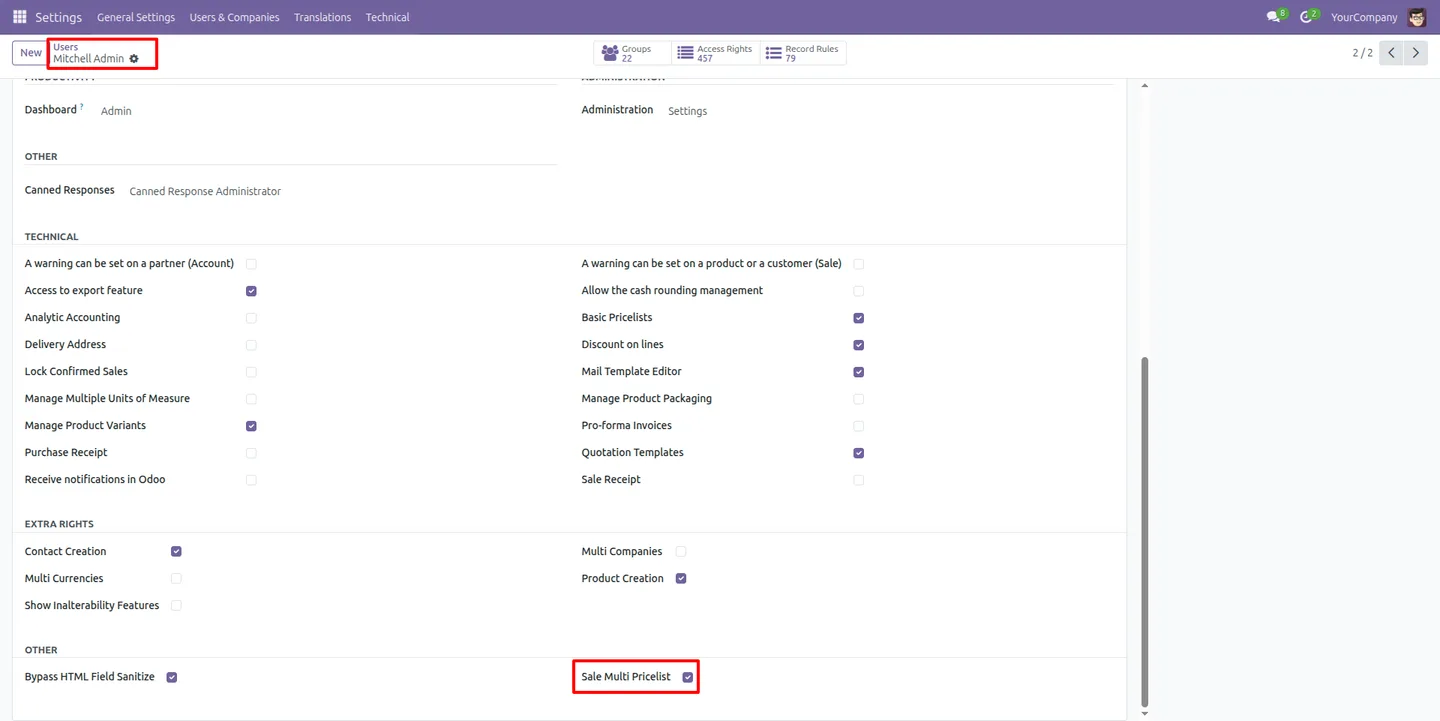
User-level access control
Administrators control which users can use Multi Pricelist per Order Line, keeping line-level pricing in the hands of the right people.
Multi Pricelist per Order Line in Odoo
Every screen, in the order you meet it — configuration first, then the module in use.
Technical details
Specification
- Publisher
- TechUltra Solutions Private Limited
- Technical name
- sale_multi_pricelist
- Odoo versions
- 16.0, 17.0, 18.0, 19.0
- Lines of code
- 329
- License
- Odoo Proprietary License v1.0 (OPL-1)
- Price
- $14.90 (one-time)
Deployment
- Odoo Online
- Odoo.sh
- On-premise
Odoo dependencies
- Sales
- Invoicing
- Discuss
Support
90 days of bug-fix support, Monday to Friday (10:00–19:00 IST). Raise a ticket at support@techultra.in.
Setup & configuration
From install to first call — here is the path.
- 1
Install the module
In Odoo, open Apps, remove the Apps filter, search for “Multi Pricelist per Order Line”, and click Install.
- 2
Grant user access
Open the users who should use the feature and enable the “User Level Sale Multi Pricelist Access” permission so line-level pricing is available to them.
- 3
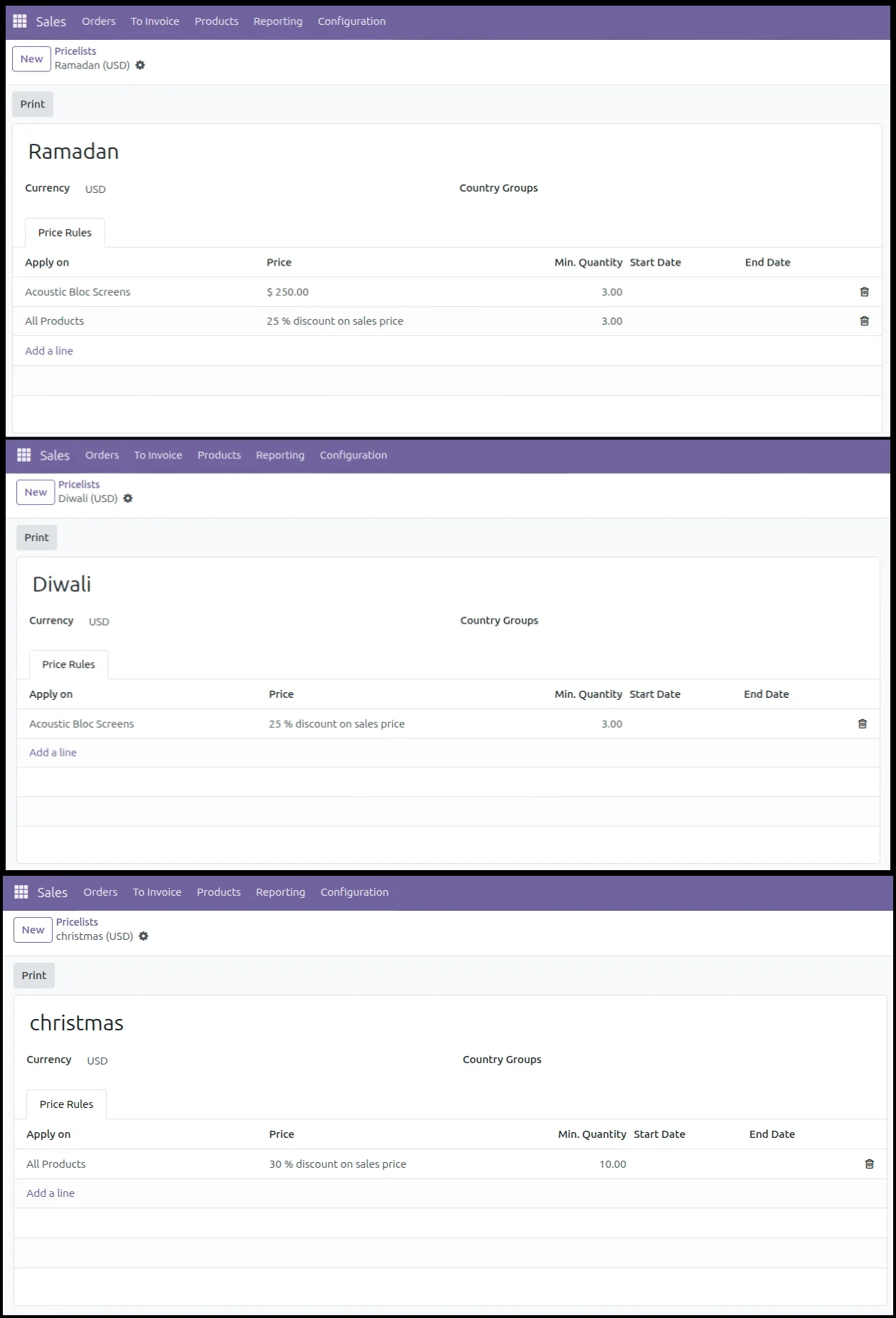
Set up your pricelists
In Sales → Configuration → Pricelists, make sure the wholesale, retail, contract, and promotional pricelists you want to compare are active.
- 4
Open the comparison wizard
On a quotation line, open the pricelist comparison wizard to see every active pricelist with its price, discount, minimum quantity, and saving.
- 5
Apply a pricelist to the line
Select the pricelist for that line and apply it. The unit price and discount recalculate automatically; lines with no pricelist use the order's default.
Frequently asked questions
-
How is this different from standard Odoo pricelists?
Standard Odoo applies one pricelist to the whole sale order. This module lets each order line use its own pricelist, so a single quotation can mix different pricing.
-
What does the comparison wizard show?
For every active pricelist it shows the price, minimum quantity, discount, and discount amount, so staff see the full pricing picture before confirming a price.
-
Does the price update when I change a line's pricelist?
Yes. When the pricelist on a line changes, the module recalculates the unit price and discount automatically to match the new rule.
-
What happens to lines with no pricelist selected?
They fall back to the sale order's own pricelist, so pricing is never left blank on a line.
-
Which pricelist rules are supported?
The module supports product, product template, category, and global pricelist rules, and respects company-specific and shared pricelists.
-
Can I limit who uses the feature?
Yes. Administrators control Multi Pricelist per Order Line access per user, so line-level pricing stays with the right people.
-
Which Odoo versions are supported?
The module supports Odoo 16.0, 17.0, 18.0, and 19.0, in both the Community and Enterprise editions.
-
Is support included?
Yes. The module includes 90 days of bug-fix support, Monday to Friday, 10:00–19:00 IST.
Related solutions
Whole-platform solutions that complement Multi Pricelist per Order Line.
Odoo Sales
Odoo Sales module — quotations, pricing rules, sales orders, deliveries, returns. CRM-Inventory-Accounting integrated. Quote-to-cash unified.
Odoo CRM
Odoo CRM module — leads, opportunities, kanban pipeline, quotation, forecasting, email integration. Native with ERP. Mid-market alternative to Salesforce.
Related services
Get the most out of this module with senior TechUltra consultants.
Odoo Customization Services
Tailored Odoo customizations from a Gold Partner — 200+ projects, upgrade-safe patterns, fixed-scope quotes, senior consultants. Free demo consultation.
Hire Odoo Developers
Hire certified Odoo developers from a Gold Partner — 400+ implementations, 92% satisfaction, Odoo since 2016. Silver / Gold / Platinum packages, free trial.
Odoo Support & Maintenance
Odoo Gold Partner support — 24/7 functional, technical, and server coverage for Enterprise and Community editions. Fast turnaround, free consultation.







