

Odoo App · Accounting & Finance
Project Retainage & Retention Management
Hold back a percentage or fixed amount on customer invoices and vendor bills, post it to dedicated retention accounts, and release it in tranches by date, milestone or approval.
Overview
Construction contractors, subcontractors and other project-based businesses often hold back part of each progress invoice until the work is accepted. This module tracks that holdback in Odoo on both sides: retention you are owed on customer invoices, and retention you hold on vendor bills.
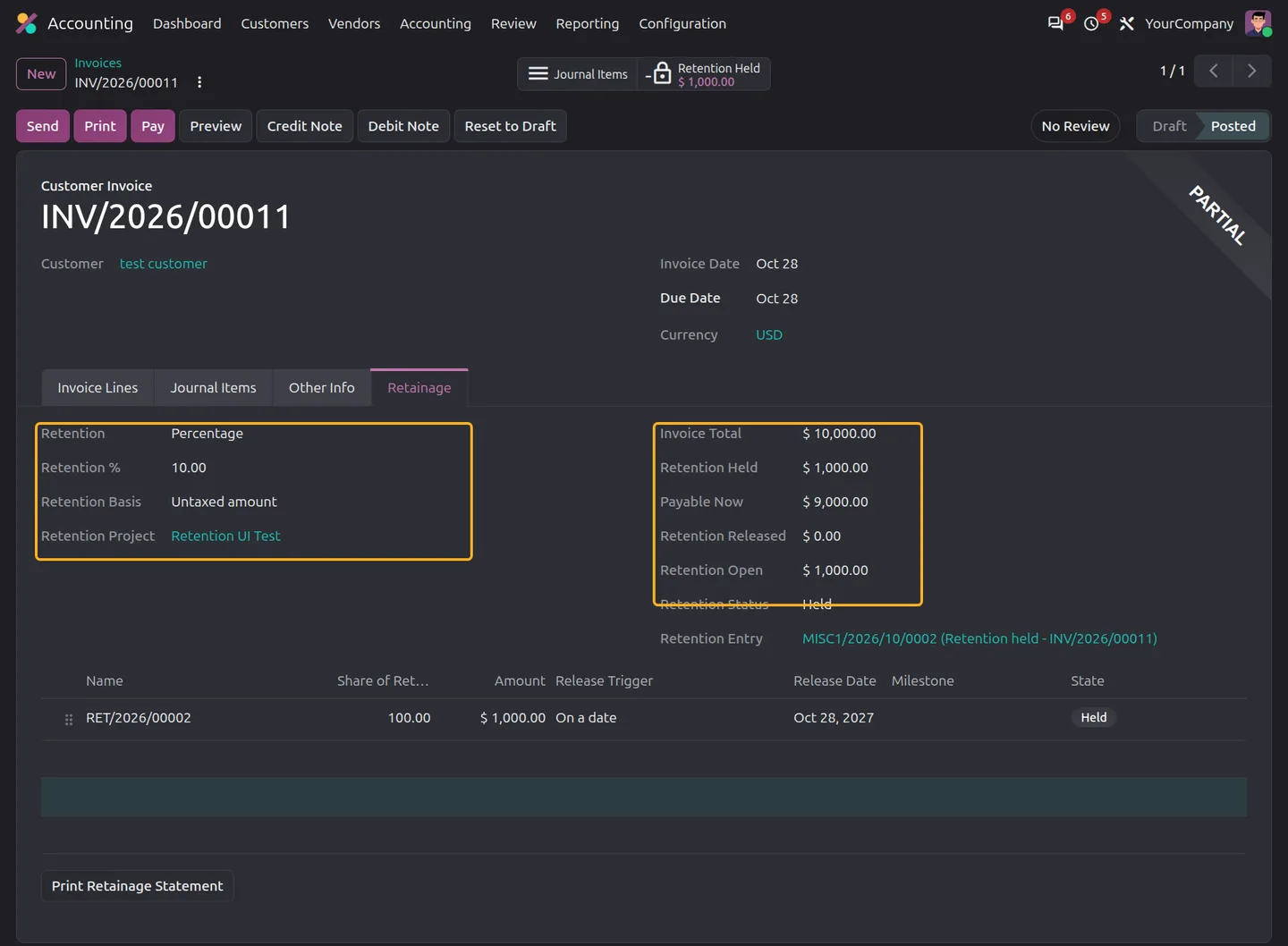
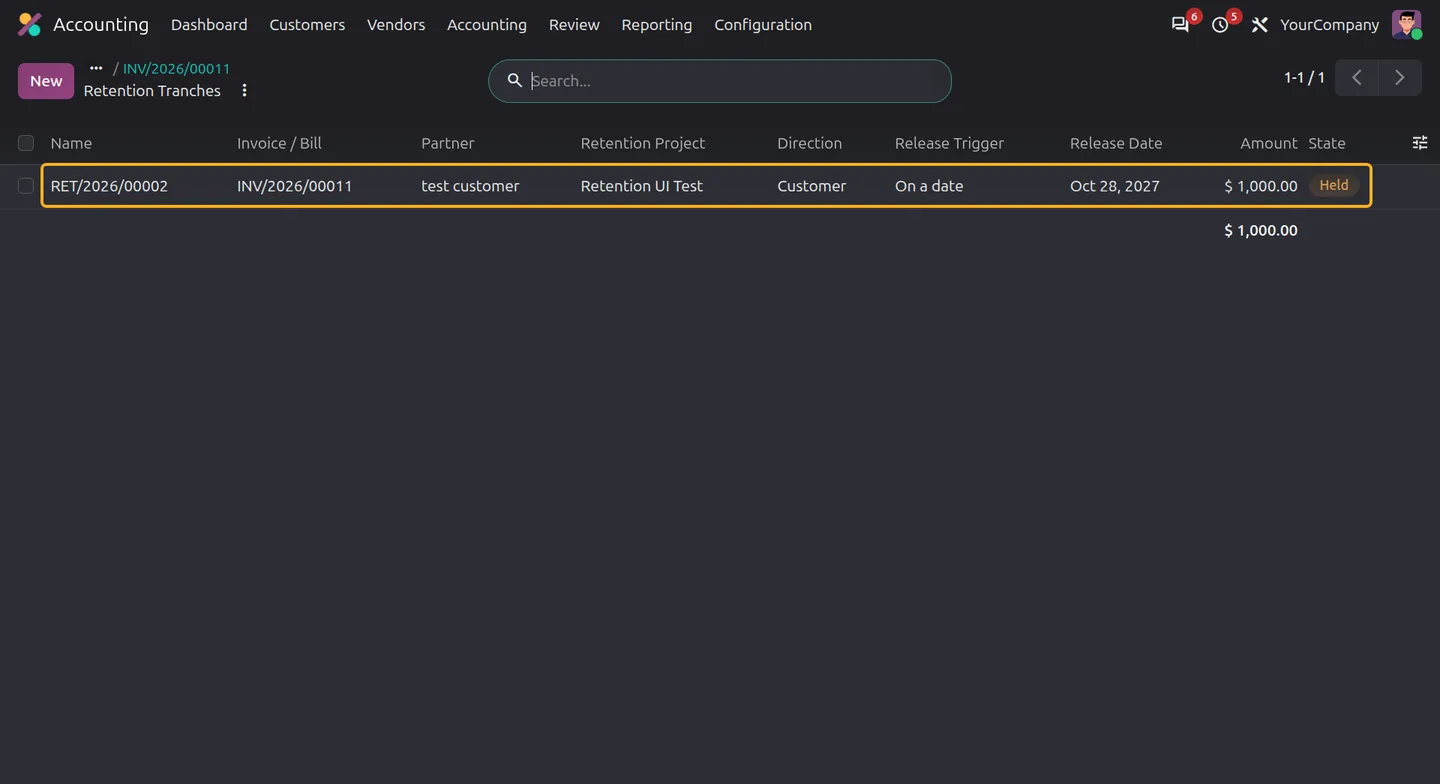
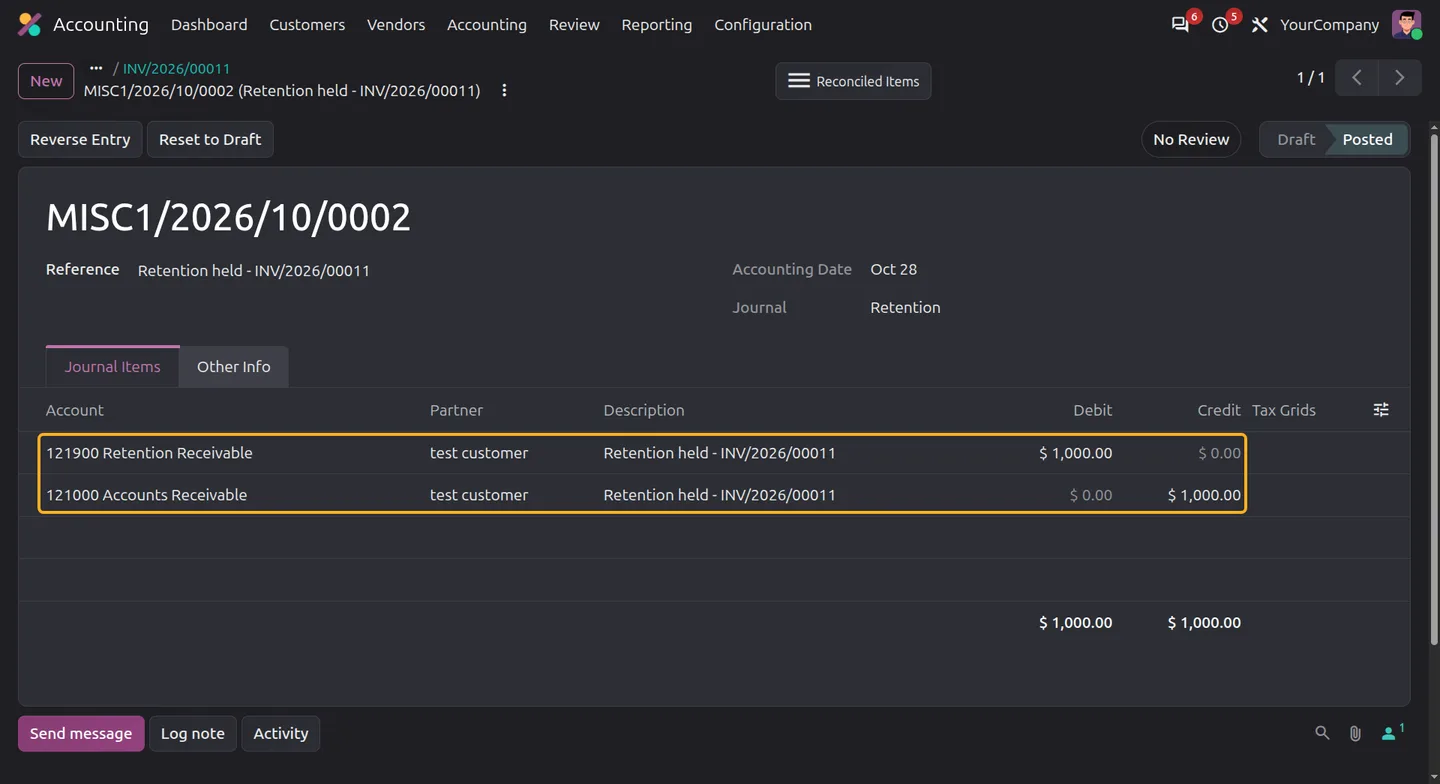
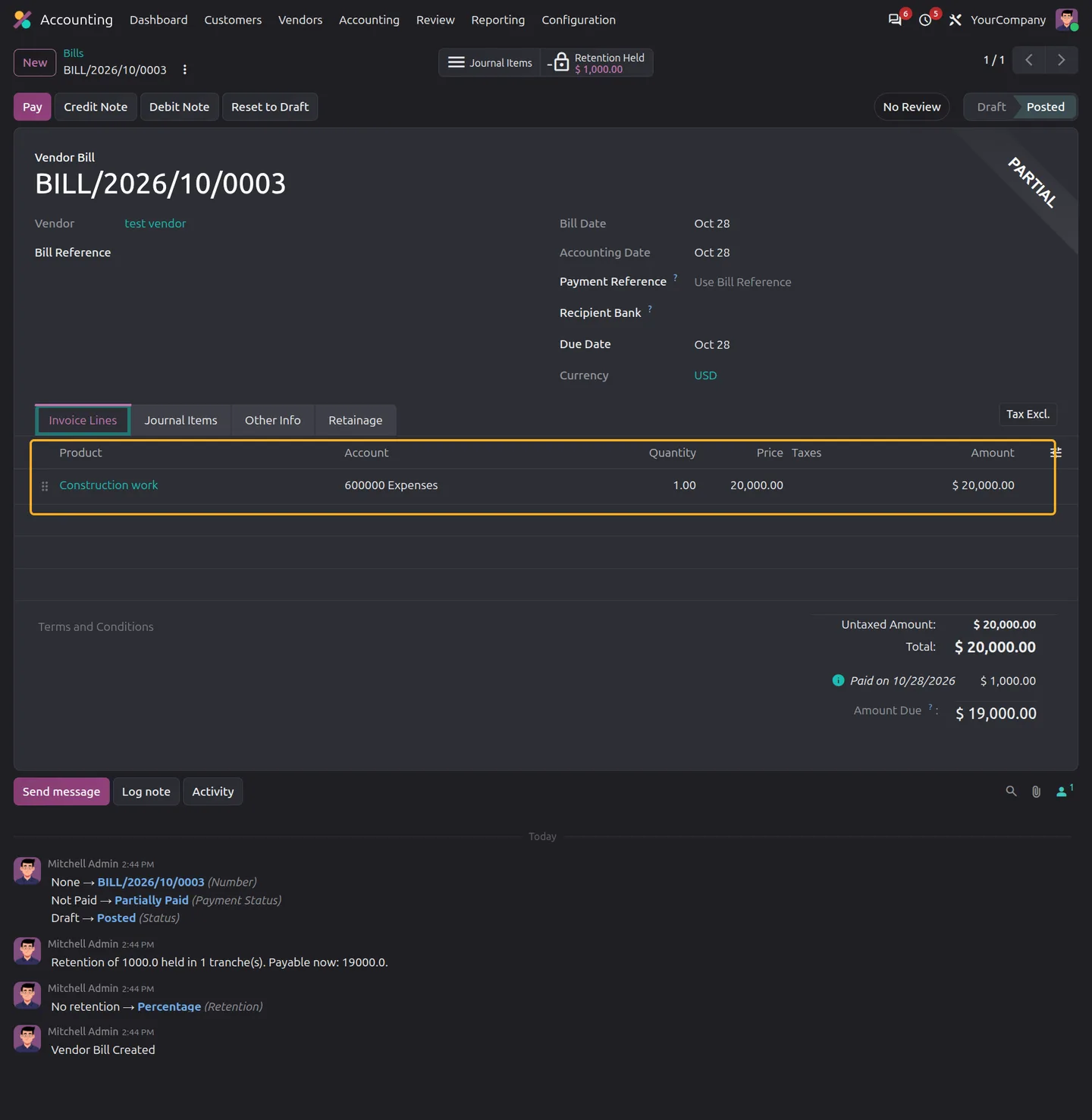
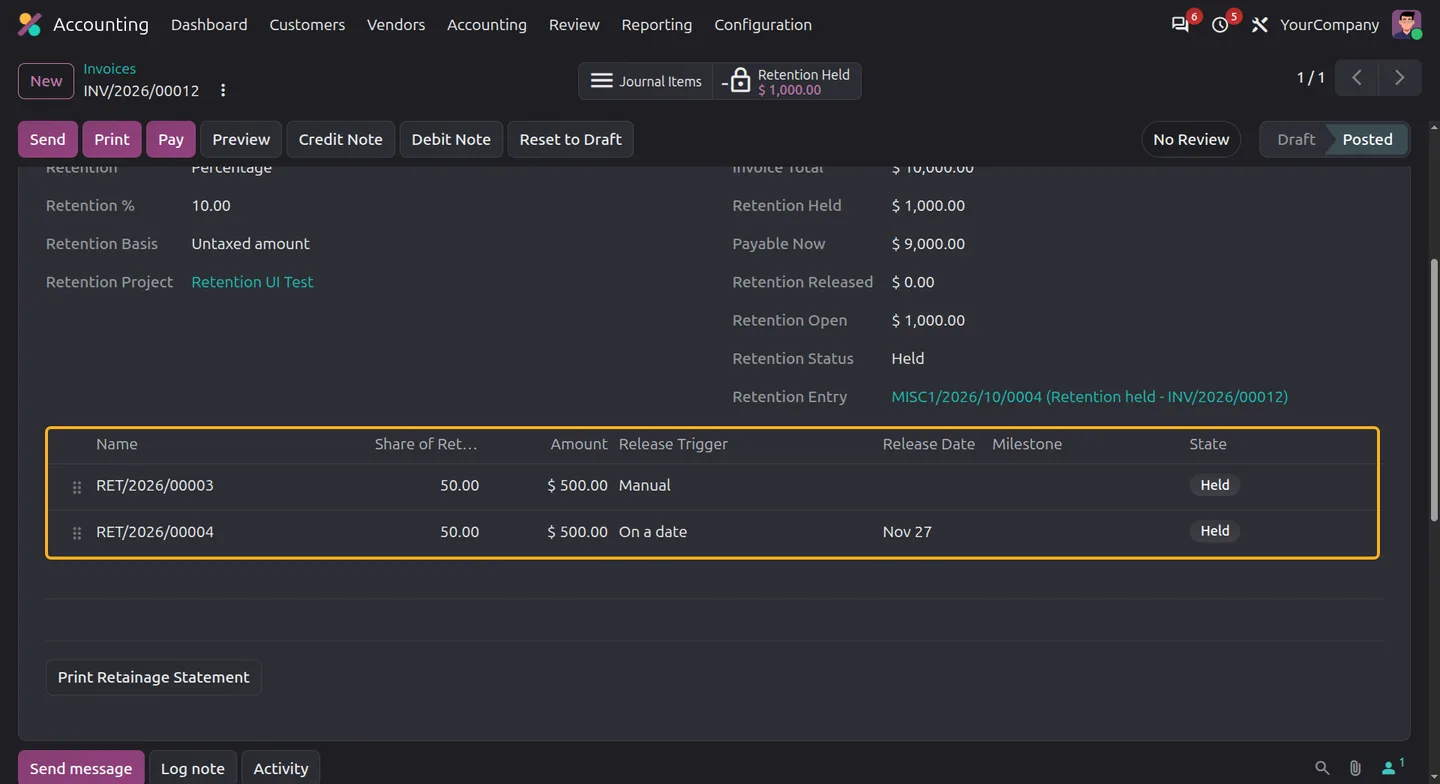
Each invoice or bill gets a Retainage tab. Choose percentage or fixed retention; percentage retention can use the untaxed amount or the invoice total. On posting, the module creates a separate journal entry that moves the retained amount to a dedicated retention receivable or payable account. It reconciles that entry against the invoice or bill, so the amount due drops to the payable-now figure. In the listing's example, 10% of a $10,000 untaxed invoice holds $1,000, leaving $9,000 payable now.
Retention can be split into release tranches, for example practical completion, a defects liability period and final acceptance. Each tranche can be released manually, on a date, or when a project milestone is reached. Retainage Managers release single tranches or approve a bulk release. A daily scheduled action can release due tranches automatically or create a reminder activity. Releasing retention creates an accounting entry only; you record the payment separately.
Key features
-
Customer invoice and vendor bill retention
Apply percentage or fixed retention to customer invoices and vendor bills. Percentage retention can use the untaxed amount or the total, and the tab shows the amount payable now.
-
Dedicated retention accounting
Posting creates a separate hold entry to retention receivable or payable accounts and reconciles it against the original invoice or bill.
-
Multiple release tranches
Split retention into scheduled shares that total 100%. The final tranche absorbs any currency rounding difference.
-
Manual, date and milestone release
Release a tranche manually, on its release date, or when a selected project milestone is reached.
-
Automatic release or reminders
A daily scheduled action releases due date and milestone tranches when auto-release is enabled, or creates a reminder activity instead.
-
Approved bulk release
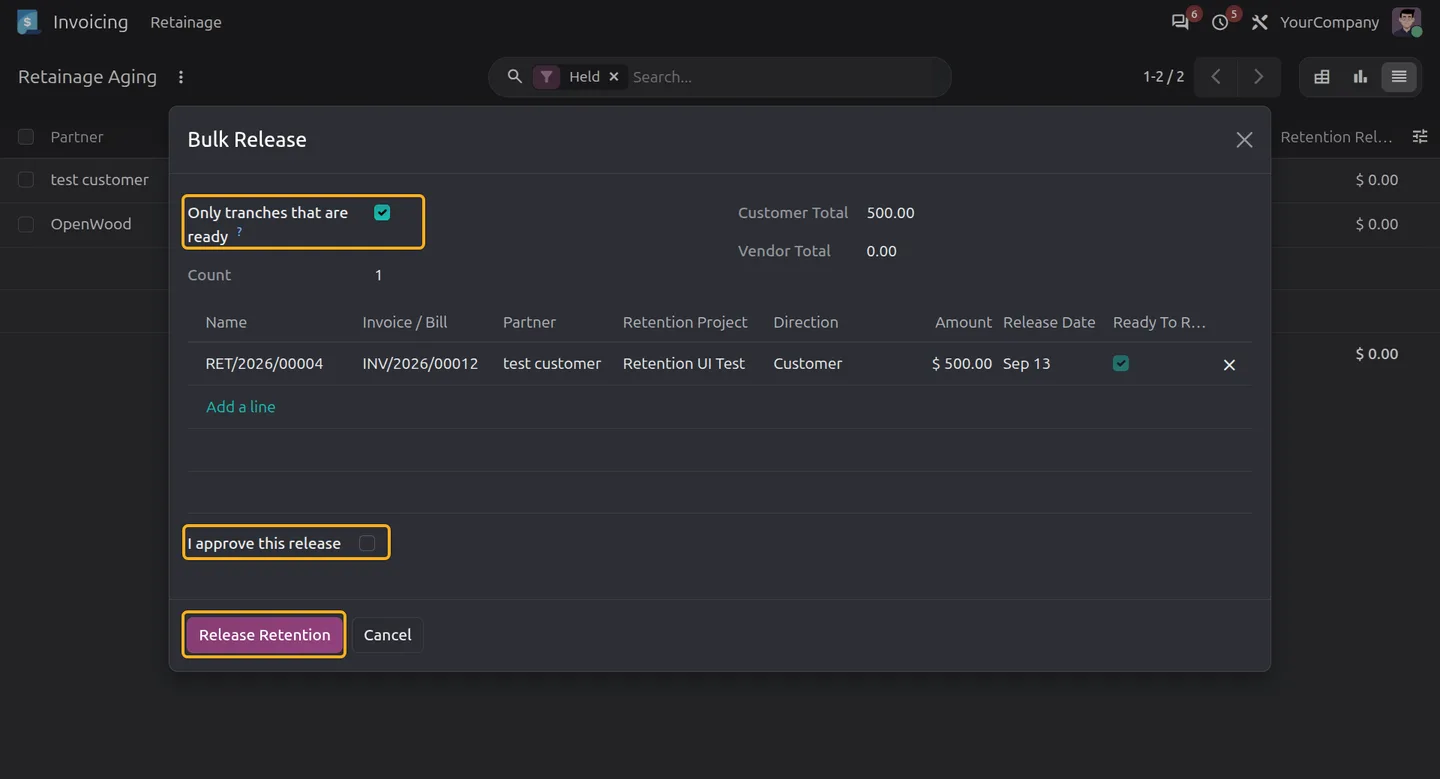
Select held tranches, review customer and vendor totals, limit the run to tranches that are ready, and tick the approval box before releasing.
-
Linked subcontractor retention
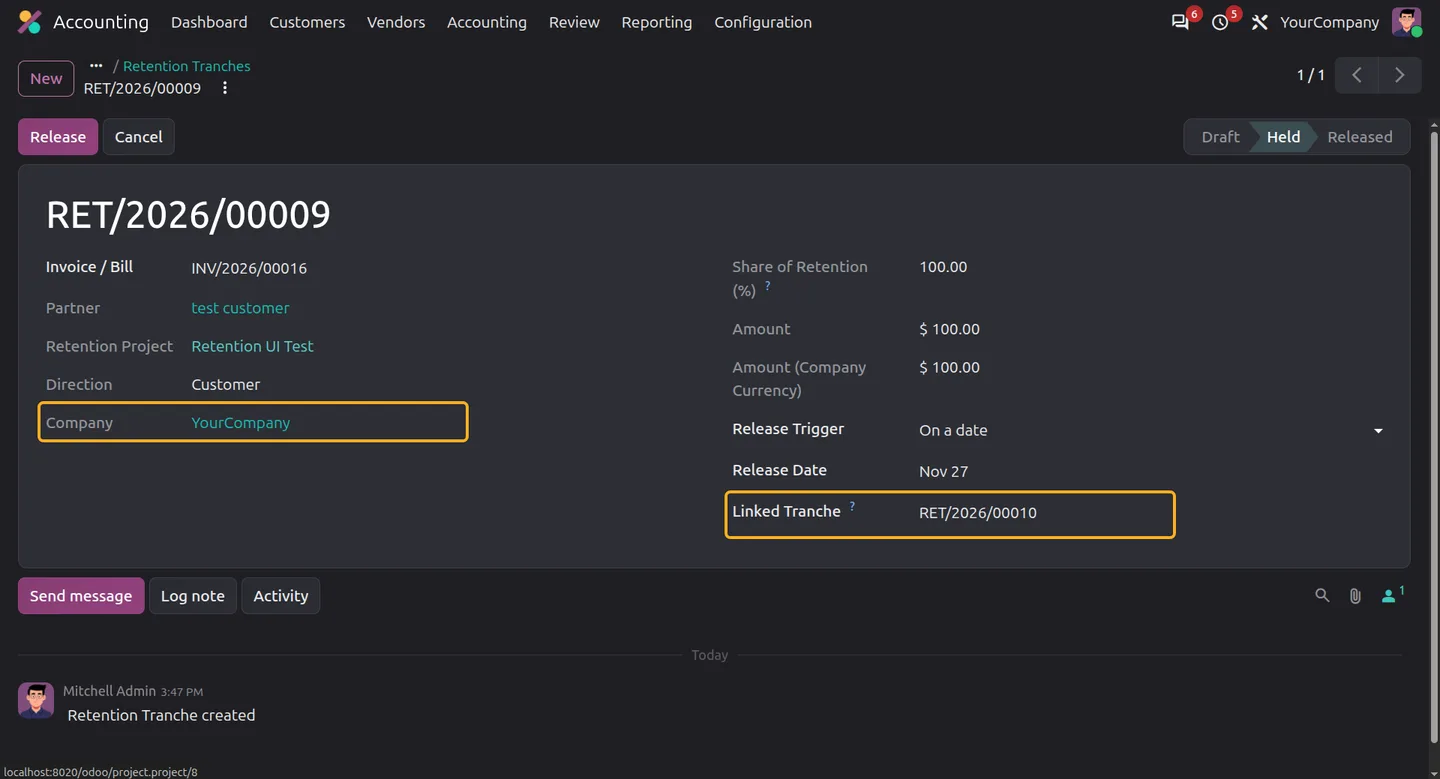
Link a customer tranche to a vendor tranche in the same company and project. With back-to-back release on, releasing one also releases the held linked tranche.
-
Retainage aging and project totals
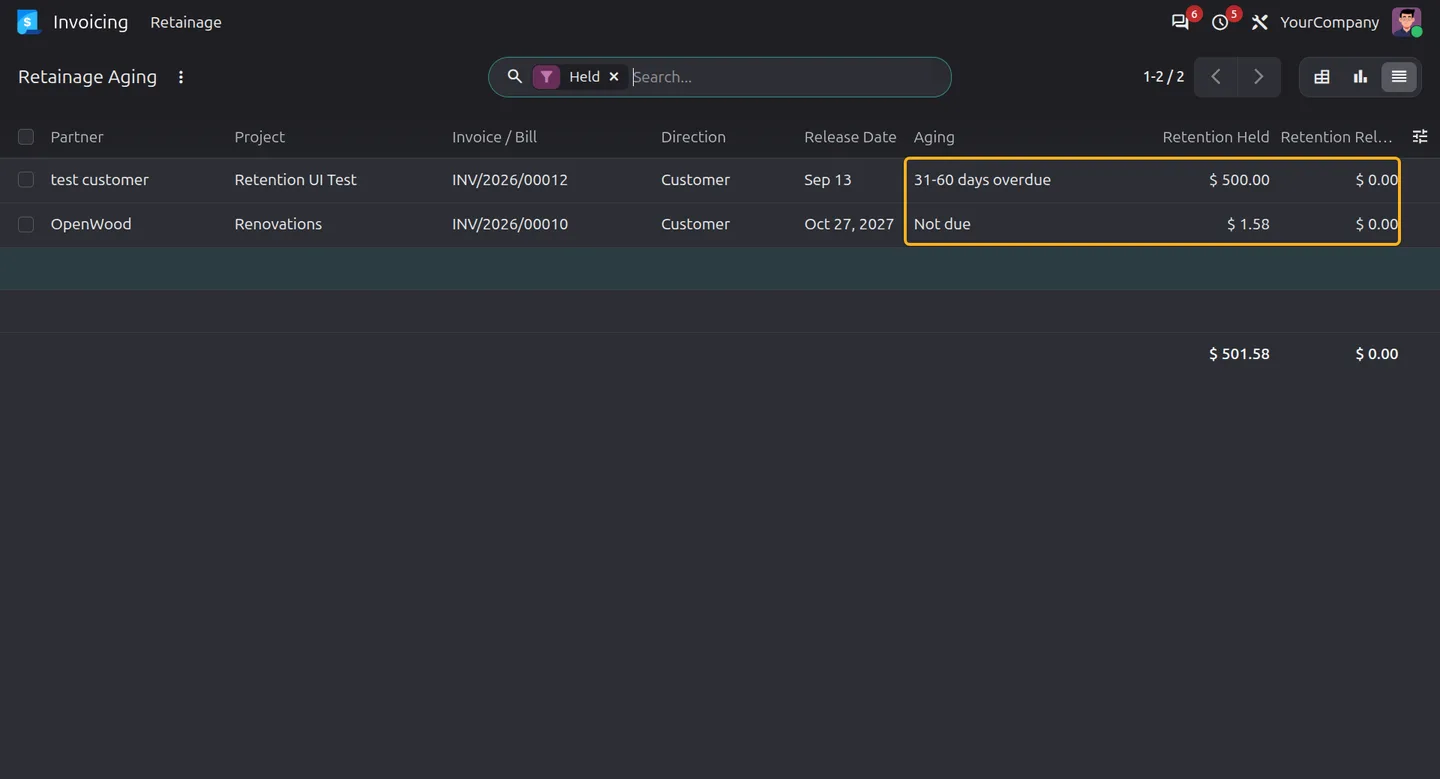
Review held and released retention by partner, project, company and direction, with not-due and overdue aging buckets.
-
PDF statement and history
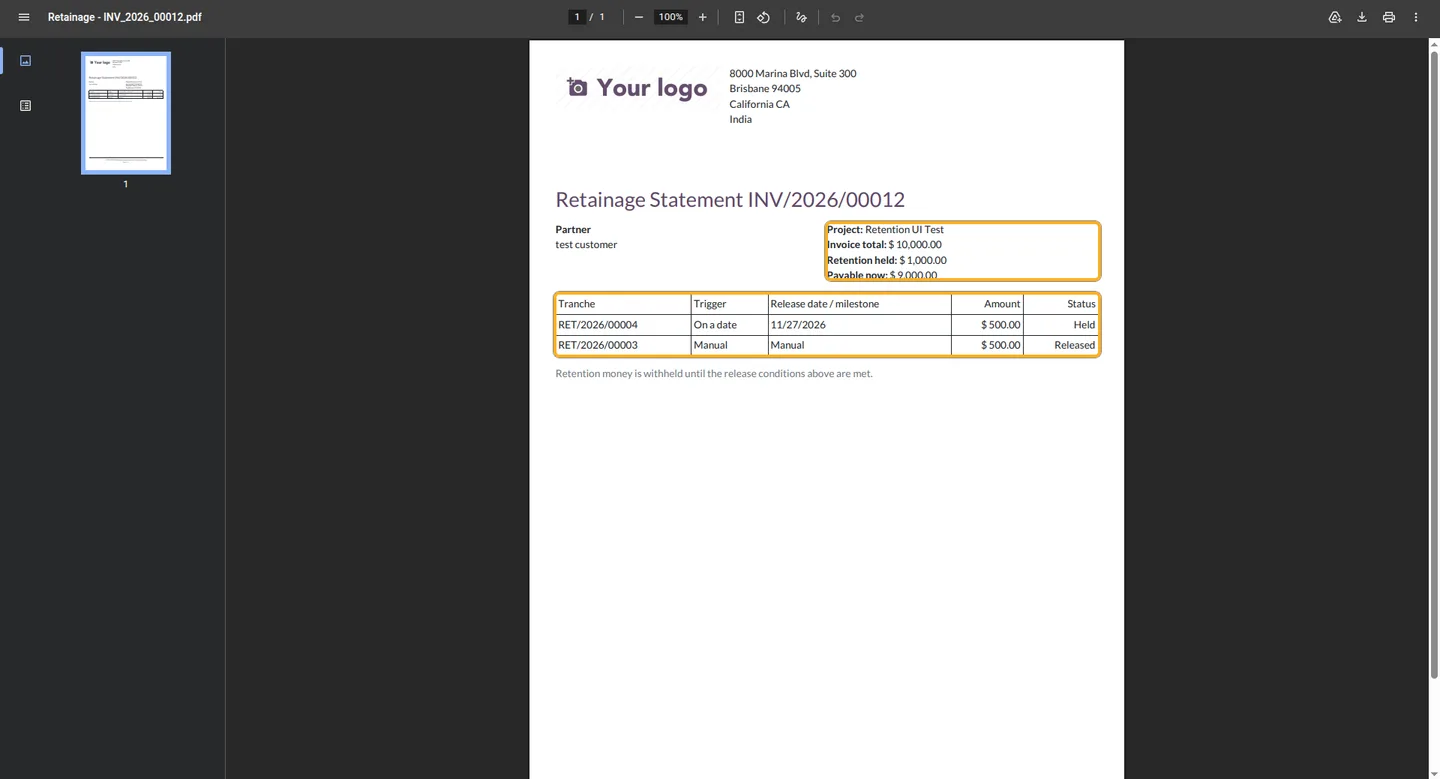
Print a retainage statement from the invoice or bill showing totals, tranches, triggers, release dates and status. Chatter records each hold and release.
Watch Project Retainage & Retention Management in use
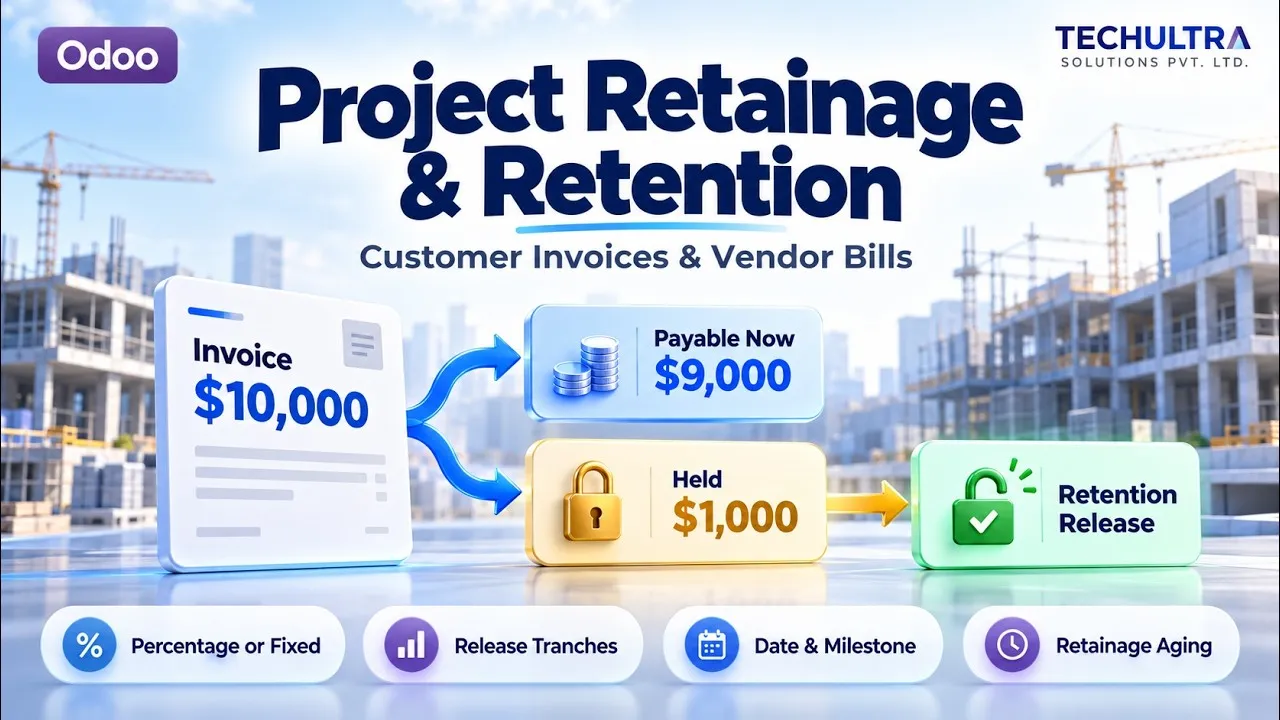
Video walkthrough of Project Retainage & Retention Management for Odoo from the TechUltra Solutions YouTube channel. Retainage for Odoo invoices and bills: calculate the holdback, post it to retention receivable or payable accounts, split it into release tranches with manual, date or milestone triggers, and track held, released and open amounts by project.
Project Retainage & Retention Management in Odoo
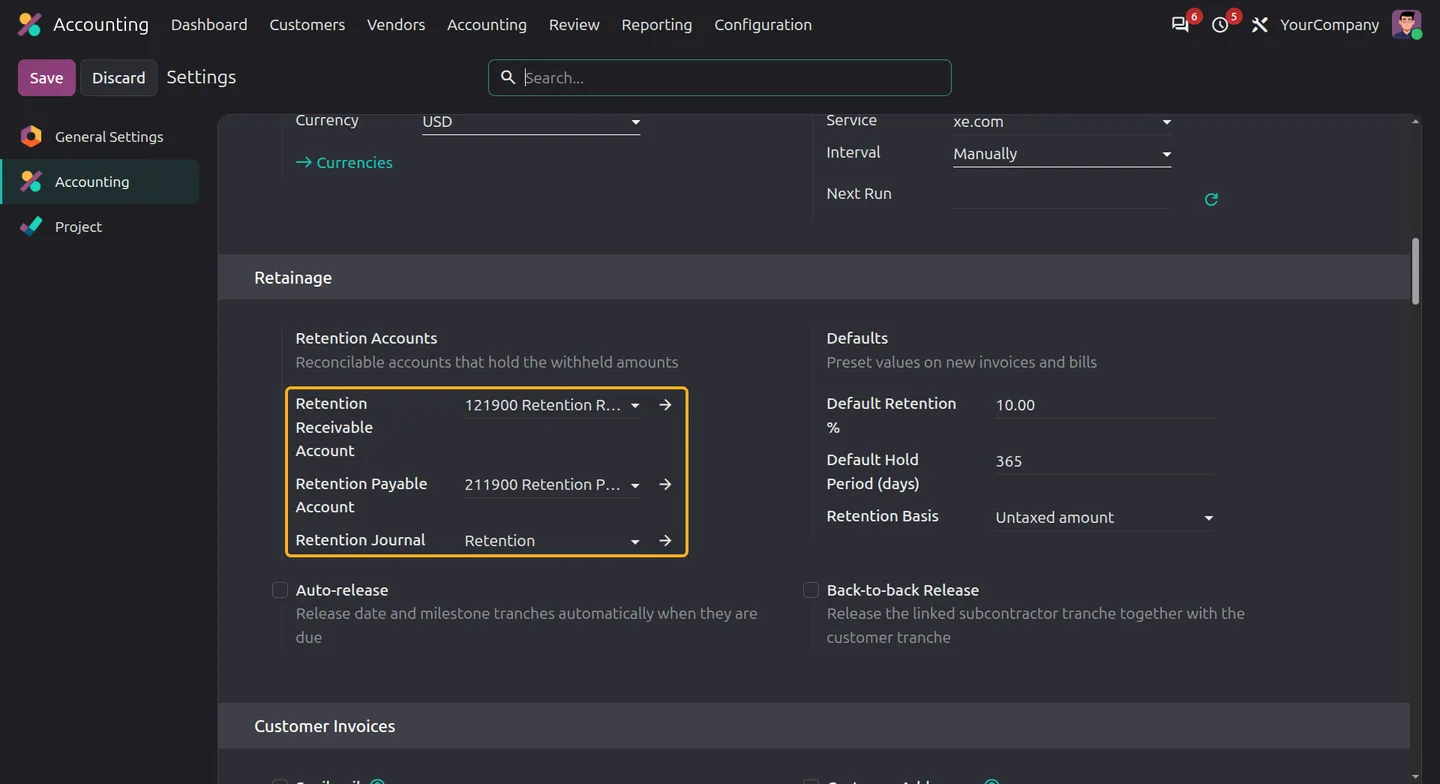
Every screen, in the order you meet it — configuration first, then the module in use.
Technical details
Specification
- Publisher
- TechUltra Solutions Private Limited
- Technical name
- project_retainage_retention
- Odoo versions
- 16.0, 17.0, 18.0, 19.0, 20.0
- Lines of code
- 1,120
- Retention types
- Percentage (untaxed amount or total) or fixed amount
- Release triggers
- Manual, date, project milestone
- Access groups
- Retainage User, Retainage Manager
- License
- Odoo Proprietary License v1.0 (OPL-1)
- Price
- $40.00 (one-time)
Deployment
- Odoo Online
- Odoo.sh
- On-premise
Odoo dependencies
- Invoicing
- Project
- Discuss
Support
90 days of bug-fix support plus 5 hours of free configuration help, Monday to Friday, 10:00–19:00 IST. Raise a ticket at support@techultra.in.
Setup & configuration
From install to first call — here is the path.
- 1
Assign retainage access
In Settings > Users & Companies > Users, set Retainage to User for people who work with retention, and to Manager for people who release it.
- 2
Prepare accounts and a journal
Create reconcilable retention receivable and retention payable accounts, plus a miscellaneous journal for retention entries.
- 3
Configure company defaults
In Accounting Settings > Retainage, select the accounts and journal, then set the default retention percentage, calculation basis and hold period in days.
- 4
Choose release options
Turn on Auto-release if due date and milestone tranches should release automatically, and Back-to-back Release if linked subcontractor tranches should release with the customer tranche.
- 5
Apply retention and post
On an invoice or bill, open the Retainage tab, set the retention and project, add tranches if needed, and post. Without a custom schedule, posting creates one tranche for the full amount.
Frequently asked questions
-
What does the module do?
It manages holdback on customer invoices and vendor bills. Apply percentage or fixed retention, post it to dedicated retention accounts, split it into release tranches, and track held, released and open amounts. It suits construction, subcontracting and other project-based billing.
-
How is the retention amount calculated?
Choose Percentage or Fixed amount. Percentage retention can use the untaxed amount or the invoice total. For a tax-free invoice of 1,000 at 5%, Retention Held is 50 and Payable Now is 950. A fixed amount lets you enter the holdback directly.
-
What must be configured before posting retention?
For each company, set retention receivable and payable accounts with reconciliation enabled and a miscellaneous retention journal in Accounting Settings > Retainage. Then set the default percentage, calculation basis and hold period. Normal invoice and bill accounts and journals must also be in place.
-
Can retention be released in stages or at a project milestone?
Yes. Create several tranches whose shares total 100% and choose a manual, date or project milestone trigger for each. Without a schedule, posting creates one tranche for the full retention using the company hold period.
-
Does releasing retention register a payment?
No. A release posts a journal entry that moves the released amount from the retention account back to the normal receivable or payable, and reconciles the retention lines. Record the actual receipt or payment separately in Odoo.
-
Can linked subcontractor tranches be released together?
Yes, if they belong to the same company. Link a customer tranche to a vendor tranche, enable Release Linked Tranches Together, and releasing one also releases the other if it is still Held.
-
Which reports are available?
Retainage Aging shows held and released amounts by partner, project, company and direction, with not-due and overdue buckets. Project retention totals link to their tranches, and a PDF retention statement prints from invoices and bills.
Listing verified against the Odoo App Store:
Related solutions
Whole-platform solutions that complement Project Retainage & Retention Management.
-
Odoo Accounting
Odoo Accounting — multi-entity, multi-currency, bank-feed integration, reconciliation, deferred revenue, GAAP / IFRS. 60+ country localisations.
-
Odoo as Accounting Software
Odoo Accounting standalone — alternative to QuickBooks, Tally, Xero, Zoho Books. Real GL, multi-entity, statutory compliance, scales into full ERP.
-
E-Invoicing on Odoo
Native e-invoicing for Odoo — India GST, Italy FatturaPA, Saudi ZATCA, Mexico CFDI, EU EN 16931. IRN registration, statutory submission, audit archives.
Related services
Get the most out of this module with senior TechUltra consultants.
-
Odoo Customization Services
Odoo customization from a Gold Partner: custom modules, workflows, reports and Studio changes, upgrade-safe and quoted at a fixed scope. Free scoping call.
-
Hire Odoo Developers
Hire Odoo developers from a Gold Partner: an AI Engineering Pod from USD 1,800 a month, or a dedicated developer for 70–160 hours. Request a proposal today.
-
Odoo Support Services & Maintenance
Odoo support services from a Gold Partner: functional and technical support plus server cover for Enterprise and Community, 30-minute P1 response, 24/7 option.