
Odoo App · Sales & Pricing
Pricelist Price on Product Form
See every applicable pricelist price on the Odoo product form, with visibility controls per pricelist, user, and product.

Overview
Pricelist Price on Product Form brings pricing onto the screen where it is needed. Instead of opening pricelist records one by one to find what a product costs, your team sees a consolidated table of every applicable pricelist price directly on the product form.
Built by TechUltra Solutions, the table respects Odoo's native rule priority — variant, then template, then category, then global — along with minimum quantities, date ranges, and currencies, and it recalculates in real time. It works for both product templates and individual variants.
Visibility is controlled at three levels. A pricelist can be shown or hidden across all products, a user can switch the table on or off in their own preferences, and an individual product can hide the whole table or specific pricelists. That keeps sensitive pricing in front of the right people only.
Key features
-
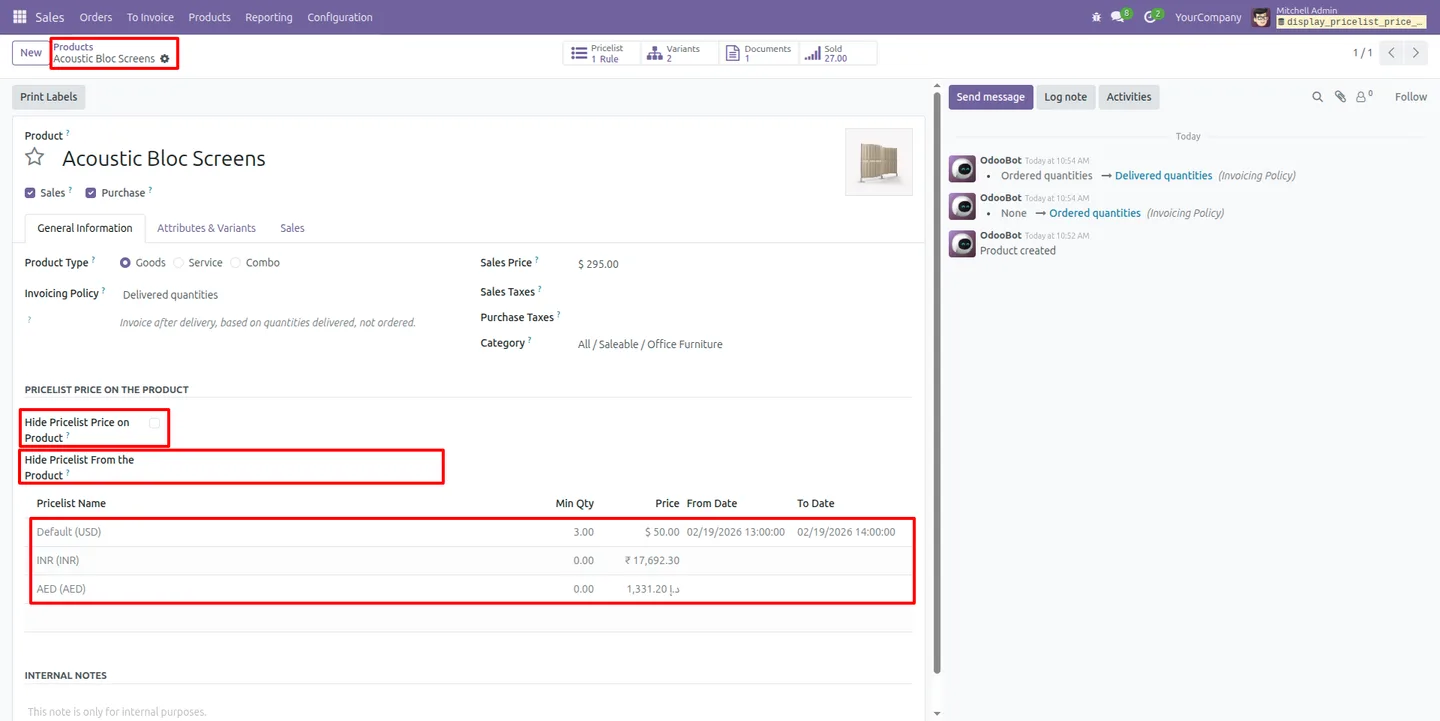
Centralised pricelist price view
All applicable pricelist prices appear in one consolidated table on the product form, so there is no switching between screens to compare pricing.
-
Native rule priority respected
The table follows Odoo's own rule order — variant, template, category, then global — along with minimum quantities, date ranges, and currencies, recalculated in real time.
-
Pricelist-level visibility control
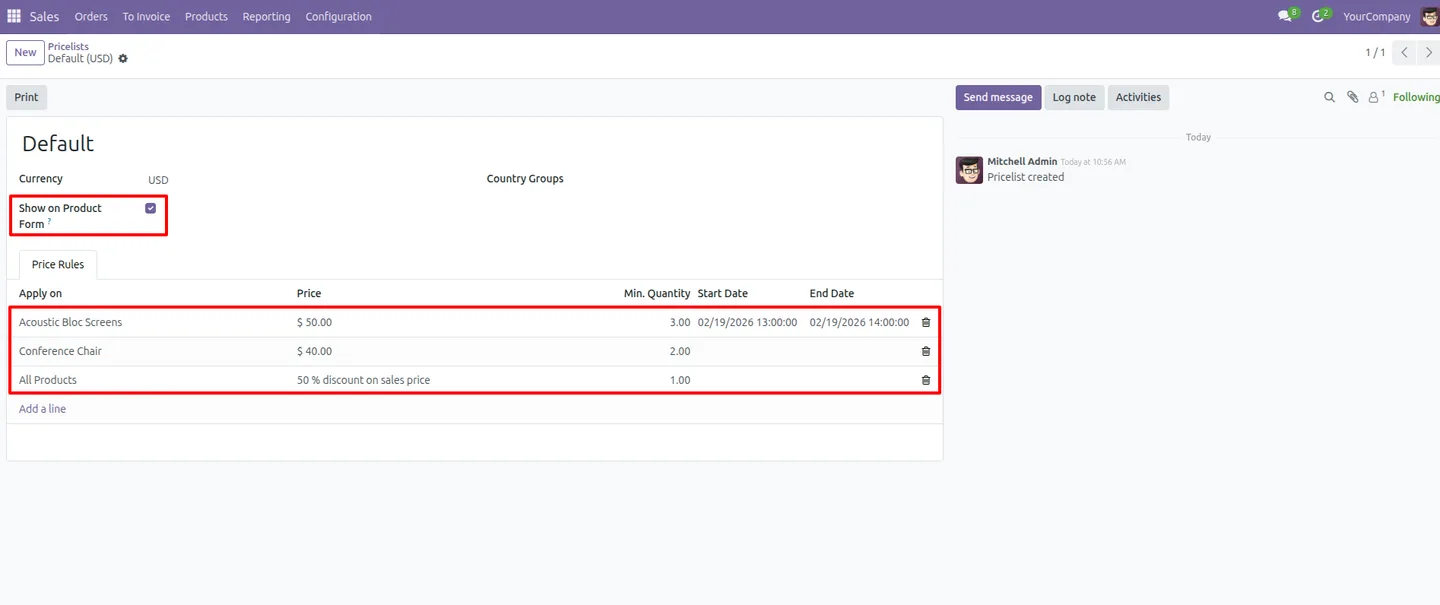
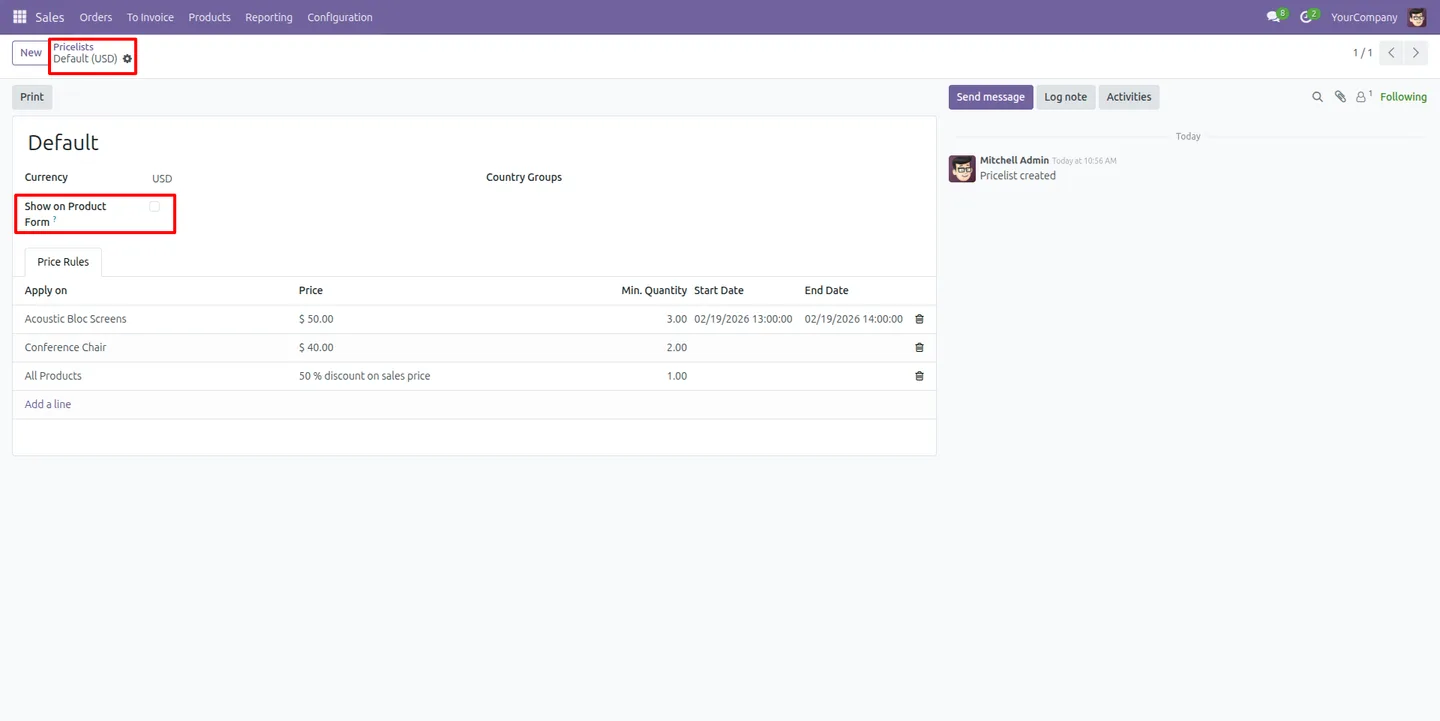
Each pricelist carries a “Show on Product Form” setting that determines whether it appears on products across the whole database.
-
User-based access control
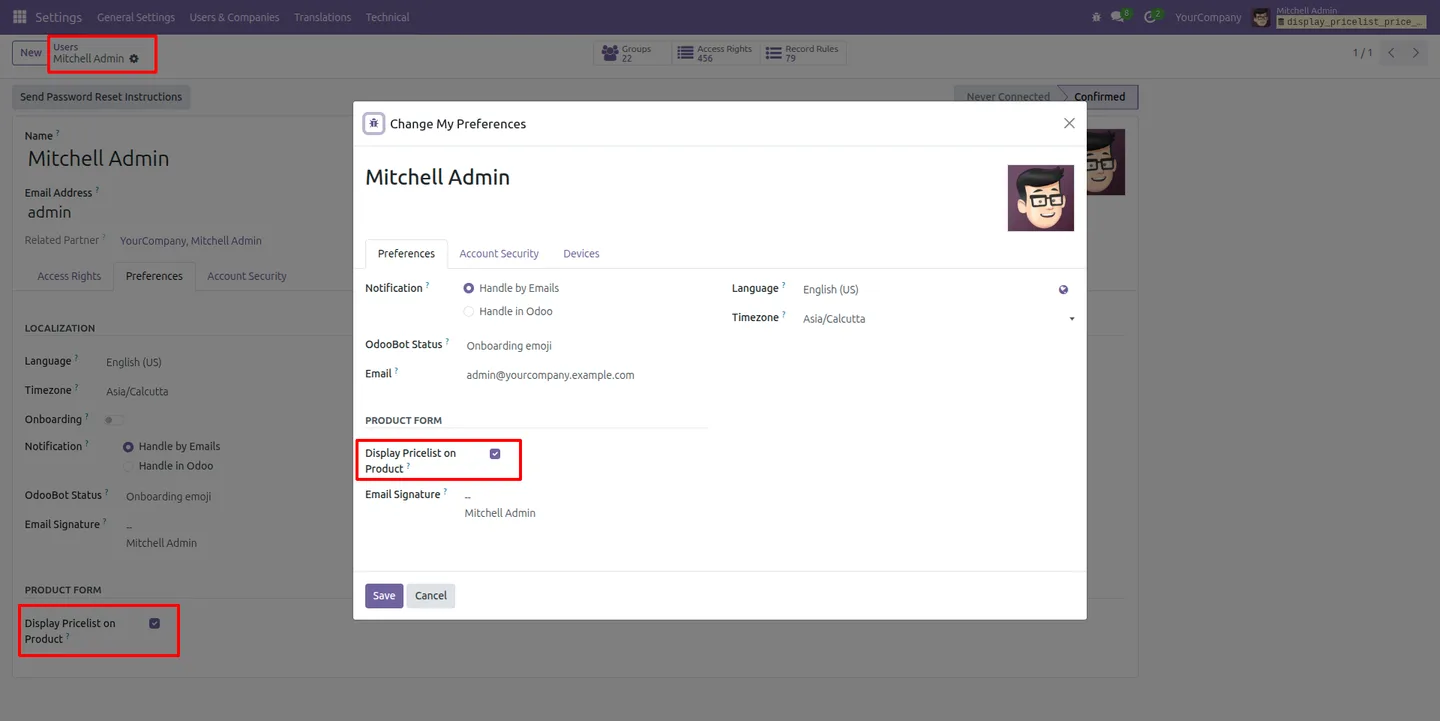
Each user enables or disables the pricelist table in their own preferences, so the view is shown only to the people who need it.
-
Product-specific restrictions
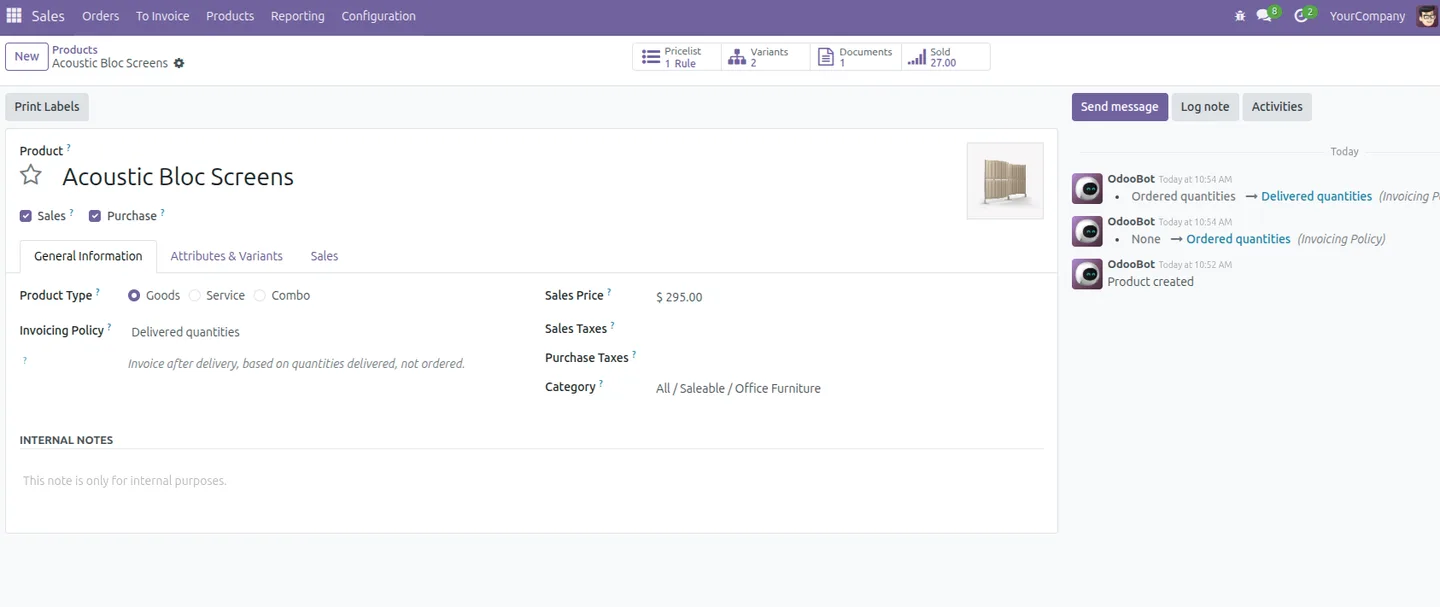
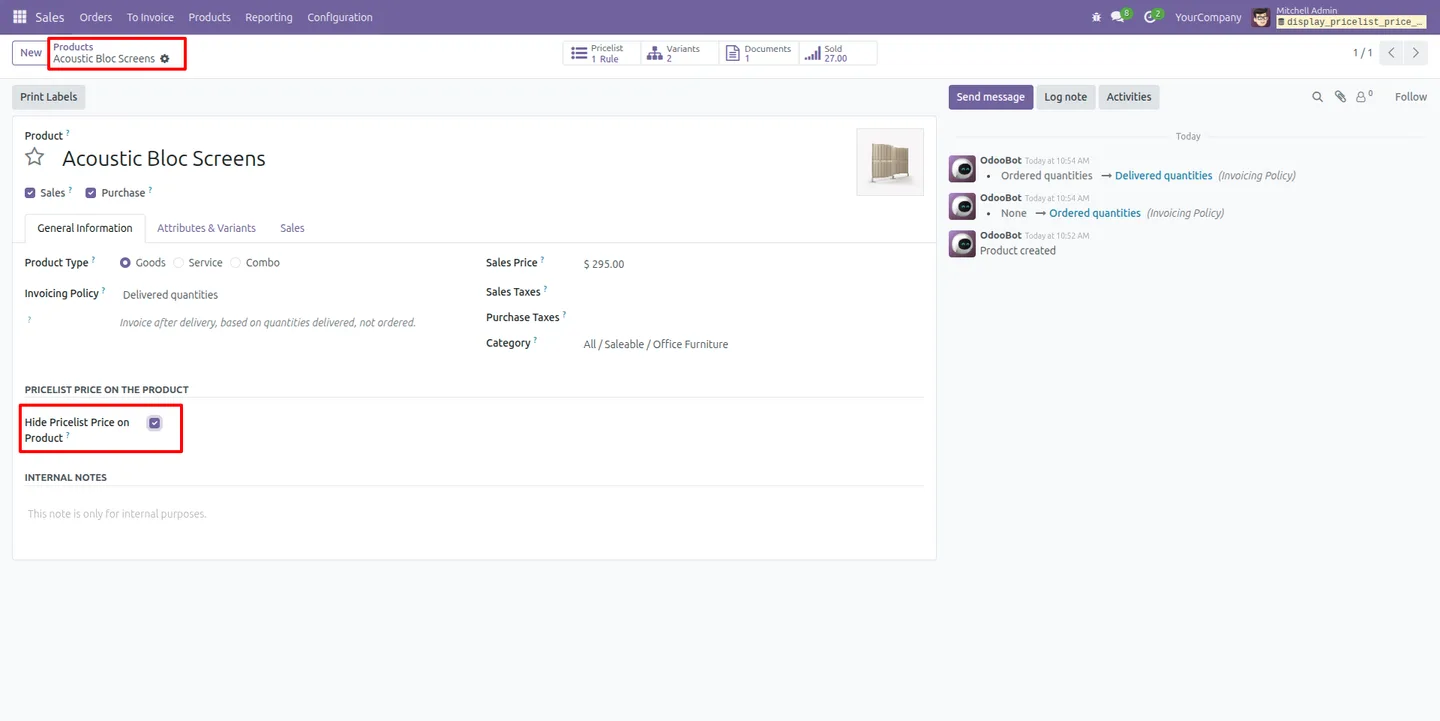
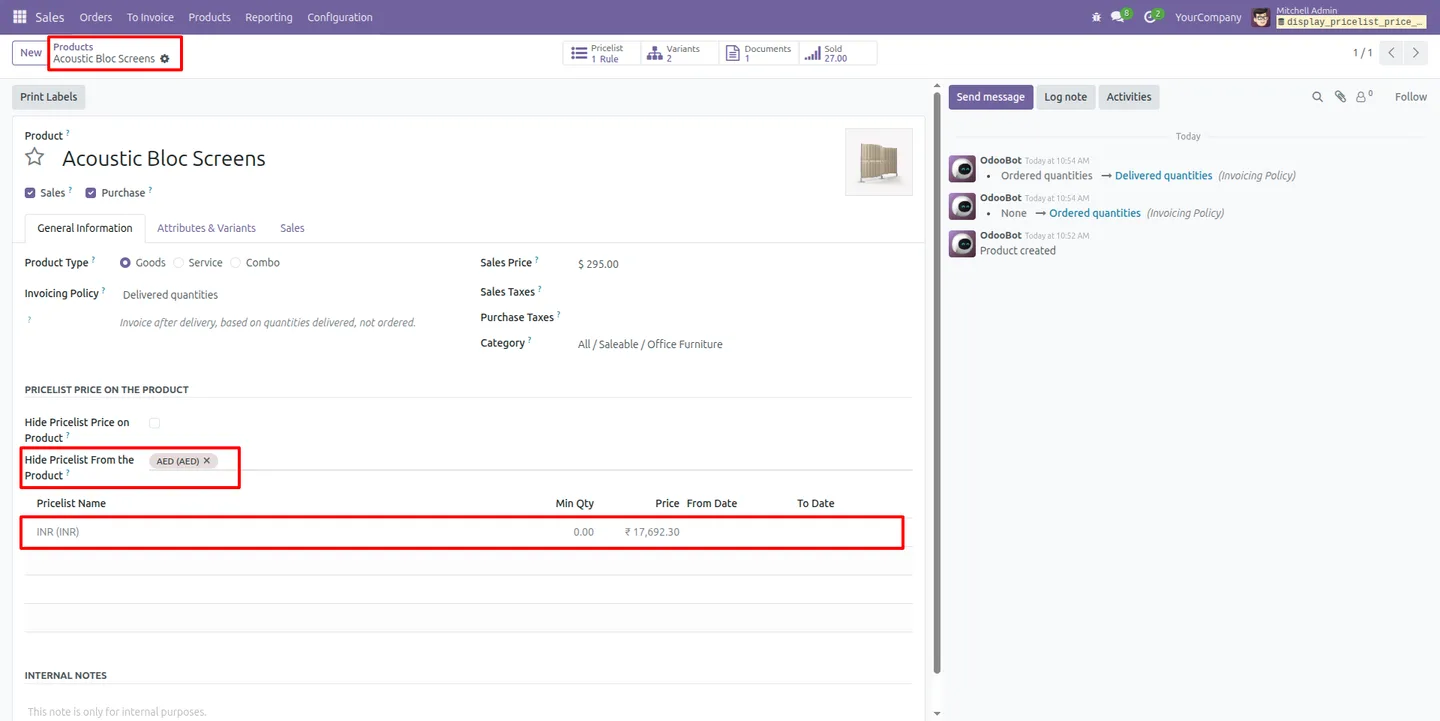
“Hide Pricelist Price on Product” removes the entire pricelist table from a chosen product, useful for items with confidential pricing.
-
Hide specific pricelists per product
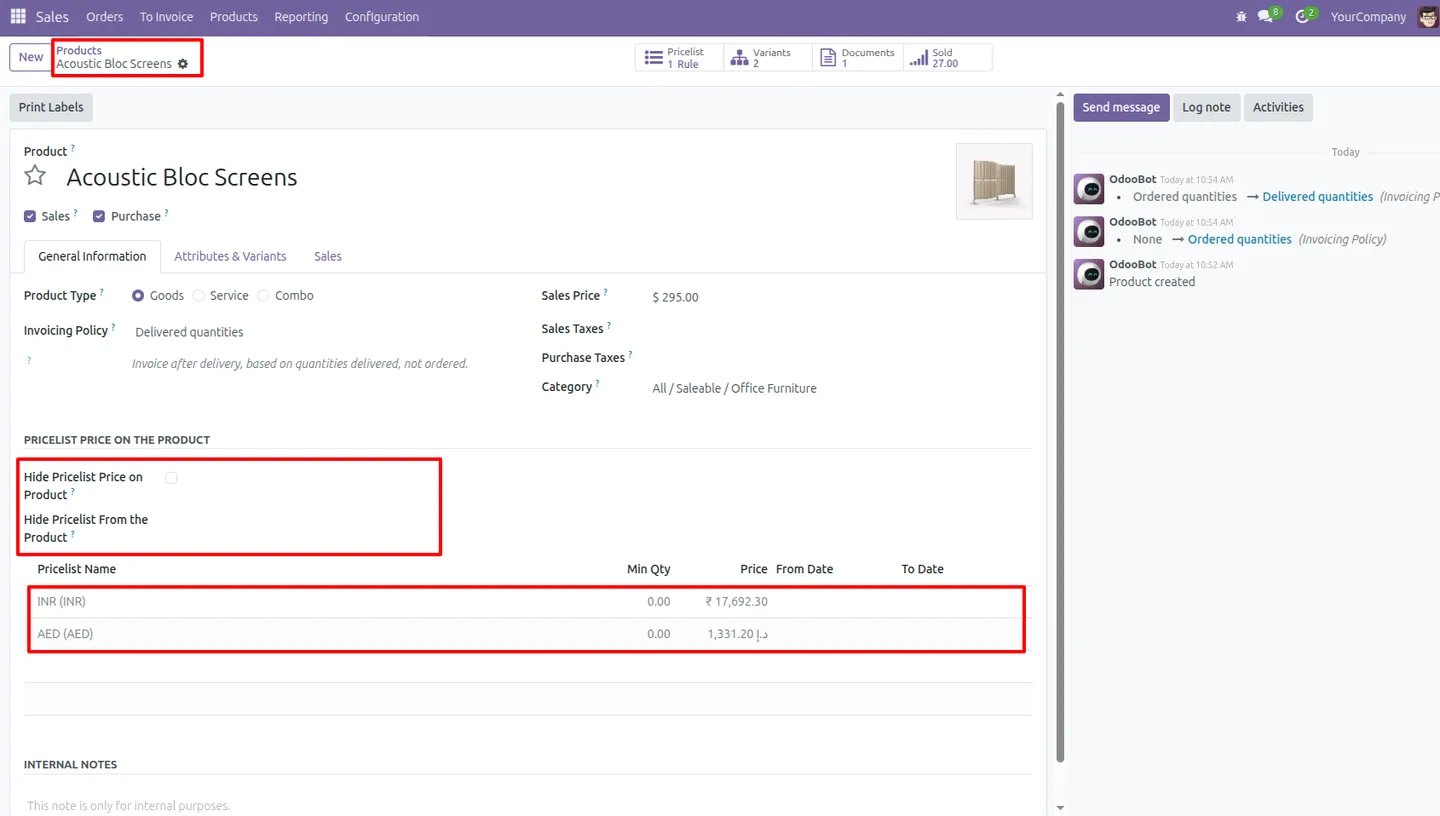
“Hide Pricelist from the Product” lets you exclude individual pricelists from a particular product while still showing the rest.
-
Global pricelist hiding
Turning off “Show on Product Form” in a pricelist's configuration removes that pricelist from every product at once.
-
Templates and variants
The pricelist table works consistently on both product templates and individual product variants, so pricing is visible wherever you open a product.
Pricelist Price on Product Form in Odoo
Every screen, in the order you meet it — configuration first, then the module in use.
Technical details
Specification
- Publisher
- TechUltra Solutions Private Limited
- Technical name
- display_pricelist_price_on_products
- Odoo versions
- 16.0, 17.0, 18.0, 19.0
- Lines of code
- 273
- License
- Odoo Proprietary License v1.0 (OPL-1)
- Price
- $12 (one-time)
Deployment
- Odoo Online
- Odoo.sh
- On-premise
Odoo dependencies
- Sales
- Discuss
Support
90 days of bug-fix support, Monday to Friday (10:00–19:00 IST). Raise a ticket at support@techultra.in.
Setup & configuration
From install to first call — here is the path.
- 1
Install the module
In Odoo, open Apps, remove the Apps filter, search for “Pricelist Price on Product Form”, and click Install.
- 2
Enable the user preference
Go to Settings → Users & Companies → Users → Preferences (or My Profile → Preferences) and turn on “Display Pricelist on Product”.
- 3
Configure pricelist visibility
Open each pricelist and set “Show on Product Form” to control whether it appears on products across the database.
- 4
Apply product-level rules
On individual products, use “Hide Pricelist Price on Product” to hide the whole table, or “Hide Pricelist from the Product” to exclude specific pricelists.
- 5
Review the pricelist table
Open a product form and confirm the table shows minimum quantities, prices, and start and end dates for every applicable pricelist.
Frequently asked questions
-
Where does the pricelist table appear?
Directly on the Odoo product form. It shows every applicable pricelist price in one consolidated table, so there is no need to open separate pricelist records.
-
Does the table follow Odoo's pricing rules?
Yes. It respects Odoo's native rule priority — variant, template, category, then global — along with minimum quantities, date ranges, and currencies, and updates in real time.
-
Can I hide pricing from certain users?
Yes. Each user enables or disables the pricelist table in their own preferences, so the view appears only for the people who need it.
-
Can I hide pricelists for a specific product?
Yes. “Hide Pricelist Price on Product” removes the whole table for that product, and “Hide Pricelist from the Product” excludes individual pricelists while keeping the rest.
-
How do I hide a pricelist from every product?
Turn off “Show on Product Form” in that pricelist's configuration. The pricelist is then removed from every product at once.
-
Does it work with product variants?
Yes. The pricelist table works consistently on both product templates and individual product variants.
-
Which Odoo versions are supported?
The module supports Odoo 16.0, 17.0, 18.0, and 19.0, in both the Community and Enterprise editions.
-
Is support included?
Yes. The module includes 90 days of bug-fix support, Monday to Friday, 10:00–19:00 IST.
Related solutions
Whole-platform solutions that complement Pricelist Price on Product Form.
Odoo Sales
Odoo Sales module — quotations, pricing rules, sales orders, deliveries, returns. CRM-Inventory-Accounting integrated. Quote-to-cash unified.
Odoo CRM
Odoo CRM module — leads, opportunities, kanban pipeline, quotation, forecasting, email integration. Native with ERP. Mid-market alternative to Salesforce.
Related services
Get the most out of this module with senior TechUltra consultants.
Odoo Customization Services
Tailored Odoo customizations from a Gold Partner — 200+ projects, upgrade-safe patterns, fixed-scope quotes, senior consultants. Free demo consultation.
Hire Odoo Developers
Hire certified Odoo developers from a Gold Partner — 400+ implementations, 92% satisfaction, Odoo since 2016. Silver / Gold / Platinum packages, free trial.
Odoo Support & Maintenance
Odoo Gold Partner support — 24/7 functional, technical, and server coverage for Enterprise and Community editions. Fast turnaround, free consultation.







