

Odoo App · Sales & Inventory
Prevent Out-of-Stock Sale
Block sales order confirmation when stock is short — stop overselling in Odoo.

Overview
Prevent Out-of-Stock Sale adds an inventory check to the Odoo sales order confirmation step. When a salesperson tries to confirm an order, the module compares ordered quantities against available stock and stops the confirmation if any product is short — so the business never commits to deliver goods it does not have.
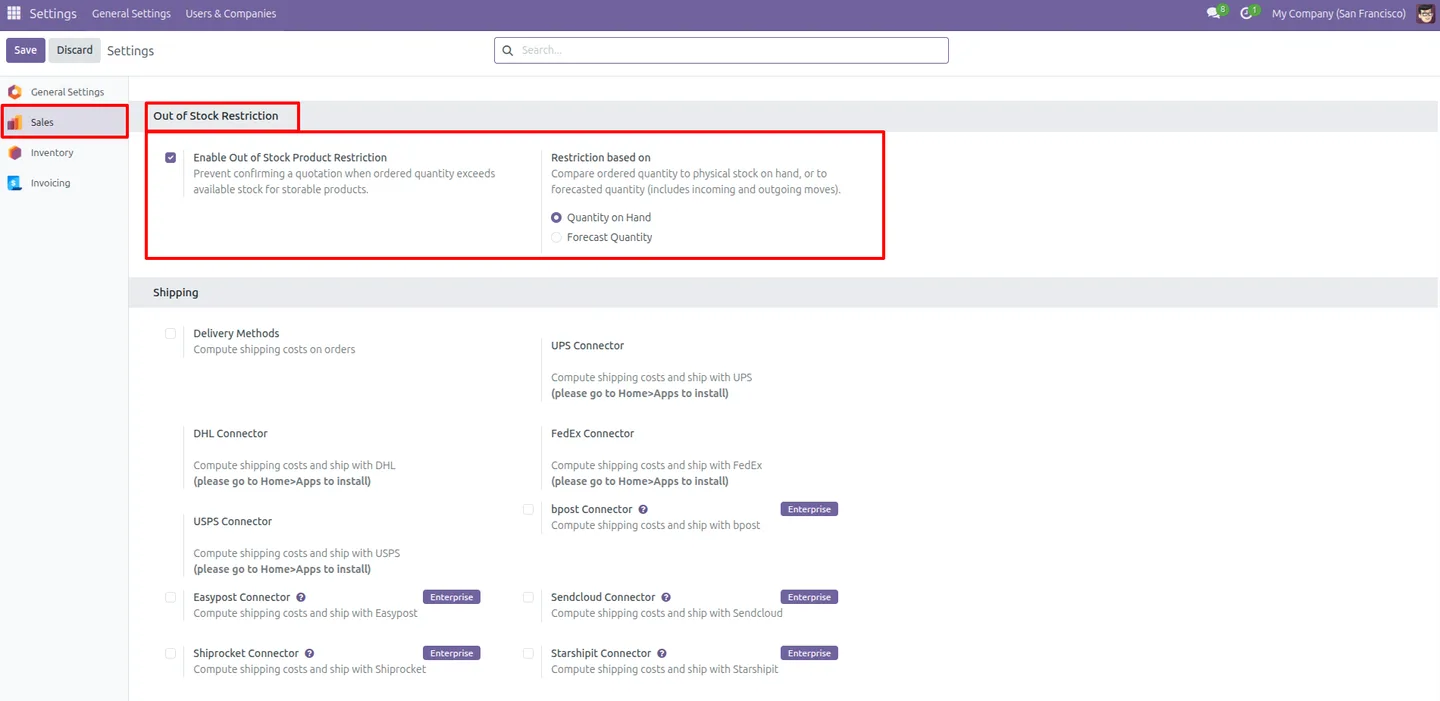
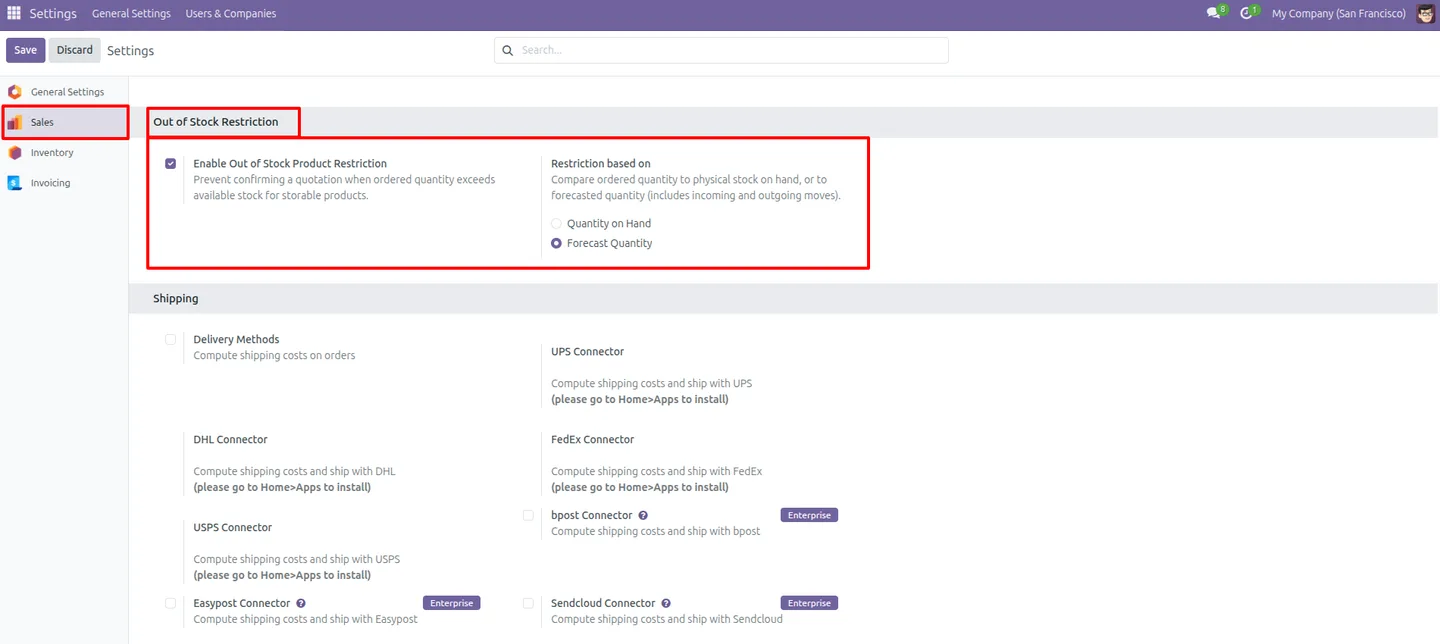
Built by TechUltra Solutions, the module lets you decide how strict the check is. Validate against quantity on hand to block on physical stock, or against forecast quantity to account for incoming receipts and other reservations. The choice is made once in Sales settings and can be changed at any time.
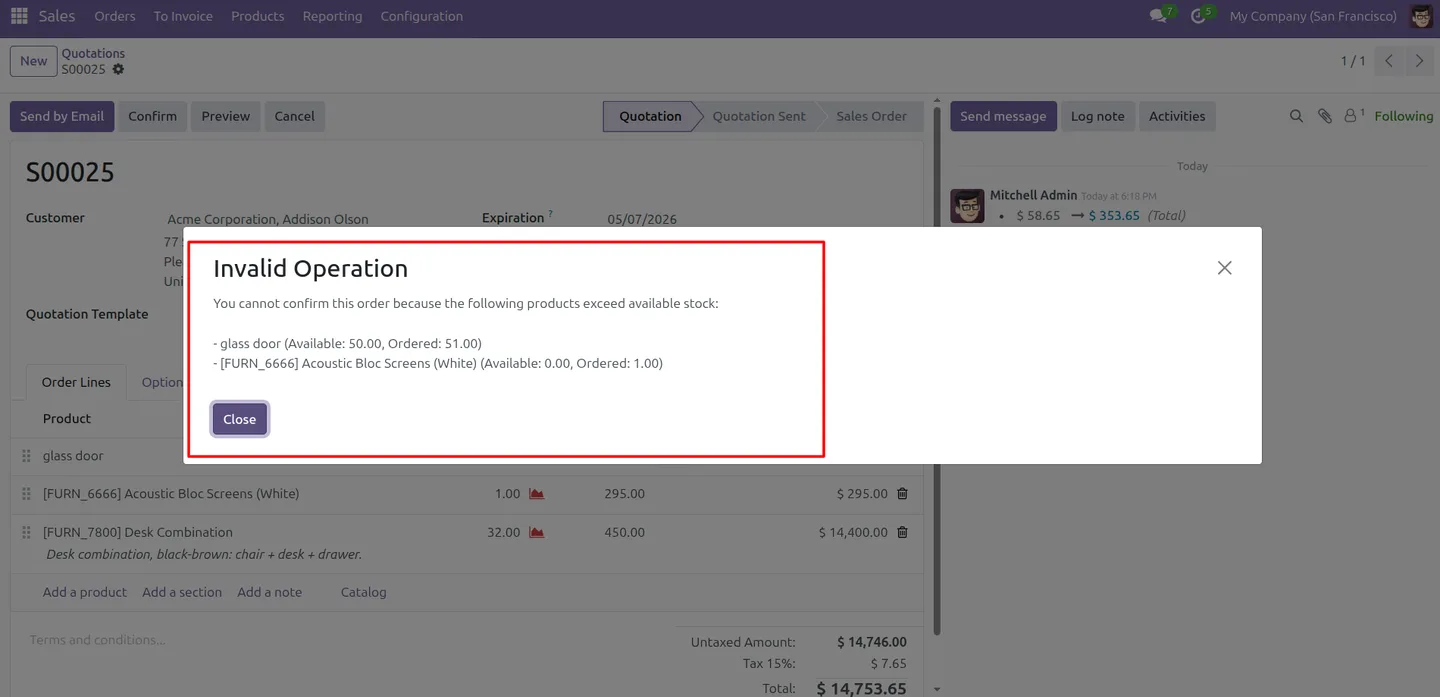
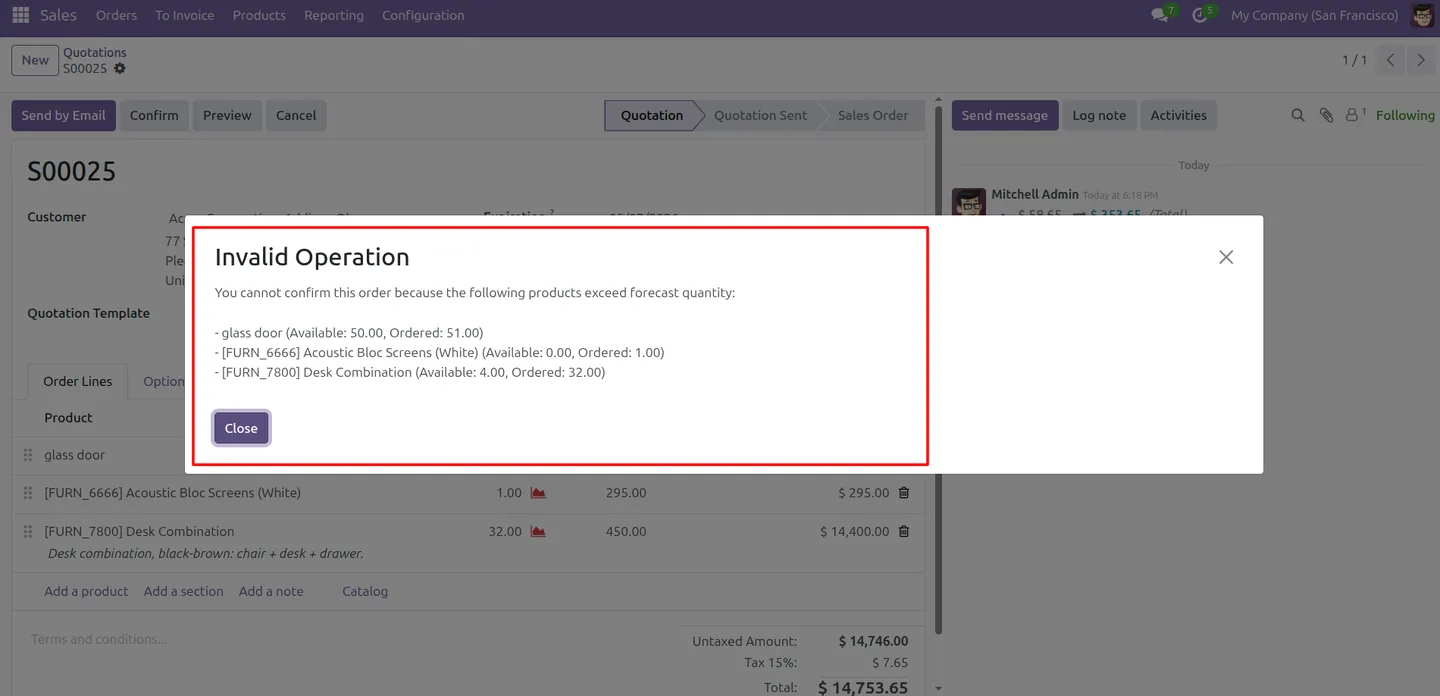
The restriction is targeted. Storable products are checked, while service products and non-stock items pass through untouched. When an order is blocked, the salesperson sees an error naming the problem and either reduces the quantity or waits for a restock before confirming.
Key features
-
Blocks confirmation of short orders
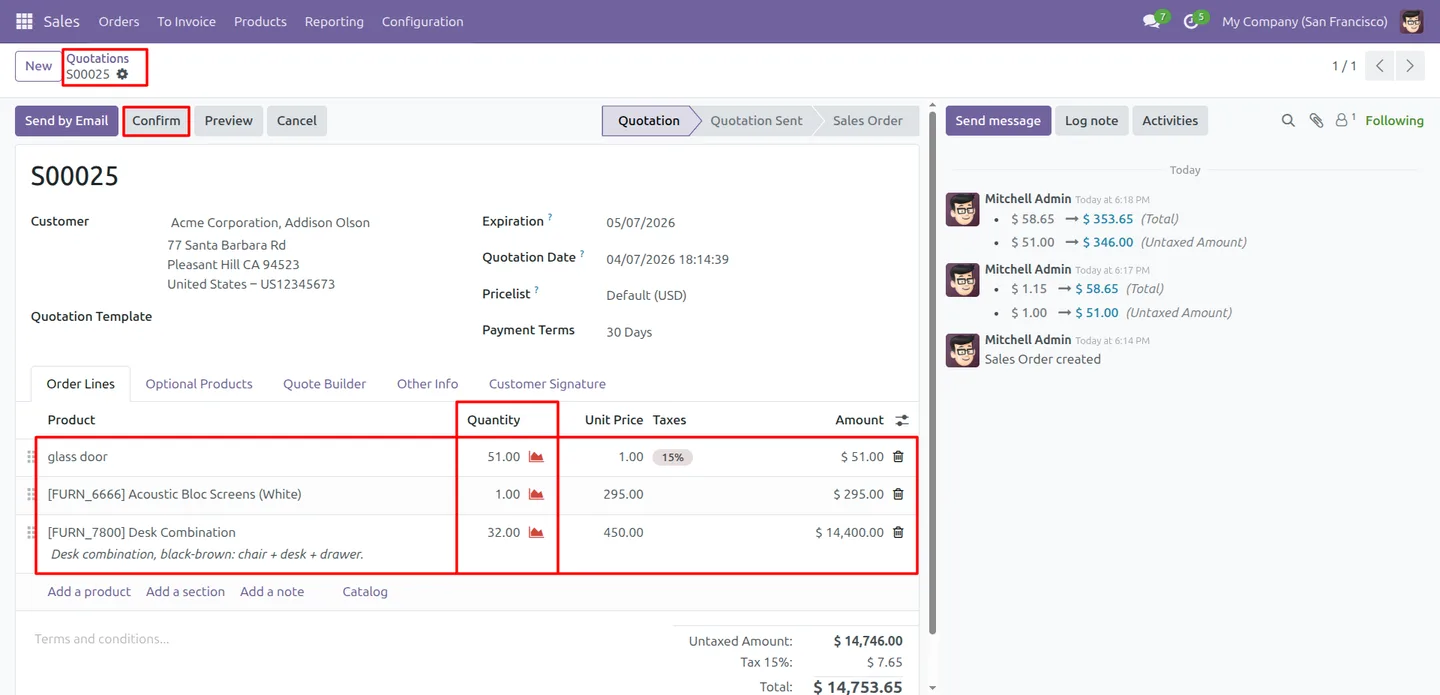
When an ordered product does not have enough stock, the sales order cannot be confirmed. The check runs at the confirmation step, before any delivery is committed.
-
On-hand quantity validation
Set the module to check quantity on hand and confirmation is blocked unless the physical stock currently available covers the order.
-
Forecast quantity validation
Set the module to check forecast quantity and the validation accounts for incoming receipts and existing reservations, not just stock on the shelf today.
-
Configurable from Sales settings
Turn the restriction on or off and switch between on-hand and forecast validation from Sales settings. No technical changes are needed.
-
Smart product filtering
Only storable products are checked. Service products and non-stock items are skipped, so orders for non-inventory lines confirm normally.
-
Clear error on blocked orders
When an order is stopped, the salesperson sees an error message identifying the issue, so they know to adjust the quantity or wait for a restock.
-
Prevents overselling
Sales commitments stay aligned with real inventory, so the business does not promise stock it cannot deliver and avoids the cancellations and apologies that follow.
-
More accurate stock and fewer surprises
Because every confirmed order is backed by available stock, inventory figures stay trustworthy and downstream delivery planning has fewer surprises.
Prevent Out-of-Stock Sale in Odoo
Every screen, in the order you meet it — configuration first, then the module in use.
Technical details
Specification
- Publisher
- TechUltra Solutions Private Limited
- Technical name
- sale_out_of_stock_restriction
- Odoo versions
- 16.0, 17.0, 18.0, 19.0
- Lines of code
- 188
- License
- Odoo Proprietary License v1.0 (OPL-1)
- Price
- $13 (one-time)
Deployment
- Odoo Online
- Odoo.sh
- On-premise
Odoo dependencies
- Sales
- Inventory
- Invoicing
- Discuss
Support
90 days of bug-fix support, Monday to Friday (10:00–19:00 IST). Raise a ticket at support@techultra.in.
Setup & configuration
From install to first call — here is the path.
- 1
Install the module
In Odoo, open Apps, remove the Apps filter, search for “Prevent Out-of-Stock Sale”, and click Install.
- 2
Open Sales settings
Go to Sales → Configuration → Settings and search for “Out of Stock Restriction” to find the module's options.
- 3
Choose the validation method
Select whether confirmation is checked against quantity on hand or forecast quantity, based on how strict you need the rule to be.
- 4
Test on a sales order
Create a sales order for a storable product with quantity above its available stock and try to confirm it — the order is blocked with an error.
- 5
Adjust the rule as needed
The restriction can be switched between on-hand and forecast validation, or turned off entirely, from Sales settings at any time.
Frequently asked questions
-
What does Prevent Out-of-Stock Sale do?
It blocks an Odoo sales order from being confirmed when an ordered product does not have enough inventory, so the business never commits to deliver goods it does not have in stock.
-
Does it check on-hand stock or forecast stock?
Either — you choose. On-hand validation checks physical stock available now, while forecast validation also accounts for incoming receipts and existing reservations.
-
Are service products affected?
No. Only storable products are checked. Service products and non-stock items pass through, so orders for non-inventory lines confirm without restriction.
-
What does a salesperson see when an order is blocked?
An error message appears identifying the out-of-stock product. The salesperson then reduces the quantity or waits for a restock before confirming the order.
-
Can the restriction be turned off?
Yes. The restriction can be enabled, disabled, or switched between on-hand and forecast validation from Sales settings at any time.
-
Which Odoo versions are supported?
The module supports Odoo 16.0, 17.0, 18.0, and 19.0, in both the Community and Enterprise editions.
-
Does it change anything before the confirmation step?
No. Quotations are unaffected — the inventory check runs only when a sales order is confirmed, so draft quotes can still be created freely.
-
Is support included?
Yes. The module includes 90 days of bug-fix support, Monday to Friday, 10:00–19:00 IST.
Related services
Get the most out of this module with senior TechUltra consultants.
Odoo Customization Services
Tailored Odoo customizations from a Gold Partner — 200+ projects, upgrade-safe patterns, fixed-scope quotes, senior consultants. Free demo consultation.
Hire Odoo Developers
Hire certified Odoo developers from a Gold Partner — 400+ implementations, 92% satisfaction, Odoo since 2016. Silver / Gold / Platinum packages, free trial.
Odoo Support & Maintenance
Odoo Gold Partner support — 24/7 functional, technical, and server coverage for Enterprise and Community editions. Fast turnaround, free consultation.







