

Odoo App · Productivity
Odoo Split View
View the record list and form side by side in a single split-screen workspace.

Overview
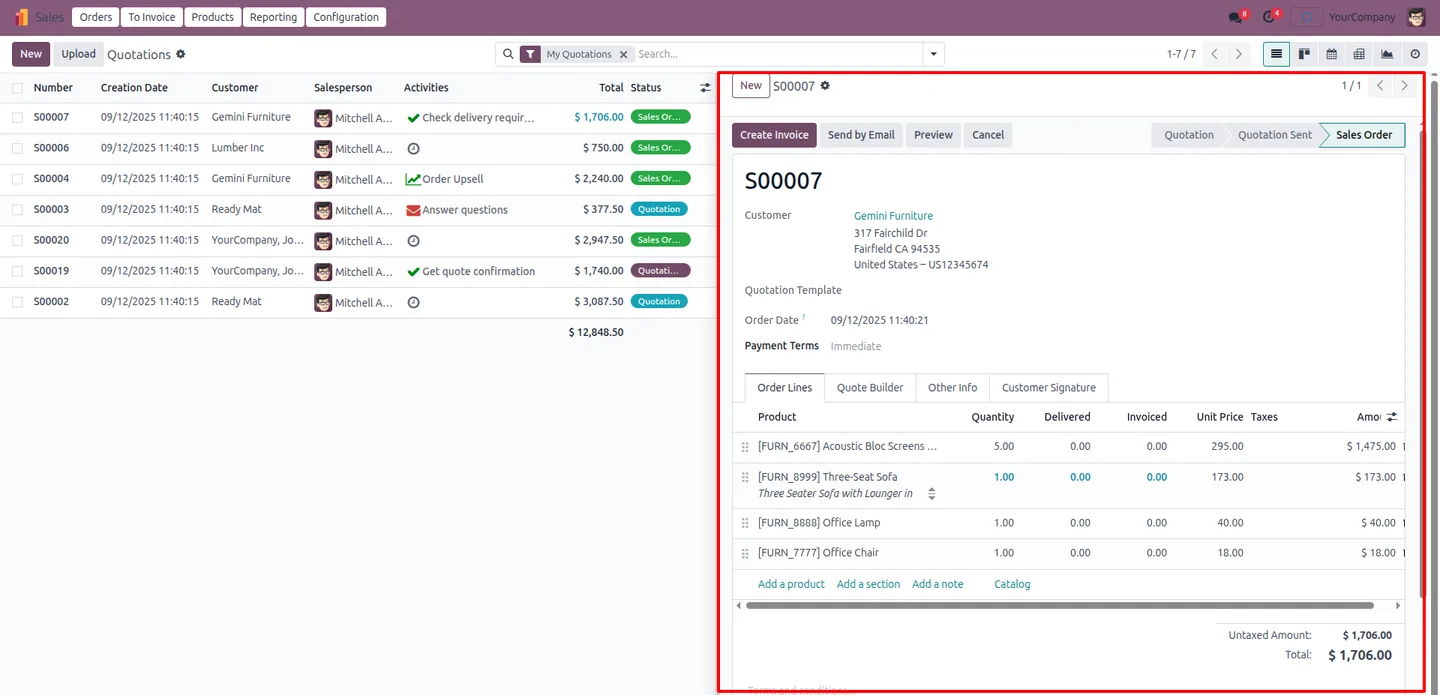
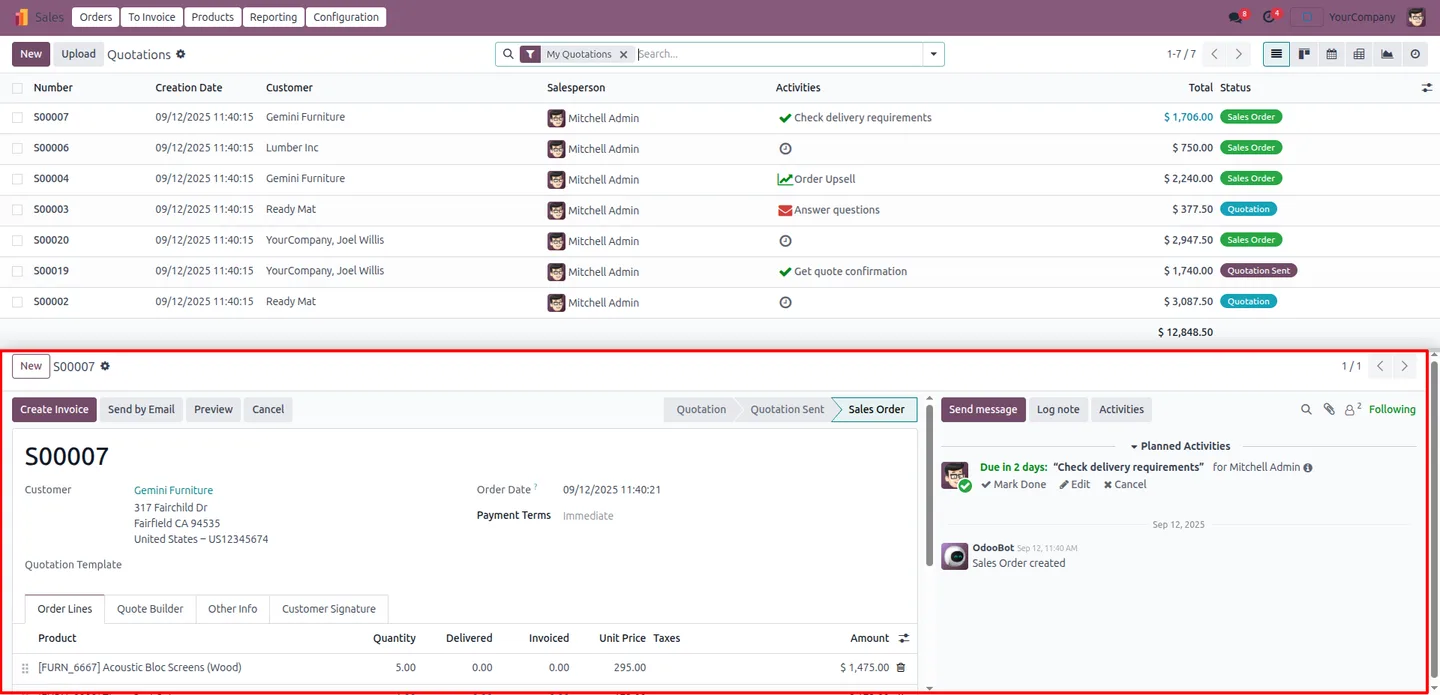
Odoo Split View ends the back-and-forth between a list and the records inside it. Instead of opening a record, editing it, and clicking back to the list, you see both at once — the list on one side, the open record's form on the other.
Built by TechUltra Solutions, the module opens any record into a split panel next to the main list view. A layout toggle switches the split between vertical and horizontal, so you can arrange the workspace to suit the screen and the task. Moving from one record to the next happens straight from the list panel, with no page reload.
Edits stay in sync: changing a record in the form panel updates the list panel automatically, so what you see on both sides always matches. The split form is embedded in an iframe — to bypass browser X-Frame-Options restrictions, install an “Ignore X-Frame headers” browser extension, available for Chrome, Edge, and Firefox.
Key features
-
Split-panel record view
Open any record into a split panel beside the main list view, so the list and the detailed form share one screen.
-
List and form together
See a list of records alongside the full form of the open record in a single interface — no switching between separate screens.
-
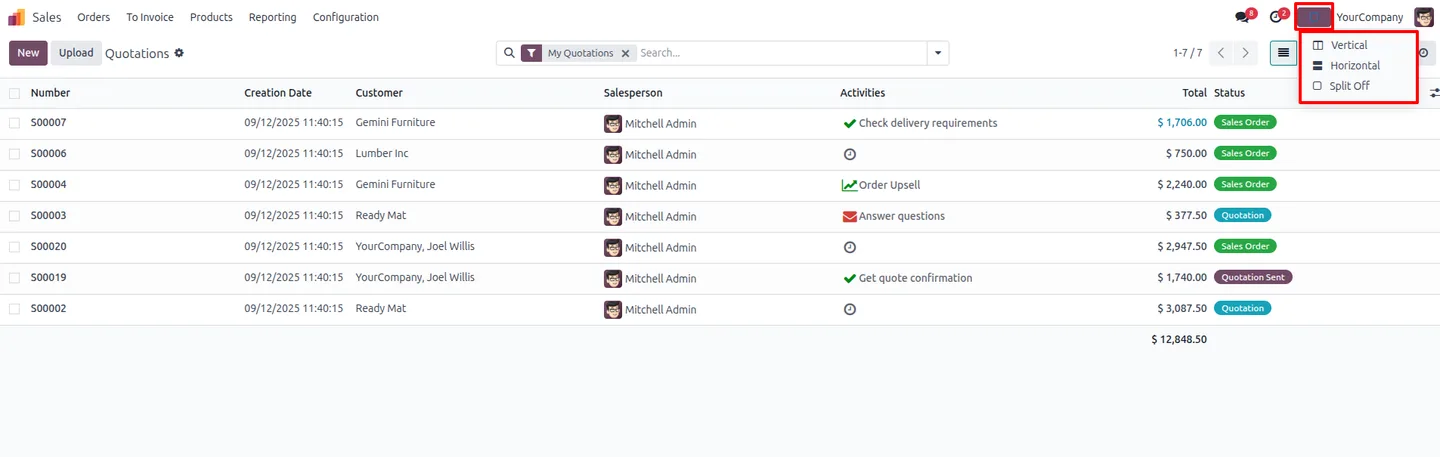
Vertical or horizontal layout
A one-click toggle switches the split between a vertical and a horizontal arrangement to fit the screen and the task.
-
Reload-free navigation
Move from one record to the next directly from the list panel, with the form panel updating without a page reload.
-
Real-time synchronisation
Editing a record in the form panel updates the list panel automatically, so both sides always show the same data.
-
Faster review and updates
Working through a batch of records — checking, correcting, and updating each one — is quicker when the list never leaves the screen.
-
Iframe-embedded form
The form panel is embedded in an iframe. An “Ignore X-Frame headers” browser extension lets it display past X-Frame-Options restrictions.
Odoo Split View in Odoo
Every screen, in the order you meet it — configuration first, then the module in use.
Technical details
Specification
- Publisher
- TechUltra Solutions Private Limited
- Technical name
- odoo_split_view
- Odoo versions
- 16.0, 17.0, 18.0, 19.0, 20.0
- Lines of code
- 395
- License
- Odoo Proprietary License v1.0 (OPL-1)
- Price
- $35 (one-time)
Deployment
- Odoo Online
- Odoo.sh
- On-premise
Odoo dependencies
- Web
Support
90 days of bug-fix support, Monday to Friday (10:00–19:00 IST). Raise a ticket at support@techultra.in.
Setup & configuration
From install to first call — here is the path.
- 1
Install the module
In Odoo, open Apps, remove the Apps filter, search for “Odoo Split View”, and click Install.
- 2
Add the browser extension
Because the form panel is embedded in an iframe, install an “Ignore X-Frame headers” extension for your browser — Chrome, Edge, or Firefox — so the form displays correctly.
- 3
Open a record in split view
Open any list view and open a record into the split panel. The list stays on one side and the record's form appears on the other.
- 4
Choose the layout
Use the layout toggle to switch the split between vertical and horizontal, arranging the workspace to suit your screen.
- 5
Work through your records
Select records from the list panel to review and edit them. Changes sync to the list panel in real time, with no reload.
Frequently asked questions
-
What does Odoo Split View show on screen?
It shows a record list and a detailed form at the same time in one workspace. You can review and edit a record in the form panel while the full list stays visible beside it.
-
Can I switch between a vertical and horizontal split?
Yes. A one-click layout toggle switches the split panel between vertical and horizontal, so you can arrange the workspace to fit your screen and task.
-
Why do I need an “Ignore X-Frame headers” browser extension?
The form panel is embedded in an iframe. Browser X-Frame-Options security can block iframe content, so an “Ignore X-Frame headers” extension — available for Chrome, Edge, and Firefox — lets the form display correctly.
-
Do I have to reload the page to change records?
No. You move from one record to the next directly from the list panel, and the form panel updates without a page reload.
-
Do edits update the list automatically?
Yes. Editing a record in the form panel updates the list panel in real time, so both sides of the split always show the same data.
-
Which Odoo versions are supported?
Odoo Split View supports Odoo 16.0, 17.0, 18.0, 19.0, and 20.0.
-
Who benefits most from split view?
Sales, inventory, and operations teams that work through many records benefit most, since the list stays in sight while each record is reviewed and updated.
-
Is support included?
Yes. The module includes 90 days of bug-fix support, Monday to Friday, 10:00–19:00 IST.
Related services
Get the most out of this module with senior TechUltra consultants.
Odoo Customization Services
Tailored Odoo customizations from a Gold Partner — 200+ projects, upgrade-safe patterns, fixed-scope quotes, senior consultants. Free demo consultation.
Hire Odoo Developers
Hire certified Odoo developers from a Gold Partner — 400+ implementations, 92% satisfaction, Odoo since 2016. Silver / Gold / Platinum packages, free trial.
Odoo Support & Maintenance
Odoo Gold Partner support — 24/7 functional, technical, and server coverage for Enterprise and Community editions. Fast turnaround, free consultation.







