

Odoo App · Website & eCommerce
Bulk Add to Cart
A variant matrix that lets shoppers order many product combinations in one click.

Overview
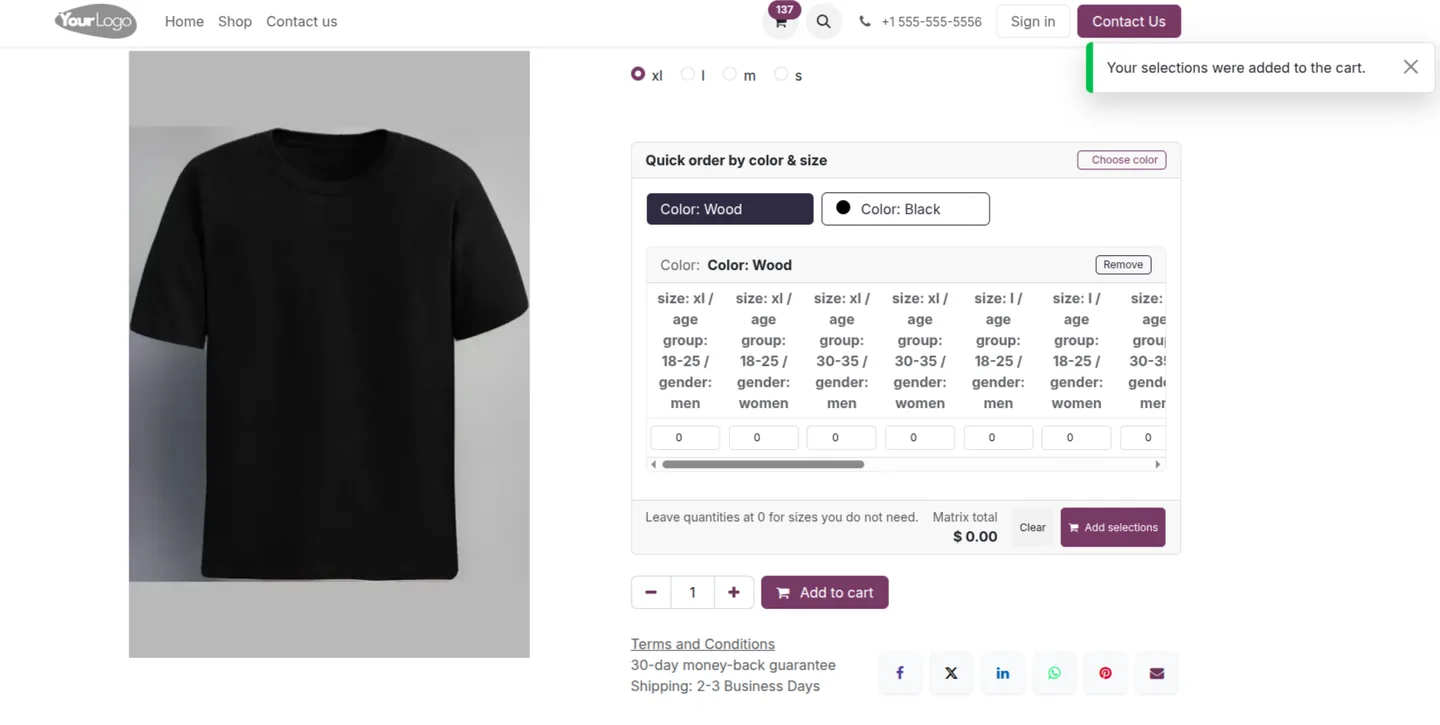
Bulk Add to Cart changes how Odoo eCommerce product pages handle variants. Standard Odoo asks the shopper to pick one combination at a time from dropdowns; this module shows every variant together in a matrix instead.
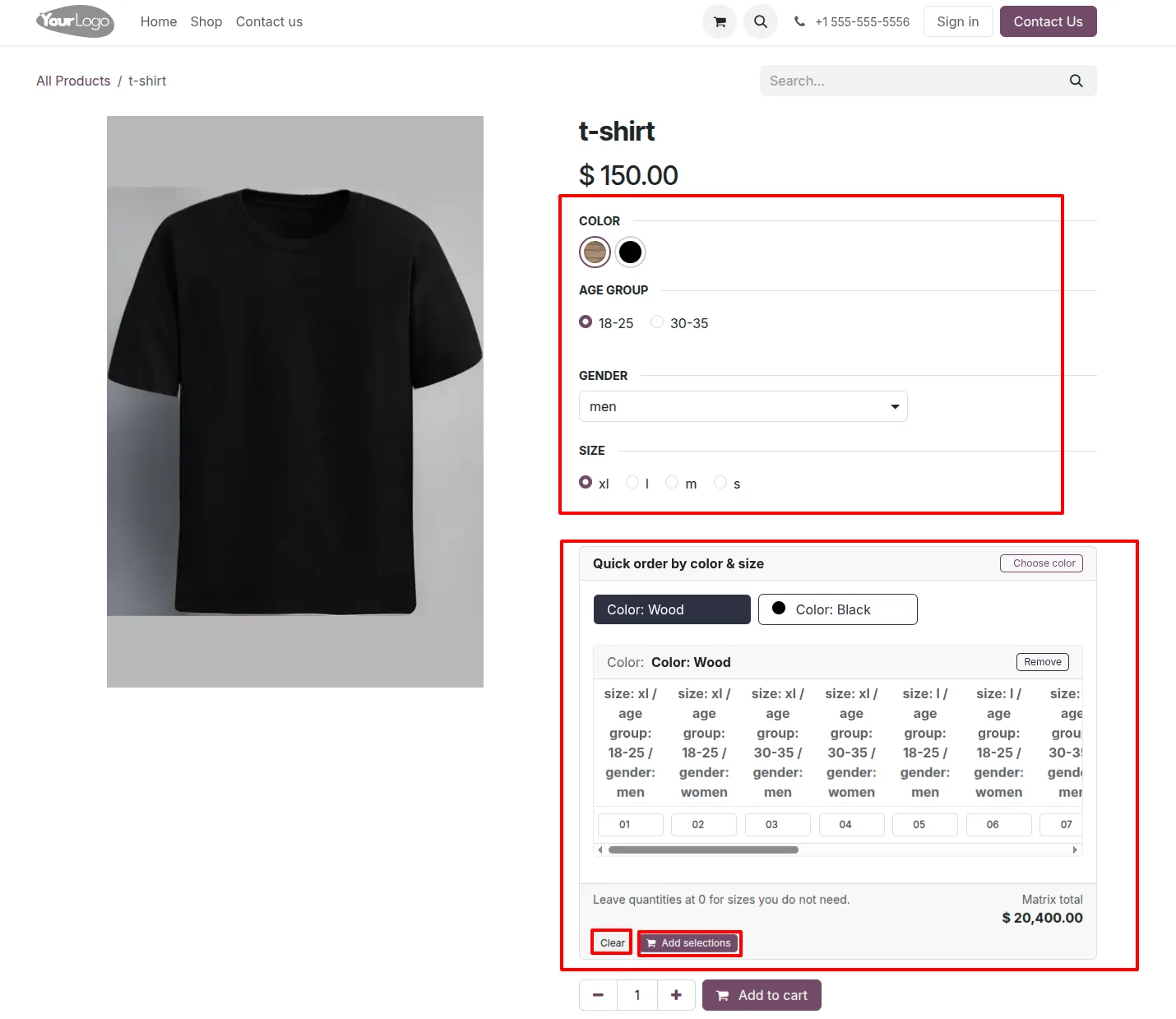
Built by TechUltra Solutions, the matrix arranges product attributes into rows and columns so a shopper can compare combinations at a glance, type a quantity into each cell they want, and send the entire selection to the cart with one action.
The grid layout is built for orders that span many variants — apparel, accessories, hardware, and wholesale lines — where picking each size and colour separately is slow. By collapsing that into one screen, the module shortens bulk orders and lifts conversion on variant-heavy products.
Key features
-
Bulk add-to-cart matrix
A dynamic variant matrix replaces single-variant dropdowns on the product page, letting shoppers select many combinations from one grid.
-
Multi-variant ordering
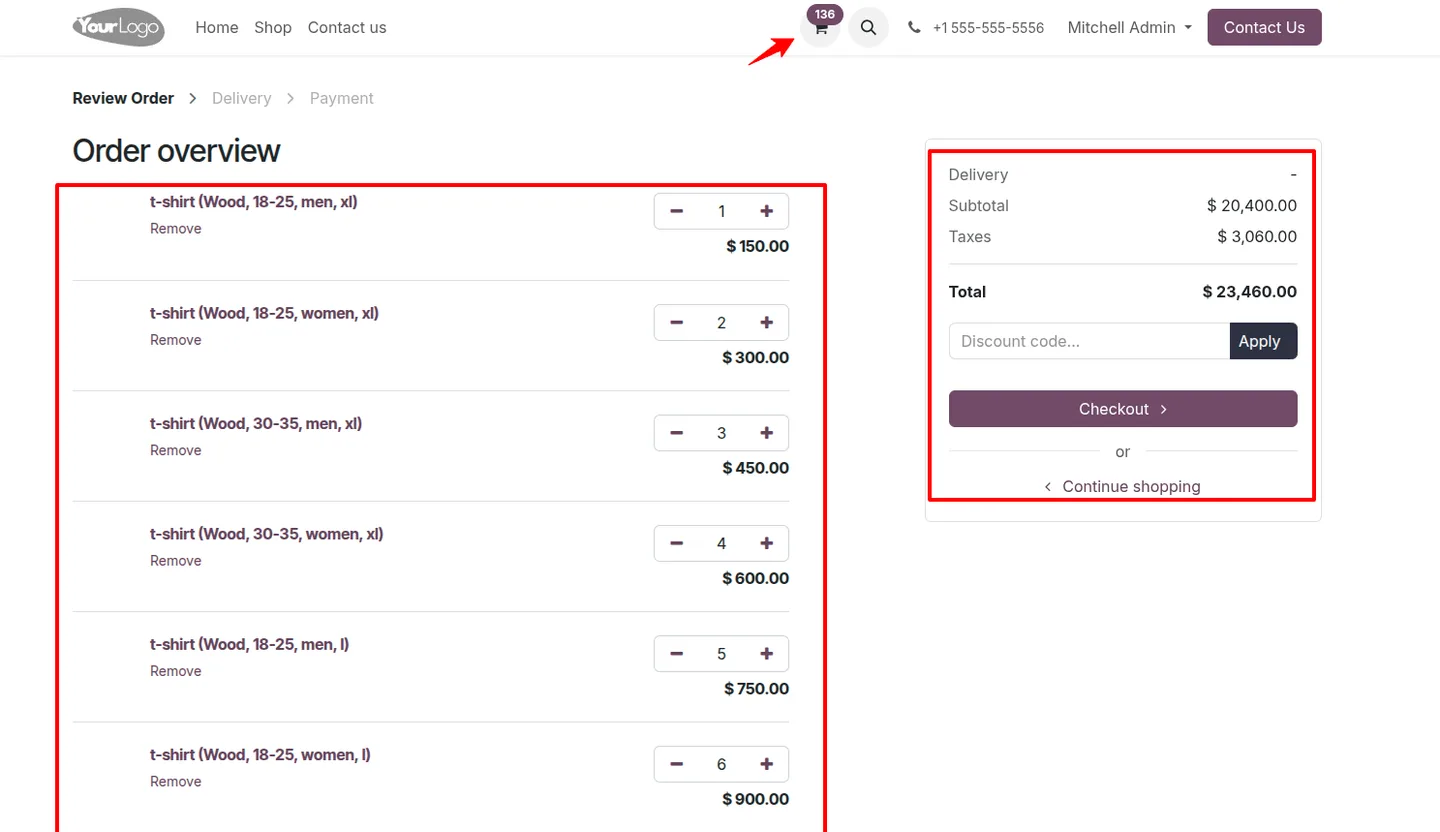
Shoppers add several product combinations to the cart at the same time instead of repeating the add-to-cart step for each variant.
-
Smart attribute layout
The module arranges product attributes into rows and columns automatically, so colour and size combinations read clearly as a grid.
-
Per-cell quantity entry
Each cell in the matrix takes its own quantity, so a shopper enters exactly how many of every variant they need in one pass.
-
Single-click cart addition
Once quantities are set, one action adds the entire selection to the cart, cutting the time it takes to place a bulk order.
-
Website and eCommerce integration
The matrix works with Odoo's standard Website and eCommerce modules, fitting into the existing product page rather than replacing it.
-
Real-time price and variant updates
Price and variant information refresh as the shopper enters quantities, so the matrix always reflects the current selection.
-
Fast bulk ordering
Performance is tuned for large orders, supporting more than 50 variants in a single request so big selections still add quickly.
Bulk Add to Cart in Odoo
Every screen, in the order you meet it — configuration first, then the module in use.
Technical details
Specification
- Publisher
- TechUltra Solutions Private Limited
- Technical name
- bulk_add_to_cart
- Odoo versions
- 16.0, 17.0, 18.0, 19.0
- Lines of code
- 720
- License
- Odoo Proprietary License v1.0 (OPL-1)
- Price
- $20 (one-time)
Deployment
- Odoo Online
- Odoo.sh
- On-premise
Odoo dependencies
- Website
- eCommerce
Support
90 days of bug-fix support, Monday to Friday (10:00–19:00 IST). Raise a ticket at support@techultra.in.
Setup & configuration
From install to first call — here is the path.
- 1
Install the module
In Odoo, open Apps, remove the Apps filter, search for “Bulk Add to Cart”, and click Install.
- 2
Confirm the prerequisites
Make sure the Website and eCommerce apps are installed, since the matrix is added to the standard eCommerce product page.
- 3
Make attributes visible on the website
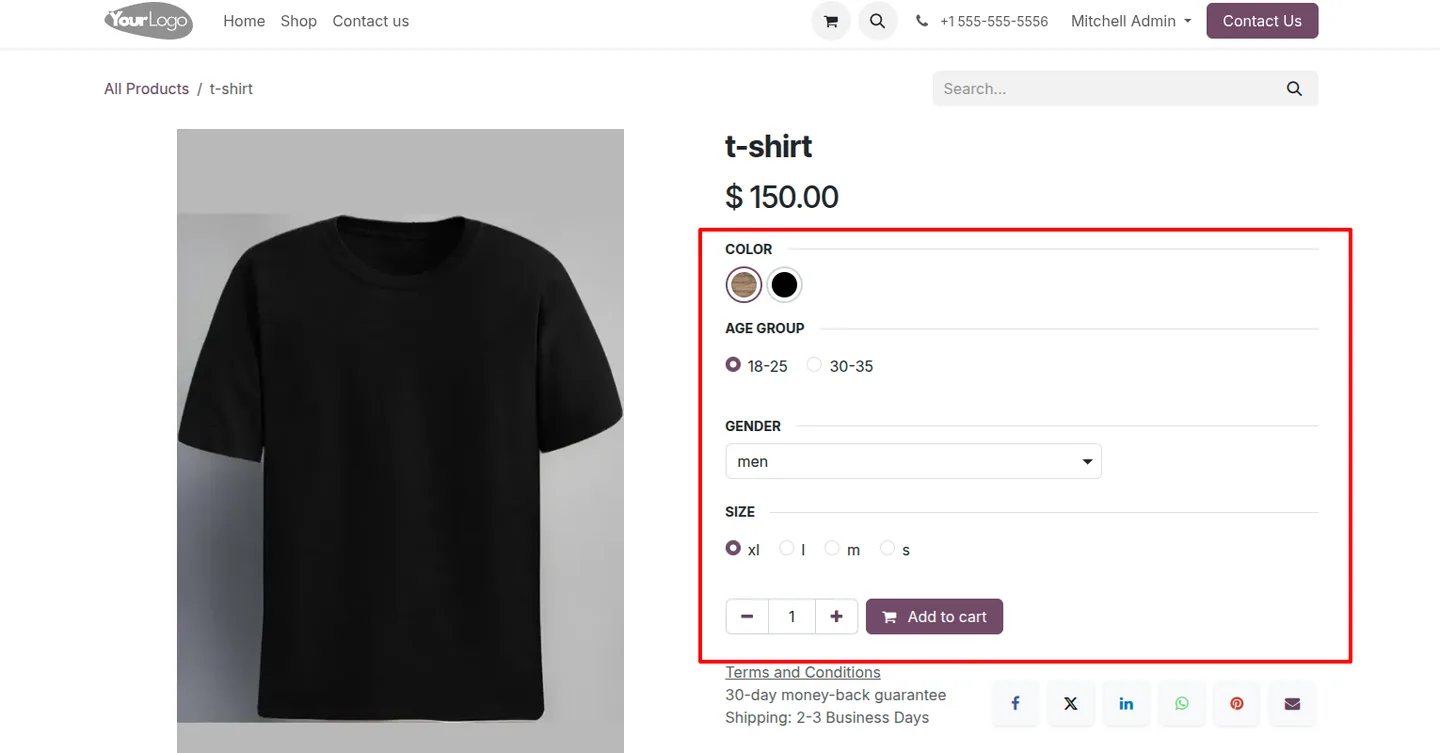
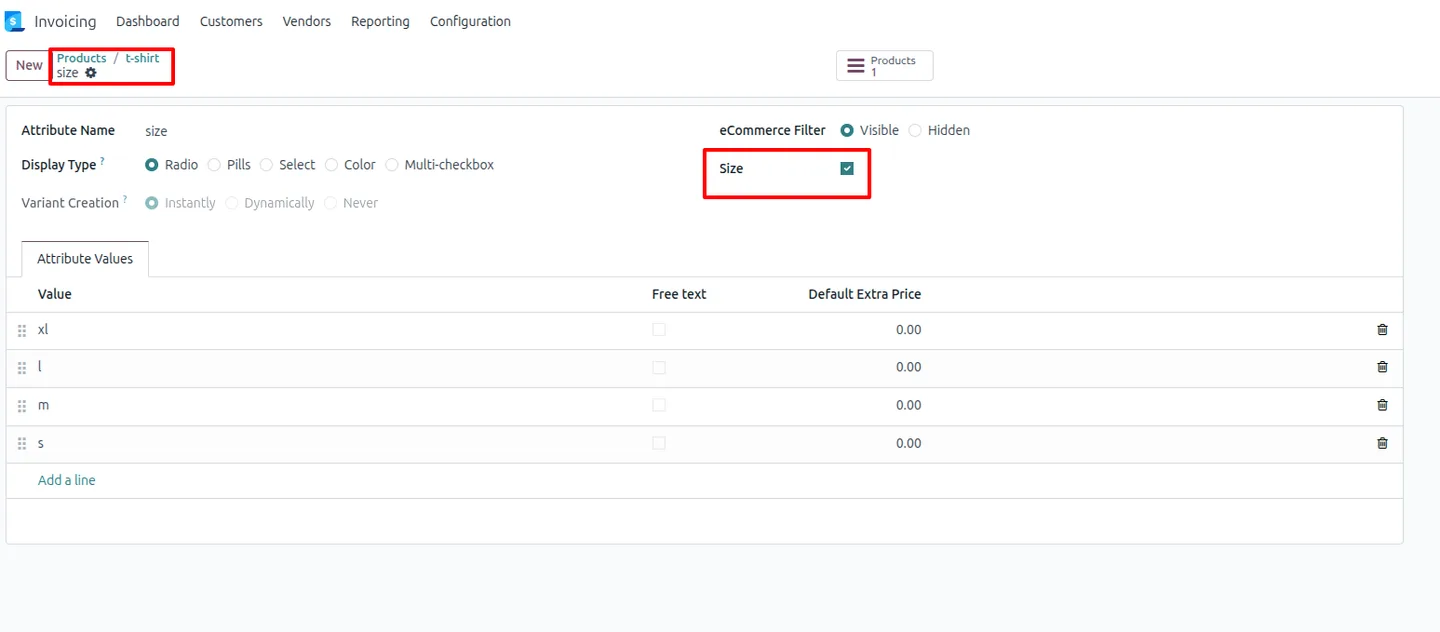
On the product, mark the attributes you want in the matrix — such as colour and size — as Visible on Website.
- 4
Choose the primary dimension
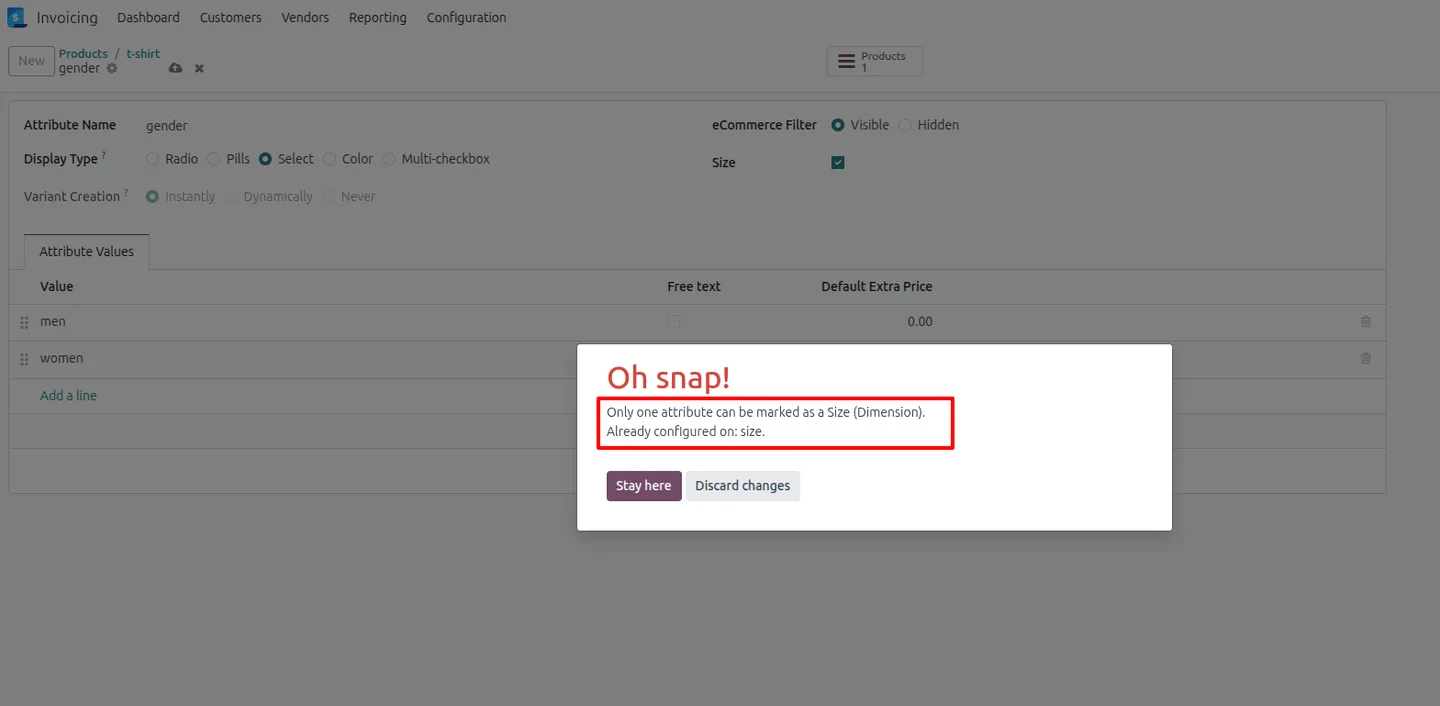
Select a primary dimension attribute, for example Size, to control how the matrix rows and columns are laid out.
- 5
Check the product page
Open the product on the website storefront and confirm the variant matrix appears with a quantity field in each cell.
Frequently asked questions
-
How is this different from the standard variant picker?
Standard Odoo uses dropdowns to choose one variant at a time. Bulk Add to Cart shows every combination in a grid so shoppers select and order many variants together.
-
Can a shopper order several variants at once?
Yes. The shopper enters a quantity into each cell of the matrix and adds the whole selection to the cart with a single click.
-
What products is the matrix best suited to?
It works well for apparel, accessories, hardware, and wholesale products — anything where customers routinely order across many sizes or colours.
-
How do I get an attribute to show in the matrix?
Mark the attributes you want, such as colour and size, as Visible on Website, then choose a primary dimension attribute to lay out the grid.
-
Does the price update as quantities change?
Yes. Price and variant information refresh in real time as the shopper enters quantities, so the matrix always reflects the current selection.
-
How many variants can it handle at once?
The module is tuned for fast bulk ordering and supports more than 50 variants in a single request, so large selections still add quickly.
-
Which Odoo versions are supported?
The module supports Odoo 16.0, 17.0, 18.0, and 19.0, in both the Community and Enterprise editions.
Related solutions
Whole-platform solutions that complement Bulk Add to Cart.
Shopify + Odoo Integration
Native Shopify-to-Odoo bidirectional sync. Products, inventory, orders, customers, refunds, accounting entries in real time. Multi-store, multi-currency, B2B.
WooCommerce + Odoo Integration
Native WooCommerce-to-Odoo bidirectional sync. Products, inventory, orders, refunds, subscriptions, accounting entries. WP-Cron-free, reliable, B2B-ready.
Amazon (Seller / Vendor Central) + Odoo Integration
Native Amazon-to-Odoo sync — Seller Central (FBM/FBA), Vendor Central, multi-marketplace. Orders, inventory, fees, reimbursements reconciled to Odoo accounting.
Related services
Get the most out of this module with senior TechUltra consultants.
Odoo Customization Services
Tailored Odoo customizations from a Gold Partner — 200+ projects, upgrade-safe patterns, fixed-scope quotes, senior consultants. Free demo consultation.
Hire Odoo Developers
Hire certified Odoo developers from a Gold Partner — 400+ implementations, 92% satisfaction, Odoo since 2016. Silver / Gold / Platinum packages, free trial.
Odoo Support & Maintenance
Odoo Gold Partner support — 24/7 functional, technical, and server coverage for Enterprise and Community editions. Fast turnaround, free consultation.







