
Business process
Procure-to-pay in Odoo 20, step by step
From a purchase need to a paid, reconciled vendor bill: the eight steps, the Odoo app that runs each one, and the gaps we usually close in approvals, matching and landed cost.
Last reviewed:
How does procure-to-pay run in Odoo 20?
8 steps, each run by the Odoo app named on it. The screenshots are from our Odoo 20 feature guide.
- 1 Agree vendor terms and blanket orders
- 2 Request quotes and compare vendors
- 3 Approve and confirm the purchase order
- 4 Receive the goods against the order
- 5 Inspect at receipt
- 6 Add freight, duty and other landed costs
- 7 Match the bill to the order and the receipt
- 8 Pay and reconcile
- 1
Agree vendor terms and blanket orders
Odoo 20 · Purchase · Purchase Agreements
Vendor price lists, lead times and a default Incoterm sit on each vendor. Blanket orders fix prices for a period, and each release draws the agreement down.
Who: Procurement manager
Purchase agreement structure: how it works in Odoo 20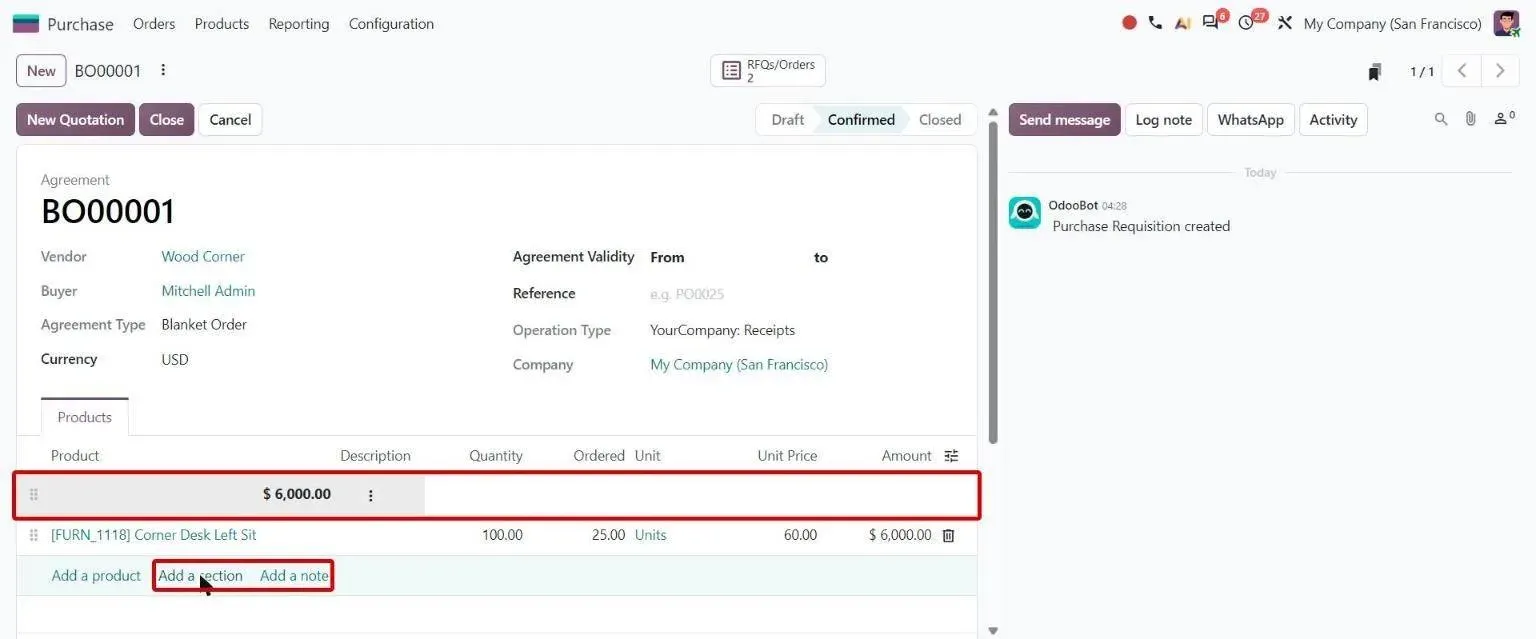
Step 1, Odoo 20 Purchase: Blanket order with section line total and Add a section / Add a note - 2
Request quotes and compare vendors
Odoo 20 · Purchase · Approvals · Inventory
Reordering rules and make-to-order routes raise requests for quotation on their own. A purchase request approved in the Approvals app turns into RFQs. Buyers then compare alternative vendor offers line by line before they choose one.
Who: Buyer
Alternatives comparison: how it works in Odoo 20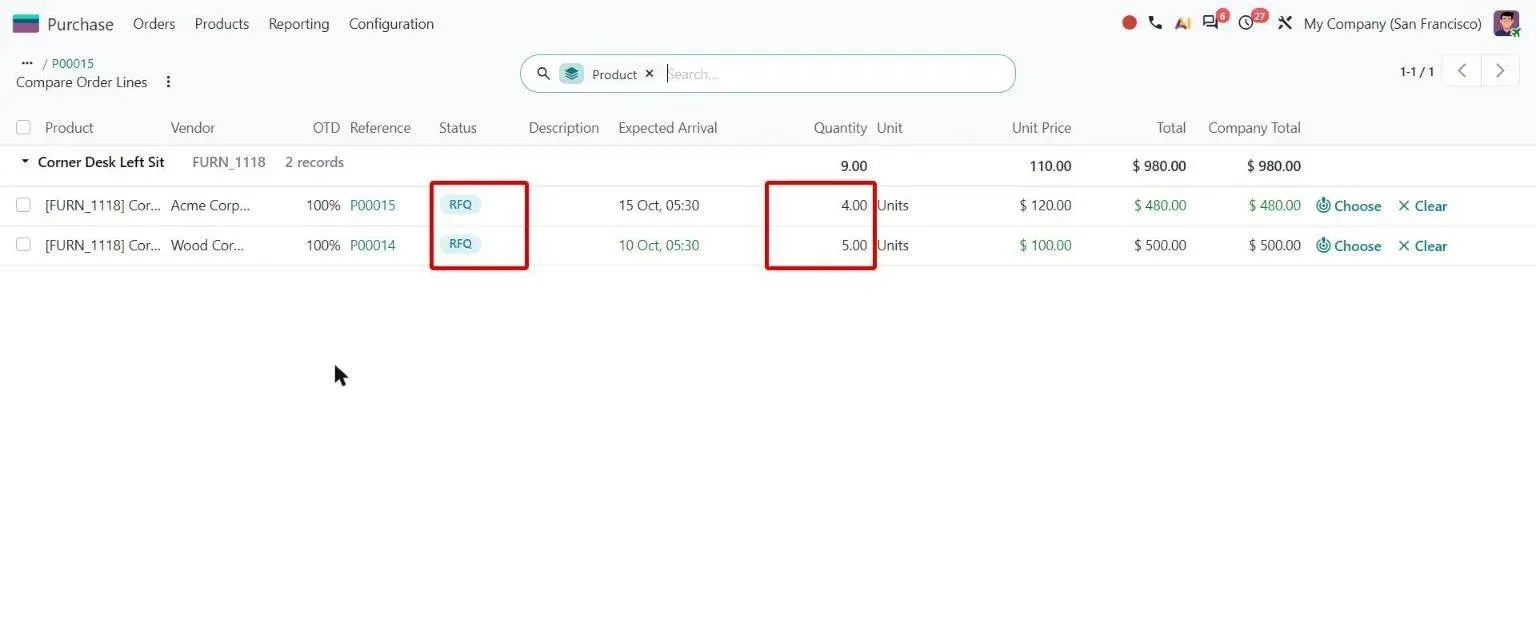
Step 2, Odoo 20 Purchase: Compare Order Lines with status badges and editable quantities - 3
Approve and confirm the purchase order
Odoo 20 · Purchase
Orders above a set amount wait for a purchase manager before they are confirmed. A confirmed order keeps its promised date for on-time tracking, while the buyer updates the expected arrival.
Who: Buyer, purchase manager
Expected arrival date: how it works in Odoo 20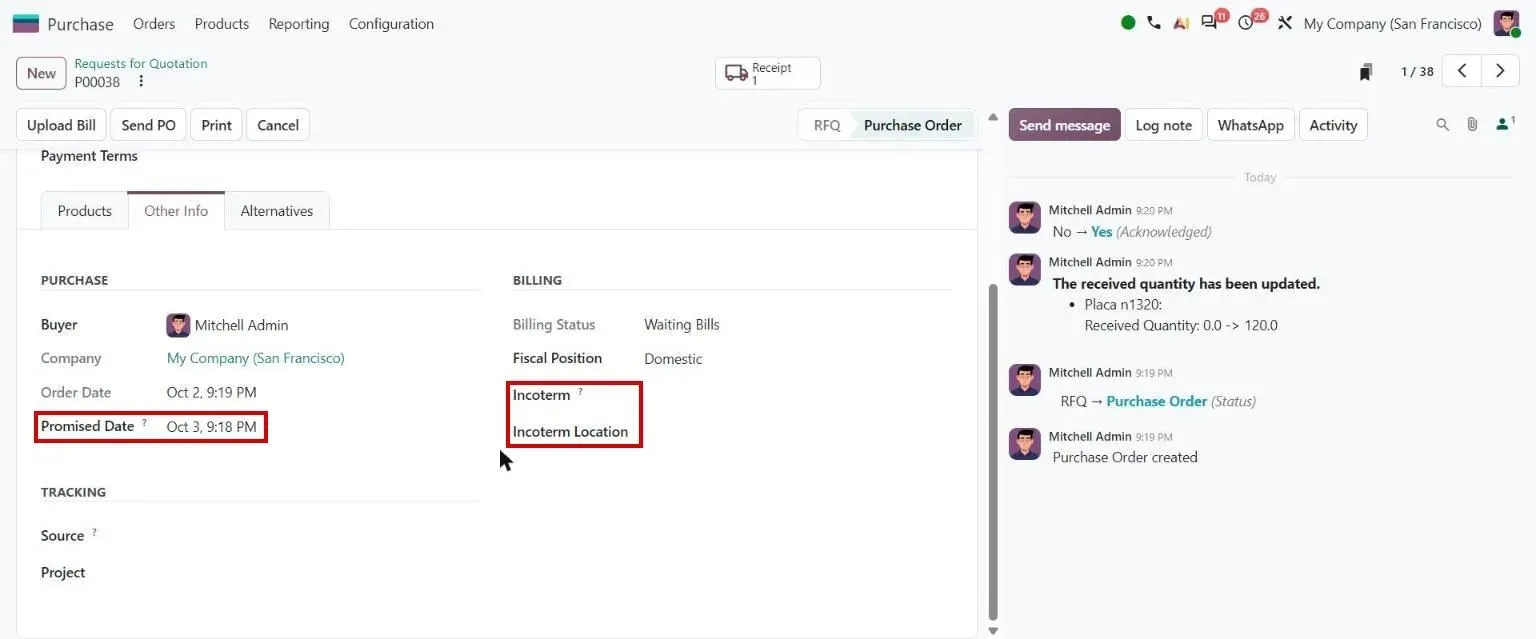
Step 3, Odoo 20 Purchase: Purchase order Other Info: Promised Date, Incoterm - 4
Receive the goods against the order
Odoo 20 · Inventory
The receipt is created from the confirmed order. Stores check what arrived against the vendor's own reference and validate the quantities received, including partial deliveries.
Who: Stores
Vendor purchase reference: how it works in Odoo 20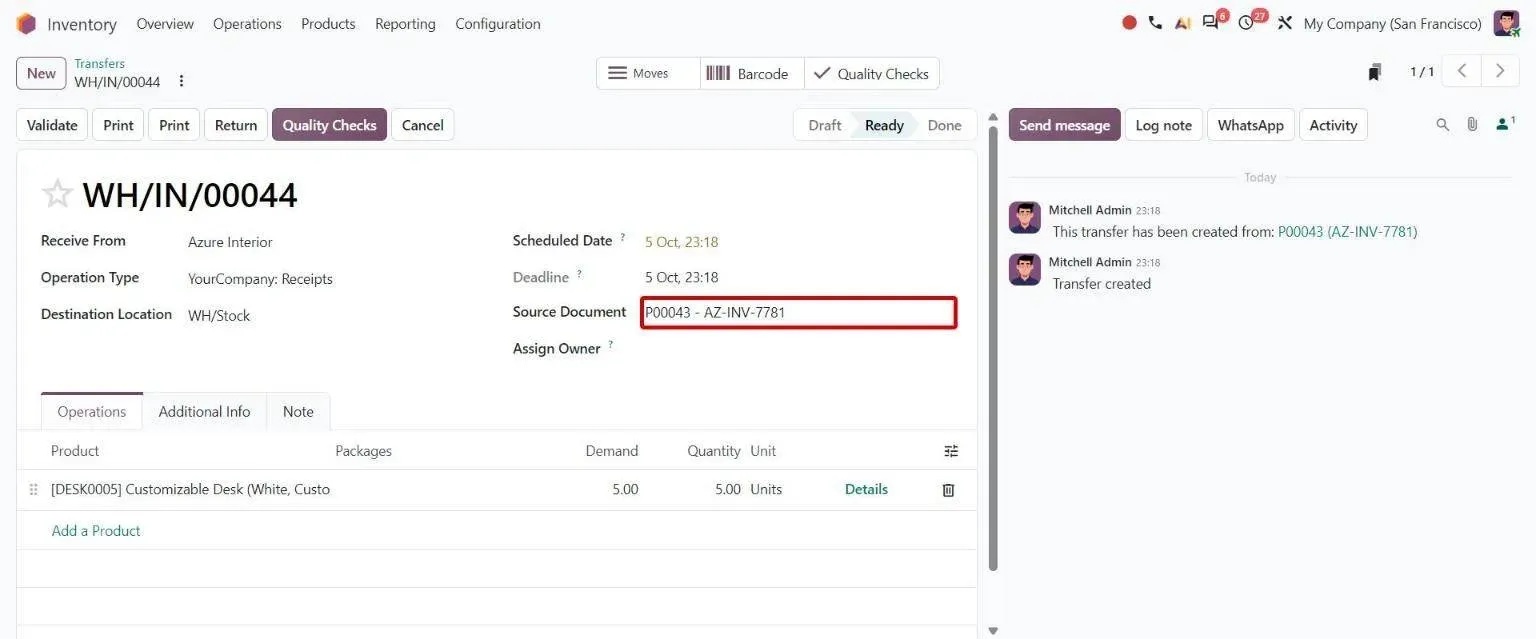
Step 4, Odoo 20 Inventory: Receipt Source Document combining PO number and vendor reference - 5
Inspect at receipt
Odoo 20 · Quality
Quality control points raise checks on the receipt before the goods reach usable stock. Only a quality administrator can validate a receipt while its checks are still open.
Who: Quality inspector
Bypass quality checks: how it works in Odoo 20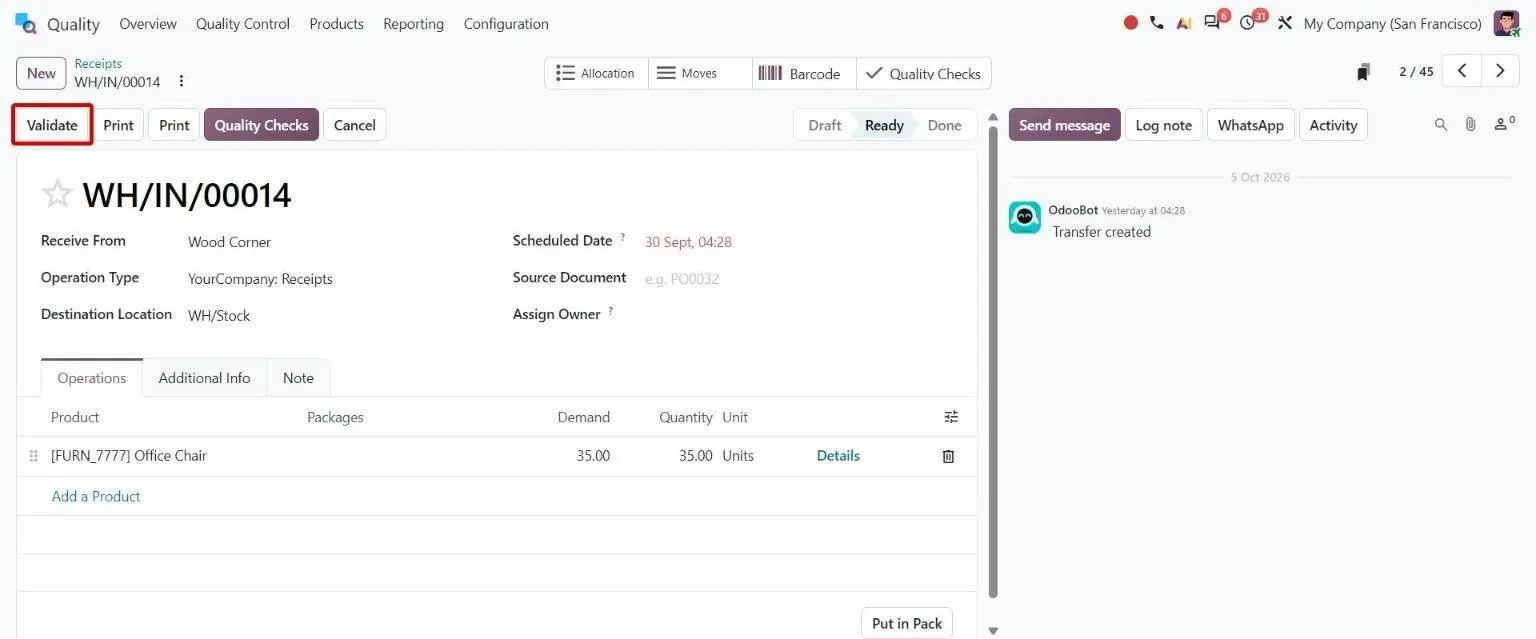
Step 5, Odoo 20 Quality: Receipt with pending Quality Checks; Validate still available as secondary button - 6
Add freight, duty and other landed costs
Odoo 20 · Inventory · Accounting
A landed cost adds freight, duty or insurance to the value of the goods received. It can come straight from a bill line, and it splits equally or by quantity, current cost, weight or volume.
Who: Cost accountant
Landed costs for specific products: how it works in Odoo 20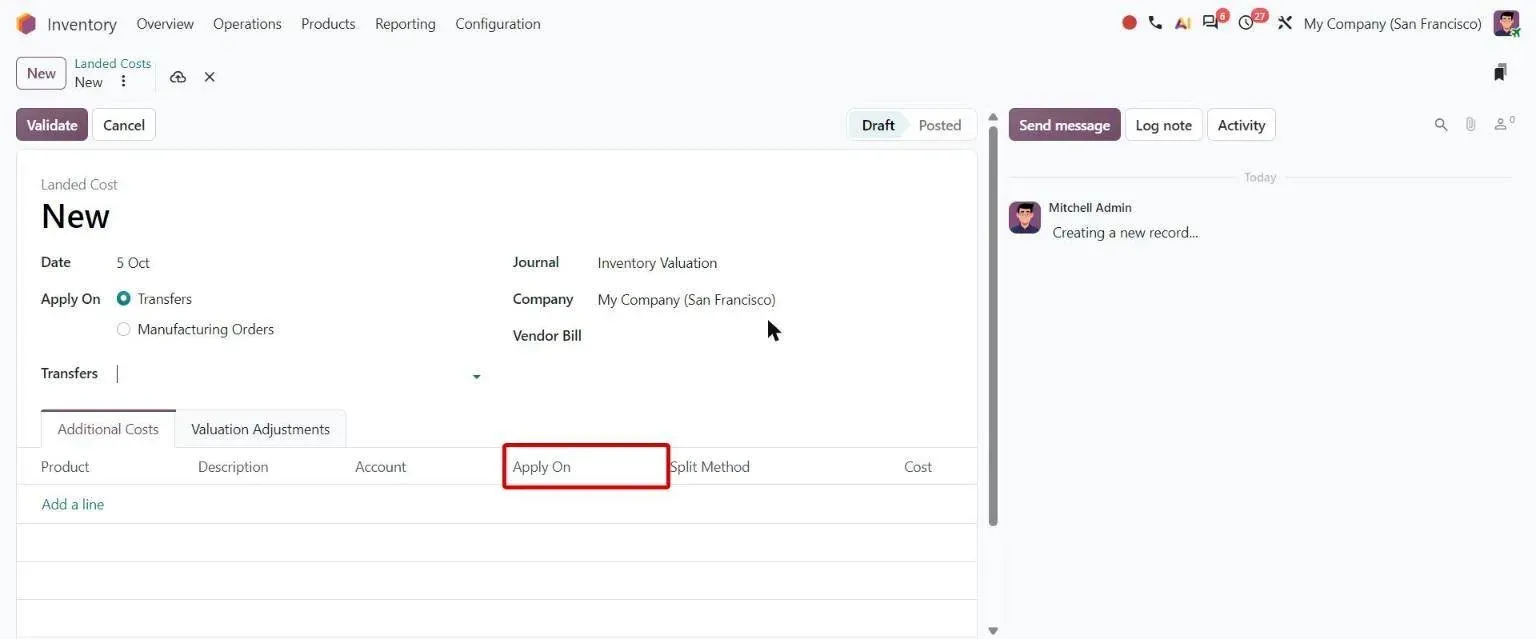
Step 6, Odoo 20 Inventory: Landed cost form with new Apply On column on cost lines - 7
Match the bill to the order and the receipt
Odoo 20 · Accounting · Purchase
The vendor bill is matched to its purchase order, and Odoo warns on price or quantity differences. With three-way matching, each bill gets a Should Be Paid status of Yes, No or Exception.
Who: Accounts payable
Purchase order matching: how it works in Odoo 20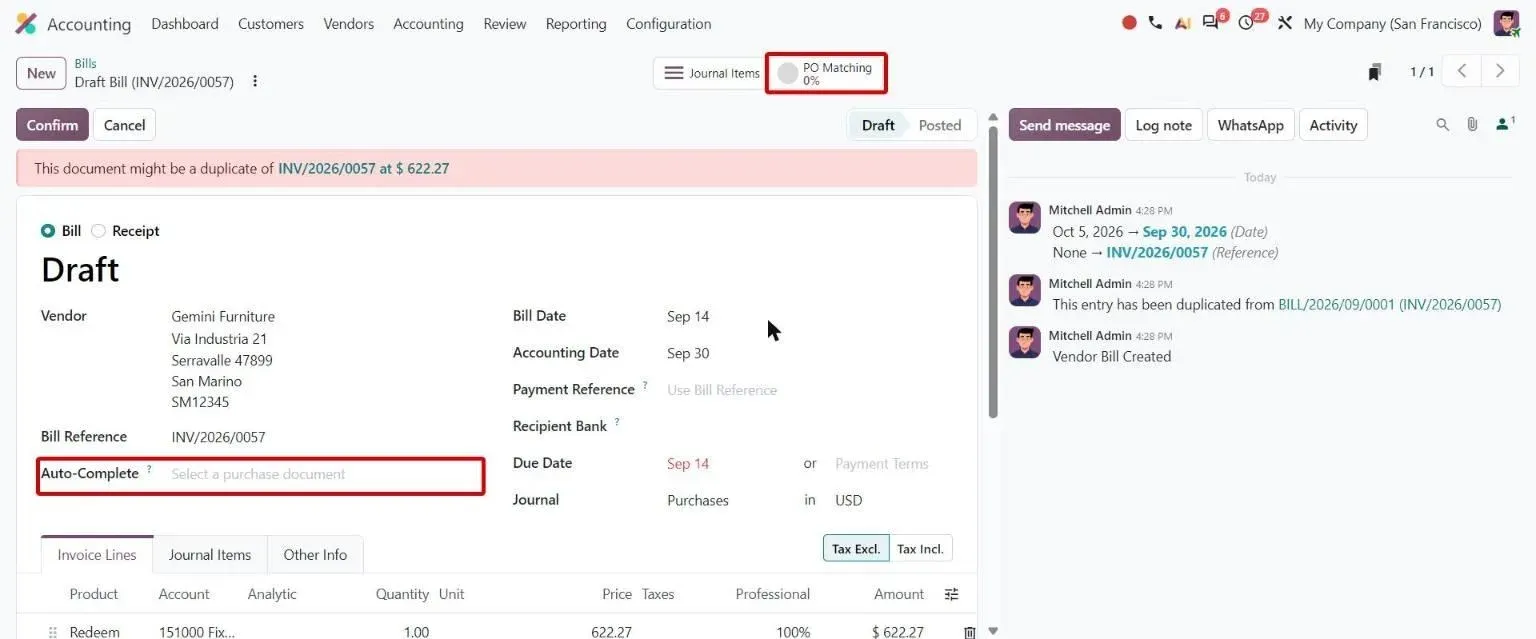
Step 7, Odoo 20 Accounting: Vendor bill with Auto-Complete purchase document field and PO Matching smart button - 8
Pay and reconcile
Odoo 20 · Accounting
Accounts payable pays bills one at a time or in batches from Odoo. The bank statement line is then matched to the payment, which closes the bill.
Who: Accounts payable, treasury
Pay bills from Odoo: how it works in Odoo 20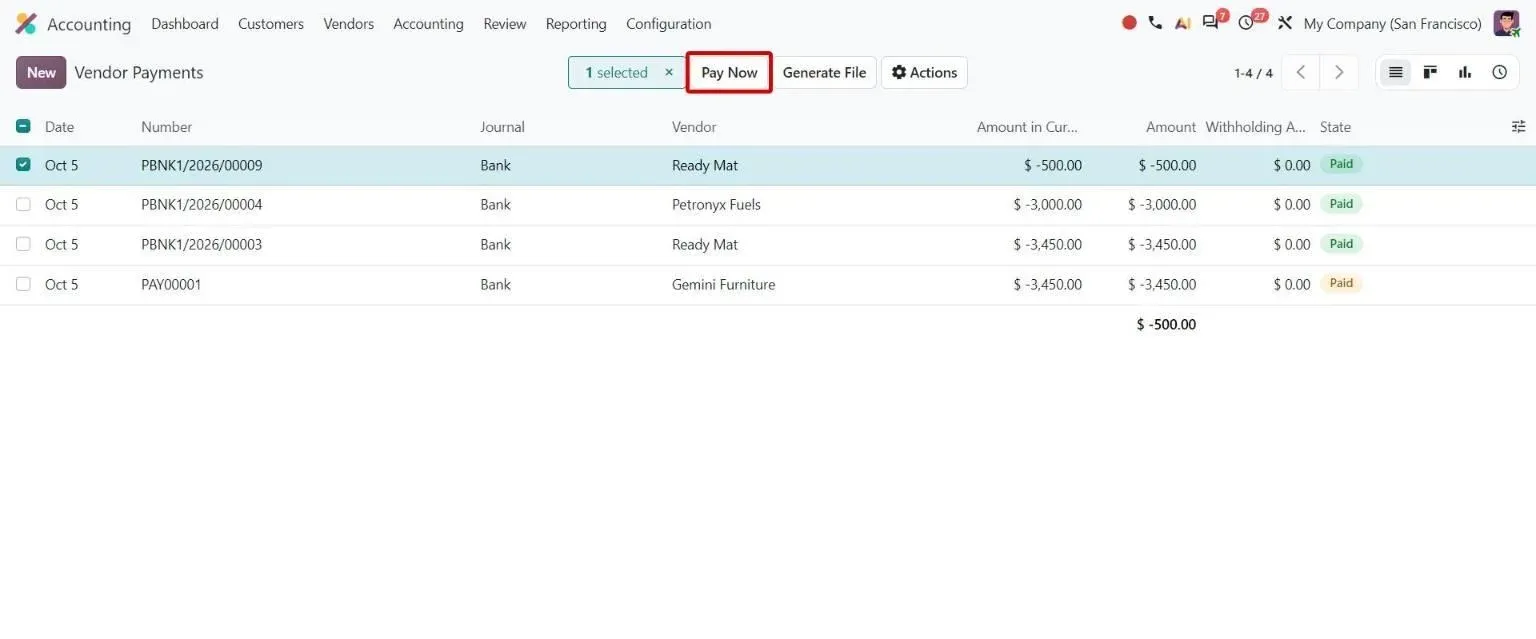
Step 8, Odoo 20 Accounting: Vendor Payments list with the Pay Now button for selected payments
Which Odoo 20 apps does procure-to-pay use?
| Odoo app | Module (edition) | What it does here |
|---|---|---|
| Purchase | purchase (Community) | Requests for quotation, purchase orders, two-level order approval and bill control policy |
| Purchase Agreements | purchase_requisition (Community) | Blanket orders with agreed prices for a period |
| Purchase alternatives | purchase_alternative (Community) | Alternative RFQs to several vendors, compared line by line |
| Inventory | stock (Community) | Receipts, reordering rules and make-to-order routes |
| Approvals | approvals (Enterprise) | Purchase requests that create RFQs once approved |
| Quality | quality_control (Enterprise) | Inspections on receipts before goods reach stock |
| Landed Costs | stock_landed_costs (Community) | Freight, duty and insurance added to stock value |
| Invoicing | account (Community) | Vendor bills, purchase order matching and payments |
| 3-way matching | account_3way_match (Enterprise) | Should Be Paid status from ordered, received and billed quantities |
| Accounting | account_accountant (Enterprise) | Bank matching, reconciliation rules and payables reports |
Where is standard Odoo enough, and where is it not?
Standard Odoo runs every step above. These are the gaps we close most often. Each is scoped and priced in discovery, not from a list.
-
An approval matrix, not two levels
Standard Odoo: Odoo 20 approves purchase orders in at most two levels, with one minimum amount per company, and any purchase manager can approve. It has no chain by amount band, department or category.
What we add: An ordered approval chain per amount, department or category. At Commonwealth Fusion, workflow automation replaced the manual approvals that were holding work up. Our Advanced Approval Workflow app does the same on Odoo 16 to 20.
-
Matching exceptions that reach a person
Standard Odoo: Three-way matching marks a bill Yes, No or Exception and adds filters for bills to pay and bills in exception. Any price difference from the order puts the bill in exception, with no tolerance. Nobody is told when that happens, and the status does not stop a payment.
What we add: Exceptions routed to the buyer who raised the order, tolerance rules per vendor or category, and a hold on payment until the exception is cleared.
-
Duty that follows the tariff line
Standard Odoo: Landed costs split one amount across the receipt by one of five methods. Odoo does not work out customs duty, so a duty bill covering items with different tariff rates is spread as if every item paid the same rate.
What we add: Duty worked out line by line from each item's tariff rate before the landed cost is posted, so every item carries the duty it actually paid.
-
Vendor discounts that reach the bill
Standard Odoo: Purchase order lines take a percentage discount only. A fixed amount off, or several discounts stacked, has to be typed into the bill by hand.
What we add: For Duke Pipes, percentage and fixed-amount vendor discounts carry from the order into the vendor bill, so product costs stay accurate.
-
Bank data that arrives on its own
Standard Odoo: Odoo connects to banks through its online bank synchronisation providers or imported statement files. A bank or treasury platform outside those needs files moved by hand every day.
What we add: For Commonwealth Fusion we built and stabilised integrations with its banking platforms, so reconciliation runs automatically instead of through a daily export and import.
Who approves what, and what is recorded?
- Purchase orders above the set amount stay in To Approve until a purchase manager approves them.
- Confirmed orders can be locked so nobody edits them after the vendor has them.
- With the bill control policy on received quantities, a bill created from an order only bills what has arrived.
- Draft bills that look like a duplicate show a warning before they are posted or paid.
- A second payment on a part-paid bill proposes only the amount still due.
- Every order, receipt, bill and payment keeps a history of who changed what, and when.
What data moves when you migrate this process?
For procure-to-pay, these records move from the old system. Open orders usually move as open orders. Unpaid bills move as opening payables so they can still be paid and matched.
- Vendors with tax IDs, payment terms and bank accounts
- Products with purchase units, vendor prices and lead times
- Open purchase orders and blanket orders
- Unpaid vendor bills and open advances
- Approval rules and who signs at each amount
- Chart of accounts mapping for expense and stock accounts
Moving from another system? See Tally to Odoo , QuickBooks to Odoo , SAP Business One to Odoo or NetSuite to Odoo .
What can AI take over in procure-to-pay?
The AI layer proposes and checks. A person still approves what gets bought, made or promised.
- OCR for vendor bills Bills read from PDF or scan into draft Odoo bills, checked by a person before posting.
- OCR for purchase orders Supplier quotes and order confirmations read into Odoo purchase orders.
- Erpmate in Odoo Purchase Late purchase orders, real vendor lead times, a vendor scorecard and receipts with no bill.
- Erpmate in Odoo Accounting Warns on bills before they post, and lists overdue items and open reconciliation before close.
- Document AI for Odoo Contracts, certificates and delivery notes read and filed against the right vendor and order.
- AI cost estimator What the AI layer costs to run each month, from your own document volumes.
Who runs procure-to-pay on Odoo with TechUltra?
Commonwealth Fusion Systems
A US fusion-energy company on Odoo Enterprise with more than 1,000 active users. Since 2023, five senior consultants on US hours have tuned Purchase, Accounting, Manufacturing and Inventory, replaced manual approvals that held work up with workflow automation, and built banking integrations for automated reconciliation.
Read the Commonwealth Fusion Systems case studyHow long does it take, and what does it cost?
Implementation starts from about USD 4,000 and goes up with scope: the number of plants and products, the gaps above, integrations and how clean your data is. A one-week discovery maps your process and ends with a fixed timeline and a fixed price.
How does it differ by industry?
Only the industries where we have a reference for this process.
-
Advanced manufacturing
Purchasing for engineering and production teams at more than 1,000 users, with approvals automated and bank data flowing into reconciliation.
Commonwealth Fusion Systems case study -
Pipes and plastics
Orders above a set amount wait for approval before confirmation, vendor discounts carry into the bill, and a delivery-challan register tracks material sent out and back.
Duke Pipes case study -
Construction
A vendor RFQ portal, a tender register and purchase requisitions on Odoo 17, with vendors qualified by certificate, trade and region.
Construction marketplace case study
Questions about procure-to-pay in Odoo
-
What is procure-to-pay in Odoo?
It is the buying process from a purchase need to a paid vendor bill: vendor terms, requests for quotation, order approval, receipt, inspection, landed cost, bill matching and payment. In Odoo 20 it runs across Purchase, Inventory, Quality and Accounting.
-
Which Odoo apps do I need for procure-to-pay?
Purchase, Inventory and Invoicing at minimum. Add Purchase Agreements for blanket orders, Approvals for purchase requests, Quality for receipt inspections, Landed Costs for freight and duty, and Accounting with 3-way matching for bank reconciliation and bill control.
-
Does Odoo do three-way matching?
Yes. With the 3-way matching setting (Enterprise), each vendor bill gets a Should Be Paid status of Yes, No or Exception from the ordered, received and billed quantities. In Community, the bill control policy on received quantities makes bills from an order bill only what has arrived.
-
Can Odoo approve purchase orders in more than two levels?
Not as standard. Odoo 20 offers one or two levels, with one minimum amount per company. An approval matrix by amount band, department or category needs configuration or a module, such as our Advanced Approval Workflow app.
-
How does Odoo handle landed costs?
Landed Costs adds freight, duty or insurance to the value of received goods. It can be created from a vendor bill line and split equally, or by quantity, current cost, weight or volume. Odoo does not calculate customs duty itself.
-
Can Odoo read vendor bills automatically?
Odoo Enterprise digitises bills with prepaid credits. Our OCR for vendor bills reads PDFs and scans into draft bills on your own Odoo, and a person checks them before posting.
-
What does it cost to set up procure-to-pay in Odoo?
Implementation starts from about USD 4,000 and goes up with scope: modules, approval rules, integrations and data clean-up. A one-week discovery ends with a fixed price. Odoo's own subscription is billed by Odoo; see Odoo pricing.