
Business process
Order-to-cash in Odoo 20, step by step
From a lead or an incoming order to cash in the bank: the eight steps, the Odoo app that runs each one, and the gaps we usually close in credit control, discounts, channels and collections.
Last reviewed:
How does order-to-cash run in Odoo 20?
8 steps, each run by the Odoo app named on it. The screenshots are from our Odoo 20 feature guide.
- 1 Capture and assign the lead
- 2 Quote from a template and the right pricelist
- 3 Customer signs and pays online
- 4 Take orders from the webshop and marketplaces
- 5 Check credit and confirm the order
- 6 Pick, pack, deliver and take returns
- 7 Invoice what was ordered or what was delivered
- 8 Chase, collect and reconcile
- 1
Capture and assign the lead
Odoo 20 · CRM
Leads arrive from website forms, email and lead mining, and rule-based assignment shares them across the sales team. Managers can cap how many leads each salesperson gets.
Who: Sales manager, salesperson
Lead distribution: how it works in Odoo 20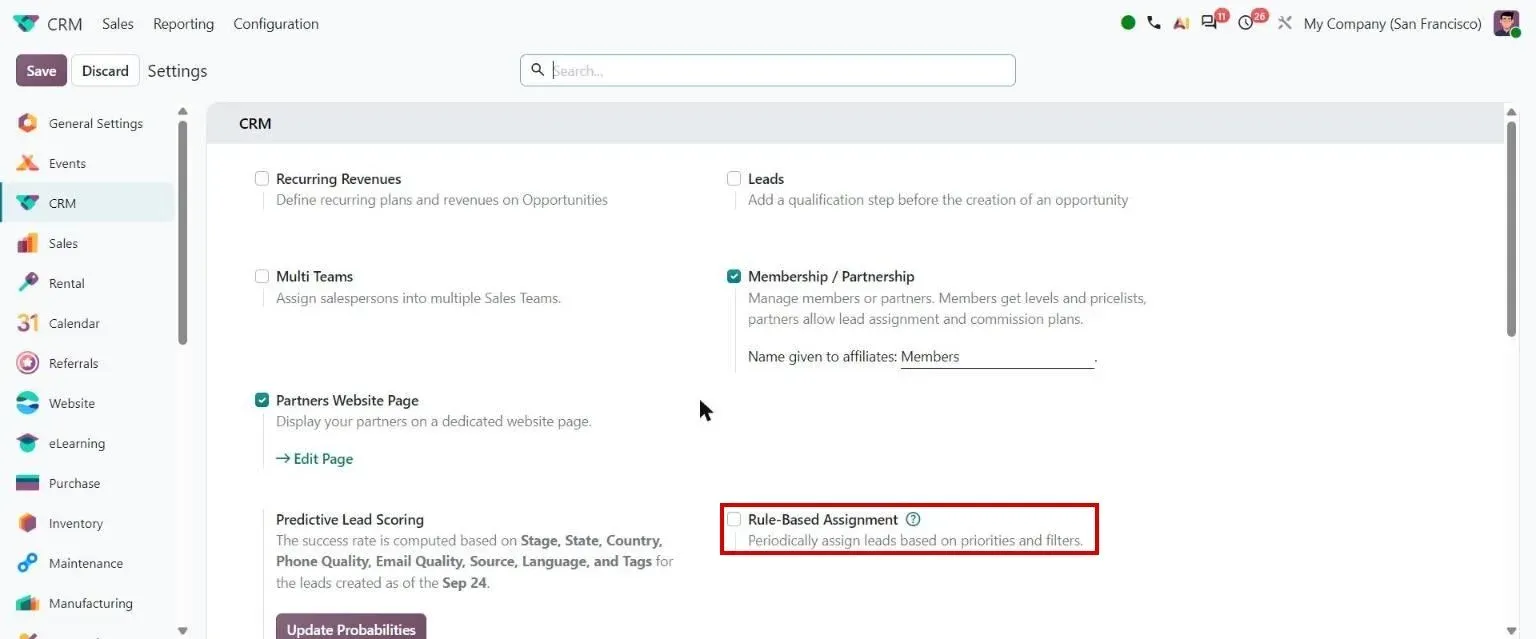
Step 1, Odoo 20 CRM: CRM settings: Rule-Based Assignment - 2
Quote from a template and the right pricelist
Odoo 20 · Sales
Quotation templates bring in standard lines, optional products and terms. The customer's pricelist sets the price by quantity, date or packaging, and the margin shows on each line before the quote goes out.
Who: Salesperson
Quotation templates: how it works in Odoo 20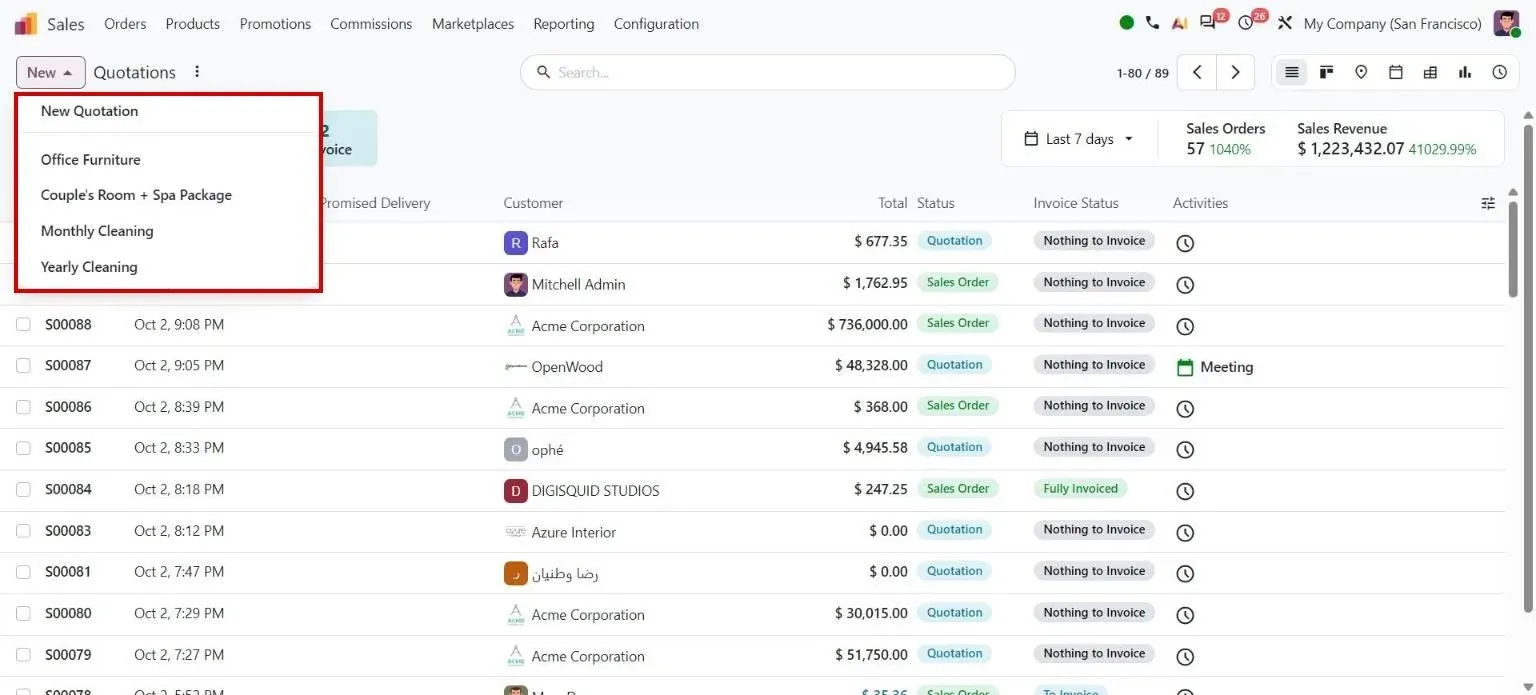
Step 2, Odoo 20 Sales: New button with quotation templates - 3
Customer signs and pays online
Odoo 20 · Sales · Payments
The quotation goes out with a link to the customer portal, where the customer reviews, signs and pays it. A prepayment can be a percentage or, in Odoo 20, a fixed amount.
Who: Customer, salesperson
Sales order portal page: how it works in Odoo 20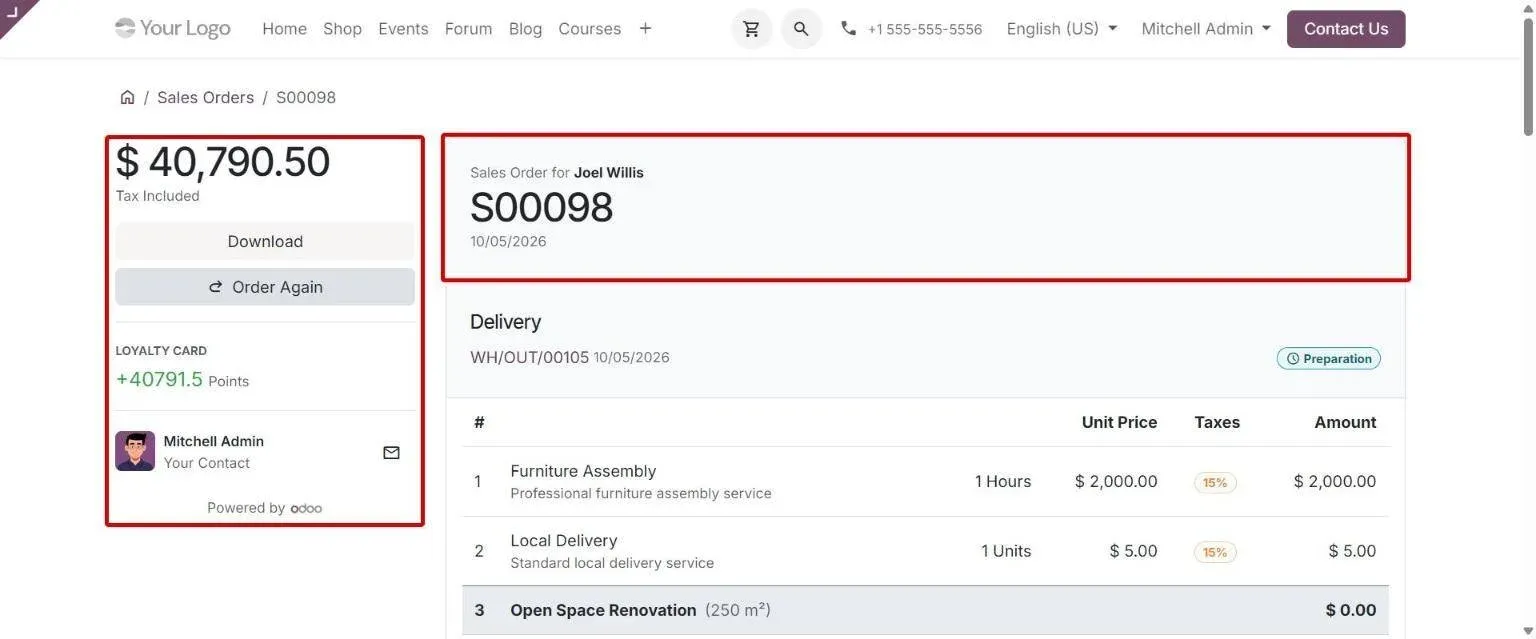
Step 3, Odoo 20 Sales: Redesigned portal order page with total/actions sidebar and order header card - 4
Take orders from the webshop and marketplaces
Odoo 20 · eCommerce · Sales
Webshop orders land in Sales as orders, usually paid at checkout. In Enterprise, the Amazon, Lazada, Shopee and TikTok Shop connectors import marketplace orders and keep stock in step.
Who: E-commerce team
TikTok: how it works in Odoo 20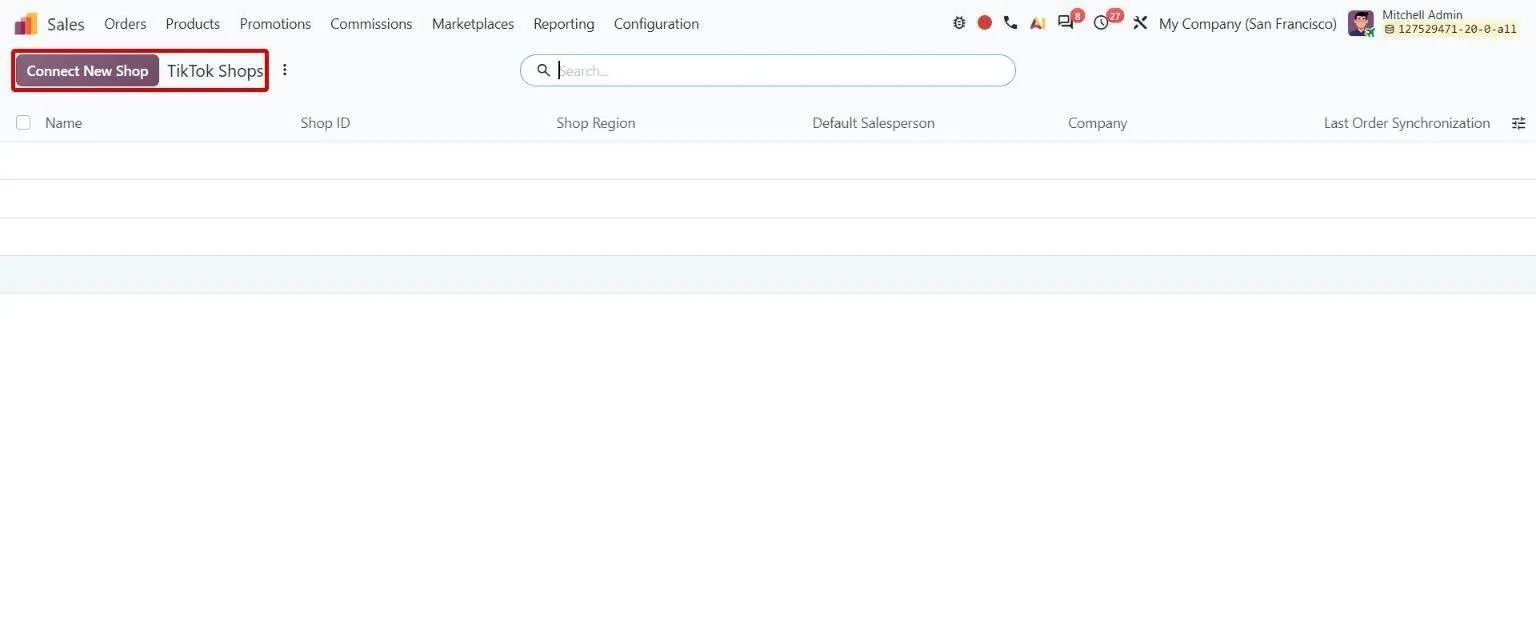
Step 4, Odoo 20 Sales: TikTok Shops list under Sales Marketplaces with Connect New Shop button - 5
Check credit and confirm the order
Odoo 20 · Sales · Invoicing
With credit limits on, a quotation for a customer over their limit shows a warning with the total due, including orders not yet invoiced. Confirming the order reserves stock and creates the delivery.
Who: Salesperson, credit controller
Dashboard: how it works in Odoo 20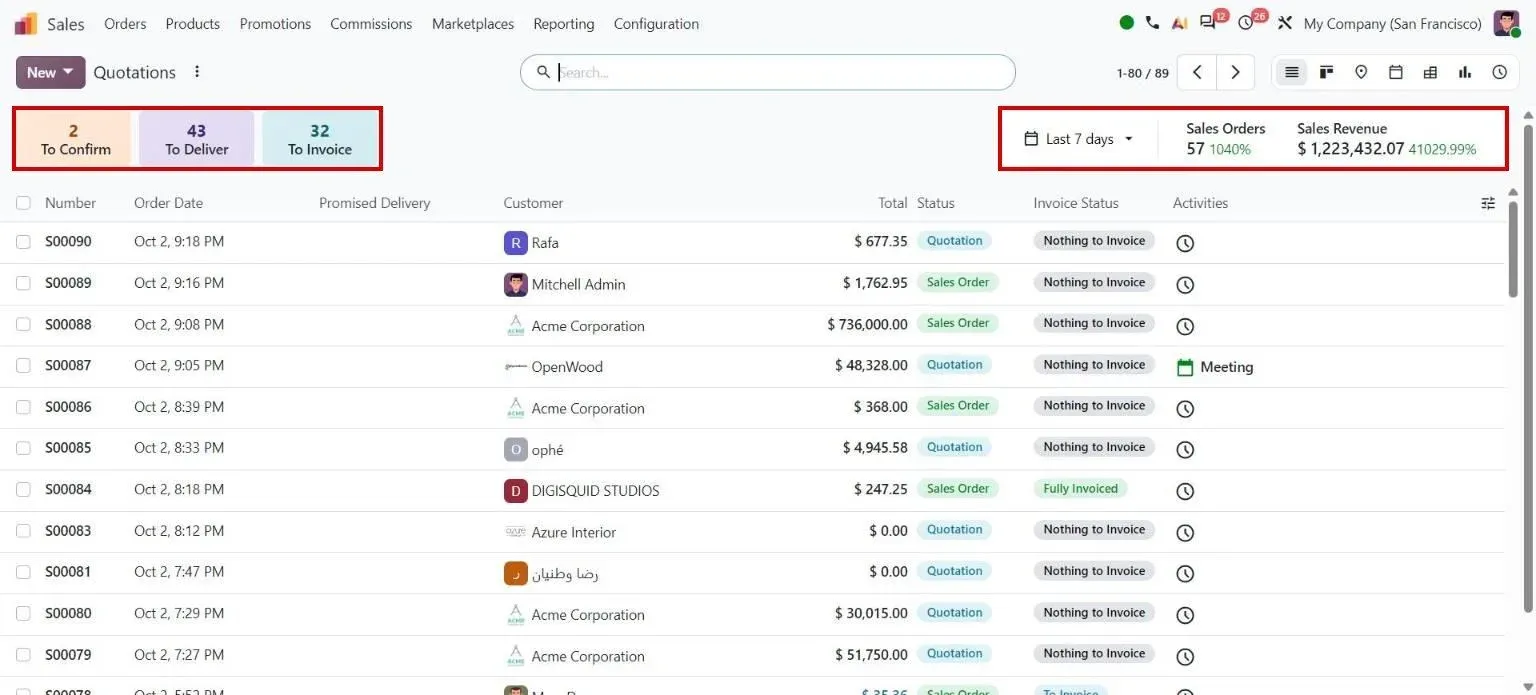
Step 5, Odoo 20 Sales: Quotations dashboard counters and revenue - 6
Pick, pack, deliver and take returns
Odoo 20 · Inventory
The delivery is created from the confirmed order and runs in one, two or three steps per warehouse. A return is created from the original delivery, so the goods come back against the right order.
Who: Warehouse
Simplified returns: how it works in Odoo 20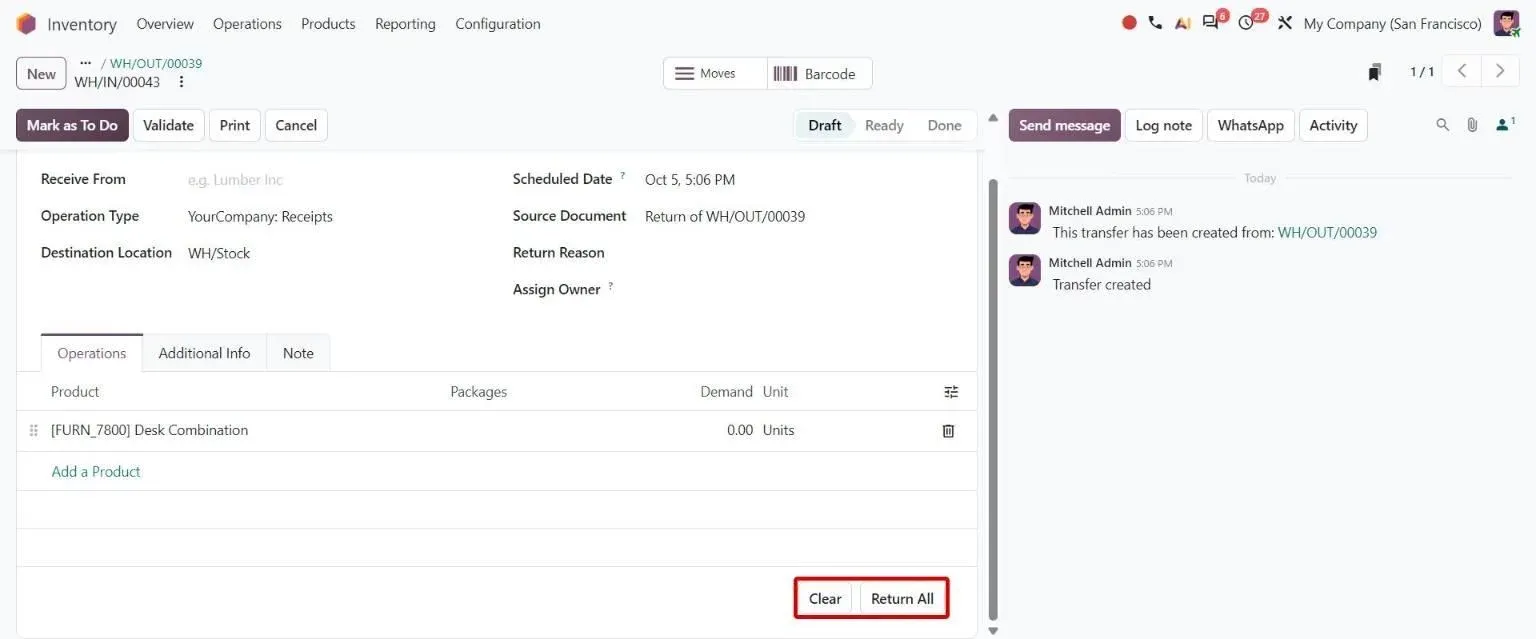
Step 6, Odoo 20 Inventory: Draft return created directly with zero quantities and Return All / Clear buttons - 7
Invoice what was ordered or what was delivered
Odoo 20 · Sales · Invoicing
Each product invoices on ordered or on delivered quantities. Invoices can be raised one order at a time or in batches, and an order can be closed for invoicing once it is done.
Who: Accounts receivable
Mark orders as fully invoiced: how it works in Odoo 20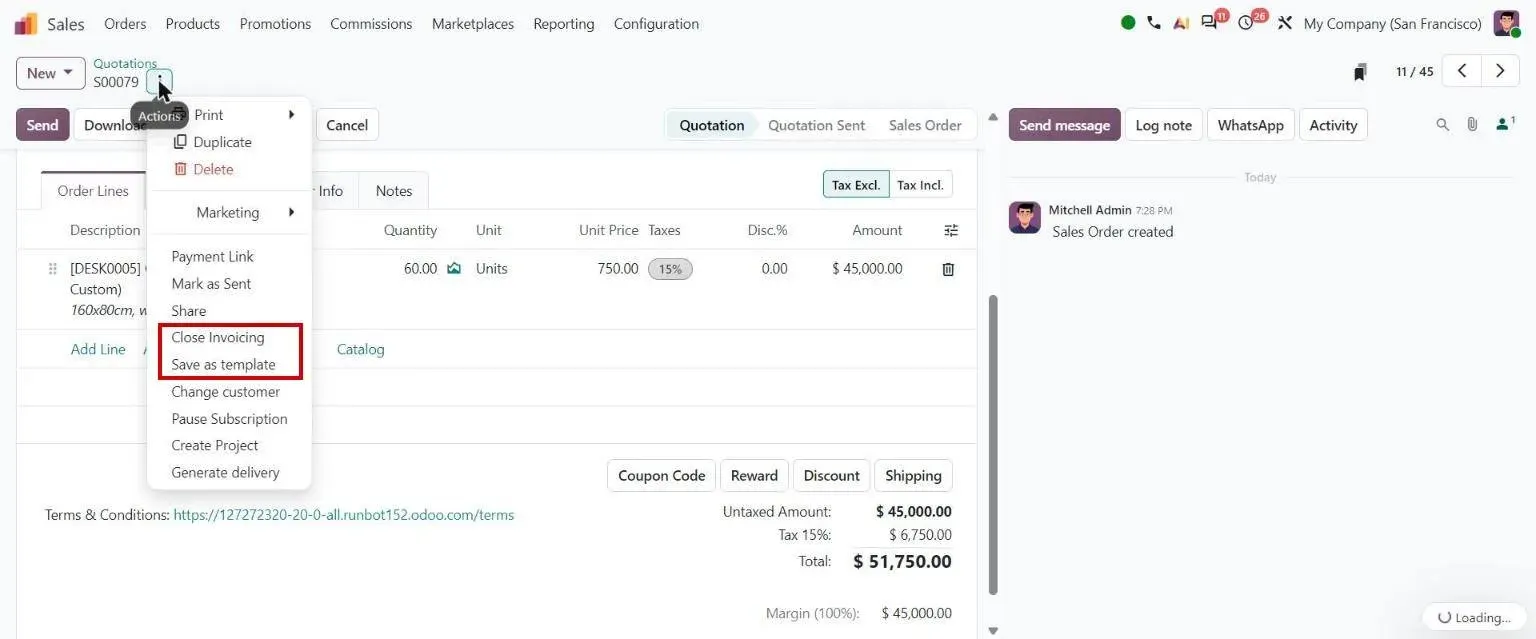
Step 7, Odoo 20 Sales: Quotation actions: Close Invoicing, Save as template - 8
Chase, collect and reconcile
Odoo 20 · Accounting · Payments
Payment reminders go out before or after the due date, by email, SMS or WhatsApp. Customers pay from the invoice link, and bank lines are matched to invoices by matching rules with a payment tolerance.
Who: Accounts receivable, credit controller
Reminder workflow: how it works in Odoo 20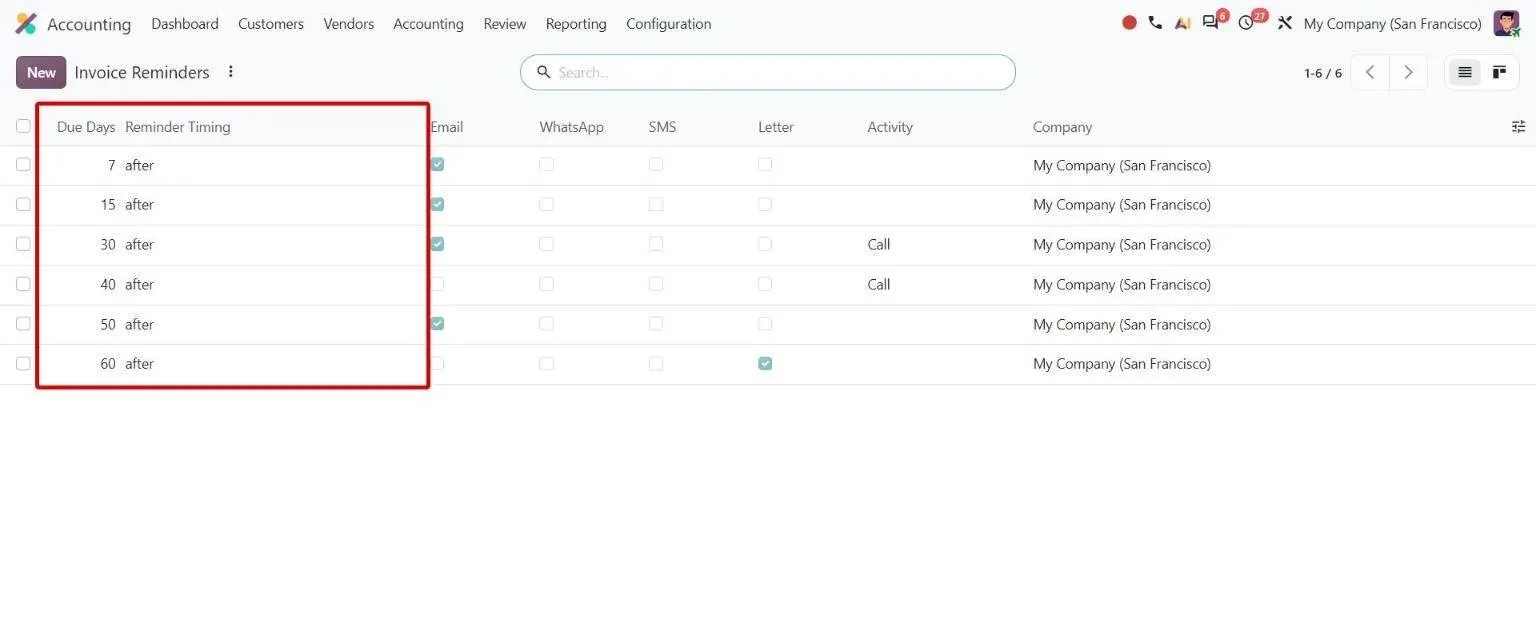
Step 8, Odoo 20 Accounting: Invoice Reminders steps with due-day offsets and before/after timing
Which Odoo 20 apps does order-to-cash use?
| Odoo app | Module (edition) | What it does here |
|---|---|---|
| CRM | crm (Community) | Leads, pipeline and rule-based lead assignment |
| Sales | sale_management (Community) | Quotations, templates, pricelists, online signature and sales orders |
| eCommerce | website_sale (Community) | Webshop orders paid at checkout |
| Payments | payment (Community) | Online payment of quotations and invoices through payment providers |
| Inventory | stock (Community) | Deliveries, pick-pack-ship routes and returns |
| Invoicing | account (Community) | Customer invoices, credit notes, credit limits and payments |
| Marketplace connectors | sale_amazon, sale_lazada, sale_shopee, sale_tiktok (Enterprise) | Marketplace orders imported as sales orders, with stock synced back |
| Payment follow-ups | account_followup (Enterprise) | Reminder levels for overdue invoices by email, SMS and WhatsApp |
| Accounting | account_accountant (Enterprise) | Bank matching, reconciliation rules and receivables reports |
Where is standard Odoo enough, and where is it not?
Standard Odoo runs every step above. These are the gaps we close most often. Each is scoped and priced in discovery, not from a list.
-
Credit control that stops the dispatch
Standard Odoo: Odoo 20 checks one credit limit per customer and shows a warning on quotations and invoices. It does not stop confirmation or delivery, and it has no rule for invoices that are overdue but under the limit.
What we add: For Duke Pipes, a credit master per customer with a limit, payment term and validity window, and a check at delivery validation that blocks shipments to customers who are over their limit or overdue.
-
Layered trade discounts on one line
Standard Odoo: Each sales order line carries one discount percentage. Pricelists can build one price on another, but the line does not keep several named discounts for the invoice and reports.
What we add: For Duke Pipes, six discount components on every sales line, from standard and trade to promotional, with approval needed for export orders and for any change to a line's price or discount before the order can be confirmed.
-
Orders from every channel, without re-keying
Standard Odoo: Odoo takes orders from its own webshop and, in Enterprise, imports them from Amazon, Lazada, Shopee and TikTok Shop. Other storefronts and marketplaces need an integration, or someone types the orders in.
What we add: For Koskii, orders from online sales channels are created in Odoo by API with their external order reference. For Mattson Group, WooCommerce syncs orders and stock with Odoo in real time.
-
Returns that end as the right credit note
Standard Odoo: Odoo creates a return from the original delivery, and the credit note is raised from the invoice or the order. Returns that arrive through another channel have no Odoo delivery to start from, so finance matches them by hand.
What we add: For Koskii, online and marketplace returns become credit notes through an order-matching register, with a barcode-correction register for scan errors at fulfilment.
-
Collections that follow how each customer pays
Standard Odoo: Payment follow-ups send reminders at set days before or after the due date, the same for every customer at that level. They do not look at how late a customer usually pays, or hold new orders.
What we add: Reminder levels and credit holds set per customer group, and our Erpmate Cash agent ranks overdue invoices by each customer's real payment pattern and drafts the reminder for a person to send.
Who approves what, and what is recorded?
- With credit limits on, quotations and invoices for a customer over their limit show the limit and the total due.
- A customer signs the quotation online, and the signature is kept on the order.
- Confirmed orders can be locked so nobody edits them after the customer has them.
- With invoicing on delivered quantities, an invoice bills only what has left the warehouse.
- Closing an order for invoicing stops further invoices on it until a manager reopens it.
- Every quotation, order, delivery, invoice and payment keeps a history of who changed what, and when.
What data moves when you migrate this process?
For order-to-cash, these records move from the old system. Open orders usually move as open orders. Unpaid invoices move as opening receivables so they can still be chased and matched.
- Customers with tax IDs, payment terms, credit limits and delivery addresses
- Products with sales prices, taxes and units
- Pricelists and customer-specific prices
- Open quotations and sales orders
- Unpaid customer invoices and customer advances
- Open leads and opportunities with their stage and owner
Moving from another system? See Tally to Odoo , QuickBooks to Odoo , Zoho to Odoo or SAP Business One to Odoo .
What can AI take over in order-to-cash?
The AI layer proposes and checks. A person still approves what gets bought, made or promised.
- WhatsApp ordering chatbot Customers ask questions and place orders on WhatsApp, and each order lands in Odoo as a normal sales order.
- WhatsApp and Odoo Order confirmations, shipping updates, invoices, payment links and reminders sent from Odoo on WhatsApp.
- OCR for customer orders Customer purchase orders read from PDF or image into Odoo sales orders, with no template per customer.
- Erpmate in Odoo Sales Checks each quote for stock by the promised date, price floor, discount limit, margin and customer credit.
- Erpmate in Odoo Accounting Overdue invoices ranked by how each customer really pays, with the reminder drafted for a person to send.
- AI cost estimator What the AI layer costs to run each month, from your own order and message volumes.
Who runs order-to-cash on Odoo with TechUltra?
Koskii
An Indian apparel brand with more than 22 stores in six cities, moved from four systems to Odoo 17 Enterprise. Online and marketplace orders that were re-keyed into finance and the warehouse now arrive by API, returns become credit notes through an order-matching register, and a scheduled job invoices pending sales between company-owned and franchise stores.
Read the Koskii case studyHow long does it take, and what does it cost?
Implementation starts from about USD 4,000 and goes up with scope: the number of plants and products, the gaps above, integrations and how clean your data is. A one-week discovery maps your process and ends with a fixed timeline and a fixed price.
How does it differ by industry?
Only the industries where we have a reference for this process.
-
Apparel retail
Store, franchise and online sales on one Odoo, with garment-level barcodes on every sale, return and transfer.
Koskii case study -
Pipes and plastics
Dealer and export orders on account, layered trade discounts, a dealer portal where salespeople order on a customer's behalf, and a credit block at dispatch.
Duke Pipes case study -
Textiles
Finished-fabric sales tied to the production run, so a quality claim traces back to the loom. Quotes use a custom fabric-grade catalogue, and profit shows per grade.
Shree Mahadev case study -
Container sales and rental
A WooCommerce store synced with Odoo in real time, so orders and stock reconcile without re-entry, alongside rental contracts.
Mattson Group case study
Questions about order-to-cash in Odoo
-
What is order-to-cash in Odoo?
It is the selling process from a lead or an incoming order to cash in the bank: lead, quotation, signature and payment, orders from other channels, credit check, delivery, invoicing and collection. In Odoo 20 it runs across CRM, Sales, Inventory, Invoicing and Payments.
-
Which Odoo apps do I need for order-to-cash?
Sales, Inventory and Invoicing at minimum. Add CRM for leads, eCommerce for a webshop, Payments for online payment, the marketplace connectors for Amazon, Lazada, Shopee or TikTok Shop, and Accounting with payment follow-ups for reminders and bank reconciliation.
-
Does Odoo block orders when a customer is over their credit limit?
Not as standard. With credit limits on, Odoo 20 shows a warning on quotations and invoices with the limit and the total due, including orders not yet invoiced. A hard block at confirmation or dispatch, or a rule for overdue invoices, needs a customisation like the one we built for Duke Pipes.
-
Can Odoo import orders from marketplaces and other online stores?
Odoo 20 Enterprise has connectors for Amazon, Lazada, Shopee and TikTok Shop that import orders and sync stock. Other stores connect through an integration, such as our WooCommerce and Odoo integration.
-
How does Odoo chase overdue invoices?
Payment follow-ups (Enterprise) send reminders at set days before or after the due date, by email, SMS or WhatsApp with an approved template. Customers can pay from the invoice link, and the payment is matched to the invoice in reconciliation.
-
Can Odoo invoice only what has been delivered?
Yes. Set the product to invoice on delivered quantities and an invoice from the order bills only what has left the warehouse. Products set to invoice on ordered quantities can be billed before delivery, for example for a prepayment.
-
What does it cost to set up order-to-cash in Odoo?
Implementation starts from about USD 4,000 and goes up with scope: modules, pricing rules, channels, integrations and data clean-up. A one-week discovery ends with a fixed price. Odoo's own subscription is billed by Odoo; see Odoo pricing.