
Business process
Record-to-report in Odoo 20, step by step
From the first journal entry to a closed month and the reports the business runs on: the eight steps, the Odoo app that runs each one, and the gaps we usually close in approvals, statutory reports, bank feeds and history.
Last reviewed:
How does record-to-report run in Odoo 20?
8 steps, each run by the Odoo app named on it. The screenshots are from our Odoo 20 feature guide.
- 1 Set up the chart, journals and tax periods
- 2 Record entries and review them
- 3 Match the bank
- 4 Depreciate fixed assets
- 5 Accrue and defer
- 6 Revalue foreign currency
- 7 File the tax return and lock the period
- 8 Report the month and the year
- 1
Set up the chart, journals and tax periods
Odoo 20 · Invoicing
The chart of accounts is a tree of parent and child accounts, and in Odoo 20 account codes are optional. Journals for sales, purchases, bank, cash and other entries sit on top, and the dashboard records how often tax returns are due and whether the company is subject to VAT.
Who: Finance controller
Parent accounts: how it works in Odoo 20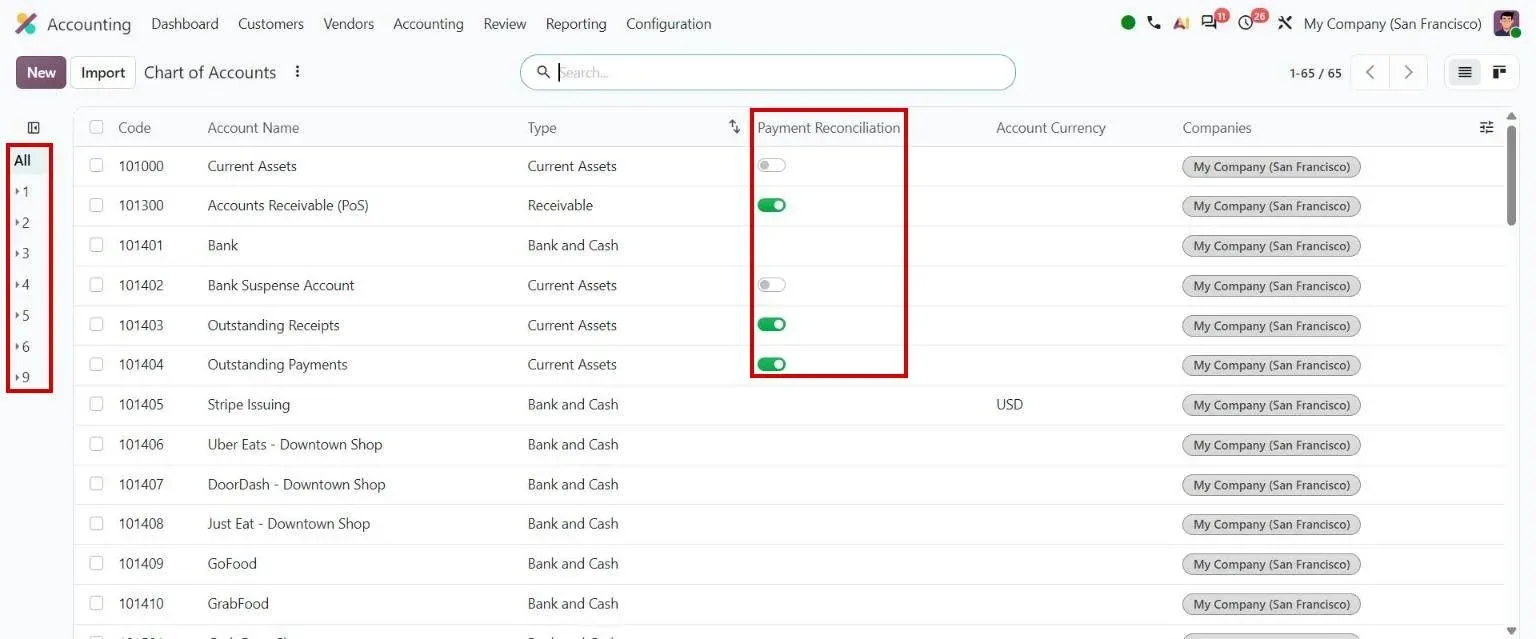
Step 1, Odoo 20 Accounting: Chart of Accounts with the parent-account hierarchy panel - 2
Record entries and review them
Odoo 20 · Invoicing
Invoices, bills and payments post their own entries, and manual journal entries cover the rest. Accounting Firms mode adds quick encoding and a review step, so a second accountant marks posted entries as reviewed.
Who: Accountant, reviewer
Accounting Firms mode settings: how it works in Odoo 20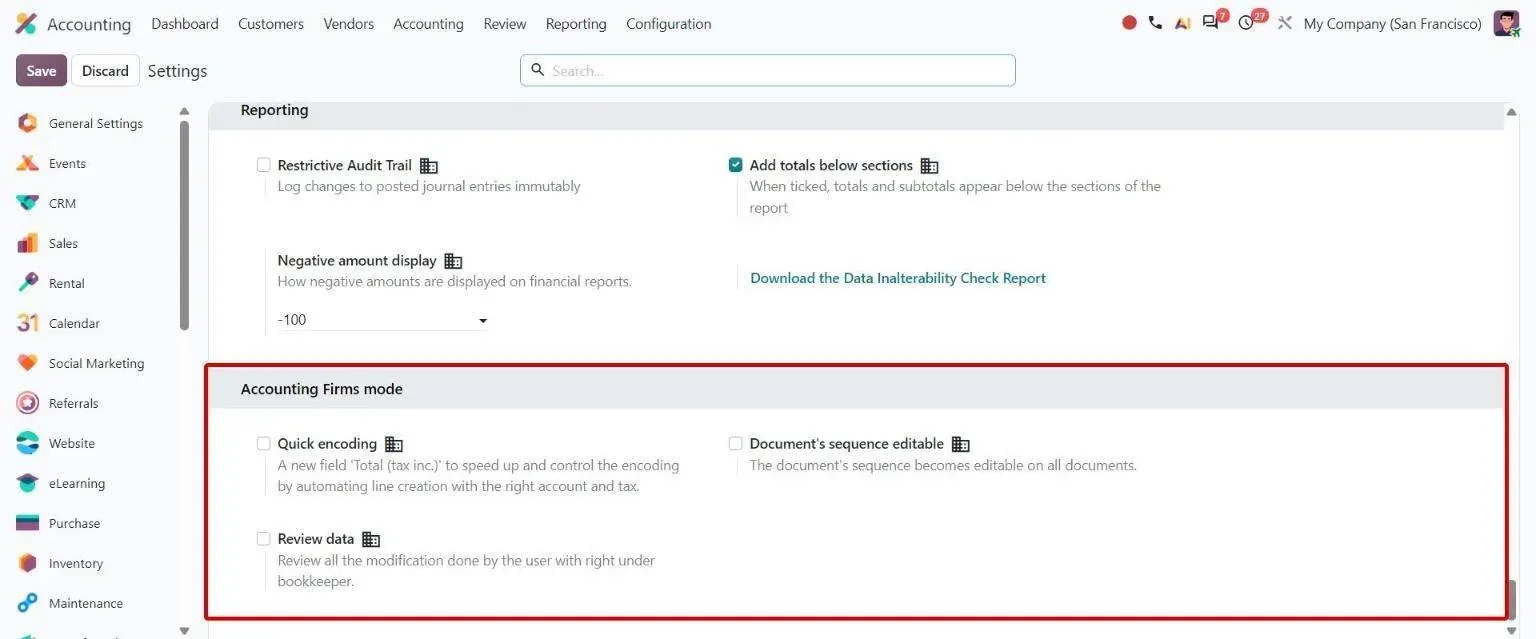
Step 2, Odoo 20 Accounting: Accounting settings block with Quick encoding, editable sequences and Review data toggles - 3
Match the bank
Odoo 20 · Accounting
Bank lines arrive by bank synchronisation, where Odoo supports the bank, or by file import. Matching rules propose the invoice or bill for each line, Run Auto Reconciliation repeats the matching on demand, and the Bank Reconciliation Summary explains the full bank balance.
Who: Accountant
Run Auto Reconciliation: how it works in Odoo 20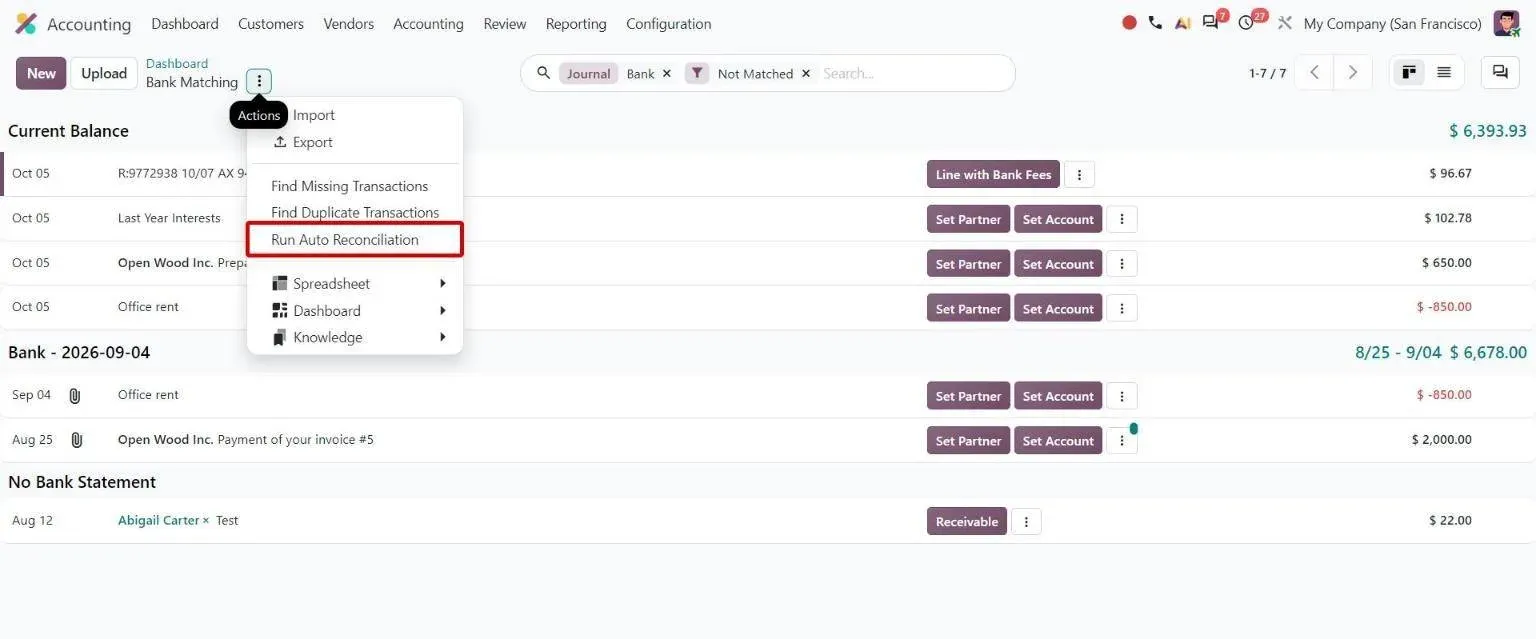
Step 3, Odoo 20 Accounting: Bank Matching actions menu with the Run Auto Reconciliation option - 4
Depreciate fixed assets
Odoo 20 · Assets
A bill line on a fixed-asset account creates the asset with that account's default depreciation model. Odoo 20 models can run on a yearly rate, such as 12.5%, or on a fractional life, such as 2.5 years, and depreciation entries post on their dates.
Who: Accountant
Asset depreciation: how it works in Odoo 20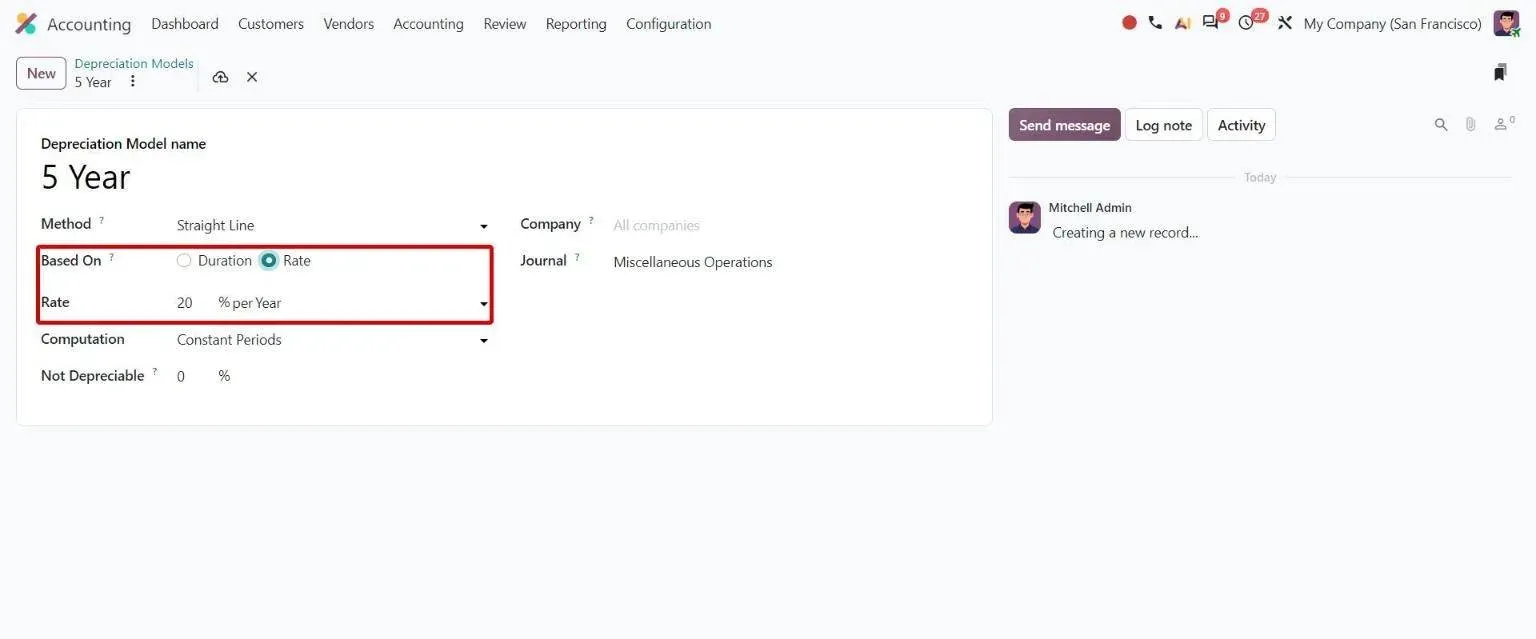
Step 4, Odoo 20 Accounting: Depreciation model form based on a yearly percentage rate - 5
Accrue and defer
Odoo 20 · Invoicing · Accounting
Accrued revenue and expense entries are created from sales and purchase order lines that are delivered but not invoiced, or received but not billed, with a reversal date. Invoice and bill lines can carry start and end dates, and Enterprise spreads the amount over the months they cover.
Who: Accountant, finance controller
Bill options display: how it works in Odoo 20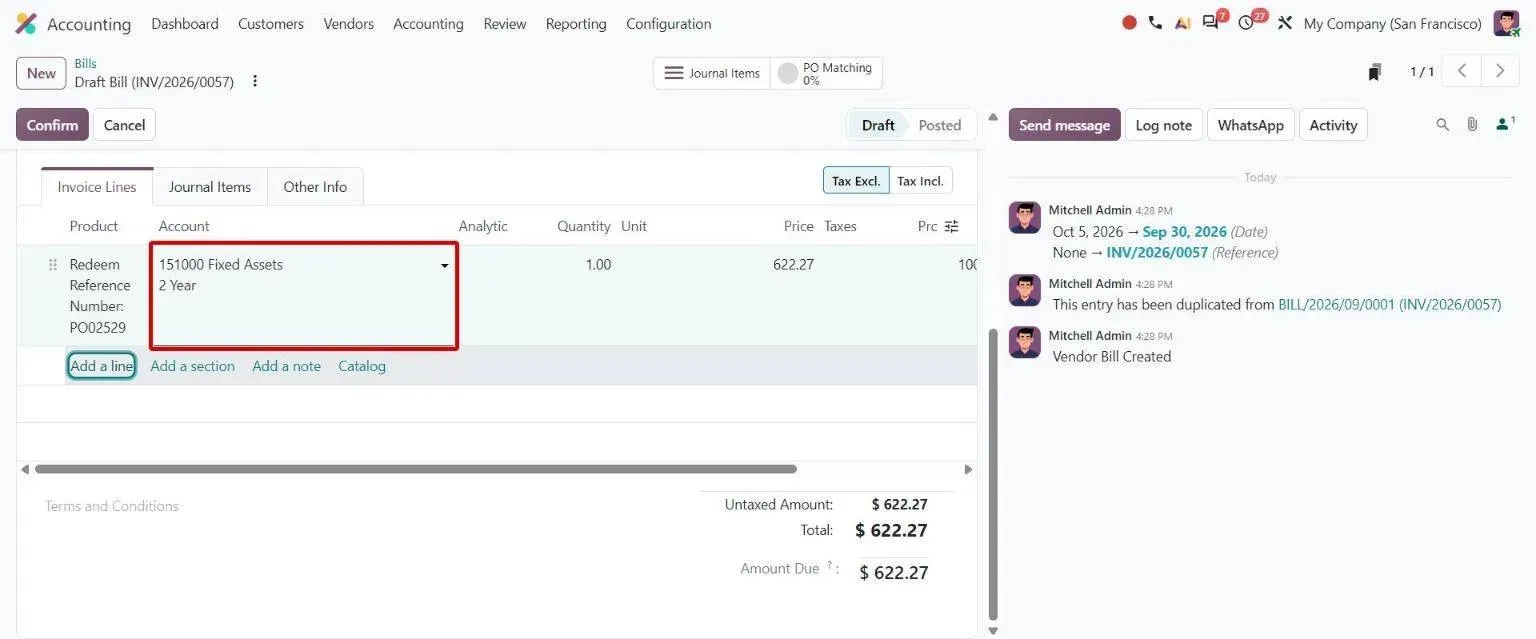
Step 5, Odoo 20 Accounting: Bill line with depreciation model stacked beneath the fixed asset account - 6
Revalue foreign currency
Odoo 20 · Accounting
The Unrealized Currency Gains/Losses report sets open foreign-currency balances at the operation rate against the current rate, and creates the adjustment entry with its reversal. For groups, the balance sheet has a Cumulative Translation Adjustments line for rate differences between companies in different currencies.
Who: Finance controller
Cumulative Translation Adjustment (CTA): how it works in Odoo 20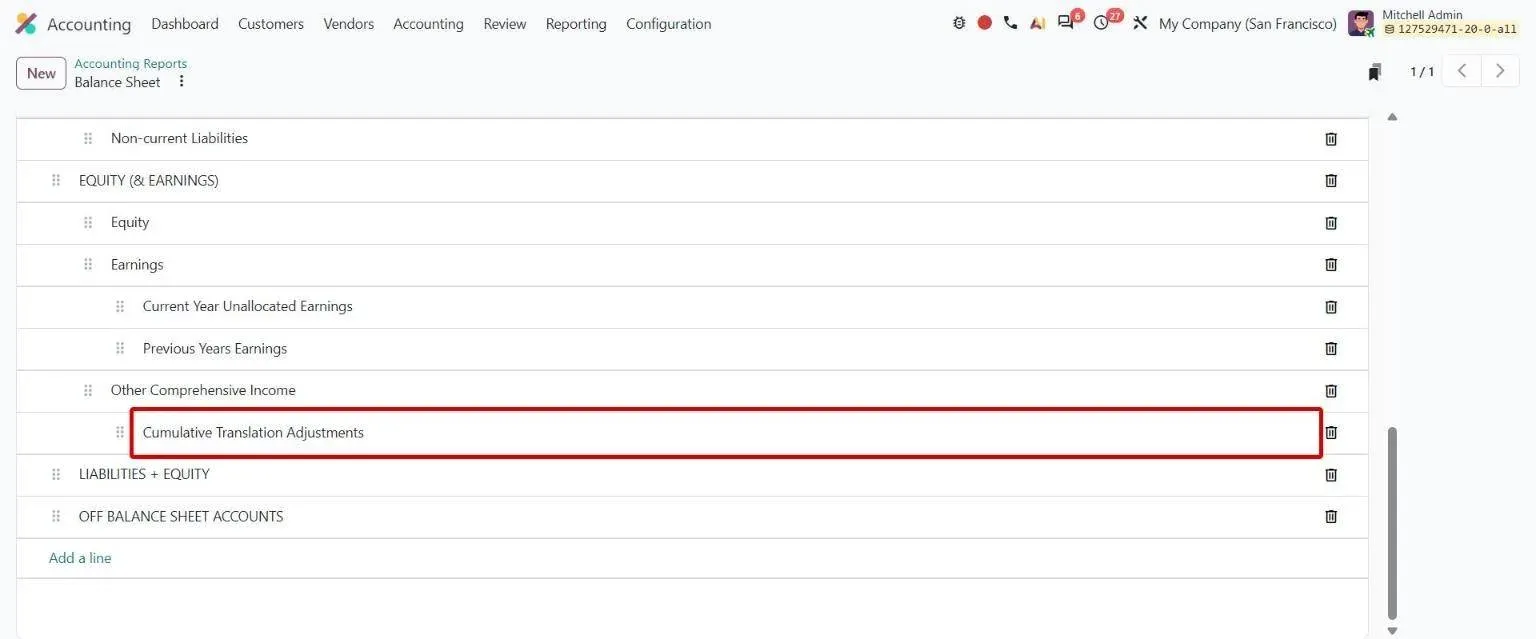
Step 6, Odoo 20 Accounting: Balance Sheet report lines with the new Cumulative Translation Adjustments line - 7
File the tax return and lock the period
Odoo 20 · Accounting
The tax return runs through checks before it is marked reviewed, submitted and paid, and the posted tax closing entry locks the tax period. Lock dates then close sales, purchases or the whole period, and a hard lock cannot be reopened.
Who: Finance controller, tax adviser
Onboarding improvements: how it works in Odoo 20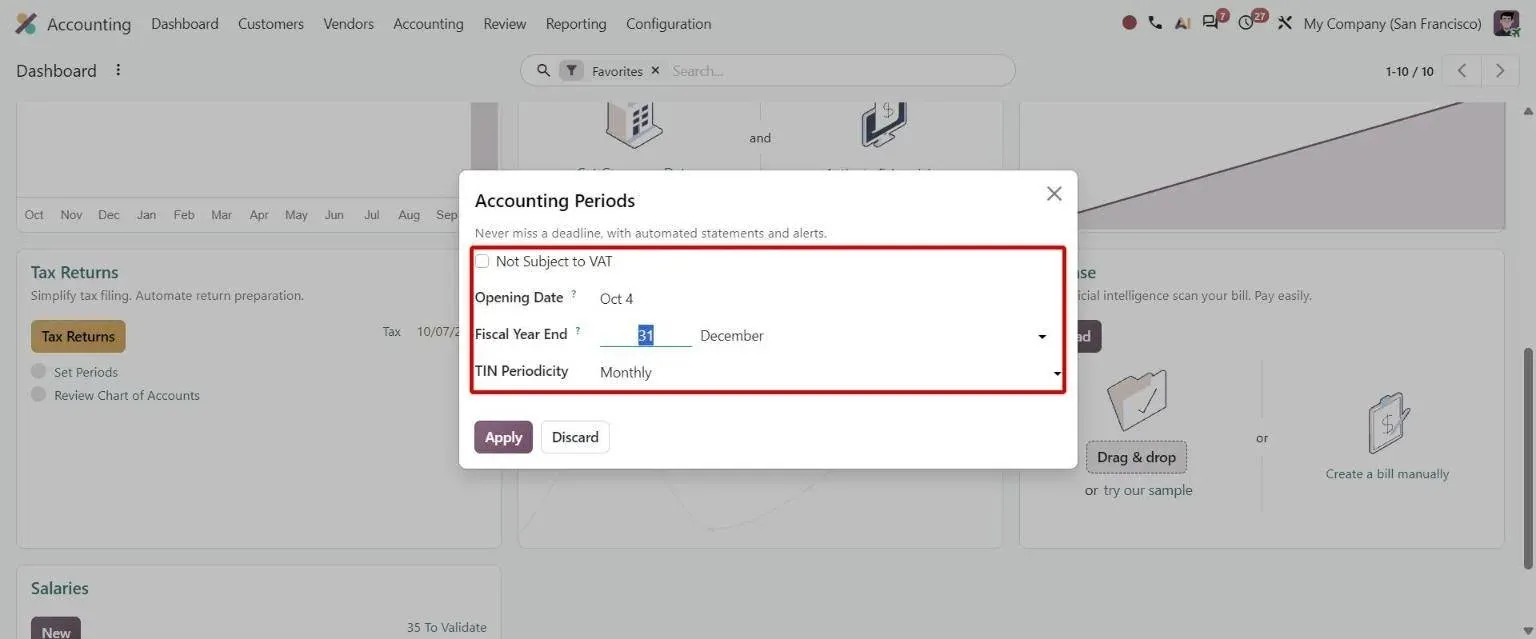
Step 7, Odoo 20 Accounting: Set Periods dialog with Not Subject to VAT and tax periodicity - 8
Report the month and the year
Odoo 20 · Accounting
Profit and loss, balance sheet, general ledger, aged receivables and payables and cash flow come from the Accounting reports, with comparison periods and drill-down to the entry. A multi-ledger is defined by its journals, so a report filtered on it uses only those entries.
Who: Finance controller, management
Multi-ledger consolidation: how it works in Odoo 20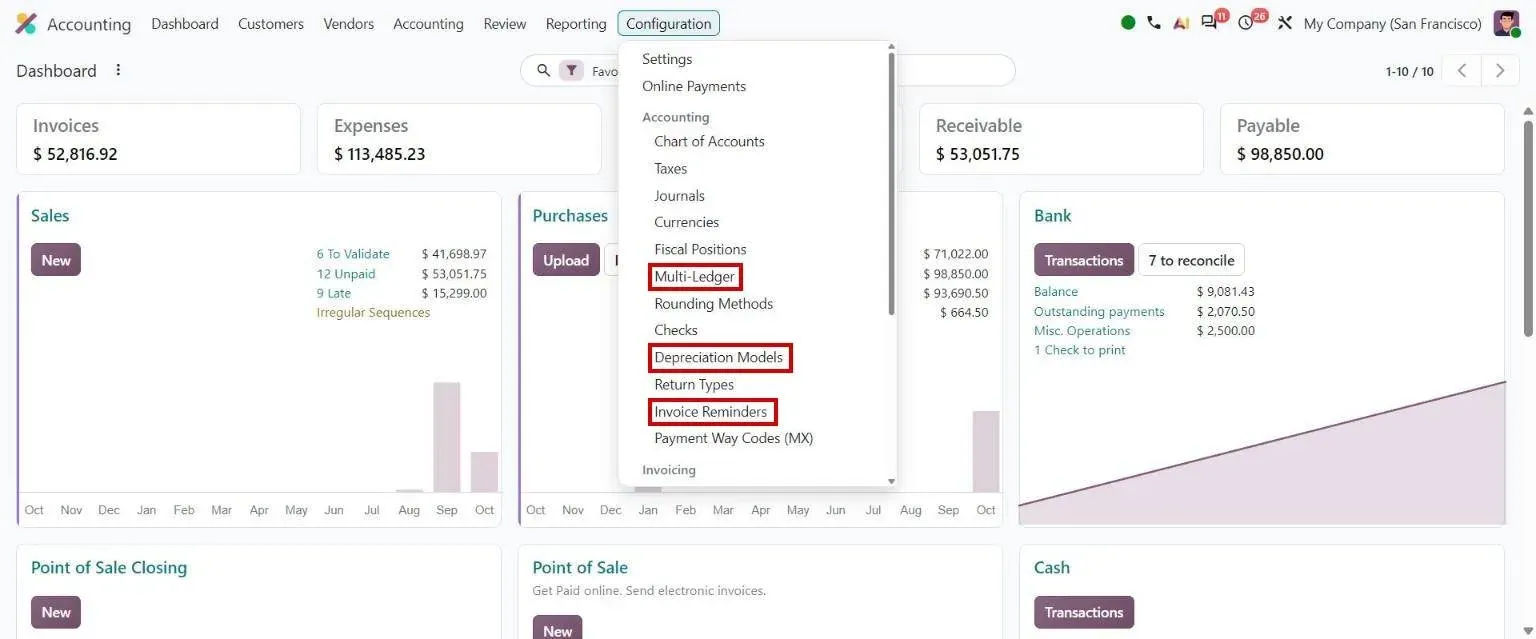
Step 8, Odoo 20 Accounting: Accounting Configuration menu: Multi-Ledger, Depreciation Models, Invoice Reminders
Which Odoo 20 apps does record-to-report use?
| Odoo app | Module (edition) | What it does here |
|---|---|---|
| Invoicing | account (Community) | Chart of accounts, journals, invoices, bills, journal entries, review status and lock dates |
| Sales and Purchase | sale, purchase (Community) | Order lines that feed accrued revenue and expense entries at month-end |
| Accounting | account_accountant (Enterprise) | Bank matching, reconciliation rules, deferrals and the lock-date wizard |
| Bank synchronisation | account_online_synchronization (Enterprise) | Bank lines fetched from supported banks into the bank journal |
| Assets | account_asset (Enterprise) | Asset register, depreciation models and depreciation entries |
| Accounting reports | account_reports (Enterprise) | Financial statements, ledgers, tax returns and unrealized currency gains and losses |
Where is standard Odoo enough, and where is it not?
Standard Odoo runs every step above. These are the gaps we close most often. Each is scoped and priced in discovery, not from a list.
-
Journal sign-off by an auditor
Standard Odoo: Odoo 20 lets accountants mark posted entries as reviewed, and the audit trail logs changes. A sign-off held by an auditor group, with the reviewer, date and reason kept on each entry, is not part of it.
What we add: For Duke Pipes, an accounting-audit state on journal entries, pending, approved or rejected, that only the auditor group can set, plus automatic mapping of the right GL account onto document lines.
-
Interest on overdue invoices
Standard Odoo: Payment follow-ups remind customers about overdue invoices. Standard Odoo does not work out interest on late payment and bill it.
What we add: For Duke Pipes, a daily job that computes overdue interest per customer and prepares it as a draft interest invoice for finance to check and post.
-
Statutory reports in the format finance reads
Standard Odoo: Odoo ships tax reports and financial statements per country through its localisation packages, laid out the way Odoo designs them. A P&L in the layout the team already knows, or a statutory report the package lacks, has to be built.
What we add: For Duke Pipes, reporting that classifies vendor bills against the legal credit period for small suppliers, and a P&L with opening and closing stock and gross profit in the format the finance team used before, now packaged as an app.
-
Bank feeds Odoo does not cover
Standard Odoo: Bank synchronisation (Enterprise) fetches statements from the banks Odoo's providers support. Other banks send files that someone imports by hand, and reconciliation waits for them.
What we add: For Commonwealth Fusion Systems, integrations with banking platforms that sync continuously for automated reconciliation, replacing a daily manual export and import.
-
History that auditors will still ask for
Standard Odoo: A new Odoo database starts from opening balances. Years of entries from an old system, or from an old Odoo version, do not come across without a migration.
What we add: For Mattson Group, a move from Odoo 9 Community to Odoo 16 Enterprise with every historical accounting record carried over ahead of German compliance audits, and accounting set up for DATEV-compatible exports, EU VAT and period close.
Who approves what, and what is recorded?
- Lock dates close sales, purchases, tax or the whole period, and a hard lock cannot be reopened.
- Posting the tax closing entry locks the tax period it covers.
- Journals can secure posted entries with a hash, so a hashed entry cannot go back to draft.
- With the audit trail on, every change to a posted entry is logged with who made it and when.
- With Accounting Firms mode, posted entries carry a review status that a second accountant sets.
- Accrual entries carry their own reversal date, so they unwind in the next period.
What data moves when you migrate this process?
For record-to-report, these records move from the old system. Most projects bring opening balances and open items, and keep the old system read-only for history. Where auditors need full history in Odoo, past years move as summarised or detailed entries.
- Chart of accounts, mapped to the Odoo chart for your country
- Opening trial balance at the cut-over date
- Open customer invoices and vendor bills, so they can still be matched
- Fixed-asset register with cost, depreciation to date and remaining life
- Bank balances and unreconciled bank lines
- Tax settings, fiscal year and lock dates
Moving from another system? See Tally to Odoo , QuickBooks to Odoo , Xero to Odoo , Sage to Odoo or SAP Business One to Odoo .
What can AI take over in record-to-report?
The AI layer proposes and checks. A person still approves what gets bought, made or promised.
- Erpmate in Odoo Accounting Keeps a running month-end list of drafts and open items, so close starts early. Every entry stays a proposal for a person to approve.
- OCR for vendor bills Vendor bills read from PDF or image into Odoo, so the ledger is complete before the month closes.
- Document AI for Odoo Invoices, expenses and orders read into Odoo records, with no template per supplier.
- AI cost estimator What the AI layer costs to run each month, from your own document volumes.
Who runs record-to-report on Odoo with TechUltra?
Duke Pipes
An Indian pipe manufacturer running finance, production, sales and purchase on one Odoo. Journal entries carry an audit state that only auditors can approve or reject, GL accounts map onto document lines automatically, a daily job prepares overdue interest as draft invoices, and the P&L comes out in the format the finance team already reads.
Read the Duke Pipes case studyHow long does it take, and what does it cost?
Implementation starts from about USD 4,000 and goes up with scope: the number of plants and products, the gaps above, integrations and how clean your data is. A one-week discovery maps your process and ends with a fixed timeline and a fixed price.
How does it differ by industry?
Only the industries where we have a reference for this process.
-
Pipes and plastics
Audit states on journal entries, a capital-asset register with hierarchical codes, overdue interest and statutory reporting on Odoo Accounting.
Duke Pipes case study -
Energy research
More than 1,000 Odoo users, banking integrations for automated reconciliation and reports rewritten for the figures finance leadership reviews each week.
Commonwealth Fusion Systems case study -
Container sales and rental
German-compliant accounting with DATEV-compatible exports, EU VAT and period close, and every historical record moved from Odoo 9.
Mattson Group case study
Questions about record-to-report in Odoo
-
What is record-to-report in Odoo?
It is the accounting cycle from the first journal entry to the reports: set up the chart, record and review entries, match the bank, depreciate assets, accrue and defer, revalue currencies, file the tax return, lock the period and report. Month-end close is the part that runs every month.
-
Can Odoo Community run the month-end close?
Partly. Invoicing in Community records invoices, bills and journal entries, sets lock dates and creates accrual entries from orders. Bank matching, assets, deferrals, the tax return flow and financial reports such as the balance sheet are in Odoo Enterprise.
-
How does Odoo lock a closed period?
Lock dates stop new or changed entries in sales, purchases, tax or the whole period, and a hard lock cannot be reopened. Posting the tax closing entry also locks the tax period. Journals can secure posted entries with a hash.
-
Does Odoo handle accruals, deferrals and depreciation?
Yes. Accrued revenue and expense entries come from order lines that are delivered but not invoiced, or received but not billed. Enterprise spreads invoice and bill lines over the months they cover and posts depreciation from the asset register.
-
Can Odoo approve journal entries before they count?
Odoo 20 lets a second accountant mark posted entries as reviewed. An approve-or-reject step held by an auditor group, with the reason on the entry, needs a customisation like the one we built for Duke Pipes.
-
Can Odoo produce a P&L in the format our accountants already use?
Odoo's reports follow its own layout and each country's localisation package. A different layout can be built as a custom report; for Indian finance teams used to Tally, we package one as the Tally Style Indian Accounting app.
-
What does it cost to set up record-to-report in Odoo?
Implementation starts from about USD 4,000 and goes up with scope: companies and currencies, the chart and tax setup, bank integrations, custom reports and how much history moves. A one-week discovery ends with a fixed price. Odoo's own subscription is billed by Odoo; see Odoo pricing.