

Odoo App · Productivity
Discuss Search
Search every word in Odoo Discuss — find any past chat in seconds, not hours.

Overview
Discuss Search adds a search bar to Odoo's Discuss module so teams can find old conversations the same way they search anywhere else — by typing a word or phrase and jumping to results.
Built by TechUltra Solutions, the module solves a real friction in busy Odoo deployments: long chat histories where a critical decision, a customer reply, or a shared link is hard to recover by scrolling alone.
Once installed it works immediately — no settings, no configuration, no per-user setup. Search any channel or direct message, step through hits with forward and backward arrows, and see at a glance how many matches there are and how many you have already visited.
Key features
-
Search bar inside Discuss
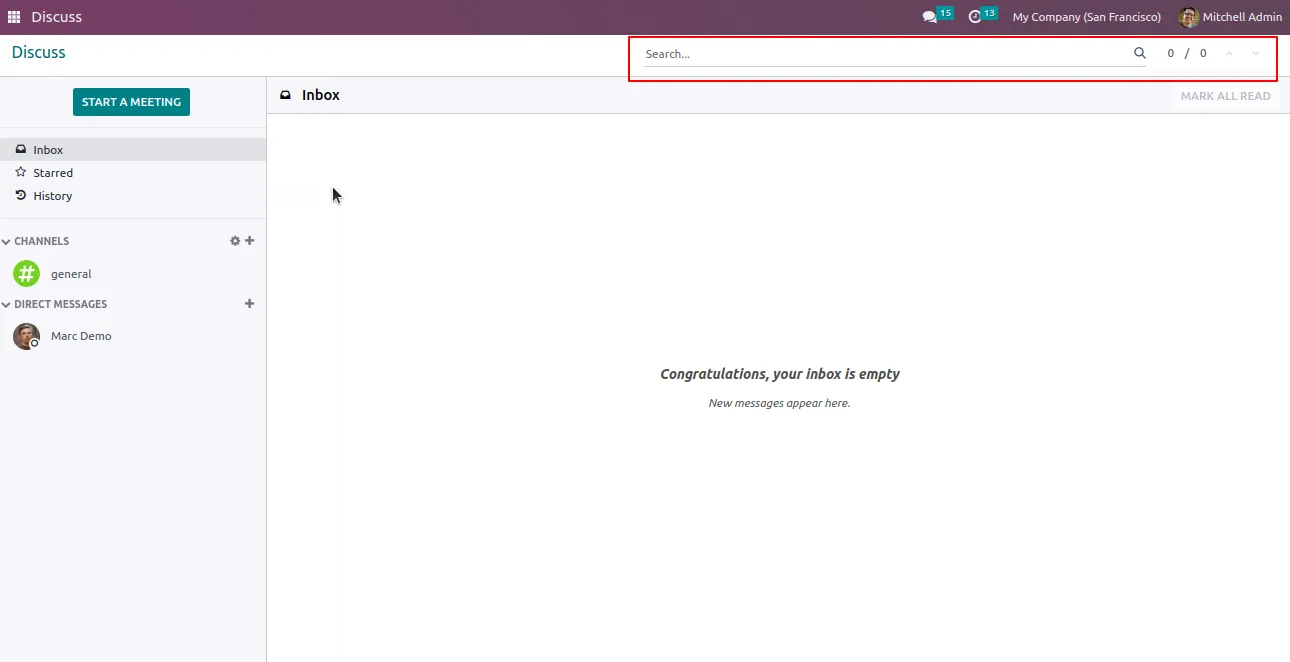
A dedicated search bar appears at the top of the Discuss chat window, ready to query any channel or direct message.
-
Search the full chat history
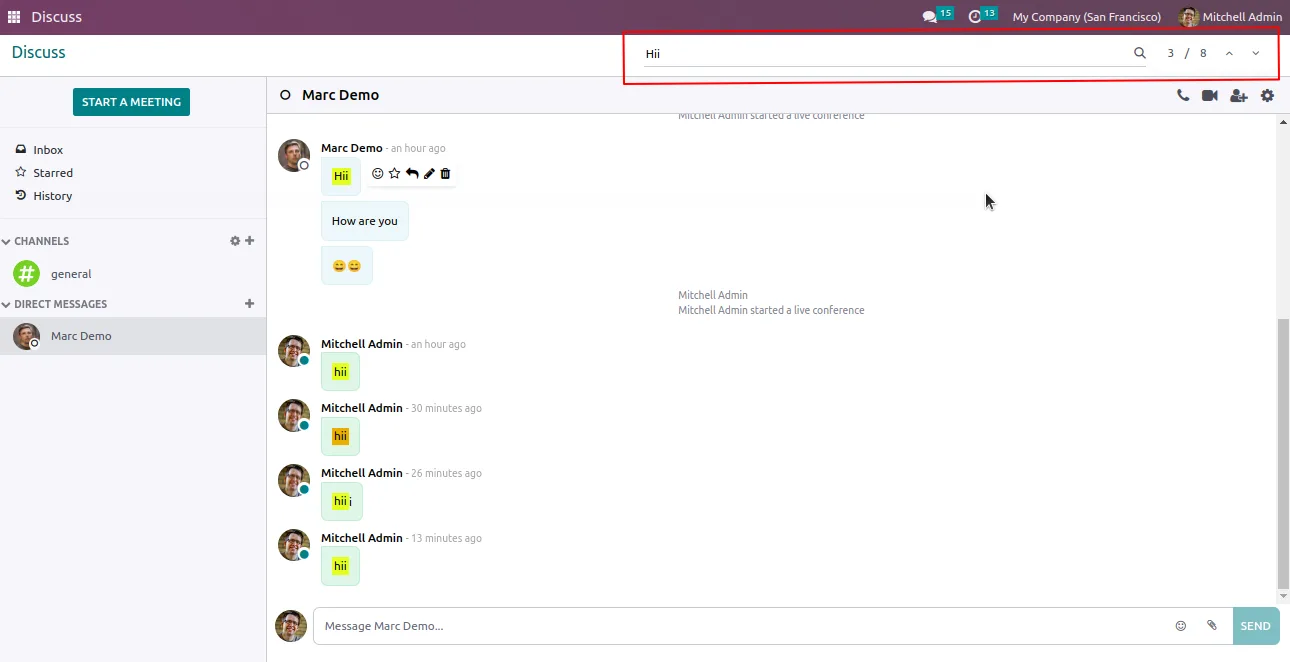
Locate important chats by typing any word or sentence — the search runs across the conversation's complete history, not just recent messages.
-
Forward and backward navigation
Arrow controls in the search bar step through results in order, so users can review every hit without losing their place.
-
Total and visited match counter
The search bar displays the total number of matched results alongside how many have already been visited — a clear sense of progress through a long list.
-
No configuration required
Install the module and the search bar is ready to use. There are no settings to configure or roles to assign before the first search.
-
No time-bound limit
Search across conversations from any period — years-old chats are reachable just as quickly as last week's.
-
Works in Community and Enterprise
Compatible with both Odoo Community and Enterprise editions on Odoo 15, 16, and 17.
Discuss Search in Odoo
Every screen, in the order you meet it — configuration first, then the module in use.
Technical details
Specification
- Publisher
- TechUltra Solutions Private Limited
- Technical name
- tus_discuss_search
- Odoo versions
- 15.0, 16.0, 17.0
- Lines of code
- 1,103
- License
- Odoo Proprietary License v1.0 (OPL-1)
- Price
- $35.54 (one-time)
Deployment
- Odoo Online
- Odoo.sh
- On-premise
Odoo dependencies
- Discuss
Support
90 days of bug-fix support, Monday to Friday (10:00–19:00 IST). Raise a ticket at support@techultra.in.
Setup & configuration
From install to first call — here is the path.
- 1
Install the module
In Odoo, open Apps, remove the Apps filter, search for “Discuss Search”, and click Install.
- 2
Open Discuss
Navigate to the Discuss app. A new search bar appears at the top of the chat window, available in channels and direct messages.
- 3
Run your first search
Type a word or phrase in the search bar and press Enter. Discuss highlights every match in the active conversation's history.
- 4
Step through matches
Use the forward and backward arrows to move between hits. The match counter shows how many results exist in total and how many you have already visited.
Frequently asked questions
-
What does Discuss Search add to Odoo?
It adds a search bar to the Odoo Discuss chat window so users can find any word or sentence inside a channel or direct-message history, with forward and backward navigation between matches.
-
Do I need to configure anything after install?
No. The module is install-and-go — there are no settings to configure, roles to assign, or scheduled jobs to enable before searching.
-
Can I search conversations from years ago?
Yes. Discuss Search has no time-bound limit and runs across the full history of the conversation, so old chats are as easy to find as recent ones.
-
Does the search show how many matches there are?
Yes. The search bar displays the total number of matched results in the conversation and how many you have visited so far.
-
Which Odoo versions are supported?
Discuss Search supports Odoo 15.0, 16.0, and 17.0, in both Community and Enterprise editions.
-
Does it work in channels and direct messages?
Yes. The search bar is available wherever Discuss is — in channels, group chats, and one-to-one direct messages.
-
Is support included?
Yes. The module ships with 90 days of bug-fix support, Monday to Friday, 10:00–19:00 IST.
Related services
Get the most out of this module with senior TechUltra consultants.
Odoo Customization Services
Tailored Odoo customizations from a Gold Partner — 200+ projects, upgrade-safe patterns, fixed-scope quotes, senior consultants. Free demo consultation.
Hire Odoo Developers
Hire certified Odoo developers from a Gold Partner — 400+ implementations, 92% satisfaction, Odoo since 2016. Silver / Gold / Platinum packages, free trial.
Odoo Support & Maintenance
Odoo Gold Partner support — 24/7 functional, technical, and server coverage for Enterprise and Community editions. Fast turnaround, free consultation.







