Odoo App · Documents & Files
Google Drive Integration
Folders created from Odoo records, attachments synced to Google Drive, and files added in Drive synced back into Odoo.

Overview
Documents in Odoo live as attachments on individual records, which works until someone needs them outside Odoo or wants a folder structure. This module adds a Cloud Storage file manager that builds folders from Odoo records and mirrors them in Google Drive.
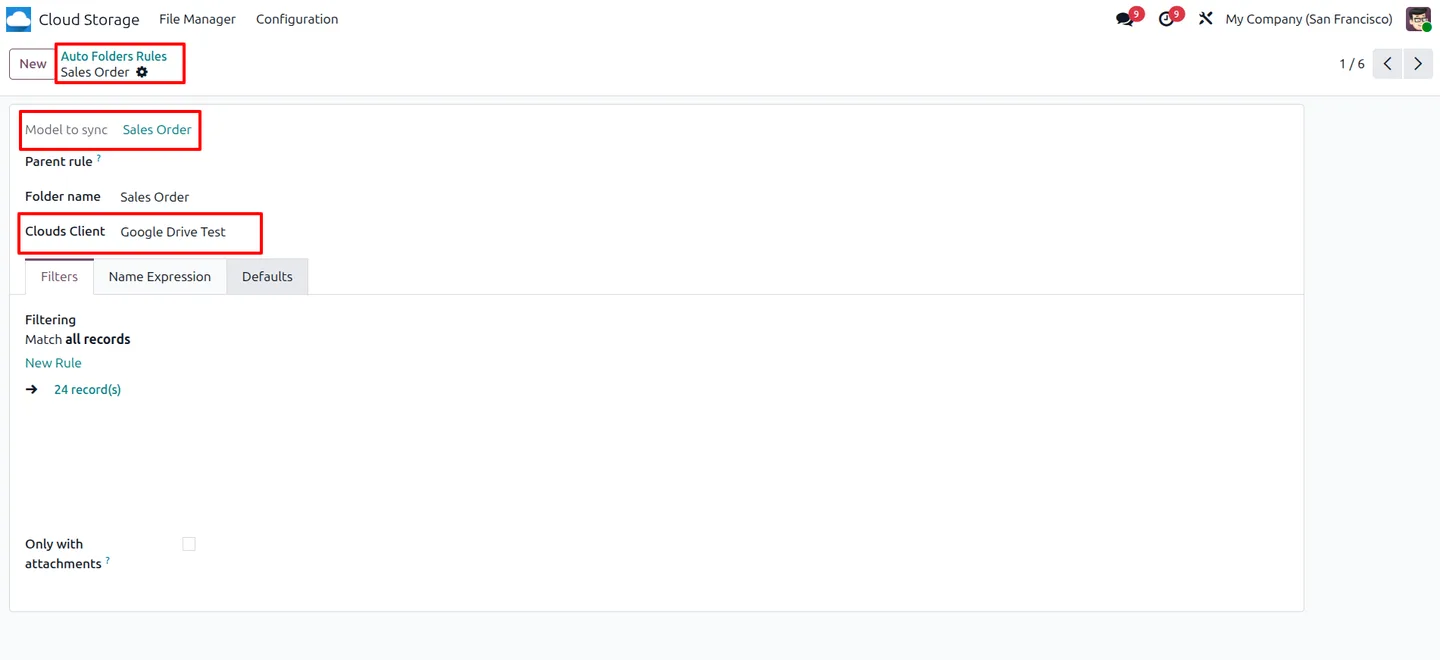
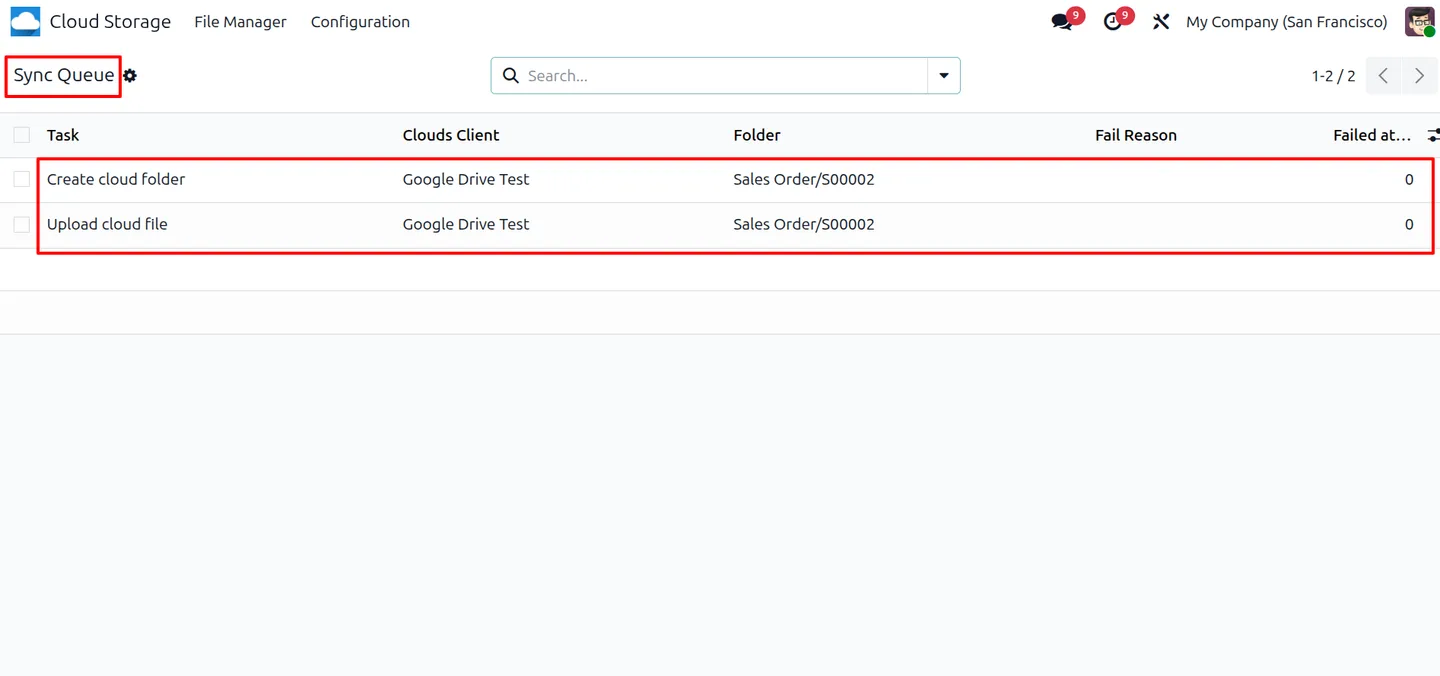
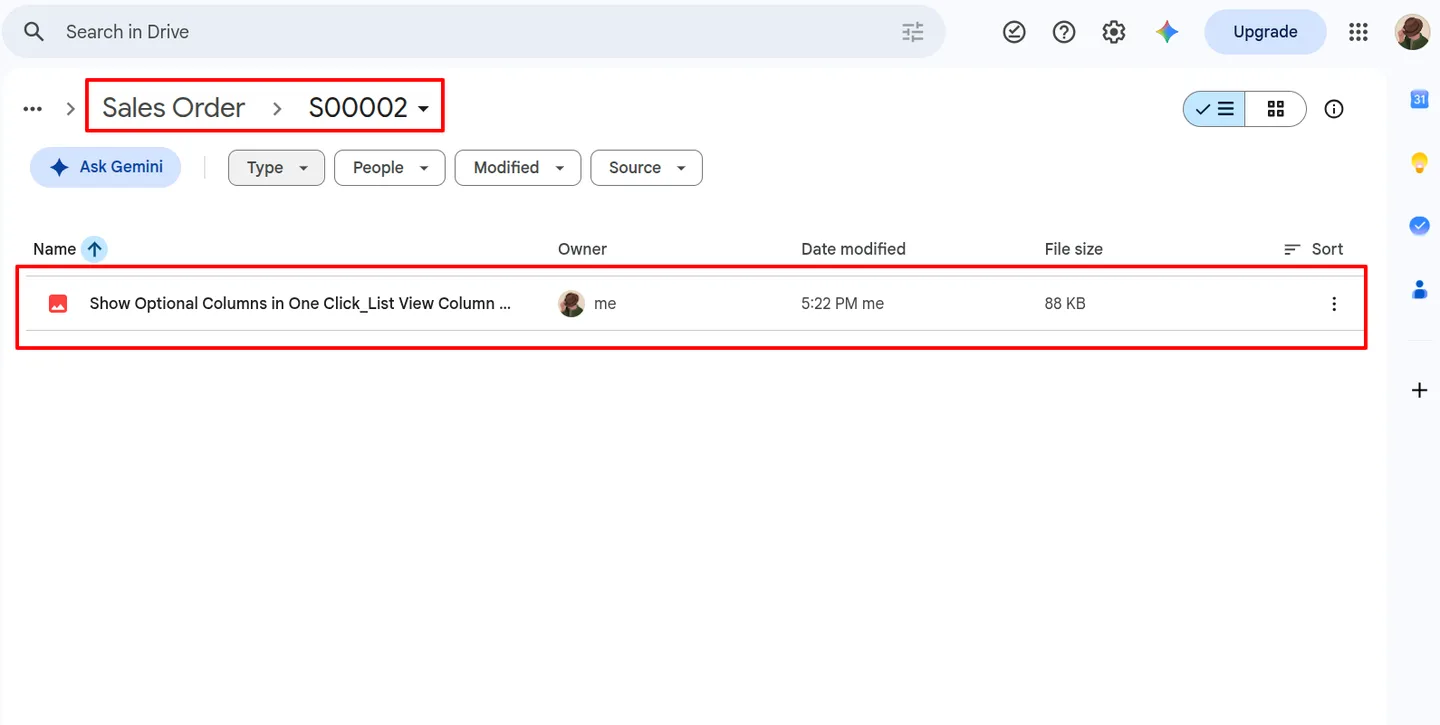
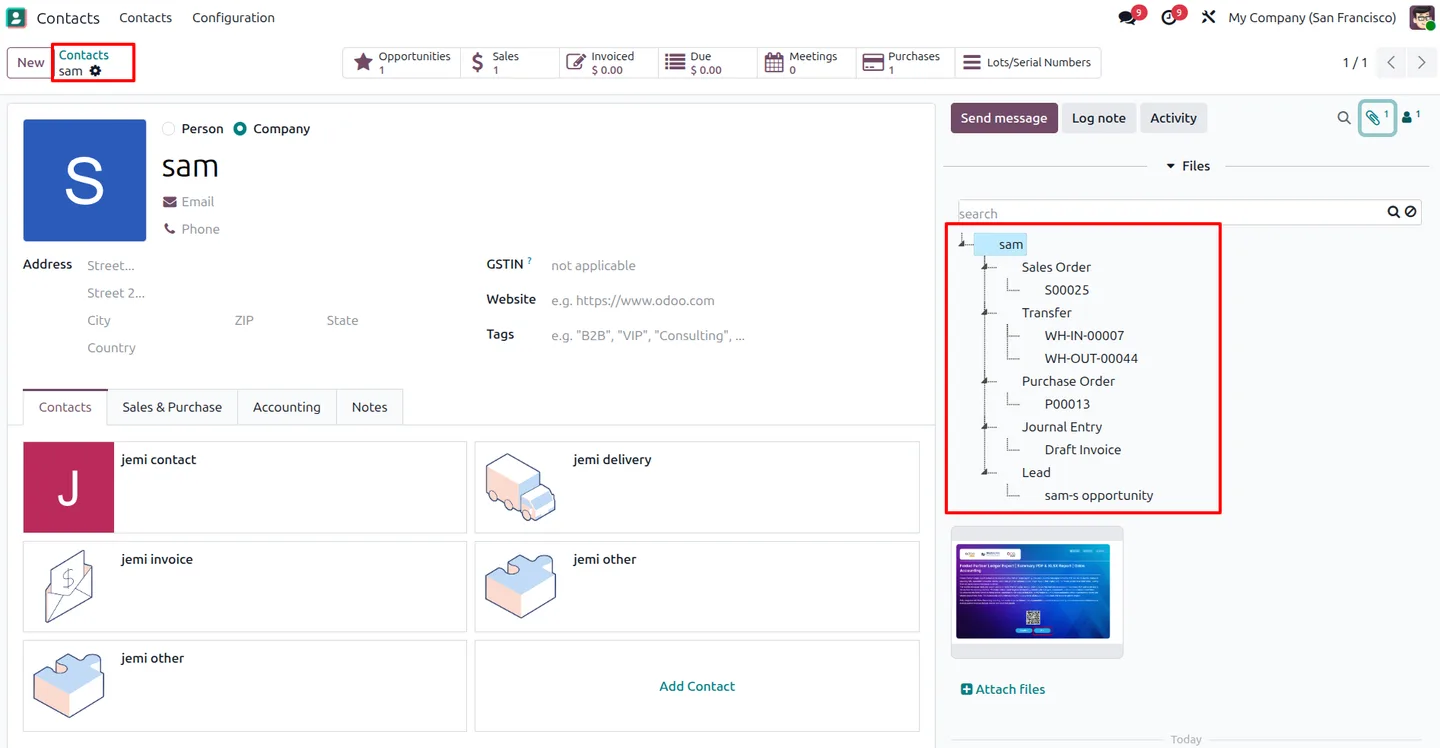
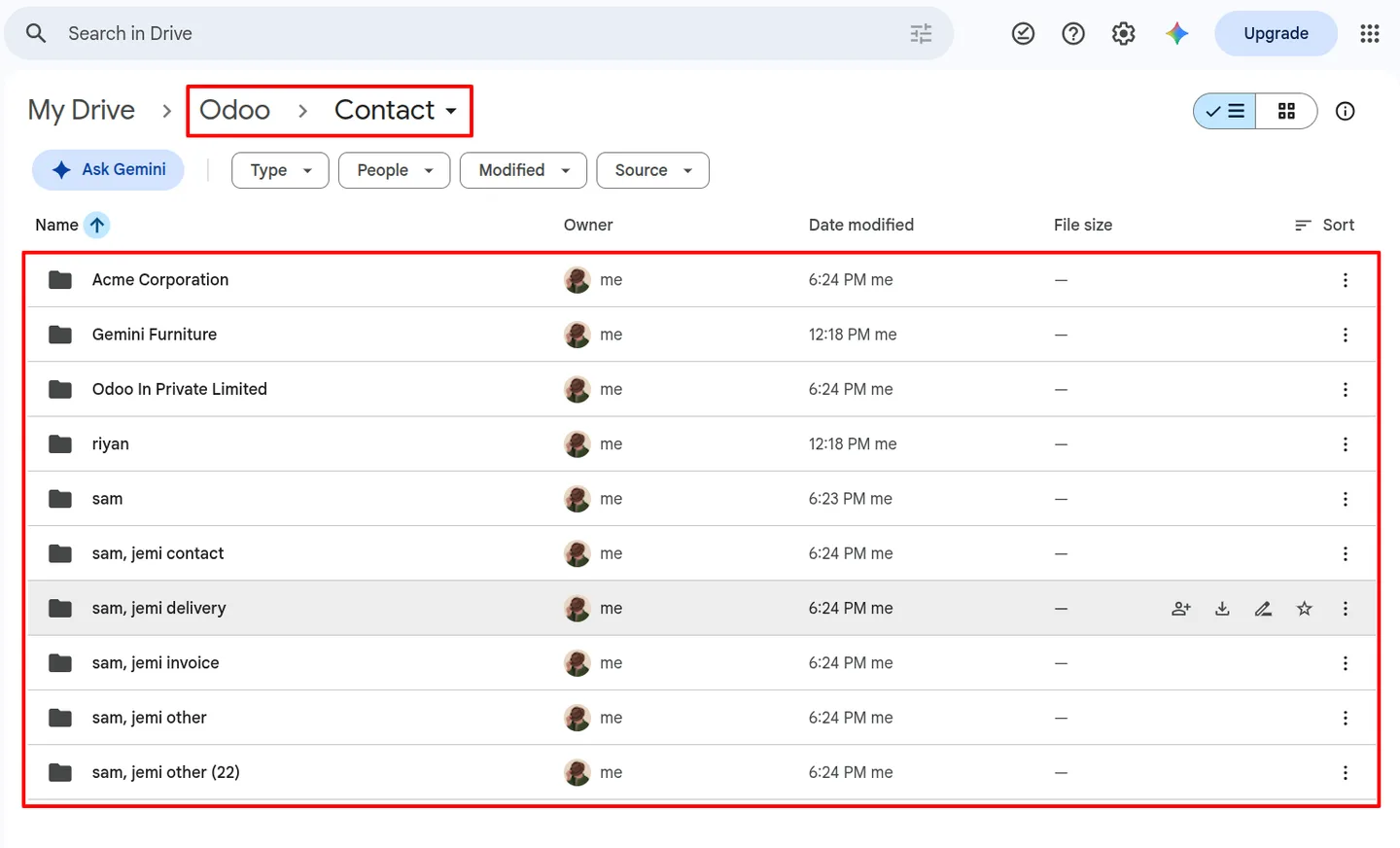
Folder rules decide which records get a folder, how it is named and where it sits. A Sale Order rule with a Contact as parent produces a customer folder containing one folder per order, in both Odoo and Drive. Attachments added on the record are queued and uploaded, and the queue shows what is pending, what failed and why.
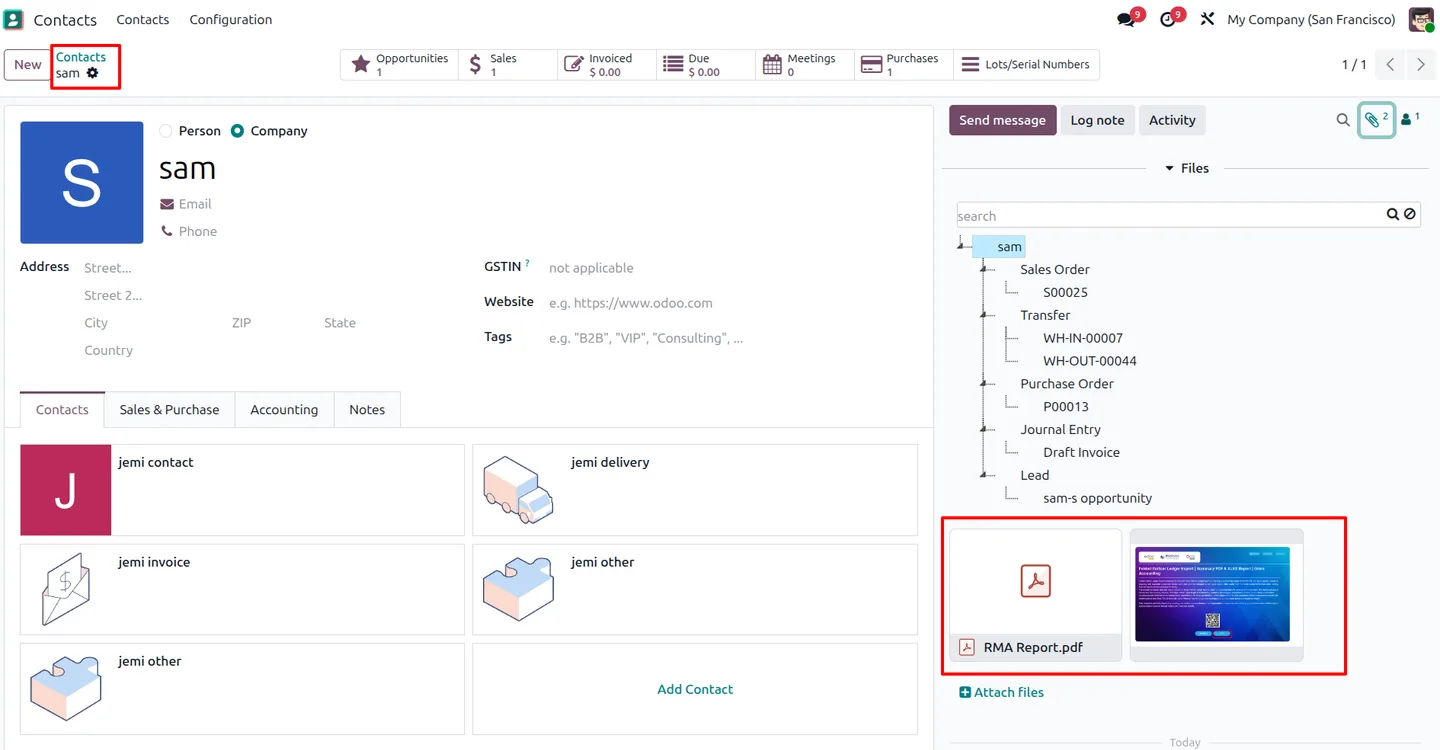
Sync works in both directions. Odoo-side changes go to Drive through the queue and scheduled actions; files added in Drive come back through Google's push notifications and the Changes API, landing in the matching Odoo folder. The connection uses OAuth 2.0 with your own Google Cloud project, and configuration menus are limited to administrators.
Key features
-
Google Drive over OAuth 2.0
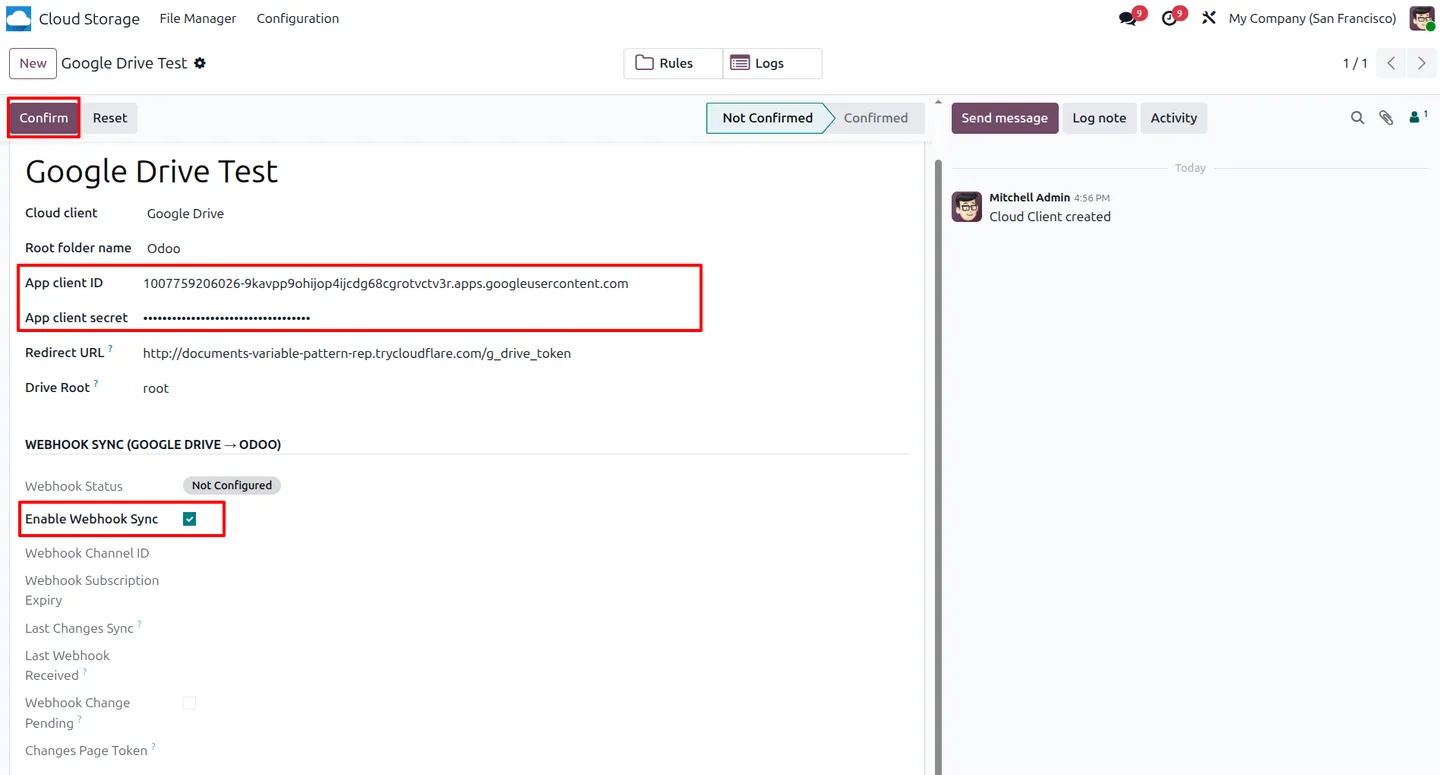
Connect with your own Google Cloud project: Drive API, OAuth consent screen, client ID and secret, redirect URL and Drive root.
-
Folder rules from Odoo records
Create folders automatically for models such as Contacts and Sale Orders, using domains, naming expressions and parent rules.
-
Odoo-to-Drive sync queue
Folders and attachments are uploaded through a queue with retry limits and logs, processed by scheduled actions or on demand.
-
Drive-to-Odoo sync
Google Drive webhooks and the Changes API bring files added directly in Drive back into the matching Odoo folder.
-
Hierarchical folders
Parent and child rules mirror a Contact folder containing its Sale Order folders, identically in Odoo and Drive.
-
Access control
Users get File Manager access to browse and manage documents; client, rule and sync configuration stays with administrators.
Google Drive Integration in Odoo
Every screen, in the order you meet it — configuration first, then the module in use.
Technical details
Specification
- Publisher
- TechUltra Solutions Private Limited
- Technical name
- tus_odoo_gdrive_integration
- Odoo versions
- 19.0
- Lines of code
- 11,279
- Modules
- cloud_base (file manager) + tus_gdrive (Google Drive connector)
- Drive targets
- My Drive or a shared drive
- License
- Odoo Proprietary License v1.0 (OPL-1)
- Price
- $99.00 (one-time)
Deployment
- Odoo Online
- Odoo.sh
- On-premise
Odoo dependencies
- Discuss
Support
90 days of bug-fix support plus 5 hours of free configuration help, Monday to Friday, 10:00–19:00 IST. Raise a ticket at support@techultra.in.
Setup & configuration
From install to first call — here is the path.
- 1
Prepare Google Cloud
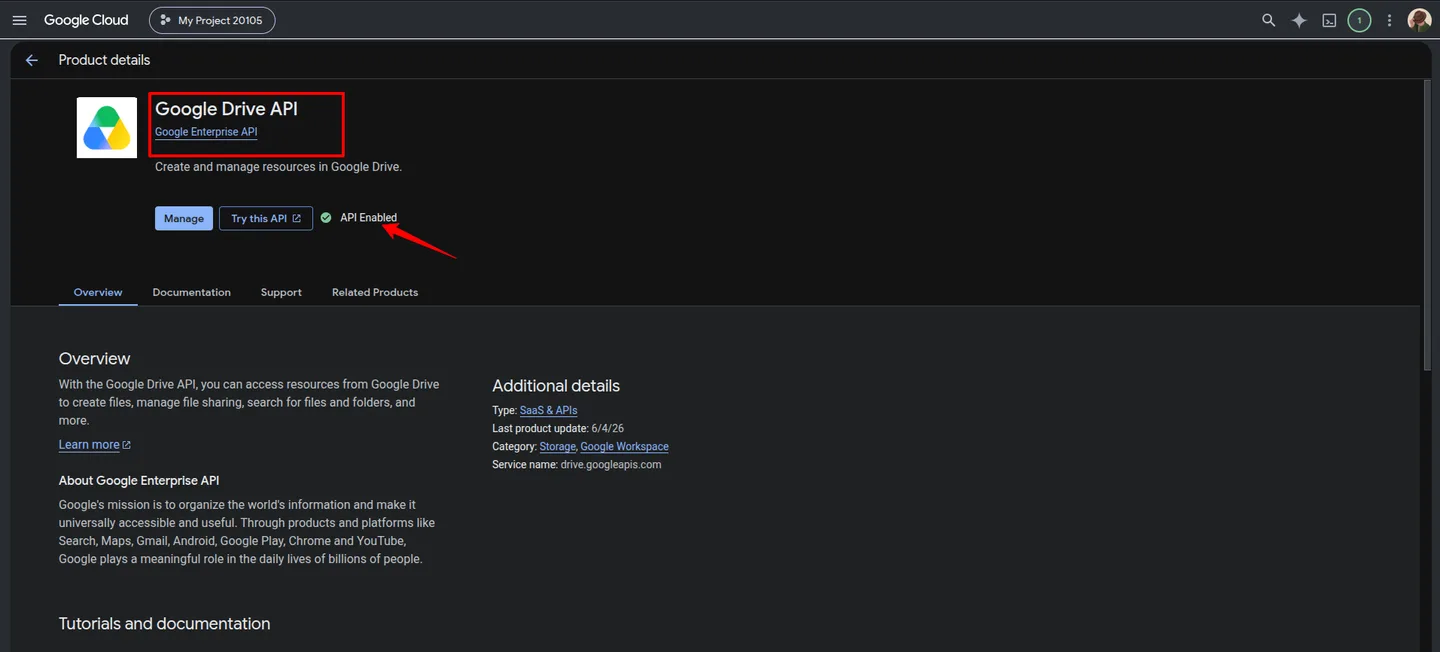
In a Google Cloud project, enable the Google Drive API, configure the OAuth consent screen with the Drive scope and branding, and create a Web application OAuth client with the same redirect URL Odoo will use.
- 2
Create the cloud client in Odoo
Enter the client ID, client secret, redirect URL and Drive root ('root' for My Drive, or a shared drive ID), then authorise and confirm the client.
- 3
Enable the webhook
Click Enable Webhook on the confirmed client so Drive-side changes are pushed to Odoo. This needs a public HTTPS Odoo URL.
- 4
Add folder rules
Create a rule for each model that should get folders, for example Sale Orders with Contacts as the parent, and set the naming and domain.
- 5
Activate the sync jobs
The Google Drive scheduled actions are inactive on a fresh install. Activate them, or process the queue manually, for forward sync to run.
Frequently asked questions
-
What is the difference between cloud_base and tus_gdrive?
cloud_base is the file manager: folders, rules, sync queue and logs. tus_gdrive adds the Google Drive OAuth connection, Drive API operations and webhook-based reverse sync. The same file manager also has an SFTP connector, the Cloud Storage & SFTP Sync module.
-
Is Google Drive sync real-time?
Odoo-to-Drive sync runs through the queue, so it needs an active scheduled action or a manual run; those jobs are inactive on a fresh install. Drive-to-Odoo sync can be near real-time with an active webhook, and Sync Now processes changes from the last checkpoint.
-
Why does the webhook need a public HTTPS URL?
Google sends push notifications to your Odoo server. Localhost and private addresses can't receive them, so web.base.url must be a reachable HTTPS domain or tunnel.
-
Do webhook subscriptions expire?
Yes. This version requests a 23-hour subscription, and the included renewal action is inactive by default and doesn't guarantee continuous renewal. Monitor the subscription status and enable scheduled backward sync to catch any missed changes.
-
Can we sync to a shared drive instead of My Drive?
Yes. Use 'root' as the Drive root for My Drive, or enter a shared drive ID. The connected Google account needs access to that drive.
-
What happens when the OAuth token expires?
The module stores the refresh token and renews access automatically. If the refresh fails, for example after access is revoked, use Reconnect on the cloud client and authorise again.
-
Does it handle large files?
Files above 5 MiB are uploaded in chunks, but the whole file is still loaded into Odoo's memory, so server memory and worker time limits apply.
Listing verified against the Odoo App Store:
Related solutions
Whole-platform solutions that complement Google Drive Integration.
Related services
Get the most out of this module with senior TechUltra consultants.
Odoo Customization Services
Odoo customization from a Gold Partner: custom modules, workflows, reports and Studio changes, written upgrade-safe and quoted at a fixed scope. Free scoping call.
Hire Odoo Developers
Hire certified Odoo developers from a Gold Partner: one developer or a team, full-time or part-time, 70–160 hours a month. Silver, Gold or Platinum plan, free trial.
Odoo Support Services & Maintenance
Odoo support services from a Gold Partner: functional and technical support plus server cover for Enterprise and Community, 30-minute P1 response, 24/7 option.