Warehouse management software in India: what Odoo's WMS covers
What Odoo Inventory does as warehouse management software: multi-step receipts and deliveries, putaway rules, batch and wave picking, barcode scanning, lots, expiry and cycle counts, plus the India angle.
Odoo Inventory is a full warehouse management system, not a stock list. It runs receipts and deliveries in one, two or three steps, sends each product to the right shelf by rule, groups picks into batches and waves, and tracks lots, serial numbers and expiry dates across as many warehouses as you run. Below is what it covers, a goods-in-to-dispatch walkthrough with real Odoo 20 screens, and where Indian businesses need extra setup.
Every feature here was checked against the Odoo 20 source code. Screens are from an Odoo 20 demo database with a US company.
What does Odoo’s warehouse management software include?
| Need | What Odoo Inventory does | Edition |
|---|---|---|
| Warehouses and bins | Any number of warehouses, each with its own locations down to the shelf and bin, and resupply routes between them | Community |
| Receiving | Receive and store in one step, receive then store in two, or receive, check quality, then store in three | Community |
| Putaway | Putaway rules send a product, category or package type to a set location, within the limits of its storage category | Community |
| Picking | Deliver in one step, pick then deliver, or pick, pack, then deliver. Batch and wave transfers group the work | Community |
| Barcode | Scanner-driven receiving, picking, packing and counting, with lot and serial entry | Enterprise |
| Traceability | Lots and serial numbers from receipt to customer; expiry, best-before and removal dates with the expiry module | Community |
| Counting | A count frequency per location schedules cycle counts; counts post their differences to stock | Community |
| Packages | Put products in packages and move or scan a whole package at once | Community |
| Reporting | Stock by location and lot, stock at a past date and a stock aging report in Odoo 20 | Community |
The edition column matters for budgeting: Inventory itself is in the free Community edition, while the Barcode app is an Enterprise app. Staff who only use the Barcode app can be licensed as Light Users on Odoo’s price list.
Goods in to dispatch: a warehouse day in Odoo
1. Goods arrive against the purchase order
A confirmed purchase order creates the receipt. Workers scan the product, any lot or serial number, and the destination in the Barcode app. Odoo 20 shows the manager those scan steps while they change the receipt settings.
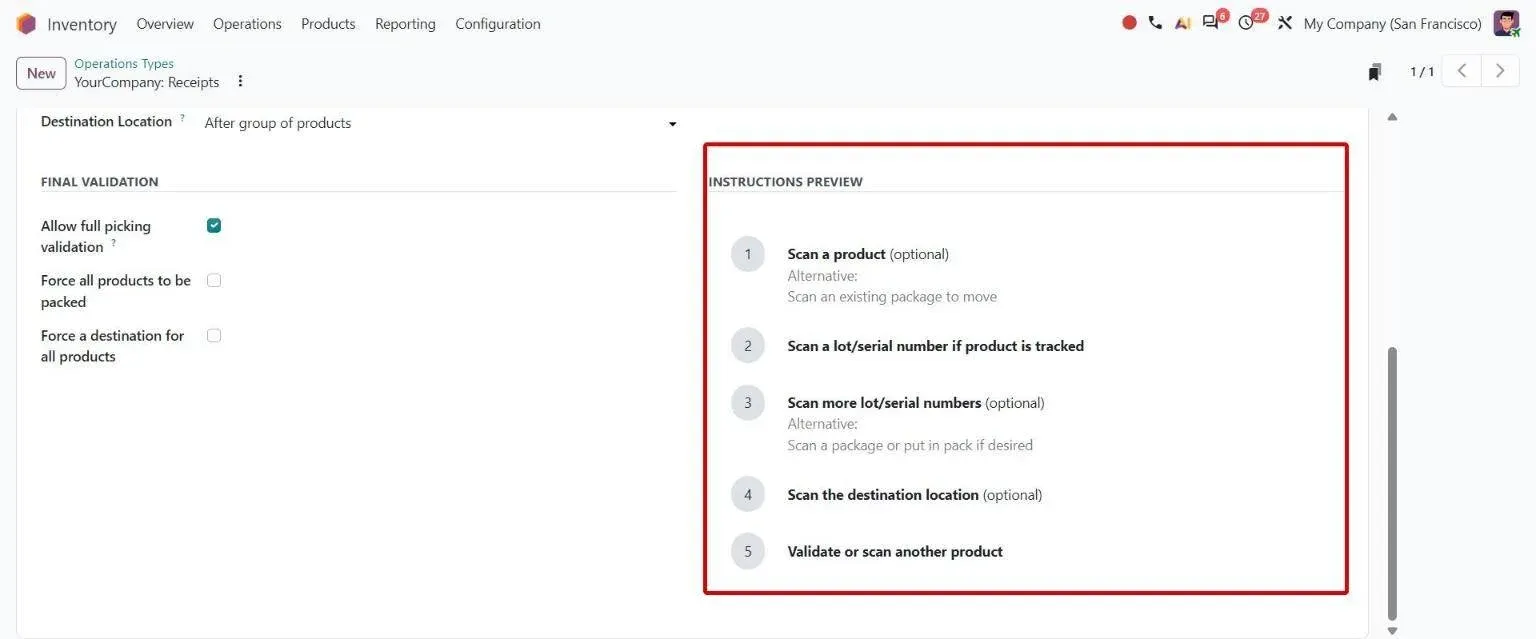
Receipts operation type: the scan steps a receiving worker follows in the Barcode app. 2. Putaway rules send stock to its shelf
With two- or three-step receipts, a putaway rule picks the shelf for each product, category or package type, and storage categories stop a bin taking more weight or mixed products than it should. Every location carries a barcode label, and in Odoo 20 labels print on thermal printers in ZPL as well as PDF.
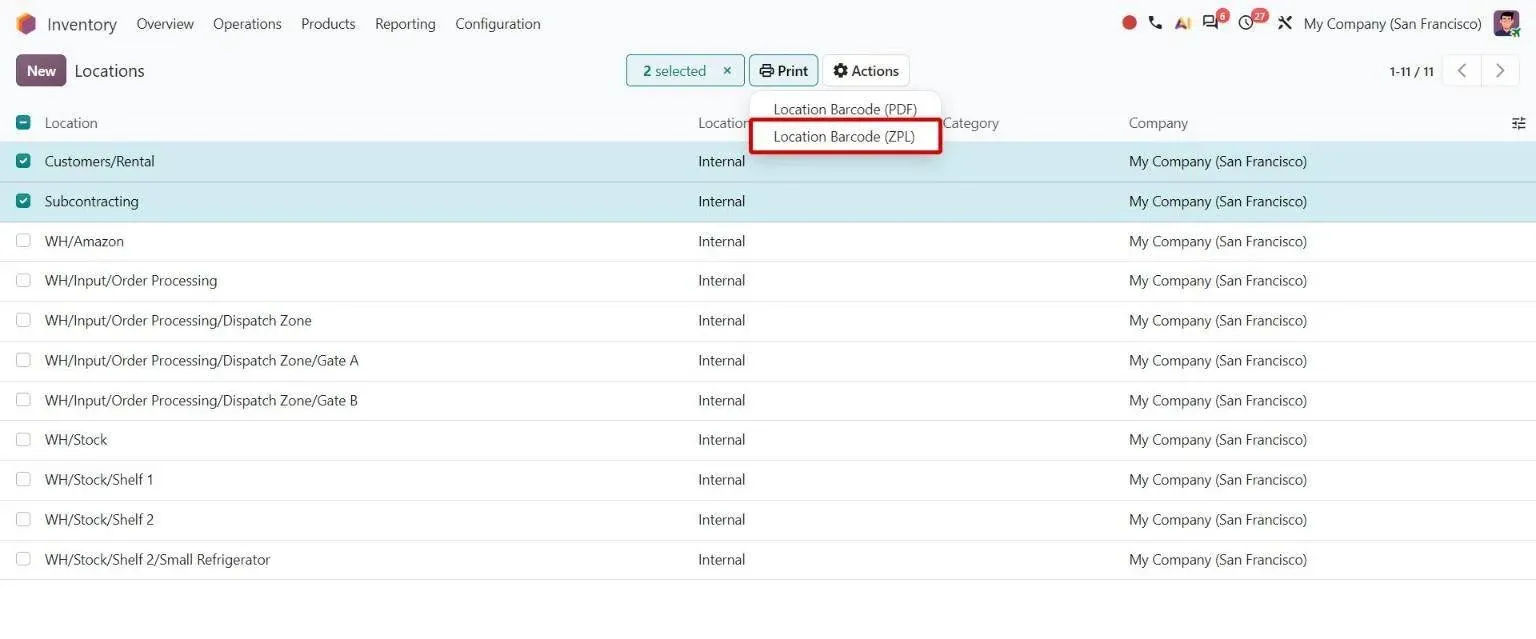
Printing location barcode labels, in PDF or ZPL for thermal printers. 3. Stock is held by location, lot and package
Each quantity sits in a location, with its lot or serial number and package. The traceability report follows a lot from the supplier’s receipt to the customer’s delivery.
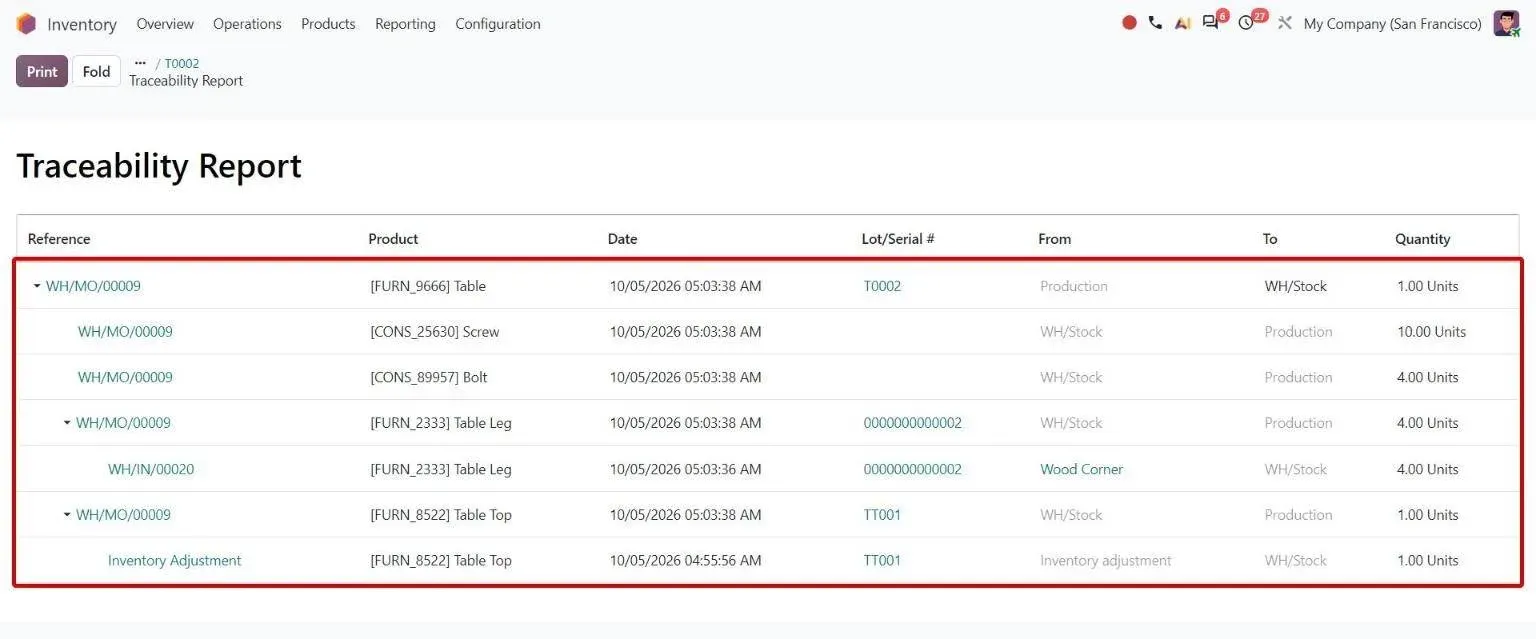
Lot traceability: from component origins to the finished lot. 4. Picks run in batches and waves, on a scanner
Deliveries waiting for the same picker are grouped into a batch; lines from many orders that share a zone go into a wave. Pickers work the batch in the Barcode app, scanning each location and product, and decide on a backorder there when stock is short. Our 3D Warehouse app draws the shortest walking route for a delivery on a map of your racks.
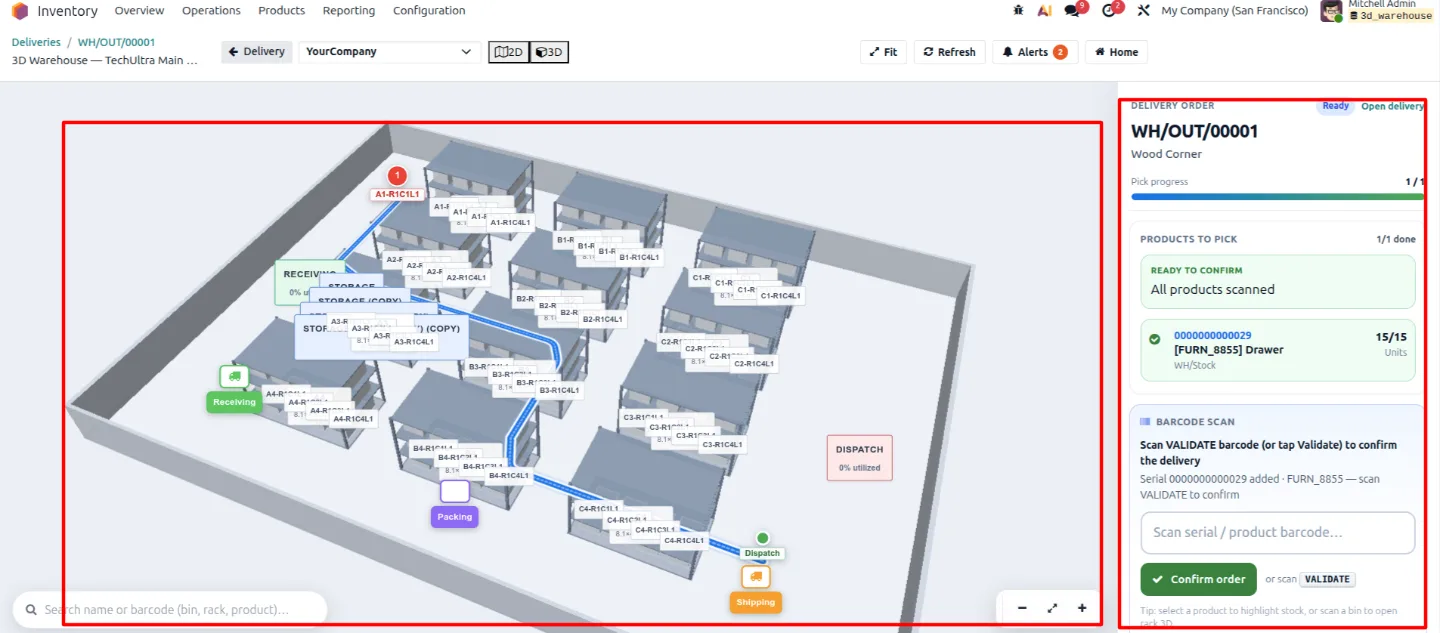
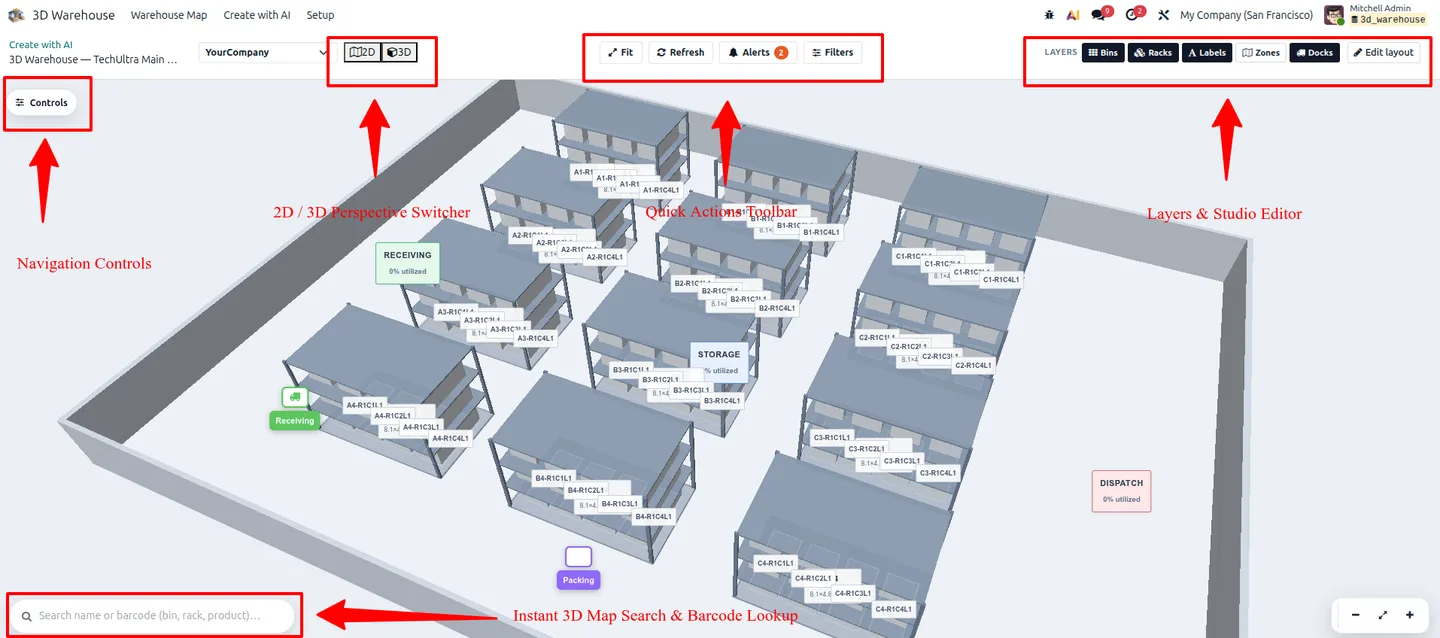
TechUltra 3D Warehouse: the picking route for one delivery, with on-map barcode scanning. 5. Pack and label
In a three-step flow, picked goods go to a packing location, are put in packages, weighed and labelled. Carrier connectors print shipping labels and return tracking numbers.
6. Deliver
Validating the delivery moves the stock out and updates the sales order. A return comes back against the original delivery.
7. Count without closing the warehouse
Set a count frequency on a location and Odoo schedules its next count. In Odoo 20 a counter can type a product’s total in the Barcode app instead of scanning every unit, and the difference posts to stock when the count is applied.
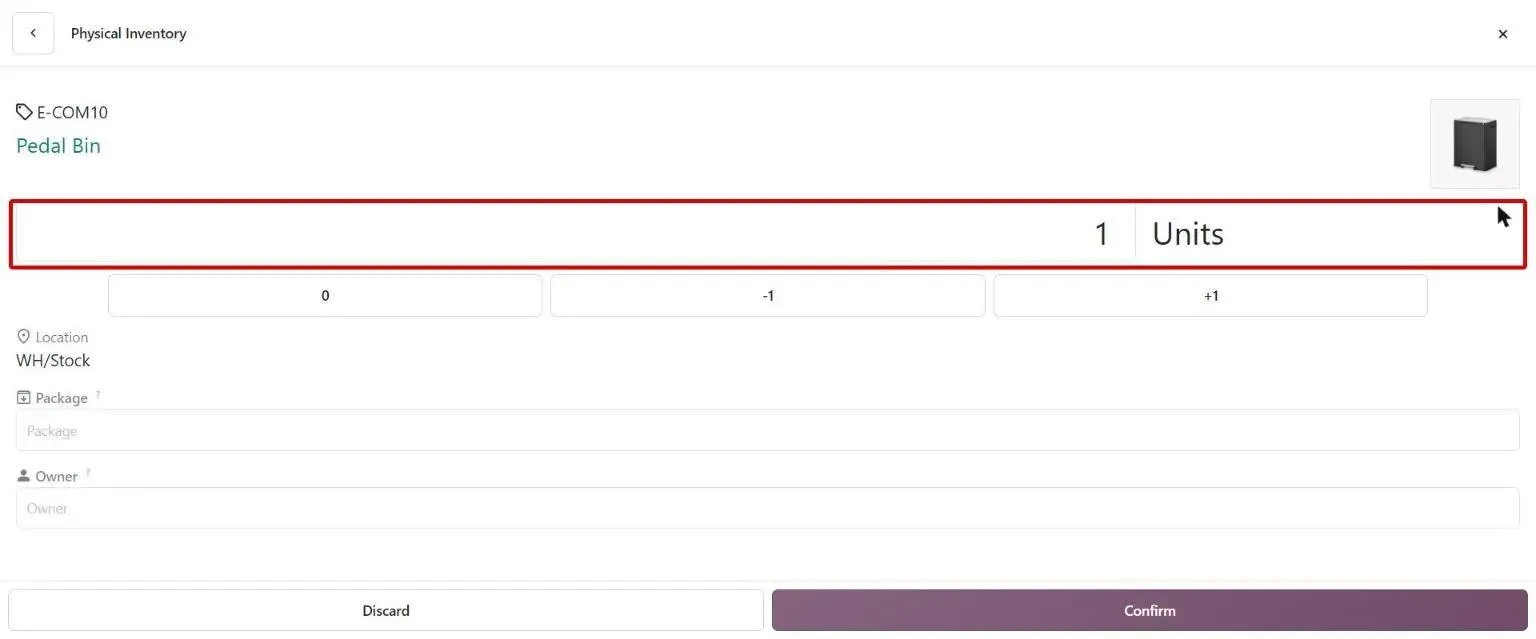
A cycle count in the Barcode app: type the total counted instead of scanning each unit.
The same eight-step flow, with the Odoo app behind each step and the gaps we usually close for 3PLs, is on our warehouse inbound-to-outbound process page.
What changes for warehouses in India?
Three things come up on almost every Indian warehouse project:
- One GSTIN per state. A business registered in several states holds a GSTIN in each. In Odoo, each registration is set up as its own branch company with its GSTIN, and its warehouses belong to that branch, so invoices and e-way bills carry the right number.
- E-way bills on stock movements. Goods moving between your own warehouses in different states still need an e-way bill above the value limit. Creating it from the delivery, not by hand on the portal, keeps the document and the stock movement in step.
- Batch-wise stock. Pharma, food and chemicals traders need lot numbers and expiry dates on every movement. Odoo tracks both, and can pick the lot that expires first.
Do you need a separate WMS on top of Odoo?
For most warehouses, no. A separate WMS makes sense when you run automated storage equipment that needs its own control software, or high-volume e-commerce fulfilment with its own carrier logic. Below that, a separate system means two stock figures to reconcile. Odoo keeps purchase, sales, manufacturing, accounting and the warehouse on one stock record.
Where Odoo needs help, it is usually in three places. Tracking containers before they land and cross-docking to chosen orders are not standard, and we built both for a 3PL client, as the inbound-to-outbound page describes. Forecasting is the second: our AI Inventory Forecast app predicts demand per product and location and suggests reorder quantities. The third is seeing the floor: 3D Warehouse turns locations into a 2D and 3D map with capacity heatmaps and picking routes, on Odoo 19.
Where we have run warehouses on Odoo
- The Miller Stores: multi-location inventory across a production unit, a central warehouse and 7+ retail shops, with lot tracking end to end.
- Shree Mahadev Tex Fab: yarn warehouse, weaving floor, finishing and finished goods as separate locations, with lots tracked through each stage.
For sector detail, see Odoo for logistics companies and third-party logistics (3PL).
Sizing your own warehouse
Before you scope a project, put your own numbers in the warehouse picking calculator. It shows your monthly picking hours and mis-picks, and a conservative range of what better picking recovers. Then bring those numbers to a scoping call and we will map them to receipts, putaway, picking and counting in Odoo.
Frequently asked questions
-
Is Odoo a warehouse management system?
Yes. Odoo Inventory covers the core of a warehouse management system: multiple warehouses and bin locations, one- to three-step receipts and deliveries, putaway rules, batch and wave picking, packages, lots, serial numbers, expiry dates and cycle counts. The Barcode app adds scanner-driven receiving, picking and counting, and is part of Odoo Enterprise.
-
Is Odoo's WMS cloud based?
It can be. Odoo runs on Odoo Online, Odoo's own cloud, on Odoo.sh, or on your own servers. The warehouse features are the same on each. The Barcode app runs in a browser and in Odoo's mobile app, so it works on phones, tablets and handheld scanners.
-
Is Odoo good warehouse management software for a small business?
Yes, if you set it up for the size of your operation. A small warehouse can run one-step receipts and deliveries with a few bin locations, then switch on two- or three-step flows, putaway rules and waves later without moving to another system. Odoo Inventory is in the free Community edition; the Barcode app needs Enterprise.
-
Does Odoo support batch and wave picking?
Yes. In Odoo 20, batch and wave transfers are part of the Inventory app. A batch groups whole pickings for one picker; a wave groups individual lines from many orders. Pickings can be added to waves automatically per operation type, optionally limited to chosen product categories, and picked in the Barcode app.
-
Can Odoo create GST e-way bills from warehouse transfers?
Yes. Odoo's India localisation includes an Indian E-waybill Stock module that creates e-way bills from deliveries in the Inventory app, alongside the module that creates them from invoices and vendor bills.
-
How do I see where every item is in an Odoo warehouse?
Stock is held per location, lot and package, so the stock report shows where each quantity sits, and in Odoo 20 it can show stock at a past date. For a visual map, TechUltra's 3D Warehouse app renders racks and bins with live quantities and draws picking routes on the map.
Related services & solutions
Put this into practice with TechUltra's senior Odoo consultants.
-
Odoo Consulting Services
Odoo consulting from a Gold Partner: current-state assessment, ERP vendor evaluation, ROI model and a written roadmap before you buy. Free first call.
-
What is Odoo?
Editions, app catalogue, who uses it, and how it compares.
-
How to choose an Odoo partner
10 criteria, 10 red flags, and the questions to ask before signing.
-
Odoo modules explained
Hub guide to the 12 most-deployed Odoo modules.