Odoo App · Inventory
Odoo 3D Warehouse — Digital Twin, AI Layout & Picking Routes
Turn Odoo stock locations into an interactive 3D warehouse map with capacity heatmaps, shortest-path picking, and on-map barcode scanning.

Overview
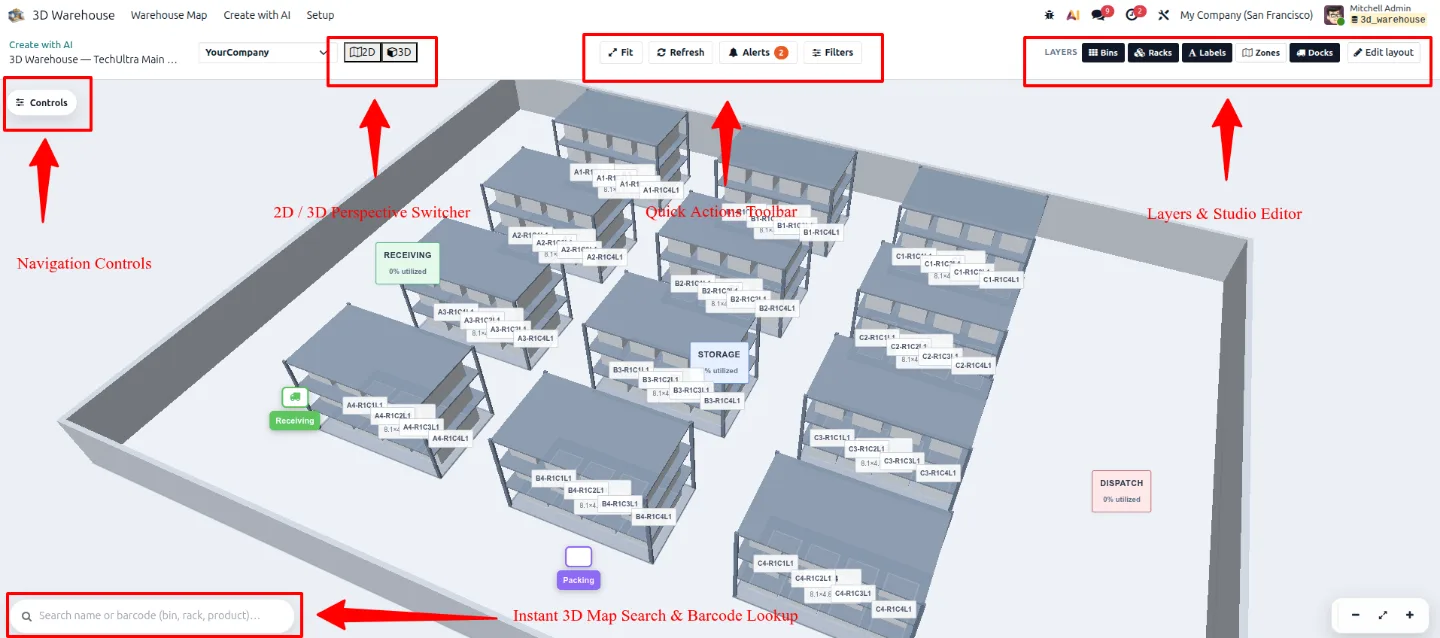
Standard Odoo inventory is a list of locations. Odoo 3D Warehouse renders the same data as a building you can walk through — zones, aisles, selective pallet racks, shelving levels, wire decks, and individual totes — so a warehouse manager can see the state of the floor rather than read it.
Every figure on the map comes from Odoo itself. The module reads `stock.warehouse`, `stock.location`, `stock.quant`, and `stock.picking` directly, so a receipt or a validated move is reflected on the map immediately. There is no external mapping service: 2D vector rendering (MapLibre GL) and 3D rack rendering (Three.js) are bundled locally.
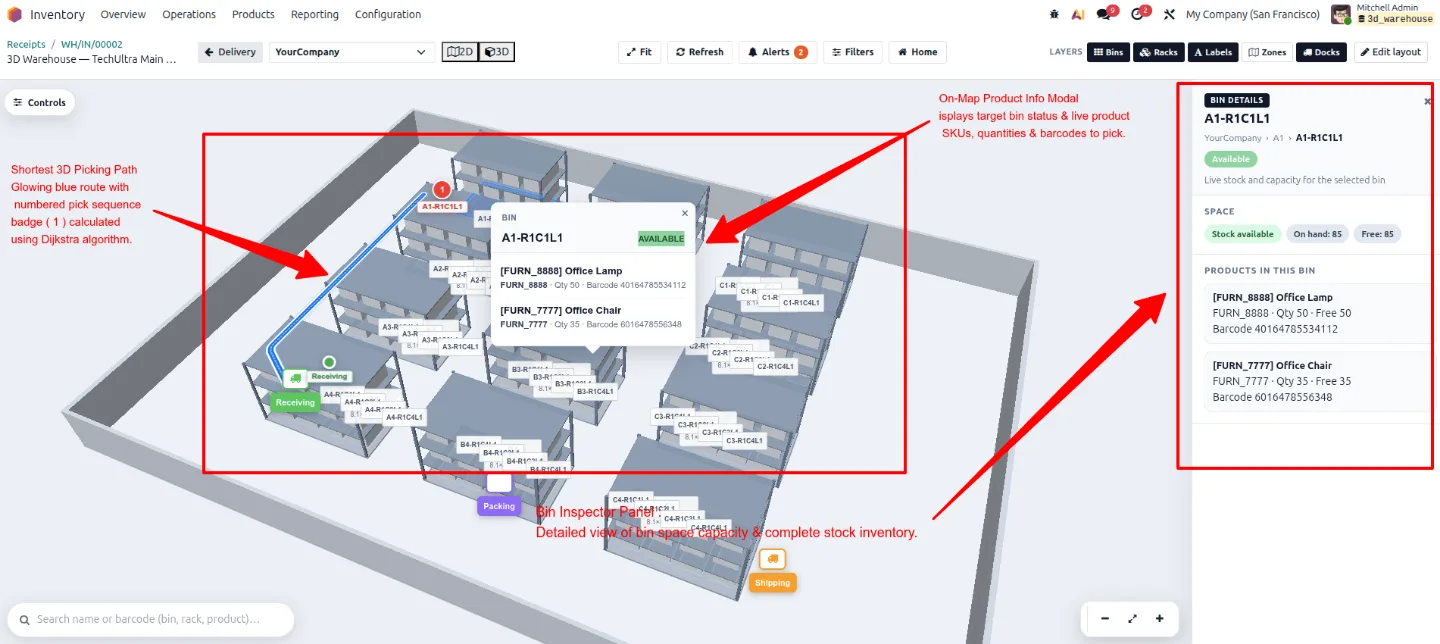
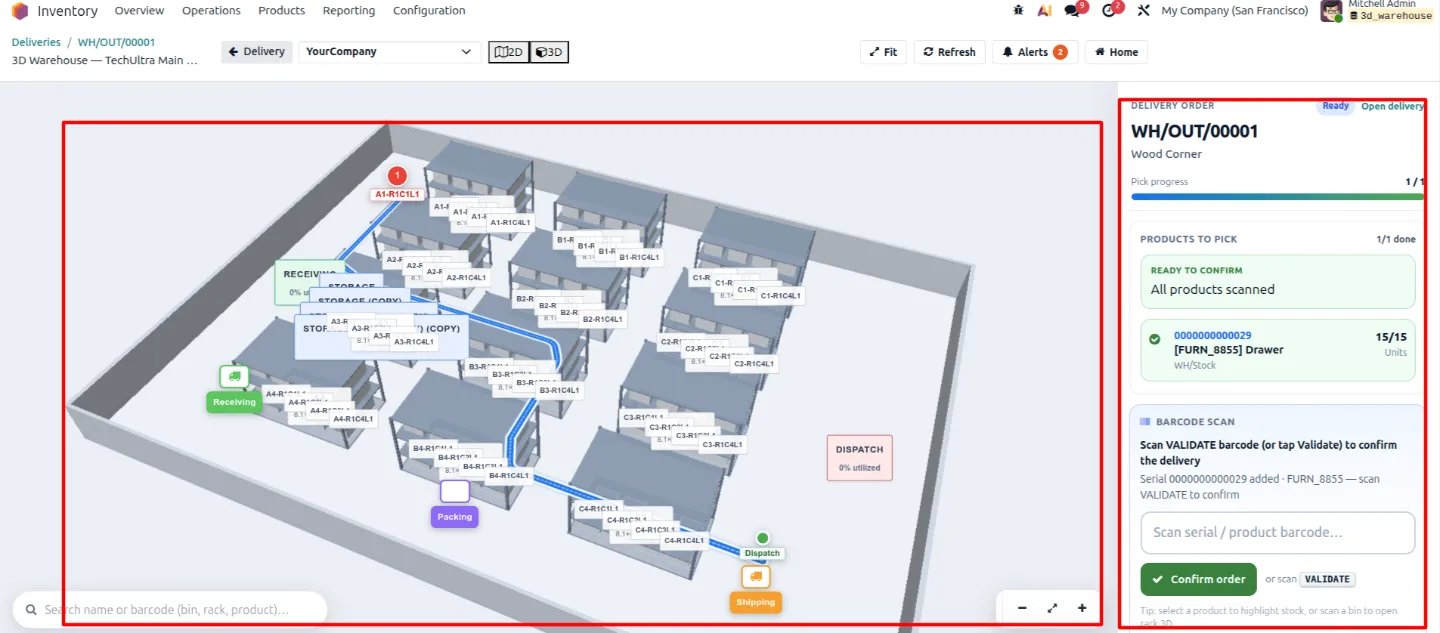
The operational payoff is in picking. For any delivery order the module models the aisles as a navigation lattice, computes the shortest walking sequence between pick locations with Dijkstra's algorithm, and draws that route on the map inside the picking view — then lets the operator scan location and product barcodes on the same screen, so move lines update with visual confirmation instead of a paper list.
Key features
-
Interactive 2D and 3D digital twin
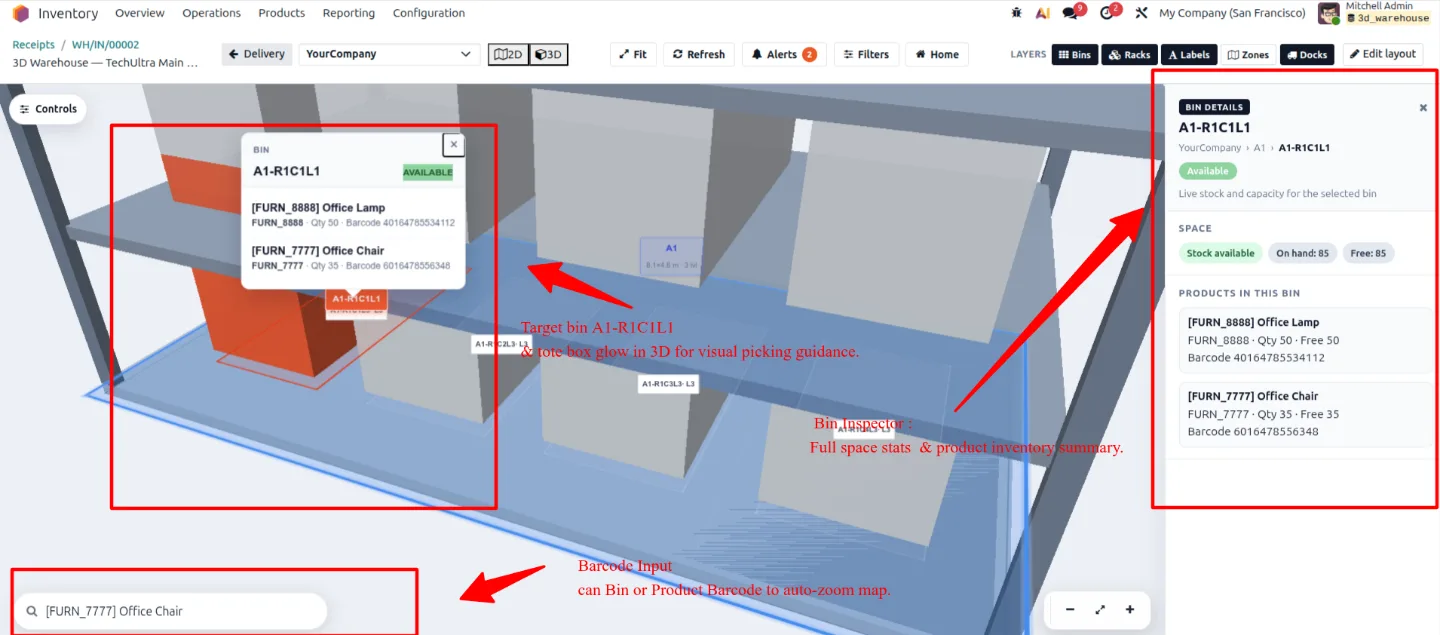
Toggle between a high-level 2D floor plan and a fully rendered 3D model of bay units, pallet racks, and storage bins. Click any rack or bin to inspect live quantities, reserved stock, lot numbers, and remaining capacity.
-
Live inventory and capacity heatmaps
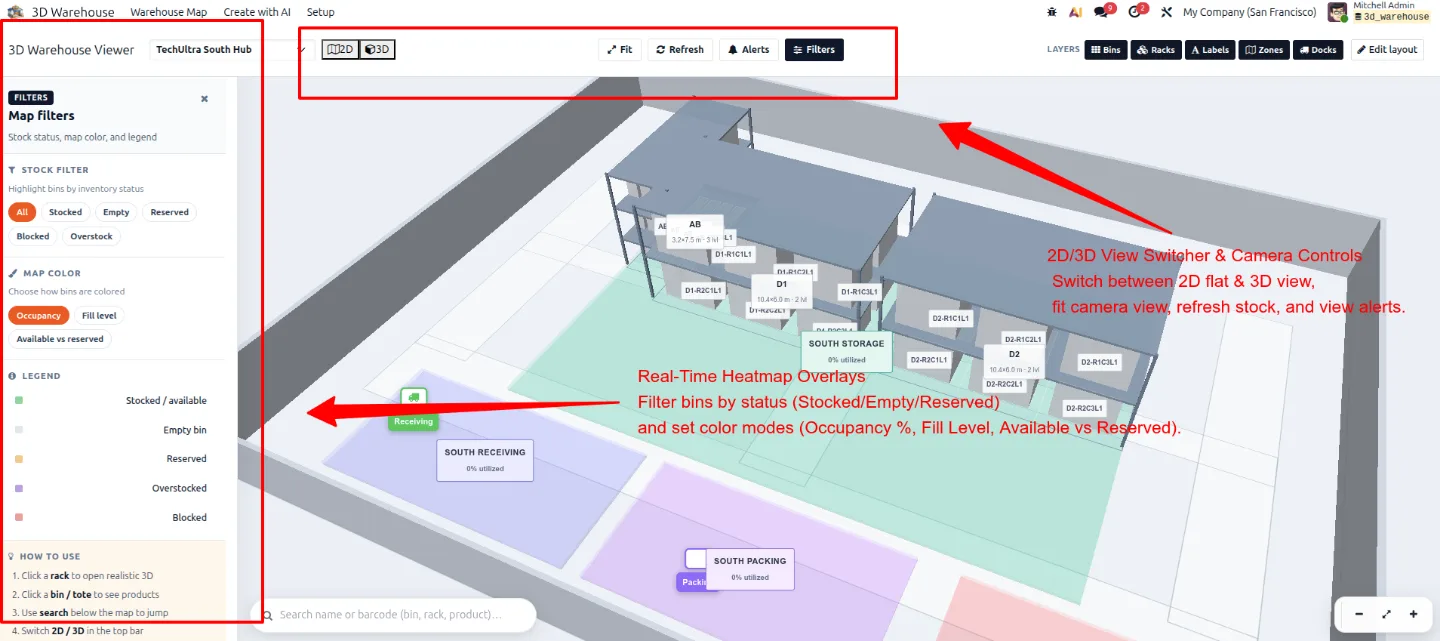
Colour-code racks and bins by stock availability, bin fullness, or reserved quantity, with operational presets for logistics, operations, safety, and space leasing.
-
Intelligent picking-route optimisation
The module models warehouse aisles as a navigation grid and uses Dijkstra's algorithm to compute the shortest walking sequence between pick locations, drawing the route on the 3D map inside the delivery order.
-
On-map barcode scanning
Operators open the map on a tablet or mobile scanner and work through a guided flow — scan the location, scan the product, enter the quantity — with move lines updating instantly and visual confirmation on the map.
-
AI-powered layout generator
Describe the warehouse in a text prompt and the wizard generates zones, rack structures, and bin allocations, which you can then adjust by hand.
-
Drag-and-drop layout studio
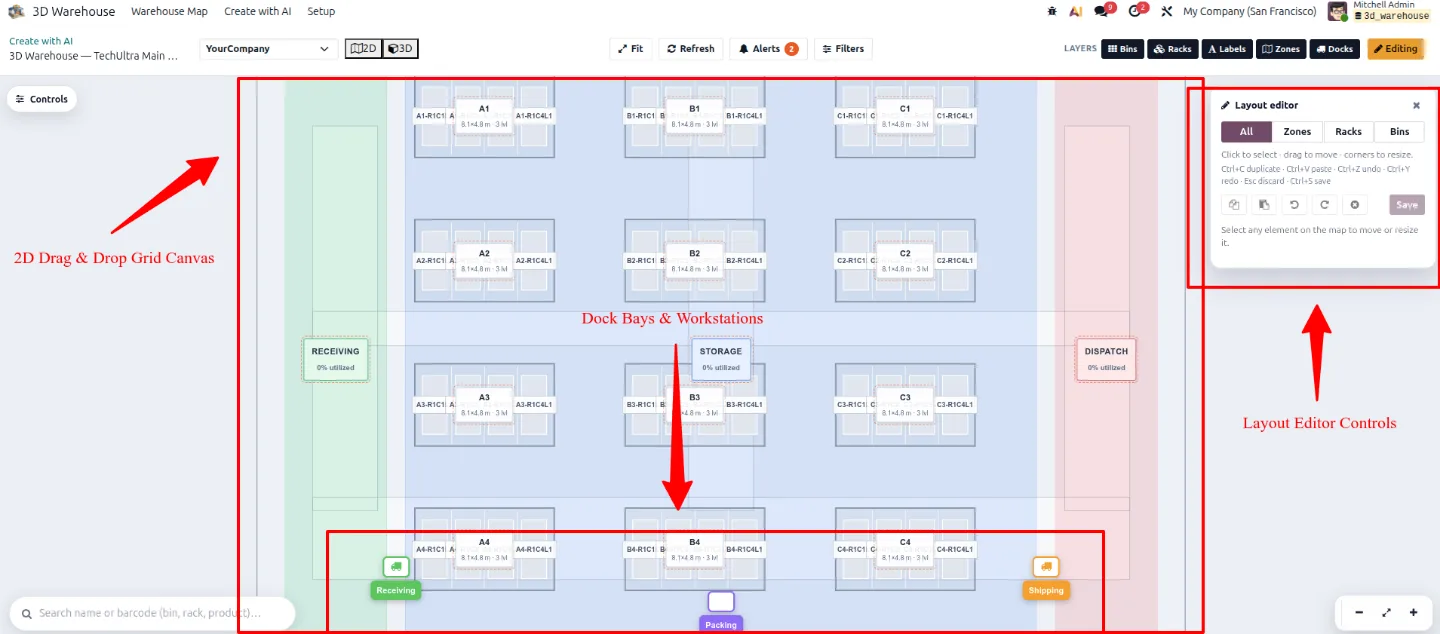
Place, rotate, resize, and reposition zones, racks, dock bays, and bins visually in the editor as the operation changes.
-
CAD and blueprint DXF import
Import CAD DXF vector files, architectural PDFs, or high-resolution floor-plan images, then align and calibrate the 3D geometry against the real facility.
-
Automated rack and bin generator
Bulk-generate multi-level pallet racks, shelf tiers, and bin matrices with automatic location synchronisation and barcode assignment.
-
Visual stock and risk alerts
Surface low stock, bin over-capacity, aisle congestion, and safety risks as alerts on the map rather than as report rows.
Watch Odoo 3D Warehouse — Digital Twin, AI Layout & Picking Routes in use
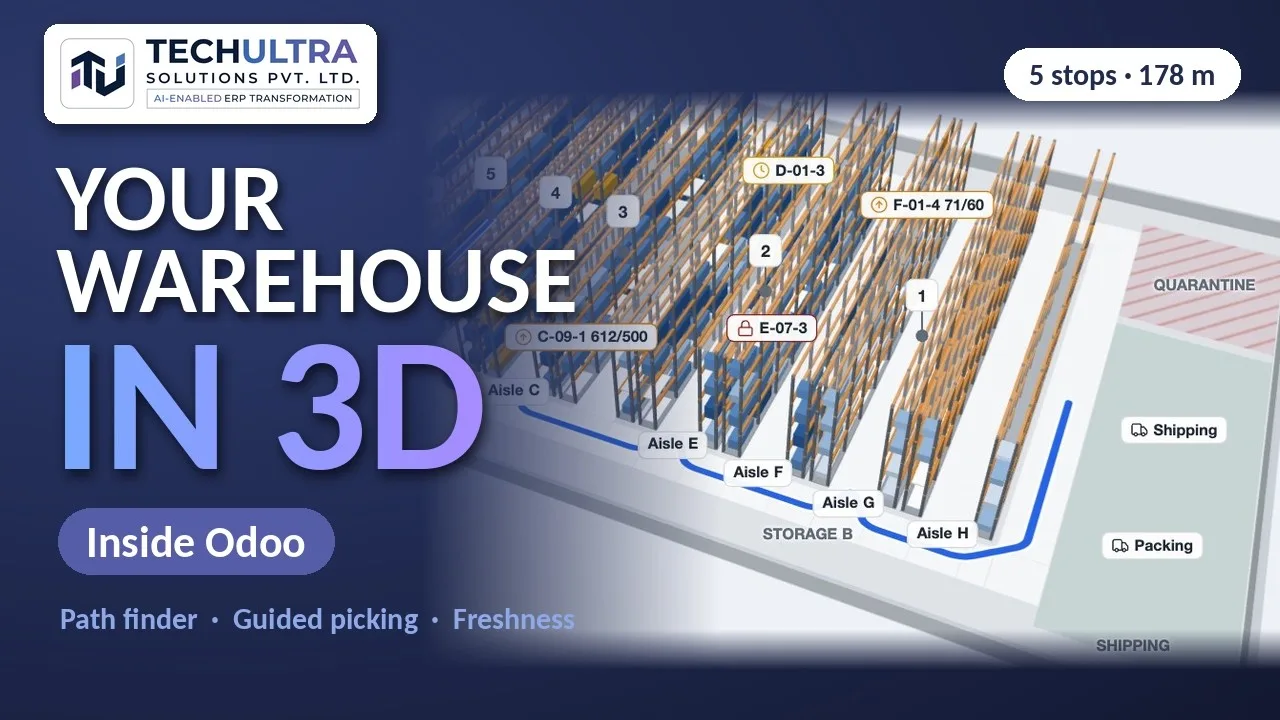
A four-minute walkthrough of 3D Warehouse for Odoo on a live Odoo 19 database: the warehouse map built from real stock locations, rack drill-down showing capacity and reserved versus available stock, barcode search across the building, a delivery turned into one walking route, guided picking with scan confirmation, and the freshness twin for cold-chain stock. It closes on the part most 3D viewers skip — how custody and an outbox keep the floor and the books from drifting apart.
What the video covers
- 0:00 Two versions of the truth
- 0:09 Introducing 3D Warehouse for Odoo
- 0:20 Warehouse Map: live 3D twin
- 0:42 Location and rack drill-down
- 1:01 Search, scan and 2D plan
- 1:14 Picking and path finder
- 1:36 Guided picking with scan confirmation
- 1:52 3D Stock Twin: freshness by lot and expiry
- 2:16 Bulk scrap and guided put-away
- 2:35 Balance sync: where floor and ERP drift apart
- 2:57 Custody + outbox: keeping floor and books in sync
- 3:19 Summary and demo
Watch “3D Warehouse for Odoo: Live Digital Twin, Path Finder & Guided Picking” on YouTube
Odoo 3D Warehouse — Digital Twin, AI Layout & Picking Routes in Odoo
Every screen, in the order you meet it — configuration first, then the module in use.
Technical details
Specification
- Publisher
- TechUltra Solutions Private Limited
- Technical name
- techultra_warehouse_3d
- Odoo versions
- 19.0
- Lines of code
- 22,296
- Rendering
- MapLibre GL (2D) + Three.js (3D), bundled locally
- License
- Odoo Proprietary License v1.0 (OPL-1)
- Price
- $248.99 (one-time)
Deployment
- Odoo Online
- Odoo.sh
- On-premise
Odoo dependencies
- Inventory
- Discuss
Support
90 days of bug-fix support plus 5 hours of free configuration support; further configuration or customisation is billable. Support runs Monday to Friday, 10:00–19:00 IST. Raise a ticket at support@techultra.in.
Setup & configuration
From install to first call — here is the path.
- 1
Install the module
Make sure standard Odoo Inventory (stock) is installed. Place `techultra_warehouse_3d` in your addons folder, enable Developer Mode, then Apps → Update Apps List → search for the module → Install.
- 2
Assign user access
Under Settings → Users & Companies → Users, set each user's 3D Warehouse role: User views maps, heatmaps, and picking paths; Supervisor runs AI layout generation, CAD import, and rack editing; Administrator holds global settings and the demo-data reload tool.
- 3
Configure module settings
Settings → Inventory → 3D Warehouse Settings holds the global parameters, scheduled jobs, AI provider, and CAD converter. Enable auto-sync so 3D bins are created from Odoo stock locations when the map opens.
- 4
Build the layout
Choose one of three routes: the drag-and-drop Layout Studio, the AI layout generator driven by a text prompt, or the automated rack-and-bin generator for bulk setup. Import a DXF or floor-plan image first if you want the geometry aligned to the real building.
- 5
Turn on picking routes and heatmaps
Open a delivery order to see the calculated pick path drawn on the map, and switch heatmap presets to match what the team is managing that day — availability, capacity, reserved stock, or risk.
Frequently asked questions
-
What is Odoo 3D Warehouse?
An Odoo 19 module that converts standard Odoo stock locations and inventory data into an interactive 2D and 3D visual digital twin. Warehouse managers and operators inspect racks, read stock heatmaps, follow optimised picking routes, and run barcode operations directly on a 3D floor map.
-
Does it require a third-party mapping service?
No. The module is standalone and native to Odoo 19. It depends only on Odoo's standard Inventory (stock) module, and bundles the 2D vector rendering (MapLibre GL) and 3D rack rendering (Three.js) libraries locally.
-
How does picking-route optimisation work?
When you open a delivery order, the module models the warehouse aisles as a navigation grid lattice and uses Dijkstra's algorithm to calculate the shortest walking sequence between pick locations. The route is drawn on the 3D map to guide the picker.
-
Can operators scan barcodes on the 3D map?
Yes. Operators open the map view on a tablet or mobile scanner and follow a guided workflow — scan the location barcode, scan the product barcode, enter the quantity — with move lines updating instantly and visual confirmation on the map.
-
How do I create or change the warehouse layout?
Three ways: the drag-and-drop Layout Studio for placing zones and racks by hand, the AI layout generator driven by a text prompt, or the automated rack-and-bin generator for bulk setup.
-
Can I import an existing CAD blueprint or floor plan?
Yes. The floor-plan import wizard accepts CAD DXF vector files, architectural PDFs, and high-resolution floor-plan images, and lets you align and calibrate the 3D geometry over the real facility drawing.
-
Is the map kept in sync with Odoo inventory?
Yes. The map reads directly from `stock.warehouse`, `stock.location`, and `stock.quant`, so any movement, receipt, or stock validation in Odoo is reflected on the map immediately.
-
Which heatmaps are available?
Stock availability (high versus low stock), storage capacity (bin fullness), reserved inventory, and operational presets tuned for logistics, operations, safety, and space leasing.
-
Which Odoo versions and editions are supported?
Odoo 19, Community and Enterprise, on Odoo Online, Odoo.sh, and self-hosted deployments.
Listing verified against the Odoo App Store:
Related solutions
Whole-platform solutions that complement Odoo 3D Warehouse — Digital Twin, AI Layout & Picking Routes.
Odoo Inventory + Warehouse Management
Odoo Inventory module — multi-warehouse, batch/serial, putaway, barcode, replenishment, cross-docking, dropship, consignment. Full WMS in your ERP.
Odoo Purchase
Odoo Purchase module — RFQ, PO, supplier portal, three-way match, blanket PO, drop-ship, sub-contracting. Integrated with Inventory + MRP + Accounting.
Related services
Get the most out of this module with senior TechUltra consultants.
Odoo Customization Services
Odoo customization from a Gold Partner: custom modules, workflows, reports and Studio changes, written upgrade-safe and quoted at a fixed scope. Free scoping call.
Hire Odoo Developers
Hire certified Odoo developers from a Gold Partner: one developer or a team, full-time or part-time, 70–160 hours a month. Silver, Gold or Platinum plan, free trial.
Odoo Support Services & Maintenance
Odoo support services from a Gold Partner: functional and technical support plus server cover for Enterprise and Community, 30-minute P1 response, 24/7 option.