
Odoo App · Accounting
Tally Style Indian Accounting & P&L Reporting for Odoo
Migrate from Tally ERP to Odoo without losing the P&L layout your finance team and CA already read — opening stock, closing stock, gross profit, and Tally-aligned COGS posting.

Overview
Indian businesses moving from Tally ERP to Odoo usually hit the same wall: Odoo's standard P&L doesn't show opening stock, closing stock, or gross profit the way Tally does, so finance teams and chartered accountants can't read the statement they've used for years. This module bridges that gap — Odoo keeps running operations, GST, and inventory, while the P&L reads like Tally.
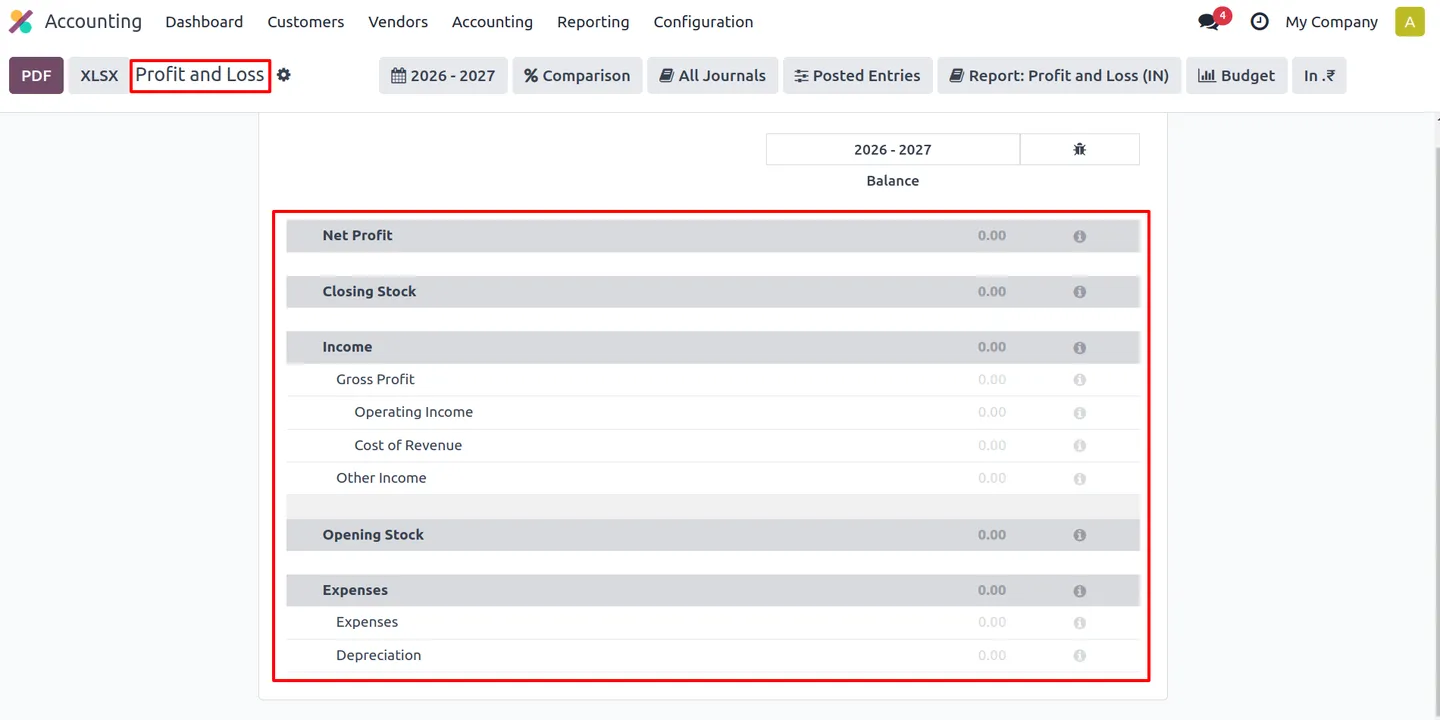
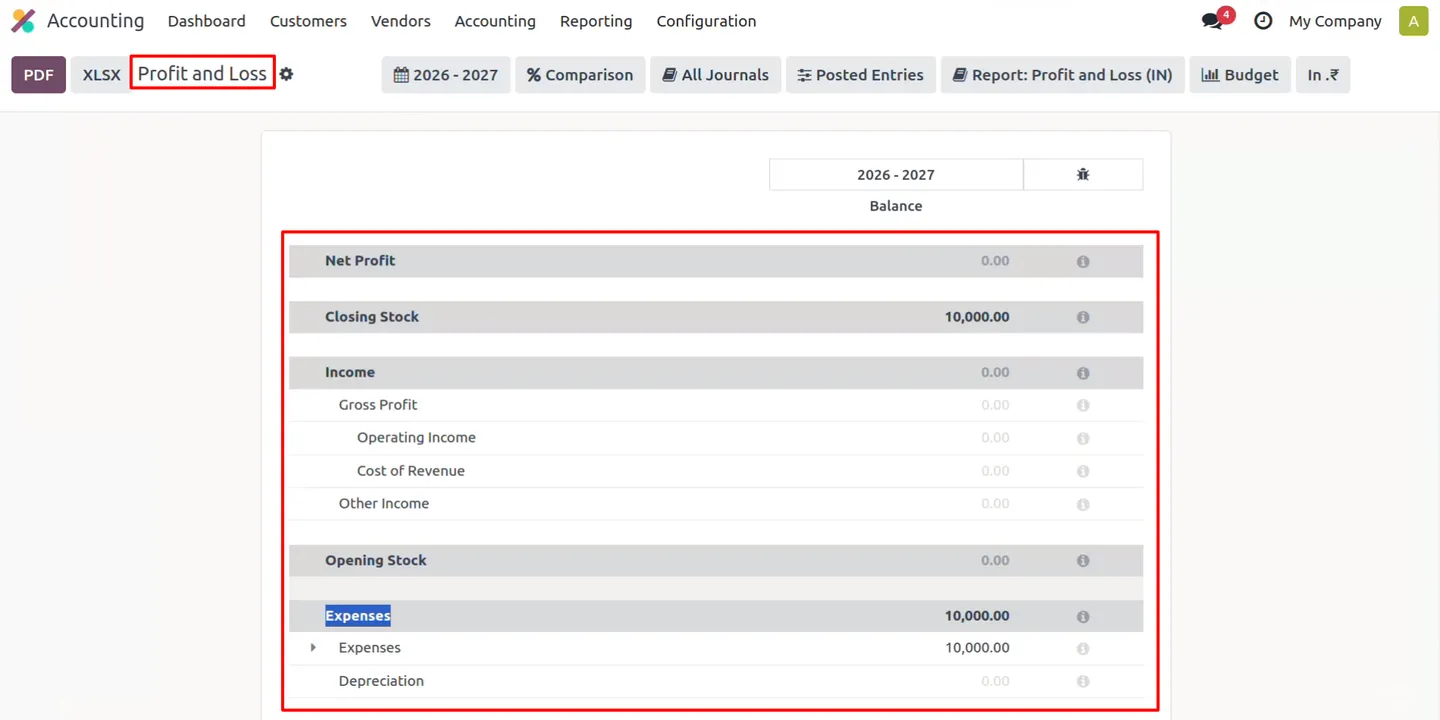
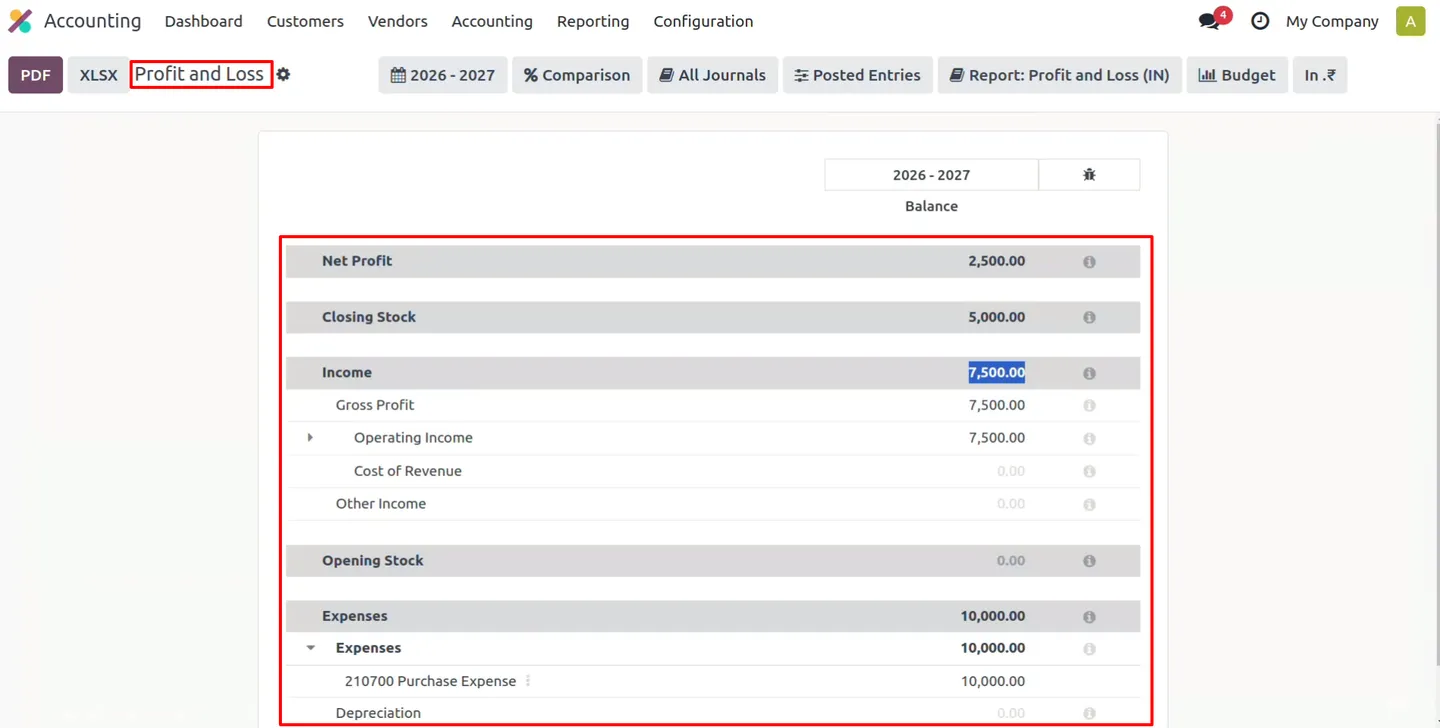
The module restructures the profit-and-loss report into Tally's sections — net profit, opening stock, closing stock, income (gross profit, operating income, cost of revenue, other income), and expenses including depreciation — with drill-down on every line, period filters, comparisons, and PDF/XLSX export. Accounts are flagged for Tally-wise line classification, and a closing-stock account is pre-configured at install.
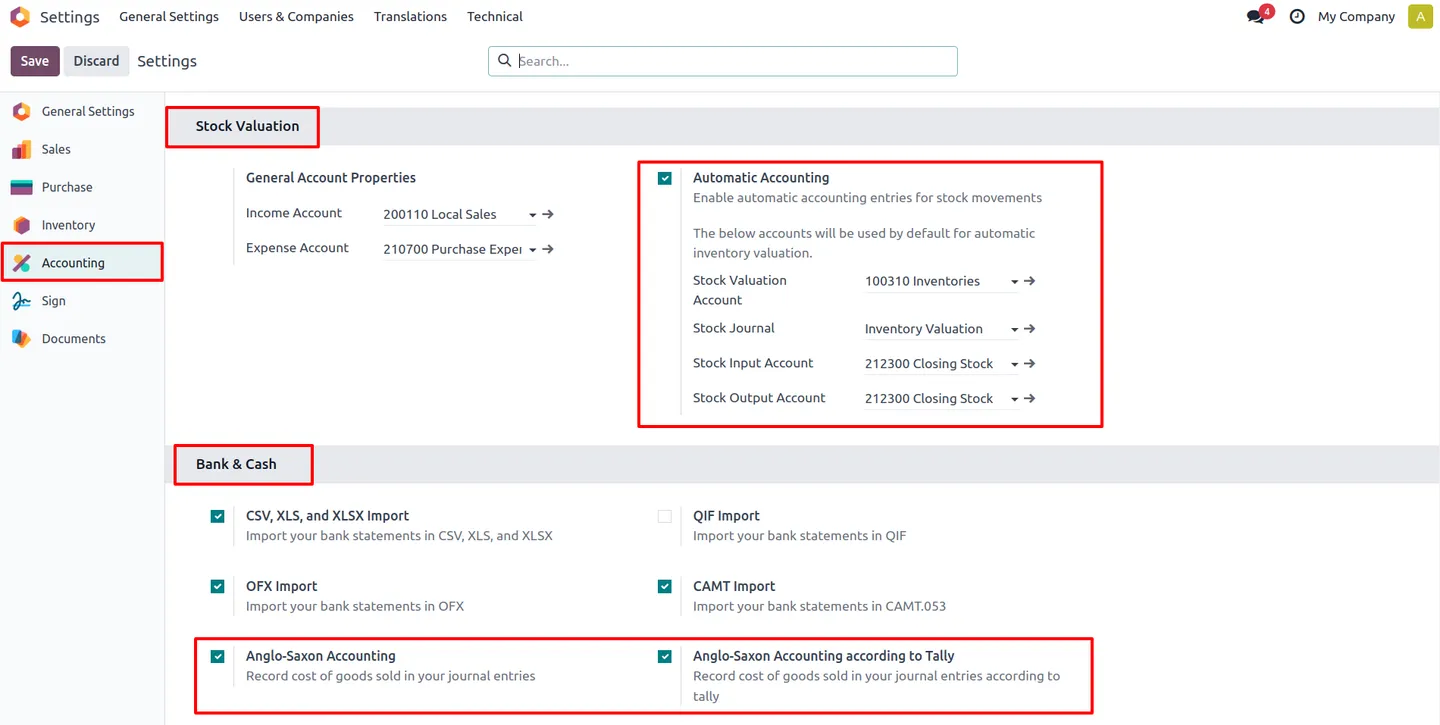
Under the hood, a company-level "Anglo-Saxon Accounting According to Tally" setting changes how COGS journal lines are generated so stock and sales accounting match Tally expectations, and perpetual-inventory defaults for India — automated real-time valuation with average-cost (AVCO) methodology — are wired into the Indian chart of accounts. The result is an end-to-end purchase → receipt → vendor bill → sale → invoice → P&L flow that lands every value on the Tally line your CA expects.
Key features
-
Tally-style Profit & Loss (India)
Restructures Odoo's P&L into Tally sections — net profit, opening stock, closing stock, income (gross profit, operating income, cost of revenue, other income), and expenses including depreciation — with drill-down on each line, period filters, comparisons, and PDF/XLSX export.
-
Tally-wise reporting on accounts
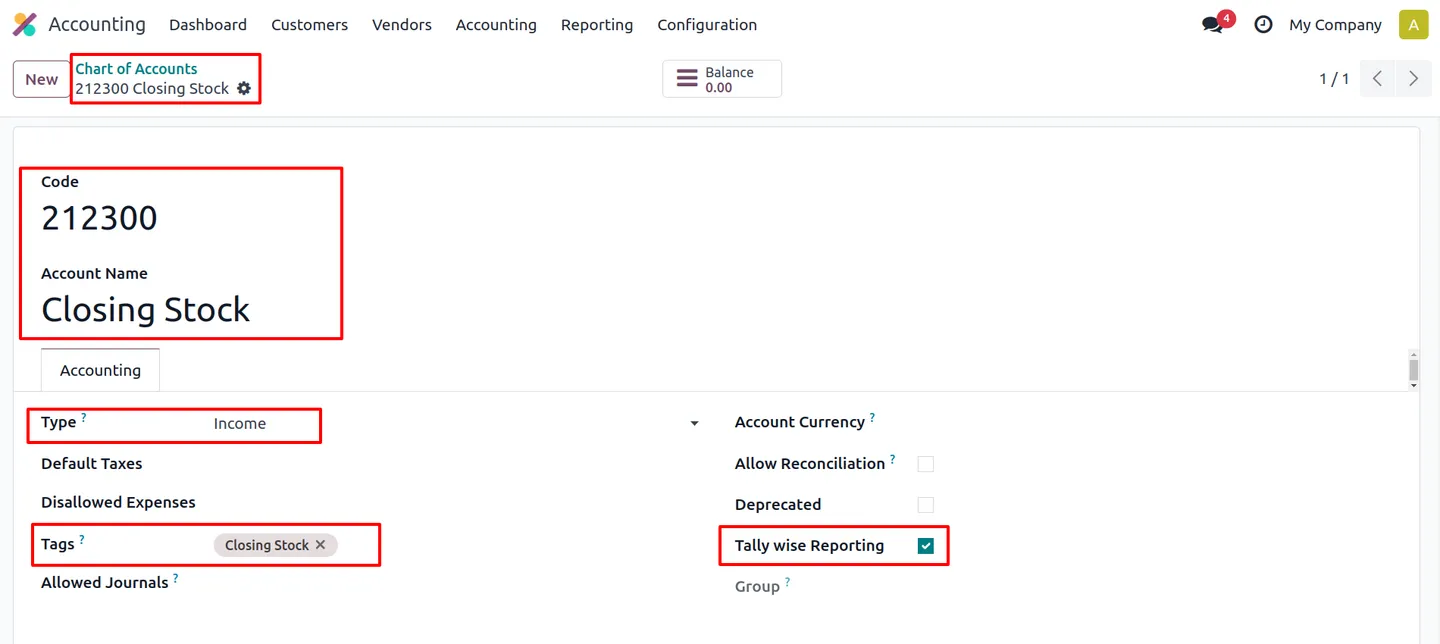
Flag any account for Tally-wise P&L line classification. A closing-stock account is pre-configured on installation, so the statement structure works from day one.
-
Anglo-Saxon accounting according to Tally
A company-level setting aligns COGS journal posting with Tally logic — Odoo skips its default Anglo-Saxon outbound COGS lines and posts the way Indian businesses treat stock and sales costing.
-
Perpetual-inventory defaults for India
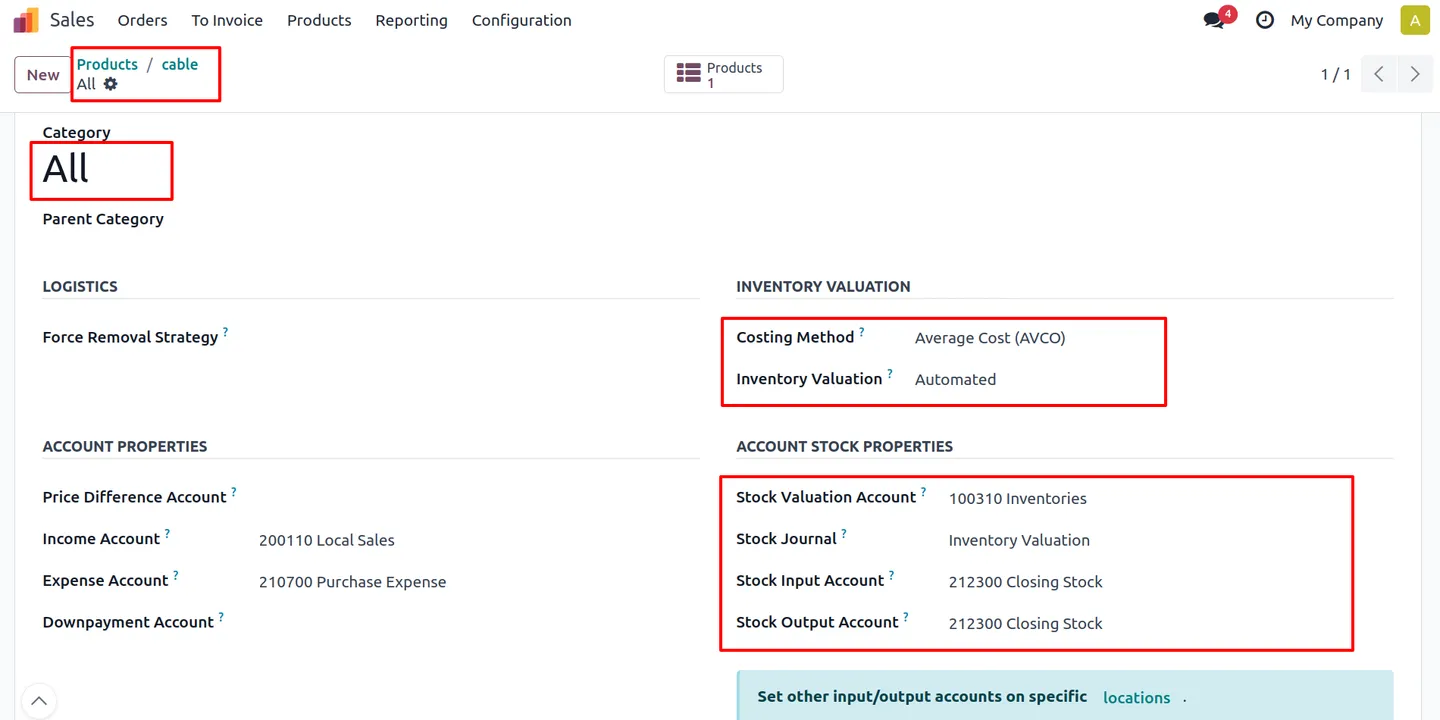
Automated real-time stock valuation with average-cost (AVCO) methodology, plus stock journal and Inventories account mapping configured automatically.
-
Indian chart-of-accounts alignment
Closing-stock account integration and stock-valuation wiring built into the Indian COA template — no manual account mapping to get Tally-correct numbers.
-
End-to-end Odoo workflow
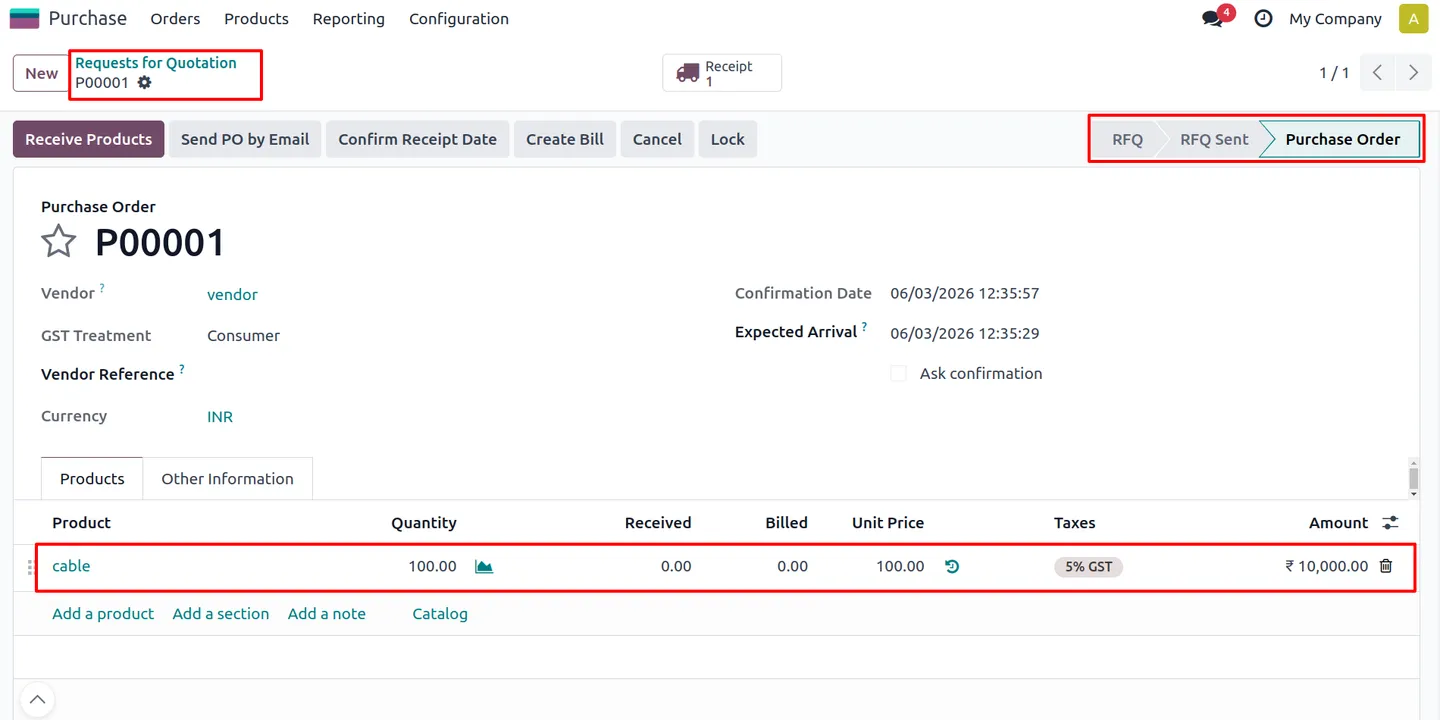
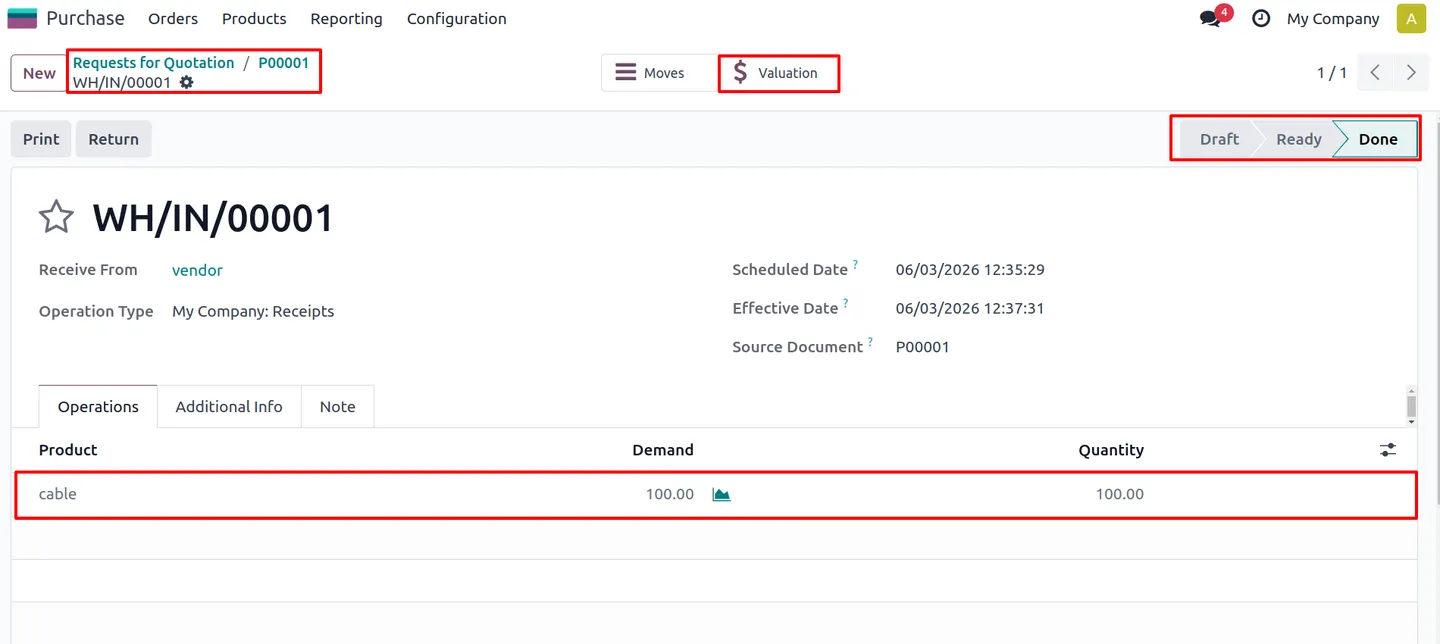
Covers the complete purchase → receipt → vendor bill → sales → invoice → P&L chain, with stock valuation entries generated automatically at each step.
-
GST-ready Indian operations
Works with Odoo's standard Indian localization — GST treatment, place of supply, INR default, and GSTIN/PAN support carry through unchanged.
Tally Style Indian Accounting & P&L Reporting for Odoo in Odoo
Every screen, in the order you meet it — configuration first, then the module in use.
Technical details
Specification
- Publisher
- TechUltra Solutions Private Limited
- Technical name
- tus_tally_account
- Odoo versions
- 18.0, 20.0 (Enterprise)
- Lines of code
- 252
- License
- Odoo Proprietary License v1.0 (OPL-1)
- Price
- $98.99 (one-time)
Deployment
- Odoo Online
- Odoo.sh
- On-premise
Odoo dependencies
- Invoicing (account)
- Accounting (accountant)
- Discuss (mail)
- Sign (sign)
- Inventory (stock)
Support
90 days of bug-fix support plus 5 hours of free configuration help (additional hours billable), Monday to Friday (10:00–19:00 IST). Raise a ticket at support@techultra.in.
Setup & configuration
From install to first call — here is the path.
- 1
Enable Automatic Accounting
In Settings, search for "Automatic Accounting" and enable it — this lets the module identify the closing-stock account automatically.
- 2
Turn on Anglo-Saxon According to Tally
Enable standard Anglo-Saxon Accounting, then the "Anglo-Saxon Accounting According to Tally" company setting. Together they align Odoo's posting engine with Tally methodology.
- 3
Configure product categories
Set Inventory Valuation to Automated (Real-Time) and Costing Method to Average Cost (AVCO) on the product categories you trade.
- 4
Assign products and run the flow
Put products in the configured categories, then run a normal purchase → receipt → bill → sale → invoice cycle. Stock-valuation journal entries post automatically and every value lands on its Tally P&L line.
Frequently asked questions
-
Does this module replace Tally ERP?
No. It brings Tally-style reporting and stock-accounting behaviour into Odoo, so the finance team sees the familiar P&L lines while the business runs operations, GST, inventory, and audit trail in Odoo 18.
-
What does "Anglo-Saxon Accounting according to Tally" mean?
With the setting enabled (alongside Odoo's standard Anglo-Saxon accounting), Odoo skips its default outbound COGS lines and follows Tally-aligned posting instead — matching how most Indian businesses treat stock and sales costing.
-
How are opening and closing stock calculated?
The module uses Indian closing-stock tagging plus accounts flagged for Tally-wise reporting. Opening stock is taken at the period start and closing stock from the beginning of books, presented in the same P&L structure Tally uses.
-
Is GST filing included?
GST fields come from Odoo's standard Indian localization. This module focuses on the Tally-style P&L and stock accounting — it does not replace GSTR filing tools, which remain separate apps.
-
Which Odoo editions and versions are supported?
Odoo 18.0 Enterprise, deployable on Odoo Online, Odoo.sh, or on-premise. The module depends on Invoicing, Accounting, Discuss, Sign, and Inventory.
-
What support is included with the $98.99 purchase?
90 days of bug-fix support and 5 hours of free configuration assistance (additional hours billable), available Monday to Friday, 10:00–19:00 IST via support@techultra.in.
Listing verified against the Odoo App Store:
Related services
Get the most out of this module with senior TechUltra consultants.
Odoo Customization Services
Odoo customization from a Gold Partner: custom modules, workflows, reports and Studio changes, written upgrade-safe and quoted at a fixed scope. Free scoping call.
Hire Odoo Developers
Hire certified Odoo developers from a Gold Partner: one developer or a team, full-time or part-time, 70–160 hours a month. Silver, Gold or Platinum plan, free trial.
Odoo Support Services & Maintenance
Odoo support services from a Gold Partner: functional and technical support plus server cover for Enterprise and Community, 30-minute P1 response, 24/7 option.







