
Business process
Hire-to-retire in Odoo 20, step by step
From an open job to an employee's last day and final pay: the eight steps, the Odoo app that runs each one, and the gaps we usually close in shifts, biometric attendance, payroll inputs, performance and exit.
Last reviewed:
How does hire-to-retire run in Odoo 20?
8 steps, each run by the Odoo app named on it. The screenshots are from our Odoo 20 feature guide.
- 1 Open the job and screen applicants
- 2 Make the offer and get it signed
- 3 Create the employee and the contract
- 4 Set working schedules and shifts
- 5 Record attendance
- 6 Request and approve time off
- 7 Run payroll and send payslips
- 8 Appraise, reward and offboard
- 1
Open the job and screen applicants
Odoo 20 · Recruitment
Job positions publish to the careers page, and applications arrive by form or email. Skills on the job give each applicant a matching score, and in Odoo 20 recruiters can filter applicants by that score and see matching talents from the pool for an open job.
Who: Recruiter, hiring manager
Matching score filter: how it works in Odoo 20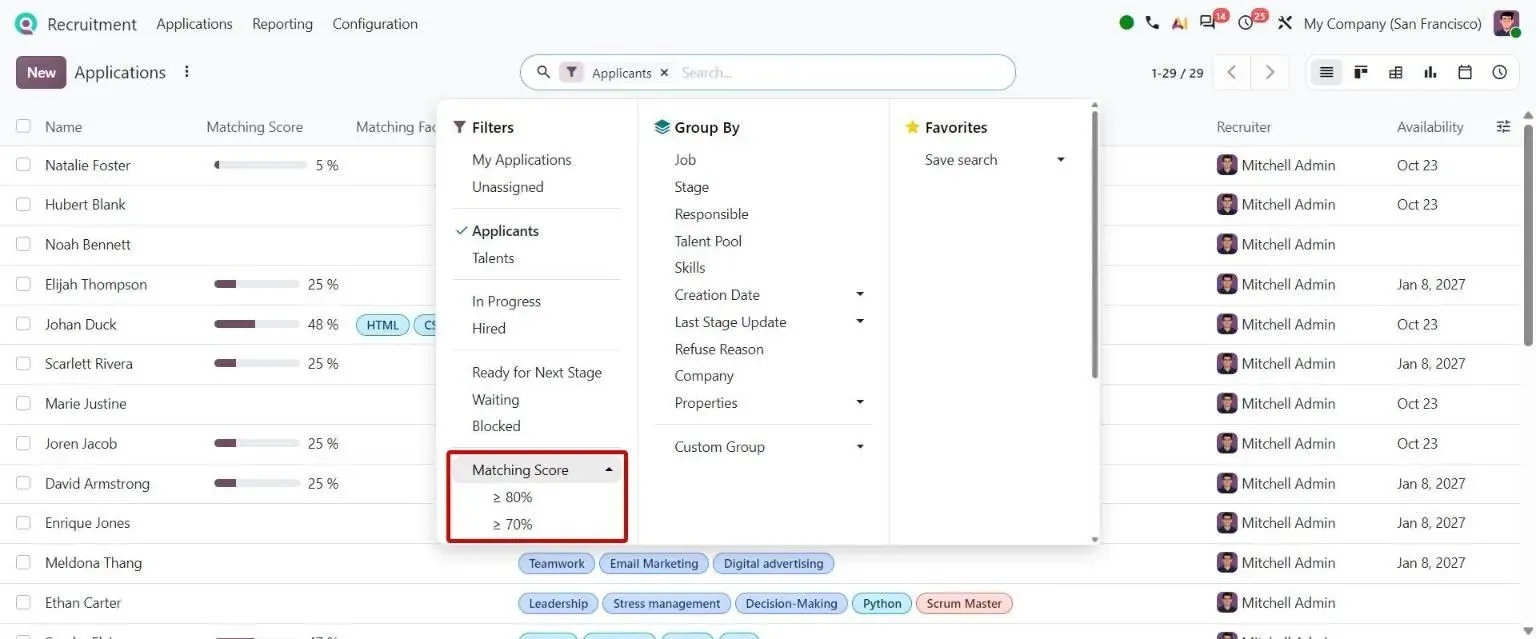
Step 1, Odoo 20 Recruitment: Matching Score filter with 80/70% thresholds beside the applicants Matching Score column - 2
Make the offer and get it signed
Odoo 20 · Recruitment · Payroll · Sign
Interviews are booked from the application in the calendar. In Odoo 20, the salary calculator works out the gross wage and the employer cost behind a target net salary, and Sign sends the offer or contract for e-signature.
Who: Recruiter, HR manager
Net to gross simulation: how it works in Odoo 20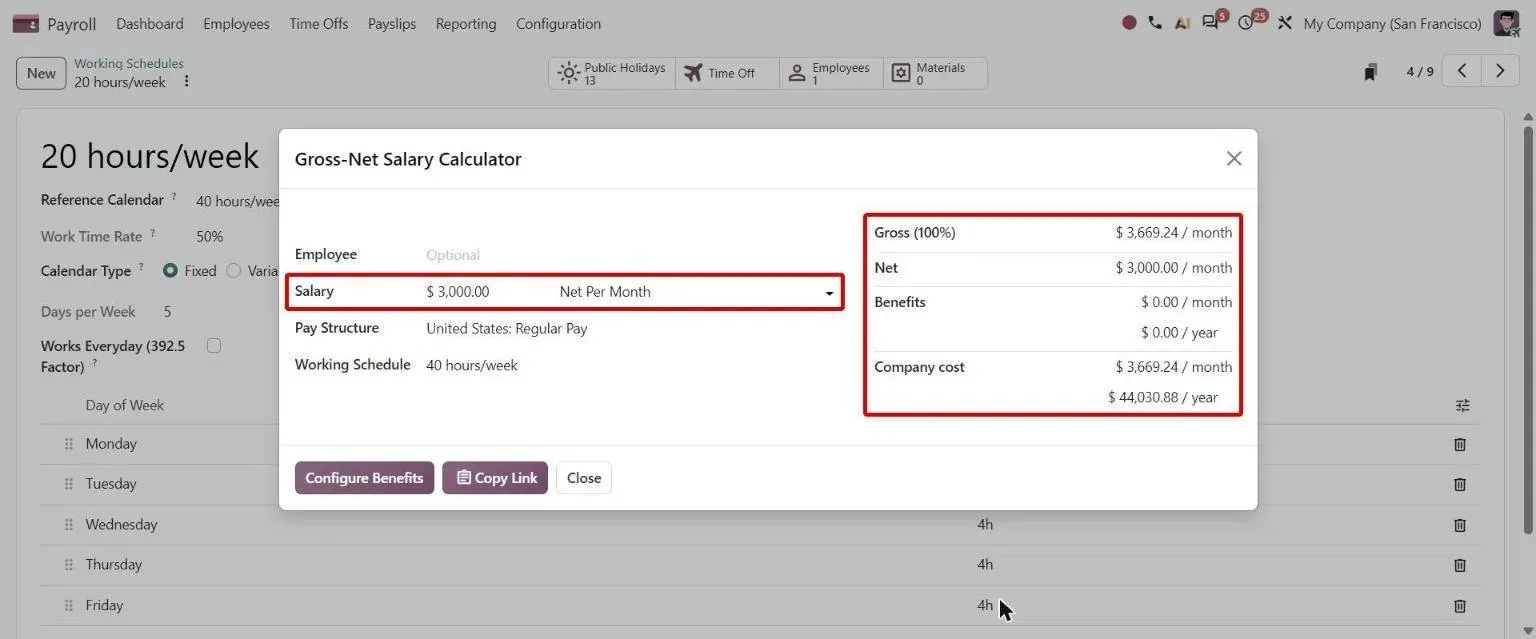
Step 2, Odoo 20 Payroll: Salary Calculator deriving gross and company cost from a Net Per Month amount - 3
Create the employee and the contract
Odoo 20 · Employees
The hired applicant becomes an employee record. In Odoo 20 the contract sits on the employee as dated versions with a start and end date, built from a contract template. Odoo 20 refuses a date change that would leave validated or paid payslips outside the contract.
Who: HR officer
Contract date modification: how it works in Odoo 20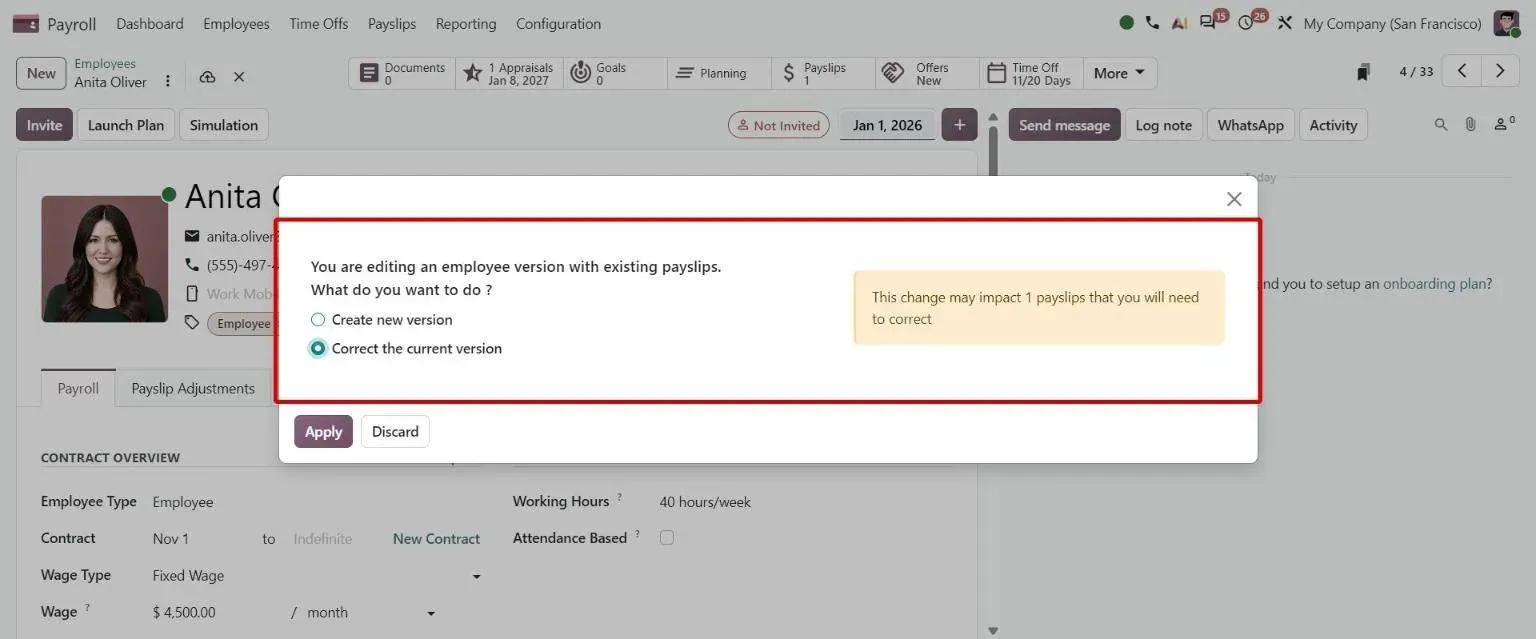
Step 3, Odoo 20 Payroll: Contract date change prompt warning that 1 existing payslip must be corrected - 4
Set working schedules and shifts
Odoo 20 · Employees · Planning
Working schedules set the hours per day, and in Odoo 20 a variable schedule plans irregular work periods in a calendar. Planning (Enterprise) assigns shifts to employees and roles, and Odoo 20 can send them on WhatsApp.
Who: Manager, planner
Variable working schedule: how it works in Odoo 20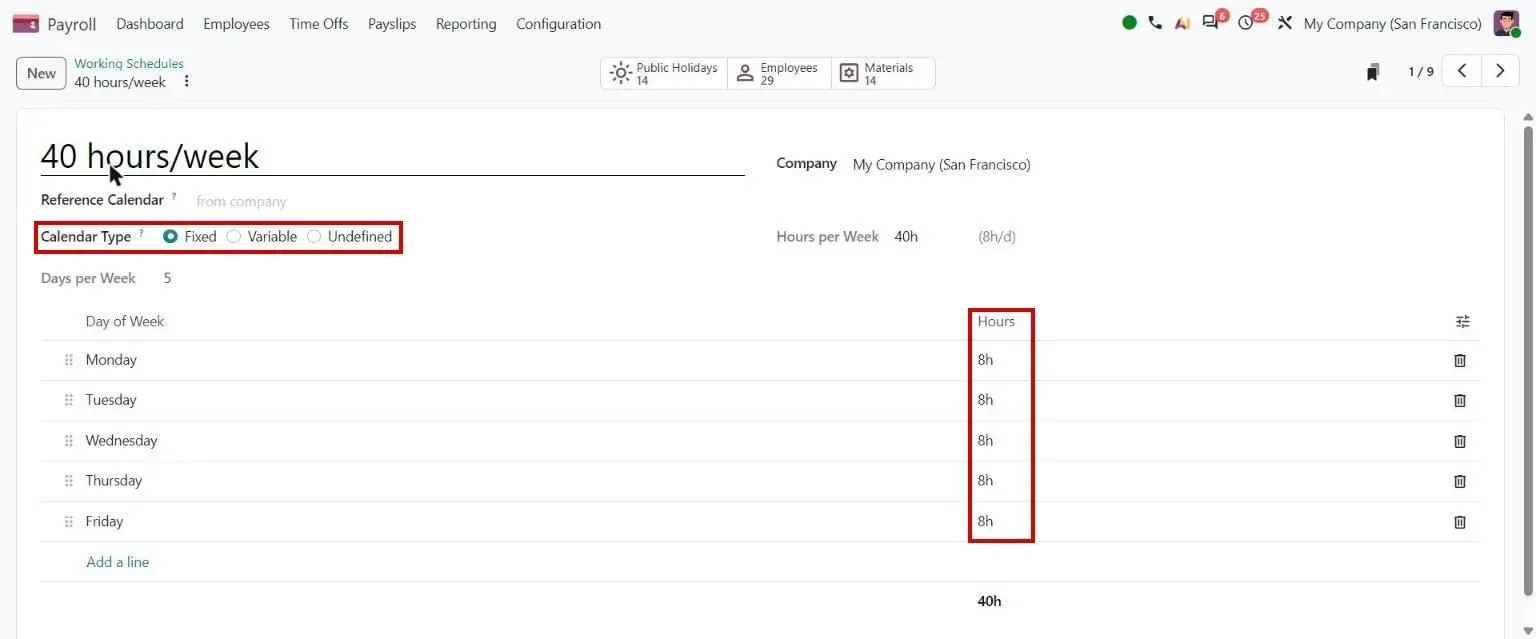
Step 4, Odoo 20 Employees: Working schedule: Calendar Type - 5
Record attendance
Odoo 20 · Attendances
Employees check in from a kiosk or from Odoo itself. Odoo 20 can take a photo at check-in, check people out automatically at a set time and read eSSL and Mantra biometric devices. Automatic rules apply overtime against the working schedule and can give public-holiday work its own time type.
Who: Employees, manager
Photo at check-in: how it works in Odoo 20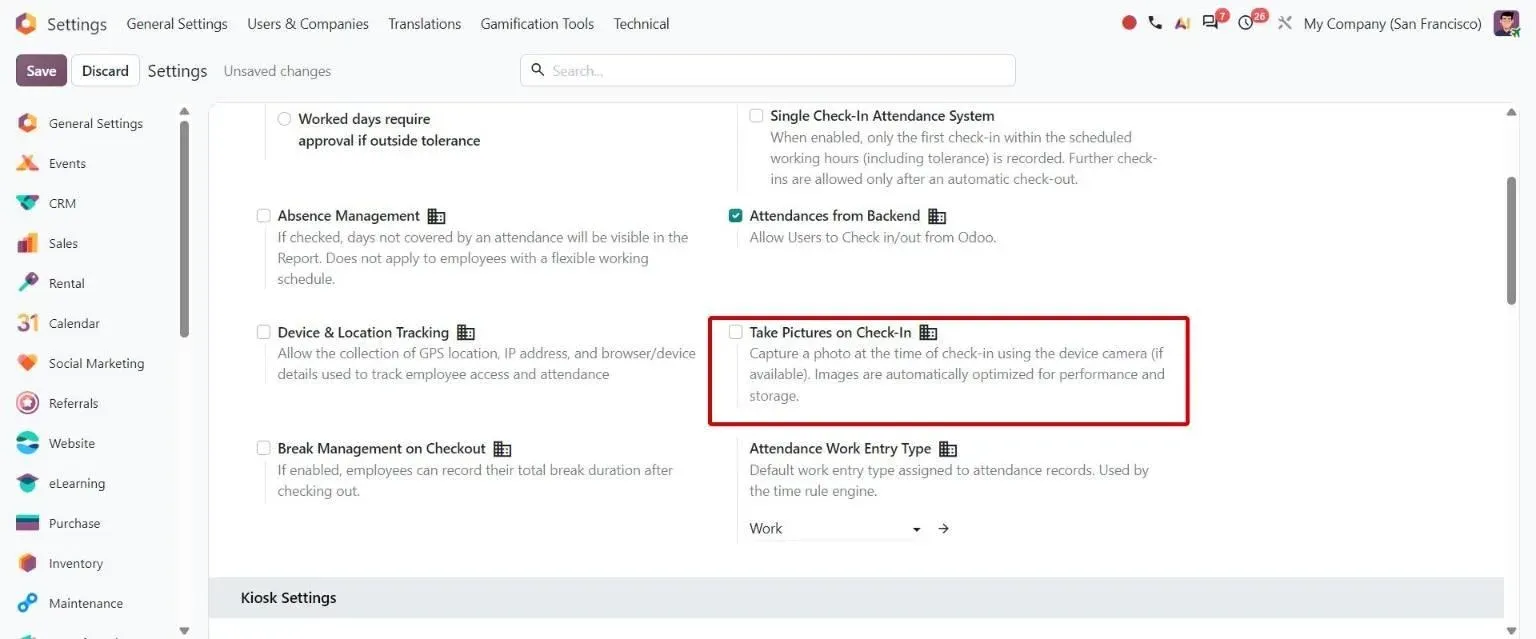
Step 5, Odoo 20 Attendances: Attendance settings: Take Pictures on Check-In option - 6
Request and approve time off
Odoo 20 · Time Off
Employees request leave against their allocations, and managers approve it. In Odoo 20 each time type counts leave in working or calendar days and sets the smallest amount that can be requested, and the Enterprise overview shows every employee for cover planning.
Who: Employee, manager
Overview: all employees: how it works in Odoo 20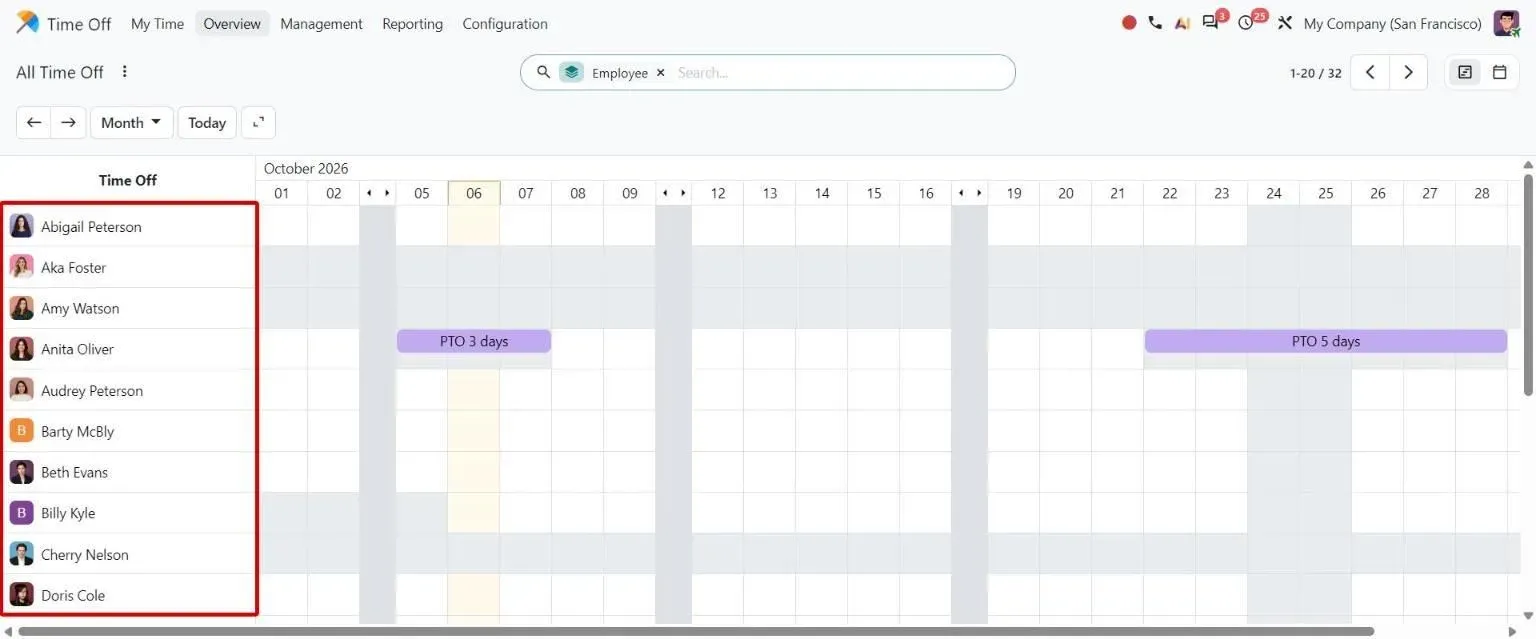
Step 6, Odoo 20 Time Off: Time Off Overview Gantt listing every employee, including those without leave - 7
Run payroll and send payslips
Odoo 20 · Payroll
A pay run turns attendance and time off into time types and computes each payslip from the salary structure. In Odoo 20 each pay run follows guided steps with a check of pending issues before it starts, and payslips go to employees when confirmed, when paid or by hand.
Who: Payroll officer
Pay run workflow: how it works in Odoo 20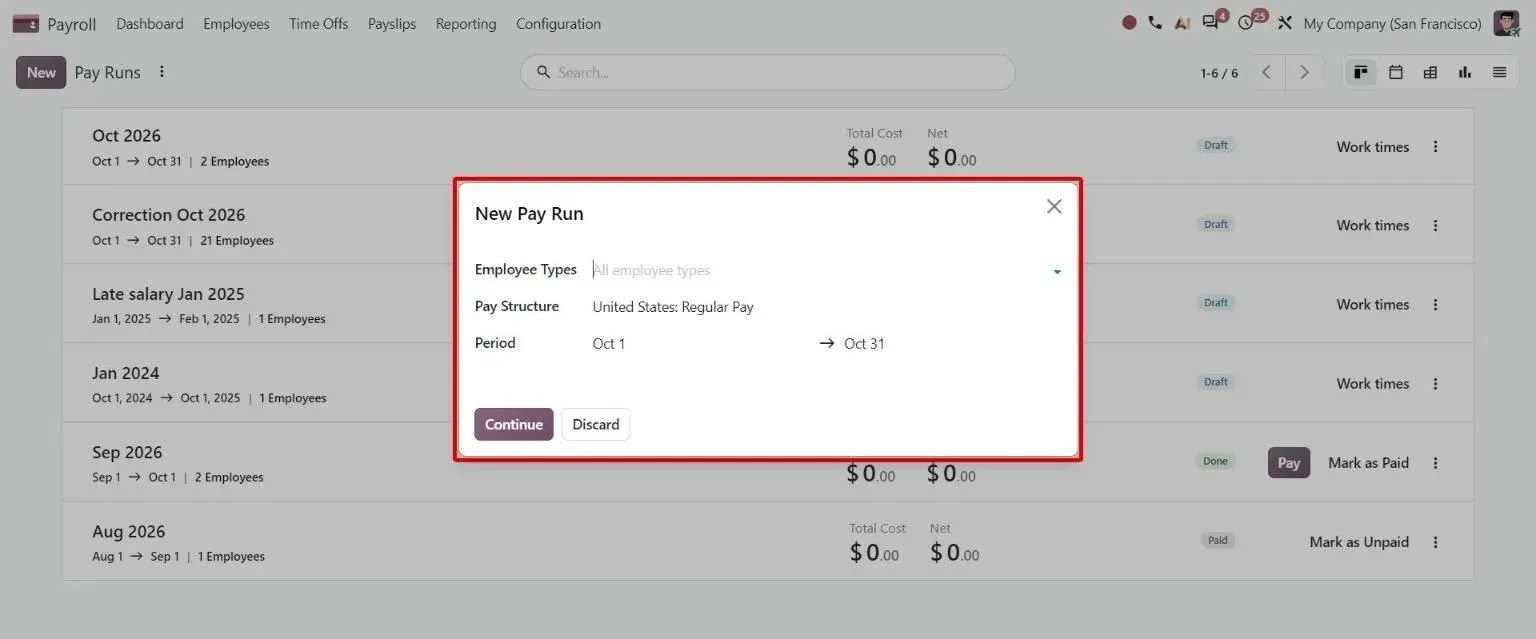
Step 7, Odoo 20 Payroll: New Pay Run guided dialog: employee types, pay structure and period - 8
Appraise, reward and offboard
Odoo 20 · Appraisals · Payroll · Employees
Appraisals use the department's template and can ask for 360 feedback, including from people outside the company. Salary increases apply to many employees at once with an effective date, a rate and an optional cap. At exit, Odoo records the end reason, notice and departure date, and archives the employee on that date.
Who: Manager, HR manager
Salary indexation: how it works in Odoo 20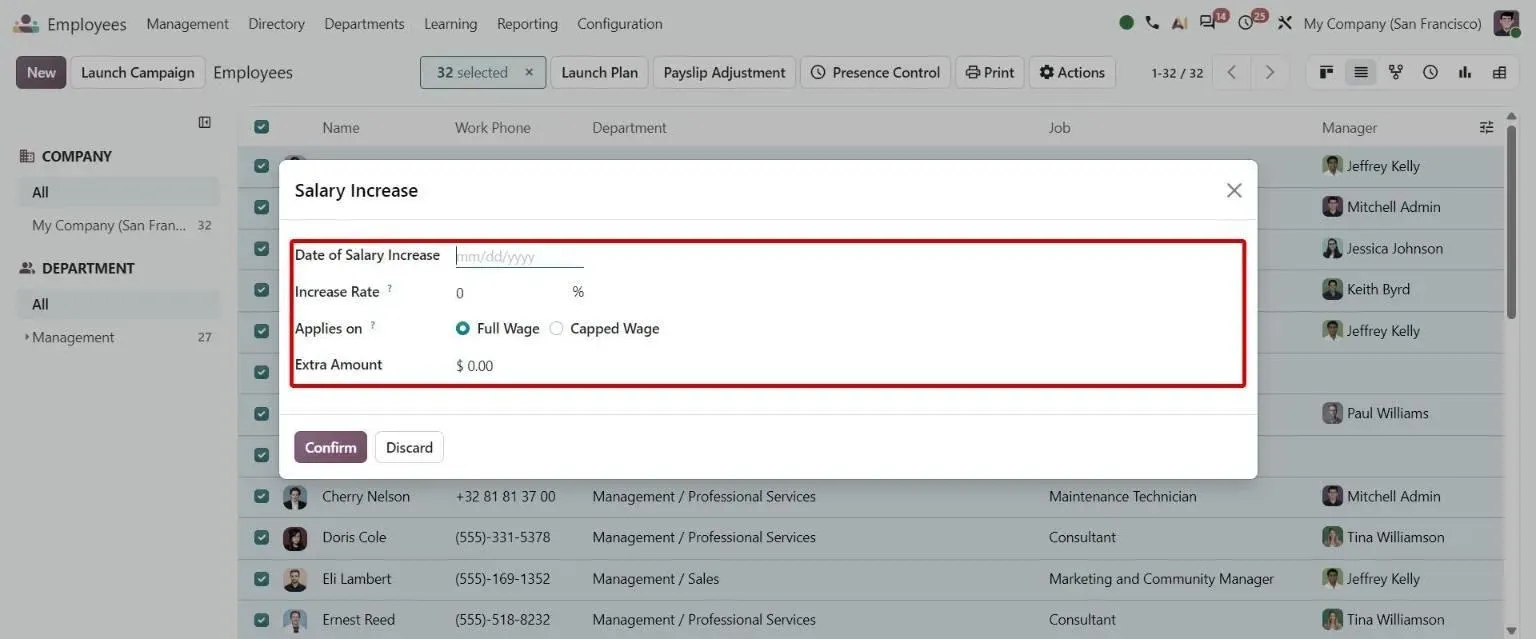
Step 8, Odoo 20 Payroll: Bulk Salary Increase wizard with date, rate, Full/Capped Wage and extra amount
Which Odoo 20 apps does hire-to-retire use?
| Odoo app | Module (edition) | What it does here |
|---|---|---|
| Employees | hr (Community) | Employee records, contracts as dated versions, working schedules and departures |
| Recruitment | hr_recruitment (Community) | Job positions, applications, interviews and the talent pool |
| Skills | hr_skills (Community) | Skills and certifications on employees and jobs, used for matching |
| Attendances | hr_attendance (Community) | Check-in and check-out, kiosk mode, overtime rules and automatic check-out |
| Time Off | hr_holidays (Community) | Leave types, allocations, requests, approvals and public holidays |
| Payroll | hr_payroll (Enterprise) | Salary structures and rules, pay runs, payslips and salary attachments |
| Appraisals | hr_appraisal (Enterprise) | Appraisal templates, goals and 360 feedback |
| Planning | planning (Enterprise) | Shifts by employee and role |
| Sign | sign (Enterprise) | E-signature for offers, contracts and HR documents |
Where is standard Odoo enough, and where is it not?
Standard Odoo runs every step above. These are the gaps we close most often. Each is scoped and priced in discovery, not from a list.
-
Attendance that follows rotating and night shifts
Standard Odoo: Attendances records check-ins and check-outs and applies overtime rules against the working schedule. It does not build a daily summary per employee against a rotating shift plan, with night shifts that cross midnight, grace periods and gate-pass time.
What we add: For Duke Pipes, a shift master that generates next month's rotating plan, and a daily attendance engine comparing planned and actual hours, overtime, late and early arrivals against a set grace, and gate-pass time.
-
Biometric devices across every branch
Standard Odoo: Odoo 20 reads attendance from eSSL and Mantra biometric devices. Other devices, push protocols from many branches and bulk back-loading after a device outage need a connector.
What we add: For a multi-branch F&B chain, a push-protocol integration for ZKTeco, eSSL and ADMS-compatible devices with processing jobs and an Excel import. For Duke Pipes, capture from biometric devices, Excel and an employee portal.
-
Advances, penalties and early-outs in the payslip
Standard Odoo: Payroll takes one-off amounts as payslip inputs and recurring deductions as salary attachments, entered by HR. An advance an employee asks for, or a penalty for leaving early, does not reach the payslip on its own.
What we add: For the F&B chain, salary advances, loans, penalties, overtime and early-out events linked to payroll, with advance and exit requests raised from the employee portal.
-
Performance that feeds pay
Standard Odoo: Appraisals collect feedback and goals, and Odoo 20 applies salary increases to many contracts with a percentage and a cap. Nothing scores each employee every month from attendance and targets and turns the score into an increment.
What we add: For Duke Pipes, a monthly gradation cycle that scores each employee from attendance and targets and maps the score to an increment percentage band.
-
A final settlement at exit
Standard Odoo: Odoo 20 records the end reason, notice period and departure date, and archives the employee on that date. Pulling unpaid advances, penalties, leave and end-of-service pay into one settlement document is not part of that flow.
What we add: For the F&B chain, a final settlement and gratuity workflow with a printable settlement document and an offboarding checklist that has to be completed.
Who approves what, and what is recorded?
- Contracts keep dated versions, so a wage or schedule change has an effective date and the history stays on the employee.
- Odoo 20 refuses a contract date change that would leave validated or paid payslips outside the contract period.
- Leave is approved against allocations, with the approval level set per time type.
- Before a pay run starts, Odoo 20 lists the pending issues to resolve first.
- Payslips can be held back and sent by hand, so nothing reaches employees before payroll checks it.
- A departure records who ended the contract, why and when, before the employee is archived.
What data moves when you migrate this process?
For hire-to-retire, these records move from the old system. Leave balances and year-to-date pay move as opening figures, so the first payroll in Odoo starts from the right totals.
- Employees with departments, managers, job positions and statutory IDs
- Current contracts with wages, schedules and start dates
- Leave types, allocations and balances taken so far
- Year-to-date payroll totals per employee
- Open job positions and active applicants
- Employee documents with their expiry dates
Moving from another system? See Tally to Odoo , SAP Business One to Odoo , Zoho to Odoo or QuickBooks to Odoo .
What can AI take over in hire-to-retire?
AI and automation capture and check the data. A person still approves every hire, payslip and exit.
- Face recognition attendance Contactless face-recognition check-in for Odoo, with GPS tracking and multi-site geofencing.
- OCR for employee expenses Receipts read into Odoo expense lines, so employees stop typing them in.
- Attendance reports and analytics Attendance reports, a matrix view and an analytics dashboard for Odoo HR.
- AI cost estimator What the AI layer costs to run each month, from your own volumes.
Who runs hire-to-retire on Odoo with TechUltra?
Duke Pipes
A uPVC and HDPE pipe manufacturer in Gujarat running a multi-shift plant on Odoo 18 Enterprise. Rotating shifts, night shifts that cross midnight and attendance from biometric devices, spreadsheets and a self-service portal feed a daily attendance engine, a gross-based salary structure runs payroll, and a monthly gradation turns attendance and targets into an increment band.
Read the Duke Pipes case studyHow long does it take, and what does it cost?
Implementation starts from about USD 4,000 and goes up with scope: the number of companies, employees and pay structures, the gaps above, integrations and how clean your data is. A one-week discovery maps your process and ends with a fixed timeline and a fixed price.
How does it differ by industry?
Only the industries where we have a reference for this process.
-
Manufacturing plant
Rotating and night shifts, a daily attendance engine, overtime sign-off by department, local payroll and monthly performance gradation.
Duke Pipes case study -
Food and beverage chain
Hourly staff across branches: recruitment documents, documents with expiry alerts, multi-level leave approval, advances and penalties in payroll, inter-branch transfers and a final settlement with gratuity.
Multi-branch F&B case study -
IT services
Skills, certifications and rate cards on every employee, so resourcing leads staff each engagement on real capability, with consultant availability in Planning.
Axiom Technologies case study
Questions about hire-to-retire in Odoo
-
What is hire-to-retire in Odoo?
It is the employee lifecycle from an open job to an employee's last day: recruit, offer, create the employee and contract, set schedules, record attendance, approve time off, run payroll, then appraise, reward and offboard. In Odoo 20 it runs in Recruitment, Employees, Attendances, Time Off, Payroll and Appraisals.
-
Which Odoo HR apps are in Community and which need Enterprise?
Employees, Recruitment, Skills, Attendances and Time Off are in Community. Payroll, Appraisals, Planning and Sign need Enterprise. Most companies that run payroll in Odoo are therefore on Enterprise.
-
Can Odoo handle rotating shifts and night shifts?
Planning (Enterprise) schedules shifts, and Attendances applies overtime rules against the working schedule. A daily summary against a rotating shift plan, with night shifts that cross midnight, grace periods and gate-pass time, needs a customisation like the attendance engine we built for Duke Pipes.
-
Does Odoo connect to biometric attendance devices?
Odoo 20 reads eSSL and Mantra biometric devices. Other devices and push protocols such as ZKTeco or ADMS need a connector, which we have built for multi-branch clients. Face recognition on a phone or tablet is also available as an Odoo app.
-
Does Odoo payroll work for my country?
Odoo Payroll ships salary structures for the countries Odoo localises. Where a structure is not provided, or a company has its own components, we build the rules, as we did for a gross-based structure at Duke Pipes. See Odoo HR and payroll.
-
How does Odoo handle an employee leaving?
A departure records the end reason, the notice period and the departure date, and archives the employee on that date. A final settlement covering advances, penalties, leave and end-of-service pay in one document is a customisation, as for the F&B chain in our multi-branch case study.
-
What does it cost to set up hire-to-retire in Odoo?
Implementation starts from about USD 4,000 and goes up with scope: companies, employees, pay structures, devices, integrations and data clean-up. A one-week discovery ends with a fixed price. Odoo's own subscription is billed by Odoo; see Odoo pricing.