

Odoo App · WhatsApp & Messaging
WhatsApp Purchase
Send Odoo RFQs and purchase orders to vendors over WhatsApp Cloud API.

Overview
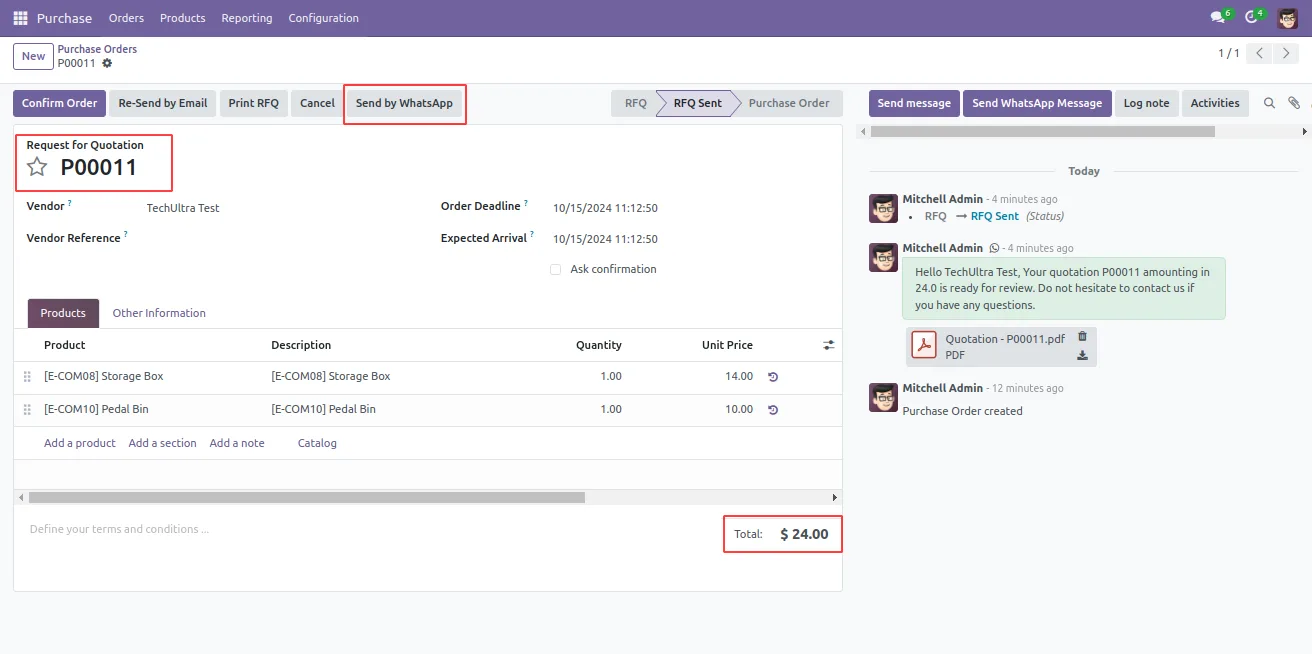
WhatsApp Purchase adds a Send by WhatsApp action to Odoo's RFQ and purchase order forms, so buyers can chase quotes and confirm orders over WhatsApp without copying numbers into a separate app.
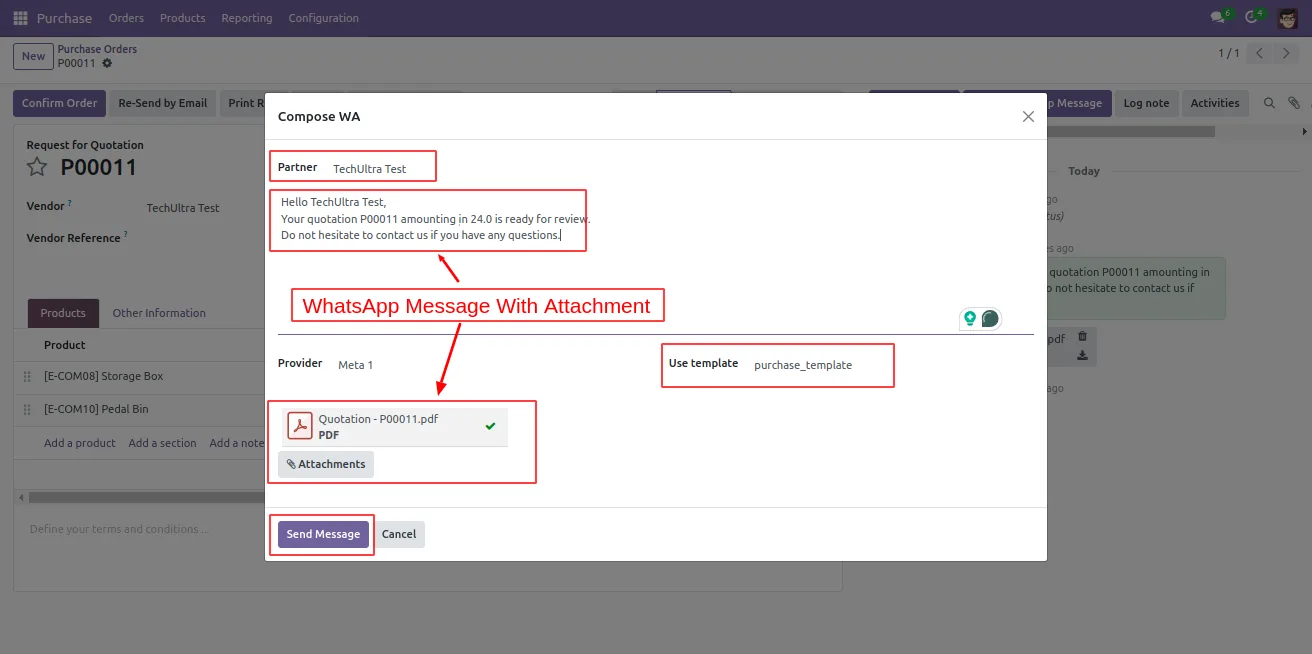
Built by TechUltra Solutions, the module runs on Meta's official WhatsApp Cloud API. A composer lets the buyer pick a dynamic WhatsApp template, attach the RFQ or PO PDF, and personalise the message with values from the order before sending it to the vendor.
Vendor replies stream back into Odoo's chat window against the originating order, giving the procurement team a single, searchable conversation per supplier and per order. The module supports Odoo 12 through 19 and pairs with TechUltra's WhatsApp Base connector.
Key features
-
Send by WhatsApp button on RFQs and POs
Open any RFQ or purchase order and click Send by WhatsApp to deliver it to the vendor over WhatsApp, without leaving the Purchase app.
-
Dynamic WhatsApp template composer
A composer opens after the send action, letting the buyer pick a pre-approved WhatsApp template and personalise it with order data before sending.
-
RFQ or PO PDF attached
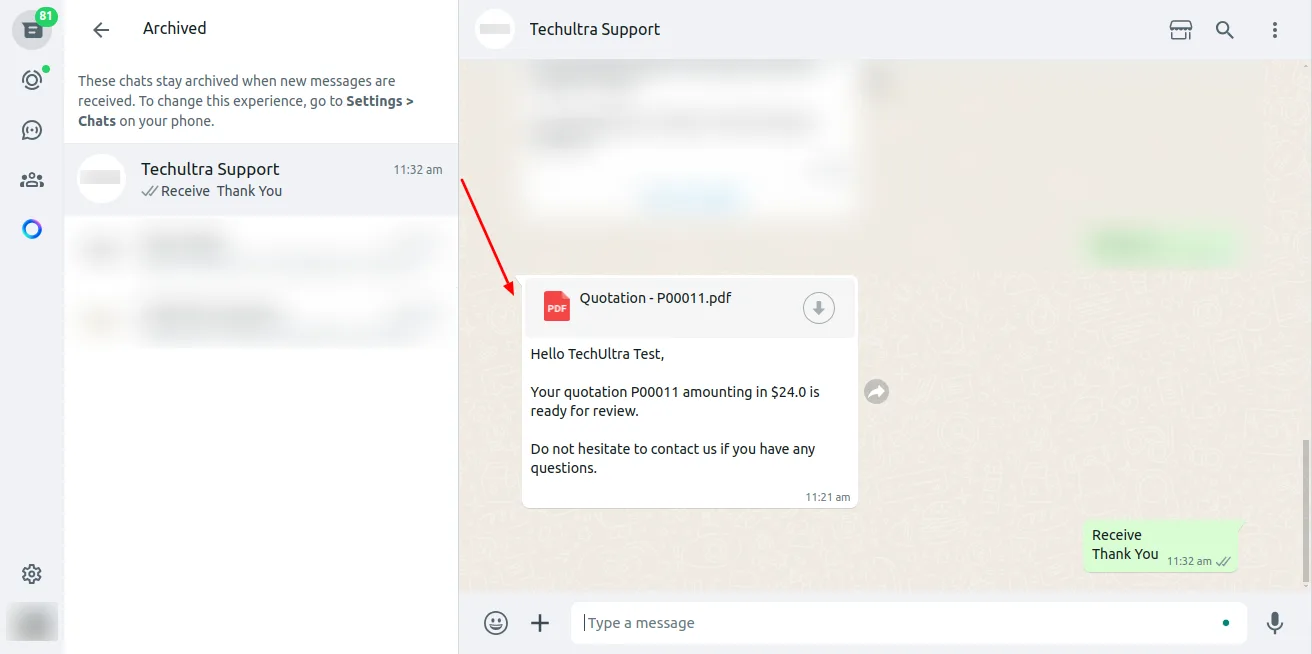
Vendors receive the WhatsApp message with the RFQ or purchase order PDF attached, so they can review and respond from their phone.
-
Two-way vendor conversation
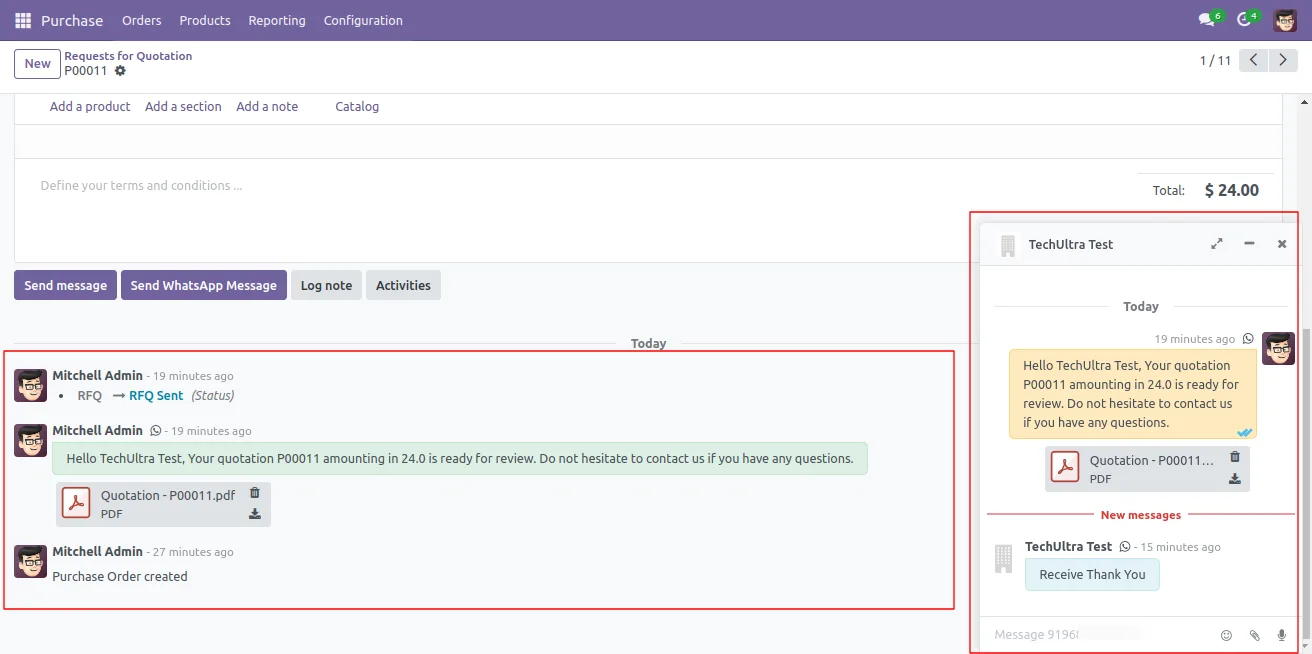
Vendors reply to the WhatsApp message directly from their device. Their replies flow back into Odoo and thread against the originating order.
-
Replies in the Odoo chat window
Inbound and outbound WhatsApp messages appear in Odoo's chat window, so buyers and managers work from one auditable procurement history.
-
Meta WhatsApp Cloud API
The module uses Meta's official WhatsApp Cloud API rather than a third-party gateway, so deliveries, templates, and limits follow Meta's rules.
-
Wide Odoo version coverage
Supports Odoo Community and Enterprise on versions 12 through 19, so the same workflow runs on legacy and current installations.
-
Same workflow for quotes and confirmations
The composer handles both RFQs and confirmed purchase orders, so the buyer uses one action across the entire procurement cycle.
WhatsApp Purchase in Odoo
Every screen, in the order you meet it — configuration first, then the module in use.



Technical details
Specification
- Publisher
- TechUltra Solutions Private Limited
- Technical name
- tus_meta_wa_purchase
- Odoo versions
- 12.0, 13.0, 14.0, 15.0, 16.0, 17.0, 18.0, 19.0
- Lines of code
- 7,640
- License
- Odoo Proprietary License v1.0 (OPL-1)
- Price
- $88 (one-time)
Deployment
- Odoo Online
- Odoo.sh
- On-premise
Odoo dependencies
- Purchase
- Discuss
- Invoicing
- WhatsApp Base (TechUltra)
Support
90 days of bug-fix support, Monday to Friday (10:00–19:00 IST). Raise a ticket at support@techultra.in.
Setup & configuration
From install to first call — here is the path.
- 1
Install the module
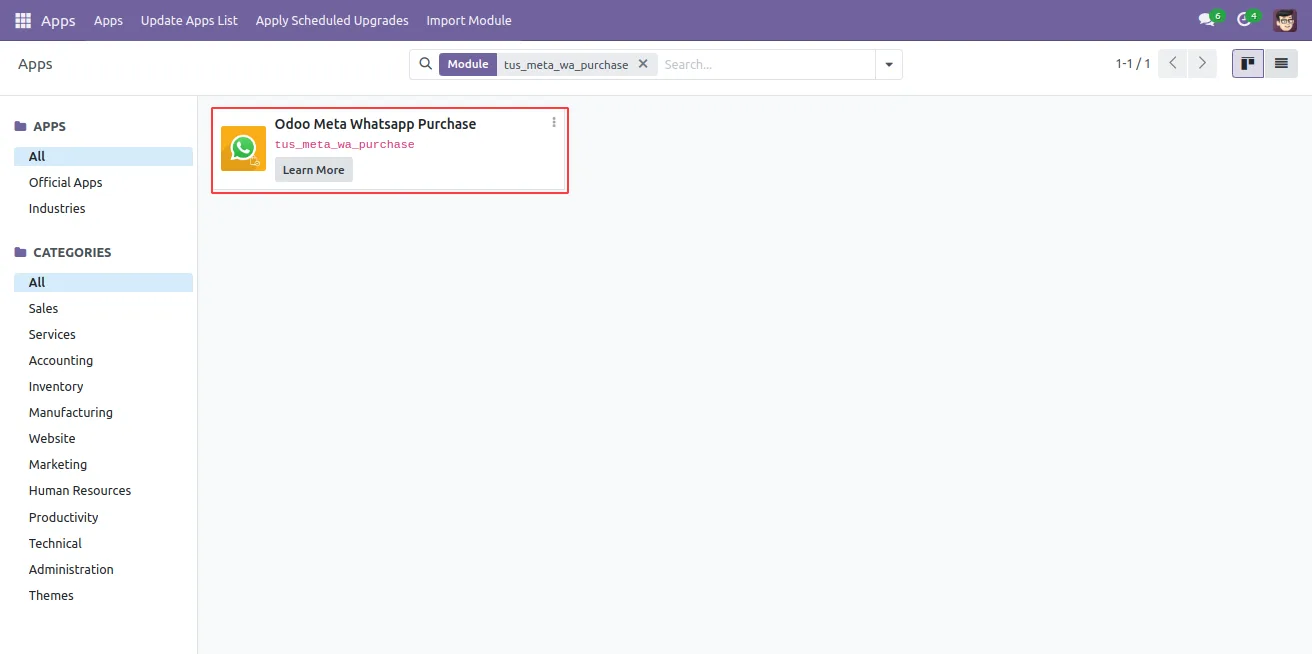
In Odoo, open Apps, remove the Apps filter, search for “WhatsApp Purchase”, and click Install. The TechUltra WhatsApp Base connector is installed automatically as a dependency.
- 2
Connect Meta WhatsApp Cloud API
In the TechUltra WhatsApp Base configuration, link your Meta WhatsApp Business Account by entering the App ID, App Secret, Phone Number ID, and permanent access token from the Meta developer dashboard.
- 3
Approve a WhatsApp template
In Meta's Business Manager, create and submit the RFQ / purchase order template. Once Meta approves it, sync the template into Odoo so the composer can use it.
- 4
Open an RFQ or PO and send
Go to Purchase → Orders → RFQs (or Purchase Orders), open the document, and click Send by WhatsApp. Pick the template, confirm the attachment, and send.
- 5
Review vendor replies in Odoo
Vendor responses appear in the chat window on the order record. Reply from Odoo to keep the full procurement conversation threaded against the document.
Frequently asked questions
-
Can I send both RFQs and confirmed purchase orders?
Yes. The Send by WhatsApp action is available on both RFQs and confirmed purchase orders, so the buyer uses the same workflow across the procurement cycle.
-
Which Odoo versions are supported?
The module supports Odoo 12.0, 13.0, 14.0, 15.0, 16.0, 17.0, 18.0, and 19.0, in both the Community and Enterprise editions.
-
Does this use the official WhatsApp Cloud API?
Yes. WhatsApp Purchase runs on Meta's official WhatsApp Cloud API, not a third-party gateway, so deliveries and templates follow Meta's own rules.
-
Is the PDF attached to the WhatsApp message?
Yes. The composer attaches the RFQ or purchase order PDF to the message so vendors receive both the notification text and the document in one place.
-
Where do vendor replies appear?
Vendor replies flow back into Odoo and appear in the chat window of the originating RFQ or purchase order, so the full thread sits on the record.
-
Do I need pre-approved WhatsApp templates?
Yes. WhatsApp Business policy requires Meta-approved templates for business-initiated messages. Create them in Meta's Business Manager and sync them into Odoo.
-
What other Odoo modules does this depend on?
It depends on Purchase (purchase), Discuss (mail), Invoicing (account), and TechUltra's WhatsApp Base connector, which handles the underlying Cloud API setup.
-
Is support included?
Yes. The module includes 90 days of bug-fix support, Monday to Friday, 10:00–19:00 IST.
Listing verified against the Odoo App Store:
Related solutions
Whole-platform solutions that complement WhatsApp Purchase.
WhatsApp ↔ Odoo Integration
Connect WhatsApp to Odoo: two-way WhatsApp Business API sync, order and invoice messages, payment links and one shared team inbox. Free demo from a Gold Partner.
AI WhatsApp Chatbot
LLM-powered WhatsApp chatbot grounded in your Odoo data. Handles ordering, support, FAQs, and lead qualification with human-agent escalation.
Odoo WhatsApp Push Notifications
Real-time WhatsApp push notifications in Odoo — web, Android, iOS. Customer names in Discuss instead of phone numbers. Compatible with Odoo 17 and 18.
Related services
Get the most out of this module with senior TechUltra consultants.
Odoo Customization Services
Odoo customization from a Gold Partner: custom modules, workflows, reports and Studio changes, written upgrade-safe and quoted at a fixed scope. Free scoping call.
Hire Odoo Developers
Hire certified Odoo developers from a Gold Partner: one developer or a team, full-time or part-time, 70–160 hours a month. Silver, Gold or Platinum plan, free trial.
Odoo Support Services & Maintenance
Odoo support services from a Gold Partner: functional and technical support plus server cover for Enterprise and Community, 30-minute P1 response, 24/7 option.







