

Odoo App · WhatsApp & Messaging
WhatsApp Helpdesk in Discuss
Work helpdesk tickets over WhatsApp from the Discuss tab — view, create, edit, and reply inline.

Overview
WhatsApp Helpdesk in Discuss connects Odoo Helpdesk to Meta's WhatsApp Cloud API, then surfaces every ticket for the current WhatsApp contact inside the Discuss conversation. Agents stop swivel-chairing between modules to handle a WhatsApp support thread.
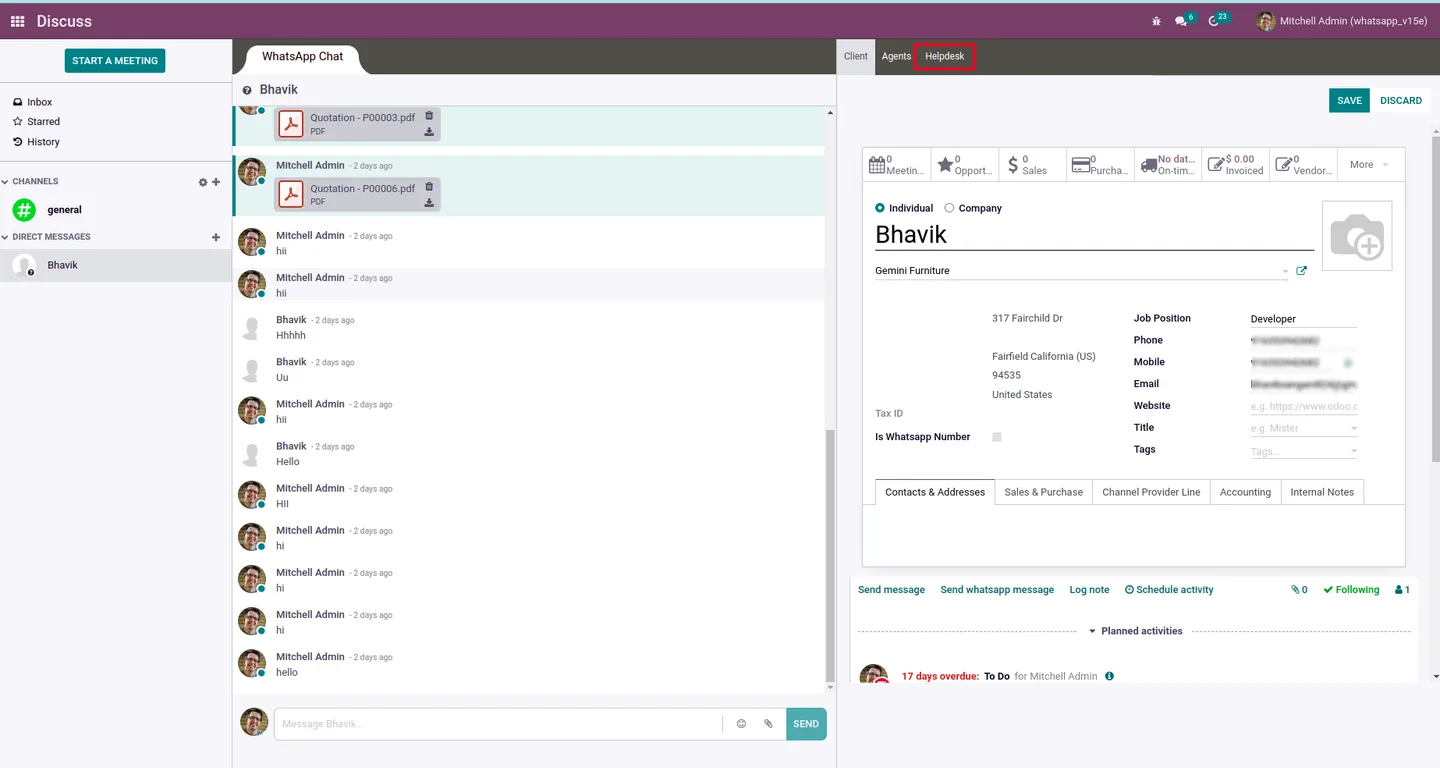
Built by TechUltra Solutions, the module adds a Helpdesk tab next to the Discuss inbox. From that tab agents see all tickets linked to the contact on the other end of the chat, open a ticket in place, create a new one, or edit an existing one — without losing the conversation context.
Outbound replies go through dynamic WhatsApp templates, with text, media, interactive lists, product lists, and reply buttons supported. Single grey, double grey, and double blue ticks are mirrored back into the Odoo chatter so support managers can audit delivery and read status against the ticket record.
Key features
-
Helpdesk tab inside Discuss
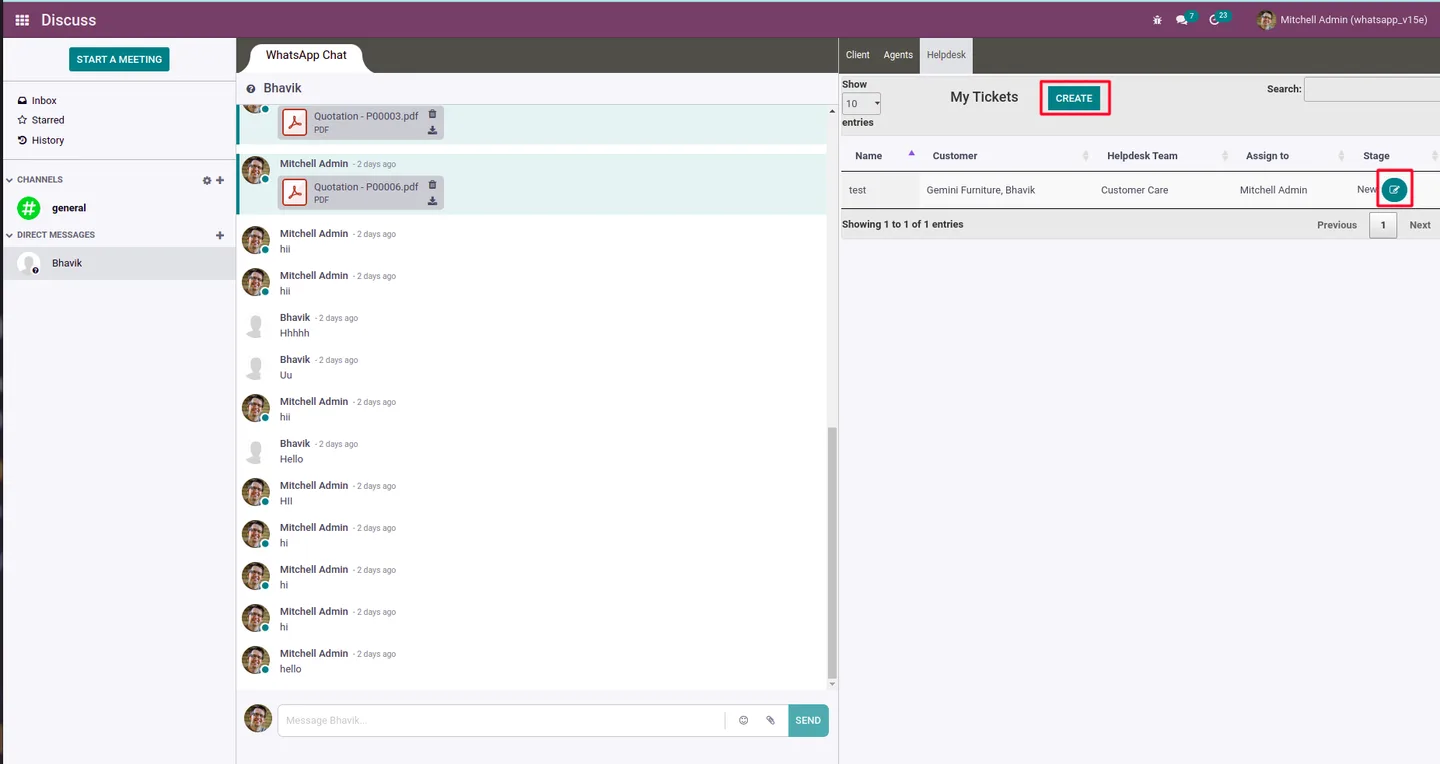
A dedicated Helpdesk tab in the Discuss menu shows every ticket for the current WhatsApp contact, with filters, groupby, and search across the WhatsApp history.
-
Create and edit tickets in place
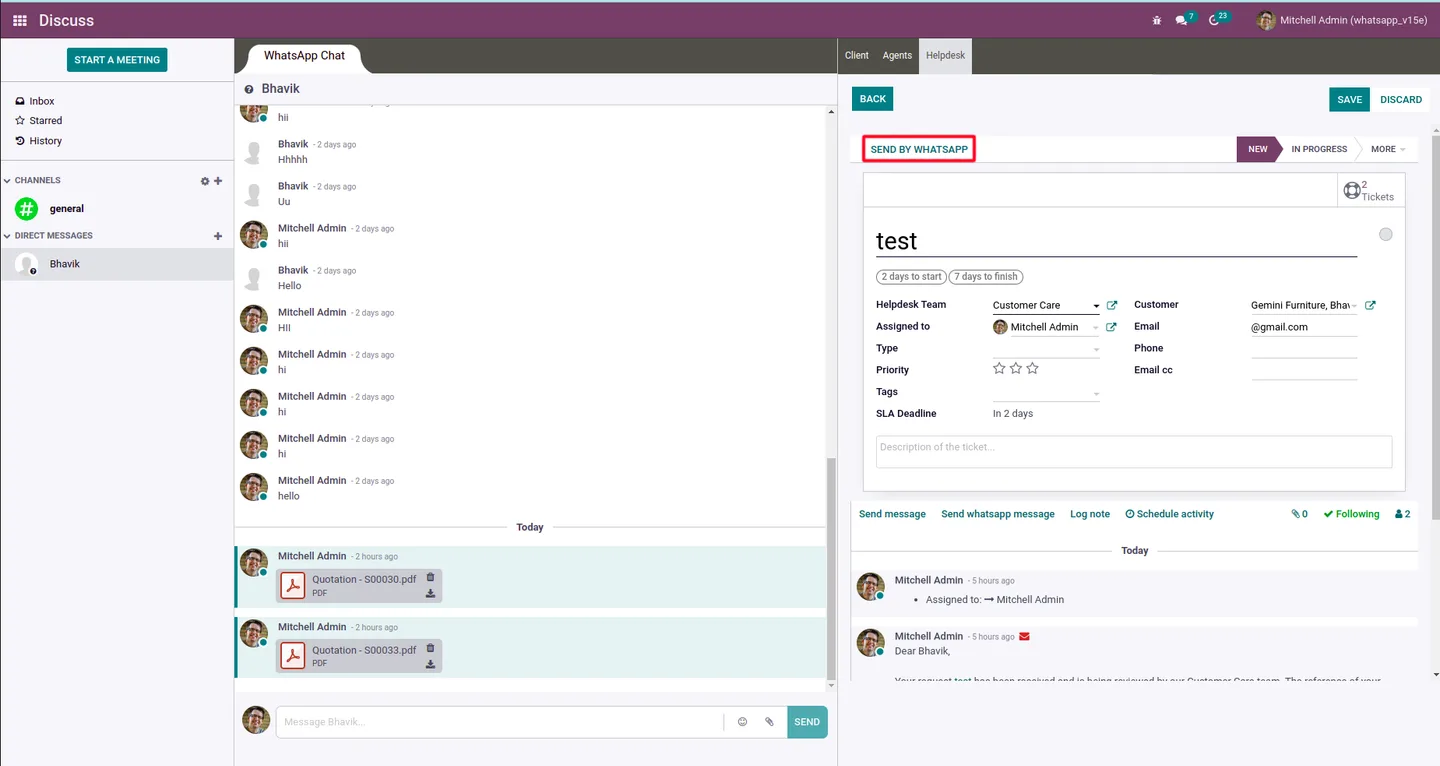
Open an existing ticket from the chat, edit it without losing context, or spin up a new ticket directly from the Discuss conversation.
-
Send by WhatsApp from any ticket
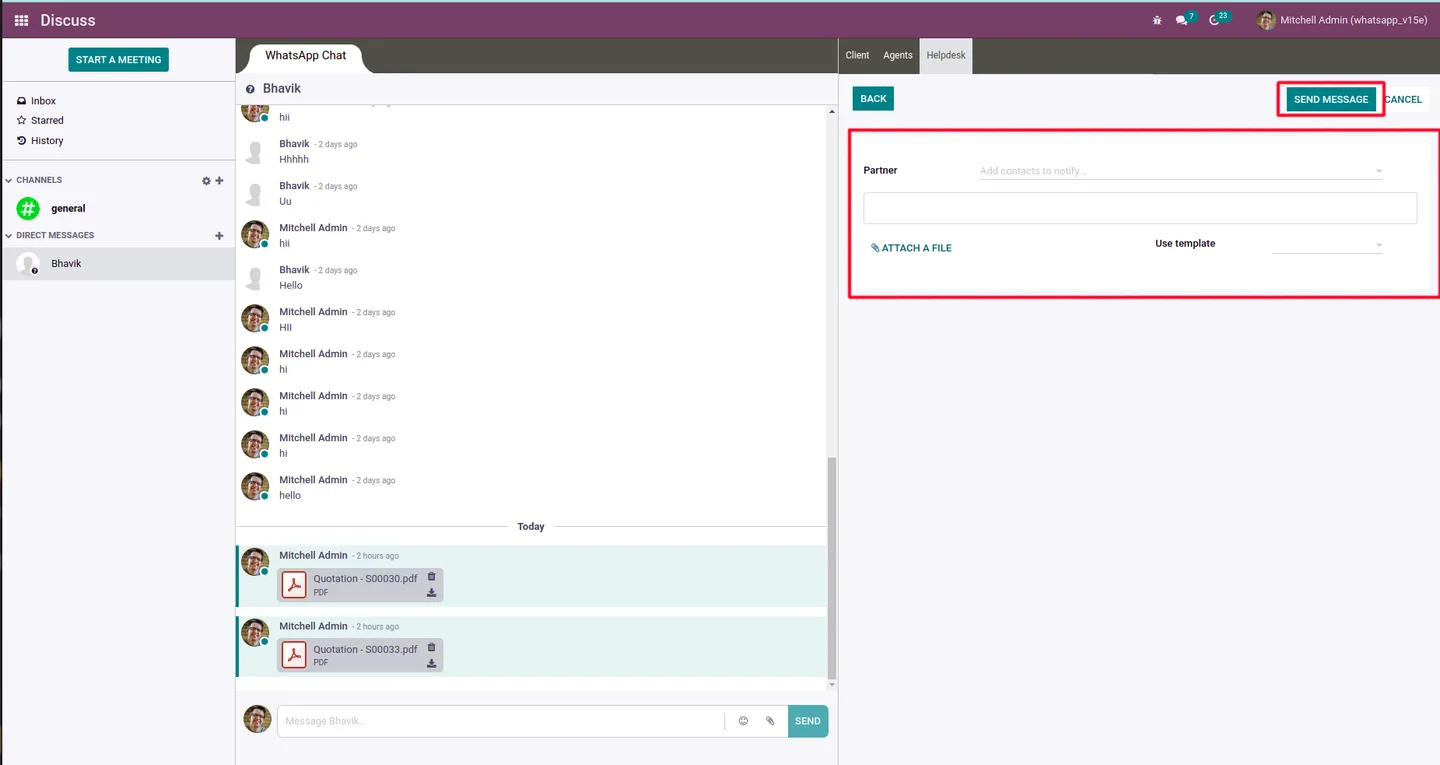
A Send By WhatsApp action on the ticket opens the WhatsApp compose window pre-filled with the contact and template, so the agent replies without copying numbers between apps.
-
Dynamic WhatsApp templates
Reply with text, multimedia, and interactive templates — quick reply buttons, list messages, product lists, and dynamic or static URL buttons — all picked from the standard Meta template library.
-
Media attachments in one click
Send product videos, images, PDFs, and .doc files inside the same WhatsApp message — no separate upload step, no leaving Odoo.
-
Delivery and read-status ticks
Single grey, double grey, and double blue ticks from Meta are surfaced in the Odoo chatter on the ticket so managers can audit delivery and read confirmation against the record.
-
Smart buttons across related modules
Ticket and partner records gain smart buttons that jump straight to the related WhatsApp history, with search and groupby across past conversations.
-
Automatic mobile-number formatting
Contact numbers are normalised to the format Meta's WhatsApp Cloud API expects, so templates send without manual cleanup on each ticket.
WhatsApp Helpdesk in Discuss in Odoo
Every screen, in the order you meet it — configuration first, then the module in use.



Technical details
Specification
- Publisher
- TechUltra Solutions Private Limited
- Technical name
- tus_meta_wa_helpdesk_in_discuss
- Odoo versions
- 12.0, 13.0, 14.0, 15.0, 16.0, 17.0
- Lines of code
- 8,313
- License
- Odoo Proprietary License v1.0 (OPL-1)
- Price
- $145.54 (one-time)
Deployment
- Odoo Online
- Odoo.sh
- On-premise
Odoo dependencies
- Helpdesk
- Discuss
- Odoo Meta WhatsApp Discuss
- Odoo WhatsApp Base
Support
90 days of bug-fix support, Monday to Friday (10:00–19:00 IST). Raise a ticket at support@techultra.in.
Setup & configuration
From install to first call — here is the path.
- 1
Install the module
In Odoo, open Apps, remove the Apps filter, search for “WhatsApp Helpdesk in Discuss”, and click Install. The Odoo Meta WhatsApp Discuss and Odoo WhatsApp Base dependencies are pulled in automatically.
- 2
Connect Meta's WhatsApp Cloud API
In WhatsApp → Configuration, enter the WhatsApp Cloud API credentials from your Meta Business account — the phone-number ID and permanent access token — and run the connection test.
- 3
Approve your message templates
Sync the approved Meta templates into Odoo, including the ticket-acknowledgement and resolution templates the support team will reply with.
- 4
Open the Helpdesk tab in Discuss
Go to Discuss and select the Helpdesk tab. Pick the WhatsApp contact you are chatting with to see every ticket linked to that partner.
- 5
Reply via Send By WhatsApp
From any ticket, click Send By WhatsApp, pick a template, attach any media, and send. Delivery and read ticks are written back to the ticket chatter automatically.
Frequently asked questions
-
Where does the Helpdesk tab appear?
Inside Odoo Discuss, alongside the inbox and direct-message tabs. Opening it for a WhatsApp contact lists every helpdesk ticket linked to that partner, with filters, groupby, and search.
-
Can agents create new tickets from a WhatsApp chat?
Yes. From the Helpdesk tab in Discuss agents can open an existing ticket, edit it in place, or create a brand-new ticket without leaving the conversation.
-
Which message types are supported?
Text, multimedia, and interactive WhatsApp templates — including quick reply buttons, list messages, product lists, and dynamic or static URL buttons — provided they are approved in your Meta Business account.
-
Can the team attach files inside the WhatsApp reply?
Yes. Product videos, images, PDFs, and .doc files can be sent inside a single WhatsApp reply directly from the ticket — no separate upload step is required.
-
Are delivery and read receipts visible?
Yes. Single grey, double grey, and double blue ticks from Meta are mirrored into the Odoo chatter on the ticket, so managers can audit who received and read each reply.
-
Which Odoo versions does it support?
Odoo 12.0, 13.0, 14.0, 15.0, 16.0, and 17.0, in both Community and Enterprise editions.
-
What are the prerequisites?
Odoo Helpdesk (helpdesk), Discuss (mail), and TechUltra's Odoo Meta WhatsApp Discuss and Odoo WhatsApp Base modules. You also need an active Meta WhatsApp Business account with the Cloud API enabled.
-
Is support included?
Yes. The module ships with 90 days of bug-fix support, Monday to Friday, 10:00–19:00 IST. Raise a ticket at support@techultra.in.
Listing verified against the Odoo App Store:
Related solutions
Whole-platform solutions that complement WhatsApp Helpdesk in Discuss.
WhatsApp ↔ Odoo Integration
Connect WhatsApp to Odoo: two-way WhatsApp Business API sync, order and invoice messages, payment links and one shared team inbox. Free demo from a Gold Partner.
AI WhatsApp Chatbot
LLM-powered WhatsApp chatbot grounded in your Odoo data. Handles ordering, support, FAQs, and lead qualification with human-agent escalation.
Odoo WhatsApp Push Notifications
Real-time WhatsApp push notifications in Odoo — web, Android, iOS. Customer names in Discuss instead of phone numbers. Compatible with Odoo 17 and 18.
Related services
Get the most out of this module with senior TechUltra consultants.
Odoo Customization Services
Odoo customization from a Gold Partner: custom modules, workflows, reports and Studio changes, written upgrade-safe and quoted at a fixed scope. Free scoping call.
Hire Odoo Developers
Hire certified Odoo developers from a Gold Partner: one developer or a team, full-time or part-time, 70–160 hours a month. Silver, Gold or Platinum plan, free trial.
Odoo Support Services & Maintenance
Odoo support services from a Gold Partner: functional and technical support plus server cover for Enterprise and Community, 30-minute P1 response, 24/7 option.







