

Odoo App · WhatsApp & Messaging
WhatsApp in Discuss
Two-way WhatsApp conversations inside Odoo Discuss, powered by Meta's Cloud API.

Overview
WhatsApp in Discuss turns Odoo's Discuss app into a real WhatsApp inbox. Inbound messages from customers land in dedicated WhatsApp channels alongside your normal team chats, and replies go straight back through Meta's WhatsApp Cloud API — no third-party bridge in between.
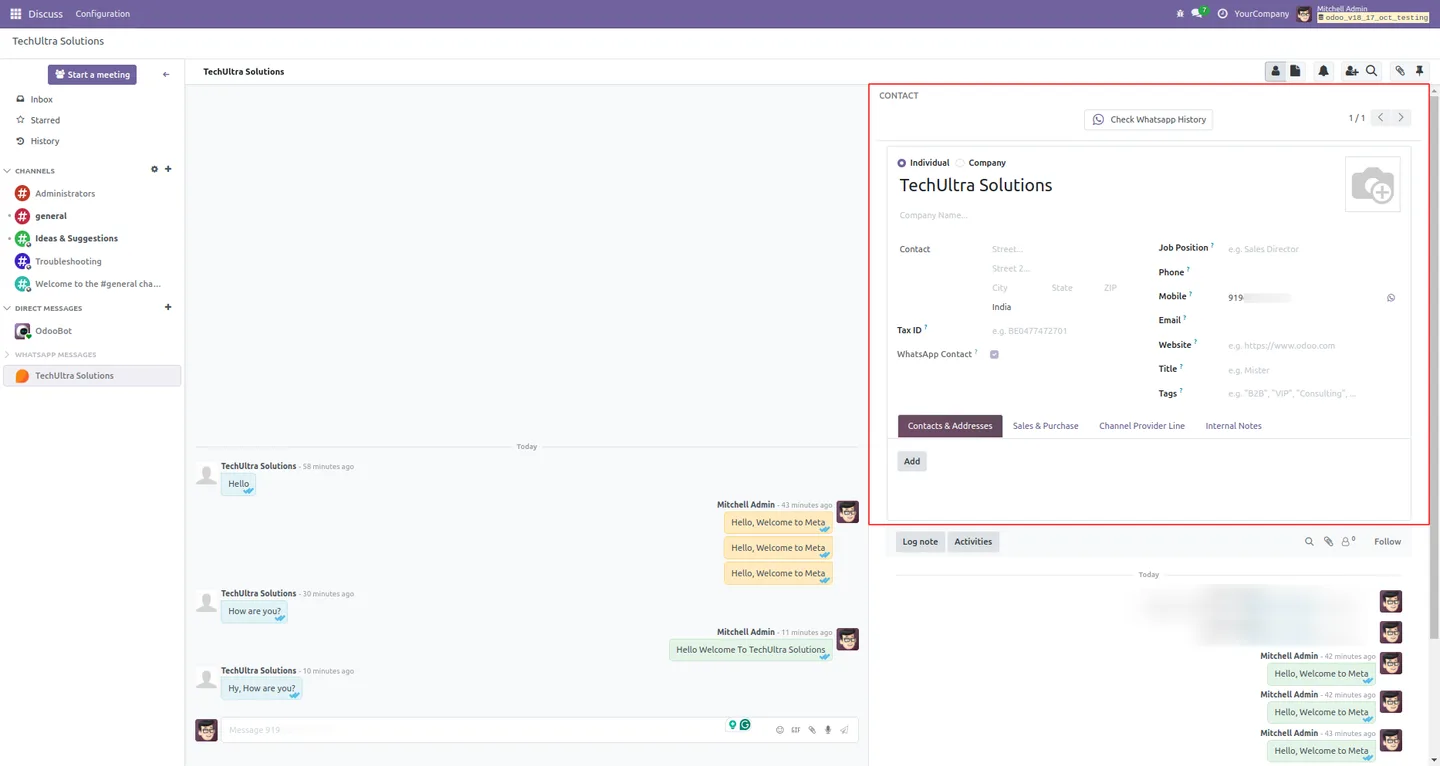
Built by TechUltra Solutions, the module sits on top of the company's WhatsApp Integration (Base) connector and reuses Odoo's familiar chat UI. Messages render with WhatsApp's tick indicators for sent, delivered, and read; media files, PDFs, and documents move both ways in a single click; and the right-hand sidebar shows the customer's contact card so agents can act on what they are reading.
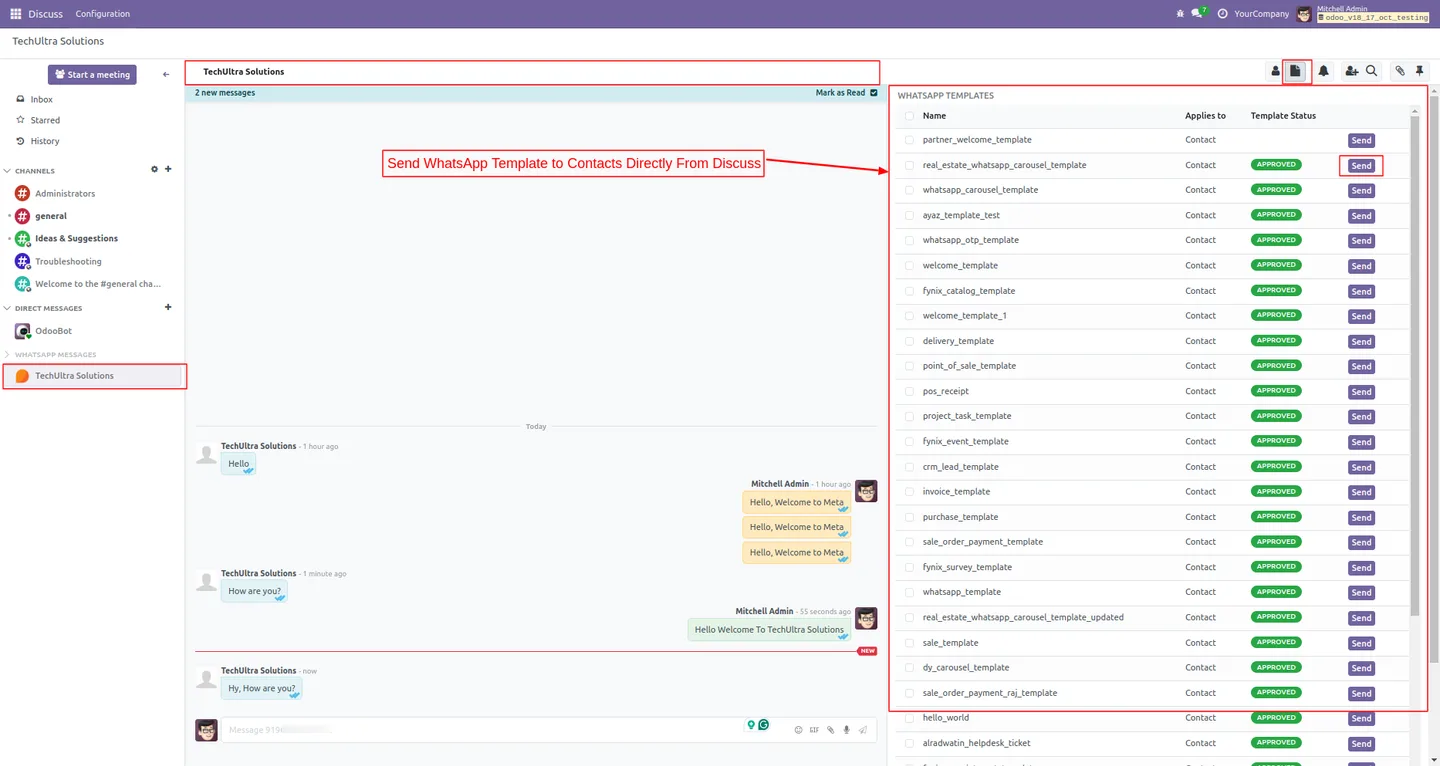
Approved WhatsApp templates can be sent directly from Discuss for opt-in or post-24-hour conversations, and additional users can be added to a chat to handle escalations. A Send WhatsApp action can also be enabled inside any document's chatter, so sales, support, and operations teams trigger conversations from the record they are working on.
Key features
-
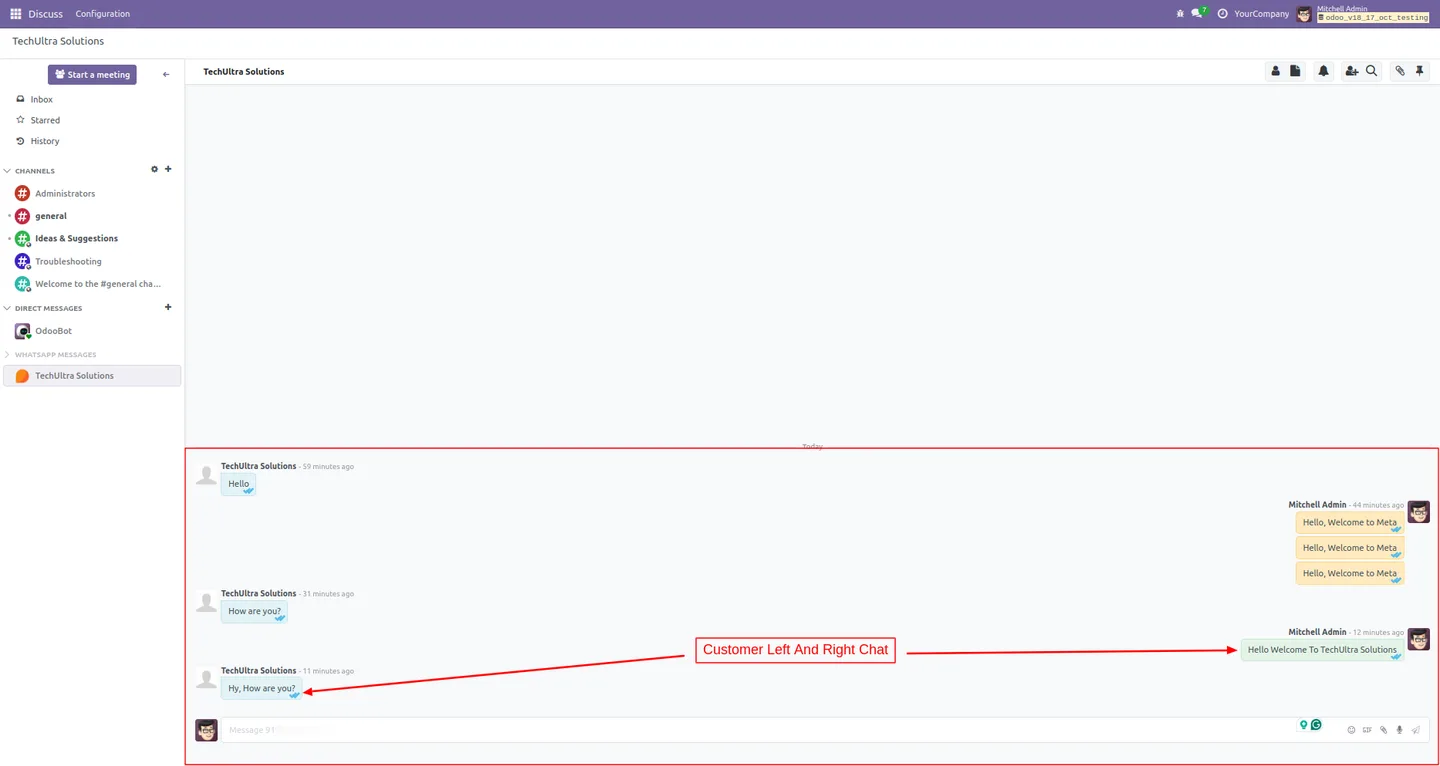
Two-way WhatsApp inside Discuss
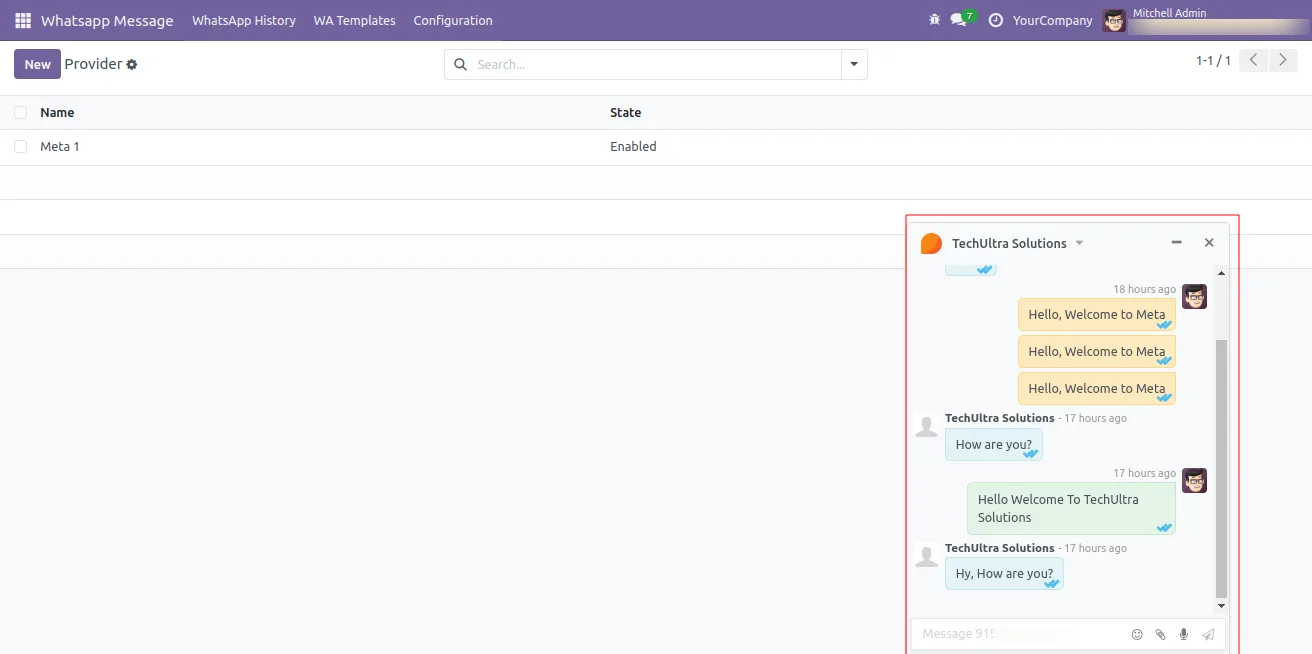
Send and receive WhatsApp messages from Odoo's native Discuss interface. Customer conversations appear as channels, so the team works in the same UI they already use for internal chat.
-
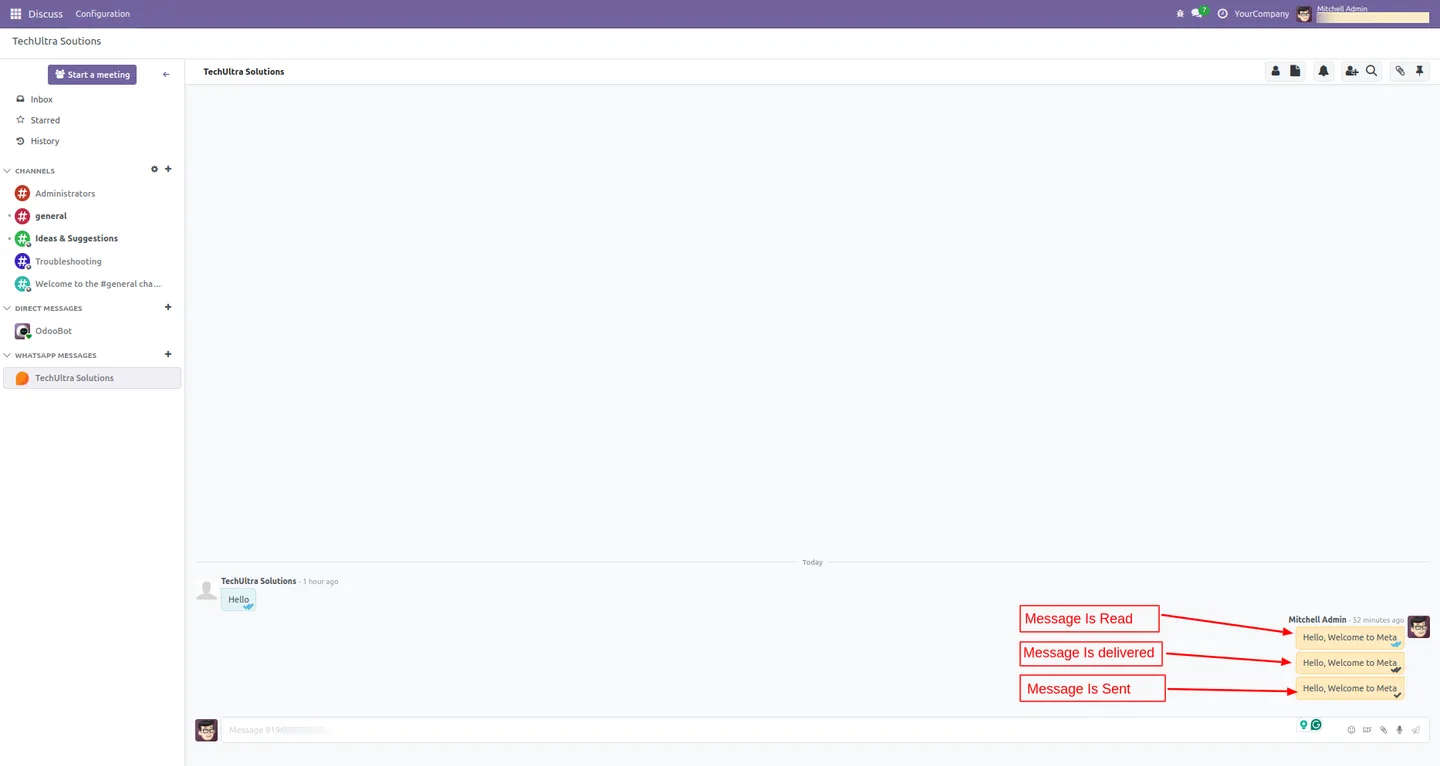
Sent, delivered, read receipts
Every outgoing message shows a single tick when sent, a double tick when delivered, and a blue double tick when read — the same status indicators users see in WhatsApp itself.
-
Media and document sharing
Send product videos, images, PDFs, and Word or Excel files to customers in one click, and receive attachments back into the conversation without leaving Odoo.
-
Approved template messages
Open the right-hand sidebar to pick from your synced WhatsApp templates and send them as the first message in a new conversation or to restart a session outside the 24-hour window.
-
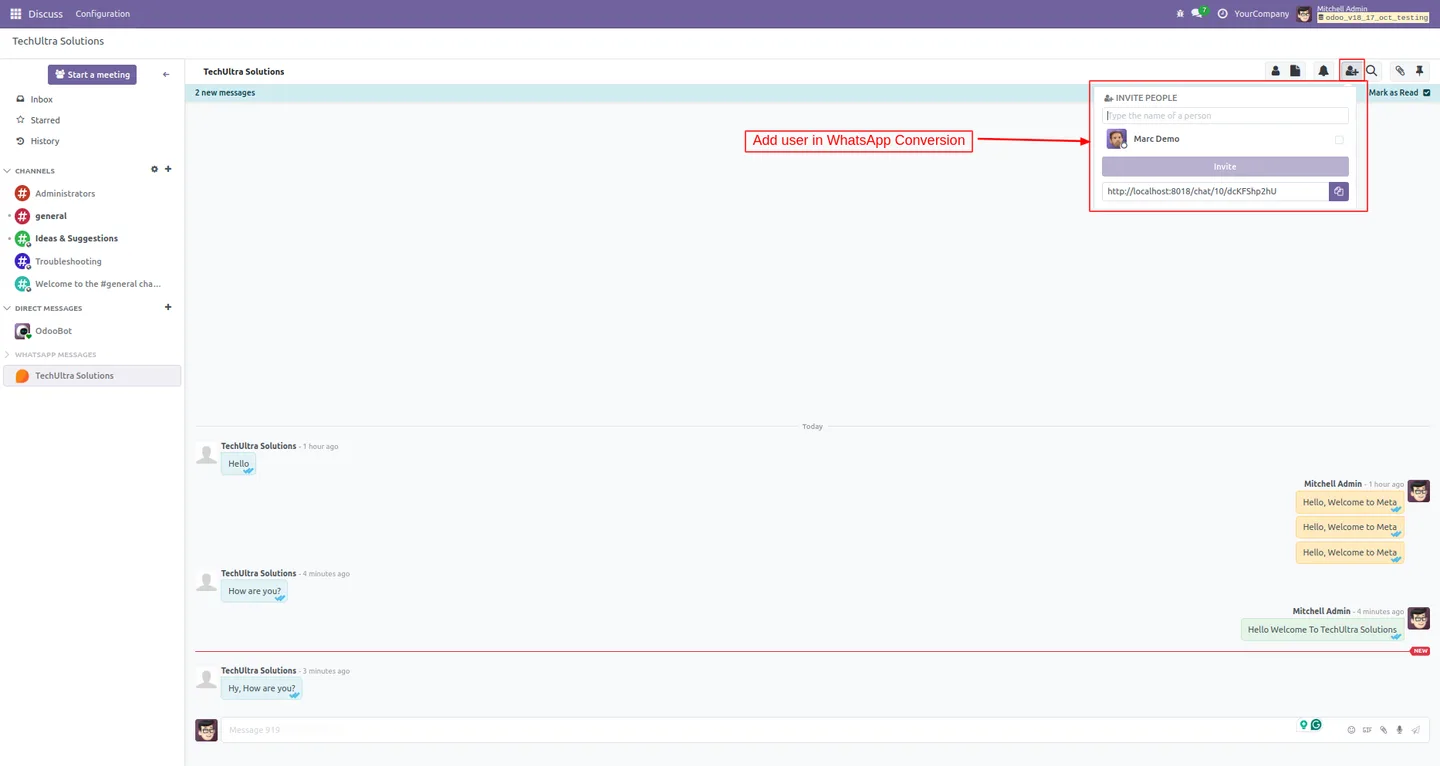
Multi-agent channels
Add additional users to any WhatsApp chat from the Agents tab so support and sales teams can collaborate on a single customer conversation.
-
Send WhatsApp from any chatter
A configurable Send WhatsApp action can be enabled on individual document chatters, so reps message customers straight from a sales order, lead, ticket, or any other record.
-
Customer context in the sidebar
While chatting, the right-hand sidebar shows the linked contact form with inline edit, so agents update customer details without switching screens.
-
Inbound message capture
Incoming messages and their attachments are stored against the conversation, so the full WhatsApp history stays inside Odoo for audit and follow-up.
WhatsApp in Discuss in Odoo
Every screen, in the order you meet it — configuration first, then the module in use.


Technical details
Specification
- Publisher
- TechUltra Solutions Private Limited
- Technical name
- tus_meta_wa_discuss
- Odoo versions
- 12.0, 13.0, 14.0, 15.0, 16.0, 17.0, 18.0, 19.0
- Lines of code
- 8,755
- License
- Odoo Proprietary License v1.0 (OPL-1)
- Price
- $128 (one-time)
Deployment
- Odoo Online
- Odoo.sh
- On-premise
Odoo dependencies
- Discuss
- WhatsApp Integration (Base)
Support
90 days of bug-fix support, Monday to Friday (10:00–19:00 IST). Raise a ticket at support@techultra.in.
Setup & configuration
From install to first call — here is the path.
- 1
Install the module
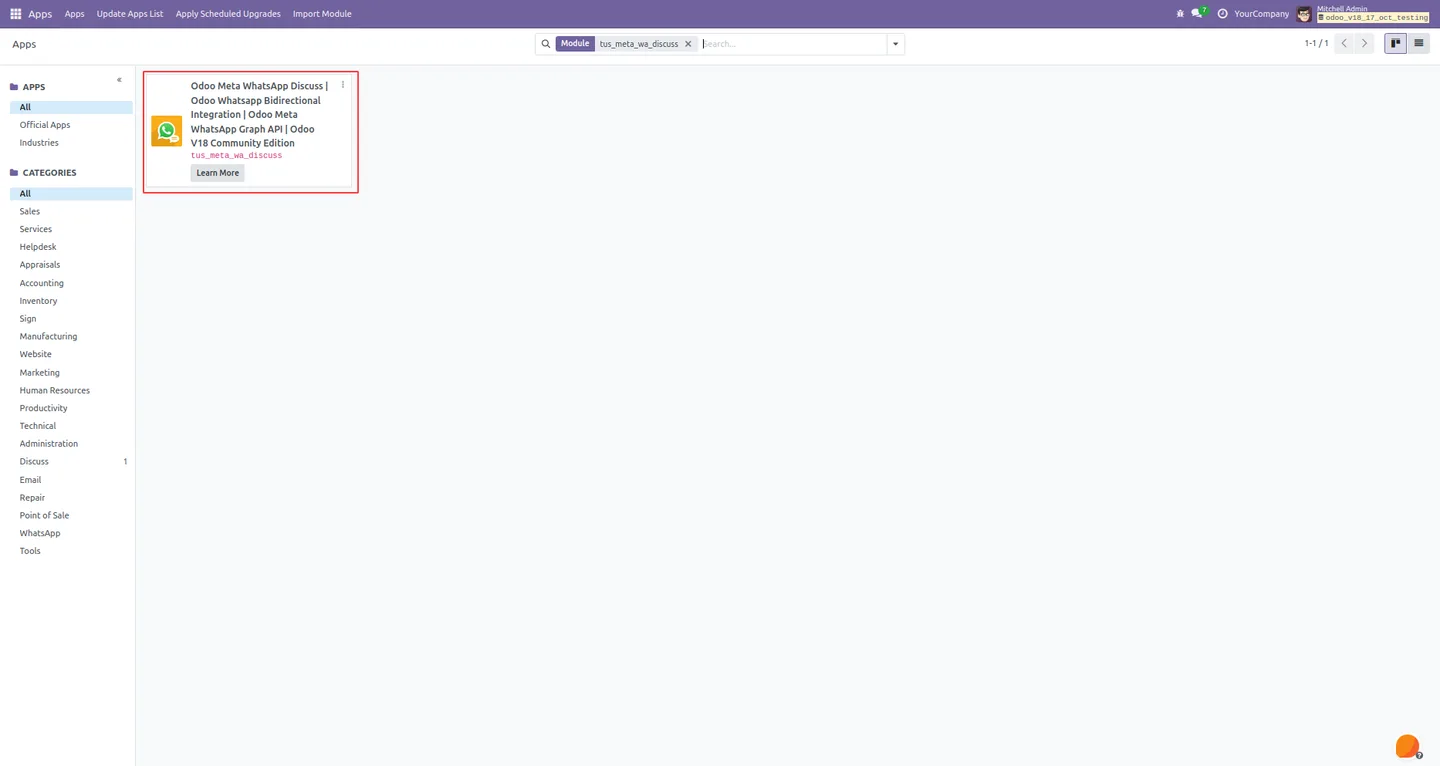
In Odoo, open Apps, remove the Apps filter, search for “WhatsApp in Discuss”, and click Install. The base WhatsApp Integration module installs alongside it as a dependency.
- 2
Connect Meta's WhatsApp Cloud API
In the base WhatsApp provider configuration, paste the Meta App ID, permanent access token, phone number ID, and WhatsApp Business Account ID, then verify the webhook callback URL and verify token.
- 3
Sync templates and phone numbers
Use the Get WhatsApp Templates and Get Phone Number actions to pull your approved templates and registered numbers from Meta into Odoo.
- 4
Enable the Send WhatsApp button
Under Configuration, choose which document chatters expose the Send WhatsApp action — for example sales orders, leads, or helpdesk tickets — so reps trigger conversations from real records.
- 5
Add agents
From any WhatsApp channel's Agents tab, add the users who should receive and reply to customer messages. Multiple agents can share a single conversation.
- 6
Start chatting
Open Discuss, pick a WhatsApp channel, and send or reply. Outbound messages show tick indicators and any media or templates you send are stored on the conversation.
Frequently asked questions
-
Does this module need anything else to work?
Yes. It runs on top of TechUltra's WhatsApp Integration (Base) module, which holds the Meta Cloud API credentials, templates, and providers. Both modules install together from the Odoo Apps menu.
-
Which Odoo versions are supported?
The module supports Odoo 12.0, 13.0, 14.0, 15.0, 16.0, 17.0, 18.0, and 19.0, in both Community and Enterprise editions.
-
Are messages truly bidirectional?
Yes. Outgoing messages are sent through Meta's WhatsApp Cloud API and incoming customer replies — including attachments — are routed back into the matching Discuss channel in real time.
-
Can I see if a customer read my message?
Outbound messages show WhatsApp's standard tick indicators: one tick for sent, two ticks for delivered, and two blue ticks once the customer reads the message.
-
Can more than one user reply to a conversation?
Yes. Each WhatsApp channel has an Agents tab where you can add multiple users. Any added agent can read history and reply to the customer from Discuss.
-
Can I send pre-approved WhatsApp templates from Discuss?
Yes. The right-hand sidebar lists every approved template synced from Meta. Pick one and send it to start a new conversation or reopen one outside the 24-hour reply window.
-
Can I trigger WhatsApp from a sales order or lead?
Yes. A Send WhatsApp action can be enabled on any document's chatter, so sales, support, and operations teams kick off conversations from the exact record they are working on.
-
Is support included?
Yes. The module includes 90 days of bug-fix support, Monday to Friday (10:00–19:00 IST). Raise a ticket at support@techultra.in.
Listing verified against the Odoo App Store:
Related solutions
Whole-platform solutions that complement WhatsApp in Discuss.
WhatsApp ↔ Odoo Integration
Connect WhatsApp to Odoo: two-way WhatsApp Business API sync, order and invoice messages, payment links and one shared team inbox. Free demo from a Gold Partner.
AI WhatsApp Chatbot
LLM-powered WhatsApp chatbot grounded in your Odoo data. Handles ordering, support, FAQs, and lead qualification with human-agent escalation.
Odoo WhatsApp Push Notifications
Real-time WhatsApp push notifications in Odoo — web, Android, iOS. Customer names in Discuss instead of phone numbers. Compatible with Odoo 17 and 18.
Related services
Get the most out of this module with senior TechUltra consultants.
Odoo Customization Services
Odoo customization from a Gold Partner: custom modules, workflows, reports and Studio changes, written upgrade-safe and quoted at a fixed scope. Free scoping call.
Hire Odoo Developers
Hire certified Odoo developers from a Gold Partner: one developer or a team, full-time or part-time, 70–160 hours a month. Silver, Gold or Platinum plan, free trial.
Odoo Support Services & Maintenance
Odoo support services from a Gold Partner: functional and technical support plus server cover for Enterprise and Community, 30-minute P1 response, 24/7 option.







