
Odoo App · WhatsApp & Messaging
WhatsApp Chatbot (Community)
Script-driven WhatsApp chatbots that create leads, tickets, and hand off to agents inside Odoo.
Overview
WhatsApp Chatbot (Community) adds rule-based conversation automation to TechUltra's WhatsApp stack. You design the chatbot as a tree of steps — each step a message, template, or action — and the engine walks every incoming WhatsApp conversation through the script using the Meta WhatsApp Cloud API.
Built by TechUltra Solutions, the module runs inside Odoo Community and reuses the WhatsApp in Discuss interface, so customer replies appear in the same Discuss channels your human agents already use. When a customer needs help a bot cannot give, the chatbot hands off to an assigned operator and the conversation continues with a real person.
Bots are not just call-and-response. Steps can fire Odoo actions tied to any model — create a CRM lead, open a helpdesk ticket, attach data to a partner — so the bot turns a WhatsApp conversation into structured records in the ERP. Multiple bots can run per company in a multi-company database, and each can be activated or deactivated in a single click.
Key features
-
Step-based chatbot scripts
Design conversations as a tree of steps with parent-child links. Each step can be a plain message, a WhatsApp template, or an Odoo action — and the bot walks customers through the tree based on their replies.
-
Automated messages and templates
Send approved WhatsApp templates and free-text messages on the Meta WhatsApp Cloud API, complete with media, so the bot can deliver brochures, pricing, or confirmations without human input.
-
Built-in Odoo actions
Bind steps to actions on any Odoo model — create a CRM lead from a qualifying answer, raise a helpdesk ticket from a complaint, or update a partner record — directly from the conversation.
-
Human handoff to agents
Assign one or more operators to the chatbot. When the script reaches an escalation step or the customer asks for a human, the conversation is handed off to a live agent in Discuss.
-
Multiple chatbots, multi-company
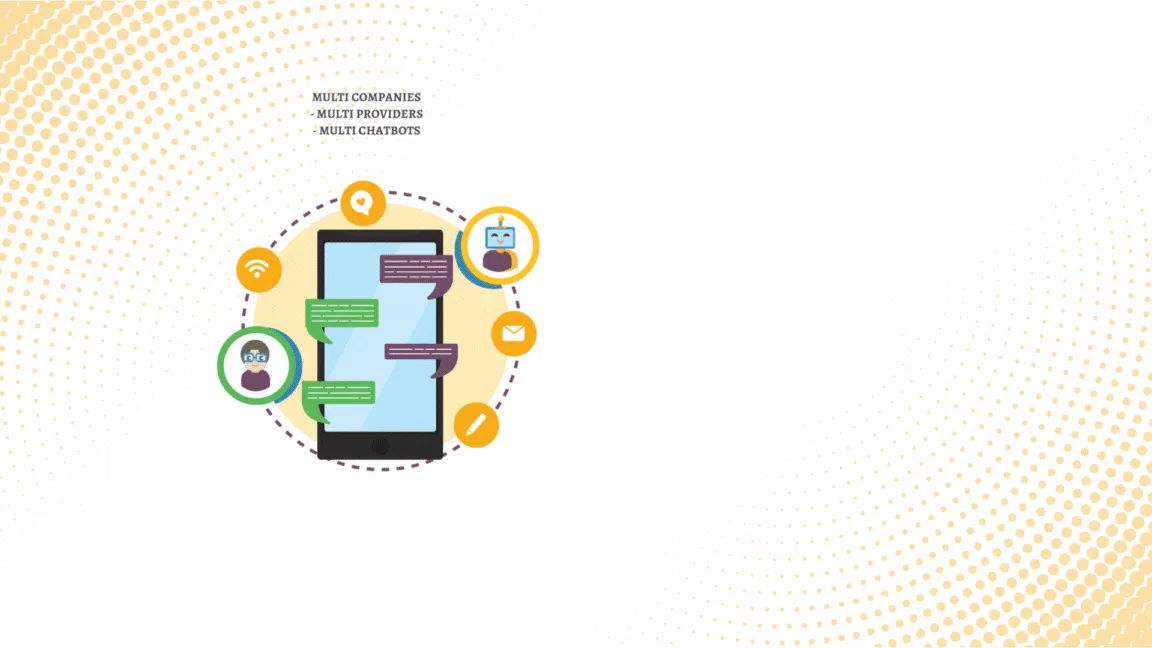
Run several chatbots in parallel — for example one per brand, language, or product line — and scope them to specific companies in a multi-company database.
-
One-click activate and deactivate
Each bot is enabled or disabled with a single toggle, so you can pause automation for maintenance, holidays, or template approvals without uninstalling anything.
-
Discuss-integrated chat history
Every bot conversation lands in Odoo Discuss channels and on the customer's chatter, so support and sales teams see the full WhatsApp history alongside their other communication.
-
Channel-based monitoring
Conversations are organised into channels you can search and filter, so supervisors review specific bot flows and intervene on the ones that need attention.
WhatsApp Chatbot (Community) in Odoo
Every screen, in the order you meet it — configuration first, then the module in use.




Technical details
Specification
- Publisher
- TechUltra Solutions Private Limited
- Technical name
- odoo_whatsapp_chatbot
- Odoo versions
- 12.0, 13.0, 14.0, 15.0, 16.0, 17.0, 18.0, 19.0
- Lines of code
- 11,547
- License
- Odoo Proprietary License v1.0 (OPL-1)
- Price
- $227 (one-time)
Deployment
- Odoo Online
- Odoo.sh
- On-premise
Odoo dependencies
- CRM
- Calendar
- Contacts
- Discuss
- WhatsApp Integration (Base)
- WhatsApp in Discuss
Support
90 days of bug-fix support, Monday to Friday (10:00–19:00 IST). Raise a ticket at support@techultra.in.
Setup & configuration
From install to first call — here is the path.
- 1
Install the module
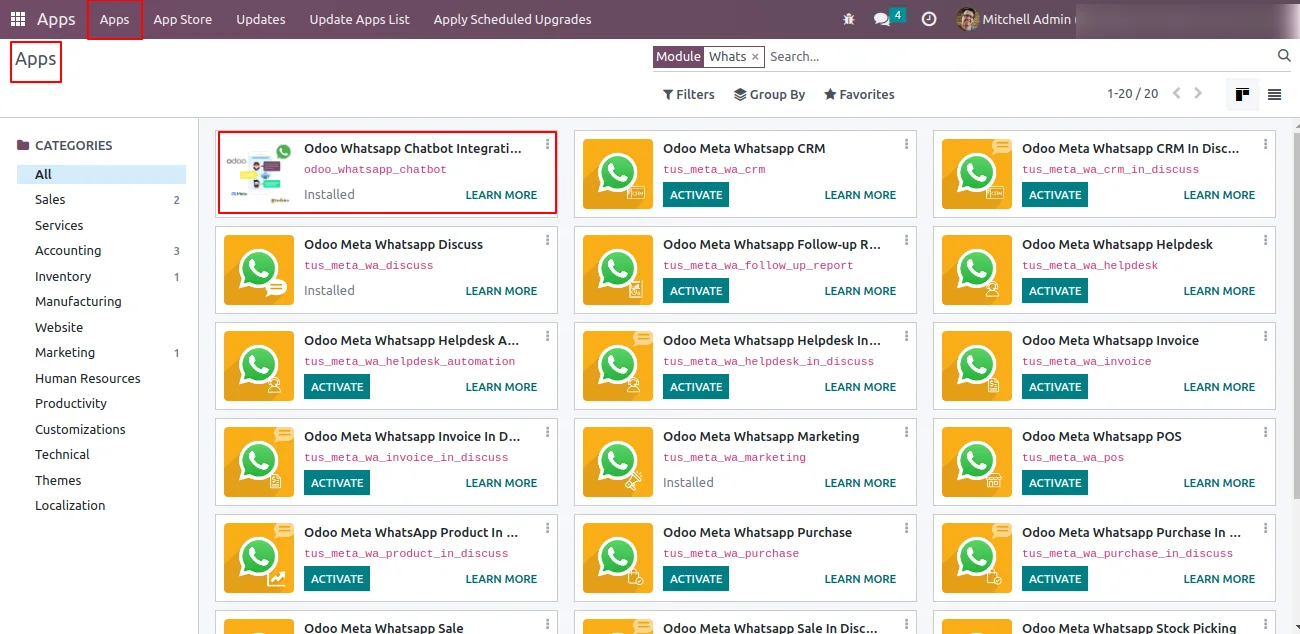
In Odoo, open Apps, remove the Apps filter, search for “WhatsApp Chatbot”, and click Install. The WhatsApp Integration (Base) and WhatsApp in Discuss modules install alongside it as dependencies.
- 2
Create a chatbot
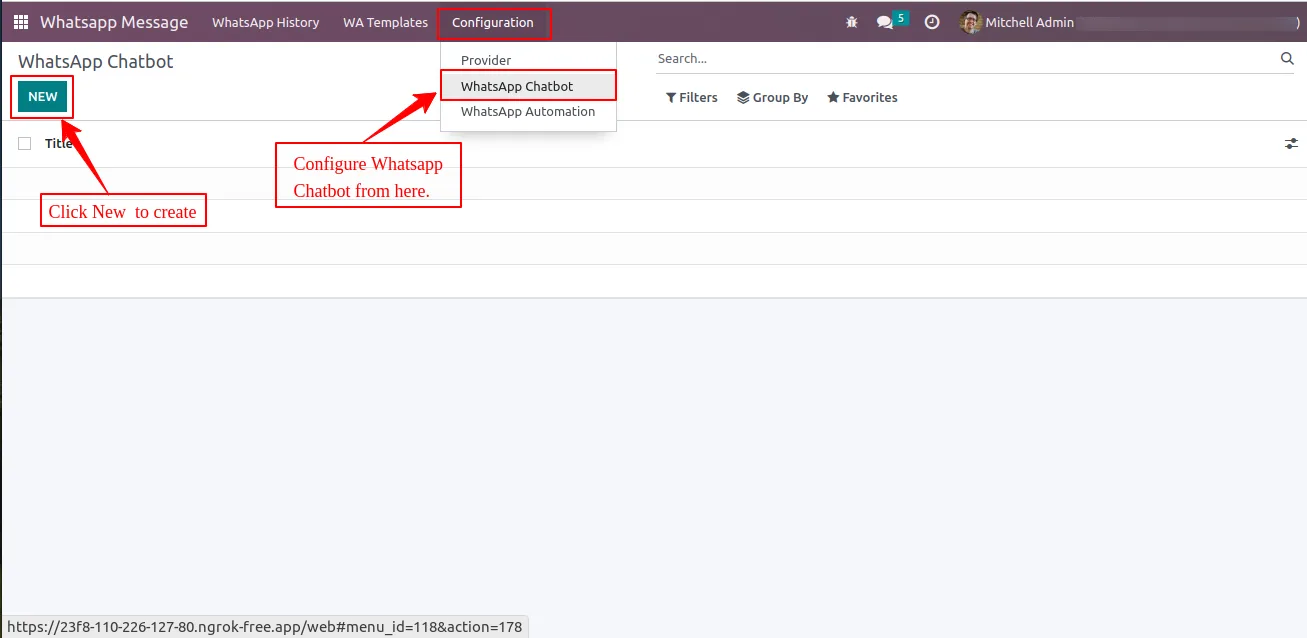
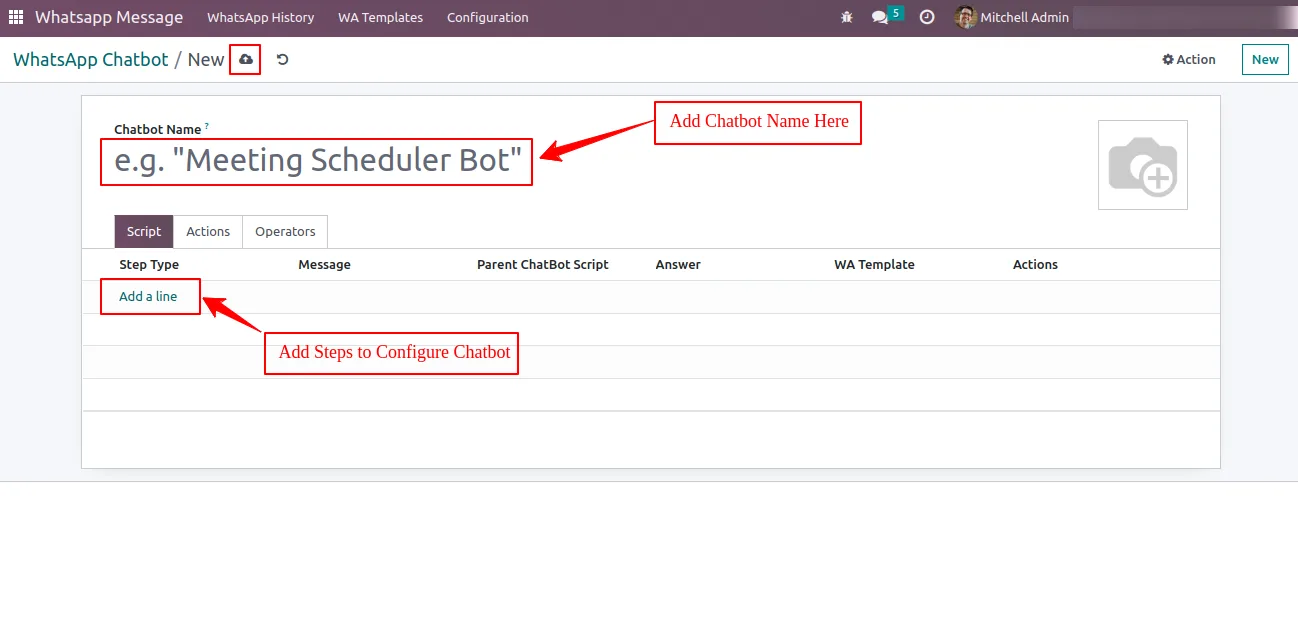
Go to WhatsApp Meta Graph API → Configuration → WhatsApp Chatbot and click New. Give the bot a descriptive name — for example “Sales pre-qualifier” or “Support triage”.
- 3
Build the conversation script
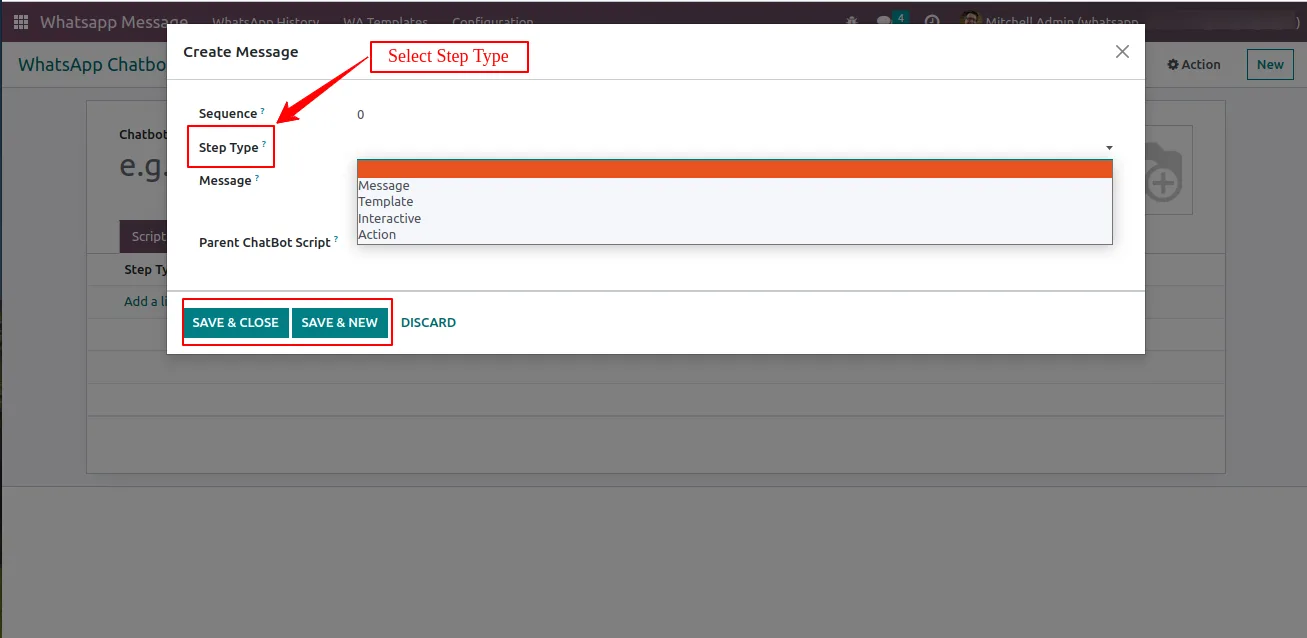
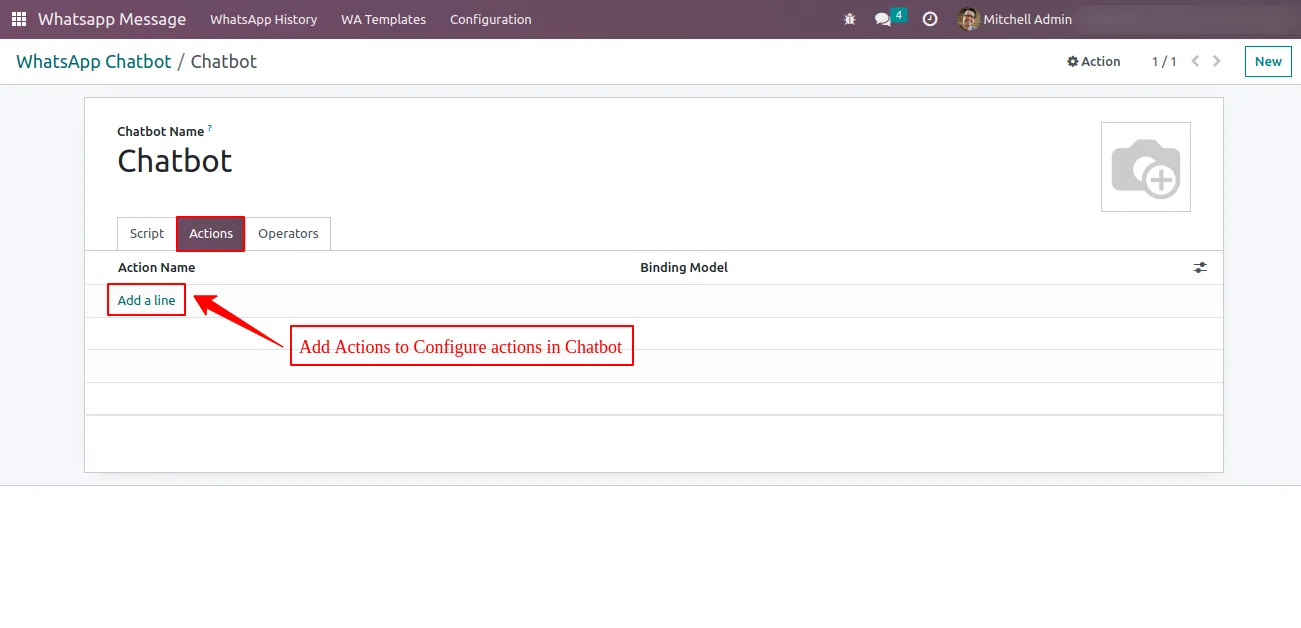
Add steps one at a time. For each step, choose the step type, paste the message the bot should react to, then add the reply, the WhatsApp template, or the action that should fire.
- 4
Link steps and define actions
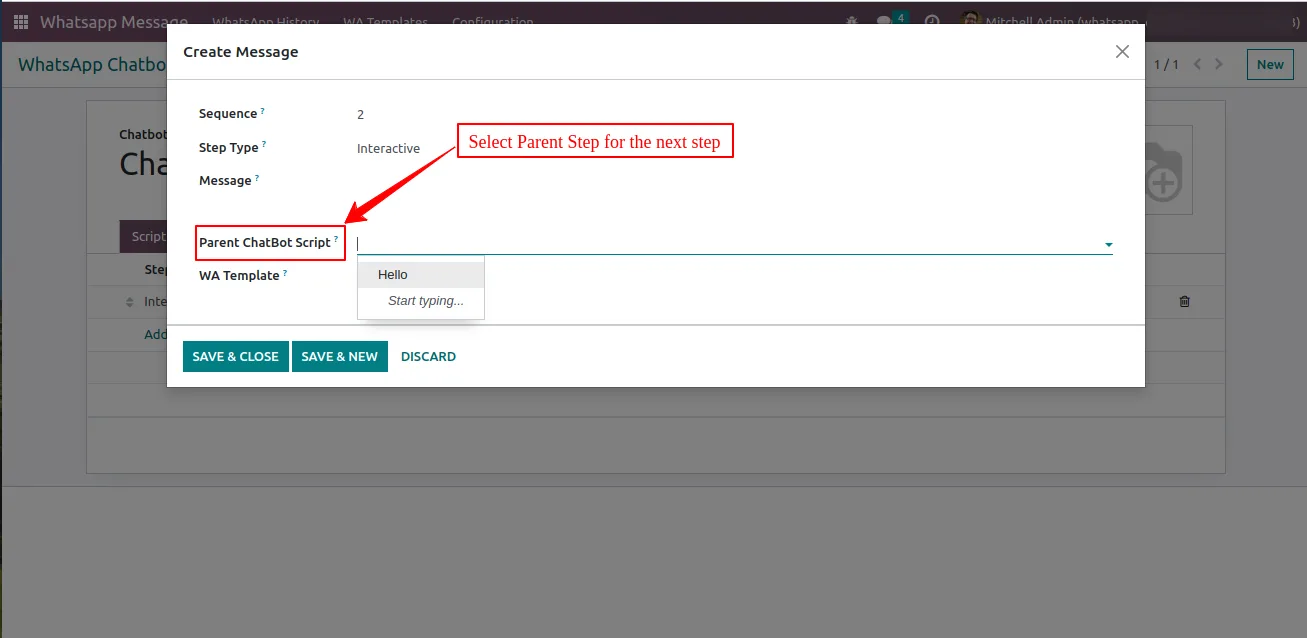
Set the parent message on each step to wire the tree together. For action steps, name the action and pick the Odoo model — for example crm.lead or helpdesk.ticket — that the bot should create or update.
- 5
Add operators
Assign one or more users as chatbot operators. Conversations escalated to humans are auto-routed to the assigned operators in Discuss.
- 6
Activate and monitor
Add the bot in WhatsApp Settings to make it live, then watch its history under the chatbot record. Use the channel list to drill into specific conversations.
Frequently asked questions
-
What does this chatbot do?
It runs a script-driven WhatsApp bot on top of Meta's WhatsApp Cloud API inside Odoo. The bot replies to customers automatically, sends templates and media, performs Odoo actions like creating CRM leads or helpdesk tickets, and hands the conversation to a human agent when needed.
-
Which Odoo versions are supported?
The module supports Odoo 12.0, 13.0, 14.0, 15.0, 16.0, 17.0, 18.0, and 19.0, in both Community and Enterprise editions.
-
Do I need other TechUltra modules to use it?
Yes. The chatbot depends on the WhatsApp Integration (Base) module for the Meta Cloud API connection and the WhatsApp in Discuss module for the inbox. Both install automatically as dependencies.
-
Can the bot create CRM leads or helpdesk tickets?
Yes. Steps can be bound to actions on any Odoo model, so a qualifying answer creates a crm.lead, a complaint opens a helpdesk.ticket, or any custom record is updated as the script runs.
-
How does the handoff to a human agent work?
Each chatbot has assigned operators. When the script reaches an escalation step or the customer asks for help, the conversation is routed to those operators in Discuss and the bot stops responding.
-
Can I run more than one chatbot?
Yes. You can run multiple bots in parallel — for example one per language, brand, or product line — and scope each to specific companies in a multi-company database.
-
Can I pause a chatbot without uninstalling it?
Yes. Each bot has a one-click activate and deactivate toggle, useful for maintenance, holidays, or while waiting on WhatsApp template approvals.
-
Where do I see what the bot has been doing?
Every bot conversation is logged as a channel in Odoo Discuss and on the customer's chatter. The chatbot record also exposes a chat history view filtered by channel.
Listing verified against the Odoo App Store:
Related solutions
Whole-platform solutions that complement WhatsApp Chatbot (Community).
WhatsApp ↔ Odoo Integration
Connect WhatsApp to Odoo: two-way WhatsApp Business API sync, order and invoice messages, payment links and one shared team inbox. Free demo from a Gold Partner.
AI WhatsApp Chatbot
LLM-powered WhatsApp chatbot grounded in your Odoo data. Handles ordering, support, FAQs, and lead qualification with human-agent escalation.
Odoo WhatsApp Push Notifications
Real-time WhatsApp push notifications in Odoo — web, Android, iOS. Customer names in Discuss instead of phone numbers. Compatible with Odoo 17 and 18.
Related services
Get the most out of this module with senior TechUltra consultants.
Odoo Customization Services
Odoo customization from a Gold Partner: custom modules, workflows, reports and Studio changes, written upgrade-safe and quoted at a fixed scope. Free scoping call.
Hire Odoo Developers
Hire certified Odoo developers from a Gold Partner: one developer or a team, full-time or part-time, 70–160 hours a month. Silver, Gold or Platinum plan, free trial.
Odoo Support Services & Maintenance
Odoo support services from a Gold Partner: functional and technical support plus server cover for Enterprise and Community, 30-minute P1 response, 24/7 option.







