

Odoo App · Productivity
TUS Web List View
Make attrs-based invisible conditions actually work on buttons in Odoo 10 tree views.

Overview
TUS Web List View fixes a long-standing Odoo 10 limitation: attrs conditions on button elements inside tree (list) views simply did not work. Developers could declare attrs="{'invisible': [('state', '=', 'done')]}" on a tree-view button and it would be ignored at render time — every row showed every button.
Built by TechUltra Solutions, this module patches the web client so attrs are evaluated per row. The result is a list view where action buttons appear only on the rows where they make sense — a much cleaner UX than scattered no-op buttons or post-click error dialogs.
It is a small front-end patch with no new menus, no configuration, and no impact on form views, where attrs already worked correctly. Install it, refresh the browser, and existing tree-view buttons start respecting their declared conditions.
Key features
-
attrs invisible on tree-view buttons
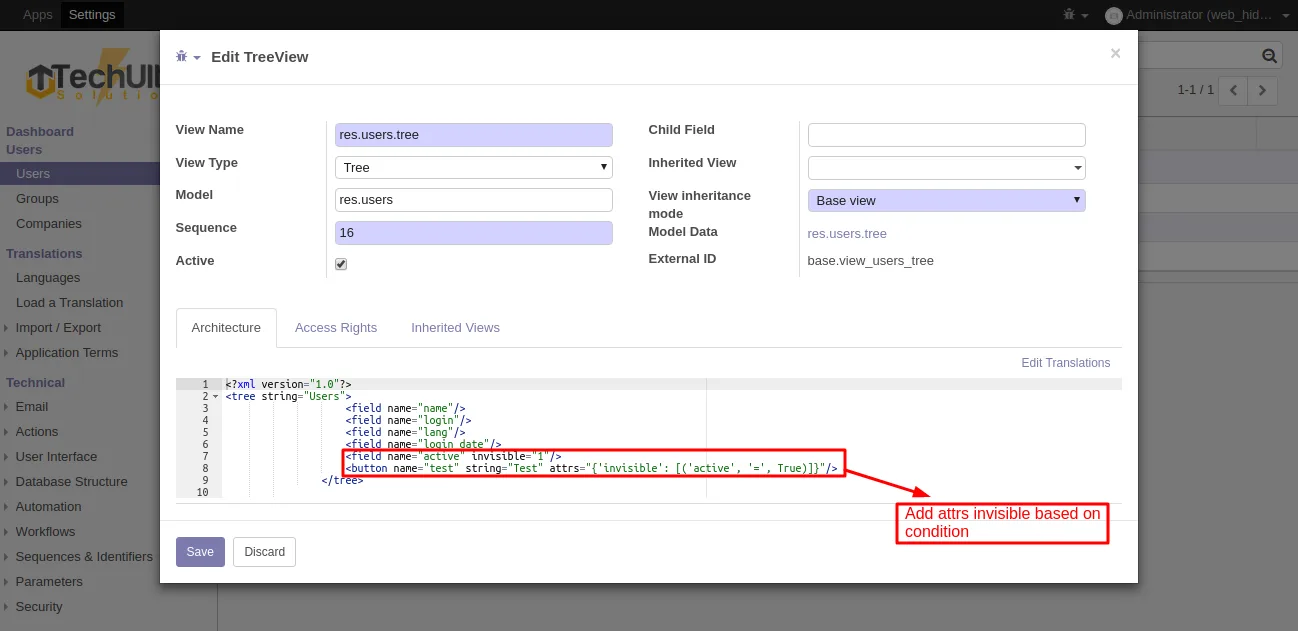
Buttons declared inside <tree> views with attrs="{'invisible': [...]}" now hide row-by-row based on the record's field values, instead of always rendering.
-
Per-row evaluation
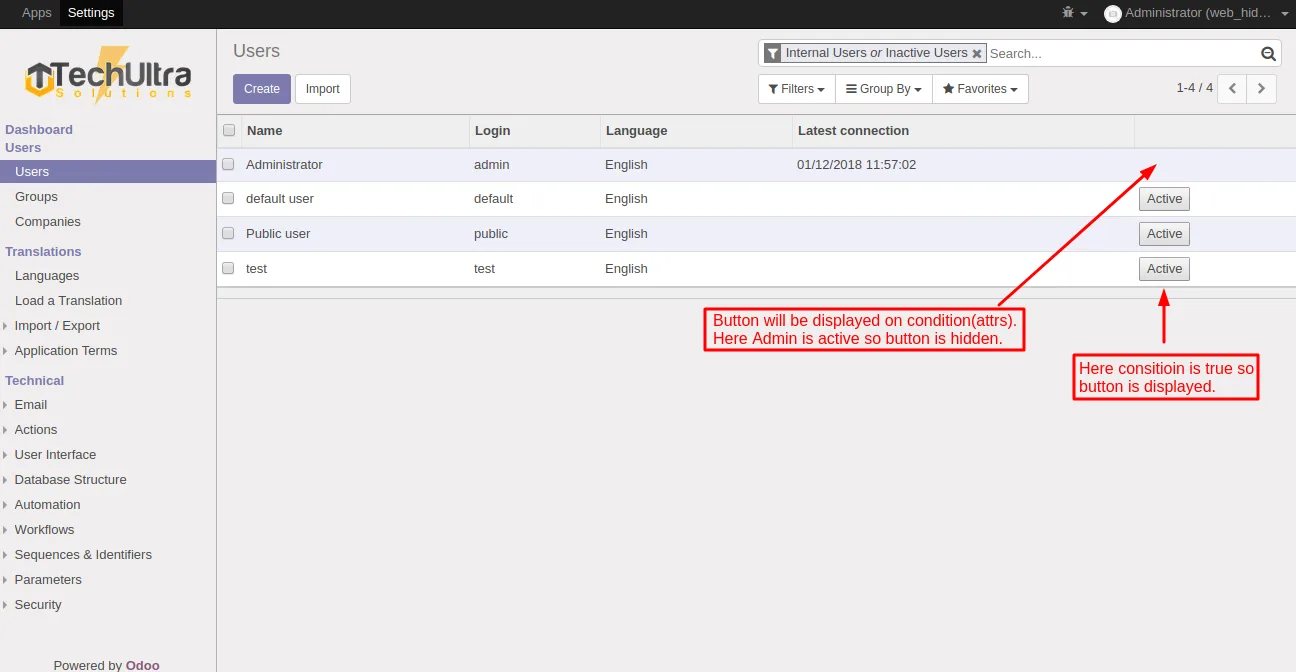
Each row's data is checked independently, so the same column can show the button on one record and hide it on the next — matching how form views already behave.
-
Cleaner list views
Action buttons stop appearing on records they do not apply to. Users see only the operations that are valid for each row, which cuts accidental clicks and error dialogs.
-
Works with existing XML
Standard Odoo XML — no new attribute, no proprietary tag. Move your existing form-view attrs syntax onto tree-view buttons and they start working.
-
No data model changes
The module patches the web client only. There are no new fields, no migrations, and no impact on database schema or stored data.
-
Targeted at Odoo 10
Built specifically for Odoo 10.0 Community and Enterprise, where the tree-view button attrs gap was most visible.
-
Zero configuration
There are no settings, menus, or permissions to manage. Install the module and the new render behaviour applies everywhere.
TUS Web List View in Odoo
Every screen, in the order you meet it — configuration first, then the module in use.
Technical details
Specification
- Publisher
- TechUltra Solutions Private Limited
- Technical name
- web_hide_button_in_tree
- Odoo versions
- 10.0
- Lines of code
- —
- License
- Odoo Proprietary License v1.0 (OPL-1)
- Price
- Free
Deployment
- Odoo Online
- Odoo.sh
- On-premise
Odoo dependencies
- Web
Support
90 days of bug-fix support, Monday to Friday (10:00–19:00 IST). Raise a ticket at support@techultra.in.
Setup & configuration
From install to first call — here is the path.
- 1
Install the module
In Odoo 10, open Apps, remove the Apps filter, search for “TUS Web List View”, and click Install.
- 2
Hard-refresh the web client
After install, hard-refresh the browser so the patched JavaScript assets are picked up by every user session.
- 3
Add attrs to tree-view buttons
In your custom or inherited views, add attrs to <button> elements inside <tree>, for example: attrs="{'invisible': [('state', '=', 'done')]}".
- 4
Test row-by-row
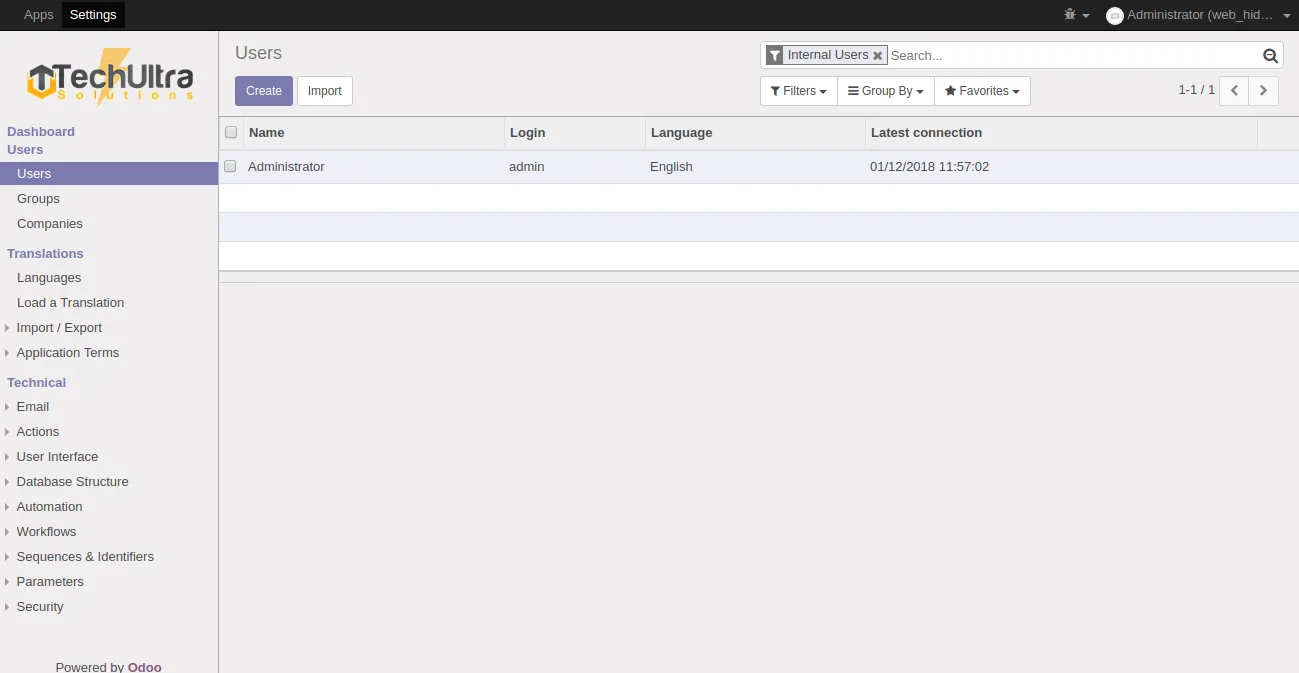
Open the affected list view and confirm the button appears only on rows where the condition is false. Records that match the invisible condition should show no button at all.
- 5
Roll out to other models
Apply the same pattern to other tree views where action buttons should appear conditionally — for example, hiding Approve on already-approved records or Cancel on completed orders.
Frequently asked questions
-
What does this module actually change?
It patches Odoo 10's web client so attrs conditions on <button> elements inside <tree> views are evaluated per row, instead of being ignored. Buttons with an invisible condition now hide row-by-row.
-
Which Odoo versions are supported?
Odoo 10.0 only, in both the Community and Enterprise editions.
-
Do I need to use a new XML attribute?
No. Use the standard attrs attribute exactly as you already do on form views — e.g. attrs="{'invisible': [('state', '=', 'done')]}". The module makes that existing syntax work on tree-view buttons.
-
Does it affect form views or other view types?
No. Form views, kanban views, and search views are unchanged. The patch is scoped to button rendering inside tree (list) views.
-
Is there any configuration after install?
None. There are no settings, no menus, and no permissions to set. Install the module, hard-refresh the browser, and existing tree-view attrs start being respected.
-
Will it conflict with my own web tweaks?
The module changes a narrow piece of list-view button rendering. If you have a custom web module that already overrides tree-view button rendering, review it first to make sure the two are compatible.
-
Is support included?
Yes. The module includes 90 days of bug-fix support, Monday to Friday, 10:00–19:00 IST.
Listing verified against the Odoo App Store:
Related services
Get the most out of this module with senior TechUltra consultants.
Odoo Customization Services
Odoo customization from a Gold Partner: custom modules, workflows, reports and Studio changes, written upgrade-safe and quoted at a fixed scope. Free scoping call.
Hire Odoo Developers
Hire certified Odoo developers from a Gold Partner: one developer or a team, full-time or part-time, 70–160 hours a month. Silver, Gold or Platinum plan, free trial.
Odoo Support Services & Maintenance
Odoo support services from a Gold Partner: functional and technical support plus server cover for Enterprise and Community, 30-minute P1 response, 24/7 option.







