
Odoo App · Productivity
Show Optional Columns
Show or hide any list column on sales orders, purchase orders, and quotations.

Overview
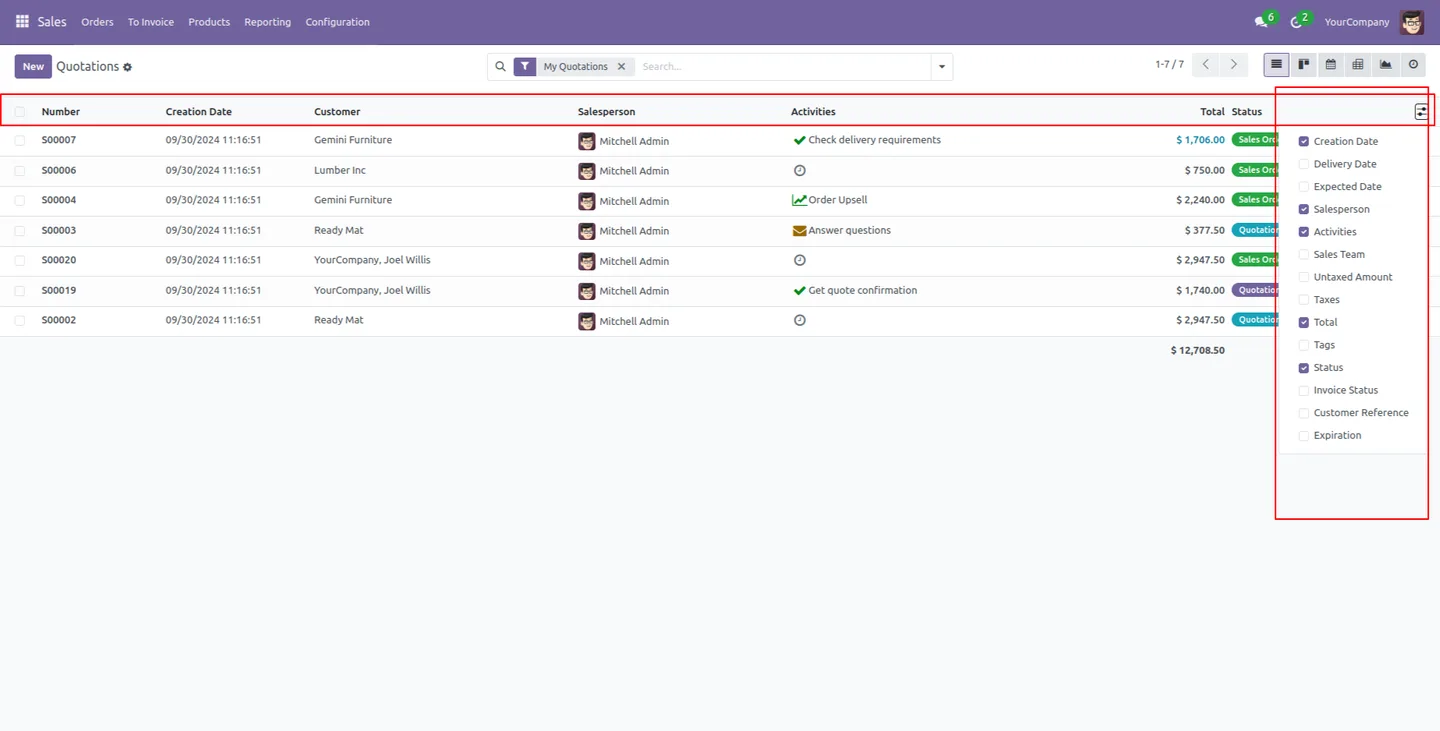
Show Optional Columns gives users control over which columns appear in Odoo list views. Odoo decides up front which columns are shown and which sit behind the optional-columns menu, and the rest cannot be toggled at all. This module removes that limit.
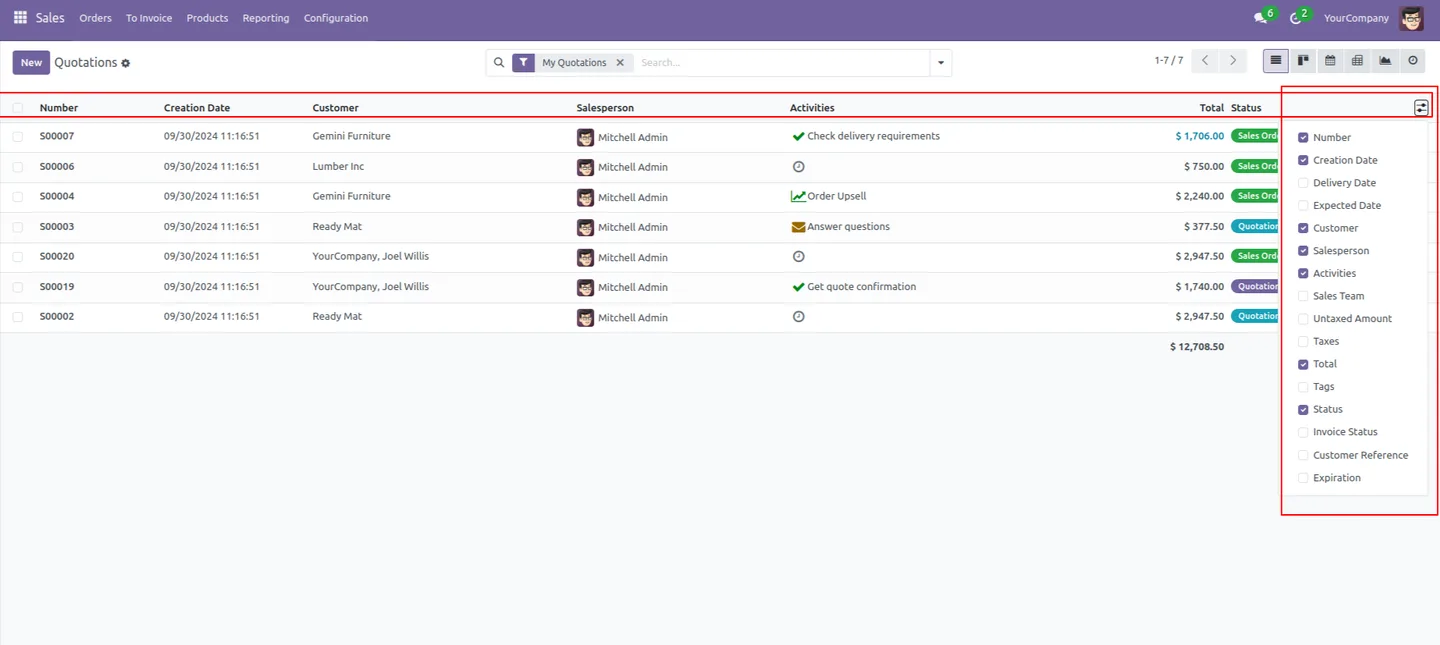
Built by TechUltra Solutions, it adds every column of a record to the show/hide menu. On a sales order, purchase order, quotation, or similar list, you can switch any field on or off to keep only the data the task needs in view.
The result is faster, cleaner data analysis. Staff see a shorter, more relevant table, managers can focus a list on the figures that matter, and the whole change is a single setting — no developer work and very little configuration.
Key features
-
Every column becomes optional
The module adds all columns of a record to the optional-columns menu, so fields Odoo would normally keep fixed can now be toggled on or off.
-
Show or hide columns on any record
Control column visibility on sales orders, purchase orders, quotations, and other list views — switch fields on and off to suit the task.
-
Keep only the columns you need
Display just the required columns and their data, so the list shows the relevant figures and nothing more.
-
Faster data analysis
A shorter, focused table makes it easier to read and compare records, helping users analyse data without distraction.
-
Time-saving day to day
Toggling columns directly in the list view saves the effort of exporting data or building custom views just to hide unwanted fields.
-
Minimal configuration
A single general setting switches the feature on. There is no per-model setup and no developer work involved.
Show Optional Columns in Odoo
Every screen, in the order you meet it — configuration first, then the module in use.
Technical details
Specification
- Publisher
- TechUltra Solutions Private Limited
- Technical name
- tus_show_optional_columns
- Odoo versions
- 16.0, 17.0, 18.0, 19.0, 20.0
- Lines of code
- 79
- License
- Odoo Proprietary License v1.0 (OPL-1)
- Price
- $21.90 (one-time)
Deployment
- Odoo Online
- Odoo.sh
- On-premise
Odoo dependencies
- Sales
- Purchase
Support
90 days of bug-fix support, Monday to Friday (10:00–19:00 IST). Raise a ticket at support@techultra.in.
Setup & configuration
From install to first call — here is the path.
- 1
Install the module
In Odoo, open Apps, remove the Apps filter, search for “Show Optional Columns”, and click Install.
- 2
Open general settings
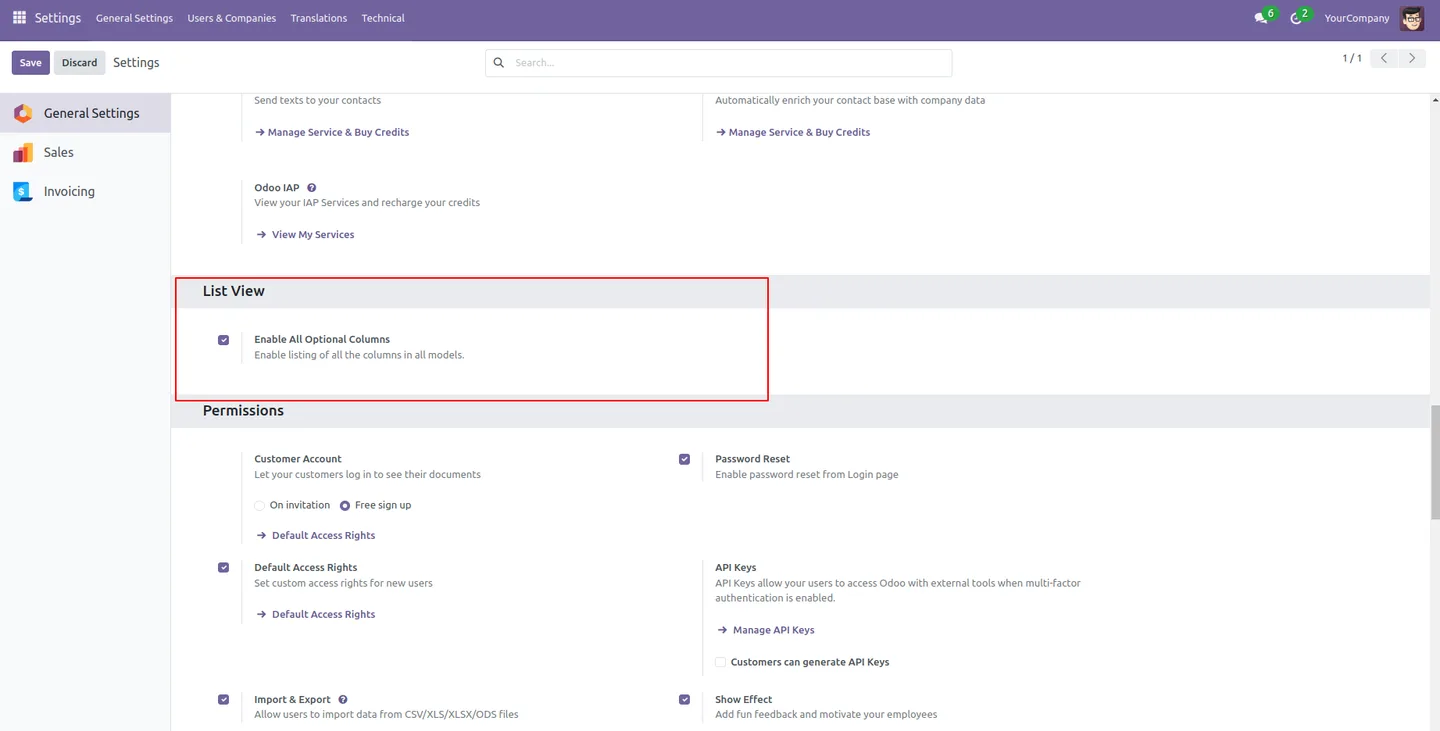
Go to Settings → General Settings and find the List view section.
- 3
Enable all optional columns
Switch on the “Enable all optional columns” option and save the settings.
- 4
Reopen the record
Open a sales order, purchase order, or quotation again so the list view reloads with every column available in the show/hide menu.
- 5
Toggle the columns you need
Use the optional-columns menu in the list view to switch fields on or off and keep only the data the task requires.
Frequently asked questions
-
What does Show Optional Columns do?
It adds every column of a list view to the optional-columns menu, so you can show or hide any field on sales orders, purchase orders, quotations, and other records.
-
How is this different from Odoo's built-in optional columns?
Odoo only lets you toggle the columns a view marks as optional. This module makes all columns optional, so fields that are normally fixed can also be switched on and off.
-
How do I turn the feature on?
Open Settings → General Settings, find the List view section, and enable the “Enable all optional columns” option. Reopen the record to see the new columns in the menu.
-
Which records does it work on?
It works on list views such as sales orders, purchase orders, and quotations, letting you control which columns appear on each.
-
Does it need much configuration?
No. A single general setting enables the feature for list views. There is no per-model setup and no developer work.
-
Which Odoo versions are supported?
The module supports Odoo 16.0, 17.0, 18.0, 19.0, and 20.0.
-
Is support included?
Yes. The module includes 90 days of bug-fix support, Monday to Friday, 10:00–19:00 IST.
Listing verified against the Odoo App Store:
Related services
Get the most out of this module with senior TechUltra consultants.
Odoo Customization Services
Odoo customization from a Gold Partner: custom modules, workflows, reports and Studio changes, written upgrade-safe and quoted at a fixed scope. Free scoping call.
Hire Odoo Developers
Hire certified Odoo developers from a Gold Partner: one developer or a team, full-time or part-time, 70–160 hours a month. Silver, Gold or Platinum plan, free trial.
Odoo Support Services & Maintenance
Odoo support services from a Gold Partner: functional and technical support plus server cover for Enterprise and Community, 30-minute P1 response, 24/7 option.







