

Odoo App · Productivity
Show/Hide Send Message Button
Hide the chatter Send Message button per user and per model across Odoo.

Overview
Show/Hide Send Message Button gives administrators control over the “Send Message” button in Odoo's chatter — the message and activity panel attached to records. By default every user with access to a record can post a message on it; this module lets you switch that off selectively.
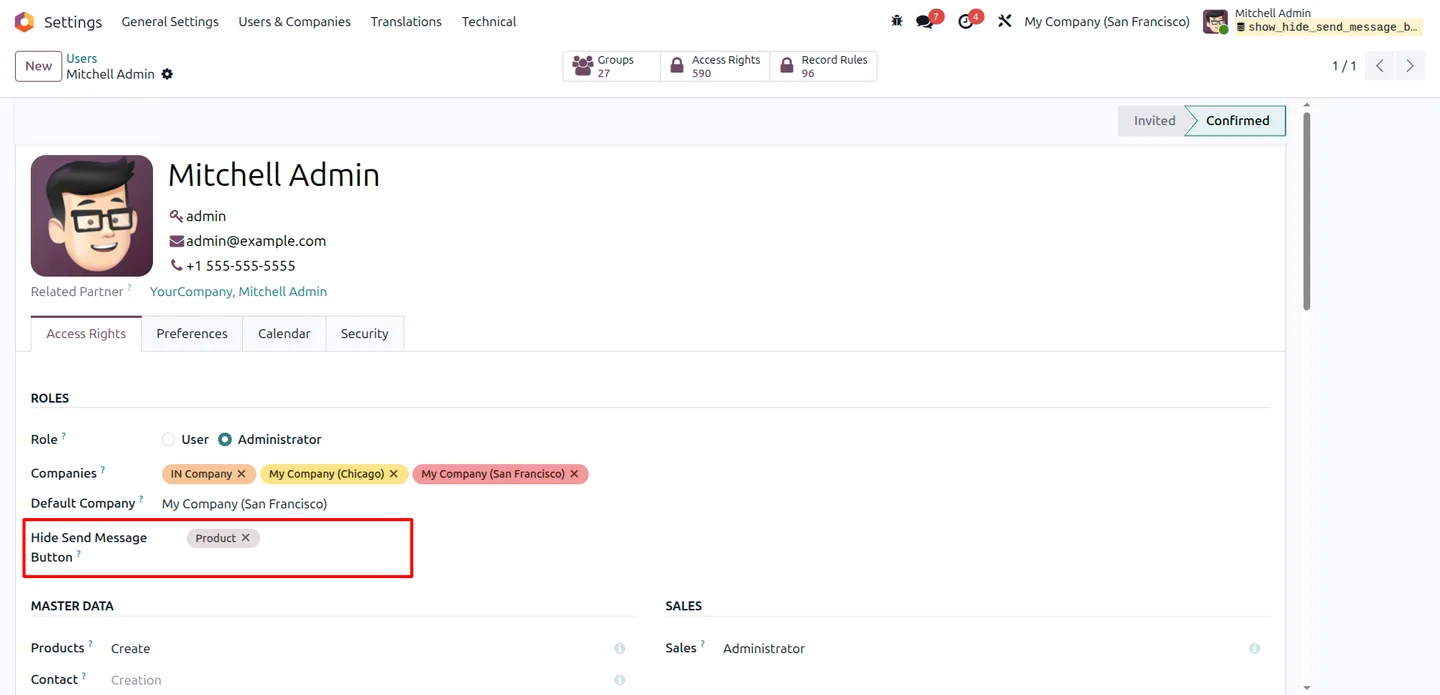
Built by TechUltra Solutions, it adds a setting on each user's profile where an administrator selects the models on which that user should not see the button. The control is per user and per model, so one person can be blocked from messaging on sales orders while still able to comment on projects.
Hiding the button limits message-sending on the records you choose, which helps keep internal communication on the channels you intend and reduces clutter in the chatter on sensitive document types. It is a small, focused module that works across Odoo 14 to 20.
Key features
-
Per-user message control
Decide which individual users may post in the chatter. The restriction is set on each user's profile, so it never affects the rest of the team.
-
Per-model targeting
Choose the exact Odoo models on which a user loses the “Send Message” button — for example, sales orders or invoices — while other record types stay unchanged.
-
Hides the button in the chatter
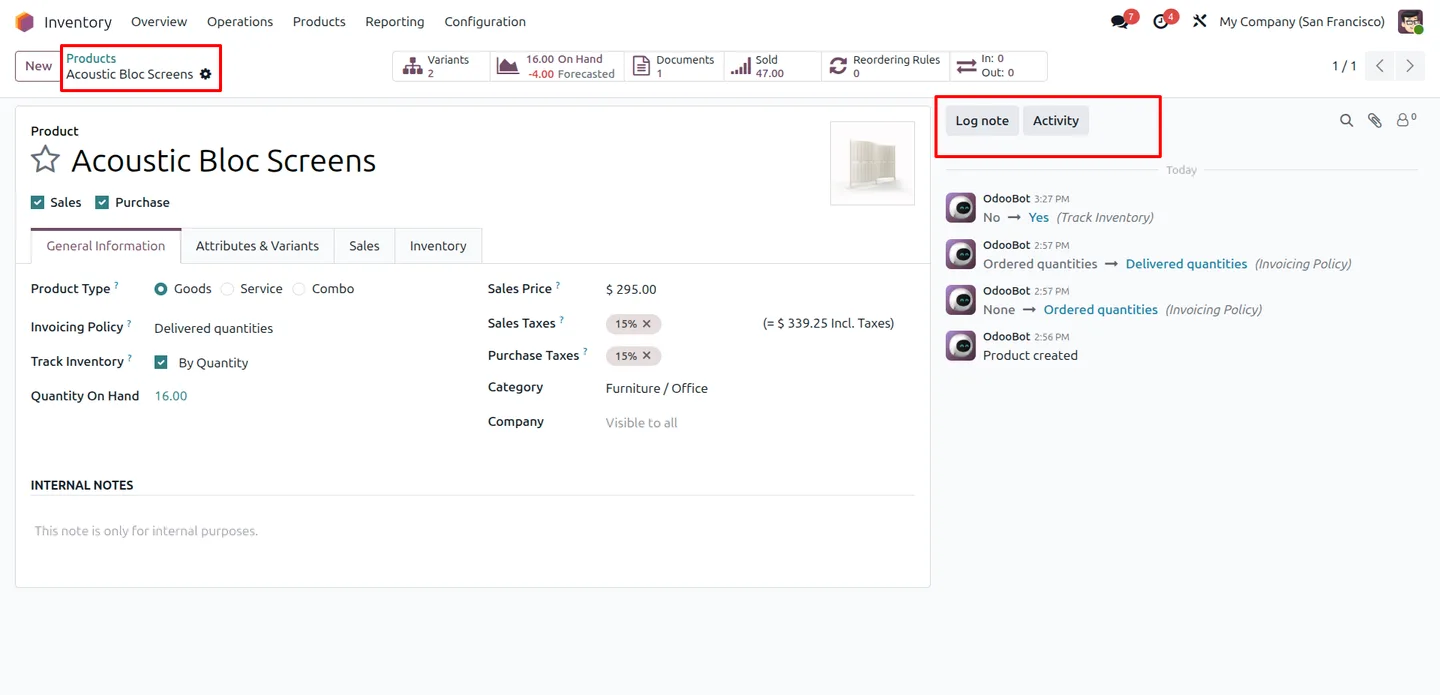
On the selected models the “Send Message” button is removed from the record's chatter, so the option is simply not there for that user.
-
Blocks message sending
With the button hidden, the affected users cannot post chatter messages on those records, keeping internal notes and discussion on the channels you intend.
-
Configured from user settings
All setup happens in Settings → Users on a single field, so there is no separate configuration screen to learn.
-
Tidier chatter on sensitive records
Removing the button on document types where messaging is not wanted keeps the chatter focused on activities and logged changes.
-
Broad Odoo version coverage
Works on Odoo 14.0, 15.0, 16.0, 17.0, 18.0, 19, and 20.0, so it fits older installs as well as the latest release.
Show/Hide Send Message Button in Odoo
Every screen, in the order you meet it — configuration first, then the module in use.
Technical details
Specification
- Publisher
- TechUltra Solutions Private Limited
- Technical name
- show_hide_send_message_button
- Odoo versions
- 14.0, 15.0, 16.0, 17.0, 18.0, 19.0, 20.0
- Lines of code
- 50
- License
- Odoo Proprietary License v1.0 (OPL-1)
- Price
- $19.89 (one-time)
Deployment
- Odoo Online
- Odoo.sh
- On-premise
Odoo dependencies
- Discuss
Support
90 days of bug-fix support, Monday to Friday (10:00–19:00 IST). Raise a ticket at support@techultra.in.
Setup & configuration
From install to first call — here is the path.
- 1
Install the module
In Odoo, open Apps, remove the Apps filter, search for “Show/Hide Send Message Button”, and click Install.
- 2
Open a user record
Go to Settings → Users and open the profile of the user whose messaging you want to restrict.
- 3
Select the models to hide the button on
In the “Hide Send Message Button” field, choose the models where that user should not see the chatter “Send Message” button.
- 4
Save and repeat
Save the user record. Configuration is per user, so repeat the steps for each user you want to restrict.
- 5
Verify the change
Have the user open a record on one of the selected models and confirm the “Send Message” button no longer appears.
Frequently asked questions
-
What does this module change in Odoo?
It lets an administrator hide the “Send Message” button in the chatter for specific users on specific models, so those users cannot post chatter messages on the chosen record types.
-
Is the restriction per user or system-wide?
It is per user. The setting lives on each user's profile, so restricting one person does not affect anyone else.
-
Can I restrict only certain models?
Yes. In the user's “Hide Send Message Button” field you pick the exact models — for example, sales orders or invoices — and the button is hidden only on those.
-
Where do I configure it?
All configuration is in Settings → Users on the “Hide Send Message Button” field. There is no separate configuration menu.
-
Does it also block logging internal notes?
The module targets the “Send Message” button. Setup is quick, so test on a sample record to confirm the chatter behaves the way your team needs before rolling it out widely.
-
Which Odoo versions are supported?
The module supports Odoo 14.0, 15.0, 16.0, 17.0, 18.0, 19.0, and 20.0, in both the Community and Enterprise editions.
-
Do I have to configure every user one by one?
Yes. Because the restriction is per user, you set the “Hide Send Message Button” field on each user record you want to control.
-
Is support included?
Yes. The module includes 90 days of bug-fix support, Monday to Friday, 10:00–19:00 IST.
Listing verified against the Odoo App Store:
Related services
Get the most out of this module with senior TechUltra consultants.
Odoo Customization Services
Odoo customization from a Gold Partner: custom modules, workflows, reports and Studio changes, written upgrade-safe and quoted at a fixed scope. Free scoping call.
Hire Odoo Developers
Hire certified Odoo developers from a Gold Partner: one developer or a team, full-time or part-time, 70–160 hours a month. Silver, Gold or Platinum plan, free trial.
Odoo Support Services & Maintenance
Odoo support services from a Gold Partner: functional and technical support plus server cover for Enterprise and Community, 30-minute P1 response, 24/7 option.







