
Odoo App · Productivity
Sequence Date Offset
Build Odoo document numbers from offset dates with custom prefixes and suffixes.

Overview
Sequence Date Offset extends how Odoo numbers documents. Odoo sequences already support date placeholders like the current year and month in a prefix or suffix, but those always use today's date — there is no built-in way to base a number on a shifted date.
Built by TechUltra Solutions, the module adds date-offset placeholders to the sequence configuration. Expressions such as %(year+X)s, %(month+X)s, and %(day+X)s let a prefix or suffix use a date that is a set number of years, months, or days ahead of or behind the document date.
Everything is configured from the standard Sequences screen — you set the prefix and suffix on a sequence record, with no coding required. It is aimed at businesses whose numbering has to follow a fiscal year or a forward-dated scheme that the default placeholders cannot express.
Key features
-
Date-offset placeholders
Add a fixed offset to the year, month, or day used in a sequence, so a document number can reflect a date other than today's.
-
Offset expressions in prefix and suffix
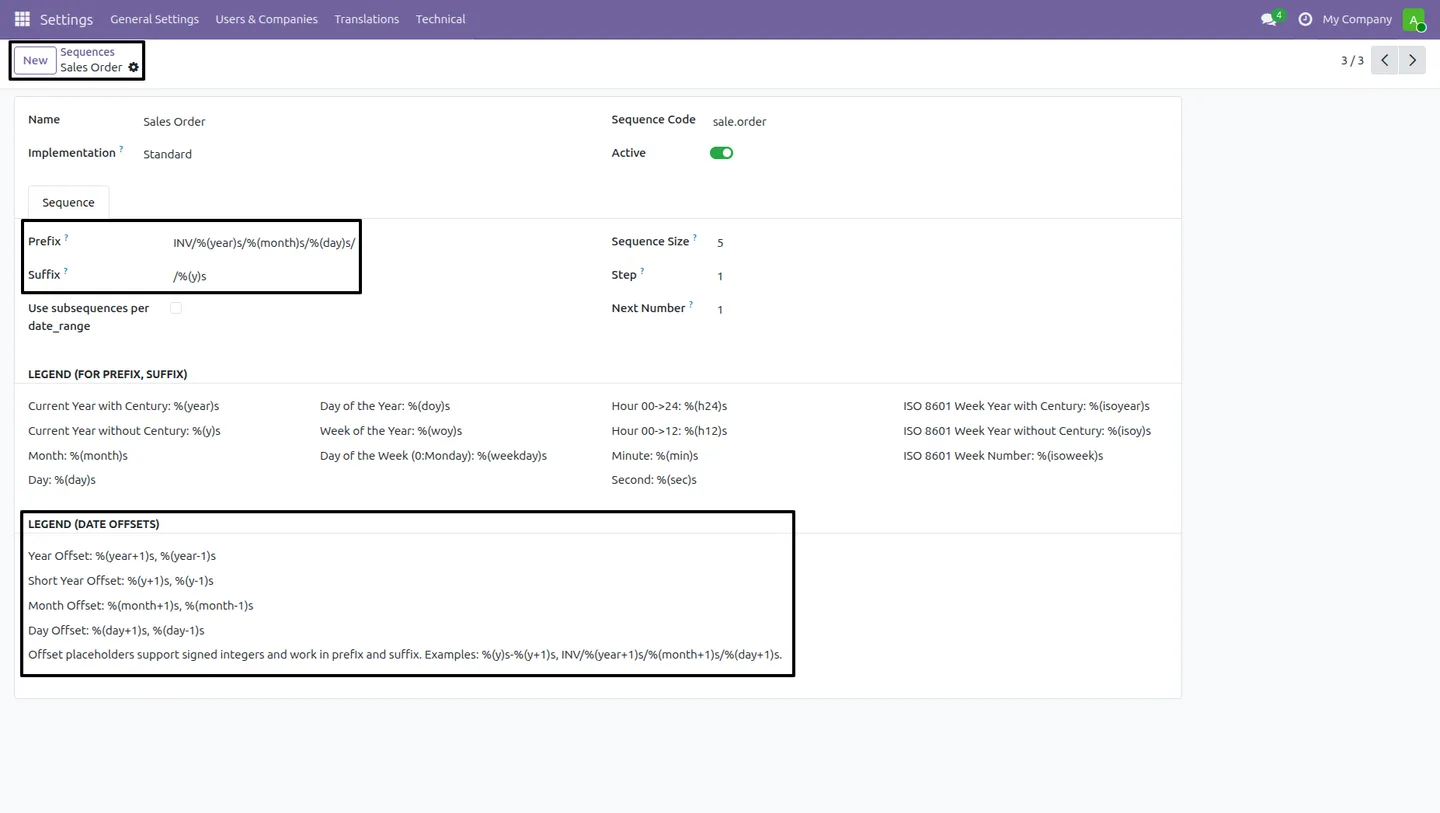
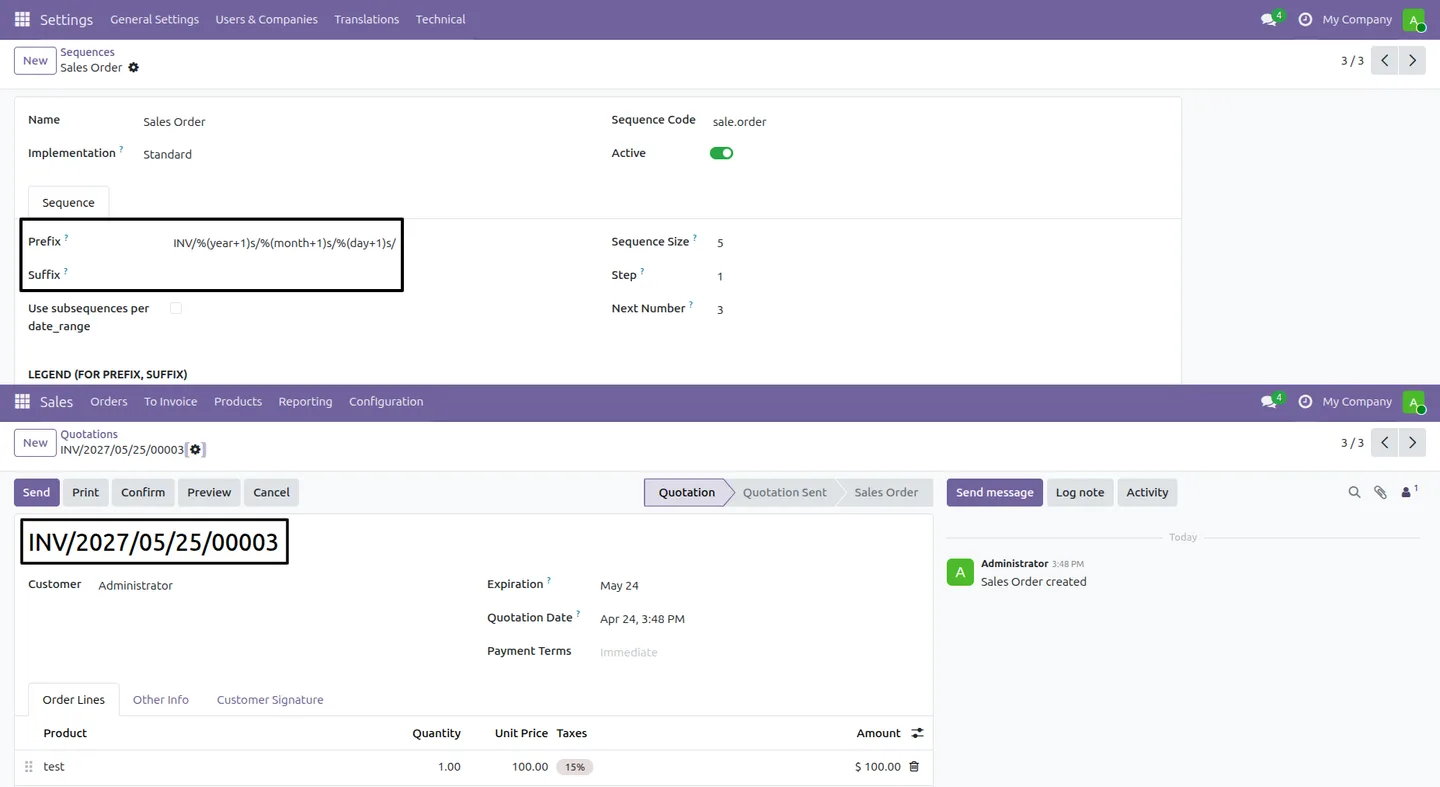
Use expressions such as %(year+X)s, %(month+X)s, and %(day+X)s in a sequence prefix or suffix, where X is the number of years, months, or days to shift.
-
Increase or decrease the date
Offsets can move the date forward or backward, so numbering can run ahead of or behind the document date as the business needs.
-
Custom prefixes and suffixes
Combine the date-offset placeholders with fixed text to build flexible prefix and suffix formats for any document sequence.
-
Fiscal-year friendly numbering
Because the year can be offset, sequence numbers can follow a fiscal year that does not match the calendar year without manual changes.
-
Configured from the sequence form
All settings live on the standard Sequences screen in Odoo, so the placeholders are added the same way you already edit a sequence.
-
No coding required
The offset placeholders are entered directly in the sequence configuration, so there is no need to write or change any Python code.
-
Works alongside standard sequences
The module extends the existing sequence engine rather than replacing it, so it integrates with current Odoo workflows and existing sequences.
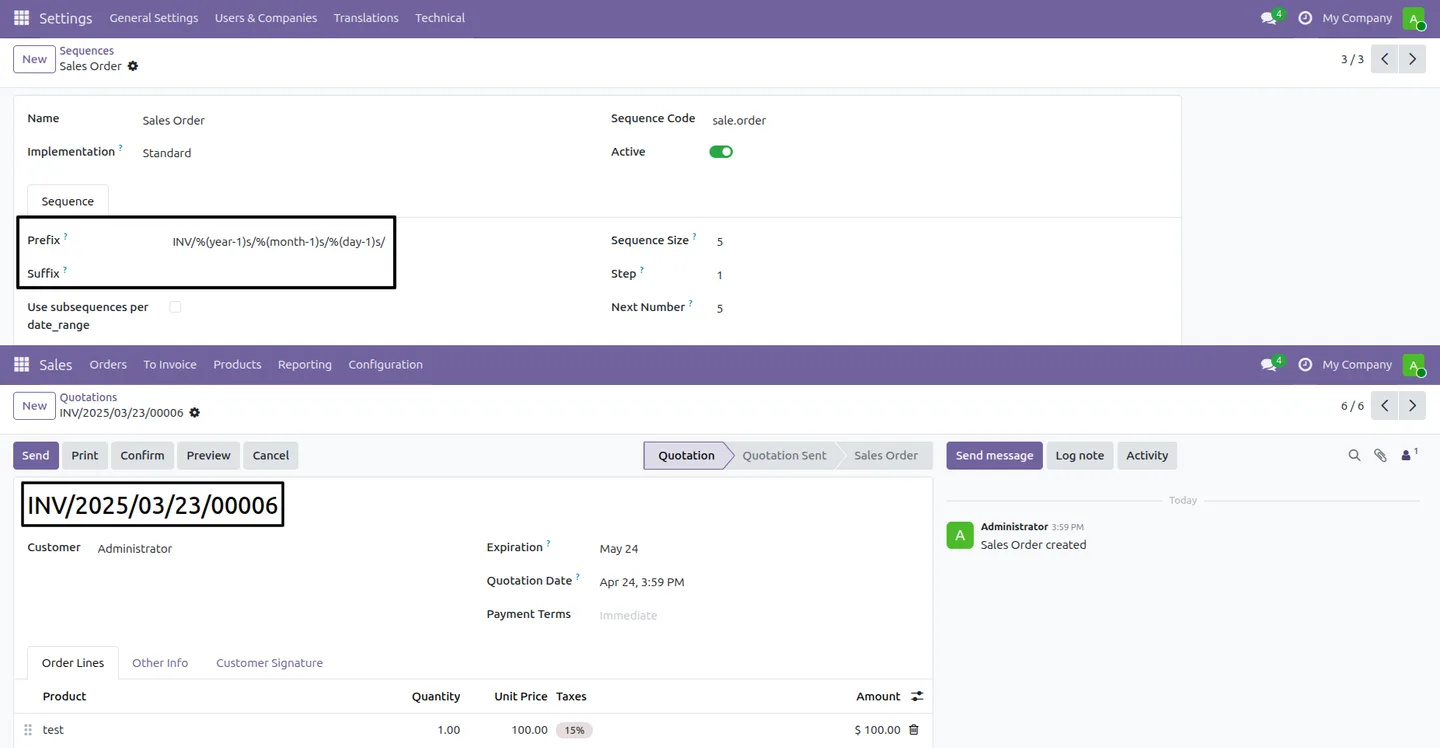
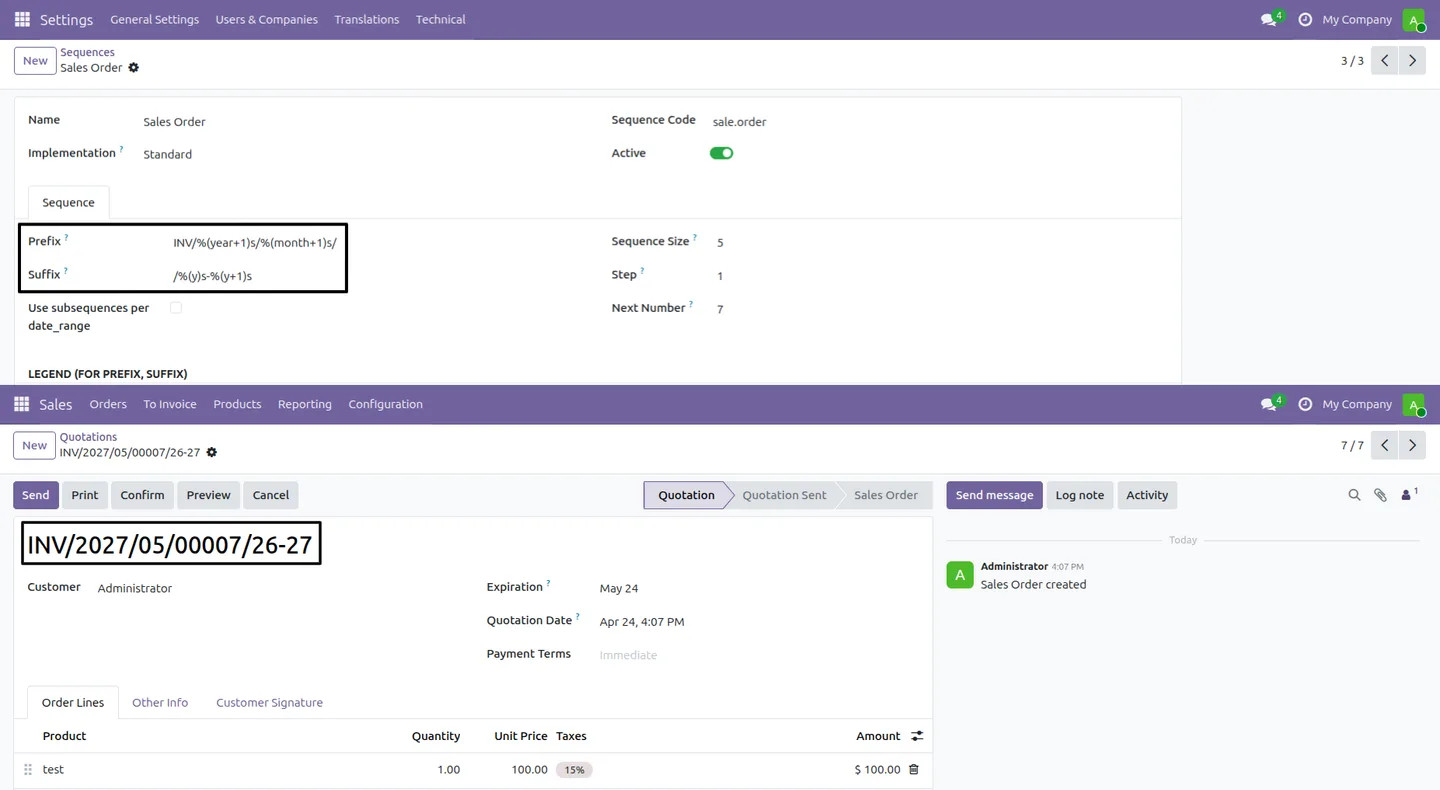
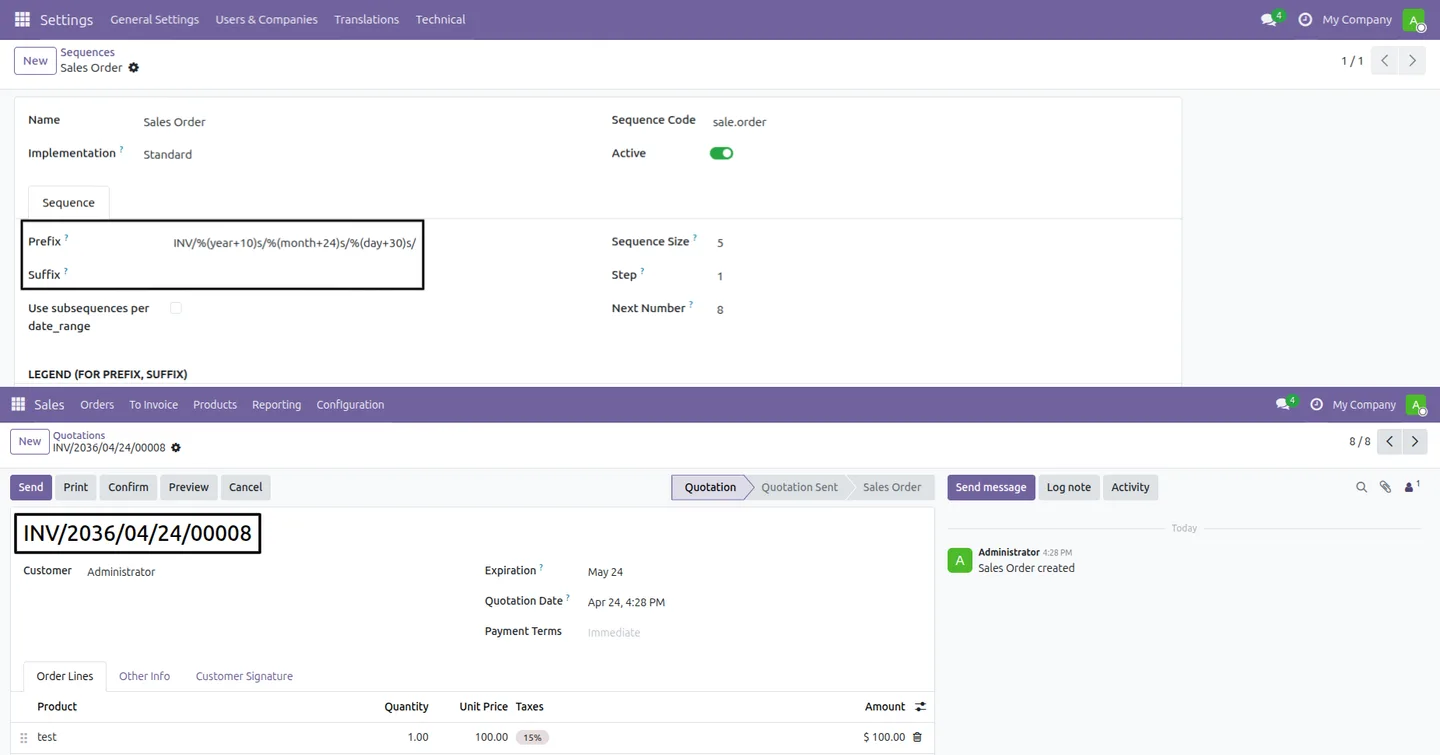
Sequence Date Offset in Odoo
Every screen, in the order you meet it — configuration first, then the module in use.
Technical details
Specification
- Publisher
- TechUltra Solutions Private Limited
- Technical name
- sequence_date_offset
- Odoo versions
- 16.0, 17.0, 18.0, 19.0, 20.0
- Lines of code
- 118
- License
- Odoo Proprietary License v1.0 (OPL-1)
- Price
- $14.90 (one-time)
Deployment
- Odoo Online
- Odoo.sh
- On-premise
Odoo dependencies
- Settings
Support
90 days of bug-fix support, Monday to Friday (10:00–19:00 IST). Raise a ticket at support@techultra.in.
Setup & configuration
From install to first call — here is the path.
- 1
Install the module
In Odoo, open Apps, remove the Apps filter, search for “Sequence Date Offset”, and click Install.
- 2
Open a sequence
Go to Settings → Technical → Sequences & Identifiers → Sequences and open the sequence you want to change, such as Sales Order.
- 3
Add the offset placeholders
In the prefix or suffix field, enter date-offset expressions like %(year+X)s, %(month+X)s, or %(day+X)s, replacing X with the offset you need.
- 4
Save the sequence
Save the sequence record so the new prefix and suffix format applies to the next documents created.
- 5
Verify the result
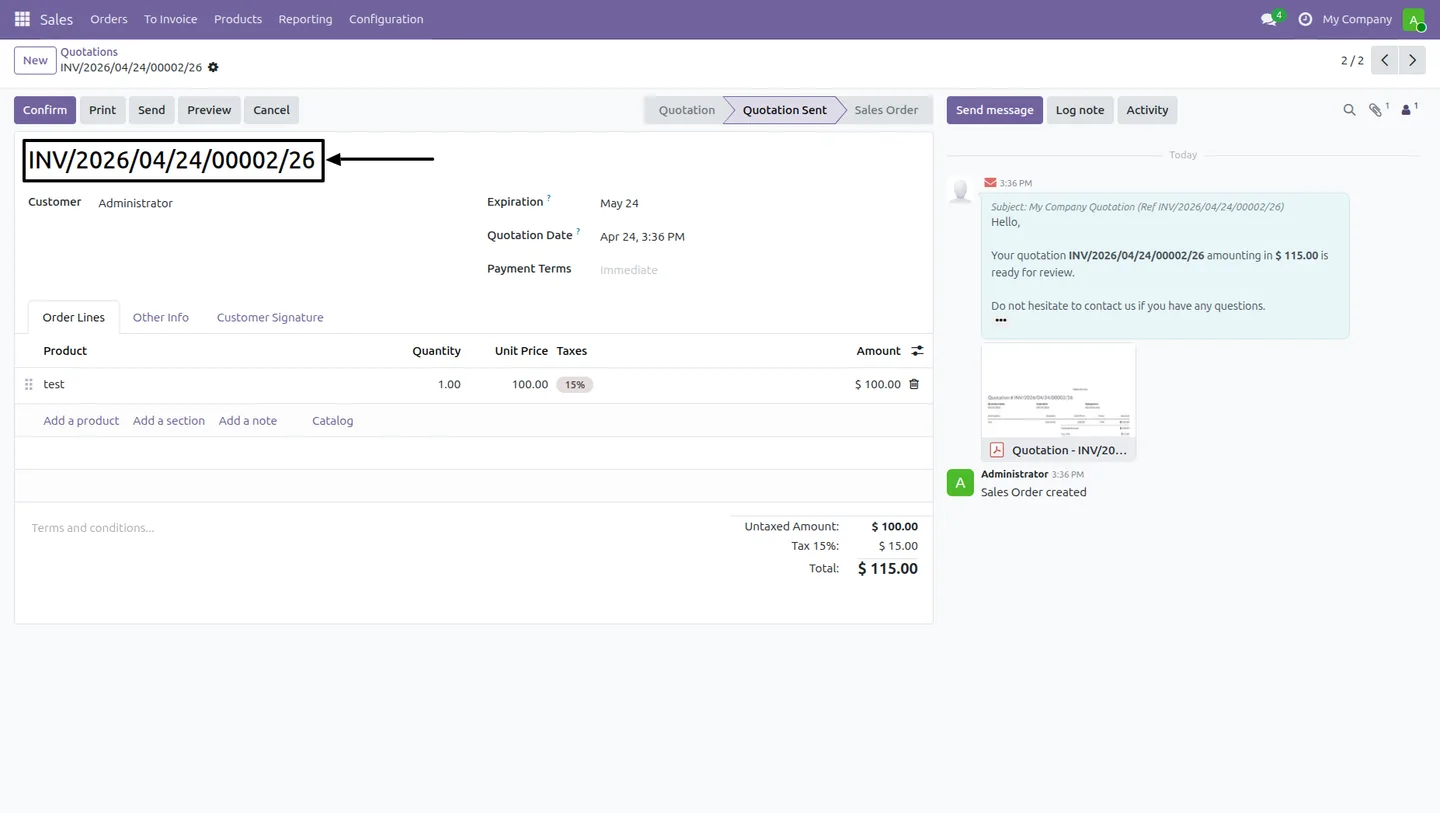
Create a document — for example a Sales Order — and confirm the generated number reflects the configured date offset.
Frequently asked questions
-
What does the date offset do?
It shifts the year, month, or day used in a sequence by a fixed amount, so a document number can be based on a date other than today's.
-
What offset expressions can I use?
You can use expressions such as %(year+X)s, %(month+X)s, and %(day+X)s in a sequence prefix or suffix, where X is the number of years, months, or days to shift.
-
Can the offset move the date backward?
Yes. Offsets can increase or decrease the date, so numbering can run ahead of or behind the document date depending on what the business needs.
-
Is this useful for fiscal-year numbering?
Yes. Because the year can be offset, sequence numbers can follow a fiscal year that does not align with the calendar year, without manual edits.
-
Do I need to write any code?
No. The offset placeholders are entered directly in the sequence configuration on the standard Sequences screen, with no coding required.
-
Where do I configure the offsets?
On the standard Sequences screen, under Settings → Technical → Sequences & Identifiers → Sequences, in the prefix and suffix fields of the sequence record.
-
Which Odoo versions are supported?
The module supports Odoo 16.0, 17.0, 18.0, 19.0, and 20.0, in both the Community and Enterprise editions.
-
Is support included?
Yes. The module includes 90 days of bug-fix support, Monday to Friday, 10:00–19:00 IST.
Listing verified against the Odoo App Store:
Related services
Get the most out of this module with senior TechUltra consultants.
Odoo Customization Services
Odoo customization from a Gold Partner: custom modules, workflows, reports and Studio changes, written upgrade-safe and quoted at a fixed scope. Free scoping call.
Hire Odoo Developers
Hire certified Odoo developers from a Gold Partner: one developer or a team, full-time or part-time, 70–160 hours a month. Silver, Gold or Platinum plan, free trial.
Odoo Support Services & Maintenance
Odoo support services from a Gold Partner: functional and technical support plus server cover for Enterprise and Community, 30-minute P1 response, 24/7 option.







