
Odoo App · Sales & Pricing
Enhanced Sale Price History
See every past sale price for a product, filtered by order state, on the product form.

Overview
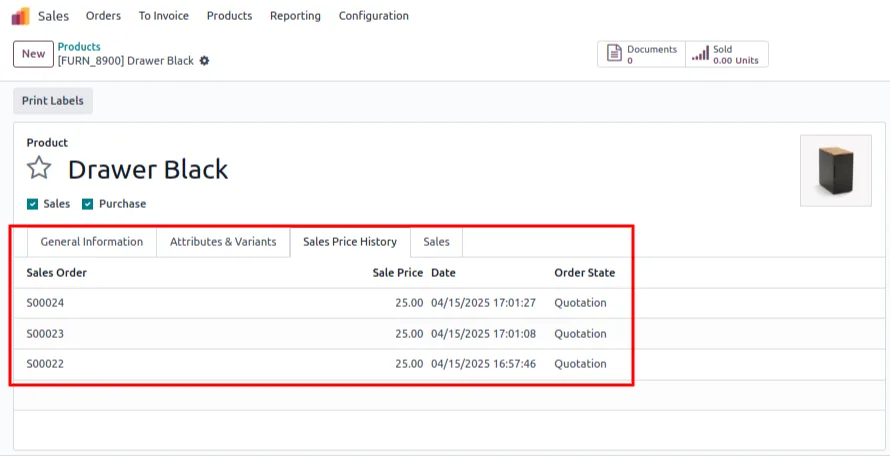
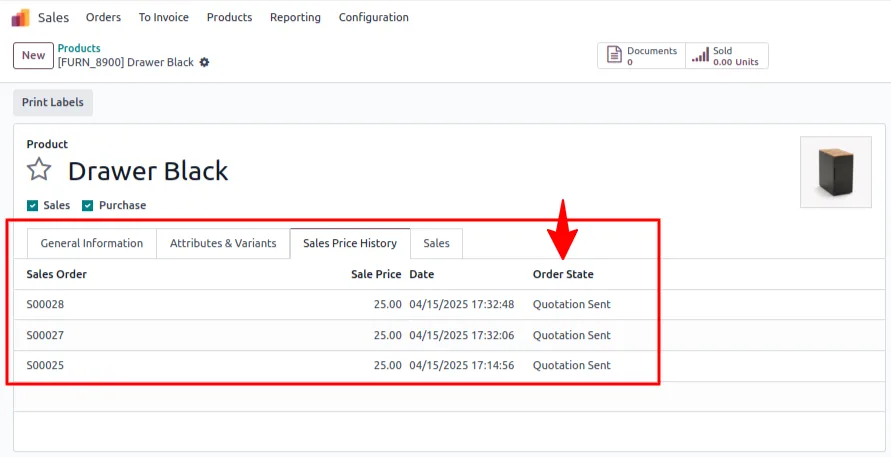
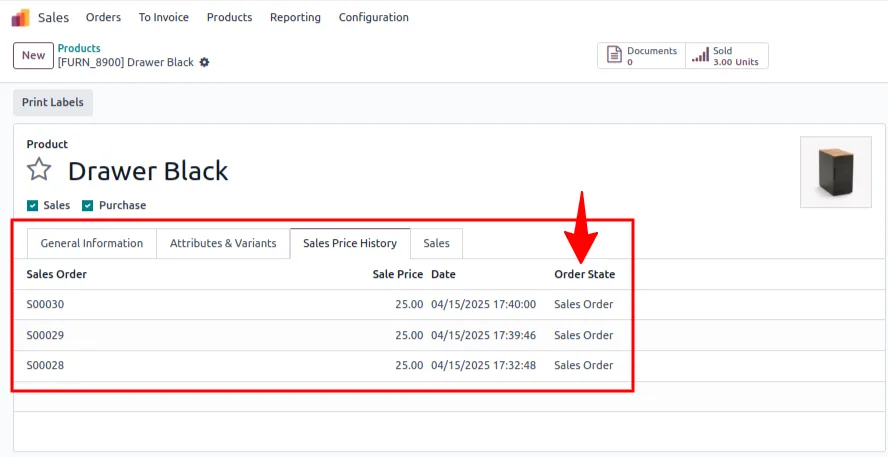
Enhanced Sale Price History puts a product's full sales pricing history on the product form. Open any product and a dedicated Sales Price History tab lists every past sale price with the originating sale order reference, the order date, and the order state — giving sales reps, pricing managers, and business owners instant context for the next quote.
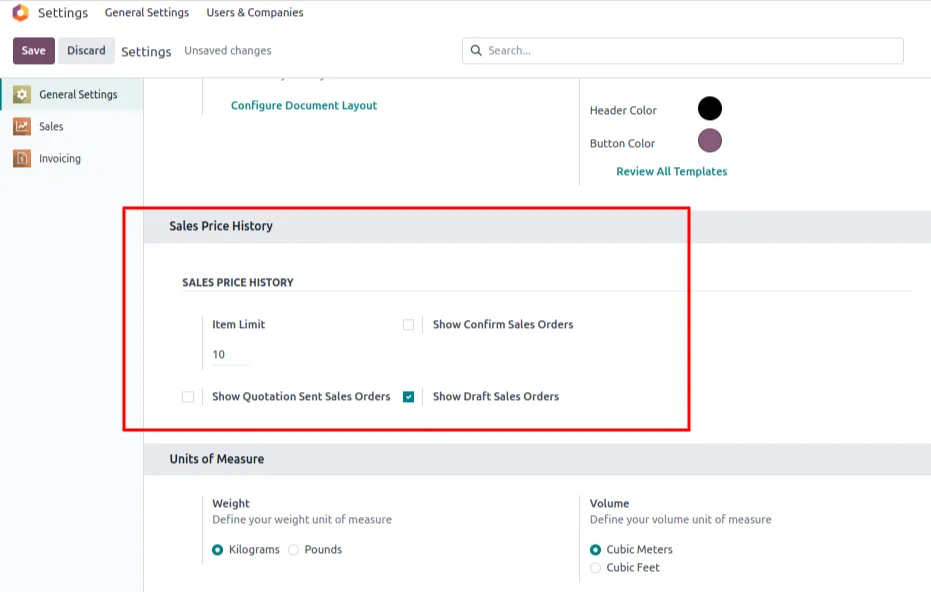
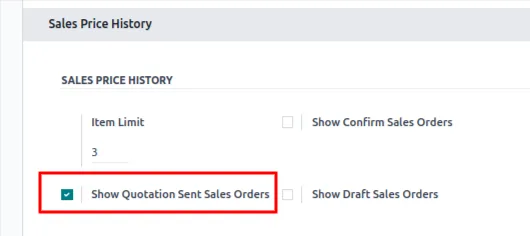
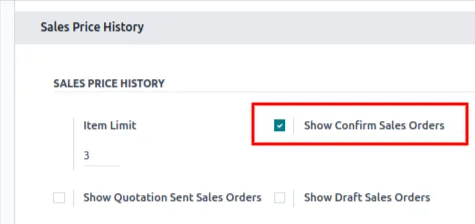
Built by TechUltra Solutions, the history is captured automatically from sale-order lines as orders move through the pipeline. A central settings panel lets administrators decide which order states feed the history — Draft Quotations, Sent Quotations, Confirmed Sale Orders, or any combination — and how many records to display per product.
The result is pricing transparency built into the place reps already work. No more cross-referencing the SO list, no more guessing whether a long-time customer got a discount last quarter. The data is on the product form, filtered to the order states that matter to your pricing policy.
Key features
-
Automatic price capture from sale orders
Every sale-order line writes its price back to the product's price history automatically — no manual data entry and no scheduled job to maintain.
-
Dedicated Sales Price History tab
A new tab on the product template form lists historical sale prices in one focused view, separate from variant and inventory data.
-
Filter by sale order state
Choose which order states feed the history — Draft Quotations, Sent Quotations, and Confirmed Sale Orders — so reps see prices from exactly the workflow stages your business trusts.
-
Configurable record limit
Set how many historical records appear per product (default 10), keeping the tab fast and focused on recent pricing rather than years of legacy data.
-
Full context per entry
Each price entry shows the sale-order reference, the unit price, the order date, and the order state so reps know whether to trust a draft quotation or only count confirmed sales.
-
Pricing-trend analysis
See whether a product's price has drifted up or down over time directly on the product form, making it easier to spot under-priced sales or runaway discounting.
-
Pricing transparency for sales teams
Sales, pricing, and management roles all see the same history, supporting consistent pricing decisions across the team without dependence on tribal knowledge.
-
Reduces manual SO lookups
Cuts the workflow of opening old sale orders to remember a previous price — the data is on the product form, ready to reference during a quote call.
-
Integrated with standard Odoo Sales
Built on top of the standard Sales module — no replacement screens, no parallel data model — so it slots into existing pipelines without changing how reps work.
-
Simple settings panel
Configuration lives in Odoo's standard settings panel — toggle the order states and set the limit; no developer mode, no custom code.
Enhanced Sale Price History in Odoo
Every screen, in the order you meet it — configuration first, then the module in use.
Technical details
Specification
- Publisher
- TechUltra Solutions Private Limited
- Technical name
- sale_price_history_enhanced
- Odoo versions
- 16.0, 17.0, 18.0, 19.0, 20.0
- Lines of code
- 153
- License
- Odoo Proprietary License v1.0 (OPL-1)
- Price
- $13.98 (one-time)
Deployment
- Odoo Online
- Odoo.sh
- On-premise
Odoo dependencies
- Sales
- Invoicing
- Discuss
Support
90 days of bug-fix support, Monday to Friday (10:00–19:00 IST). Raise a ticket at support@techultra.in.
Setup & configuration
From install to first call — here is the path.
- 1
Install the module
In Odoo, open Apps, remove the Apps filter, search for “Enhanced Sale Price History”, and click Install.
- 2
Configure the order states
Go to Settings → Sales and enable the order states you want included in the price history — Draft Quotations, Sent Quotations, Confirmed Sale Orders, or any combination.
- 3
Set the record limit
Set the maximum number of historical price entries displayed per product (default 10). Save the settings.
- 4
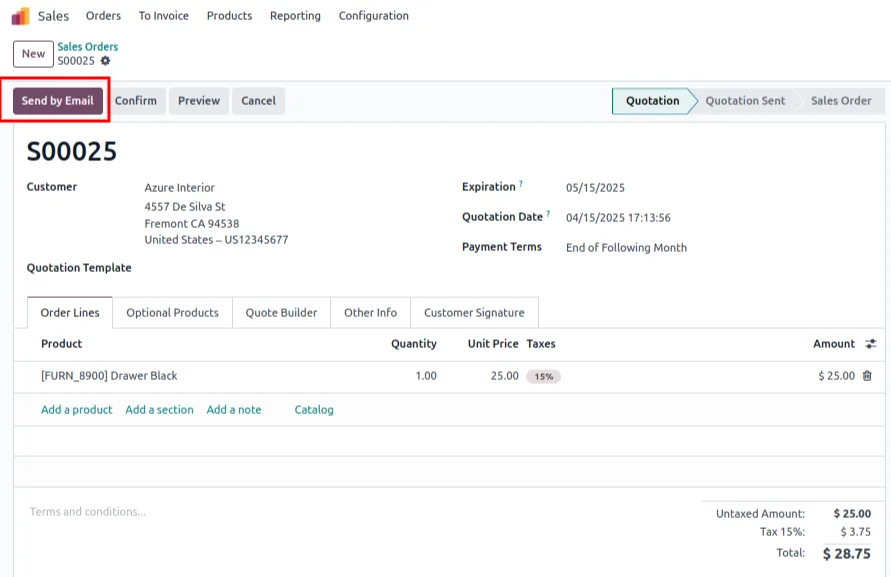
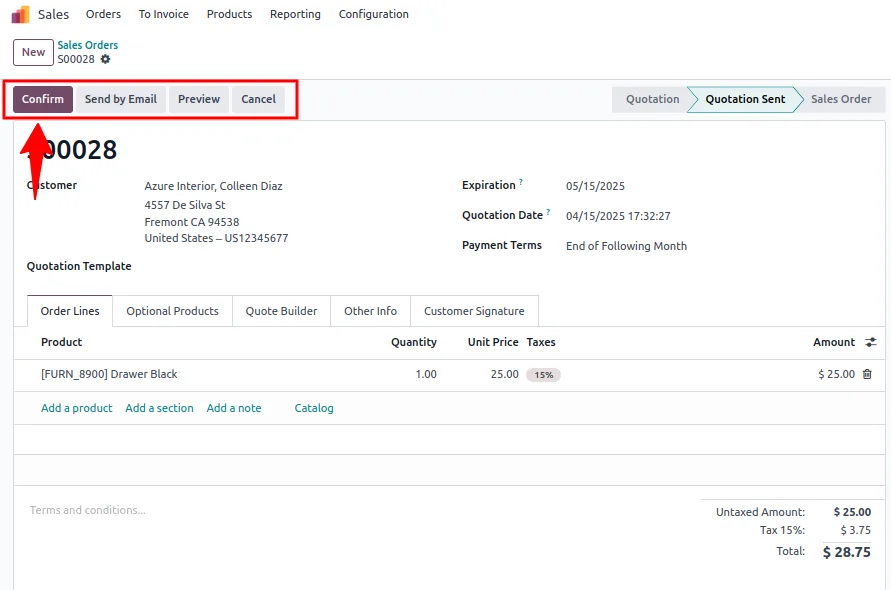
Create or open a sale order
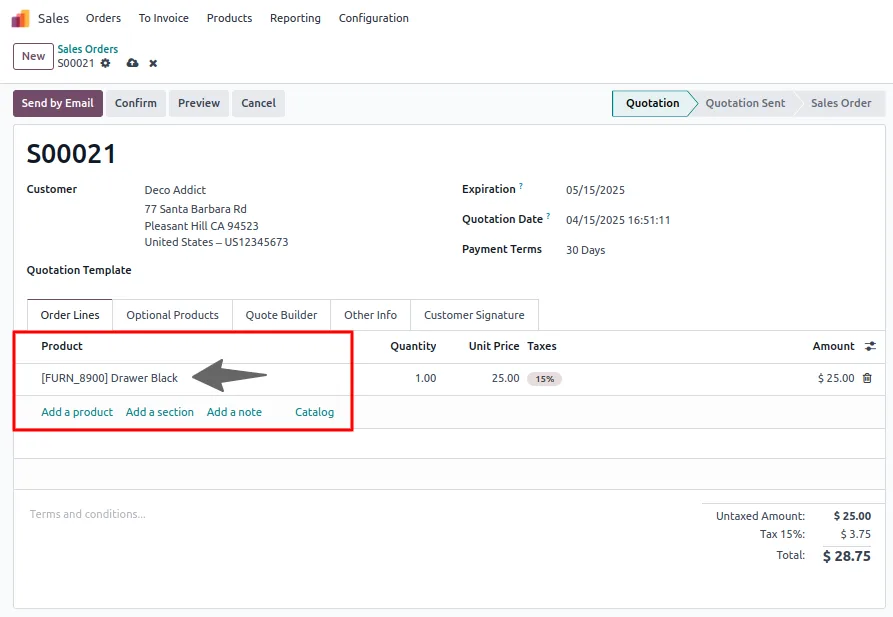
Create a new sale order or open an existing one and add a product line with a price.
- 5
View the price history
Go to Sales → Products, open the product, and switch to the Sales Price History tab. Every matching past sale-order line is listed with its price, reference, date, and state.
- 6
Tune the policy
Adjust which order states are included as your pricing policy evolves — for example, exclude Draft once your sales process is mature so reps only see prices from sent or confirmed orders.
Frequently asked questions
-
Where does the price history appear?
A dedicated Sales Price History tab is added to every product template. Each entry shows the price, sale-order reference, order date, and order state.
-
Which sale order states can I include?
Draft Quotations, Sent Quotations, and Confirmed Sale Orders. You decide which combination feeds the history from the Sales settings panel.
-
How many historical records are shown per product?
The limit is configurable from the settings — the default is 10. Increase it for products with frequent pricing changes, decrease it to keep the tab focused on the most recent sales.
-
Do I need to import legacy data?
No. The module reads from existing sale-order lines, so historical price data is available as soon as you install and configure the module.
-
Is the data captured automatically going forward?
Yes. New sale-order lines are recorded into the price history automatically based on the order states you have enabled.
-
Which Odoo versions are supported?
The module supports Odoo 16.0, 17.0, 18.0, 19.0, and 20.0, in both the Community and Enterprise editions.
-
Will it slow down the product form on large catalogues?
No. The history is limited by the configurable record count and filtered by order state, keeping the Sales Price History tab fast even on busy products.
-
Is support included?
Yes. The module includes 90 days of bug-fix support, Monday to Friday, 10:00–19:00 IST.
Listing verified against the Odoo App Store:
Related solutions
Whole-platform solutions that complement Enhanced Sale Price History.
Odoo Sales
Odoo Sales module — quotations, pricing rules, sales orders, deliveries, returns. CRM-Inventory-Accounting integrated. Quote-to-cash unified.
Odoo CRM
Odoo CRM module — leads, opportunities, kanban pipeline, quotation, forecasting, email integration. Native with ERP. Mid-market alternative to Salesforce.
Related services
Get the most out of this module with senior TechUltra consultants.
Odoo Customization Services
Odoo customization from a Gold Partner: custom modules, workflows, reports and Studio changes, written upgrade-safe and quoted at a fixed scope. Free scoping call.
Hire Odoo Developers
Hire certified Odoo developers from a Gold Partner: one developer or a team, full-time or part-time, 70–160 hours a month. Silver, Gold or Platinum plan, free trial.
Odoo Support Services & Maintenance
Odoo support services from a Gold Partner: functional and technical support plus server cover for Enterprise and Community, 30-minute P1 response, 24/7 option.







