

Odoo App · Sales & Pricing
Sale Order Line Adder
Insert a blank sale order line right after any existing line in Odoo.

Overview
Sale Order Line Adder fixes a small but constant annoyance in Odoo: new sales order lines always land at the bottom. When you need a line in the middle of a long quotation, this module lets you put it exactly where it belongs.
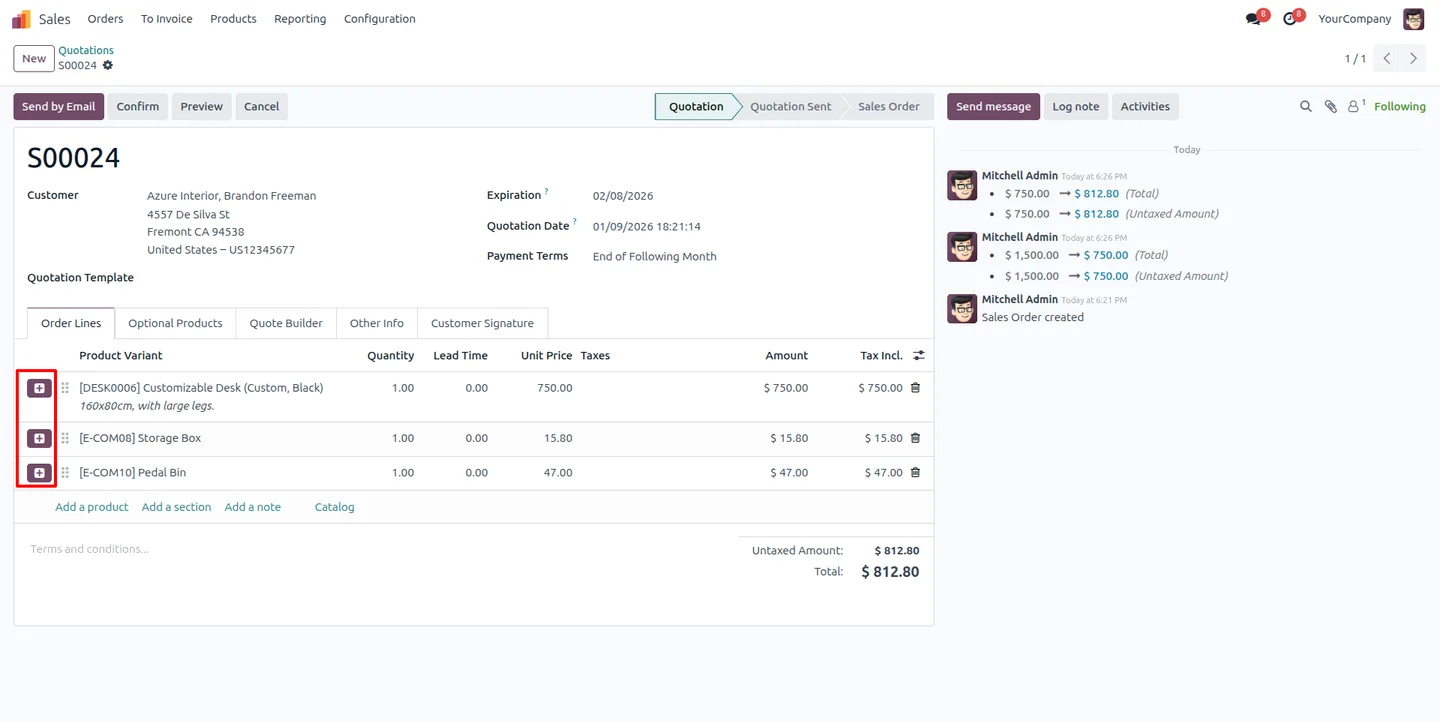
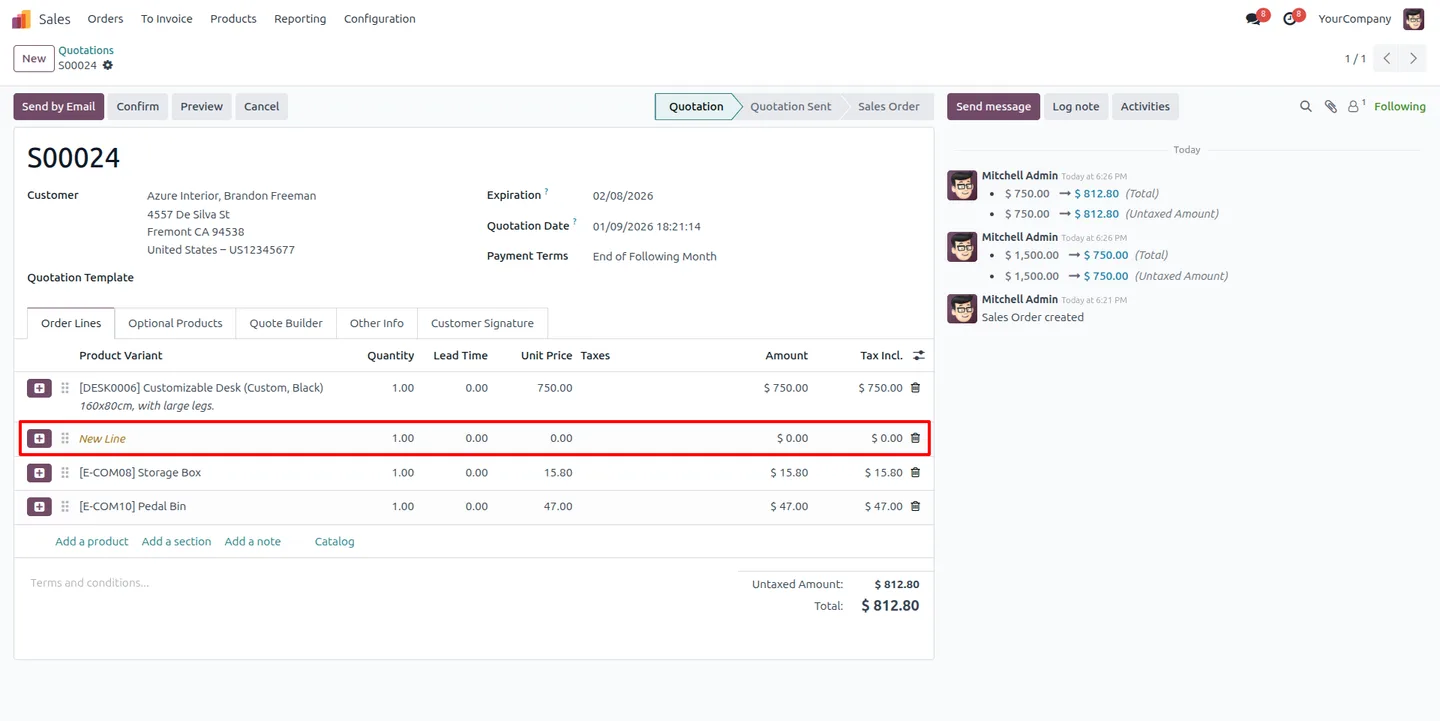
Built by TechUltra Solutions, the module adds a plus button next to every sales order line. Click it and a blank line appears directly below the selected one. The module increments the sequence of all following lines so nothing is reordered by hand.
The inserted line is a clean placeholder — no product and no values are pre-selected — so you fill it in as you would any other line. It keeps long sales orders organised without dragging rows or rebuilding the order.
Key features
-
Insert a line after any selected line
A plus button next to each sales order line inserts a new blank line immediately below it, so a line goes exactly where you need it.
-
Automatic sequence adjustment
When a line is inserted, the module increments the sequence of every line that follows, keeping the order of the document correct.
-
Clean placeholder line
The new line is added as an empty placeholder with default values and no product pre-selected, ready for you to complete.
-
Organised long sales orders
Add lines mid-order without dragging rows around, so long quotations and orders stay tidy and easy to read.
-
Works inside the standard order view
The plus button appears directly in the Odoo sales order line view — no separate wizard or dialog to open.
-
No configuration needed
The feature is available on sales orders as soon as the module is installed, with nothing to set up first.
Sale Order Line Adder in Odoo
Every screen, in the order you meet it — configuration first, then the module in use.
Technical details
Specification
- Publisher
- TechUltra Solutions Private Limited
- Technical name
- sale_order_line_adder
- Odoo versions
- 16.0, 17.0, 18.0, 19.0, 20.0
- Lines of code
- 37
- License
- Odoo Proprietary License v1.0 (OPL-1)
- Price
- $29.90 (one-time)
Deployment
- Odoo Online
- Odoo.sh
- On-premise
Odoo dependencies
- Sales
- Invoicing
- Discuss
Support
90 days of bug-fix support, Monday to Friday (10:00–19:00 IST). Raise a ticket at support@techultra.in.
Setup & configuration
From install to first call — here is the path.
- 1
Install the module
In Odoo, open Apps, remove the Apps filter, search for “Sale Order Line Adder”, and click Install.
- 2
Open a sales order
Go to the Sales app and open any quotation or sales order with one or more order lines.
- 3
Insert a blank line
Click the plus button next to the line you want to add a row after. A new blank line appears directly below it.
- 4
Complete the new line
Fill in the product, quantity, and price on the placeholder line. The sequence of the lines below has already shifted to keep the order intact.
Frequently asked questions
-
Where does the new line appear?
Directly below the line whose plus button you click. Unlike the standard Add a line action, you are not forced to add the row at the bottom of the order.
-
Does the inserted line have a product on it?
No. The new line is a clean placeholder with default values and no product selected, so you fill it in yourself.
-
What happens to the lines below the new one?
The module automatically increments their sequence numbers, so every line keeps its position and the order is not reshuffled.
-
Do I need to configure anything after installing?
No. The plus button appears on sales order lines as soon as the module is installed — there is no setup step.
-
Does it work on quotations as well as confirmed orders?
Yes. The plus button is available wherever you edit sales order lines, including quotations and confirmed sales orders.
-
Which Odoo versions are supported?
The module supports Odoo 16.0, 17.0, 18.0, 19.0, and 20.0, in both the Community and Enterprise editions.
-
Is support included?
Yes. The module includes 90 days of bug-fix support, Monday to Friday, 10:00–19:00 IST.
Listing verified against the Odoo App Store:
Related solutions
Whole-platform solutions that complement Sale Order Line Adder.
Odoo Sales
Odoo Sales module — quotations, pricing rules, sales orders, deliveries, returns. CRM-Inventory-Accounting integrated. Quote-to-cash unified.
Odoo CRM
Odoo CRM module — leads, opportunities, kanban pipeline, quotation, forecasting, email integration. Native with ERP. Mid-market alternative to Salesforce.
Related services
Get the most out of this module with senior TechUltra consultants.
Odoo Customization Services
Odoo customization from a Gold Partner: custom modules, workflows, reports and Studio changes, written upgrade-safe and quoted at a fixed scope. Free scoping call.
Hire Odoo Developers
Hire certified Odoo developers from a Gold Partner: one developer or a team, full-time or part-time, 70–160 hours a month. Silver, Gold or Platinum plan, free trial.
Odoo Support Services & Maintenance
Odoo support services from a Gold Partner: functional and technical support plus server cover for Enterprise and Community, 30-minute P1 response, 24/7 option.







