
Odoo App · Security & Access
Restrict Product & Category Access
Show each user only the products and categories they are allowed to see.

Overview
Restrict Product & Category Access closes a gap in standard Odoo: by default, every internal user with sales or inventory rights sees every product in the catalogue. This module lets administrators assign each user a specific list of allowed products, allowed categories, or both — and silently filters product fields throughout Odoo so the user only sees what they should.
Built by TechUltra Solutions, the filter applies wherever a product is selected: sales quotations and orders, purchase orders and vendor bills, inventory transfers, stock operations, and any other product-selection field. Multi-level security means you can authorise broad categories for a team while still pinning specific products to specific users.
Configuration is on the standard user form — no record rules, no developer mode. The module is performance-optimised for large catalogues and is built for businesses running multi-branch operations, departmental product splits, or warehouse-specific stock that should not be visible to every internal user.
Key features
-
User-wise product access control
Admins can restrict product visibility for each user by assigning only the products they are allowed to access.
-
Category-wise product restriction
Restrict access to products based on product categories using the Allow Category option.
-
Allow Product permission
Enable product-level access control and assign specific products to users directly from the user form.
-
Allow Category permission
Enable category-level access control and assign authorised product categories to users so they automatically see every product under those categories.
-
Sales product restriction
Users can only view and select allowed products while creating quotations and sales orders.
-
Purchase product restriction
Restrict users from selecting unauthorised products while creating purchase orders and vendor bills.
-
Inventory product restriction
Limit product visibility in stock operations, inventory adjustments, transfers, and warehouse-related workflows.
-
Unauthorised product selection prevention
Users cannot access or select restricted products in product fields anywhere in Odoo.
-
Real-time access management
Product and category access updates are applied immediately after configuration — no restart or cache refresh needed.
-
Multi-level product security
Supports both product-level and category-level authorisation in parallel for stronger, layered business control.
-
Performance-optimised filtering
Efficient product filtering keeps Sales, Purchase, and Inventory views smooth even on large product catalogues.
Restrict Product & Category Access in Odoo
Every screen, in the order you meet it — configuration first, then the module in use.

Technical details
Specification
- Publisher
- TechUltra Solutions Private Limited
- Technical name
- restrict_product_and_category_access_for_users
- Odoo versions
- 16.0, 17.0, 18.0, 19.0, 20.0
- Lines of code
- 77
- License
- Odoo Proprietary License v1.0 (OPL-1)
- Price
- $10.01 (one-time)
Deployment
- Odoo Online
- Odoo.sh
- On-premise
Odoo dependencies
- Discuss
Support
90 days of bug-fix support, Monday to Friday (10:00–19:00 IST). Raise a ticket at support@techultra.in.
Setup & configuration
From install to first call — here is the path.
- 1
Install the module
In Odoo, open Apps, remove the Apps filter, search for “Restrict Product and Category Access for Users”, and click Install.
- 2
Open the user record
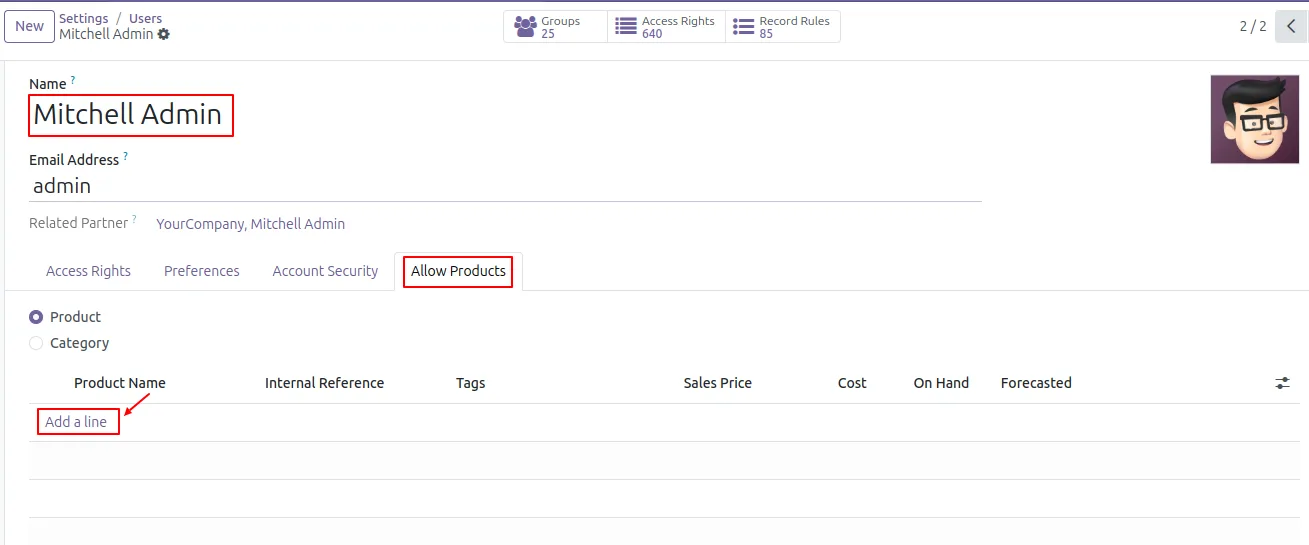
Go to Settings → Users & Companies → Users and open the user whose product access you want to control.
- 3
Assign allowed products
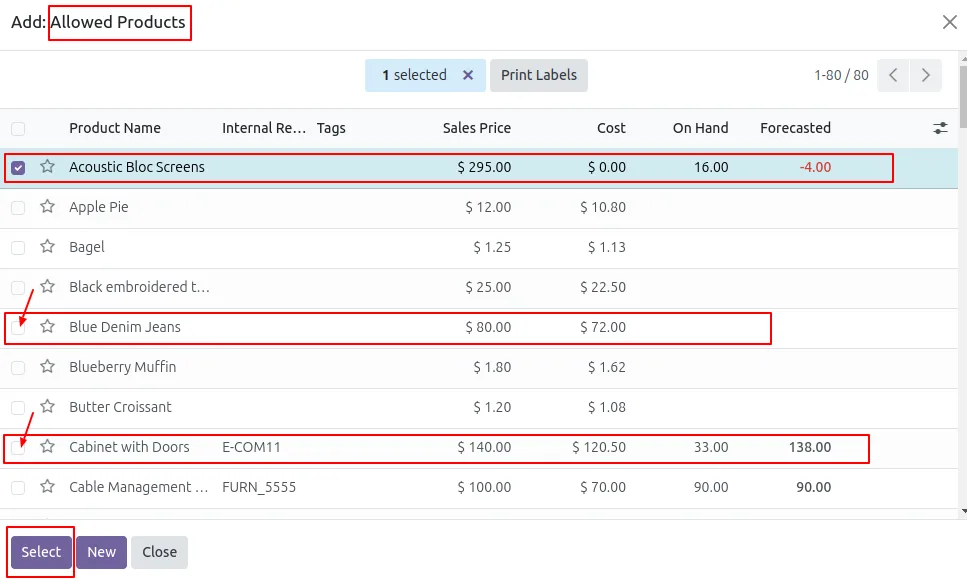
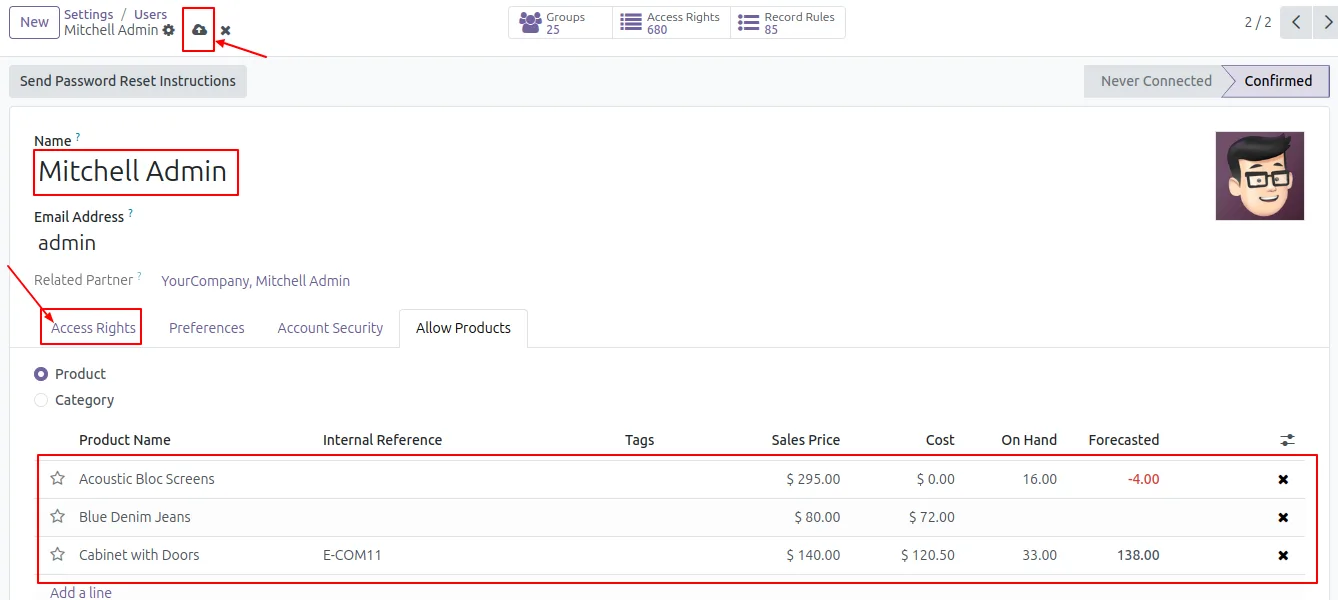
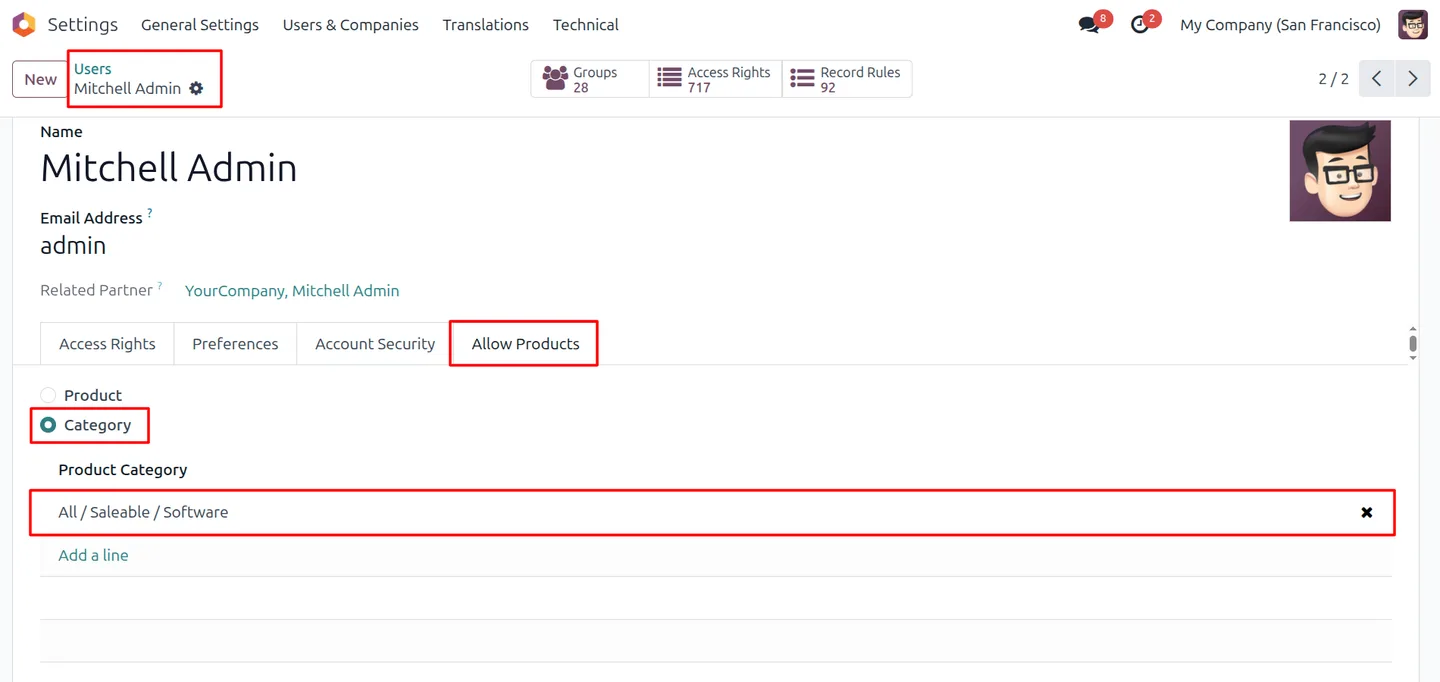
On the user form, find the Allow Products section, click Add a line, and pick the specific products from the catalogue that the user should be able to see.
- 4
Assign allowed categories (optional)
To grant broader access, add product categories under Allow Category — the user automatically gains visibility to every product in those categories.
- 5
Save and verify
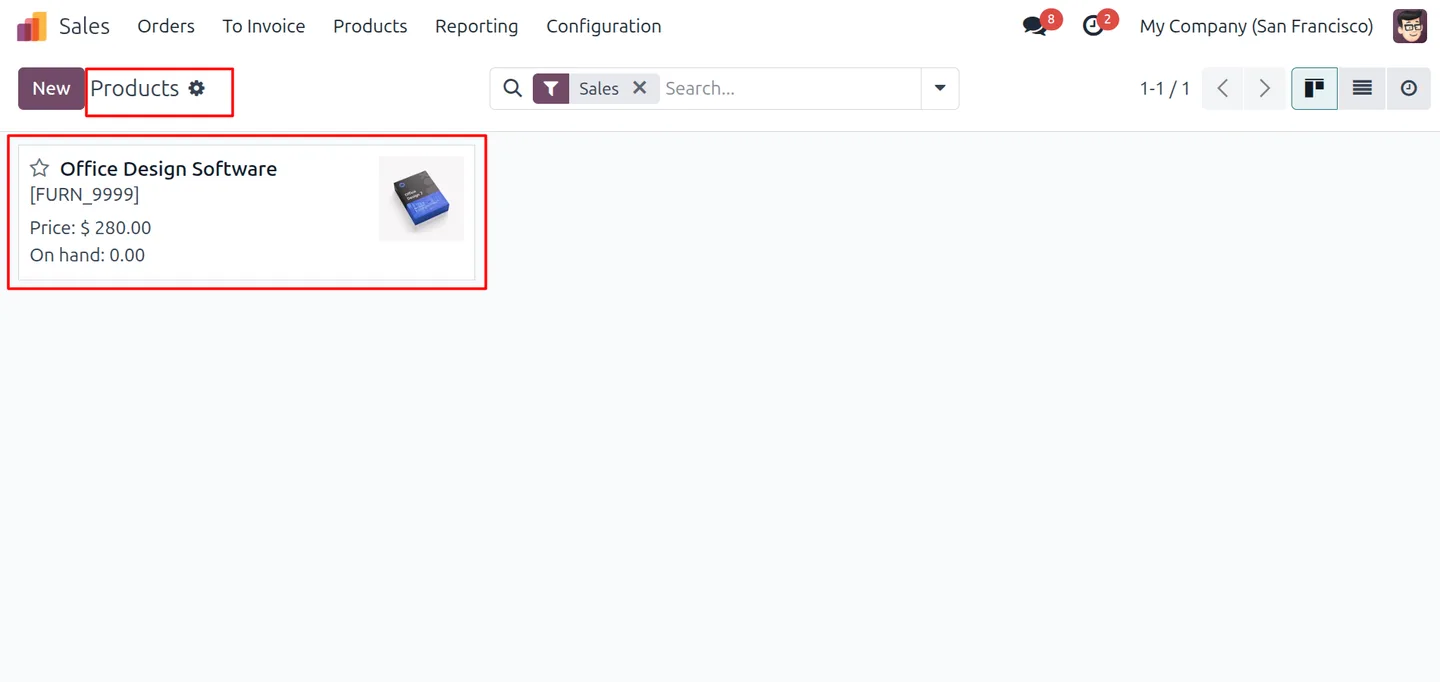
Save the user, log in as that user, and confirm that Sales, Purchase, and Inventory product fields only show the authorised products.
- 6
Reset for admins
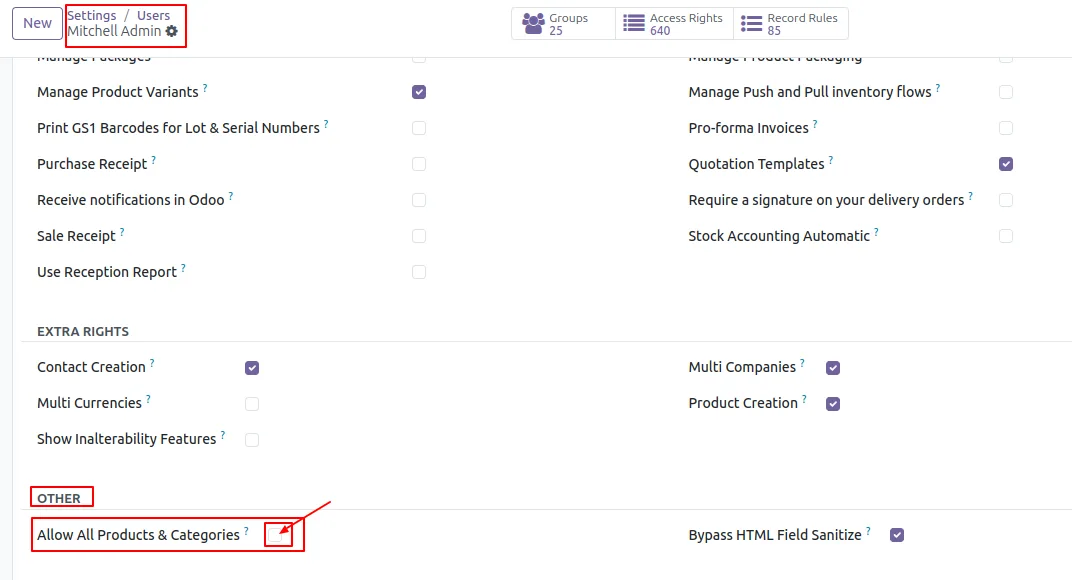
For users who should see everything, leave Allow Products and Allow Category empty or grant the Allow All Products and Categories permission so no filter is applied.
Frequently asked questions
-
Where in Odoo does the restriction take effect?
Restricted users only see allowed products in Sales quotations and orders, Purchase orders and vendor bills, Inventory transfers, stock operations, and every other product-selection field in Odoo.
-
Can I restrict by product, by category, or both?
Both. Assign specific products under Allow Product, broad categories under Allow Category, or combine the two — the module supports multi-level product security.
-
What happens when a user has no allowed products configured?
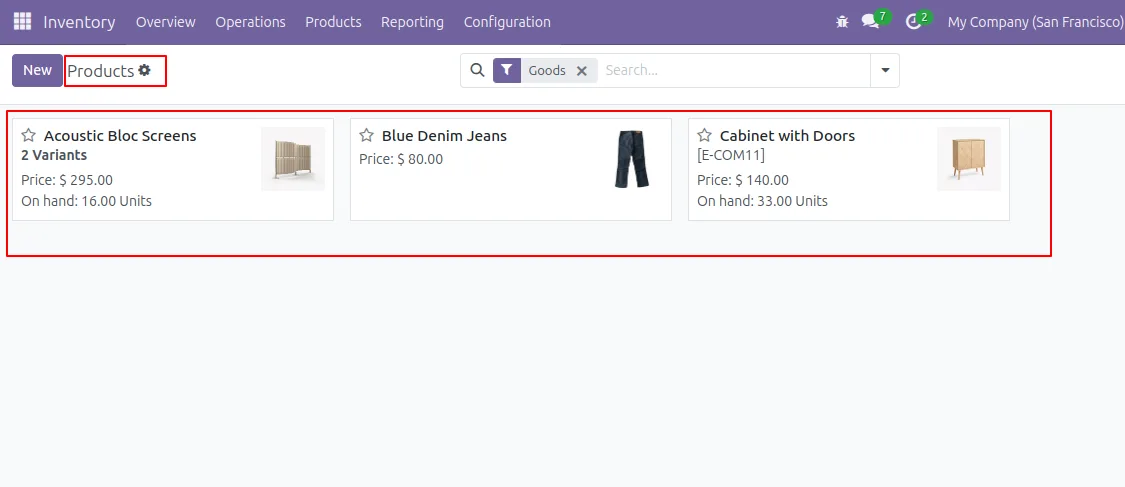
Depending on the Allow All Products and Categories setting, the user either sees no products at all or sees everything. Set it explicitly so behaviour matches your policy.
-
Will administrators be affected by the restriction?
No, as long as you leave their allowed lists empty or grant the Allow All Products and Categories permission. The module is designed so admins still see the full catalogue.
-
Which Odoo versions are supported?
The module supports Odoo 16.0, 17.0, 18.0, 19.0, and 20.0, in both the Community and Enterprise editions.
-
Is it suitable for large product catalogues?
Yes. The filter is performance-optimised so list and search views stay fast even on catalogues with tens of thousands of products.
-
How quickly do permission changes take effect?
Immediately. Once you save the user record, the next page load applies the new allowed-product and allowed-category filter.
-
Is support included?
Yes. The module includes 90 days of bug-fix support, Monday to Friday, 10:00–19:00 IST.
Listing verified against the Odoo App Store:
Related services
Get the most out of this module with senior TechUltra consultants.
Odoo Customization Services
Odoo customization from a Gold Partner: custom modules, workflows, reports and Studio changes, written upgrade-safe and quoted at a fixed scope. Free scoping call.
Hire Odoo Developers
Hire certified Odoo developers from a Gold Partner: one developer or a team, full-time or part-time, 70–160 hours a month. Silver, Gold or Platinum plan, free trial.
Odoo Support Services & Maintenance
Odoo support services from a Gold Partner: functional and technical support plus server cover for Enterprise and Community, 30-minute P1 response, 24/7 option.







