

Odoo App · Productivity
Record Sorting
Per-user default sort order on any Odoo model — set once, applied everywhere.

Overview
Record Sorting solves a small but daily friction in Odoo: each user wants a different default order on the lists they use most. The module lets users save a sort rule per model — pick a field, choose ascending or descending — and Odoo applies it whenever that user opens the list.
Built by TechUltra Solutions, the rules sit under Users and Companies as Sorting Records. Each record can hold multiple lines, so a single user can configure sort orders across many models in one place. The module prevents duplicate model entries inside a single record, so configurations stay clean and conflict-free.
Sorting Records can be toggled active or inactive without deleting the underlying configuration. That makes it easy to switch between sort preferences — for example, during month-end review — and switch back, without rebuilding the rules each time.
Key features
-
Per-user default sort
Each user can save their own preferred default order for the same list. Different team members see the records in the order that works for their workflow.
-
Field selection
Specify which field on the model should drive the sort. Any sortable field on the record is fair game — dates, numbers, codes, names.
-
Ascending or descending
Pick ascending (lowest to highest) or descending (highest to lowest) for each rule, so newest-first lists and lowest-stock-first lists are both one click away.
-
Multi-model configuration
Add multiple lines to a single Sorting Record to cover multiple models — sales orders, purchase orders, contacts, partners — all in one configuration record.
-
Activate or deactivate without losing settings
Toggle a Sorting Record active or inactive without deleting it. Switch preferences during month-end or during a specific project, then flip back when you are done.
-
Single-model safeguard
The module prevents creating more than one sort rule for the same model inside a single record, which avoids the conflicts that come from overlapping sort orders.
-
Saved preferences
Users save sort preferences once. The configuration sticks across sessions, so the right order is in place every time they open Odoo.
-
Wide Odoo version support
Available for Odoo 14.0, 15.0, 16.0, 17.0, 18.0, 19, and 20.0, in both Community and Enterprise — usable on long-running deployments as well as the latest release.
Record Sorting in Odoo
Every screen, in the order you meet it — configuration first, then the module in use.
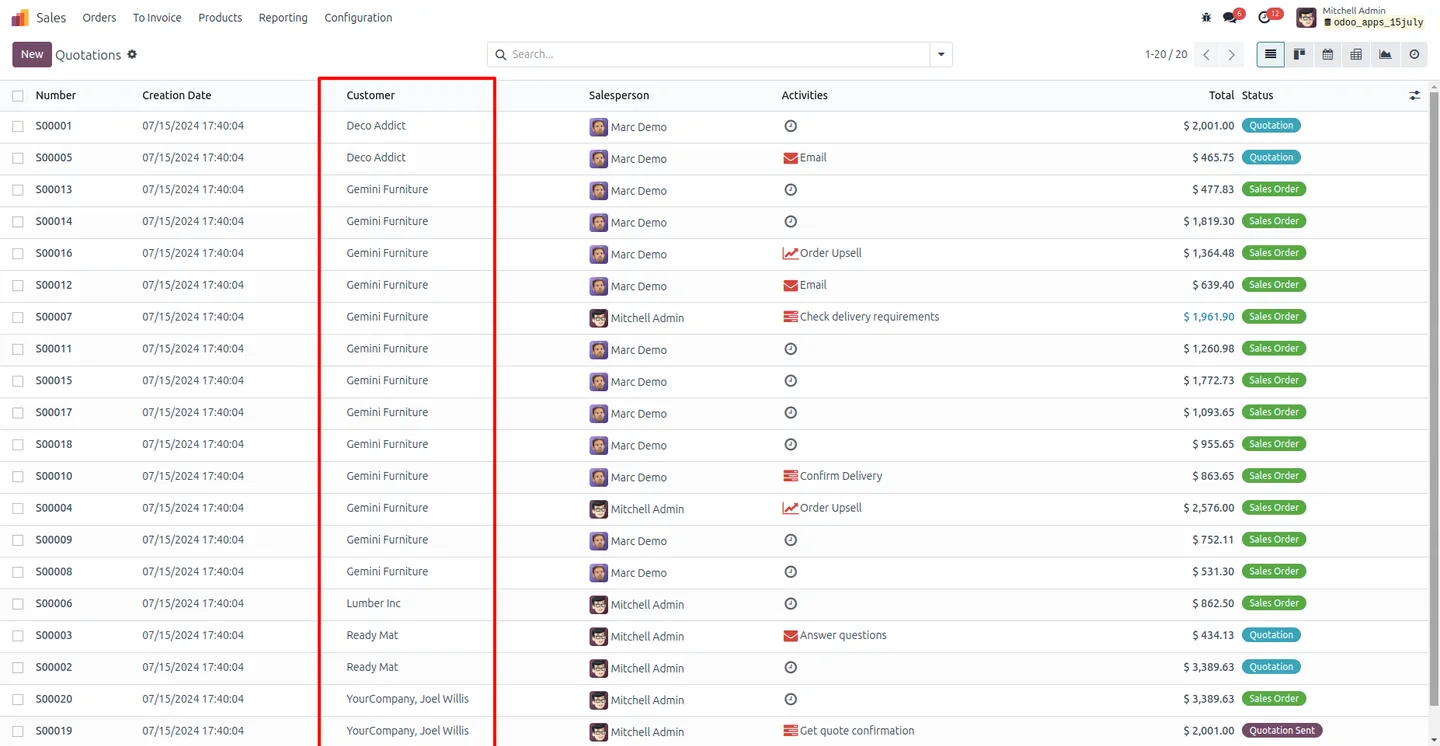
Technical details
Specification
- Publisher
- TechUltra Solutions Private Limited
- Technical name
- tus_sorting_record
- Odoo versions
- 14.0, 15.0, 16.0, 17.0, 18.0, 19.0, 20.0
- Lines of code
- 118
- License
- Odoo Proprietary License v1.0 (OPL-1)
- Price
- $11.65 (one-time)
Deployment
- Odoo Online
- Odoo.sh
- On-premise
Odoo dependencies
- Base
Support
90 days of bug-fix support, Monday to Friday (10:00–19:00 IST). Raise a ticket at support@techultra.in.
Setup & configuration
From install to first call — here is the path.
- 1
Install the module
In Odoo, open Apps, remove the Apps filter, search for “Record Sorting”, and click Install.
- 2
Enable the user-level setting
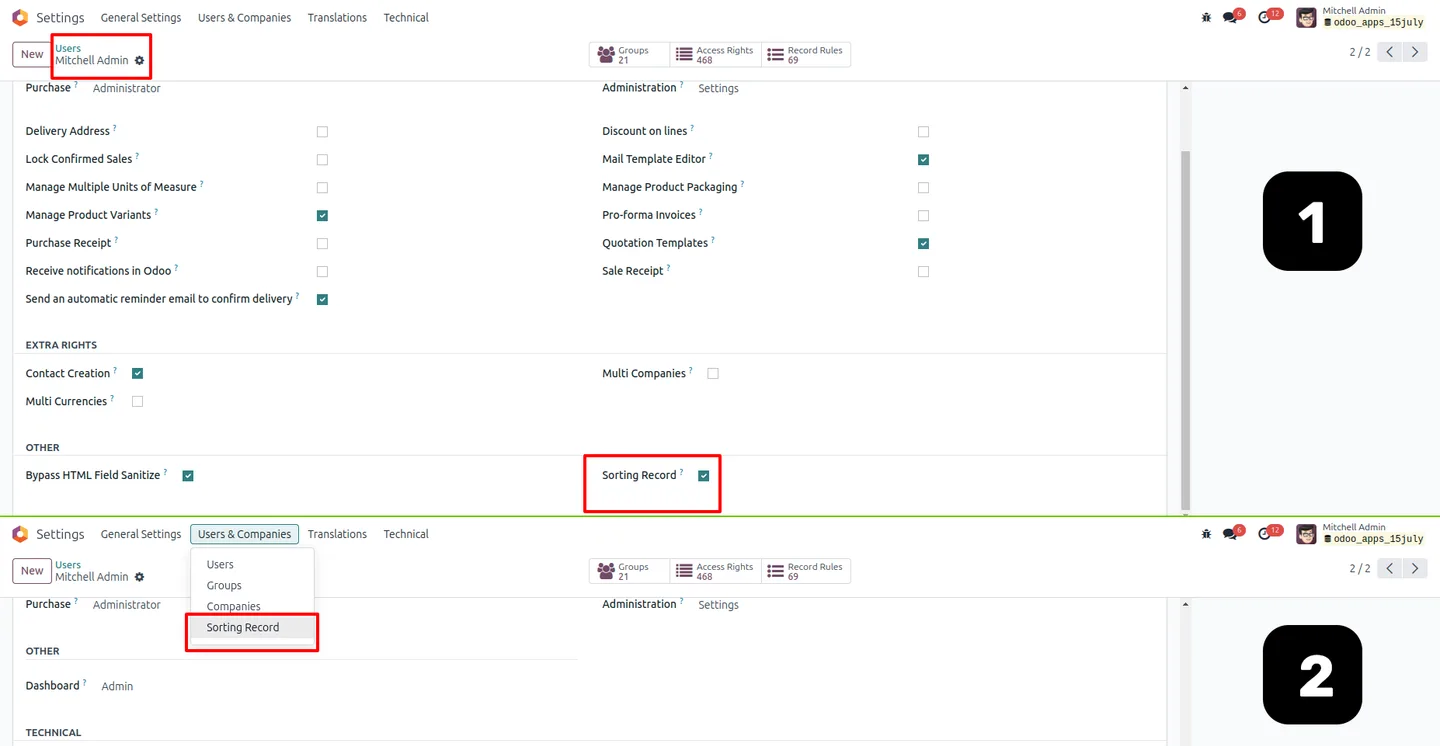
Go to Settings → Users and locate the Sorting Records option. Switch it on and refresh the browser so the new menu becomes available.
- 3
Open the Sorting Records menu
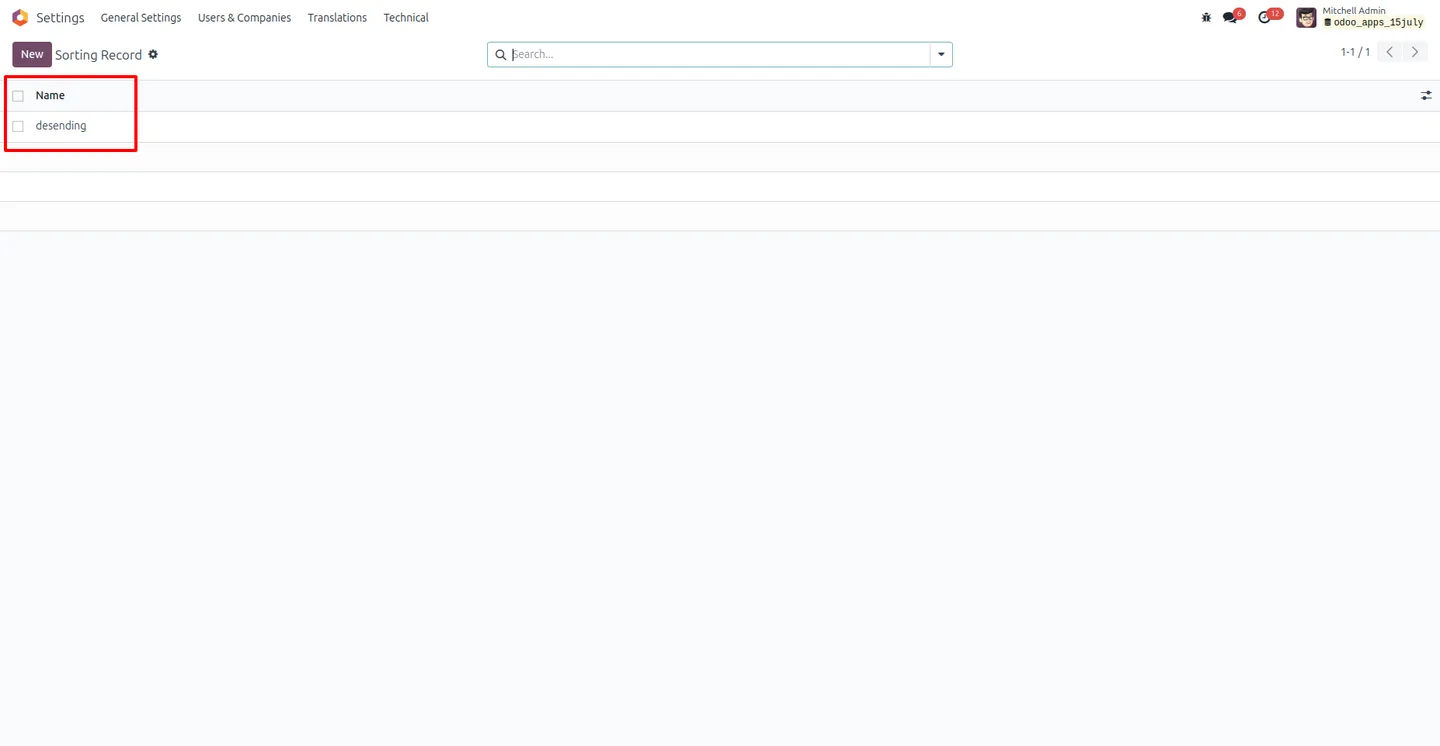
Under Users and Companies, open the Sorting Records list. This is where each user's sort rules live.
- 4
Create a sorting record
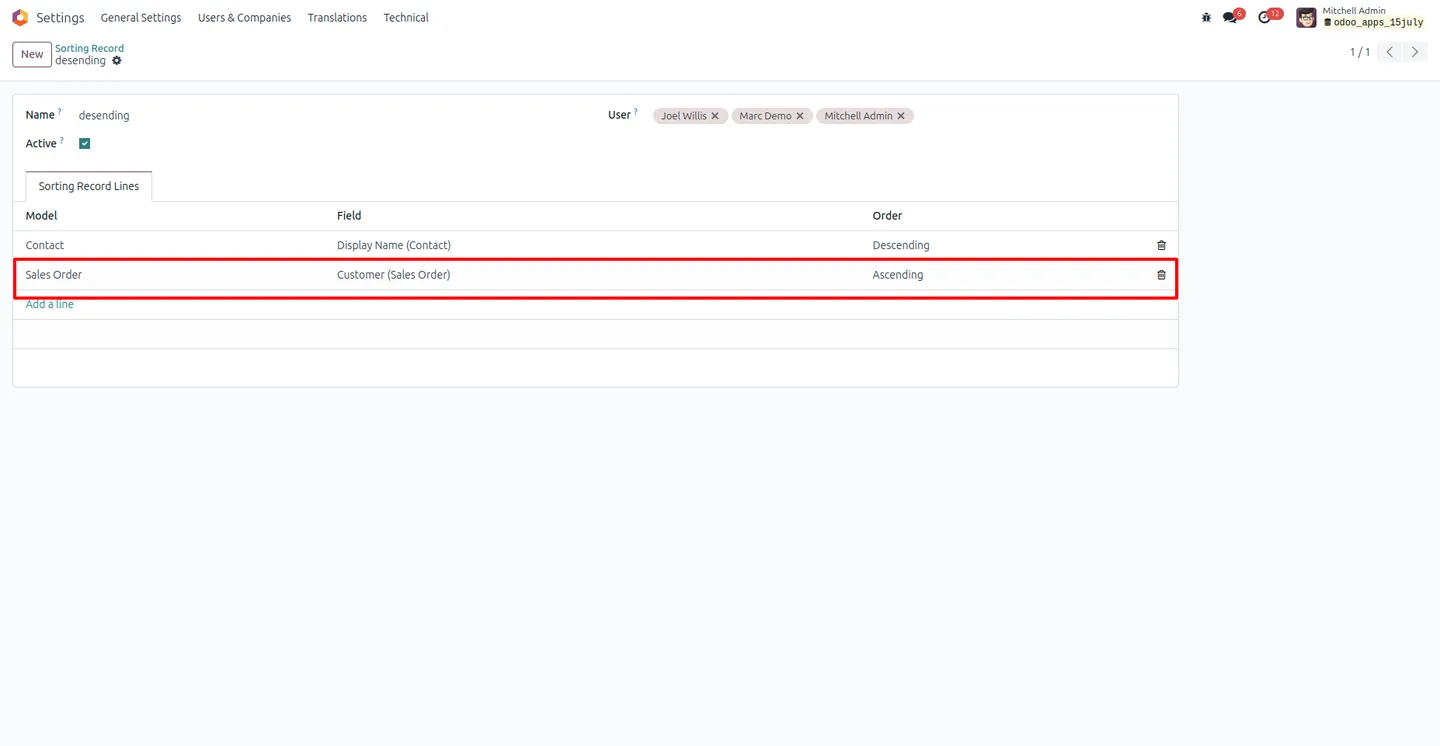
Create a new record with a name, the user it applies to, and the Active flag turned on. Each user can have their own configuration here.
- 5
Add sort lines
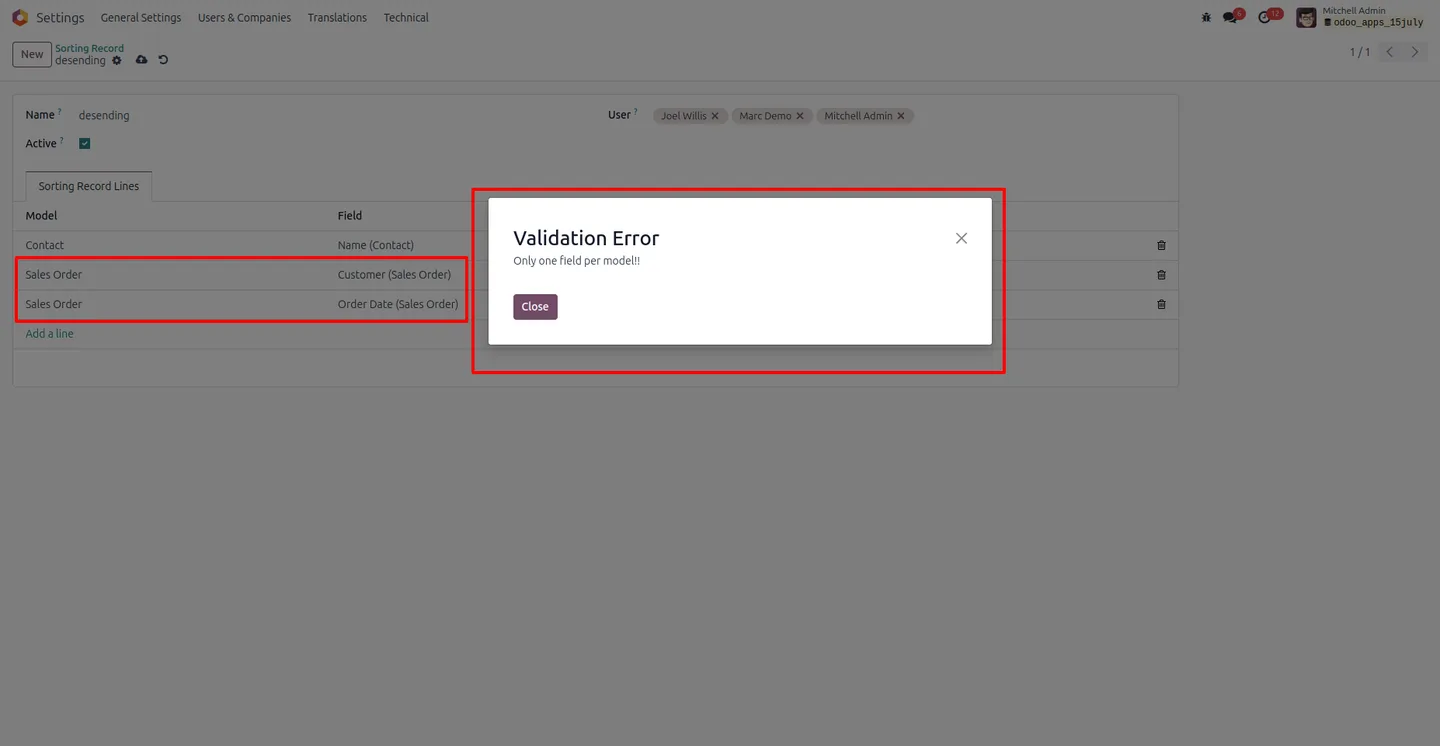
Under Sorting Record Lines, add a line per model: pick the model, the field to sort on, and the order (ascending or descending). Add more lines for any other models you want to control. The module blocks duplicate model entries within a single record.
- 6
Save and test
Save the record and open one of the configured models. The list now opens in your saved default order. Toggle the record off any time to revert temporarily.
Frequently asked questions
-
Does each user need their own sorting record?
Yes. Sorting rules are tied to a user, so different team members can see the same list in different default orders. One user's preferences do not affect anyone else's view.
-
Can one record cover multiple Odoo models?
Yes. A single Sorting Record can hold multiple lines — one per model — so you can configure default sort orders for sales orders, purchase orders, partners, and any other model in one place.
-
What if I add the same model twice in one record?
The module blocks duplicate model entries within a single Sorting Record, which prevents conflicting sort orders for the same list.
-
Can I switch a sort rule off without losing the configuration?
Yes. Each Sorting Record has an active flag. Toggle it off to revert temporarily — for month-end review, for example — and toggle it back on when you want the saved sort order to apply again.
-
Which Odoo versions are supported?
Record Sorting supports Odoo 14.0, 15.0, 16.0, 17.0, 18.0, 19.0, and 20.0, in both the Community and Enterprise editions.
-
Where do I configure sort rules?
After enabling the Sorting Records option in Settings → Users, the Sorting Records menu appears under Users and Companies. All sort rules are created and edited there.
-
Does it support ascending and descending order?
Yes. Each line on a Sorting Record can be set to ascending (lowest to highest) or descending (highest to lowest), depending on what you want to see first.
-
What support is included?
The module includes 90 days of bug-fix support, Monday to Friday, 10:00–19:00 IST. Tickets can be raised at support@techultra.in.
Listing verified against the Odoo App Store:
Related services
Get the most out of this module with senior TechUltra consultants.
Odoo Customization Services
Odoo customization from a Gold Partner: custom modules, workflows, reports and Studio changes, written upgrade-safe and quoted at a fixed scope. Free scoping call.
Hire Odoo Developers
Hire certified Odoo developers from a Gold Partner: one developer or a team, full-time or part-time, 70–160 hours a month. Silver, Gold or Platinum plan, free trial.
Odoo Support Services & Maintenance
Odoo support services from a Gold Partner: functional and technical support plus server cover for Enterprise and Community, 30-minute P1 response, 24/7 option.







