

Odoo App · Project Management
Project Subtasks
Delegate Odoo 10.0 project tasks into subtasks with a one-click assignment wizard.

Overview
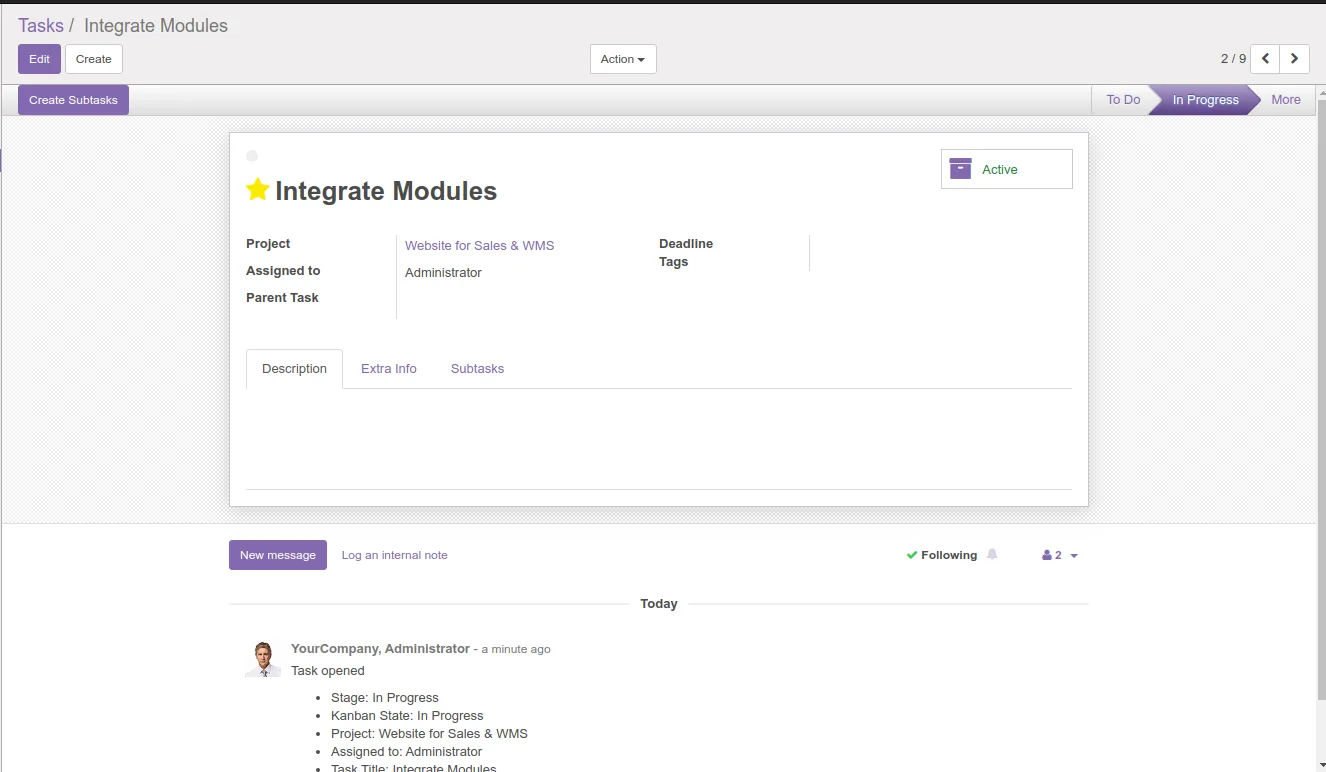
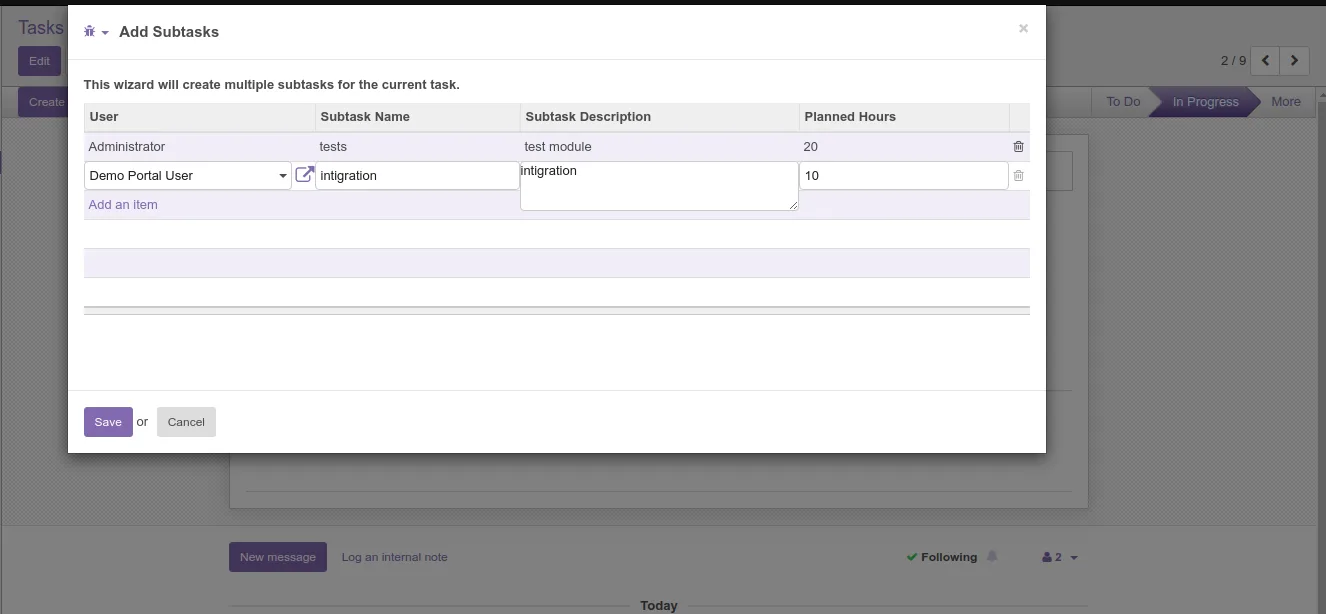
Project Subtasks extends Odoo 10.0's Project application with a lightweight task-delegation flow. A new Project Subtask button on the project view opens a wizard dialog that captures a child task and the user it should be delegated to.
Built by TechUltra Solutions, the module turns Odoo's flat task list into a parent-and-subtask structure, so larger pieces of work can be broken down and assigned across the team without leaving the project.
The module depends only on the standard Project and Discuss apps, ships under the Odoo Proprietary License v1.0, and is available for $5.82 on the Odoo App Store. It runs on Odoo Online, Odoo.sh, and on-premise installations of Odoo 10.0.
Key features
-
Project Subtask button
A new Project Subtask button appears in the project view of Odoo's Project app, giving users a single entry point to delegate work without searching through menus.
-
Subtask delegation wizard
Clicking the button opens a wizard dialog where the parent task is broken into a subtask and assigned to a chosen user in one short form.
-
Direct user assignment
Each subtask is delegated to a specific Odoo user from inside the wizard, so the responsibility for the child task is recorded immediately.
-
Parent-task linkage
Subtasks remain tied to the originating project task, keeping the breakdown of larger work visible from the parent record.
-
Works with the standard Project app
The module extends Odoo's native Project app rather than replacing it, so existing tasks, stages, and reports keep working unchanged.
-
Discuss notifications
Because the module depends on Discuss, subtask assignments use Odoo's standard messaging and follower notifications to alert the delegated user.
-
Lightweight footprint
Only Project and Discuss are required as dependencies — both ship with a standard Odoo 10.0 install — so there is no extra stack to deploy.
Project Subtasks in Odoo
Every screen, in the order you meet it — configuration first, then the module in use.
Technical details
Specification
- Publisher
- TechUltra Solutions Private Limited
- Technical name
- task_delegation
- Odoo versions
- 10.0
- License
- Odoo Proprietary License v1.0 (OPL-1)
- Price
- $5.82 (one-time)
Deployment
- Odoo Online
- Odoo.sh
- On-premise
Odoo dependencies
- Project
- Discuss
Support
90 days of bug-fix support, Monday to Friday (10:00–19:00 IST). Raise a ticket at support@techultra.in.
Setup & configuration
From install to first call — here is the path.
- 1
Install the module
In Odoo 10.0, open Apps, remove the Apps filter, search for “Project Subtasks” (technical name task_delegation), and click Install.
- 2
Confirm dependencies
The module depends on the standard Project and Discuss apps. Install them first if your environment does not already have them.
- 3
Open a project
Go to Project, open any existing project, and locate the new Project Subtask button added by the module.
- 4
Delegate a subtask
Click Project Subtask to open the wizard, enter the subtask details, choose the user to delegate it to, and save. The subtask is created and assigned in one step.
- 5
Follow up through Discuss
Use Odoo's Discuss messaging on the parent and subtasks to coordinate updates — the assigned user is added as a follower automatically.
Frequently asked questions
-
Which Odoo version does this module support?
Project Subtasks is published for Odoo 10.0. Newer Odoo releases ship with a different task-hierarchy model and need a separate build.
-
Where does the new button appear?
The Project Subtask button appears in the project view of the standard Project app. Opening any project gives you access to the delegation wizard.
-
Can I assign each subtask to a different user?
Yes. The wizard captures the delegated user for the subtask, so different child tasks under the same parent can go to different team members.
-
Does the module replace Odoo's Project app?
No. It extends the standard Project app with a delegation wizard, so existing projects, tasks, stages, and reports keep working as before.
-
What does the module depend on?
It depends on the standard Project and Discuss apps that ship with Odoo 10.0 — no extra third-party modules are required.
-
How much does it cost?
Project Subtasks is a one-time purchase of $5.82 on the Odoo App Store, distributed under the Odoo Proprietary License v1.0 (OPL-1).
-
Is support included?
Yes. TechUltra Solutions provides 90 days of bug-fix support, Monday to Friday, 10:00–19:00 IST, via support@techultra.in.
Listing verified against the Odoo App Store:
Related solutions
Whole-platform solutions that complement Project Subtasks.
Related services
Get the most out of this module with senior TechUltra consultants.
Odoo Customization Services
Odoo customization from a Gold Partner: custom modules, workflows, reports and Studio changes, written upgrade-safe and quoted at a fixed scope. Free scoping call.
Hire Odoo Developers
Hire certified Odoo developers from a Gold Partner: one developer or a team, full-time or part-time, 70–160 hours a month. Silver, Gold or Platinum plan, free trial.
Odoo Support Services & Maintenance
Odoo support services from a Gold Partner: functional and technical support plus server cover for Enterprise and Community, 30-minute P1 response, 24/7 option.







