

Odoo App · Project Management
Project Profitability
Track profit and margin across Odoo from lead qualification to project delivery.

Overview
Project Profitability connects the money side of Odoo CRM and Project so you can see whether a deal is profitable before and after it is delivered. Standard Odoo tracks revenue and costs in separate places; this module brings budget, cost, revenue, and margin together against each lead and project.
Built by TechUltra Solutions, the module adds a one-click profitability calculation to the opportunity form. The result combines real costs — timesheet cost, expense cost, vendor bill cost, and other costs — against revenue and budget, and each calculation is saved so you can review how a deal's numbers changed over time.
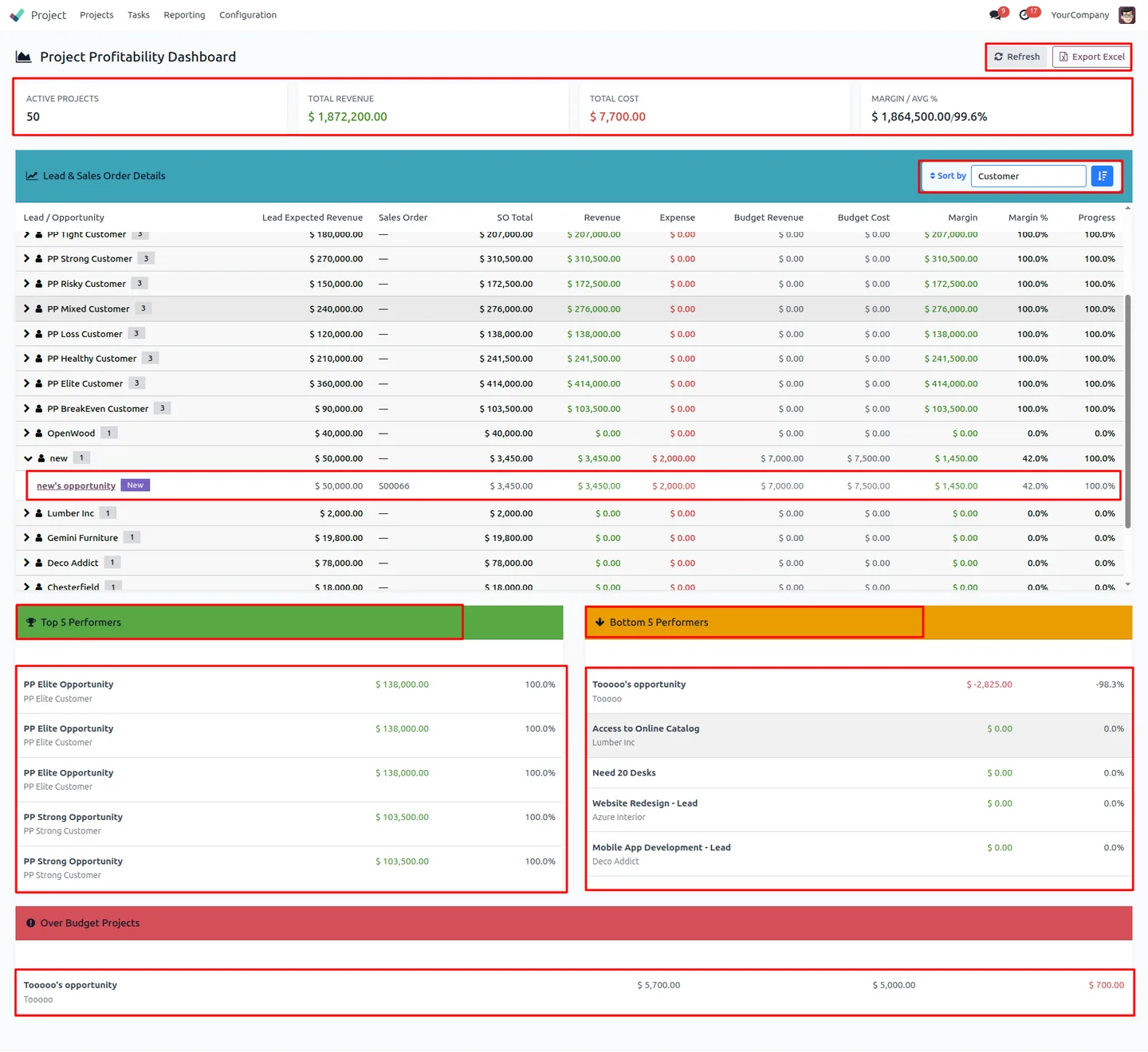
A built-in dashboard turns those records into KPIs: customer-by-customer analysis, top and bottom performers, and budget insights. Lead and sales order profitability data exports to Excel for reporting, audit, and management review.
Key features
-
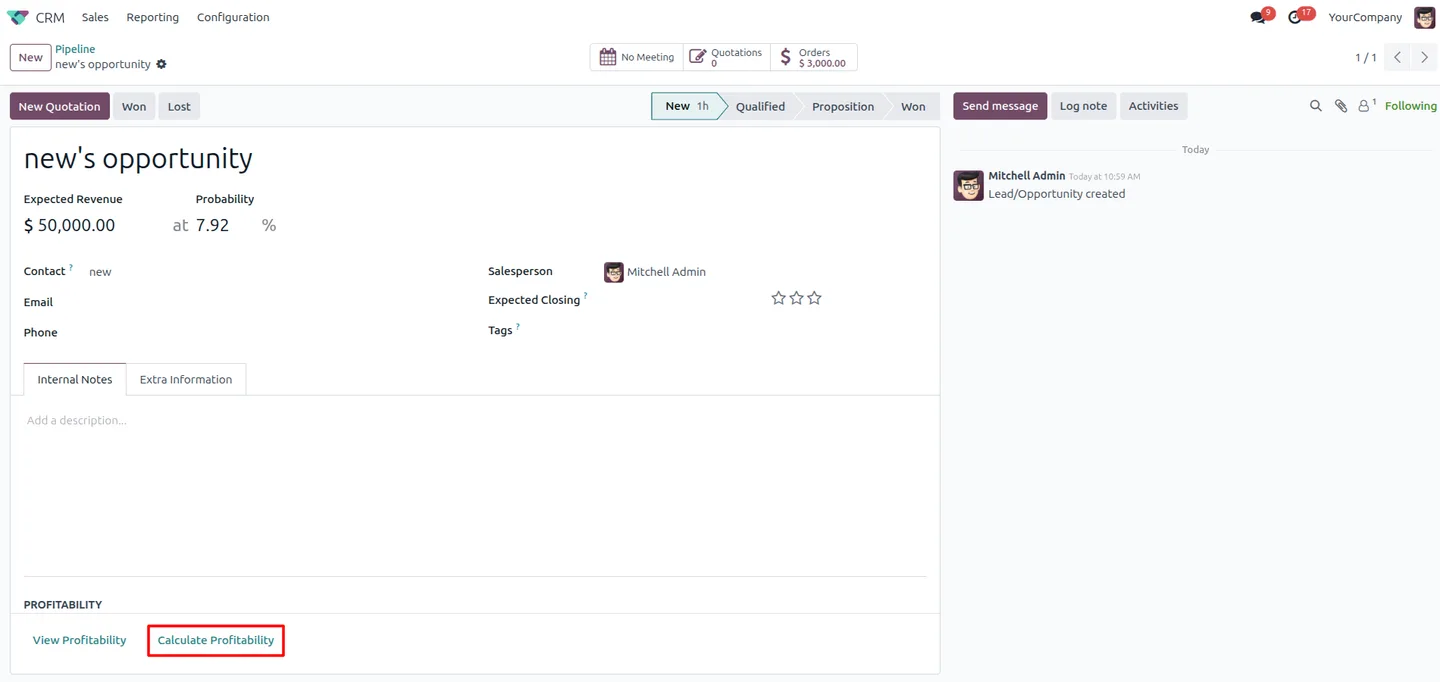
Lead profitability from the opportunity form
Calculate profitability for a CRM lead directly on the opportunity, with a single click — no separate report or manual spreadsheet to maintain.
-
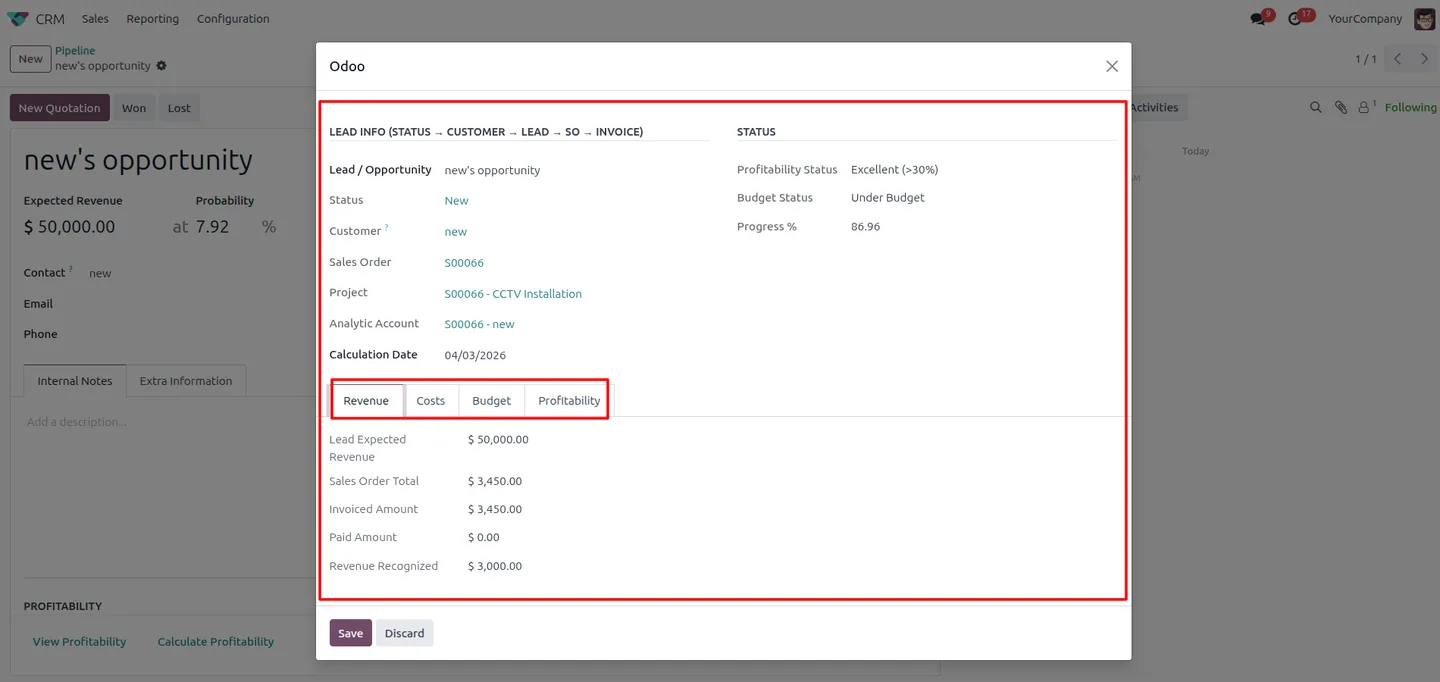
Profitability calculation popup
The calculation opens a popup with a concise snapshot of the key financial metrics — budget, cost, revenue, and profitability — for the lead or order.
-
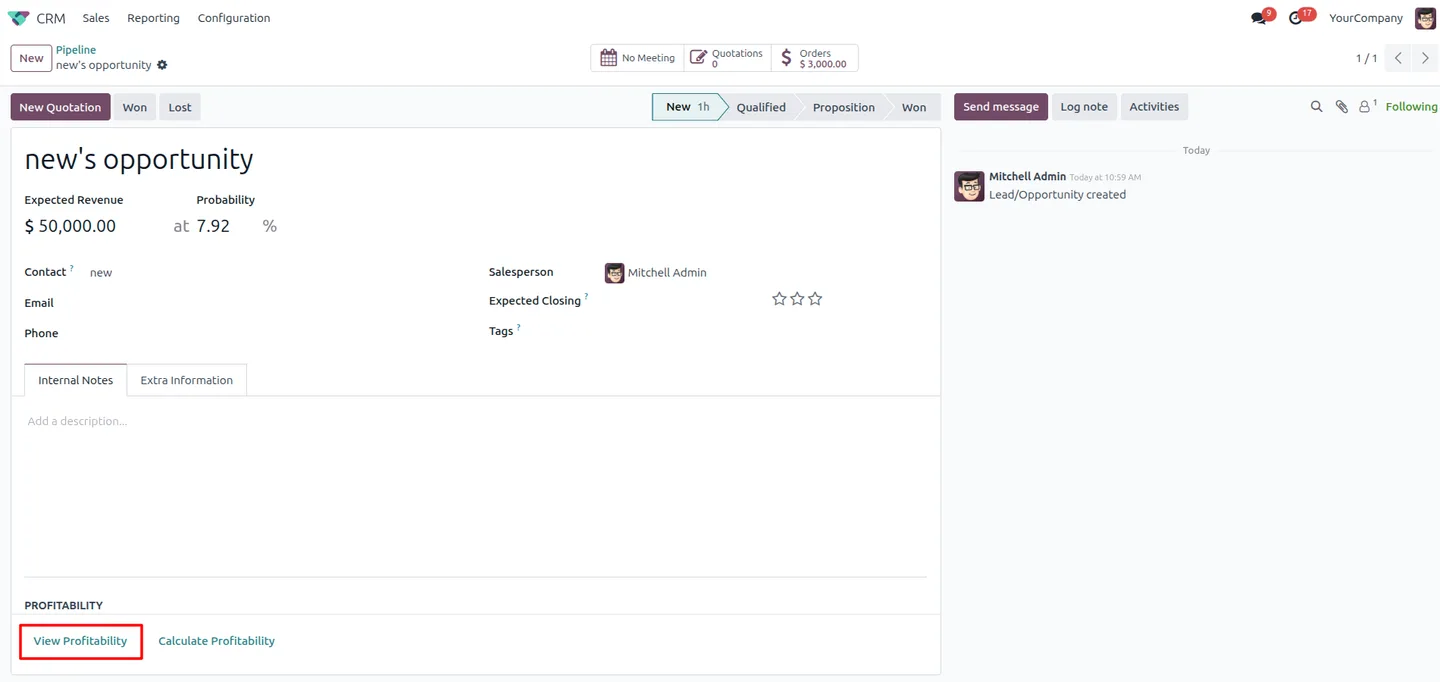
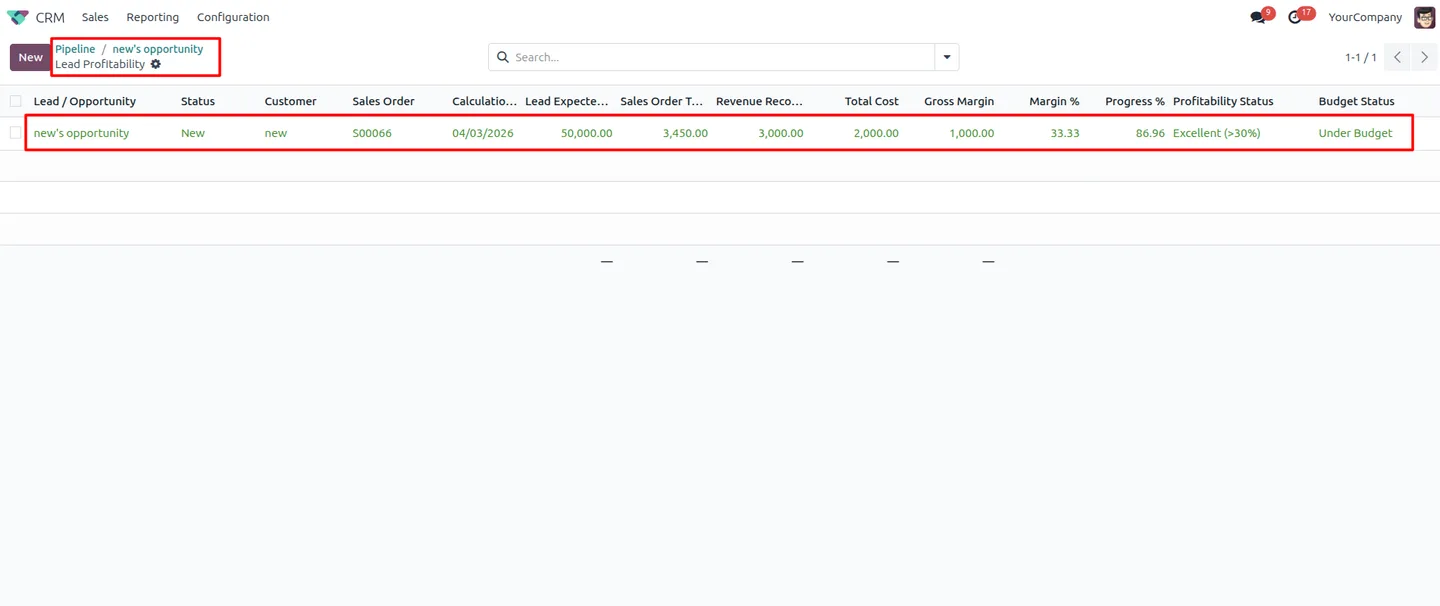
Profitability history
Every calculation is saved, so you can open the full profitability history from an opportunity and see how its numbers changed as the deal progressed.
-
Detailed profitability records
Each record tracks revenue, cost, budget, margin, and progress metrics, giving a complete financial picture of a lead or project in one place.
-
Real cost calculation
Cost totals combine timesheet cost, expense cost, vendor bill cost, and other cost, so margin reflects what the work actually cost rather than an estimate.
-
Interactive KPI dashboard
A dashboard presents KPIs, customer-wise analysis, top and bottom performers, and budget insights, with a refresh control to pull the latest figures.
-
Excel export
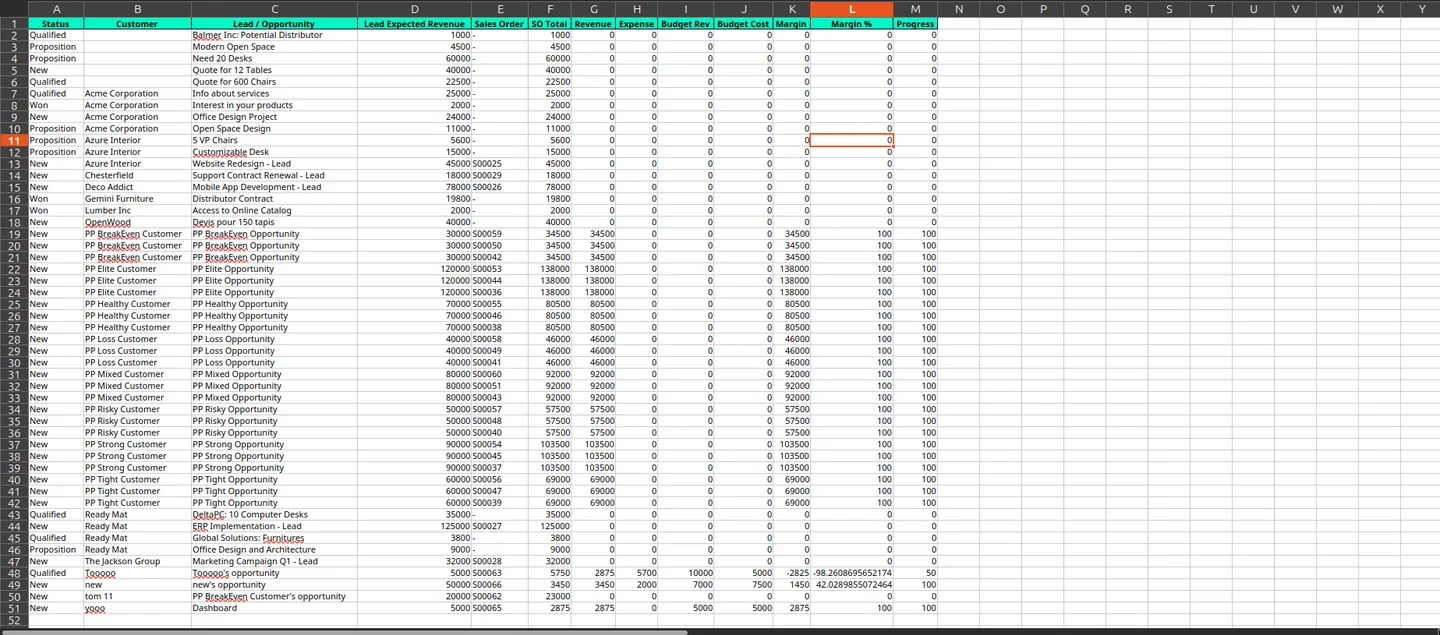
Download lead and sales order profitability data to Excel for reporting, audit trails, and management analysis outside Odoo.
-
Lead-to-delivery coverage
Profitability is tracked across the full lifecycle — from initial lead qualification through to final project execution — in one consistent view.
Project Profitability in Odoo
Every screen, in the order you meet it — configuration first, then the module in use.
Technical details
Specification
- Publisher
- TechUltra Solutions Private Limited
- Technical name
- project_profitability
- Odoo versions
- 16.0, 17.0, 18.0, 19.0, 20.0
- Lines of code
- 2,023
- License
- Odoo Proprietary License v1.0 (OPL-1)
- Price
- $19.89 (one-time)
Deployment
- Odoo Online
- Odoo.sh
- On-premise
Odoo dependencies
- CRM
- Sales
- Project
- Purchase
- Invoicing
- Contacts
- Calendar
- Discuss
Support
90 days of bug-fix support, Monday to Friday (10:00–19:00 IST). Raise a ticket at support@techultra.in.
Setup & configuration
From install to first call — here is the path.
- 1
Install the module
In Odoo, open Apps, remove the Apps filter, search for “Project Profitability”, and click Install.
- 2
Open a CRM opportunity
Go to CRM and open an opportunity. The profitability calculation action is available directly on the opportunity form.
- 3
Calculate profitability
Run the calculation with one click. A popup shows the budget, cost, revenue, and profitability for the lead.
- 4
Review the profitability history
Open the profitability history from the opportunity to see every saved calculation and how the numbers changed over time.
- 5
Open the dashboard
Use the profitability dashboard to review KPIs, customer-wise analysis, and top and bottom performers across all leads and projects.
- 6
Export to Excel
Export lead and sales order profitability data to Excel whenever you need it for reporting, audit, or management review.
Frequently asked questions
-
How does Project Profitability calculate cost?
Cost totals combine timesheet cost, expense cost, vendor bill cost, and other cost, so the margin you see reflects what the work actually cost rather than an estimate.
-
Can I calculate profitability for a CRM lead?
Yes. The module adds a one-click profitability calculation to the opportunity form, and a popup shows the budget, cost, revenue, and profitability for that lead.
-
Does the module keep a history of calculations?
Yes. Every profitability calculation is saved as a record, so you can open the full history from an opportunity and see how the numbers changed as the deal progressed.
-
What does the dashboard show?
The dashboard presents KPIs, customer-wise analysis, top and bottom performers, and budget insights, with a refresh control to load the latest figures.
-
Can I export profitability data?
Yes. Lead and sales order profitability data exports to Excel for reporting, audit trails, and management analysis outside Odoo.
-
Which Odoo versions are supported?
The module supports Odoo 16.0, 17.0, 18.0, 19.0, and 20.0, in both the Community and Enterprise editions.
-
Which Odoo apps does it need?
It works alongside CRM, Sales, Project, Purchase, and Invoicing, drawing on timesheets, expenses, and vendor bills to build an accurate cost picture.
-
Is support included?
Yes. The module includes 90 days of bug-fix support, Monday to Friday, 10:00–19:00 IST.
Listing verified against the Odoo App Store:
Related solutions
Whole-platform solutions that complement Project Profitability.
Related services
Get the most out of this module with senior TechUltra consultants.
Odoo Customization Services
Odoo customization from a Gold Partner: custom modules, workflows, reports and Studio changes, written upgrade-safe and quoted at a fixed scope. Free scoping call.
Hire Odoo Developers
Hire certified Odoo developers from a Gold Partner: one developer or a team, full-time or part-time, 70–160 hours a month. Silver, Gold or Platinum plan, free trial.
Odoo Support Services & Maintenance
Odoo support services from a Gold Partner: functional and technical support plus server cover for Enterprise and Community, 30-minute P1 response, 24/7 option.







