

Odoo App · Purchase
Product Purchase Price History
See a product's past purchase prices right on the RFQ and PO line in Odoo.

Overview
Product Purchase Price History gives Odoo buyers immediate visibility into what a product has previously cost — by supplier and by document type — without leaving the line they are working on. The module pulls historical prices from past RFQs and purchase orders and shows them alongside the new line in the Purchase app.
Built by TechUltra Solutions, it adds a configurable Product Item Limit and a Price History Data setting (Both, Request for Quotation, or Purchase Order) to the Purchase configuration, so admins can decide how much history each buyer sees and which documents count.
Because the history is filtered to the line's supplier and product, buyers can spot price drift, negotiate from real numbers, and avoid asking finance to pull spreadsheets. The module supports Odoo 16.0, 17.0, 18.0, 19.0, and 20.0 in both Community and Enterprise editions.
Key features
-
Historical prices on the PO line
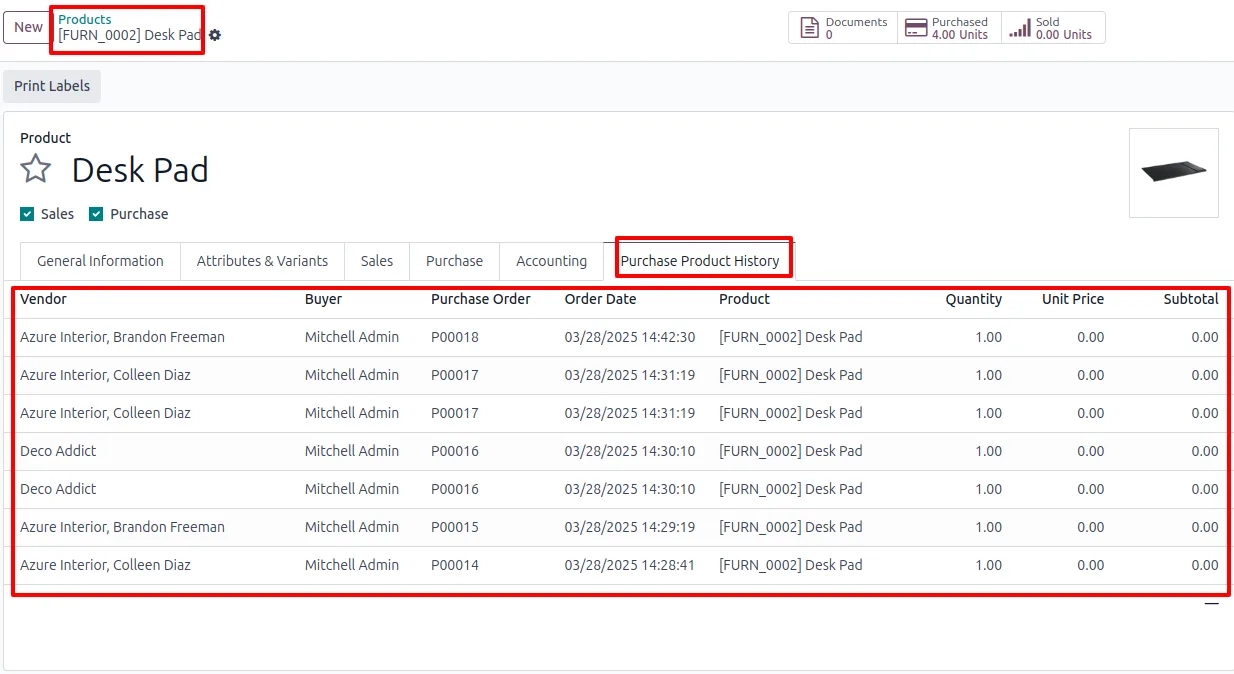
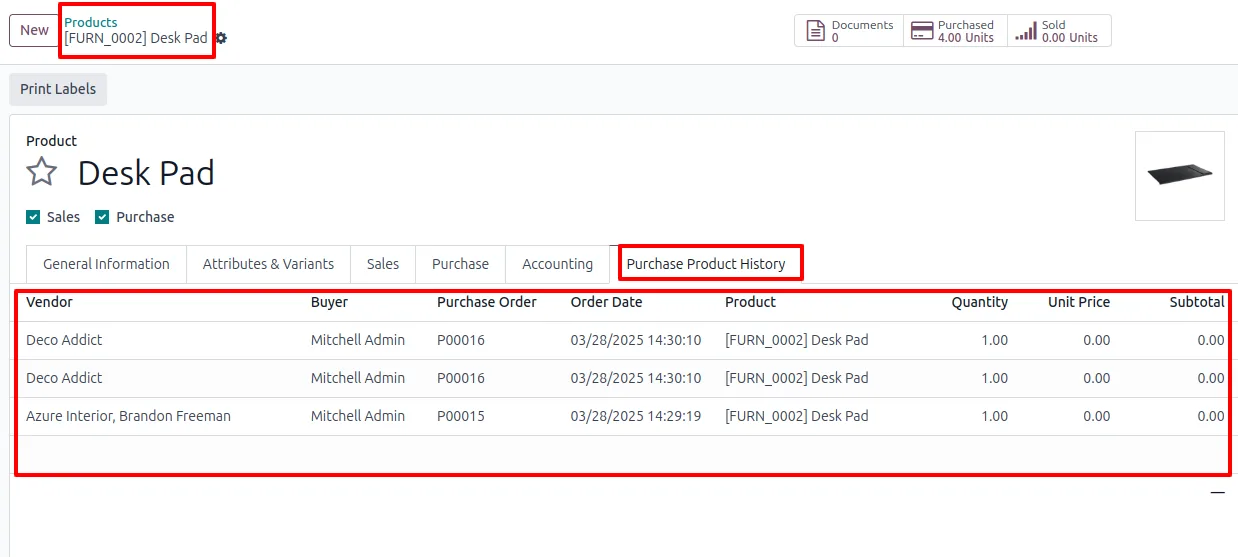
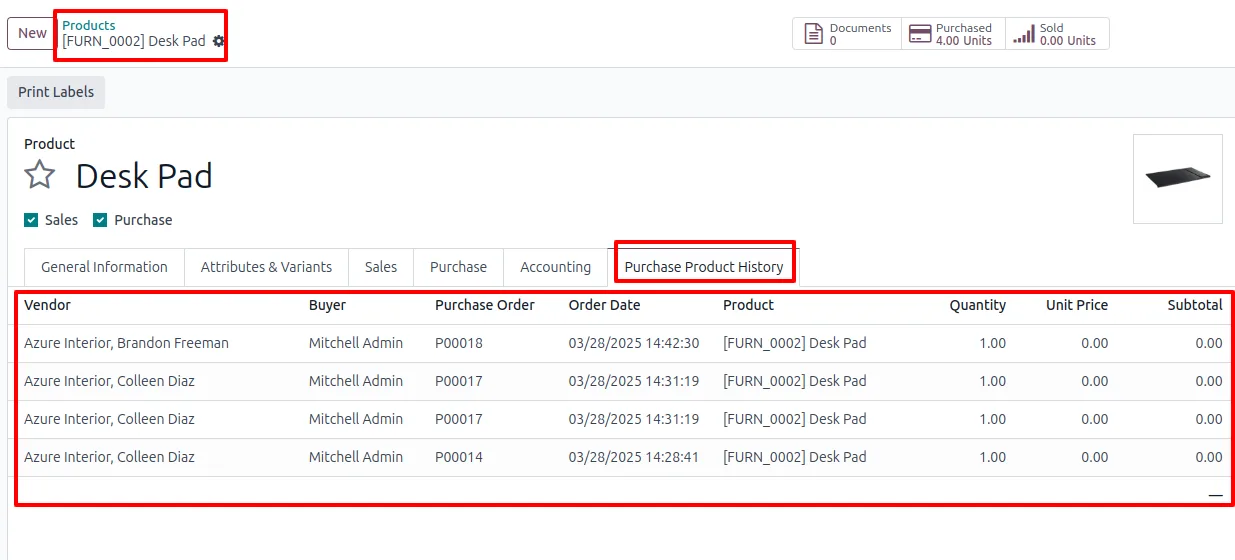
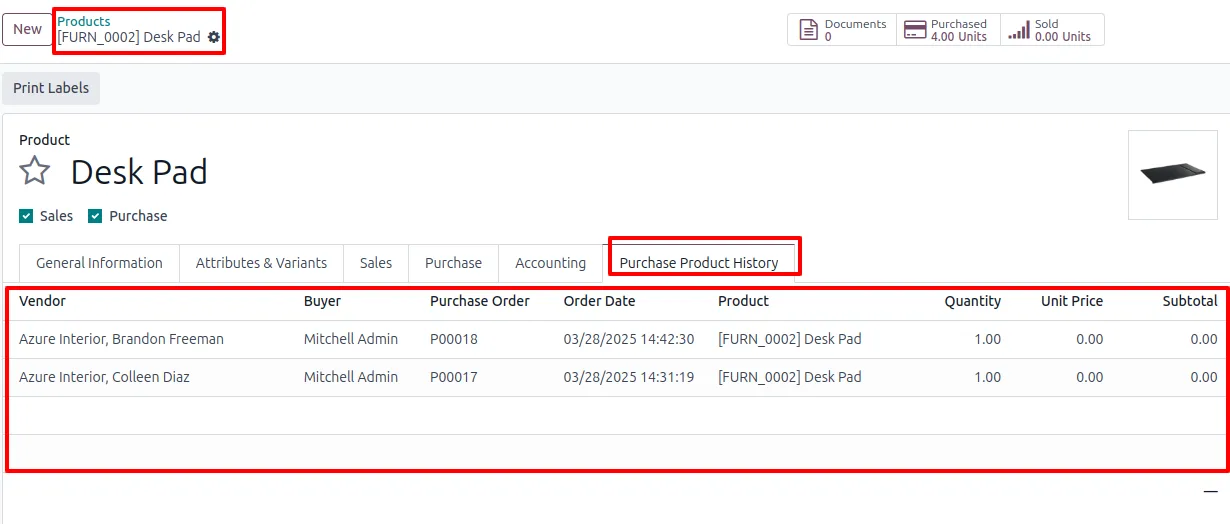
Past purchase prices for the selected product appear directly on the quotation or purchase order line, so buyers see what the same product cost on previous deals without opening a separate report.
-
Supplier-specific history
Prices are filtered to the line's supplier where applicable, giving an accurate picture of what that vendor has charged in the past rather than a blended average across all suppliers.
-
Configurable item limit
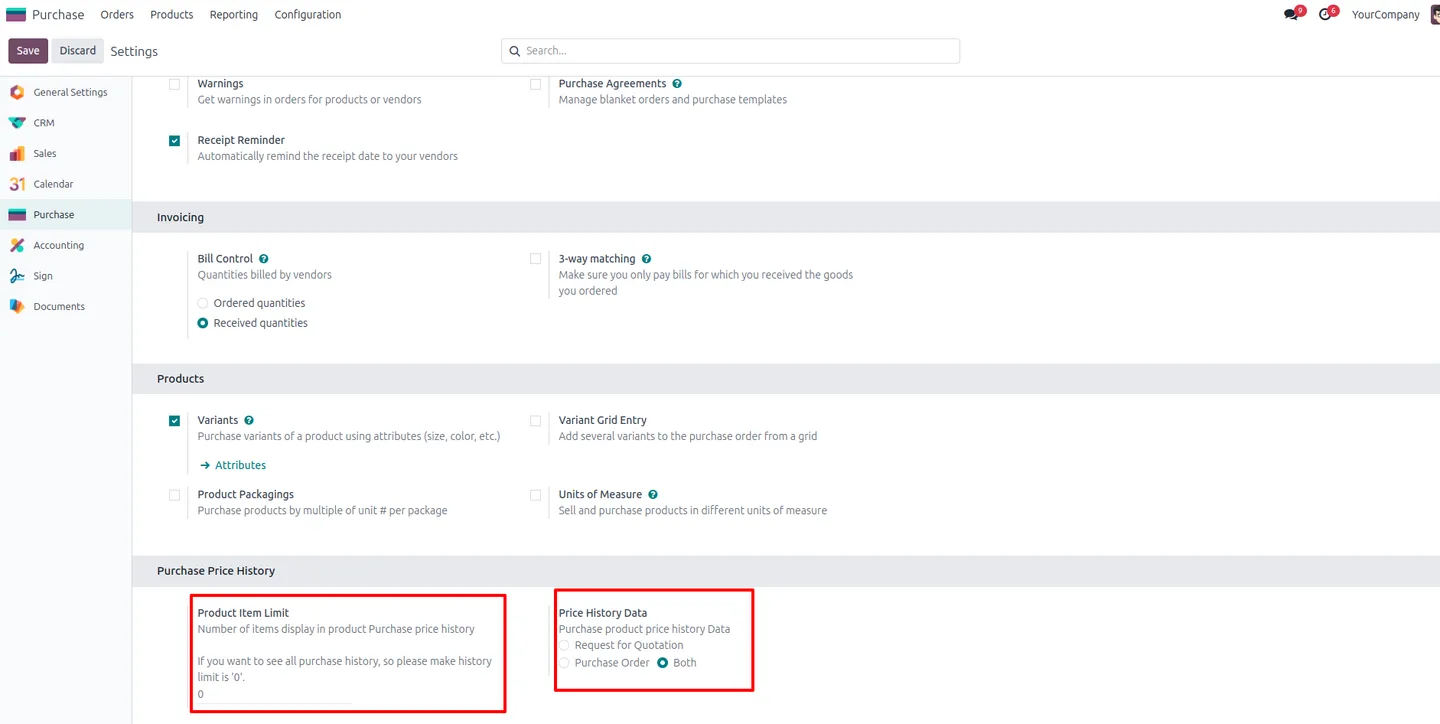
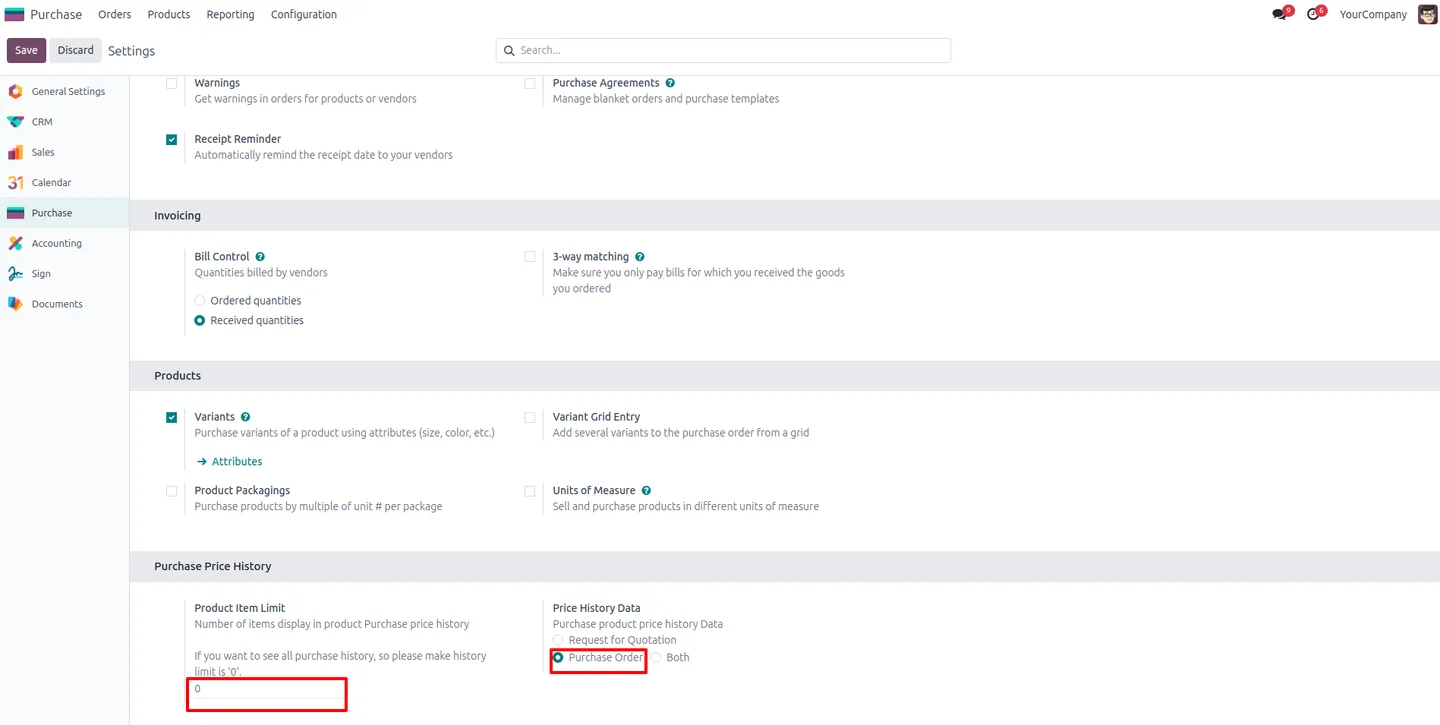
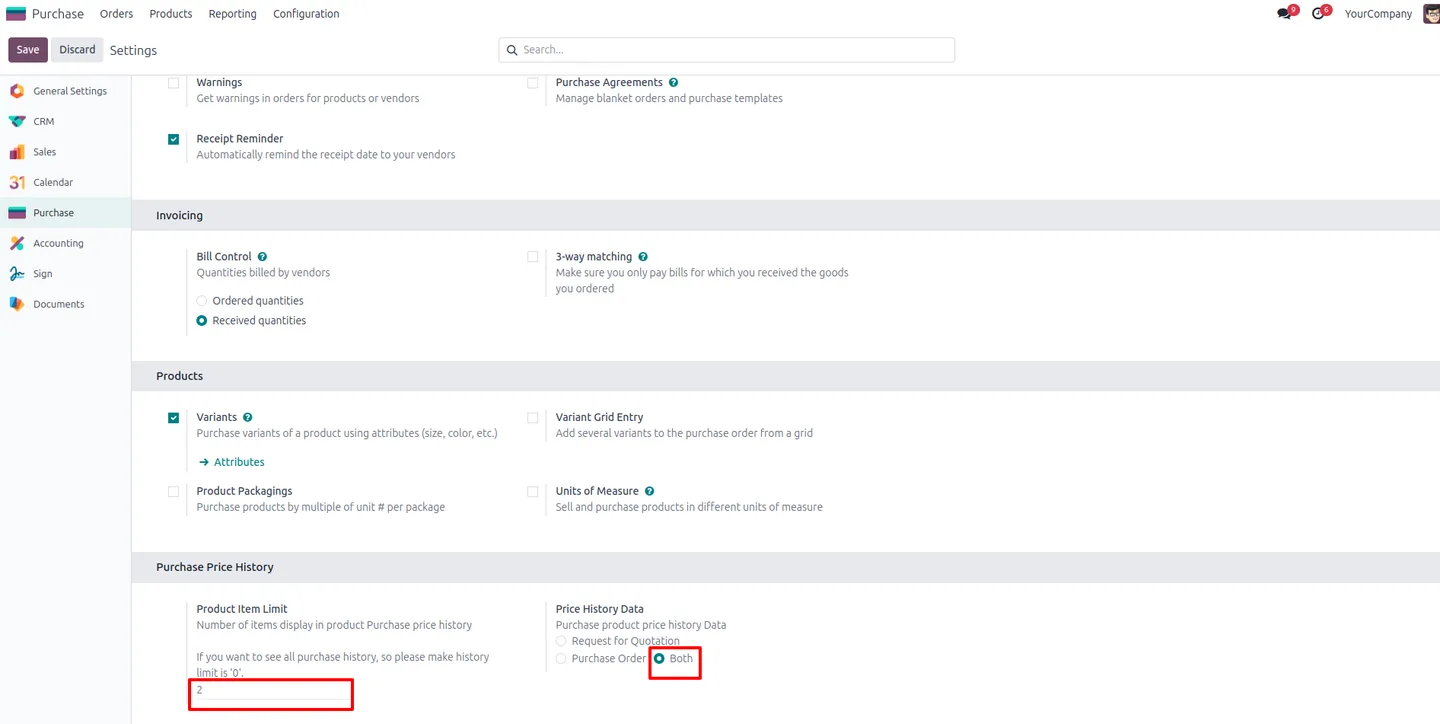
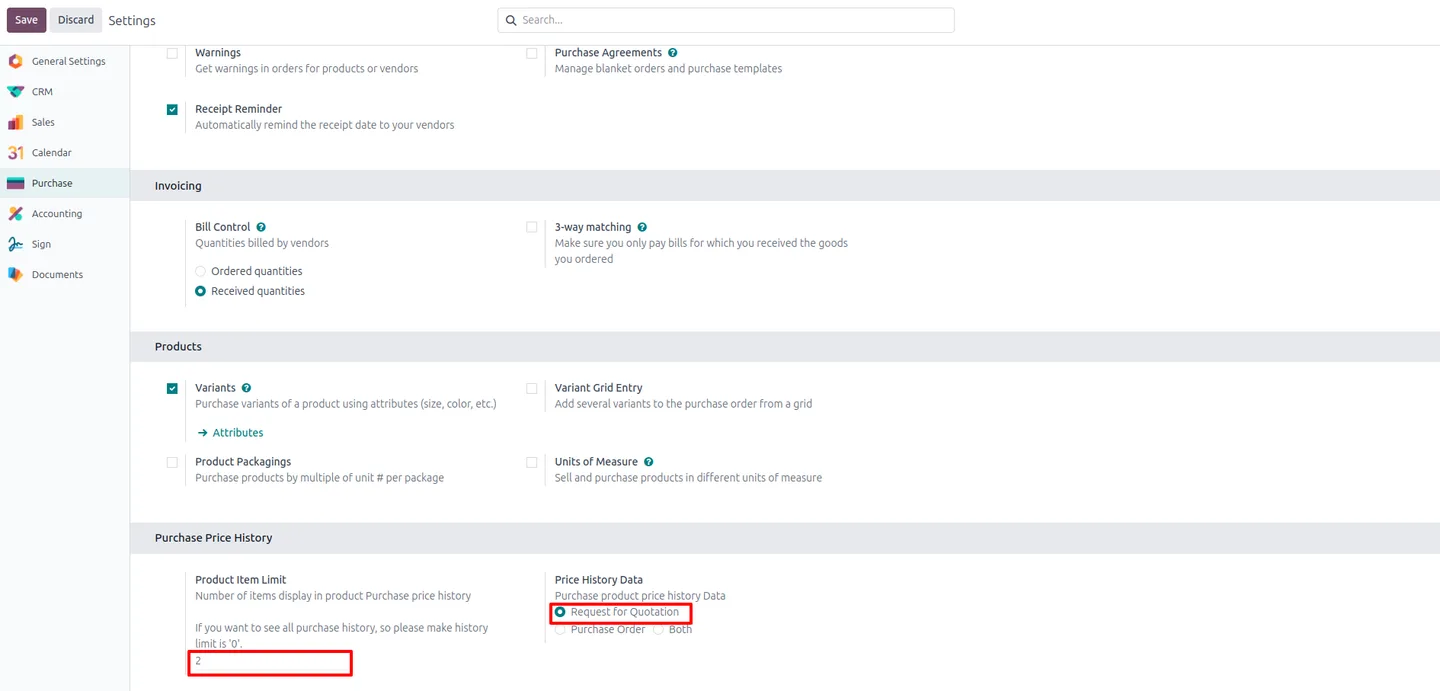
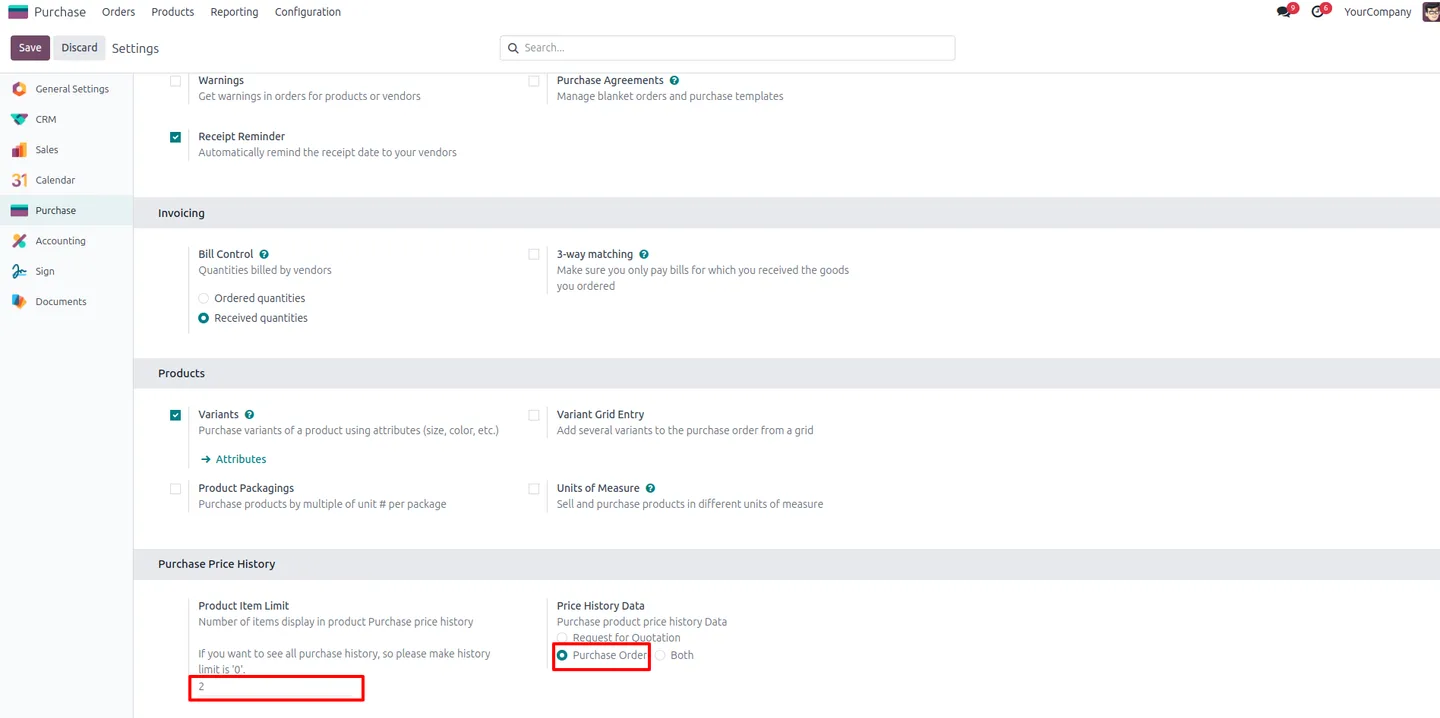
Set Product Item Limit in Purchase → Configuration → Settings to cap how many historical lines are shown. The default is 0, which shows every available record; set a number to show only the most recent N entries.
-
Choose RFQ, PO, or both as the source
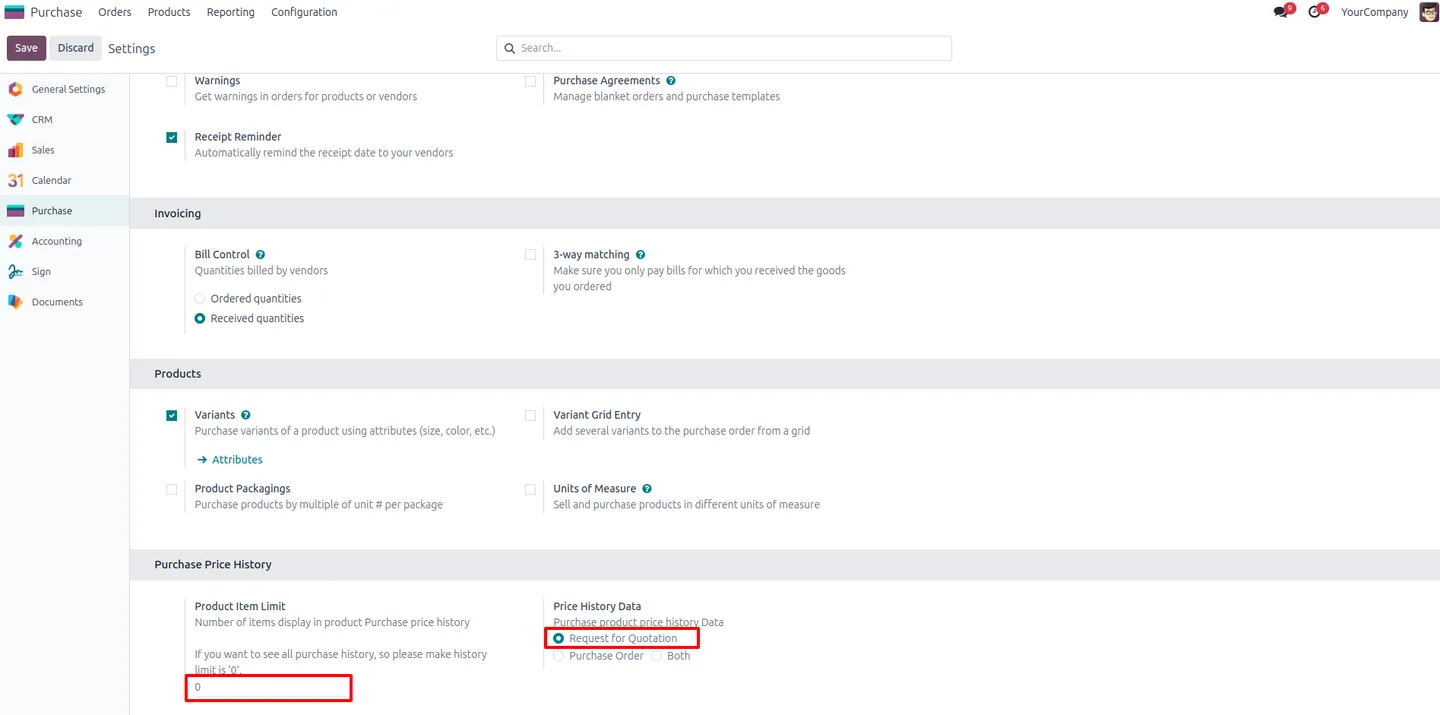
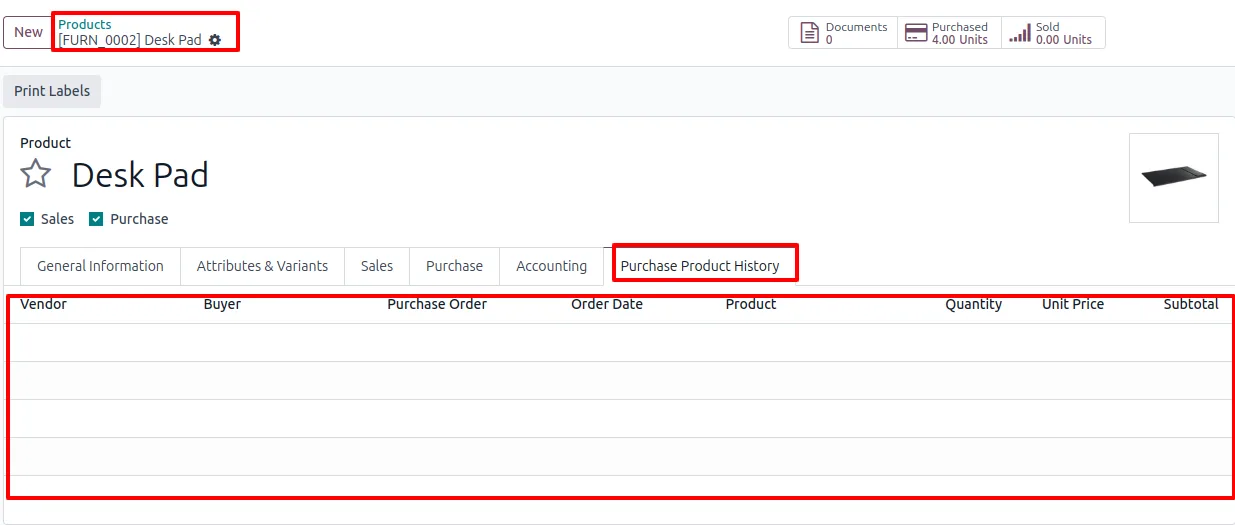
The Price History Data setting accepts Both, Request for Quotation, or Purchase Order. Show only confirmed PO history if you don't want unsent quotations to skew the buyer's reference price.
-
Per-user access toggle
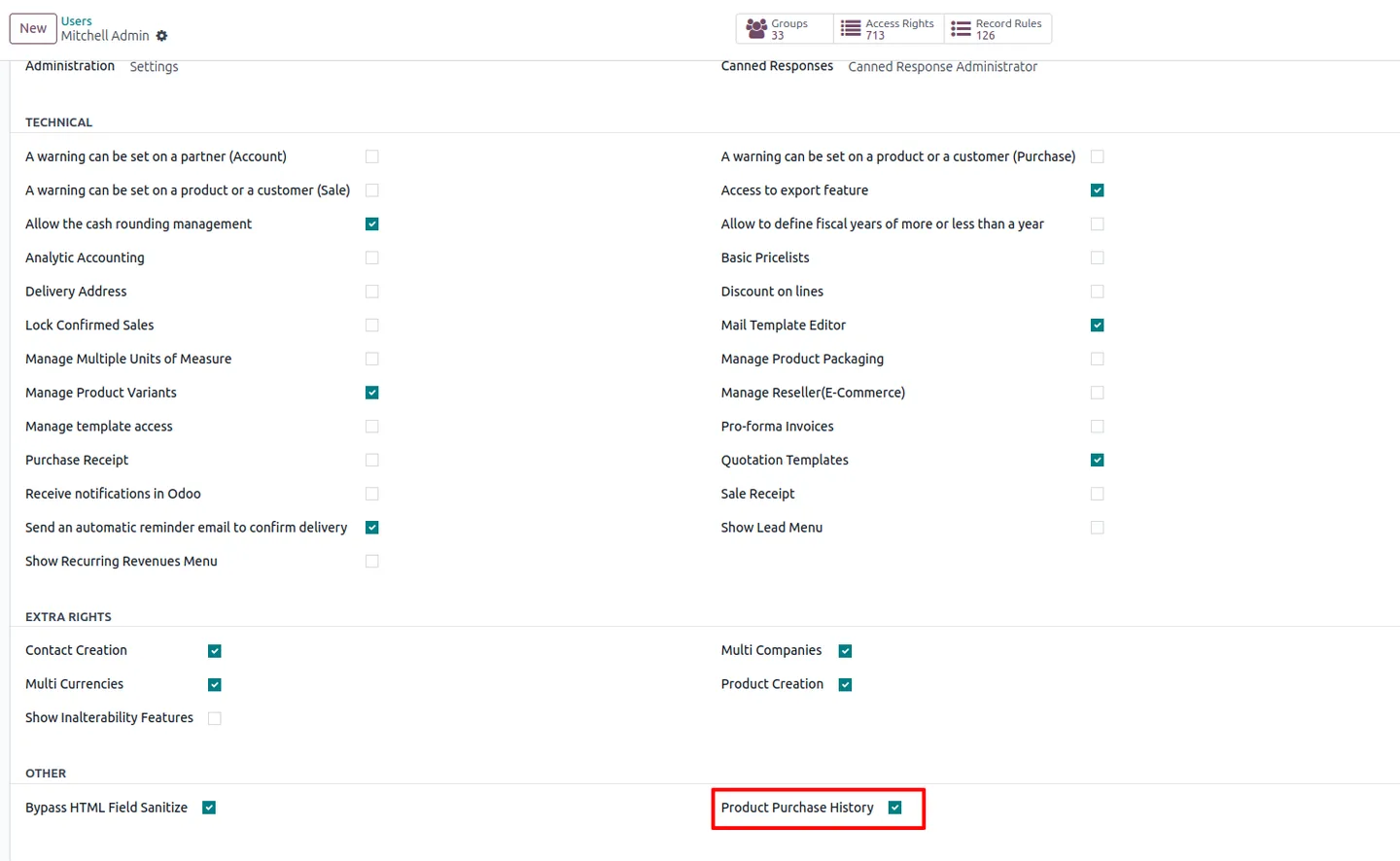
Access is opt-in per user: enable the “Product Purchase History” checkbox on a user record to expose the history on quotations and POs for that buyer.
-
Detailed product item information
Each historical entry exposes the line's product details so buyers can verify they are comparing the same variant before quoting a new price.
-
Purchasing insights for negotiation
By showing trends across past purchases, the module gives buyers concrete data points to push back on a supplier's new quote — no spreadsheets or BI dashboard required.
Product Purchase Price History in Odoo
Every screen, in the order you meet it — configuration first, then the module in use.
Technical details
Specification
- Publisher
- TechUltra Solutions Private Limited
- Technical name
- tus_product_purchase_price_history
- Odoo versions
- 16.0, 17.0, 18.0, 19.0, 20.0
- Lines of code
- 189
- License
- Odoo Proprietary License v1.0 (OPL-1)
- Price
- $10.60 (one-time)
Deployment
- Odoo Online
- Odoo.sh
- On-premise
Odoo dependencies
- Purchase
- Sales
- Invoicing
- Discuss
Support
90 days of bug-fix support, Monday to Friday (10:00–19:00 IST). Raise a ticket at support@techultra.in.
Setup & configuration
From install to first call — here is the path.
- 1
Install the module
In Odoo, open Apps, remove the Apps filter, search for “Product Purchase Price History” (technical name tus_product_purchase_price_history), and click Install.
- 2
Enable access on the buyer's user record
Go to Settings → Users & Companies → Users, open the buyer, and tick the “Product Purchase History” checkbox so the price history is shown on quotations and POs for that user.
- 3
Configure the history source and limit
Go to Purchase → Configuration → Settings and scroll to the Purchase Price History section. Set Product Item Limit (default 0 = unlimited) and Price History Data (default Both — choose Request for Quotation or Purchase Order to narrow the source).
- 4
Open a quotation or PO and add a product
Create a new RFQ or PO and add a product line. The module shows the matching historical purchase prices for that product (and supplier, where relevant), respecting the configured limit and source.
- 5
Adjust per buyer or per company
Tune the limit and source per company if needed, and grant or revoke the per-user access toggle as new buyers join the team.
Frequently asked questions
-
Where does the price history actually appear?
On the purchase order and request-for-quotation lines themselves. Once enabled for a user, the historical prices for the selected product show up directly on the line they are working on — no separate report.
-
Can I limit how many historical entries are shown?
Yes. Purchase → Configuration → Settings exposes a Product Item Limit field. Leave it at 0 to show every entry, or set a number such as 2 to show only the two most recent historical purchases per product.
-
Can I exclude unconfirmed quotations from the history?
Yes. The Price History Data setting accepts Both, Request for Quotation, or Purchase Order. Pick Purchase Order to show only confirmed POs and ignore quotations.
-
Is the history filtered by supplier?
Yes, where applicable. Prices are scoped to the line's supplier so buyers see what that specific vendor charged previously, not a blended average across the supplier base.
-
Which Odoo versions are supported?
Odoo 16.0, 17.0, 18.0, 19, and 20.0, in both Community and Enterprise editions.
-
Do I need to give every buyer access?
No. Access is opt-in per user. Tick the “Product Purchase History” checkbox on a user record to expose the feature for that buyer; leave it off for users who should not see historical pricing.
-
Does this require any external service or data warehouse?
No. The module reads historical purchase data already stored in Odoo's Purchase app — no external service, ETL, or analytics warehouse is required.
-
Is support included?
Yes. The module includes 90 days of bug-fix support, Monday to Friday, 10:00–19:00 IST. Tickets go to support@techultra.in.
Listing verified against the Odoo App Store:
Related solutions
Whole-platform solutions that complement Product Purchase Price History.
Odoo Purchase
Odoo Purchase module — RFQ, PO, supplier portal, three-way match, blanket PO, drop-ship, sub-contracting. Integrated with Inventory + MRP + Accounting.
Odoo Inventory + Warehouse Management
Odoo Inventory module — multi-warehouse, batch/serial, putaway, barcode, replenishment, cross-docking, dropship, consignment. Full WMS in your ERP.
Related services
Get the most out of this module with senior TechUltra consultants.
Odoo Customization Services
Odoo customization from a Gold Partner: custom modules, workflows, reports and Studio changes, written upgrade-safe and quoted at a fixed scope. Free scoping call.
Hire Odoo Developers
Hire certified Odoo developers from a Gold Partner: one developer or a team, full-time or part-time, 70–160 hours a month. Silver, Gold or Platinum plan, free trial.
Odoo Support Services & Maintenance
Odoo support services from a Gold Partner: functional and technical support plus server cover for Enterprise and Community, 30-minute P1 response, 24/7 option.







