
Odoo App · Sales & Pricing
Pricelists Grade
Assign Odoo sales pricelists to customers by grade — tier pricing without manual lookups.

Overview
Pricelists Grade adds a simple grade layer between your customers and your Odoo pricelists, so tier pricing applies automatically instead of being set quote by quote.
Built by TechUltra Solutions, the module lets you define the grades your business actually uses — Gold, Silver, Bronze, distributor tiers, volume bands — and link each grade to a pricelist. Sales staff pick the grade on the customer record once; the matching pricelist then drives every new quote and order.
The result is consistent pricing across the sales team, fewer mistakes when staff turn over, and a clear audit trail of which grade — and therefore which pricelist — a customer was on at any point in time.
Key features
-
Assign sales pricelists by grade
Link each pricelist to a grade so customers in the same tier all quote at the same prices, without staff having to remember the mapping.
-
Create the grades your business uses
Add as many grades as you need — Gold, Silver, Bronze, distributor tiers, volume bands — from a dedicated configuration menu.
-
Attach a grade to each pricelist
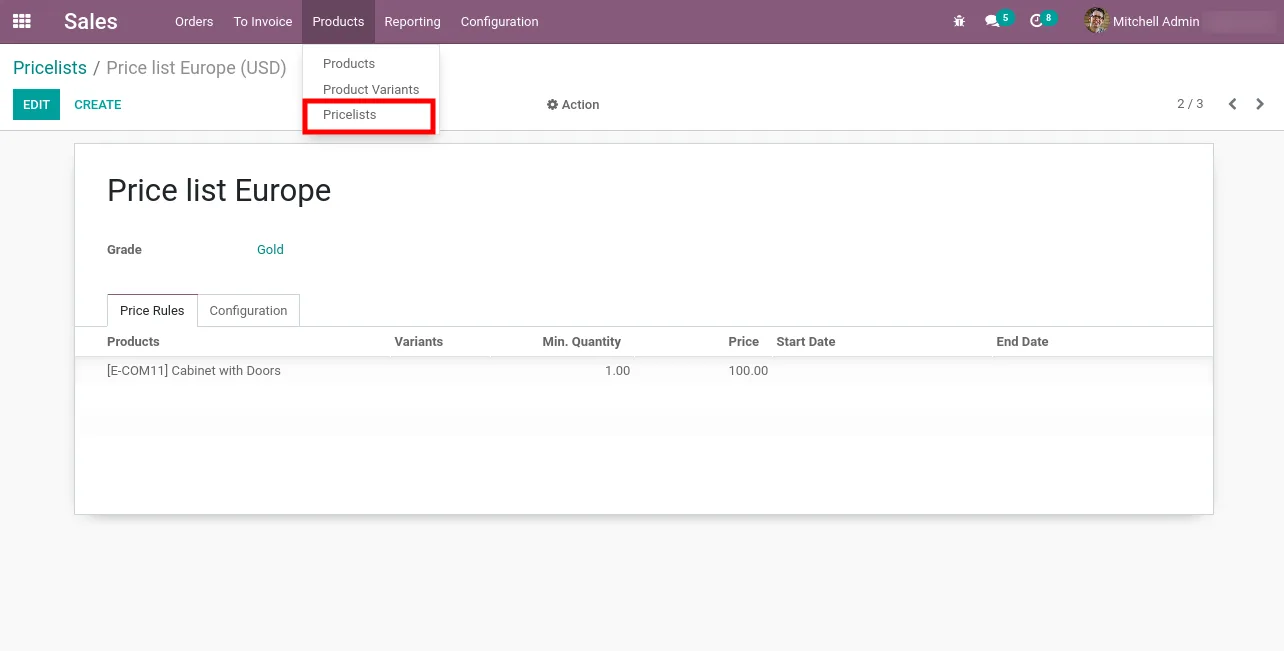
Open any sales pricelist and pick the grade it serves. The grade then flows through to every customer who sits in that tier.
-
Set a grade on every customer
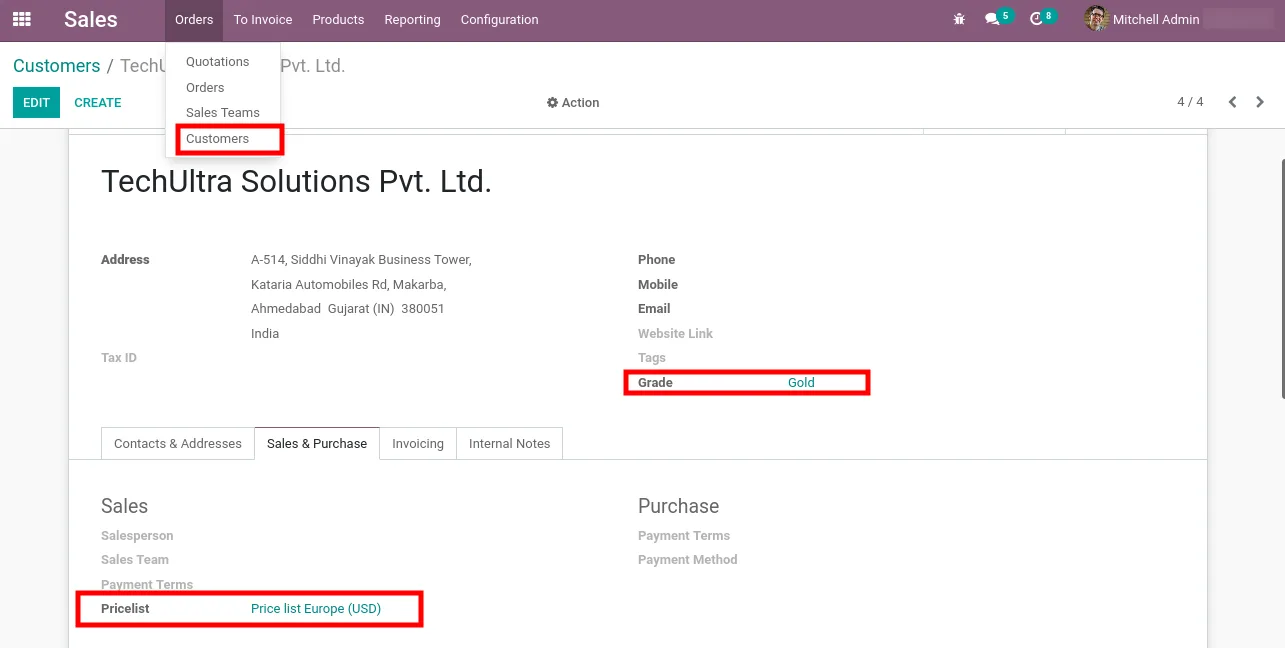
Choose the grade for each customer directly on the partner record, so the right pricelist is one field away on every contact.
-
Pricelists apply automatically
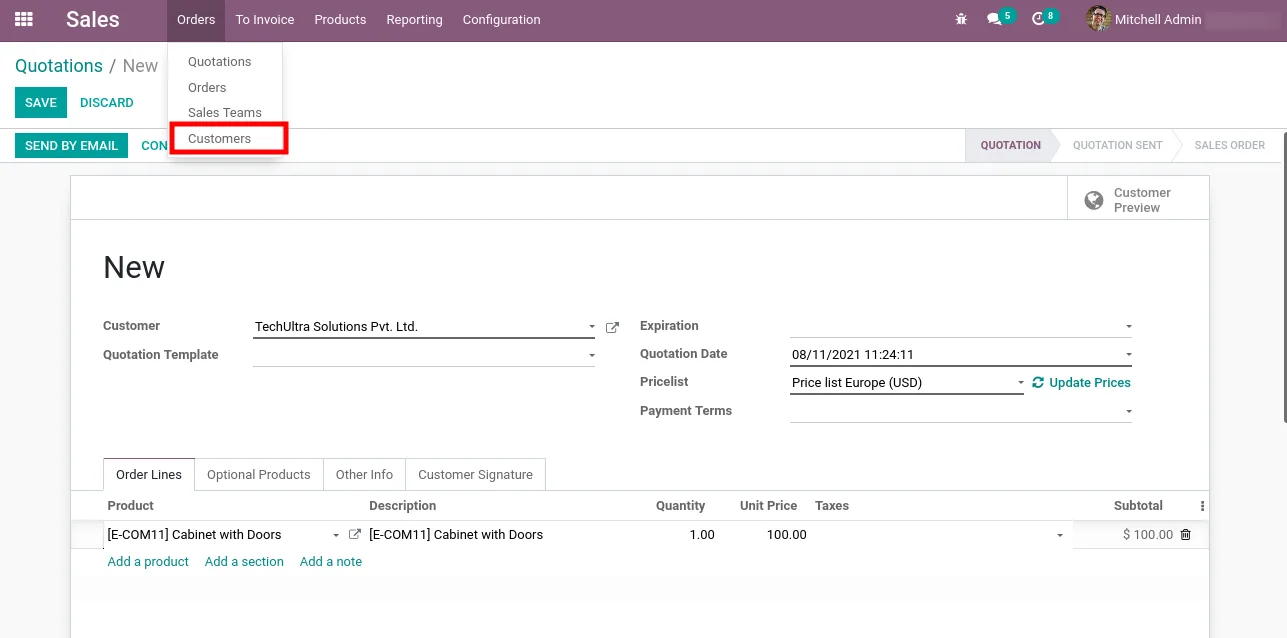
When a salesperson creates a quote or sales order, the pricelist matching the customer's grade is selected for them — no manual pick from a long list.
-
Works with Odoo Sales out of the box
Built on top of the standard Sales, Discuss, and Invoicing apps, with no extra modules required beyond Odoo's own.
-
Supports Odoo 12 through 17
A single, lightweight module that has been kept current across Odoo 12, 13, 14, 15, 16, and 17 — Community and Enterprise.
Pricelists Grade in Odoo
Every screen, in the order you meet it — configuration first, then the module in use.
Technical details
Specification
- Publisher
- TechUltra Solutions Private Limited
- Technical name
- tus_pricelist_grade
- Odoo versions
- 12.0, 13.0, 14.0, 15.0, 16.0, 17.0
- Lines of code
- 111
- License
- GNU Affero General Public License v3 (AGPL-3)
- Price
- Free
Deployment
- Odoo Online
- Odoo.sh
- On-premise
Odoo dependencies
- Sales
- Discuss
- Invoicing
Support
90 days of bug-fix support, Monday to Friday (10:00–19:00 IST). Raise a ticket at support@techultra.in.
Setup & configuration
From install to first call — here is the path.
- 1
Install the module
In Odoo, open Apps, remove the Apps filter, search for “Pricelists Grade”, and click Install.
- 2
Enable pricelists in Sales
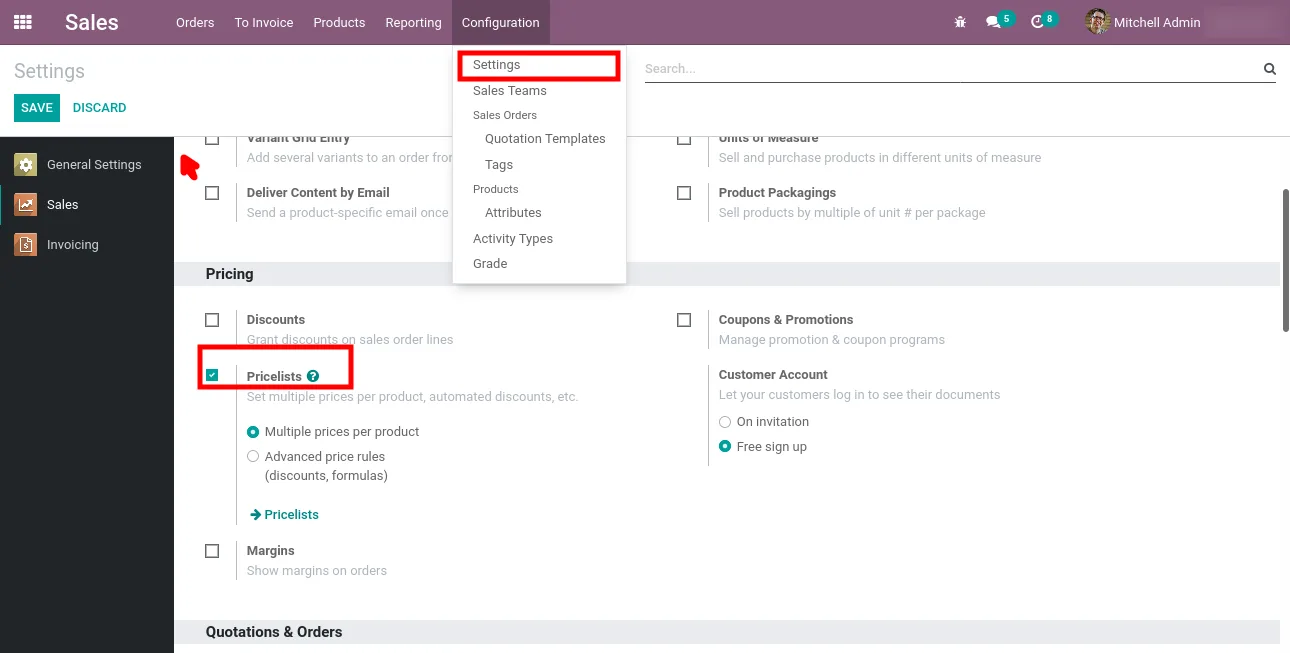
Go to Sales → Configuration → Settings and turn on the Pricelist option so multiple sales pricelists are available across the platform.
- 3
Create your grades
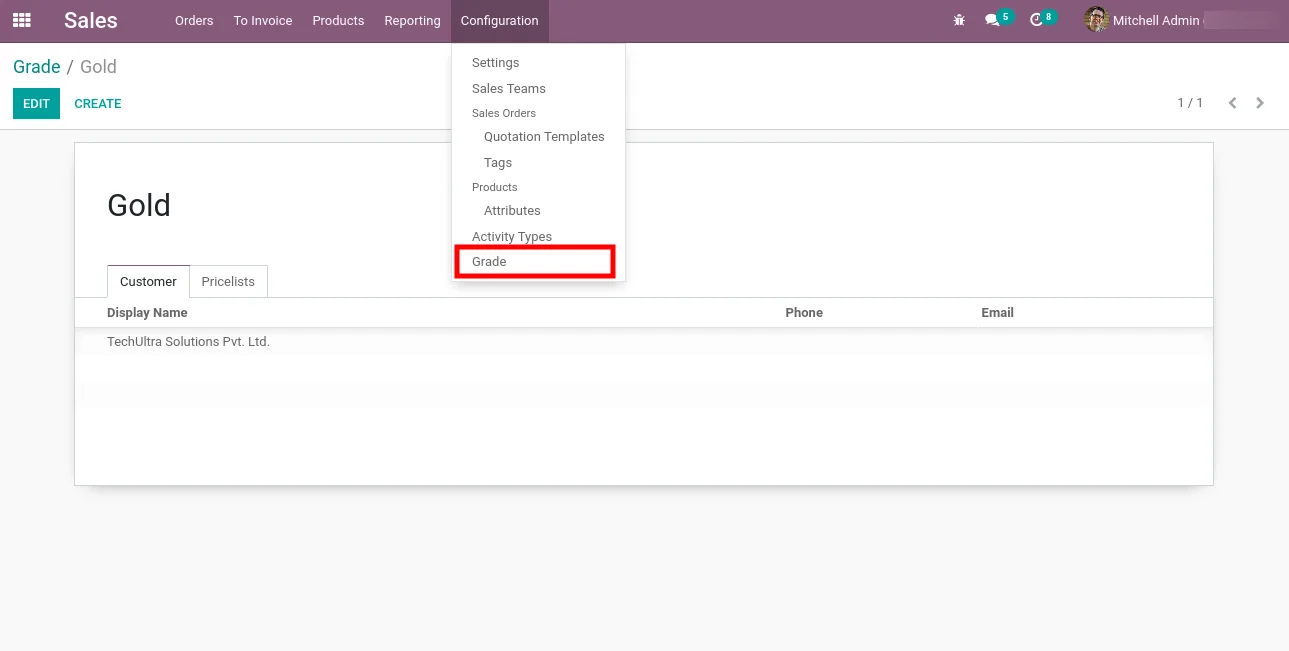
Open Sales → Configuration → Grade and add the grades you want to use — for example Gold, Silver, and Bronze, or distributor tiers that match your commercial policy.
- 4
Attach grades to pricelists
Edit each sales pricelist and set the grade it should serve. Each grade can be tied to one pricelist.
- 5
Assign grades to customers
Open a customer record and select the grade that applies. The matching pricelist then drives every quote and sales order from that point on.
Frequently asked questions
-
How does grade-based pricing work in Odoo?
You create a grade, attach a sales pricelist to it, and set that grade on each customer. When a salesperson starts a quote, Odoo picks the pricelist linked to the customer's grade automatically — no manual selection step.
-
Can I create my own grade names?
Yes. Open Sales → Configuration → Grade and add any grades that match how your business segments customers — Gold/Silver/Bronze, distributor tiers, volume bands, or anything else you use today.
-
Is the module really free?
Yes. Pricelists Grade is published on the Odoo App Store under the AGPL-3 licence at no cost, by TechUltra Solutions.
-
Which Odoo versions does it support?
The module supports Odoo 12.0, 13.0, 14.0, 15.0, 16.0, and 17.0, in both Community and Enterprise editions.
-
Which Odoo apps does it depend on?
It depends on the standard Sales, Discuss, and Invoicing apps. No third-party modules or community apps are required.
-
Can a customer be in more than one grade?
Each customer is assigned one grade at a time, which keeps the pricing rule unambiguous on every quote. Change the grade on the customer record whenever a tier upgrade or downgrade is agreed.
-
Does it work for both B2B and retail customers?
Yes. Any customer record can be assigned a grade, so the module fits B2B price tiers, distributor pricing, and retail loyalty bands alike.
Listing verified against the Odoo App Store:
Related solutions
Whole-platform solutions that complement Pricelists Grade.
Odoo Sales
Odoo Sales module — quotations, pricing rules, sales orders, deliveries, returns. CRM-Inventory-Accounting integrated. Quote-to-cash unified.
Odoo CRM
Odoo CRM module — leads, opportunities, kanban pipeline, quotation, forecasting, email integration. Native with ERP. Mid-market alternative to Salesforce.
Related services
Get the most out of this module with senior TechUltra consultants.
Odoo Customization Services
Odoo customization from a Gold Partner: custom modules, workflows, reports and Studio changes, written upgrade-safe and quoted at a fixed scope. Free scoping call.
Hire Odoo Developers
Hire certified Odoo developers from a Gold Partner: one developer or a team, full-time or part-time, 70–160 hours a month. Silver, Gold or Platinum plan, free trial.
Odoo Support Services & Maintenance
Odoo support services from a Gold Partner: functional and technical support plus server cover for Enterprise and Community, 30-minute P1 response, 24/7 option.







