

Odoo App · Sales & Pricing
Pricelist User Access Control
Assign and restrict pricelists per Odoo user — protect margins and stop unauthorized pricing changes.

Overview
Pricelist User Access Control adds per-user pricelist permissions to Odoo Sales, so each salesperson only sees and applies the pricelists their role allows. The result is fewer wrong prices on quotes, no unauthorized discounts, and tighter control of margins across teams.
Built by TechUltra Solutions, the module fits cleanly into the standard Odoo Sales workflow. Administrators map allowed pricelists on the user record, and from then on the user's pricelist selector only shows what they are permitted to use when creating a quotation or sales order.
The module is well suited to businesses running customer-specific, regional, wholesale, distributor, or role-based pricing — anywhere multiple pricelists exist and the wrong one in the wrong hands costs money.
Key features
-
User-based pricelist access control
Assign specific pricelists to individual users so sales representatives use only approved pricing structures during quotation and sales order creation.
-
Restrict unauthorized pricelist selection
Prevent users from selecting or modifying unauthorized pricelists in sales orders, improving pricing security and operational accuracy.
-
Secure pricing and margin protection
Protect the business from incorrect pricing, unauthorized discounts, revenue leakage, and margin loss with controlled pricelist permissions.
-
Flexible mapping for sales teams
Configure different pricelists for different users, sales teams, branches, regions, or departments based on business requirements.
-
Improved quotation accuracy
Reduce manual pricing errors by ensuring users can only apply authorized pricelists while preparing quotations and sales orders.
-
Built for multi-level pricing structures
Suited to businesses managing customer-specific pricing, regional pricing, wholesale pricing, distributor pricing, or role-based sales pricing strategies.
Pricelist User Access Control in Odoo
Every screen, in the order you meet it — configuration first, then the module in use.


Technical details
Specification
- Publisher
- TechUltra Solutions Private Limited
- Technical name
- user_pricelist_restriction
- Odoo versions
- 16.0, 17.0, 18.0, 19.0, 20.0
- Lines of code
- 31
- License
- Odoo Proprietary License v1.0 (OPL-1)
- Price
- $13.86 (one-time)
Deployment
- Odoo Online
- Odoo.sh
- On-premise
Odoo dependencies
- Sales
- Invoicing
- Discuss
Support
90 days of bug-fix support, Monday to Friday (10:00–19:00 IST). Raise a ticket at support@techultra.in.
Setup & configuration
From install to first call — here is the path.
- 1
Install the module
In Odoo, open Apps, remove the Apps filter, search for “Pricelist User Access Control”, and click Install.
- 2
Create product pricelists
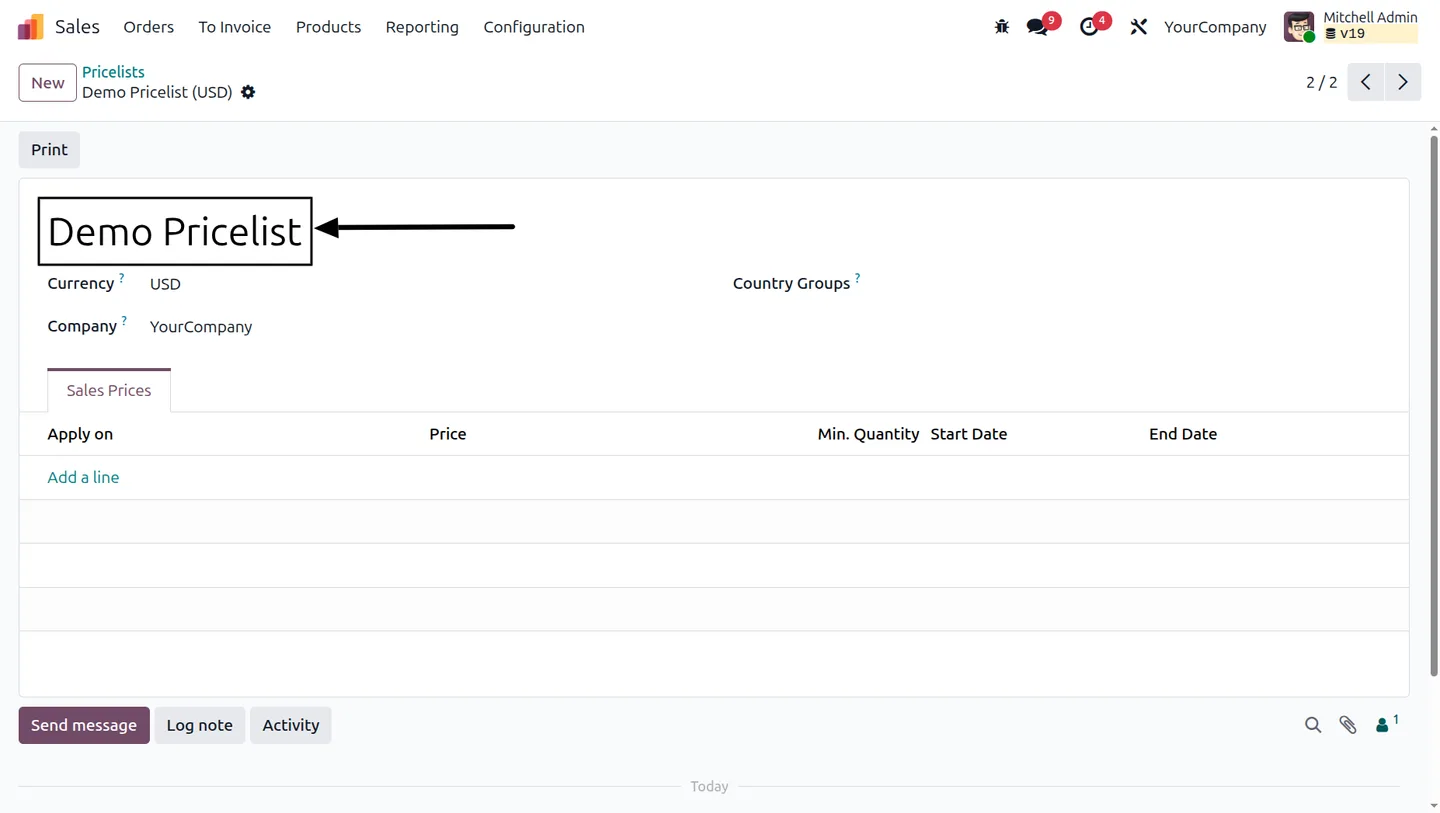
Go to Sales → Products → Pricelists and create the pricelists your business uses, if they don't already exist.
- 3
Assign allowed pricelists to each user
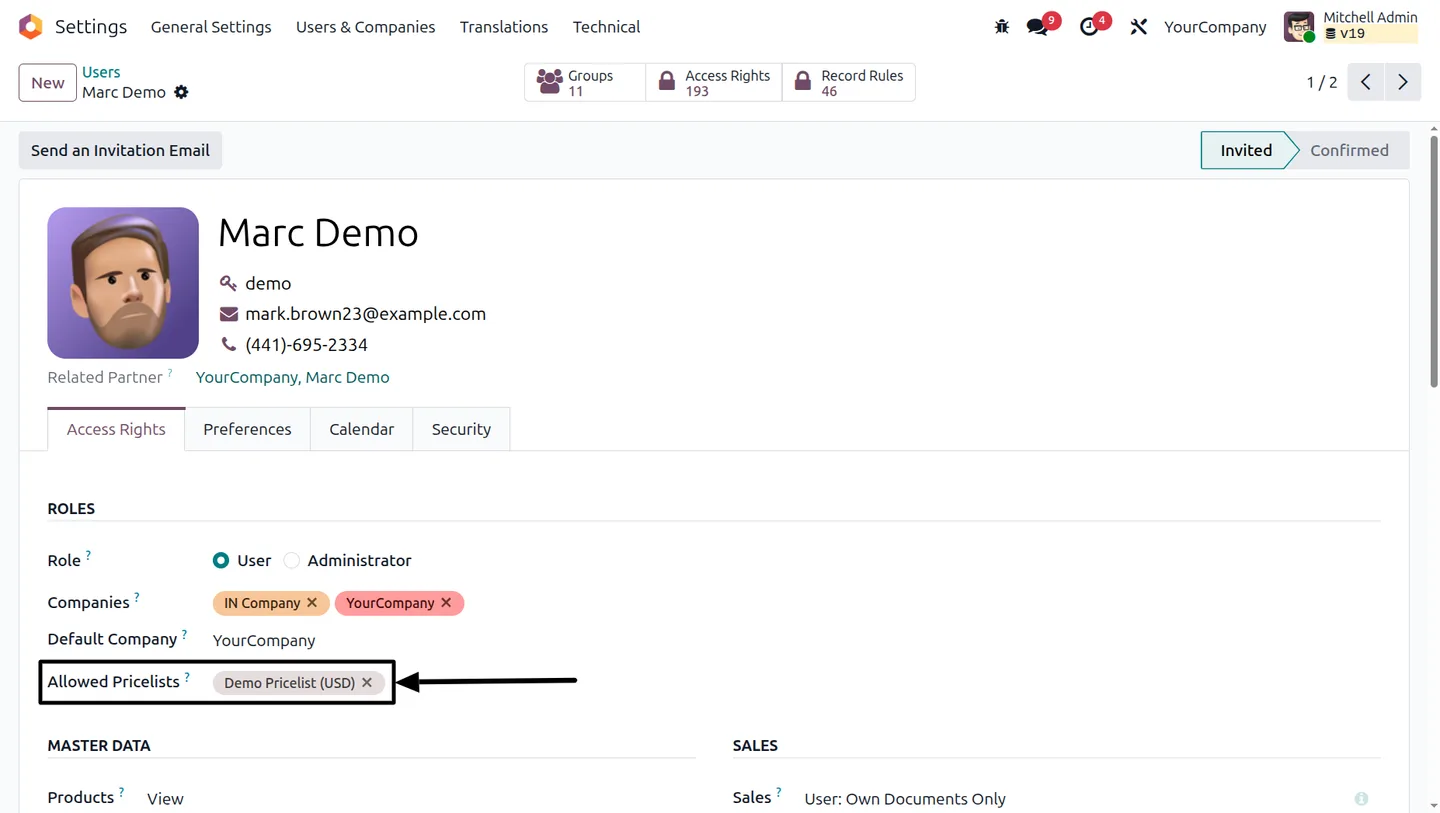
Open Settings → Users & Companies → Users, pick the salesperson, then add the pricelists they are allowed to use in the Allowed Pricelists field and save.
- 4
Verify the restriction
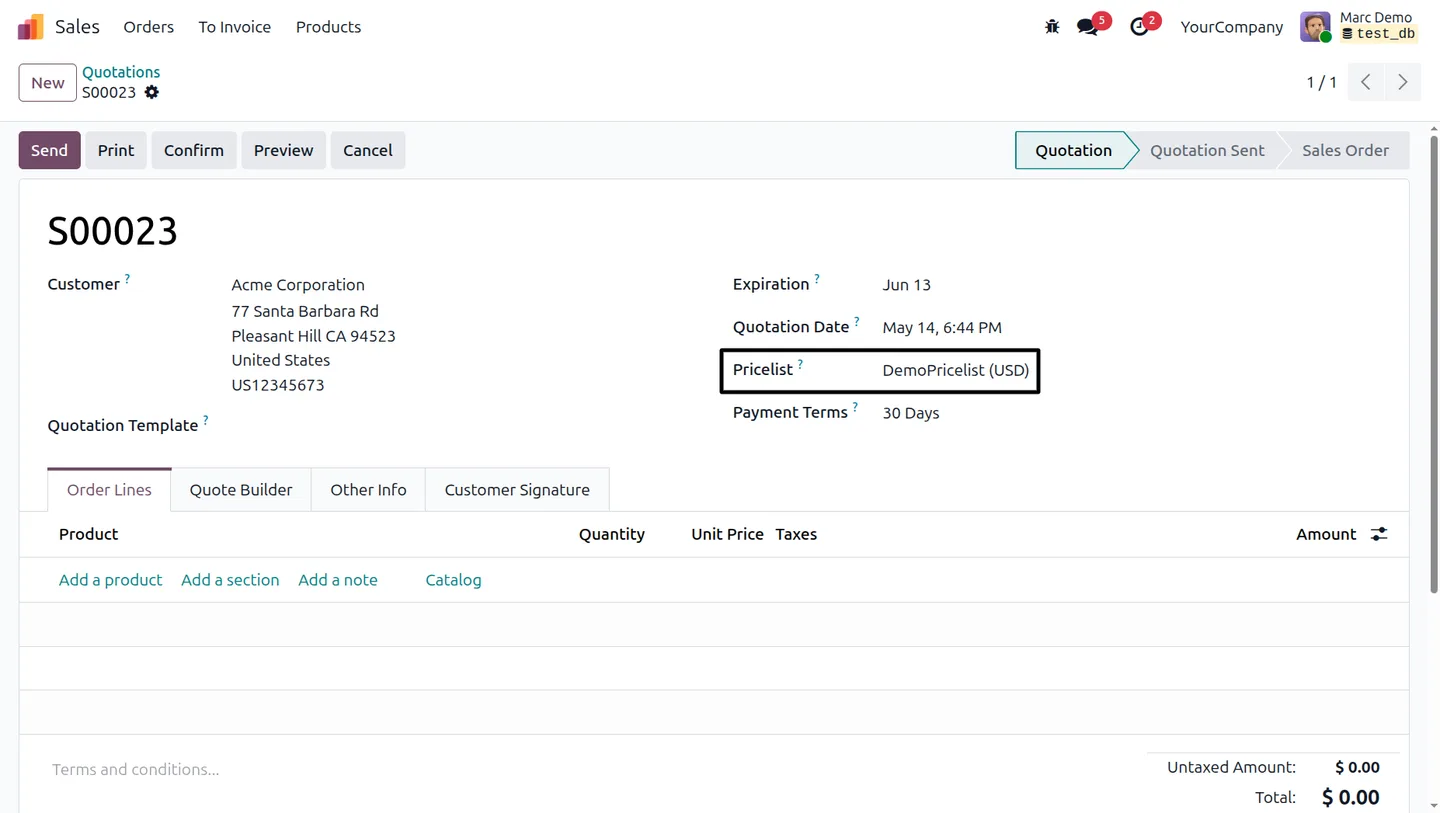
Log in as the assigned user, create a new quotation or sales order, and confirm that only the permitted pricelists appear in the pricelist selector.
Frequently asked questions
-
What problem does this module solve?
It stops salespeople from selecting the wrong pricelist on a quotation or sales order. Each user only sees the pricelists administrators have assigned to them, which protects margins and prevents unauthorized discounts.
-
Which Odoo versions are supported?
Pricelist User Access Control supports Odoo 16.0, 17.0, 18.0, 19.0, and 20.0, in both Community and Enterprise editions.
-
Where do I assign pricelists to a user?
Open Settings → Users & Companies → Users, select the user, and choose the pricelists they are allowed to use in the Allowed Pricelists field on their record.
-
Can I assign more than one pricelist to a user?
Yes. The Allowed Pricelists field accepts multiple pricelists, so a user can be granted access to as many pricelists as their role requires.
-
Does it affect existing Odoo Sales workflows?
No. The module slots into the standard Odoo Sales workflow — it only filters which pricelists each user can pick on a quotation or sales order.
-
Is it suitable for multi-team or multi-region pricing?
Yes. The mapping is flexible enough to support different pricelists per user, sales team, branch, region, or department, which is useful for customer-specific, wholesale, distributor, or role-based pricing.
-
Does the price include support?
Yes. The module includes 90 days of bug-fix support, Monday to Friday, 10:00–19:00 IST.
Listing verified against the Odoo App Store:
Related solutions
Whole-platform solutions that complement Pricelist User Access Control.
Odoo Sales
Odoo Sales module — quotations, pricing rules, sales orders, deliveries, returns. CRM-Inventory-Accounting integrated. Quote-to-cash unified.
Odoo CRM
Odoo CRM module — leads, opportunities, kanban pipeline, quotation, forecasting, email integration. Native with ERP. Mid-market alternative to Salesforce.
Related services
Get the most out of this module with senior TechUltra consultants.
Odoo Customization Services
Odoo customization from a Gold Partner: custom modules, workflows, reports and Studio changes, written upgrade-safe and quoted at a fixed scope. Free scoping call.
Hire Odoo Developers
Hire certified Odoo developers from a Gold Partner: one developer or a team, full-time or part-time, 70–160 hours a month. Silver, Gold or Platinum plan, free trial.
Odoo Support Services & Maintenance
Odoo support services from a Gold Partner: functional and technical support plus server cover for Enterprise and Community, 30-minute P1 response, 24/7 option.







