
Odoo App · Reporting & PDF
POS Session Report Secure ZIP
Bulk-export POS sales detail PDFs into one password-protected ZIP.
Overview
POS Session Report Secure ZIP is built for retailers and accountants who need to pull a stack of Point of Sale Sales Details reports out of Odoo quickly — and share them without leaking sensitive cash and card data on the way.
Built by TechUltra Solutions, the module adds a single Export Sales Details action to the POS Sessions list. Users select the sessions they want — daily, weekly, or any custom range — and the module bundles every Sales Details PDF into one ZIP archive.
The ZIP can be locked with a password chosen in the wizard, so the file can be emailed, dropped into shared storage, or archived without worrying that the underlying QWeb reports are open to anyone who finds them. The workflow stays entirely inside Odoo, with no third-party converter or external script.
Key features
-
Bulk POS sales-details export
Export multiple POS Sales Details reports in bulk with just a few clicks — no need to open and print each session individually.
-
Password-protected ZIP output
Secure the ZIP file with an optional password to ensure data privacy when sharing or archiving Point of Sale reports.
-
Single consolidated archive
Consolidate multiple QWeb-generated reports into a single compressed ZIP file, so you ship one attachment instead of dozens of PDFs.
-
Flexible session selection
Select the specific sales reports you want to export — whether daily, weekly, or a custom range — directly from the POS Sessions list view.
-
Guided export wizard
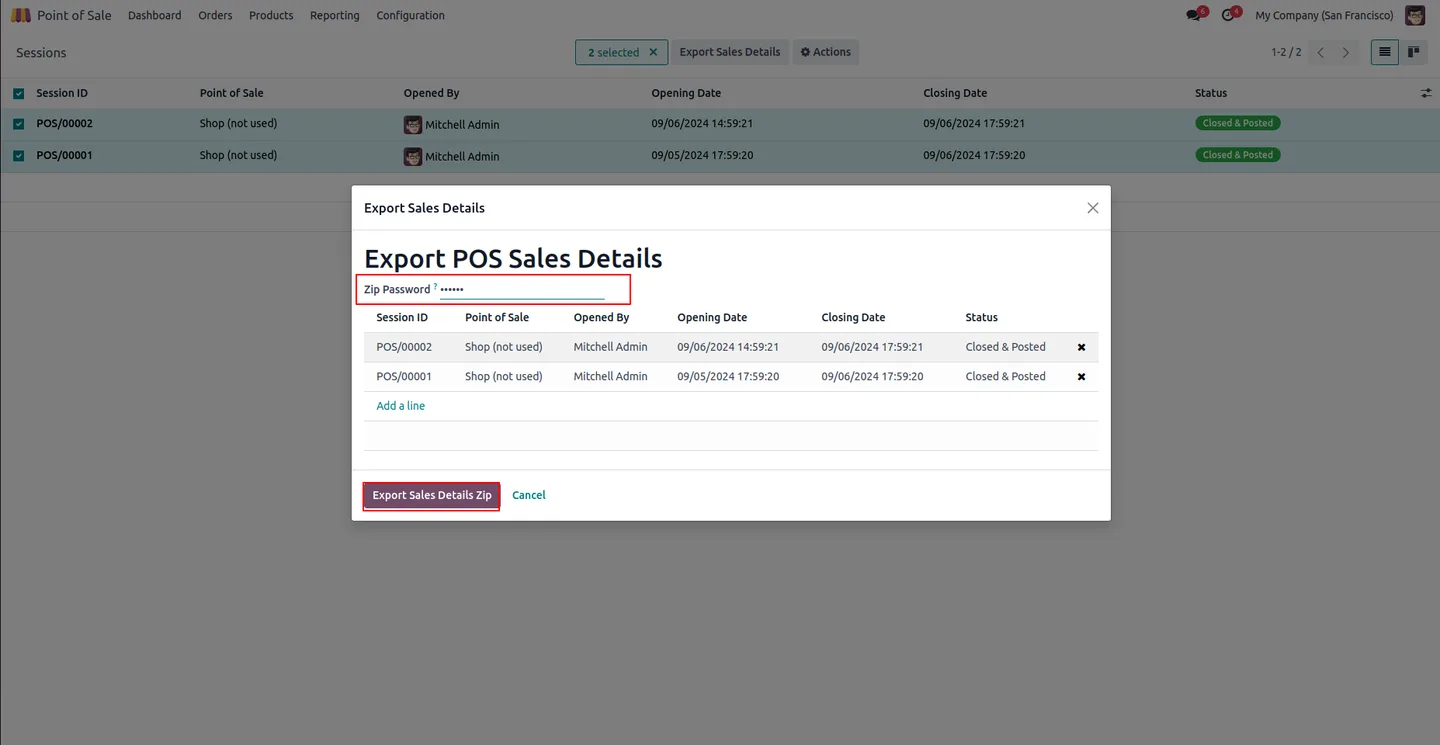
A user-friendly wizard walks users through the export process — confirm the selected sessions, set the password, and generate the file.
-
Native Odoo integration
Works within the Odoo interface, integrating seamlessly with existing POS features — no third-party converter or external command-line tool required.
-
Time-saving automation
Automates the process of exporting and securing multiple reports, saving time for retailers and accountants who would otherwise stitch ZIPs together by hand.
-
User-level enablement
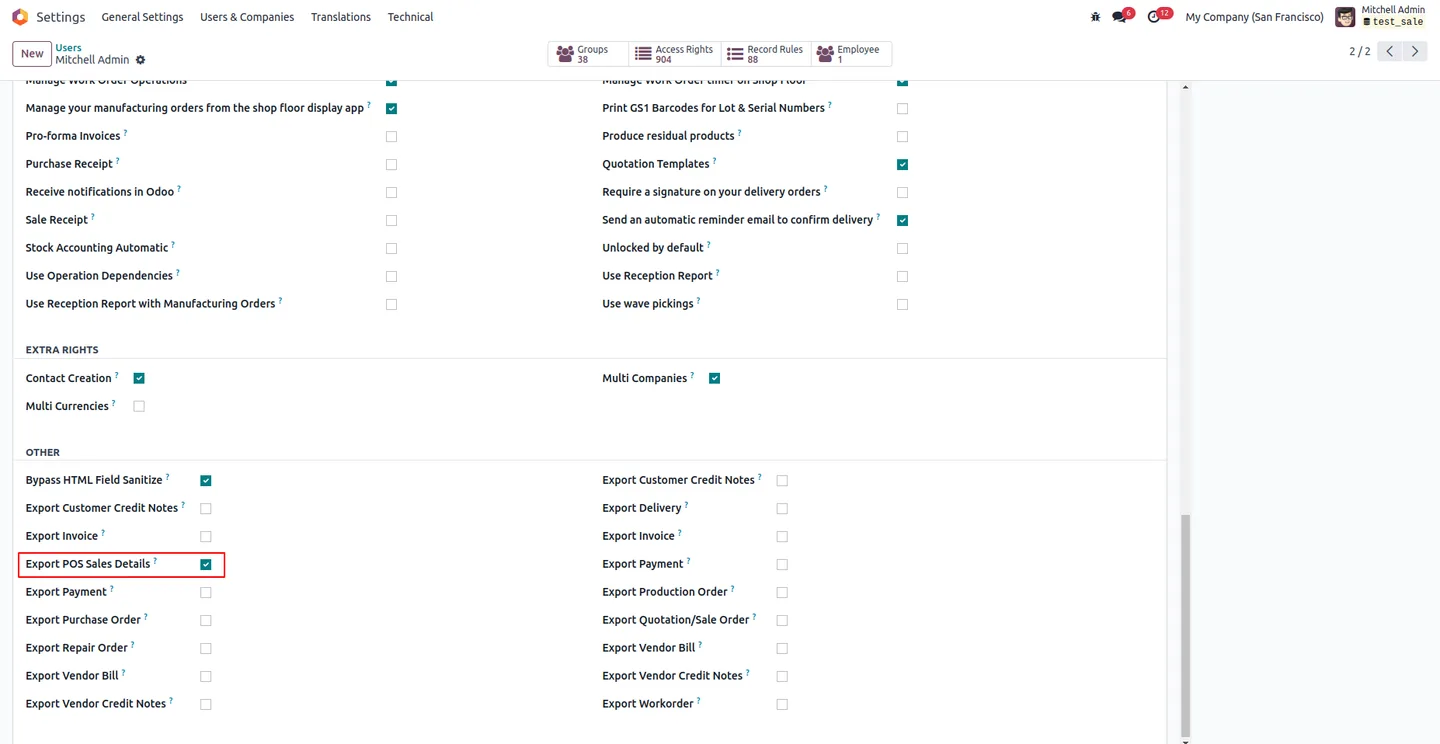
An Export POS Sales Details access flag controls which users can run the wizard, so only the right staff can generate consolidated session reports.
POS Session Report Secure ZIP in Odoo
Every screen, in the order you meet it — configuration first, then the module in use.
Technical details
Specification
- Publisher
- TechUltra Solutions Private Limited
- Technical name
- pos_session_report_zip_secure
- Odoo versions
- 16.0, 17.0, 19.0, 20.0
- Lines of code
- 128
- License
- Odoo Proprietary License v1.0 (OPL-1)
- Price
- $15.14 (one-time)
Deployment
- Odoo Online
- Odoo.sh
- On-premise
Odoo dependencies
- Point of Sale
- Discuss
- Inventory
- Invoicing
Support
90 days of bug-fix support, Monday to Friday (10:00–19:00 IST). Raise a ticket at support@techultra.in.
Setup & configuration
From install to first call — here is the path.
- 1
Install the module
In Odoo, open Apps, remove the Apps filter, search for “POS Session Report Secure ZIP”, and click Install.
- 2
Enable the export feature
Go to Settings → Users, find the Export POS Sales Details field, enable it for the relevant users, and refresh the page.
- 3
Open the POS Sessions list
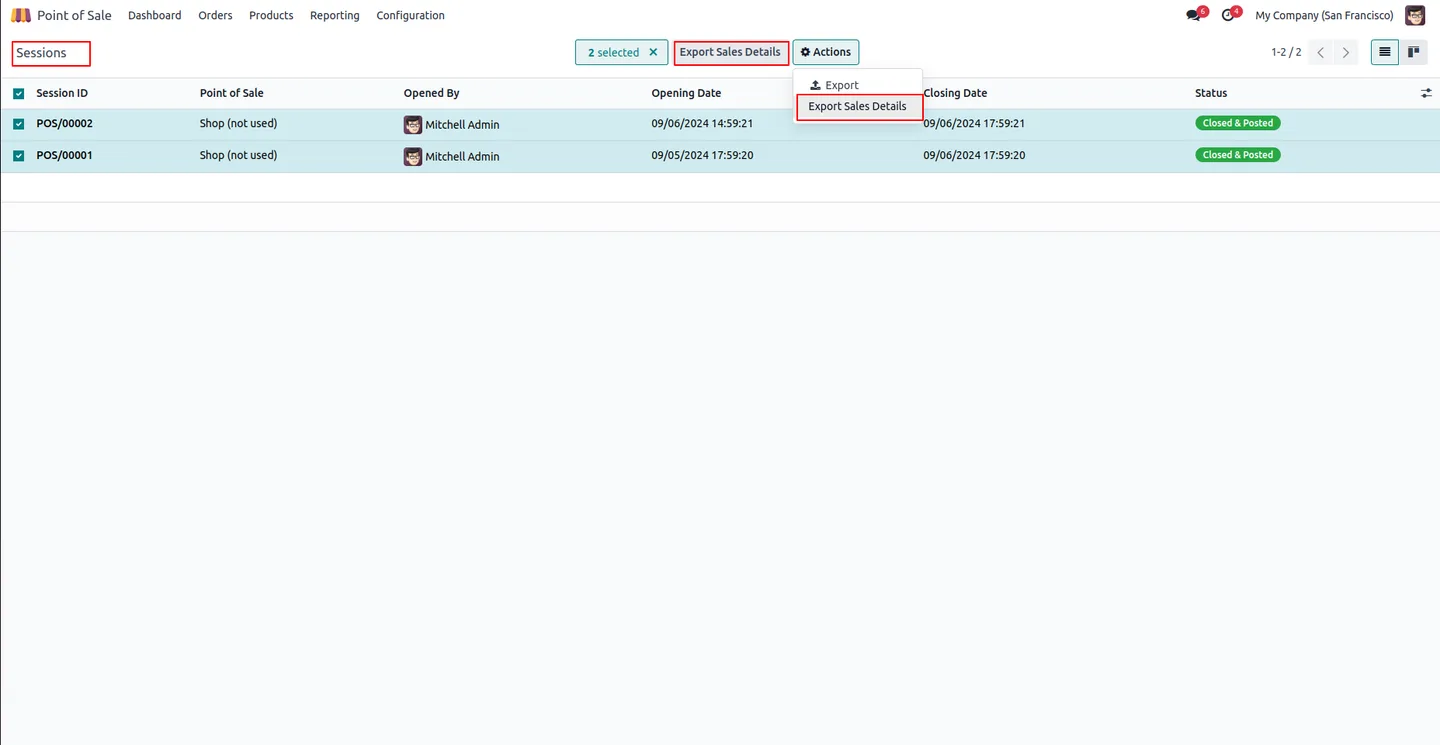
Navigate to Point of Sale → Orders → Sessions. The Export Sales Details button is now available from the list view and the server actions menu.
- 4
Select sessions and launch the wizard
Tick the POS sessions you want to export — daily, weekly, or any custom range — and click Export Sales Details to open the wizard.
- 5
Apply a password and export
Enter a ZIP password to protect the file, or leave it blank for an unprotected archive. Click Export Sales Details Zip to generate the file.
- 6
Extract and review
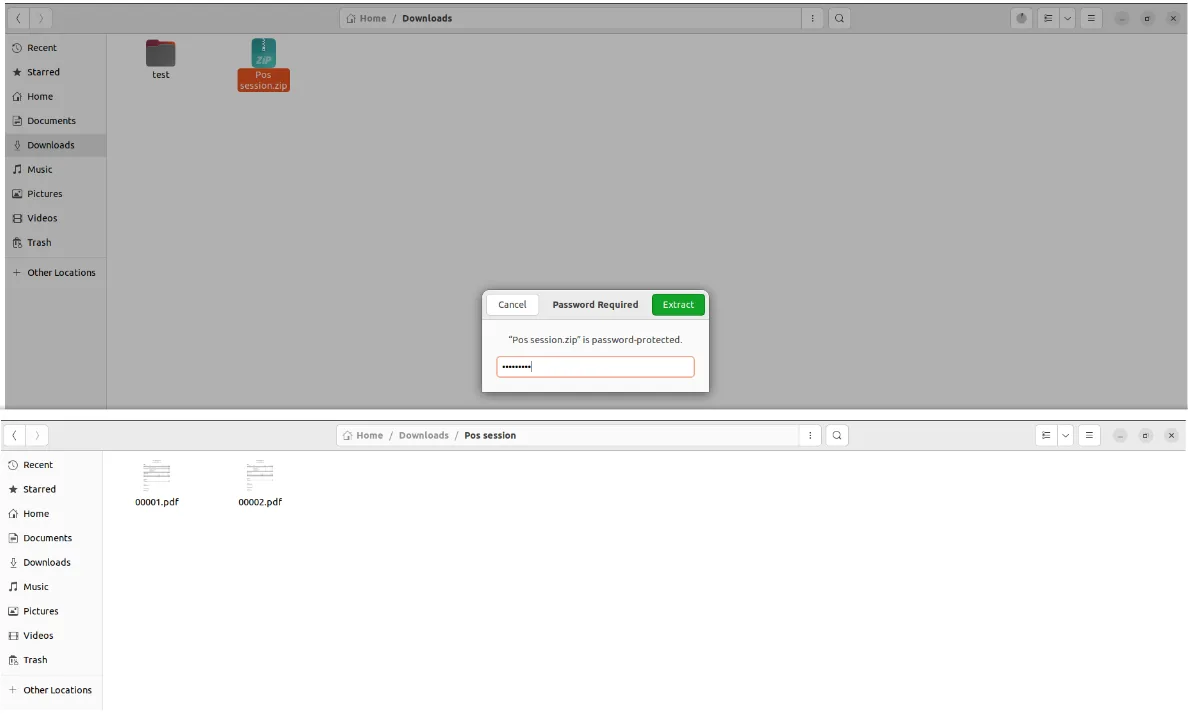
Recipients enter the ZIP password when extracting the archive and get a single folder containing every POS Sessions Sales Details PDF you selected.
Frequently asked questions
-
Which Point of Sale report is exported?
The module bundles the standard POS Sessions Sales Details PDF for every session you select. Each session becomes one PDF inside the consolidated ZIP.
-
Is the ZIP password mandatory?
No. The password field is optional. Leave it blank for a plain ZIP, or enter a value to generate a password-protected archive that recipients must unlock before extracting.
-
How do I choose which sessions to export?
From Point of Sale → Orders → Sessions, use the standard list-view filters and selection checkboxes to pick the sessions you want — daily, weekly, or any custom range — then click Export Sales Details.
-
Which Odoo versions are supported?
The module supports Odoo 16.0, 17.0, 19.0, and 20.0. Get in touch if you need a build for a different release.
-
Do I need any other module?
The module depends on Point of Sale, Discuss, Inventory, and Invoicing — standard Odoo apps that POS-driven businesses already run.
-
Who can run the export?
Only users with the Export POS Sales Details flag enabled in Settings → Users can launch the wizard, so administrators control which roles can generate consolidated reports.
-
Is support included?
Yes. The module includes 90 days of bug-fix support, Monday to Friday, 10:00–19:00 IST.
Listing verified against the Odoo App Store:
Related services
Get the most out of this module with senior TechUltra consultants.
Odoo Customization Services
Odoo customization from a Gold Partner: custom modules, workflows, reports and Studio changes, written upgrade-safe and quoted at a fixed scope. Free scoping call.
Hire Odoo Developers
Hire certified Odoo developers from a Gold Partner: one developer or a team, full-time or part-time, 70–160 hours a month. Silver, Gold or Platinum plan, free trial.
Odoo Support Services & Maintenance
Odoo support services from a Gold Partner: functional and technical support plus server cover for Enterprise and Community, 30-minute P1 response, 24/7 option.







