

Odoo App · Point of Sale
POS Refund
Refund products at the POS by scanning their barcode — quantities update against the original order automatically.
Overview
POS Refund speeds up returns at the Point of Sale by letting cashiers refund products with a barcode scan instead of hunting for the right line on the original receipt.
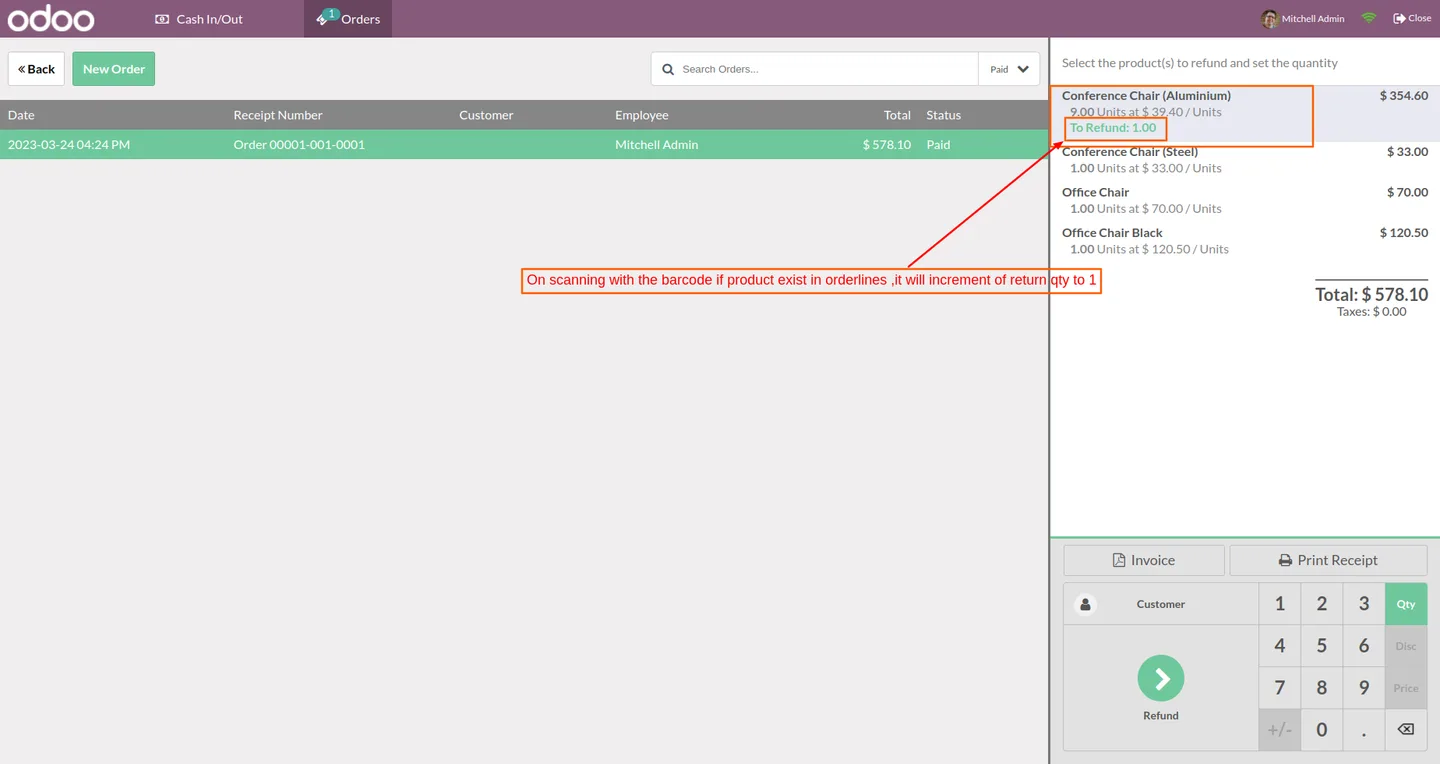
Built by TechUltra Solutions, the module hooks into Odoo's existing POS refund workflow. When a barcode is scanned on a refund order, it checks the originating POS order, decrements the originally-sold quantity, and adds the same item to the refund with a return quantity of one.
The result is faster returns, fewer mis-keyed quantities, and a refund record that always matches the goods coming back over the counter — without changing how your team uses Odoo Point of Sale day to day.
Key features
-
Barcode-driven refunds
Scan a product's barcode on a refund order at the POS. The module looks up the original sale and adds the matching line to the refund automatically.
-
Quantity matched to the original order
When a scanned product exists on the original POS order, its sold quantity is decremented and the return quantity is incremented by one — no manual editing.
-
Native Odoo POS workflow
Refunds still flow through Odoo's standard Point of Sale return process, so cashiers do not learn a new screen — just scan to add the line.
-
Fewer mis-keyed returns
Removing the manual line-picking step cuts the most common refund mistake — refunding the wrong product or the wrong quantity at the till.
-
Faster customer turnaround
Scanning a barcode is faster than searching through receipt lines, which keeps queue times down even when the original order has many items.
-
Works with existing POS hardware
Any USB or Bluetooth barcode scanner already supported by Odoo POS works — no extra hardware to buy.
-
Built on Odoo 16 and 17
The module is maintained against Odoo Community and Enterprise editions for versions 16.0 and 17.0.
POS Refund in Odoo
Every screen, in the order you meet it — configuration first, then the module in use.




Technical details
Specification
- Publisher
- TechUltra Solutions Private Limited
- Technical name
- pos_refund
- Odoo versions
- 16.0, 17.0
- Lines of code
- 176
- License
- Odoo Proprietary License v1.0 (OPL-1)
- Price
- $17.47 (one-time)
Deployment
- Odoo Online
- Odoo.sh
- On-premise
Odoo dependencies
- Point of Sale
- Discuss
- Inventory
- Invoicing
Support
90 days of bug-fix support, Monday to Friday (10:00–19:00 IST). Raise a ticket at support@techultra.in.
Setup & configuration
From install to first call — here is the path.
- 1
Install the module
In Odoo, open Apps, remove the Apps filter, search for “POS Refund”, and click Install.
- 2
Restart the POS session
Close any open Point of Sale sessions and reopen them so the new refund behaviour is loaded into the POS interface.
- 3
Open a refund order
From the POS, find the original order and start a refund as you normally would in Odoo Point of Sale.
- 4
Scan the product barcode
Scan the barcode of the item the customer is returning. The module matches it against the original order and adds the refund line with a return quantity of one.
- 5
Validate and pay out the refund
Complete the refund payment and close the order as usual. The original POS order's quantity is reduced by the refunded amount.
Frequently asked questions
-
What does POS Refund actually change in Odoo Point of Sale?
It adds barcode-driven refund handling. When you scan a product on a refund order, the module looks up the original POS order, decrements the originally-sold quantity, and increments the return quantity by one — no manual line picking.
-
Which Odoo versions are supported?
The module is published for Odoo 16.0 and 17.0, in both Community and Enterprise editions.
-
Do I need special barcode hardware?
No. Any USB or Bluetooth scanner that already works with Odoo Point of Sale is fine — the module reads scans through the same channel as the standard POS.
-
What happens if the scanned product is not on the original order?
The module only updates quantities when the scanned product exists on the original POS order. If a customer returns something that was not sold on that ticket, the cashier handles it through Odoo's standard refund flow.
-
Does this work with both Community and Enterprise editions?
Yes. POS Refund is built against the standard Point of Sale app and works on both Community and Enterprise editions of Odoo 16 and 17.
-
Is refund history still visible in Odoo?
Yes. Refunds remain ordinary Odoo POS refund orders — they show up in POS reporting, accounting entries, and inventory moves like any other return.
-
What support is included with the module?
You get 90 days of bug-fix support from TechUltra Solutions, Monday to Friday (10:00–19:00 IST). Raise a ticket at support@techultra.in.
Listing verified against the Odoo App Store:
Related solutions
Whole-platform solutions that complement POS Refund.
Related services
Get the most out of this module with senior TechUltra consultants.
Odoo Customization Services
Odoo customization from a Gold Partner: custom modules, workflows, reports and Studio changes, written upgrade-safe and quoted at a fixed scope. Free scoping call.
Hire Odoo Developers
Hire certified Odoo developers from a Gold Partner: one developer or a team, full-time or part-time, 70–160 hours a month. Silver, Gold or Platinum plan, free trial.
Odoo Support Services & Maintenance
Odoo support services from a Gold Partner: functional and technical support plus server cover for Enterprise and Community, 30-minute P1 response, 24/7 option.







