

Odoo App · Point of Sale
POS Cash Rounding
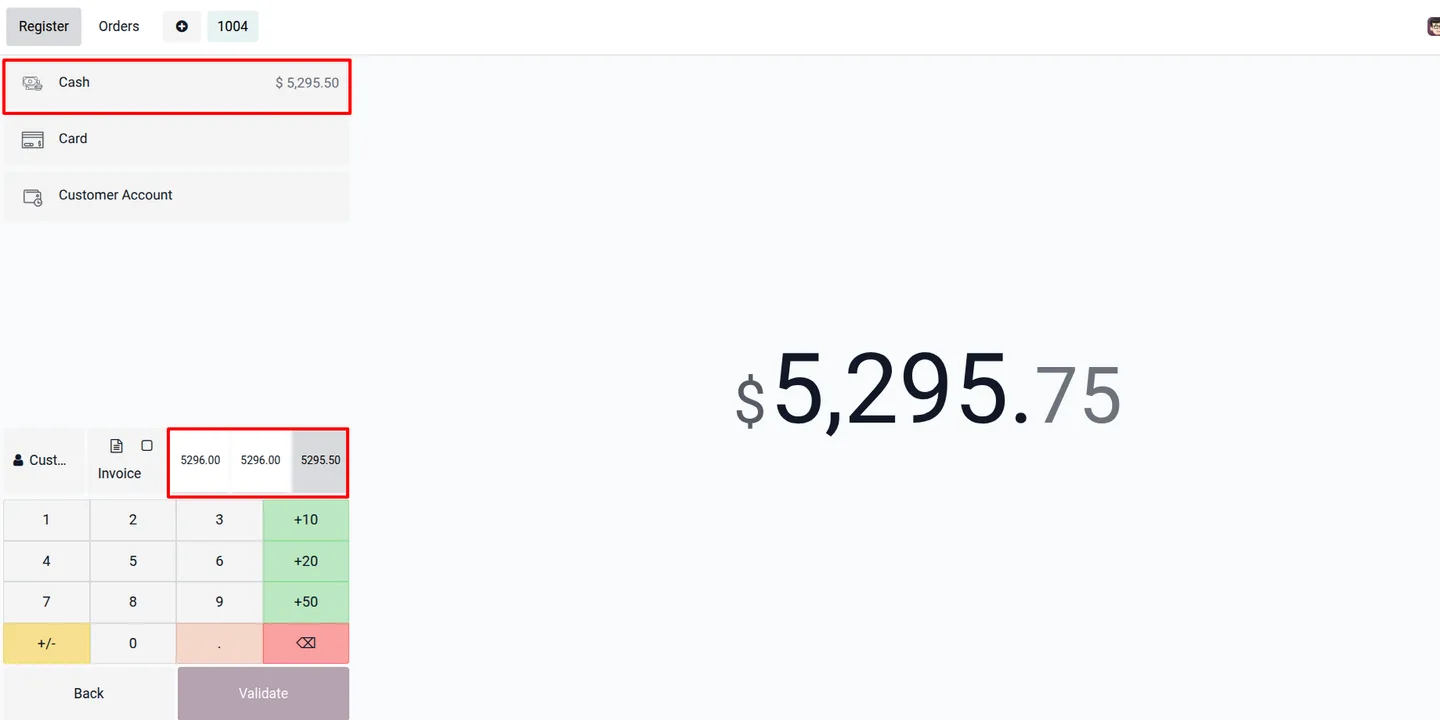
Choose the cash rounding amount on the Odoo POS payment screen during a live session.

Overview
Odoo's Point of Sale applies a single cash rounding method, and once a session is open that method cannot be changed. If a cashier needs a different rounded total — for a coin shortage or a currency without small denominations — there is no way to switch.
POS Cash Rounding removes that limitation. Built by TechUltra Solutions, it lets you define multiple cash rounding methods and then choose between them on the POS payment screen, even mid-session.
The module computes the rounding options from the methods you set up and presents them at payment time. The cashier selects the option that fits, so the final cash amount is accurate without ending the session or editing configuration.
Key features
-
Change rounding during payment
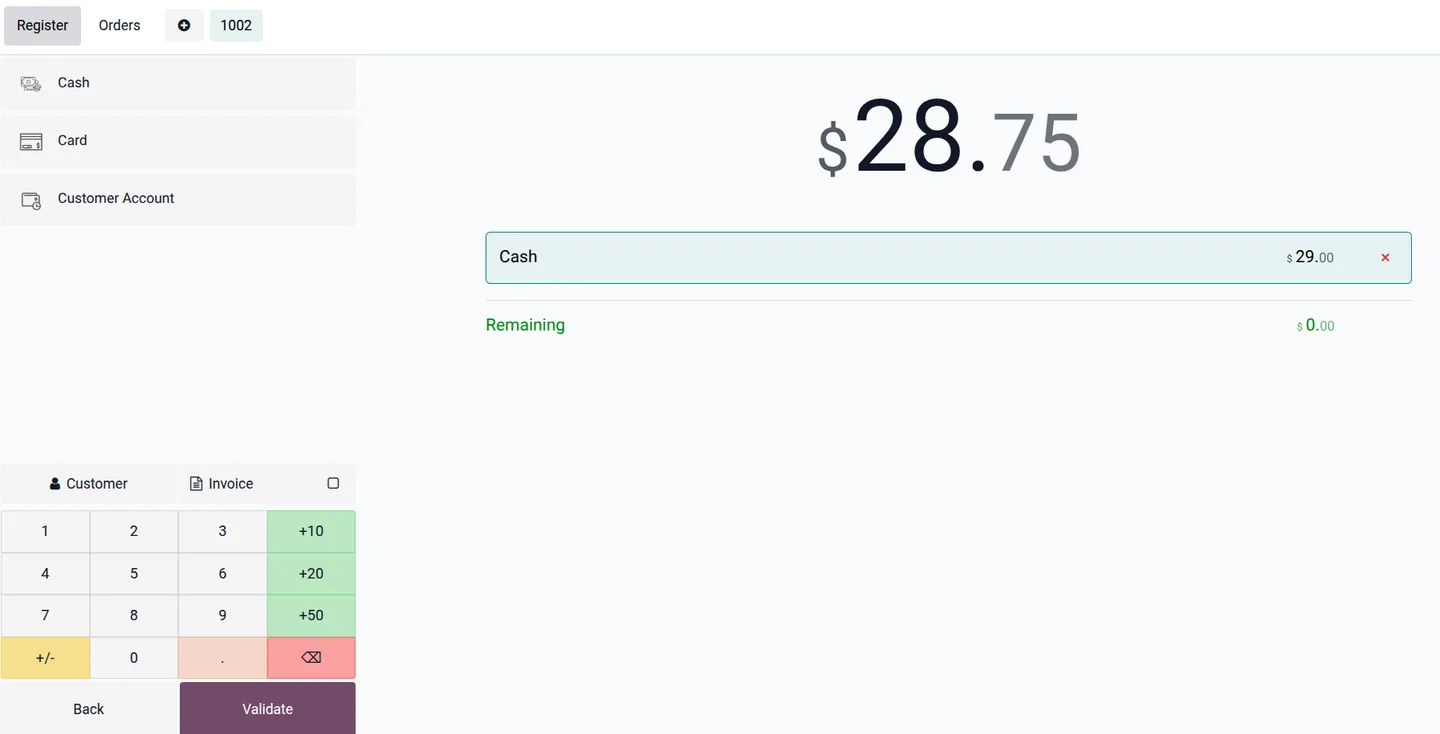
Cashiers adjust the cash rounding amount on the payment screen while the POS session is open — no need to close the session first.
-
Multiple cash rounding methods
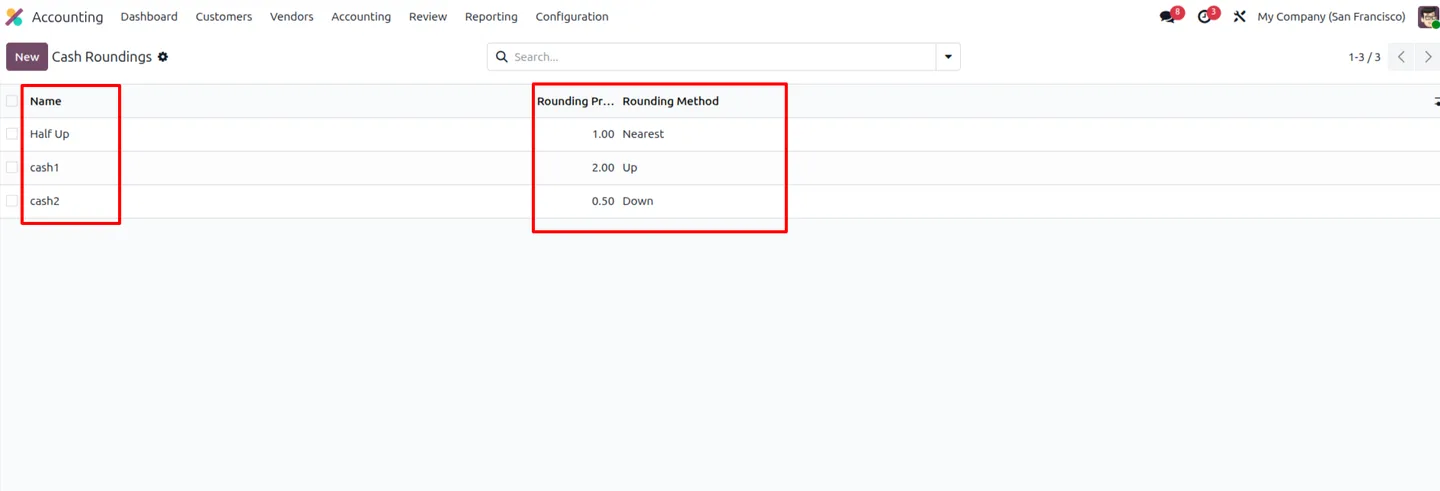
Define several cash rounding methods, each with its own precision and rounding rule, so the right option is ready for different situations.
-
Default cash rounding method
Set one method as the default so it applies automatically unless the cashier picks a different option at payment time.
-
Quick link to rounding methods
The configuration screen links straight through to the cash rounding methods, so adding or editing a method takes only a couple of clicks.
-
Computed rounding options
The module calculates the rounded amounts from your configured methods and presents them on the payment screen as ready-to-pick alternatives.
-
Accurate payment totals
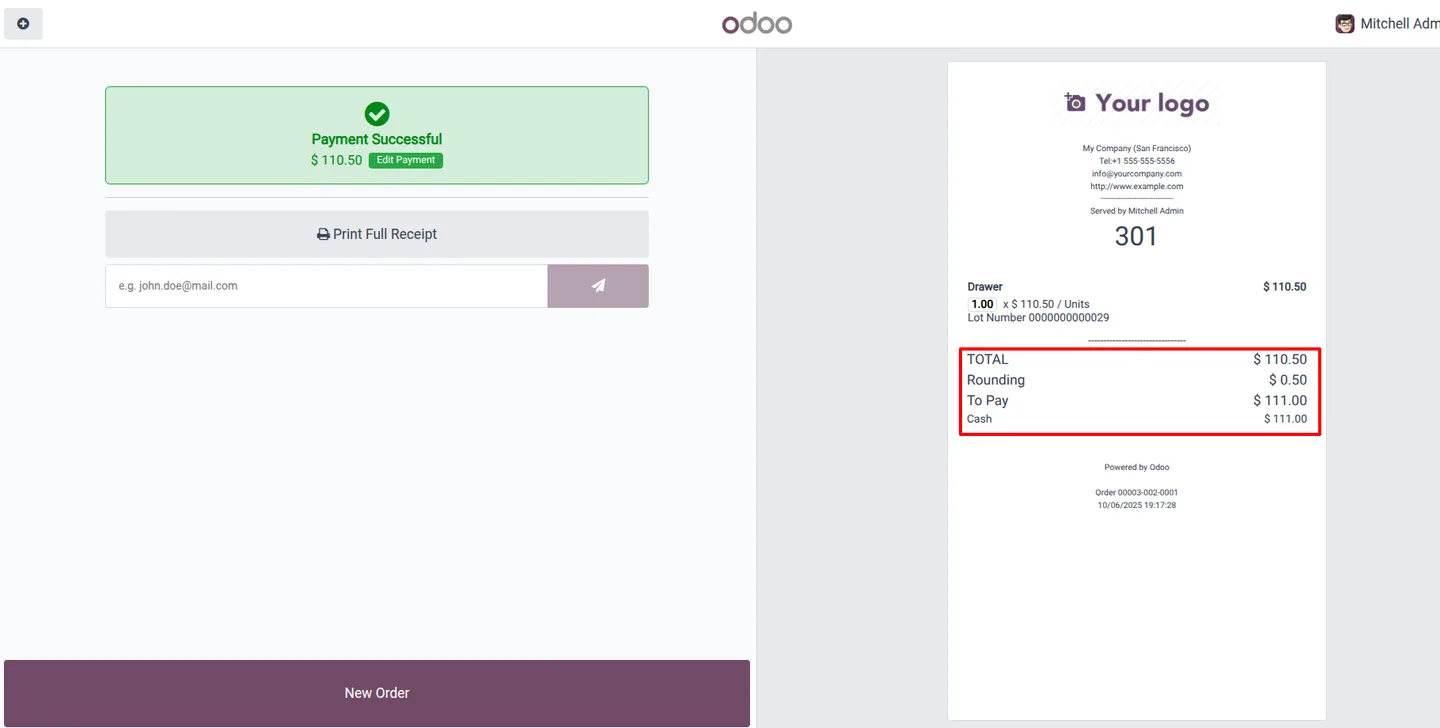
Choosing the right rounding option produces a precise final cash amount, which keeps the drawer and the receipt in agreement.
-
Simple configuration
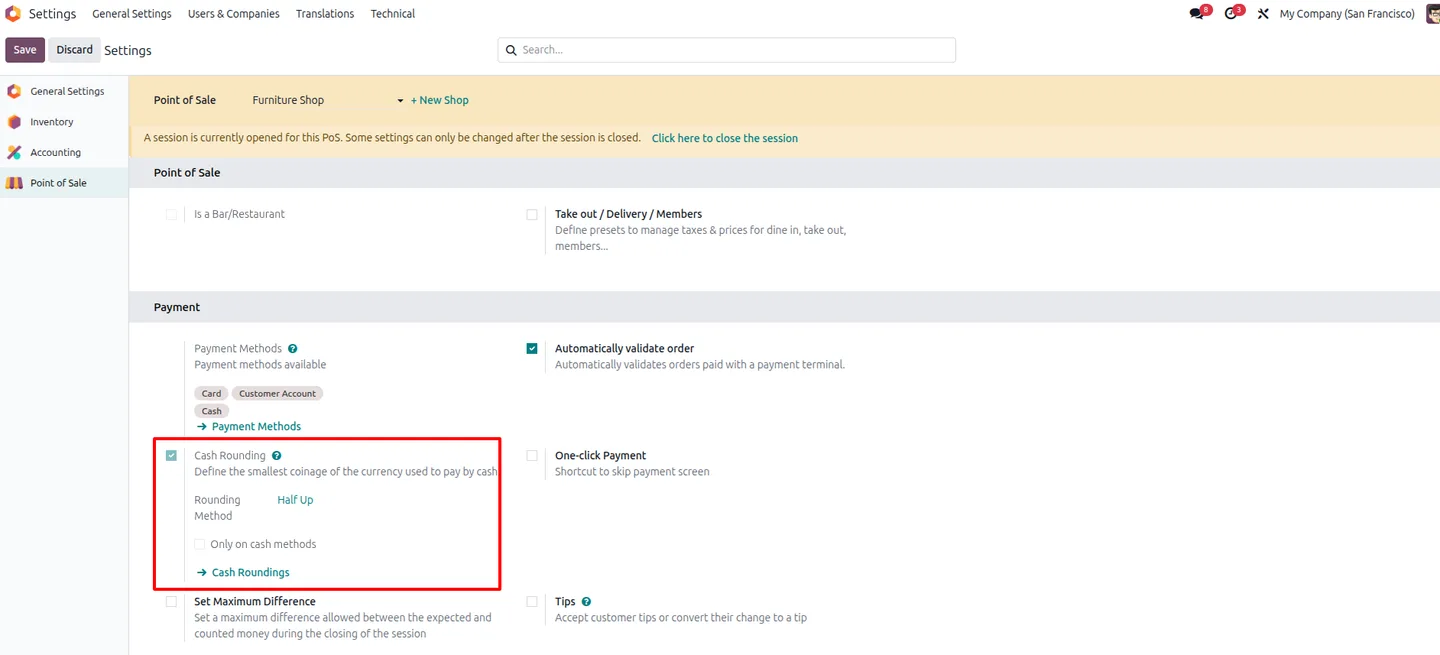
Cash rounding is enabled from the Point of Sale settings, and methods are created with a name, precision, and rounding rule — a short, one-time setup.
POS Cash Rounding in Odoo
Every screen, in the order you meet it — configuration first, then the module in use.
Technical details
Specification
- Publisher
- TechUltra Solutions Private Limited
- Technical name
- cash_rounding
- Odoo versions
- 16.0, 17.0, 18.0, 19.0, 20.0
- Lines of code
- 161
- License
- Odoo Proprietary License v1.0 (OPL-1)
- Price
- $17.47 (one-time)
Deployment
- Odoo Online
- Odoo.sh
- On-premise
Odoo dependencies
- Point of Sale
- Invoicing
- Inventory
- Discuss
Support
90 days of bug-fix support, Monday to Friday (10:00–19:00 IST). Raise a ticket at support@techultra.in.
Setup & configuration
From install to first call — here is the path.
- 1
Install the module
In Odoo, open Apps, remove the Apps filter, search for “POS Cash Rounding”, and click Install.
- 2
Enable cash rounding
Go to Point of Sale → Configuration → Settings and turn on Cash Rounding for the POS where you want to use it.
- 3
Create rounding methods
Open the cash rounding methods, click Create, and set a Name, Rounding Precision, and Rounding Method for each option you need.
- 4
Set a default method
Assign one method as the default so it applies automatically when a cashier does not pick a different option.
- 5
Adjust rounding at payment
On the POS payment screen, the cashier selects the preferred rounding option from the computed alternatives to set the final cash amount.
Frequently asked questions
-
Why can't I change cash rounding in standard Odoo POS?
Odoo's Point of Sale applies one cash rounding method, and it cannot be edited while a session is active. This module adds the ability to pick a different rounding option on the payment screen mid-session.
-
Can I set up more than one rounding method?
Yes. You can create multiple cash rounding methods, each with its own precision and rounding rule, and choose between them at payment time.
-
Does a default rounding method still apply?
Yes. You can mark one method as the default. It applies automatically unless the cashier selects a different option during payment.
-
Where do I enable cash rounding?
Cash rounding is turned on under Point of Sale → Configuration → Settings. From there you can open and manage the cash rounding methods.
-
Does changing rounding affect the payment total?
Yes. The selected rounding option determines the final rounded cash amount, so the cashier can set an accurate total that matches the drawer.
-
Which Odoo versions are supported?
The module supports Odoo 16.0, 17.0, 18.0, 19.0, and 20.0, in both the Community and Enterprise editions.
-
Is support included?
Yes. The module includes 90 days of bug-fix support, Monday to Friday, 10:00–19:00 IST.
Listing verified against the Odoo App Store:
Related solutions
Whole-platform solutions that complement POS Cash Rounding.
Related services
Get the most out of this module with senior TechUltra consultants.
Odoo Customization Services
Odoo customization from a Gold Partner: custom modules, workflows, reports and Studio changes, written upgrade-safe and quoted at a fixed scope. Free scoping call.
Hire Odoo Developers
Hire certified Odoo developers from a Gold Partner: one developer or a team, full-time or part-time, 70–160 hours a month. Silver, Gold or Platinum plan, free trial.
Odoo Support Services & Maintenance
Odoo support services from a Gold Partner: functional and technical support plus server cover for Enterprise and Community, 30-minute P1 response, 24/7 option.







