
Odoo App · Website & Portal
Portal User Chatter
Let portal users chat with your team and each other from inside the Odoo portal.

Overview
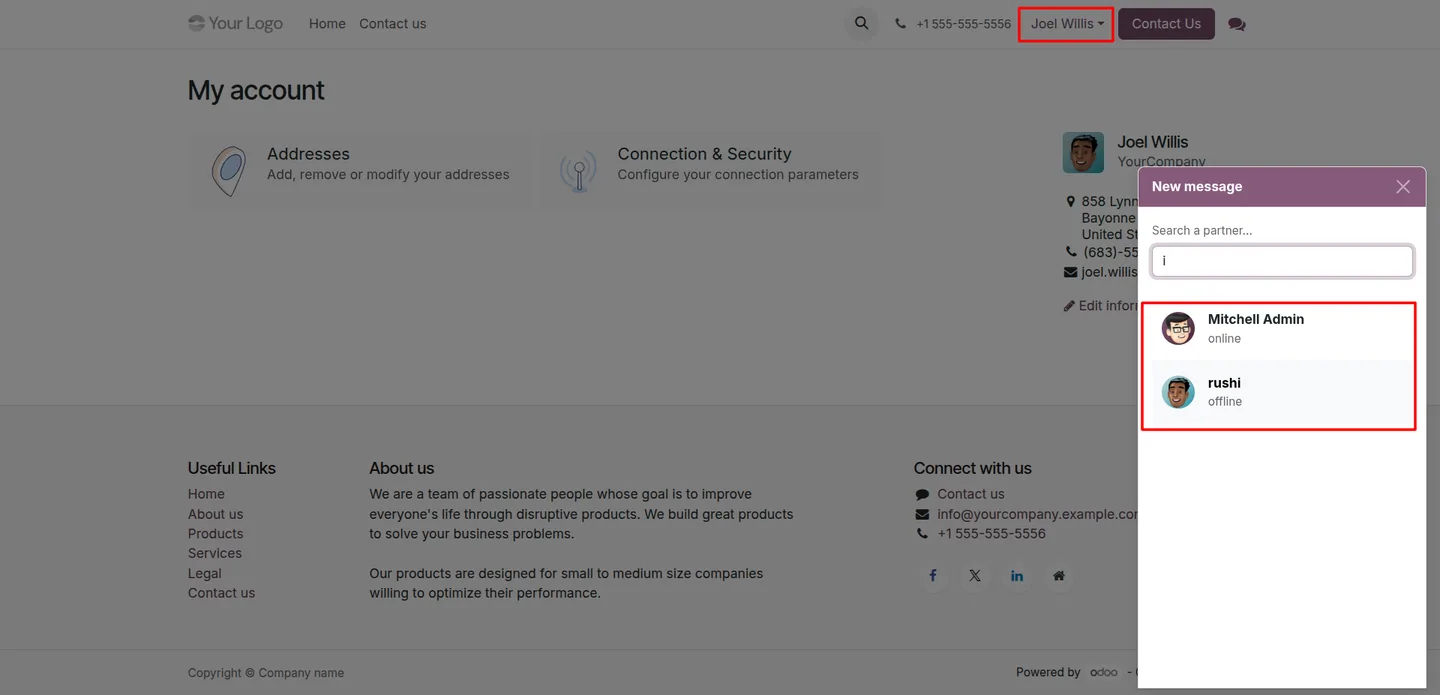
Odoo's portal lets customers view their quotations, invoices, and tickets, but it gives them no way to send a message. Portal User Chatter closes that gap: it adds a chat menu to the portal so customers can reach your team — and each other — without email or a separate support tool.
Built by TechUltra Solutions, the module puts a simple conversation interface inside the existing Odoo portal. Messages send and arrive instantly, an availability indicator shows who is online, and every conversation stays in one place so customers can pick up where they left off.
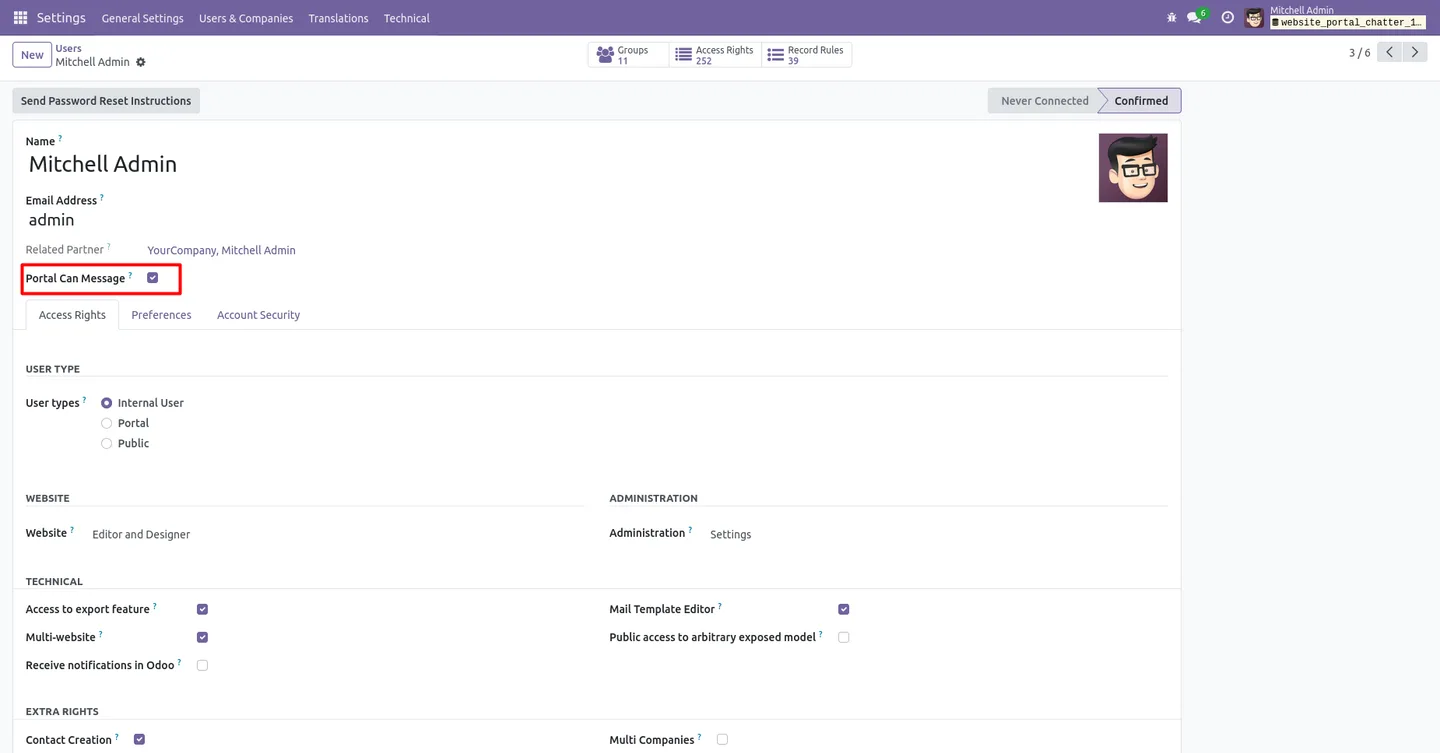
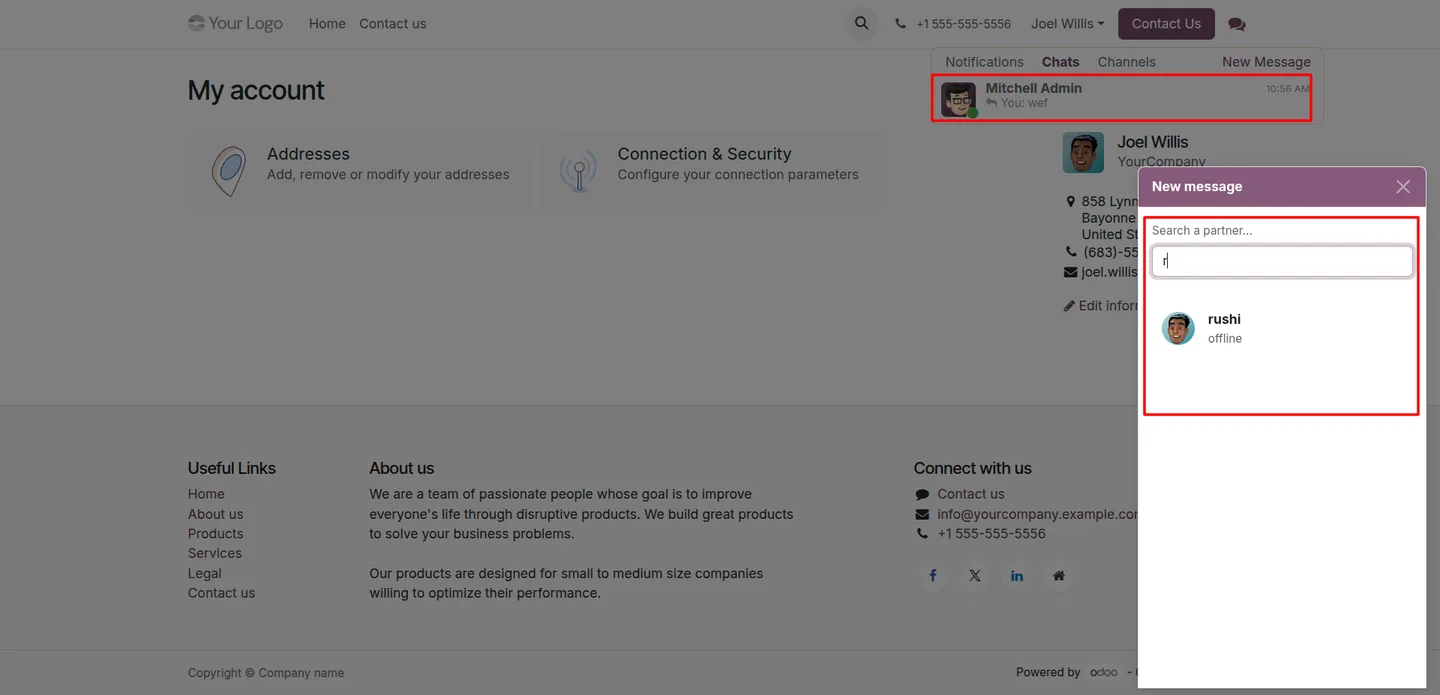
Access is controlled per internal user. A portal user can only message internal staff who have the "Portal Can Message" setting enabled, so you decide exactly which team members are reachable from the portal. Chat between portal users is supported too, and every message is visible only to its intended recipients.
Key features
-
Chat with internal users
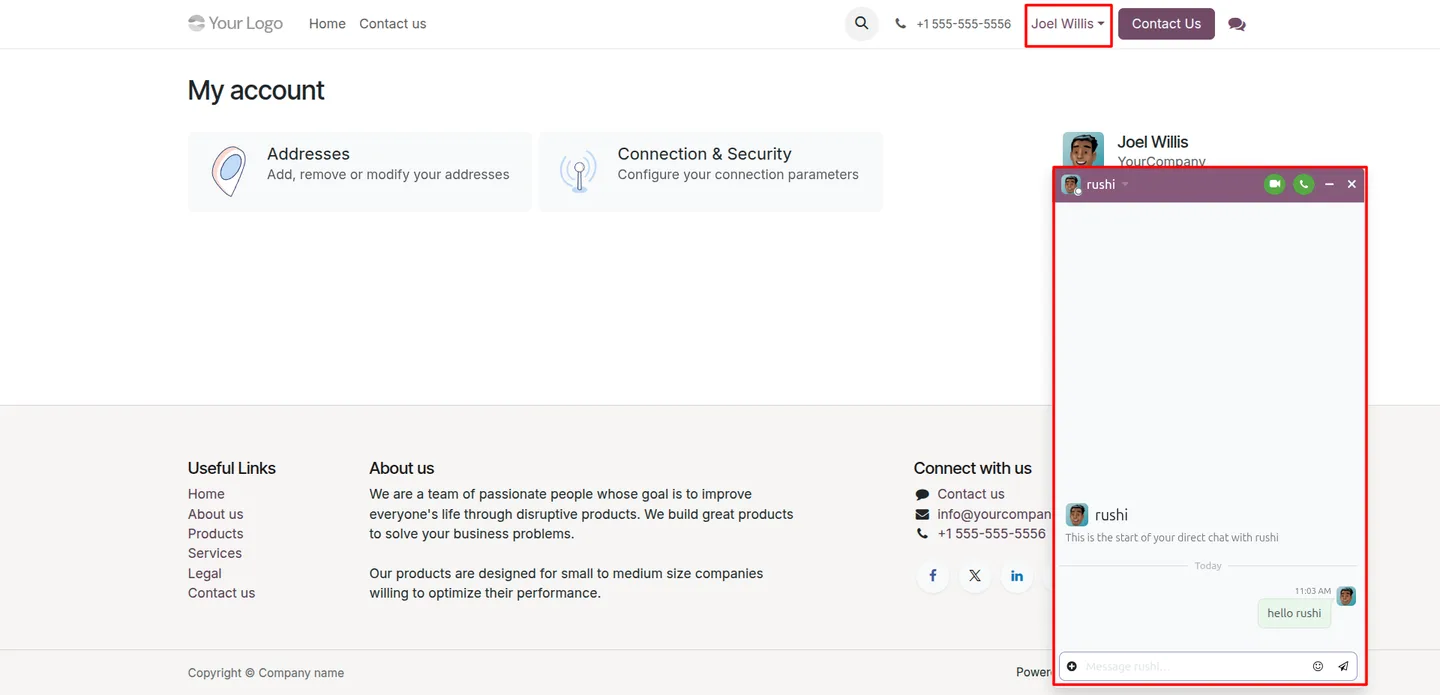
Portal users can start and join conversations with your internal team directly from the portal, removing the need to switch to email for routine questions.
-
Portal-to-portal messaging
Portal users can also message other portal users, so partners, contractors, or members on the same portal can communicate without an internal user in the loop.
-
Real-time delivery
Messages are sent and received instantly, giving customers a responsive chat experience rather than a slow email round-trip.
-
Chat menu in the portal dashboard
The chat feature is reached from the portal user's account dashboard — a clear, familiar entry point with no extra app or login.
-
Online-presence indicators
Users can see who is currently online and available to chat, making it easier to know when to expect a reply.
-
Private, recipient-only messages
Every chat is private: messages are visible only to the intended recipients, so conversations stay confidential between the people involved.
-
Fully inside the Odoo portal
Chat runs within the standard Odoo portal interface — customers manage all their messages without leaving the portal they already use.
-
Per-user access control
A "Portal Can Message" field on each internal user form decides who portal users may contact, giving you precise control over which staff are reachable.
Portal User Chatter in Odoo
Every screen, in the order you meet it — configuration first, then the module in use.
Technical details
Specification
- Publisher
- TechUltra Solutions Private Limited
- Technical name
- website_portal_chat
- Odoo versions
- 17.0, 18.0, 19.0, 20.0
- Lines of code
- 931
- License
- Odoo Proprietary License v1.0 (OPL-1)
- Price
- $41.99 (one-time)
Deployment
- Odoo Online
- Odoo.sh
- On-premise
Odoo dependencies
- Discuss
- Live Chat
- Website
Support
90 days of bug-fix support, Monday to Friday (10:00–19:00 IST). Raise a ticket at support@techultra.in.
Setup & configuration
From install to first call — here is the path.
- 1
Install the module
In Odoo, open Apps, remove the Apps filter, search for “Portal User Chatter”, and click Install.
- 2
Choose which internal users are reachable
Open each internal user under Settings → Users & Companies → Users and enable the “Portal Can Message” field. This field appears only for internal users and controls who portal users can contact.
- 3
Check the portal chat menu
Sign in as a portal user and open the account dashboard. The chat menu is available there, ready for the user to start a conversation.
- 4
Start a conversation
From the chat menu, a portal user selects an enabled internal user or another portal user and sends a message. Replies arrive in real time.
- 5
Confirm presence and privacy
Verify that online users show as available and that messages are visible only to the people in the conversation.
Frequently asked questions
-
Why can't portal users message anyone in standard Odoo?
By default Odoo limits portal users to viewing and managing their own records, with no internal messaging access. Portal User Chatter removes that limitation and adds a chat interface to the portal.
-
How do I decide which staff portal users can contact?
Each internal user form has a “Portal Can Message” field. Portal users can only message internal users who have that field enabled, so you control exactly which team members are reachable.
-
Can portal users chat with each other?
Yes. The module supports portal-to-portal messaging, so two portal users — such as partners or contractors — can communicate directly without an internal user involved.
-
Are the conversations private?
Yes. Every message is visible only to its intended recipients. Chats stay confidential between the people in the conversation.
-
Where do portal users find the chat?
The chat menu is on the portal user's account dashboard. There is no separate app or login — it sits inside the Odoo portal customers already use.
-
Is chat delivered in real time?
Yes. Messages are sent and received instantly, and an availability indicator shows which users are currently online.
-
Which Odoo versions does it support?
Portal User Chatter supports Odoo 17.0, 18.0, 19.0, and 20.0, in both the Community and Enterprise editions.
-
Is support included?
Yes. The module includes 90 days of bug-fix support, Monday to Friday, 10:00–19:00 IST.
Listing verified against the Odoo App Store:
Related services
Get the most out of this module with senior TechUltra consultants.
Odoo Customization Services
Odoo customization from a Gold Partner: custom modules, workflows, reports and Studio changes, written upgrade-safe and quoted at a fixed scope. Free scoping call.
Hire Odoo Developers
Hire certified Odoo developers from a Gold Partner: one developer or a team, full-time or part-time, 70–160 hours a month. Silver, Gold or Platinum plan, free trial.
Odoo Support Services & Maintenance
Odoo support services from a Gold Partner: functional and technical support plus server cover for Enterprise and Community, 30-minute P1 response, 24/7 option.







