

Odoo App · Website & Portal
Portal Quotation Editing
Let portal customers edit quantities and delete lines on quotations before they accept.

Overview
Portal Quotation Editing makes the customer portal interactive for draft quotations. Instead of emailing the sales team to ask for a smaller quantity or to drop a line item, the customer makes the change themselves in the portal.
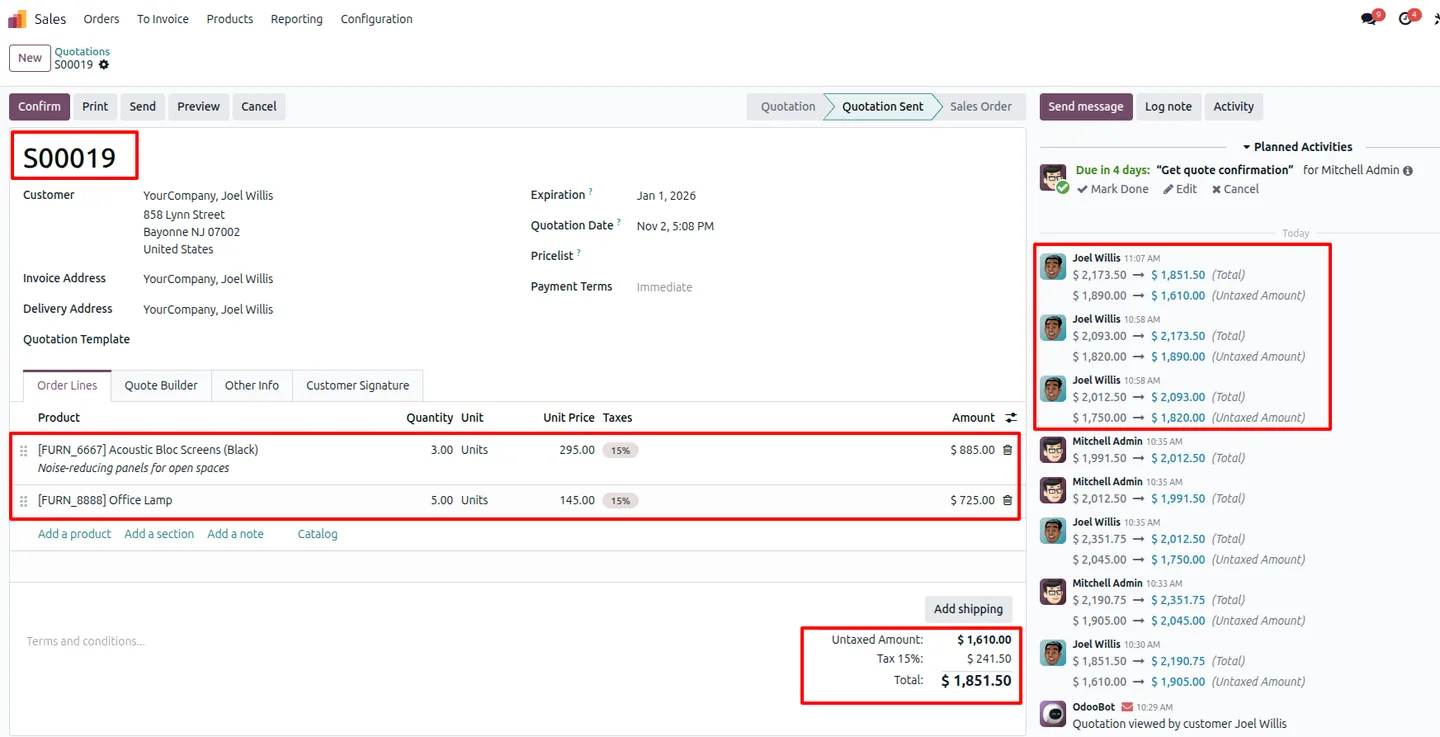
Built by TechUltra Solutions, the module adds quantity editing and line deletion controls to the portal quotation page. As the customer edits, the quotation total recalculates so they always see the current price before they decide to accept.
Every change made in the portal writes back to the backend sale order immediately, so the sales team always sees the same figures the customer sees. There is no separate review queue and no risk of the portal and the internal order drifting apart.
Key features
-
Edit quantities on quotation lines
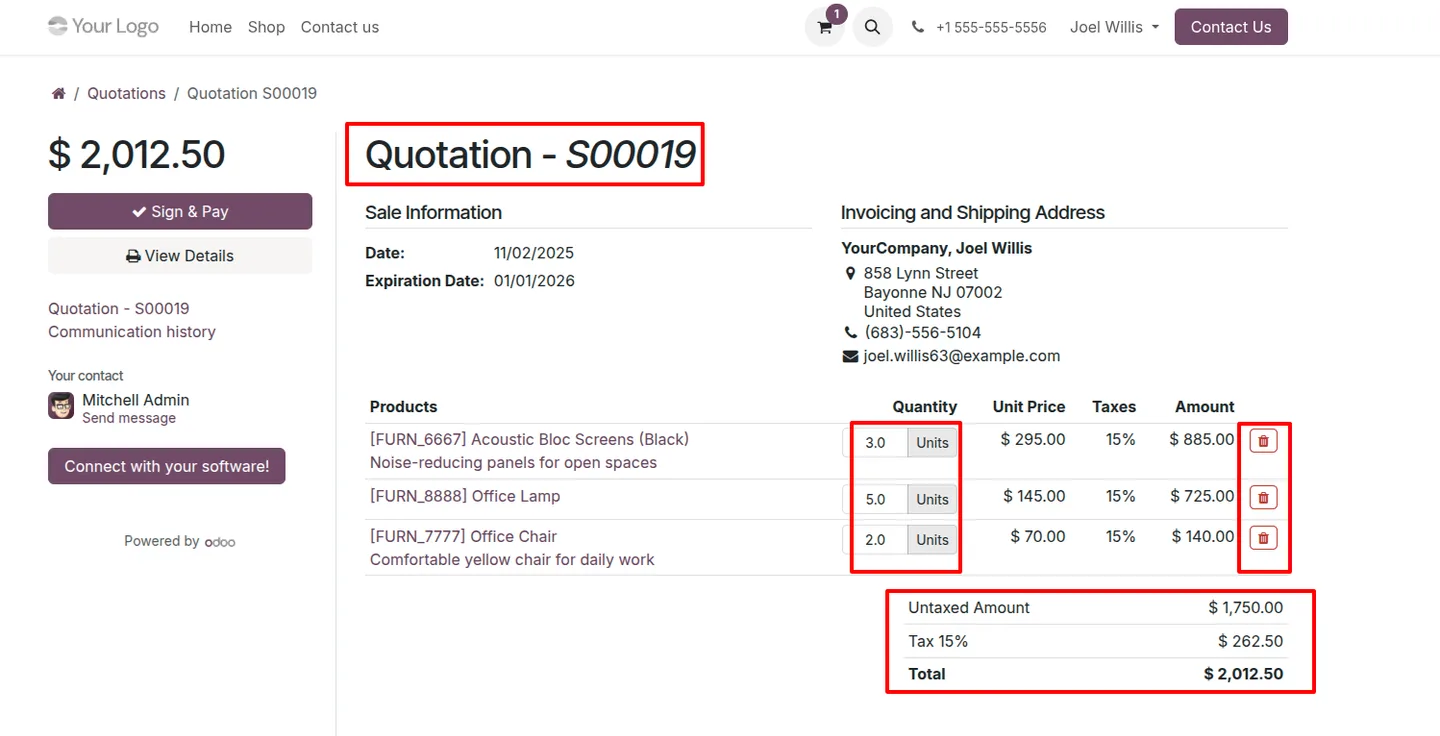
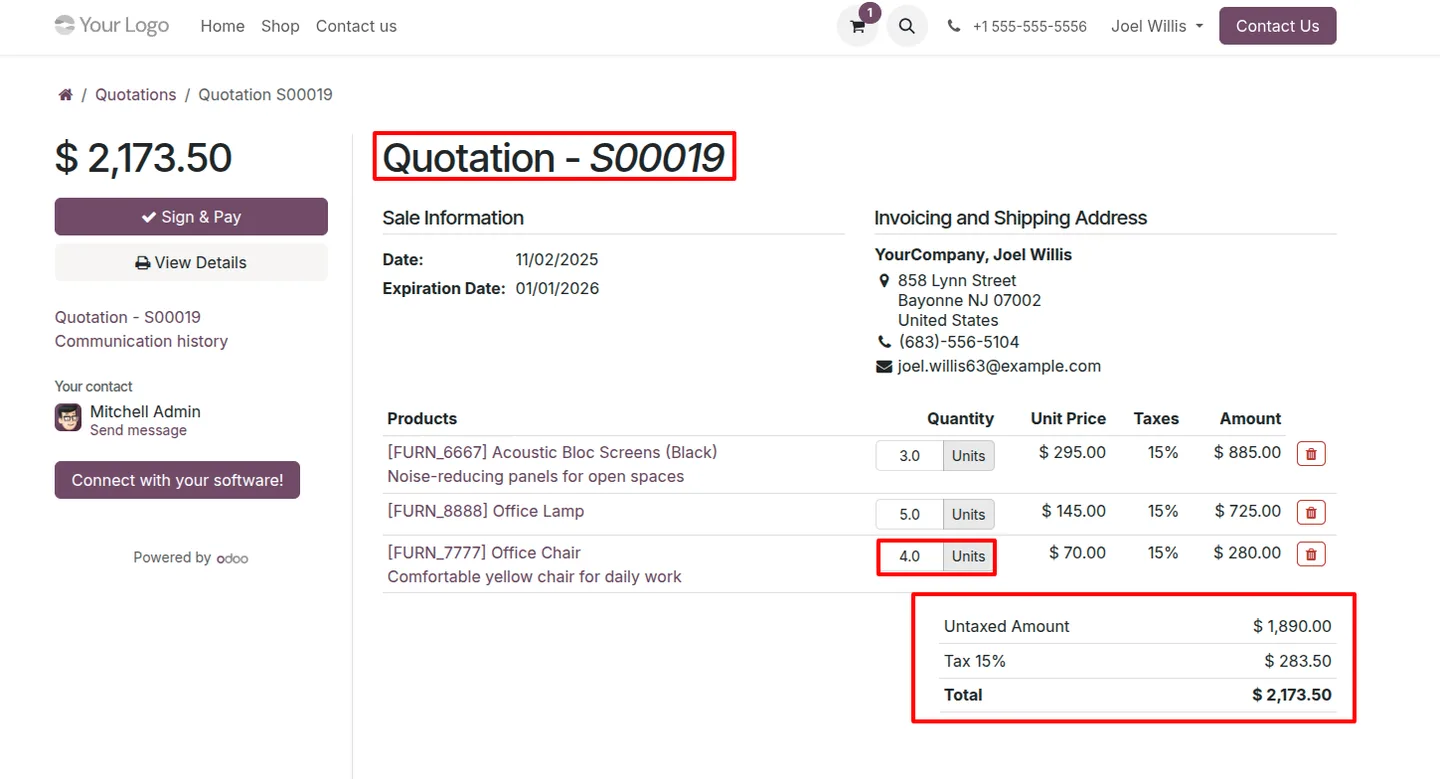
Portal customers can change the ordered quantity on any line of a draft quotation directly from the portal, without contacting the sales team.
-
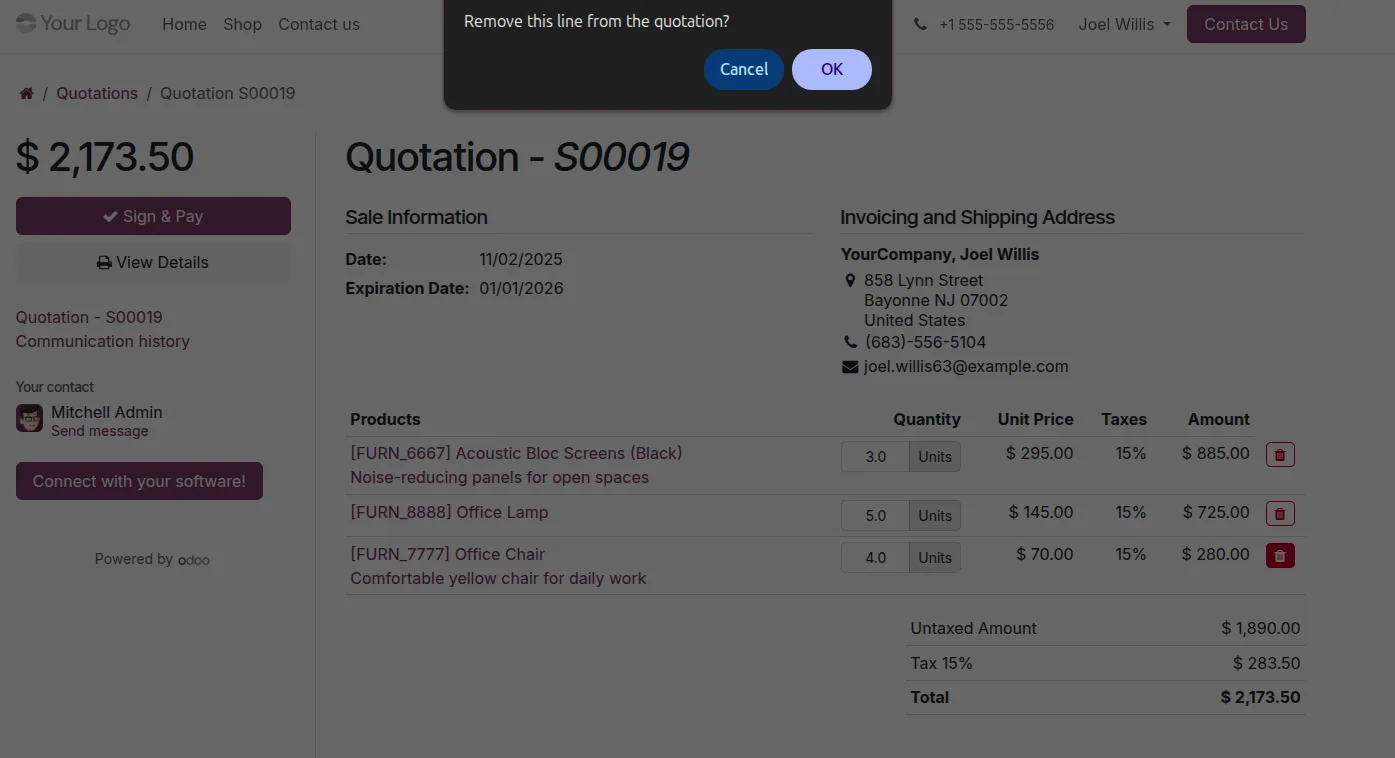
Delete order lines from a quotation
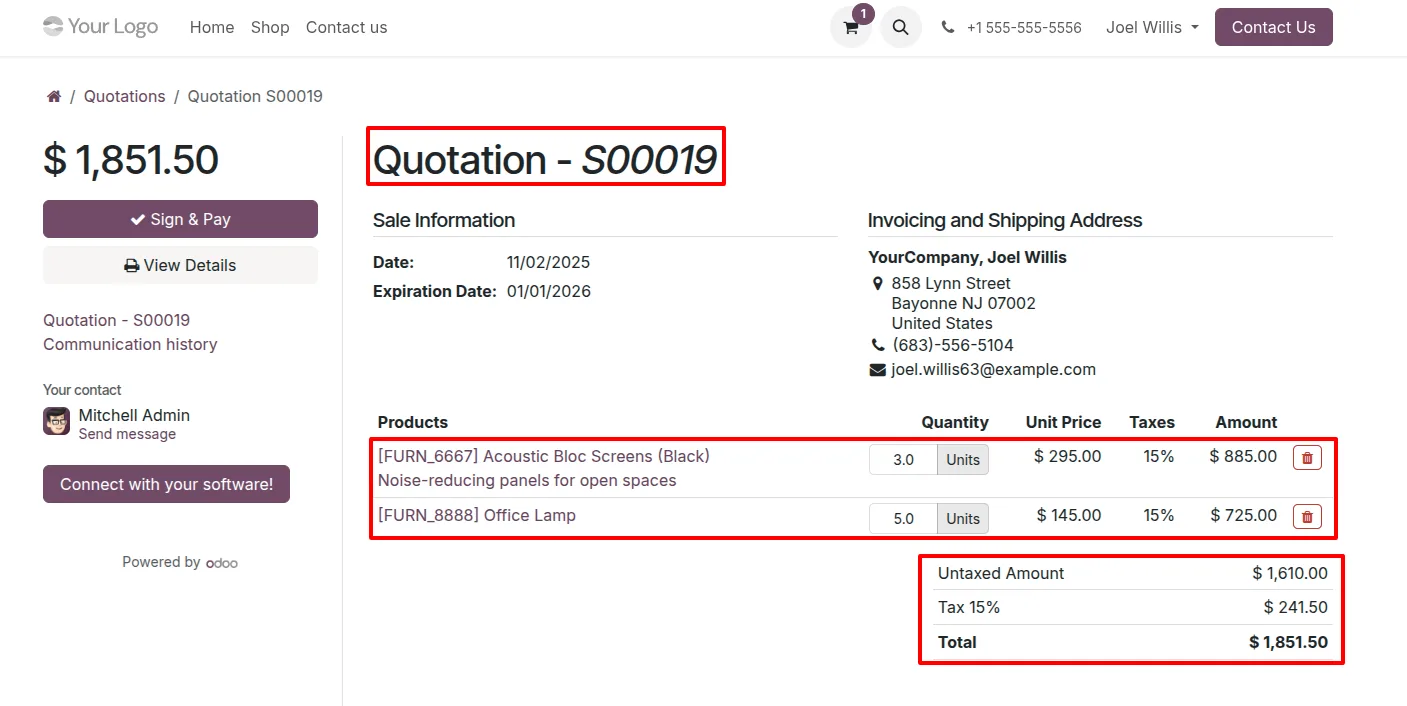
Customers can remove order lines they no longer want from a quotation in the portal, trimming it down before they accept.
-
Real-time backend synchronisation
Every quantity change and line deletion made in the portal updates the linked backend sale order immediately, keeping customer and sales views identical.
-
Dynamic pricing updates
As the customer edits quantities or removes lines, the quotation total recalculates so the price shown always reflects the current order.
-
Editing limited to draft quotations
Changes apply to quotations before they are finalised, so customers refine the order while it is still open rather than after acceptance.
-
User-friendly portal interface
The quantity and delete controls sit inside the standard Odoo portal quotation page, so customers use them without any training.
Portal Quotation Editing in Odoo
Every screen, in the order you meet it — configuration first, then the module in use.
Technical details
Specification
- Publisher
- TechUltra Solutions Private Limited
- Technical name
- portal_quotation_customize
- Odoo versions
- 16.0, 17.0, 18.0, 19.0, 20.0
- Lines of code
- 210
- License
- Odoo Proprietary License v1.0 (OPL-1)
- Price
- $16 (one-time)
Deployment
- Odoo Online
- Odoo.sh
- On-premise
Odoo dependencies
- Website
- eCommerce
- Sales
- Invoicing
Support
90 days of bug-fix support, Monday to Friday (10:00–19:00 IST). Raise a ticket at support@techultra.in.
Setup & configuration
From install to first call — here is the path.
- 1
Install the module
In Odoo, open Apps, remove the Apps filter, search for “Portal Quotation Editing”, and click Install.
- 2
Confirm the prerequisites
Make sure the Website, eCommerce, Sales, and Invoicing apps are installed, since the module extends the standard portal quotation page.
- 3
Send a quotation to a customer
Create a quotation in Sales and send it to a portal customer so it appears in their portal as a draft.
- 4
Review the portal controls
Open the quotation as the portal customer. The editable quantity fields and the delete-line options appear on the quotation page.
- 5
Verify backend sync
Make a change in the portal, then open the same sale order in the Sales backend to confirm the quantities and lines match.
Frequently asked questions
-
What can a portal customer change on a quotation?
A portal customer can edit the quantity on each quotation line and delete order lines they no longer want, all from the portal view of the quotation.
-
Do portal changes reach the sales team?
Yes. Every quantity edit and line deletion updates the linked backend sale order in real time, so the sales team sees the same order the customer sees.
-
Does the quotation total update as the customer edits?
Yes. The quotation recalculates its total as quantities change or lines are removed, so the customer always sees the current price before accepting.
-
Can customers edit a quotation after they accept it?
Editing is intended for draft quotations. Customers refine quantities and lines while the quotation is still open, before it is finalised.
-
Which apps does this module need?
It builds on the standard portal quotation page, so the Website, eCommerce, Sales, and Invoicing apps should be installed in your database.
-
Which Odoo versions are supported?
The module supports Odoo 16.0, 17.0, 18.0, 19.0, and 20.0, in both the Community and Enterprise editions.
-
Do customers need training to use it?
No. The quantity fields and delete controls appear inside the familiar Odoo portal quotation page, so customers use them without any setup or training.
Listing verified against the Odoo App Store:
Related services
Get the most out of this module with senior TechUltra consultants.
Odoo Customization Services
Odoo customization from a Gold Partner: custom modules, workflows, reports and Studio changes, written upgrade-safe and quoted at a fixed scope. Free scoping call.
Hire Odoo Developers
Hire certified Odoo developers from a Gold Partner: one developer or a team, full-time or part-time, 70–160 hours a month. Silver, Gold or Platinum plan, free trial.
Odoo Support Services & Maintenance
Odoo support services from a Gold Partner: functional and technical support plus server cover for Enterprise and Community, 30-minute P1 response, 24/7 option.







